If there are theme, core and plugin updates, you want to first update plugins.
If the plugin is a major update DO NOT update the plugin.
How do you know if it's major or minor?
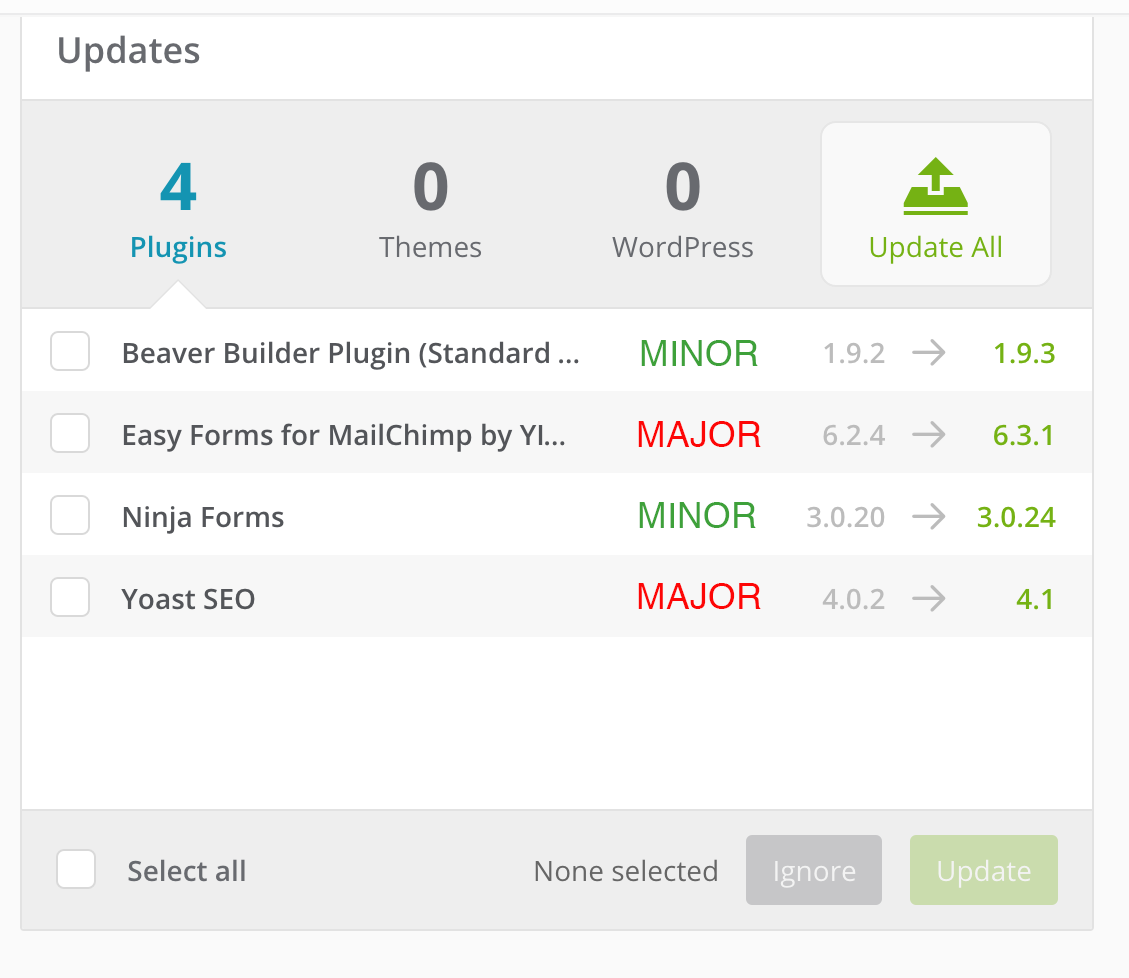
Take a look at this example.
Basically, if the value for spot #1 (ones) or #2 (tenths) changes, it's major. If spot #3 (hundredths) changes it's minor.
In the example above, Beaver Builder and Ninja forms are minor updates because only the hundredths value changed. Easy Forms and Yoast SEO both have tenths value changes.
In closing, follow this process to determine minor vs major updates:
- Did the ones value change (spot #1)? It's MAJOR, don't update and continue with major update process outlined below.
- Did the tenths value change (spot #2)? It's MAJOR don't update and continue with major update process outlined below
- Did the hundredths value change (spot #2)? It's MINOR go ahead and update.
Follow along with the video below. There is one plugin to update (minor update) and one we skip because it's a major update. Complete the checklist for the plugin update task.