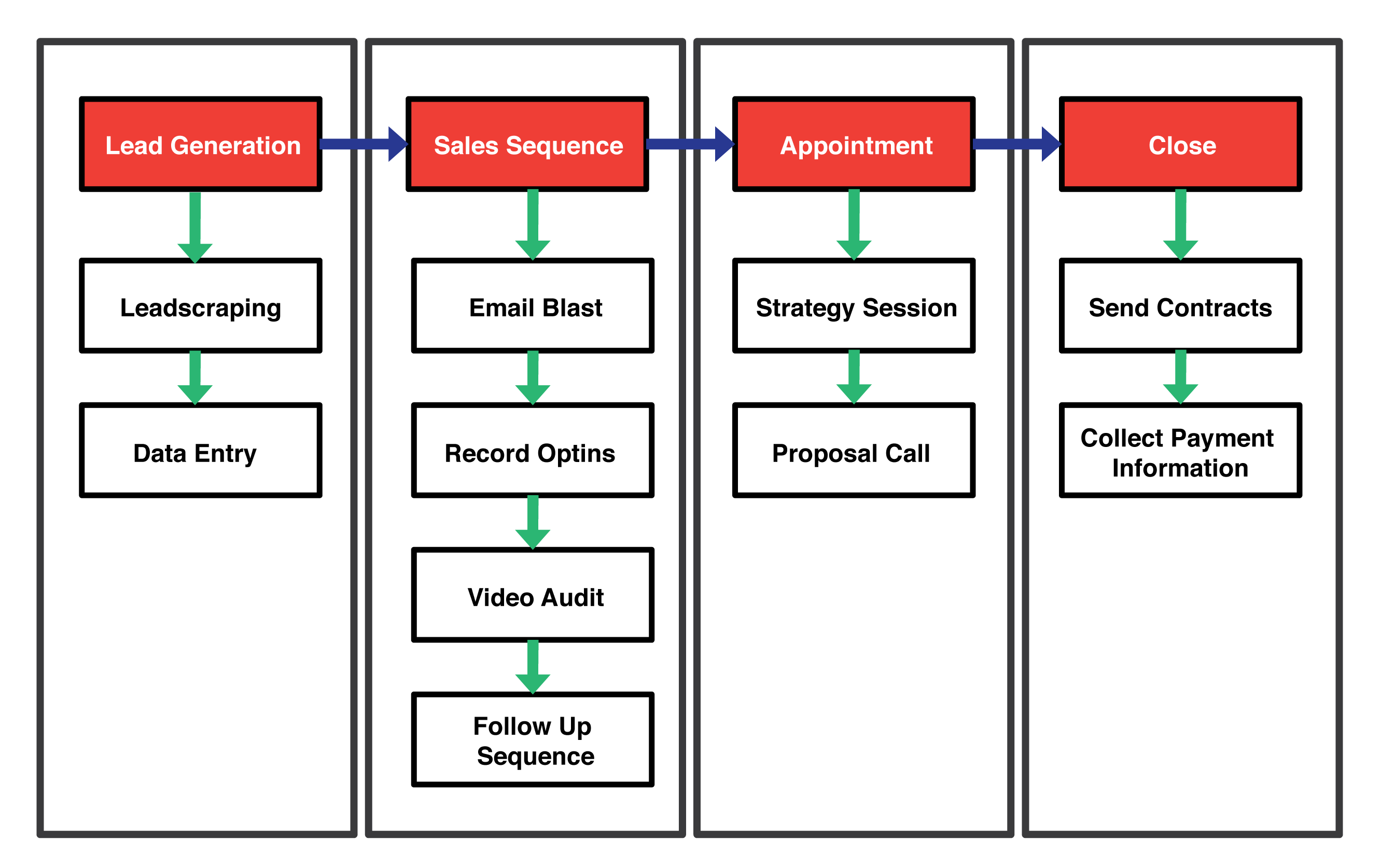
This sales process is going to allow us to cold email potential leads, and sell them on our SEO and Web Design services. This will strictly be a process for using cold email as the initial foot in the door, and then we will be using various follow up sequences in order to get them to sign up for our services and pay us money. The main outcome will be a paying client from this process.
Purpose
In order to streamline our cold emails sales process and close leads that need our services. The purpose is to make MORE REVENUE. We will be having sales people fulfill the roles of following up and sending the video audits and closing customers.
The inputs for the Client Acquisition strategy will include the project manager providing a lead form which will have the niches and keywords that would need to be targeted, prospected, and scraped for the Lead Generation step. The output of this process would be a paying client, and the feedback of the system will involve having money in the bank. If using this process we don't get our desired outcome, we will iterate over the procedure. The process however also has a variety of independent variables and that involves the initial email blast template, and the follow up sequences that will be used. This process is the general overview of the client acquisition strategy that involves cold email outreach.
Pre Steps: Input for the Machine
The lead form needs to be filled out by the owners to choose the appropriate niche that will be targeted in order to get clients. The lead form will also include where these leads will be prospected from whether it is Google, Yellowpages, or another source in which the leads can be scraped from.
Depending on the job, the lead may not be scraped and might also be manually be given to a VA to prospect themselves, however software will generally be used for this tasks.
Roles
* The Project Manager role below will be fulfilled by the owners until one is hired.
Lead Generation:
Posting Upwork Job: Project Manager / Owner
Lead Scraping: Depends, but VA
Data Entry: VA
Sales Sequence:
Email Blast: Project Manager / Owner
Record Optins: Project Manager / Owner
Video Audit: Sales Partners
Follow Up Sequence: Sales Partners
Appointment & Calls
Strategy Session: Sales Partners
Proposal Call: Sales Partners
Close
Sending Contracts: Owners
Collecting Payment Information: Owners
General Steps - Cheat Sheet
Post Job on Upwork
Find a qualified VA in order to fulfill the lead generation task
Send VA Instructions for their lead generating task
Check submitted work and load leads into Pitchbox or Mail Merge
Drip emails out according to schedule to Campaign Tracker spreadsheet
Send video audits and follow up sequences to leads that respond back
Send over Contracts and Payment methods when lead is closed
This is what the general client acquisition strategy we are going to be implementing, however this is just part of the main machine.
Recording an opt in refers to you adding a lead's response to the CRM in Google Sheets we have provided.
In the video below, we will be going over exactly what needs to be done when recording opt ins that you want to keep track of.
Tools/Resources/Related
Google Chrome
Google Account (Gmail)
This is a quick overview of the spreadsheet that will help keep track of all the opt ins for the prospects.
Steps
Receive an email of a prospect opting in for a video audit
Record the prospects information the spreadsheet that has been shared to you (as shown in the video)
Name
Company
Phone
Website
Audit Status
Audit Link
Proceed to making the video audit in the next section
Step 2: Sales Sequence - Video Audit
Outcome
The outcome of this step in the sales sequence involves recording a video audit for a potential client that opted in for a video audit, or simply needed an audit done. This audit will show them all the issues a lead has with their website and search rankings. The video that will be recorded needs to be around 5-12 minutes, depending on how many issues the prospect has with their website.
Remember in the video you will also have to quickly go over solutions on how to fix these issues, keep in mind that this is not giving away anything special, we simply need to have the video GIVE VALUE to the potential lead. And during the video, you need to insist that they reply back immediatly and book a strategy session right away to discuss these issues further.
Goal: Book the prospect on the phone for a strategy session
Purpose
The purpose of recording a video audit is that we want to show the lead all the problems they have with their site, and then get them to book a strategy session with us to go over everything. We need to show them pain points that they might not even know about, and also in the video suggest various solutions to them as well. The audit will need to be informative for the lead, and establish us as an expert so they know we can be trusted in fixing these issues. The video audit is there to give value, inform the client of all the problems with the solutions, and get them to have a strategy session with us. Remember that simply giving value, and showing the pain points is not enough, get the appointment.
Resources/Tools/Related
Screencast Software (Recommended: OBS, however feel free to use any software as long as the resolution of the video is in 1080P)
Microphone (Blue Yeti or Blue Snowball) *if you don't have a solid microphone, try to invest in one ASAP, it makes a significant difference in the audit. Remember that audio quality > video quality
This video tutorial will show you how to do a video audit for the prospect.
Example Video Audit
Core Recording Steps
The following directions are going to be explained in the video with more detail, the following steps are just a general overview of the video audit.
Quick Video Introduction: Introduce yourself quickly in the video, stating who you are, and where you're from (iFlex Studios), be sure to say the lead's first name. We will provide a loose script regarding the video audit, make sure to not make the video sound robotic or too scripted.
SEMRush: Show the lead's SEMRush stats so they can see the difference between theirs and their competitor's stats. Then quickly analyze their stats, showing them which keywords they need to rank higher for, and how they aren't ranking for certain keywords that they should be.
Screaming Frog SEO: Quickly go over some On page SEO issues their website has very very quickly, they don't usually know what any of this stuff means so just skim over it quickly, but explain how it's hurting their rankings and that it needs to be fixed for them to rank properly, etc.
Google Page Speed Test: Go over their page speed results, and then tell them why it is important to have a faster website, and show them how it's hurting their business.
Google Mobile Friendly Test:
Direct Website Audit (Conversion Rate Optimization):
Watch the video below in order to see a full explanation on how to make a proper video audit. Remember that the goal of the audit is to get them to respond back and book a strategy session, so always keep this in mind.
Post Steps
Take a screenshot of their website to you use as the thumbnail for the video when uploaded to Youtube
Upload the video to Youtube as "Unlisted"
Add the default Description to the video
Email the Video Audit to the lead using the corresponding email follow up template in the follow up sequence (which is going to be the next page)
Add the video audit's youtube link in the CRM spreadsheet that you have been given.
Default Youtube Video Description
Hey {{First Name}}, email me back, and let me know when you're available to get on the phone to talk about these issues further.
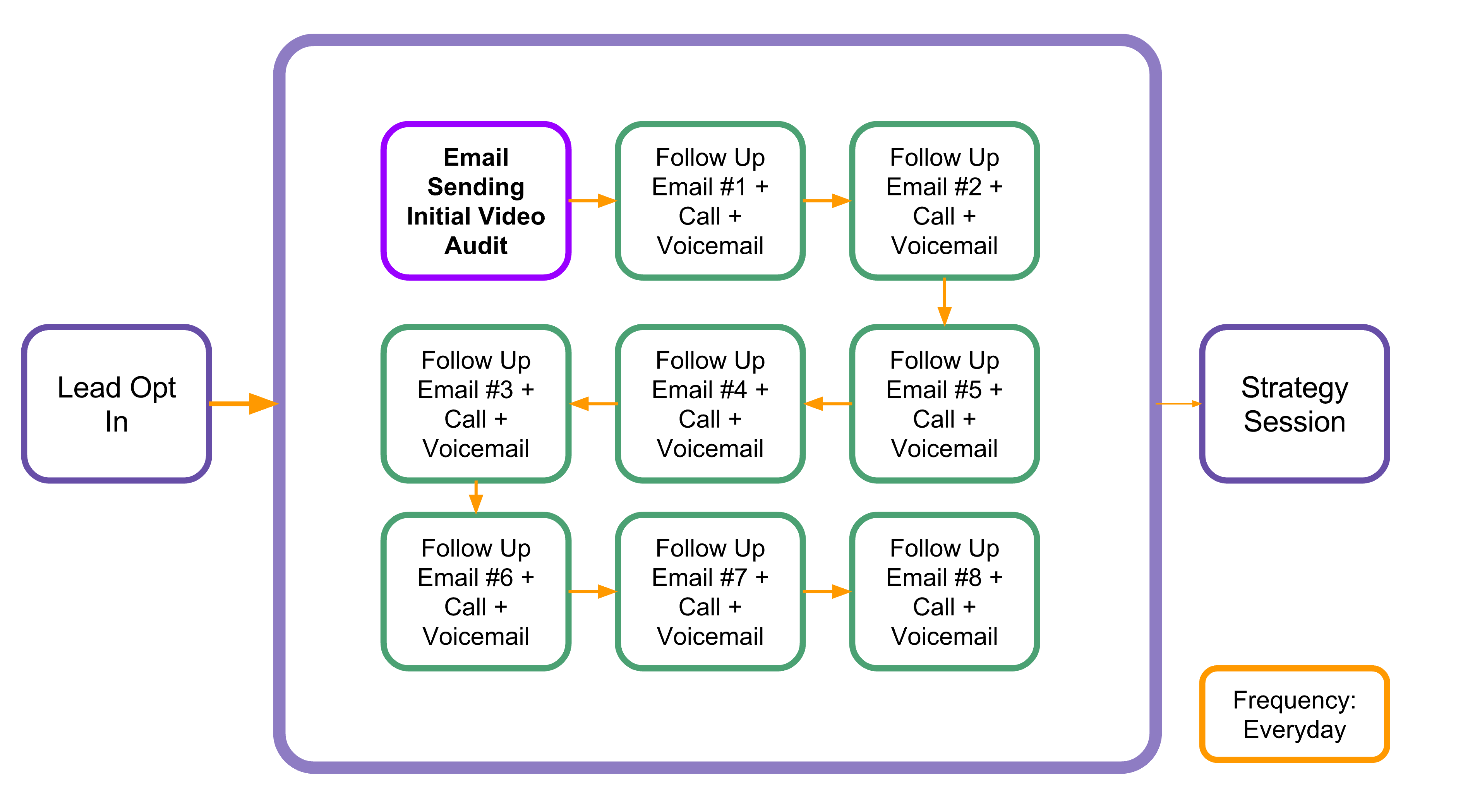
The outcome of the follow up sales sequence will allow us to get a lead that requested a video audit to get on the phone with us for a strategy session (consultation call), and this call will allow us to then get them on a following proposal call.
Purpose
The purpose of the follow up sequence is that after we have a lead that opts in for a video, we want to follow up right away with the video and get them on the phone with us for a strategy session. This will involve us sending multiple follow up emails and calls after the initial opt in, because very often a lead will opt in for a video, but will not reply back after the video has been sent. We need to keep following up with them until we get the strategy session which then leads to the proposal call. Follow ups might also include social media messages, such as LinkedIn messages, or Facebook messages to the lead's brand page.
Resources/Tools/Related
Gmail
Phone
Social Media Networks (LinkedIn, Facebook, Twitter, Youtube)
Google Apps
Additional Information
Follow Up sequences will always be up for change, whether that means that the templates will change, or the sequence itself will change.
This is going to be the general process of the follow up sequence after a lead has opted in for a video. Keep in mind that the middle of the follow up process will change depending on what sequence we will be testing, and the templates that will be used for each part of the sequence will change as well. All the information regarding the sequence that is going to be run for that current week/month will be given in a Google Slides presentation, and will be linked in the Google Sheets CRM file.
Main First Step
The first step of the follow up sequence would be to send the video audit over to the lead ASAP. This means within the next hour if you can, the faster the better. People are constantly browsing the web all day, so they probably will completely forget about you if you don't follow up with them fast enough, minimum you need to follow up with them within 24 hours.
Follow Up Sequence
The video below will give a quick explanation on the follow up sequences that you will be executing after a lead opts in, and when you have recorded and uploaded your video audit.
Step 4: Appointment - Strategy Session
Outcome
Gather more information about the prospect and what they need
Book a proposal call with the client, using the information you've found.
Purpose
The purpose of the strategy session is so you can get more information regarding where the prospect is at, and exactly what they need. This information will help you qualify the lead so you can build out a proper proposal for them that you'll sell them on. Remember, schedule a proposal call with the client right over the phone, the following video training will go over that information.
Tools/Resources/Related
Google Drive
Phone
Question List*
Prospect Note Sheet*
Watch the video from 0:00 - 38:00 for the information regarding the strategy session
General Introduction
Questions to Ask on the Call
Confirmation / Follow Up Email Right After the Call
Hey {{name}},
Thanks for your time today, just to confirm, we will speak again {{date}} at {{time}}. If you could also be near a computer, that would be great.
Best Regards,
{{sender-name}}
Step 5: Appointment - Proposal Call
Outcome
You will need to get the client to agree to sign onto the deal, and have them agree that you will send them the contracts over right away, and collect payment information.
Purpose
The purpose of the proposal call is that you want to present the prospect a presentation regarding a service you want to sell them. This will be framed as an investment for them, and the purpose of the call is to close a deal with them.
Tools/Resources/Related
Join.me
Google Slides Template
Google Drive
Phone
Google Keyword Planner (for keyword research)
Start: 38:30 and finish the video to the end. We will be using a different proposal presentation from what is shown in the video, and a different set of questions that are referenced in the video, however there is a lot of important information that is covered regarding the closing of a client on the proposal call right away in this training.