What is Process Street?
Request a demo
Share
Copy link
Edit
in
Process Street
Templates
/
GTM – AdWords Remarketing Code
Uncategorized
GTM – AdWords Remarketing Code
1
In Google Tag Manager, select an account. The Containers page appears.
2
Click your site’s container in the list. The Tags page appears.
3
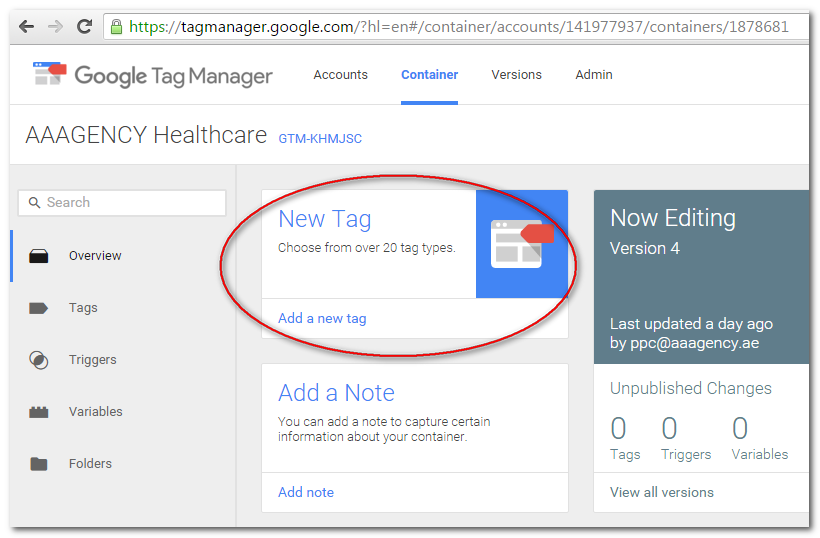
Click "New Tag" from the Container screen.
4
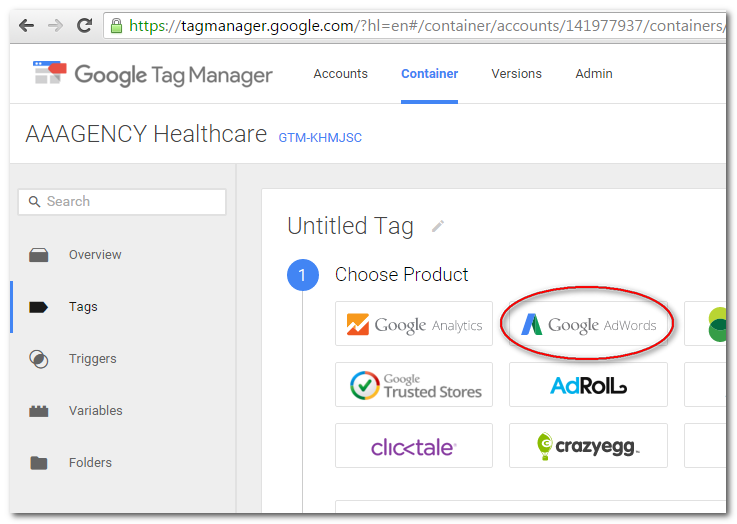
Select "Google AdWords" as Product
5
Choose "Remarketing" as tag type. Click Continue.
6
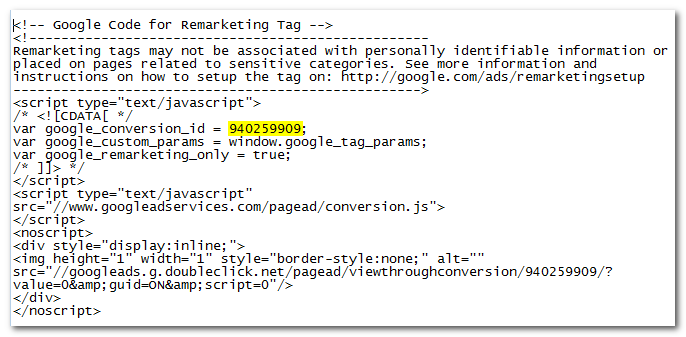
Configure tag by adding the "Conversion ID". Click Continue.
7
Select "All Pages" and name your tag with "AdWords Remarketing". Click "Create Tag".
In Google Tag Manager, select an account. The Containers page appears.
Click your site’s container in the list. The Tags page appears.
Click "New Tag" from the Container screen.
Select "Google AdWords" as Product
Choose "Remarketing" as tag type. Click Continue.
Configure tag by adding the "Conversion ID". Click Continue.
Select "All Pages" and name your tag with "AdWords Remarketing". Click "Create Tag".
Browse all templates
Edit in Process Street
Stay updated—subscribe to our blog!
More templates like this
Payroll Processing – User Guide
PROCEDURE PAYROLL PROCESSING-TSHEETS &QB-Payroll Processing
How to Build a Process from Resources (Copy)
2. Entrega de proyecto
12 Month Maintenance Schedule
Resource Based Economy Transition Team Support
View all Uncategorized templates