Check Skype Settings
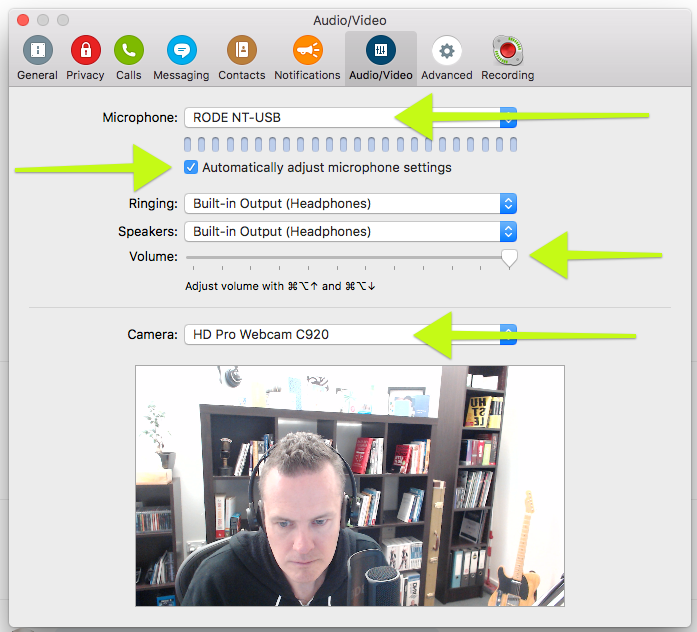
Before the scheduled time of your interview make sure your Skype preferences are set for the correct audio and video settings.
- the microphone should be set to your Rode NT USB
- make sure the checkbox "automatically adjust microphone settings" is ticked
- the speakers should be set to your headphones and the volume should be somewhere between 80% and 100% (use this volume slider to adjust the volume of your guests voice if they are too quiet or too loud)
- the camera should be set to the Logitech C920 (also known as the HD Pro Webcam C920)
The Interview
At the scheduled time of your interview type the following into Skype:
"Hi {Guest Name}, are you ready to rock?"
Wait for their response in the affirmative and then video call your guest.
Introduce yourself to your guest and thank them for their time. Feel free to engage in a little pre-show banter to build some rapport.
When you are ready to record the interview hit the record button on the Call Recorder window and make sure the audio metres are registering for the input (your microphone) and the output (your guests microphone).
Once you have determined that the audio is recording correctly, leave a three second gap of silence, clap your hands in front of the camera and begin your interview using the format outlined below.
It is a good idea to tell your guest you're going to clap for the edit before you do it.
This makes it easier for our editor to find the start of the interview and lineup the audio and video in postproduction.
Podcast Interview Format
So what's the process for interviewing our podcast guests? Let's keep it consistent!
Here's Troy's video, if you want the format directly from him!
https://www.facebook.com/troydean73/videos/10154051702658325
Here's the outline :
Intriguing outtake from Interview
See "the golden nugget" below.
Coach Intro + Reason to listen
EG: "Hi I'm Cath Hughes, one of the coaches at WP Elevation and a WordPress consultant based in Sydney, Australia. In this episode of the WP Elevation podcast, I had the pleasure of sitting down with [Guest Name] and talking about [topic of conversation]. I hope you can stay with us..."
Music Intro
Nothing for the coach to do here.
Sponsor Message
Usually sponsored by WP Elevation, VUM or one of our sponsors. Nothing for the coach to do here.
Interview
5-minute bracket:
- Welcome to the podcast
- Who are you?
- Why is this important now? What should listeners be paying attention now?
15-minute bracket:
- Announce the download which we're going to be giving away as part of it. (shortlink)
Ex: for "Copywriting for search engines", we might say "hey, on our website at wpelevation.com/shortlink, you'll be able to download the checklist that Kate is going to talk to about right now."
- Takeaways - here, we unpack the download with 3, 5, or 7 key points in the conversation. We want the most value, as long as the whole thing doesn't take any longer than 15 minutes.
5-minute bracket:
Recap the main points from the interview.
Call to Action
EG: "Go to wpelevation.com/shortlink, download the checklist, subscribe to the podcast, and leave us some comments on what you'd like to see next."
Shortlink Note: Every episode will have a shortlink that the coach will know in advance, so each coach will know which link to promote. We use "Pretty Link Lite" to make sure the podcast links redirect nicely.
Sign Off
"Hey I look forward to speaking to you in the next podcast. Until then, go elevate!"
Music Outro
Nothing for the coach to do here.