


Turn every policy into automated workflows with built-in enforcement and audit-ready proof.



Workflow Monitoring

Workflow monitoring is the practice of tracking a live workflow while work is still moving, so your team can see status, ownership, blockers, deadlines, approvals, and evidence before the workflow breaks down.
It is not the same as checking a report after work is finished. Good workflow monitoring shows what is happening now, who needs to act next, which rule or deadline is at risk, and what response should happen before the delay becomes a bigger operational problem.
In this guide, we will cover what workflow monitoring means, what to monitor, how it fits into workflow management, and how Process Street helps teams turn monitoring signals into enforced execution.
We will cover:
- What workflow monitoring means
- Why workflow monitoring matters
- What to monitor in a workflow
- Workflow monitoring versus workflow management
- How to set up workflow monitoring
- Workflow monitoring with Process Street
- Workflow monitoring mistakes to avoid
- How to improve workflow monitoring over time
- FAQs
What workflow monitoring means
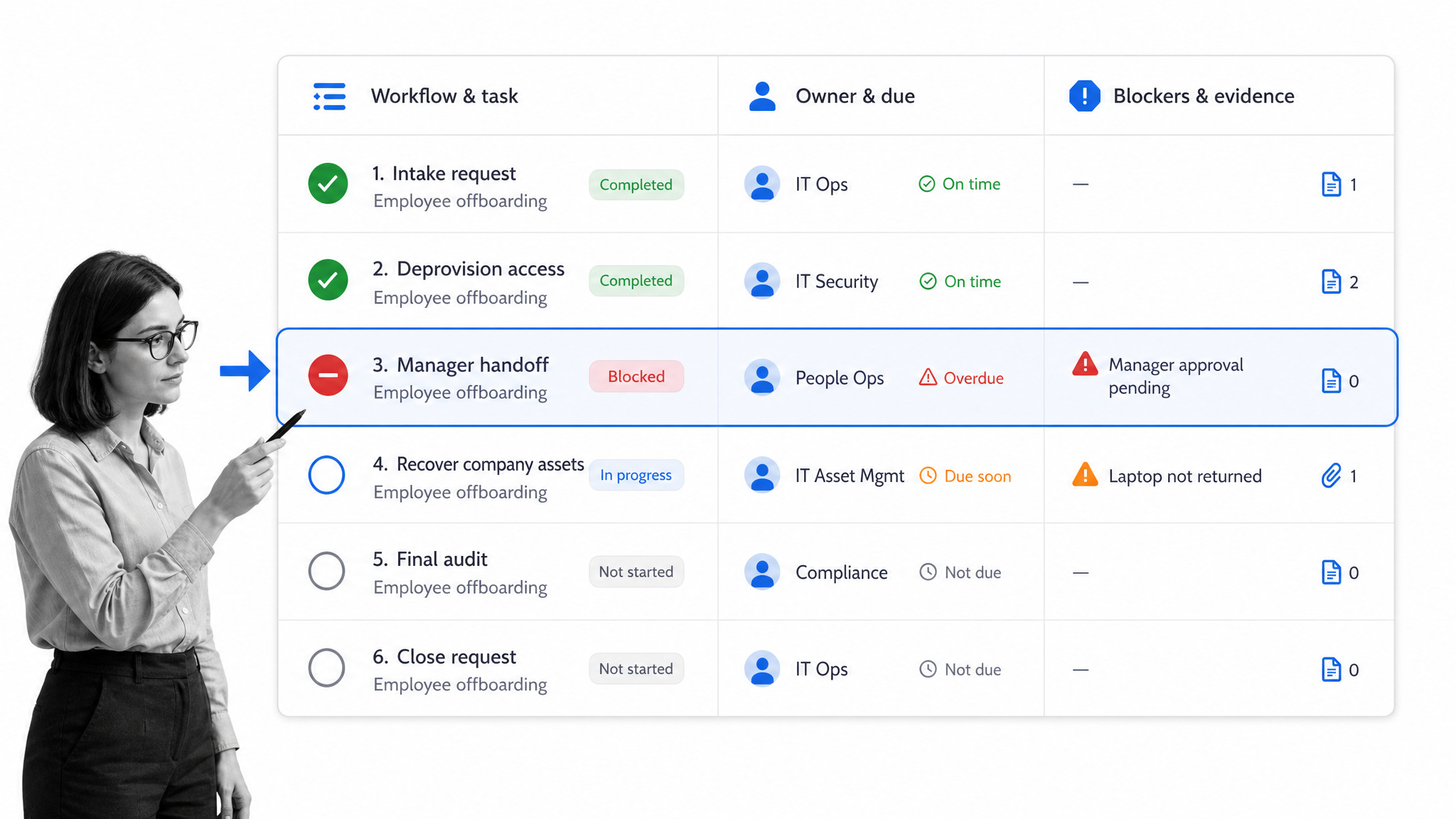
Workflow monitoring means watching a defined sequence of tasks as it runs. The goal is to know whether each workflow run is progressing through the expected steps, with the right owner, inside the expected time window, with the right evidence attached.
A workflow can be simple, such as a manager approving a request. It can also be complex, such as customer onboarding, vendor review, employee onboarding, invoice approval, policy review, incident response, or quality control. In every case, monitoring adds a live control layer to the workflow.
Workflow monitoring answers live execution questions
- Which workflow runs are active, blocked, overdue, or complete?
- Who owns the next task, review, approval, or handoff?
- Which required fields, files, signatures, or comments are missing?
- Which exception needs escalation, remediation, or process improvement?
- Which workflow pattern keeps repeating across teams or departments?
That is why a workflow management system is a natural place for monitoring. The system already knows the task sequence, the owner, the due date, and the completion rule. Monitoring turns those details into operational signals.
Monitoring is active, not decorative
A dashboard that nobody acts on is reporting. Workflow monitoring should trigger behavior. If a task is overdue, someone gets assigned. If evidence is missing, the workflow blocks completion. If a handoff keeps failing, the process owner gets an improvement task.
Atlassian describes workflow management as organizing and automating task sequences so work moves smoothly. Workflow monitoring takes that same idea and asks whether the sequence is moving smoothly right now.
The monitoring layer should stay close to the real work. If a workflow owner has to open five tools to understand one stalled handoff, the monitoring system is already creating extra coordination cost. The better pattern is a single workflow record that shows the task, owner, due state, evidence, and next action together.
Why workflow monitoring matters
Teams often discover workflow problems after the damage is done. A customer asks for an update, an approver missed a deadline, an employee skipped a required step, or an audit reviewer finds missing evidence. Workflow monitoring helps catch those issues while there is still time to fix them.
It makes ownership visible
When a workflow stalls, the first question is usually simple: who owns the next move? Monitoring should answer that immediately. If a task has no owner, the workflow is already at risk. If the owner is overloaded, the process may need reassignment or automation.
It catches bottlenecks before they spread
One late approval can delay a whole process. One missing field can block downstream work. One unclear handoff can create repeated follow-up messages. Workflow monitoring surfaces the bottleneck at the step level, so teams do not have to guess where the process slowed down.
For recurring project work, project workflow management is stronger when monitoring shows whether each reusable project workflow is moving through intake, review, approval, execution, and closeout as expected.
It creates audit-ready proof
In compliance, finance, HR, legal, quality, and customer operations, completion is not enough. Teams need proof that the right person did the right task, at the right time, with the right evidence. Monitoring should preserve the trail instead of forcing people to reconstruct it from messages and spreadsheets.
A structured internal audit reporting workflow is a practical example: the workflow should monitor findings, owners, supporting evidence, approvals, corrective actions, and closeout.
It makes process improvement less subjective
Without monitoring, process improvement conversations often rely on anecdotes. One team says approvals are slow. Another says requests arrive incomplete. Another says the workflow is fine but people ignore it. Monitoring gives the team a shared operating record, so the discussion starts from actual workflow behavior instead of memory.
What to monitor in a workflow
The best workflow monitoring signals are the ones that change a decision. If a signal does not help someone act, it belongs in a report, not in an active monitoring system.
Task status
Track whether each task is not started, active, waiting, blocked, overdue, rejected, approved, or complete. Status should come from the workflow itself, not from a manually edited spreadsheet that trails the real work.
Owner and role
Every task needs a clear owner or role. Workflow monitoring should show whether ownership is assigned, whether the owner has acknowledged the work, and whether the task has been reassigned or escalated.
Time and aging
Monitor due dates, cycle time, approval age, wait time, and handoff delay. Step-level timing matters because total workflow duration hides the exact place where work got stuck.
Required evidence
Monitor whether the workflow has the attachments, field values, comments, approvals, signatures, screenshots, or system records required to prove completion. A task marked complete without evidence can create risk even when the workflow appears green.
For standard work, a standard operating procedure workflow should monitor the required steps and evidence that make the SOP enforceable in practice.
Exceptions and rework
Exceptions are the most important monitoring signal. Examples include missing evidence, late approvals, rejected work, failed automations, skipped tasks, duplicate handoffs, or repeated rework. Each exception should have a response path.
AWS describes Workflow Monitor in its MediaConnect documentation as a way to discover, visualize, and monitor workflow resources. Even though that example is technical, the operational lesson applies broadly: monitoring becomes useful when it maps resources, signals, and response rules together.
Workflow monitoring versus workflow management
Workflow monitoring is part of workflow management. Workflow management covers the broader system of designing, running, improving, and governing workflows. Monitoring focuses on live status, exceptions, and response.
Workflow management defines the route
Workflow management answers questions such as: what steps should happen, in what order, who owns them, which fields are required, what approvals are needed, and which systems should be updated. SAP describes workflow management as designing, operating, and tracking workflows to complete business activities.
Workflow monitoring watches the route in motion
Workflow monitoring answers a more immediate question: is this workflow run moving correctly right now? If the route says legal review should happen after security review, monitoring checks whether that step happened, whether it happened on time, and whether the approval evidence exists.
Workflow automation moves the route forward
Workflow automation routes tasks, reminders, notifications, data updates, and approvals without manual chasing. Monitoring checks whether the automated and human parts of the workflow are still behaving correctly.
The strongest systems combine all three. Workflow management defines the process, automation moves work forward, and monitoring keeps the execution path under control.
How to set up workflow monitoring
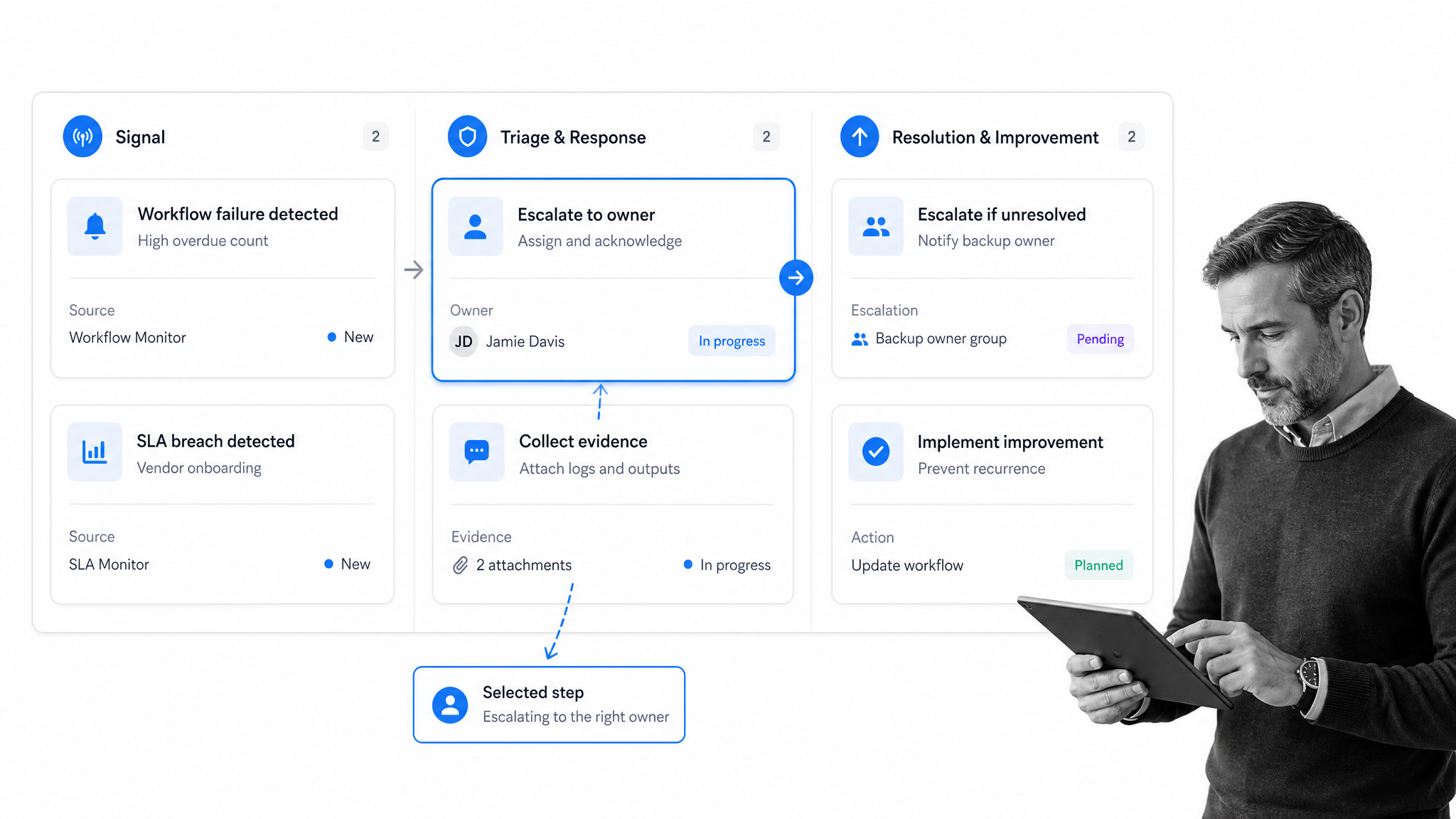
Start workflow monitoring with one repeatable workflow where delay, missing evidence, or unclear ownership creates real risk. Do not begin with a company-wide dashboard. Begin with a workflow that matters enough for people to act on the signals.
1. Define the workflow boundary
Name the start event, end event, owner, inputs, outputs, systems, and required evidence. A vague workflow boundary creates vague monitoring. A business process analysis workflow can help map the work before you add monitoring rules.
2. Choose the signal set
Pick a small set of signals first: overdue tasks, unassigned work, missing evidence, approval age, blocked handoffs, failed automations, and repeated rework. Each signal should have a threshold and a reason for existing.
3. Assign response owners
Do not send every alert to a shared inbox. Decide who investigates, who approves the fix, who contacts the owner, who updates the workflow, and who confirms the issue is closed.
This ownership model should be written into the workflow, not held in a manager’s head. If a handoff fails during a vacation, role-based ownership and backup assignment keep the response from depending on one person noticing the issue.
4. Build the escalation workflow
Monitoring should create structured follow-up. If evidence is missing, the workflow requests it. If an approval is late, the owner gets notified and a backup reviewer can be assigned. If an exception repeats, a process improvement task gets created.
5. Review patterns regularly
A single exception is an incident. A repeated exception is a process design problem. Use monitoring data to improve instructions, ownership, automation, approvals, and evidence requirements. A process improvement tracker gives those improvements a place to live.
Wikipedia’s workflow management system overview describes these systems as supporting setup, performance, and monitoring of defined task sequences. That is the practical goal here: define the route, run the route, and monitor whether the route holds up.
Once the first monitored workflow is working, expand carefully. Add adjacent workflows that share owners, evidence requirements, or customer impact. This keeps the monitoring model coherent instead of turning it into a disconnected set of dashboards.
Workflow monitoring with Process Street
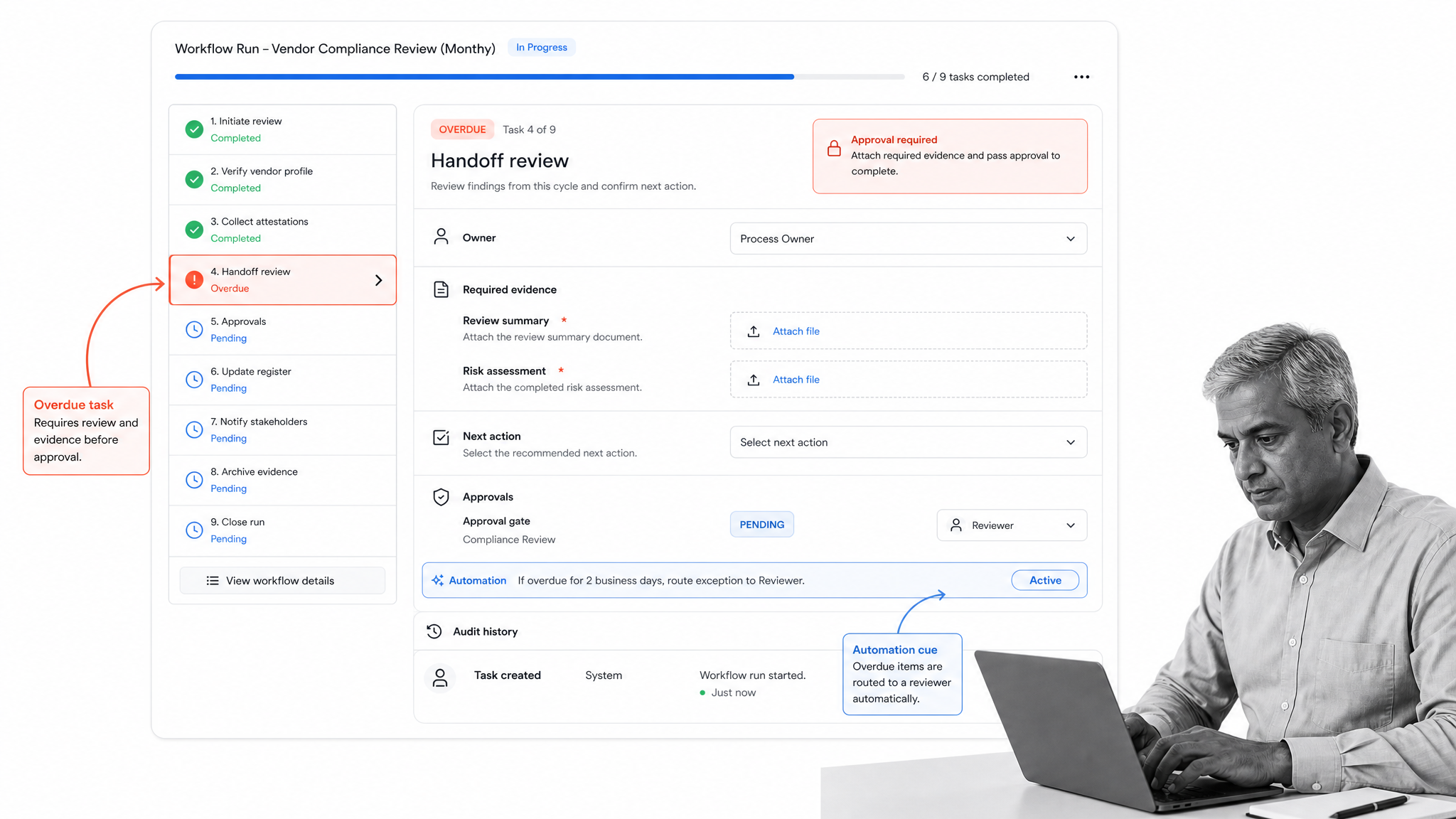
Process Street turns monitored workflows into executable workflows. Instead of keeping the procedure in one place, the tracker in another, and the evidence in messages, teams run the workflow where owners, required fields, approvals, automations, and audit history live together.
Monitor work at the task level
Each workflow run shows what has been completed, what is waiting, who owns the next step, and what information is still missing. That makes workflow monitoring specific. You are not looking at an abstract process map. You are looking at the work itself.
Use rules to prevent bad completion
Required fields, approvals, role assignments, conditional logic, and stop tasks help prevent work from moving forward before the right steps are complete. Monitoring is stronger when the system can enforce the standard instead of only reporting that someone missed it.
Connect monitoring to automation
Process Street has direct, universal integrations to 5,000+ systems. Need a new one? An AI agent builds it on the fly. That means workflow monitoring signals can connect to the tools where work already happens, while the workflow remains the controlled execution layer.
Keep proof with the workflow
Approvals, comments, field values, file uploads, task history, and audit trails stay attached to the workflow run. Operations and compliance teams can inspect the record without rebuilding it from scattered tools.
For teams starting with repeatable tasks, a process improvement checklist can help clarify what should be standardized before monitoring becomes more advanced.
Workflow monitoring mistakes to avoid
Workflow monitoring can create noise if it is designed as a dashboard project instead of an execution system. The common mistakes are simple, and they are avoidable.
Monitoring too much
More signals do not always create better control. Too many alerts train people to ignore the system. Start with signals tied to risk, delay, customer experience, compliance, or rework.
Tracking status without response
A red status is only useful when someone knows what to do. Every monitored exception should map to a response owner, escalation path, and closeout rule.
Separating monitoring from the workflow
If monitoring lives in a spreadsheet while work happens in email, the signal will drift from the truth. The closer monitoring is to the workflow execution layer, the more reliable it becomes.
Drift is especially dangerous when teams copy old workflows, rename them, and forget to update the monitoring rules. The dashboard may say the process is healthy while the real workflow has changed underneath it.
Ignoring evidence
Completion without evidence is weak monitoring. Make sure required files, approvals, comments, field values, or system records are captured before the workflow can close.
Leaving improvements outside the system
Monitoring should feed process improvement. When the same exception repeats, update the workflow, clarify the step, automate the handoff, or change the approval path. A process management habit makes monitoring data useful beyond the incident.
How to improve workflow monitoring over time
The first version of workflow monitoring should catch obvious misses. The better version should help your team predict risk, remove recurring blockers, and improve the workflow itself.
Tighten thresholds
Early thresholds are often too broad. After you have real workflow data, tune them by step and risk level. A two-day delay might be acceptable in one task and dangerous in another.
Segment by risk
Do not treat every exception the same way. A missing optional comment is different from a skipped compliance approval. High-risk exceptions need escalation. Low-risk exceptions may only need review during a weekly process meeting.
Connect monitoring to root cause analysis
Repeated workflow exceptions usually point to unclear instructions, weak ownership, overloaded approvers, missing integrations, or unnecessary steps. A root cause analysis and corrective action workflow turns the pattern into a fix.
Audit the monitoring model
Monitoring can drift just like any workflow. Review whether the signals still match the process, whether owners are current, whether evidence requirements are useful, and whether response workflows still reflect how the team should act.
SafetyCulture’s workflow management guide, SAP, Atlassian, and other workflow management resources all point toward the same practical lesson: tracking work is useful only when it improves how work gets done. Workflow monitoring should make the next action clearer, not add another passive dashboard.
The simplest maturity test is whether a monitored signal changes what happens next. If it changes assignment, escalation, evidence collection, approval, remediation, or process design, keep it. If it only adds another number to a dashboard, remove it or move it into periodic reporting.
FAQs
What is workflow monitoring?
Workflow monitoring is the practice of tracking a live workflow so teams can see status, owners, deadlines, blockers, approvals, and evidence while work is still happening. It helps teams catch workflow problems early instead of discovering them after completion.
Why is workflow monitoring important?
Workflow monitoring is important because it turns workflow visibility into action. Teams can catch overdue tasks, missing evidence, unclear ownership, failed handoffs, and repeated rework before those issues affect customers, audits, or internal deadlines.
What should a team monitor in a workflow?
A team should monitor task status, owner, due date, aging, blockers, exceptions, required evidence, approvals, automation failures, and completion quality. The best workflow monitoring signals are tied to a clear response action.
How do you set up workflow monitoring?
Start with one important recurring workflow. Define the workflow boundary, choose a few action-oriented signals, assign response owners, build escalation rules, and review recurring exceptions for process improvement.
What is the difference between workflow monitoring and workflow management?
Workflow management is the broader discipline of designing, running, improving, and governing workflows. Workflow monitoring is the live tracking layer that shows whether a workflow is moving correctly and what needs attention now.
How does Process Street support workflow monitoring?
Process Street supports workflow monitoring by turning procedures into executable workflows with task owners, required fields, approvals, automations, and audit history. Teams can see what is complete, what is blocked, what evidence is missing, and who owns the next step.
