


Turn every policy into automated workflows with built-in enforcement and audit-ready proof.



Form Organizer

A form organizer is a system for collecting, sorting, routing, tracking, and storing submitted forms so the information turns into completed work instead of another inbox to manage.
The phrase can mean a physical paper tray, but for business teams it usually points to a digital operating layer: one place where requests, approvals, attachments, owners, deadlines, and records stay connected. A useful form organizer does more than hold forms. It tells the team what should happen next.
That matters because forms are rarely the work itself. A vendor intake form needs review. An expense form needs validation. A compliance checklist needs evidence. An employee evaluation form needs completion, approval, and retention. When those steps live outside the form, teams lose context, miss deadlines, and struggle to prove what happened. Process Street turns those steps into repeatable workflows so every submitted form can move through a controlled process.
In this guide, we are going to cover everything you need to know about form organizers, including:
- What is a form organizer?
- Why teams need a form organizer
- Form organizer vs. form builder vs. form management system
- Core parts of an effective form organizer
- How to build a form organizer workflow
- How to choose the right form organizer
- Form organizer best practices
- Common form organizer mistakes
- FAQs
What is a form organizer?
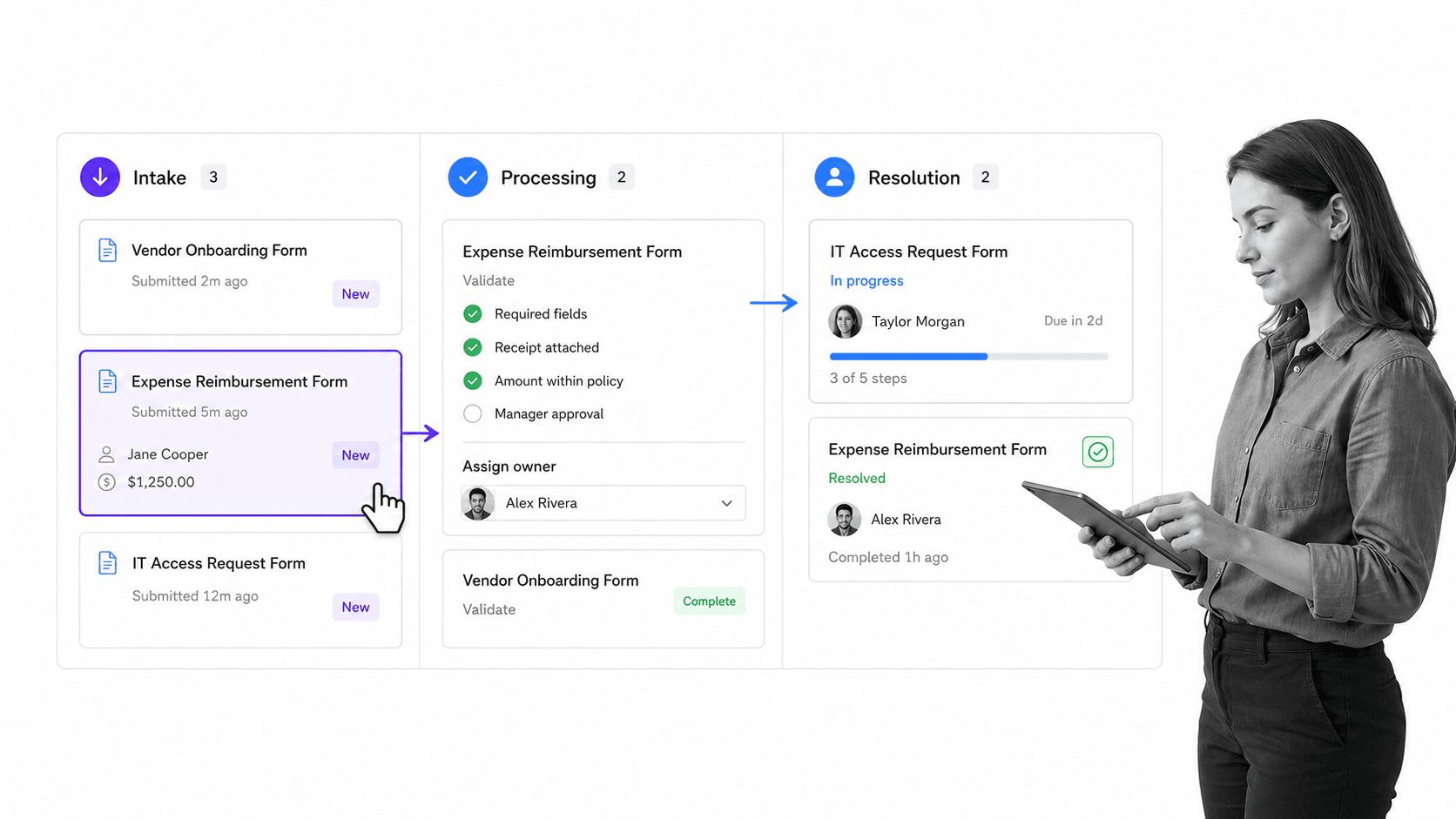
A form organizer is the intake and control system around a form. It keeps track of where each submission came from, what type of request it represents, who owns it, what information is missing, what approval path applies, and where the final record should be stored.
Forms management covers the broader lifecycle of forms. Jotform describes that lifecycle as creating, distributing, completing, evaluating, and automating forms for collecting information and making decisions. That definition is useful because it separates the form from the decision process around it. A form organizer sits in the middle of that lifecycle: after information is collected, before the work is considered done. Jotform forms management guide
The basic job
The basic job is simple: make every form submission visible, assigned, and actionable. Without that layer, submitted forms become scattered records. Someone has to check the inbox, download attachments, copy information into another system, ask for missing details, chase approvals, and remember the retention rule. A form organizer makes those steps explicit.
- Capture the submission and its attachments in one place.
- Classify the form type so the right process starts.
- Validate required fields before work continues.
- Route the submission to the correct owner or approver.
- Track status until the request is resolved.
- Store the final record with enough context for audit or reporting.
Physical versus digital form organizers
A physical form organizer is a tray, folder, or paper sorter. It helps one person keep paper from piling up. A digital form organizer is different. It coordinates people, deadlines, systems, and evidence. It should be searchable, reportable, and connected to the workflow that follows the form.
That distinction matters when the form triggers operational risk. A paper tray may be fine for low-volume office paperwork. It does not work when a late approval blocks procurement, a missing attachment affects compliance, or a customer request needs a service-level response.
Why teams need a form organizer
Teams need a form organizer when form submissions create work across more than one person. The moment a form needs approval, review, exception handling, system updates, or retention, the form has become a workflow.
Digital form guides often focus on creation, but the real operational cost appears after submission. GoFormz notes that digital forms can send captured data into cloud storage, ERP, or CRM systems. That handoff is where organization becomes critical, because every destination creates a decision about ownership, quality, and follow-through. GoFormz form builder guide
Forms create hidden queues
Most form problems are queue problems. The team knows the form exists, but it does not know which submissions are waiting, which are blocked, which are urgent, and which are complete. This creates silent delays. A submitted request can look finished to the person who filled out the form while the operations team still has three unresolved steps.
Forms carry context
Forms are not just data-entry screens. They carry context about a transaction, request, incident, employee, vendor, customer, or control. If that context is separated from the workflow, people make decisions with partial information. A form organizer keeps the form, attachments, comments, approvals, and final outcome tied together.
Forms become records
Many completed forms become business records. They may support financial controls, HR decisions, vendor reviews, audits, quality checks, or regulatory responses. Document Strategy Media frames forms as records of transactions or events that organizations rely on to conduct operations. That is why organization, retrieval, and retention matter. The Document Strategy Media forms management article is a useful reference for treating forms as operating records, not throwaway submissions.
Form organizer vs. form builder vs. form management system
A form organizer is often confused with a form builder or a forms management system. They overlap, but they solve different problems. The clean way to separate them is to ask where the tool is strongest: before submission, immediately after submission, or across the full lifecycle.
Form builder
A form builder helps you create the form itself. It gives you fields, logic, validation, layouts, and sometimes templates. It answers questions like: What information do we need? Which fields are required? Can the user upload a file? Does one answer reveal another section?
Form organizer
A form organizer manages the work created by the submission. It answers questions like: Who reviews this? What is missing? What approval path applies? Has the record been stored? What is overdue? Which submissions are blocked?
Forms management system
A forms management system is the broader governance layer. It can include form creation, version control, publishing, access, submission tracking, retention, reporting, and automation. A form organizer can live inside that system, or it can be a workflow layer that connects the form builder to the downstream work.
- Use a form builder when the main problem is collecting better information.
- Use a form organizer when the main problem is routing and completing submitted work.
- Use a forms management system when the main problem is governing the full lifecycle of many forms.
Core parts of an effective form organizer
A strong form organizer gives the team a controlled path from submission to resolution. It should reduce judgment calls, not add another dashboard people have to babysit.
Intake rules
Intake rules classify each submission. A vendor onboarding form should not follow the same path as a travel request, IT access request, customer complaint, or marketing intake form. Classification can be based on form type, department, amount, risk level, location, customer tier, or any field that changes the work required.
Validation checks
Validation checks prevent bad submissions from moving downstream. Required fields, attachment checks, duplicate detection, and policy thresholds should happen early. A good organizer makes missing information visible and routes the request back for correction before it wastes reviewer time.
Ownership and assignment
Every submitted form needs one current owner. That does not mean one person does all the work. It means someone is accountable for the next action. If ownership is unclear, the queue becomes a shared inbox where everyone assumes someone else is handling it.
Approval paths
Approval paths define who must sign off before the request can move forward. Formstack positions approval workflow around reviewing forms, tracking submission status, and providing updates. Zoho Forms describes multi-step approval processes for common requests such as leave and purchase orders. The exact tool matters less than the operating principle: approvals should happen in the same path as the submitted form. Formstack approval workflow overview Zoho Forms approval workflow page
Status, audit trail, and storage
The status model should be simple enough to scan: new, validating, waiting, approved, rejected, completed, archived. The audit trail should show who did what and when. Storage should preserve the final record, attachments, approval decisions, and retention status together.
How to build a form organizer workflow
You can build a form organizer by mapping what happens after a form is submitted. Start with one high-value form type. Expense reimbursement, vendor intake, access requests, employee evaluations, incident reports, training audits, and compliance checklists are good candidates because each one has clear ownership and visible consequences when missed.
1. Pick one form type
Choose a form that creates recurring operational work. A process improvement form checklist is useful when teams need to capture changes and route them through review. A structured employee evaluation form is useful when HR needs consistent completion and manager follow-through. Start with one form before trying to organize every submission path at once.
2. Define the required outcome
The outcome is not “form submitted.” The outcome is the business state you need after the form is handled. For a vendor intake form, the outcome may be an approved vendor record with required documents attached. For a training audit, it may be a signed evaluation and corrective action list. For a compliance checklist, it may be evidence ready for review.
3. Map the routing rules
Routing rules decide who sees the form and when. Keep these rules explicit. If the amount is above a threshold, send it to finance. If the request touches customer data, send it to security. If the form is incomplete, send it back to the submitter. If the form is low risk, auto-approve or skip unnecessary review.
4. Add validation gates
Validation gates keep the process clean. Before a request reaches an approver, check required fields, attachments, duplicate records, policy limits, and the correct department. This is where a form organizer becomes more useful than a spreadsheet: it can stop weak submissions before they create downstream rework.
5. Connect the workflow to the system of record
Microsoft documents a simple version of this idea for Microsoft Forms: a form event can trigger an automated workflow in Power Automate. In a business form organizer, the same principle applies more broadly. A submission should trigger the right workflow, update the right record, and notify the right people without forcing someone to copy data manually. Microsoft Forms automated workflow guide
6. Measure the queue
Once the workflow is live, track queue health. Look at open submissions, overdue reviews, missing-information loops, approval cycle time, rejection reasons, and records waiting for storage. If the queue is part of a broader operating system, connect it with an operations tracking software page so the team can see work before it becomes a fire drill.
How to choose the right form organizer
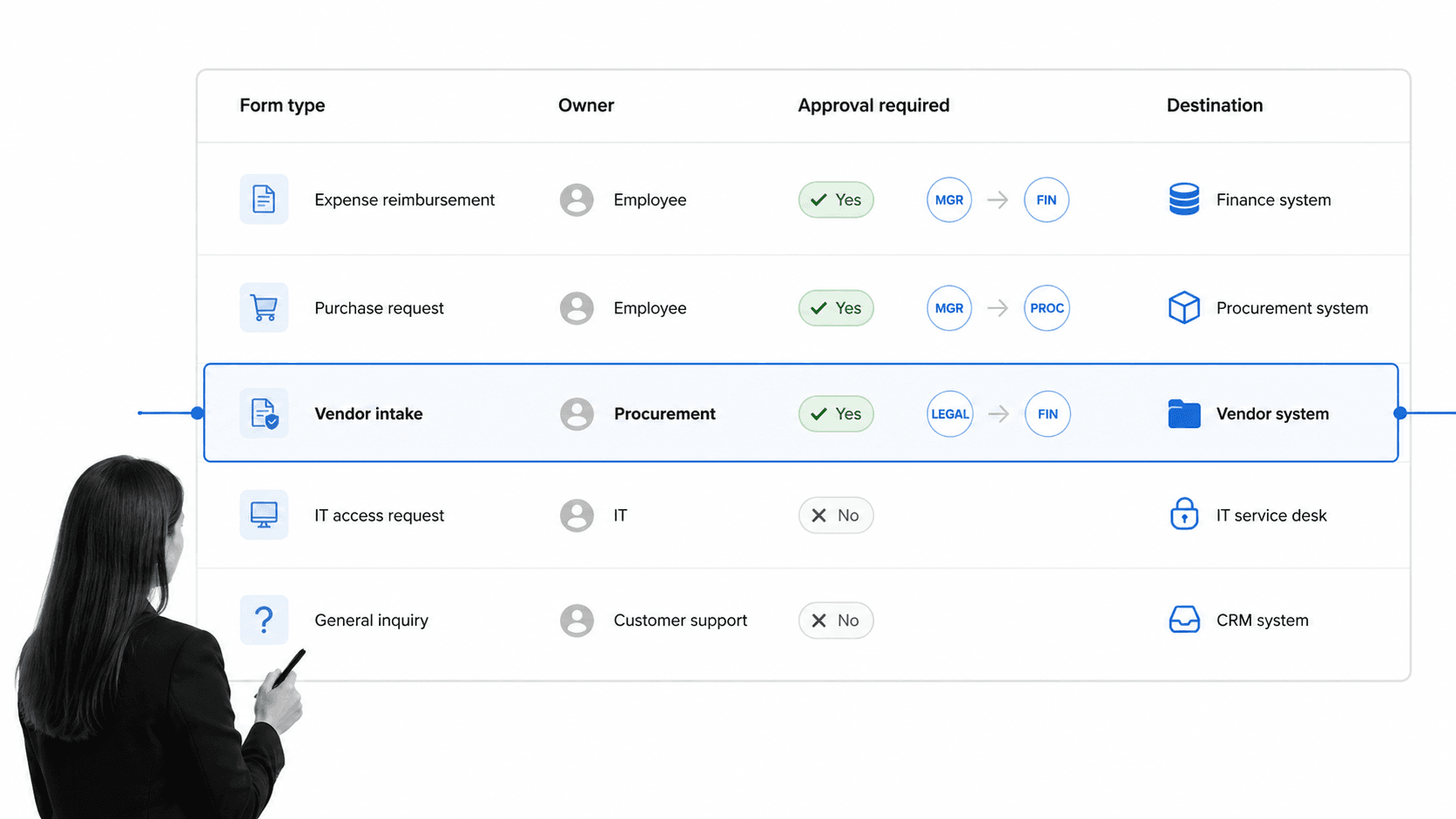
The right form organizer depends on the complexity of the work after submission. A simple team may only need a shared board and a few statuses. A regulated team needs stronger routing, permissions, audit trails, evidence handling, and retention rules.
Match the tool to the risk
Low-risk forms can move through a lightweight queue. High-risk forms need controls. If a form affects money, access, customer commitments, compliance evidence, employee records, vendor onboarding, or audit readiness, choose a system that can prove the work was done correctly.
Look for workflow depth
A form organizer should do more than display submissions. It should run the process attached to each submission. That means assignments, due dates, approval tasks, automations, conditional paths, and status changes. If you need a broader comparison, a workflow management system or workflow automation software may be the better lens.
Check governance requirements
Governance requirements decide whether your organizer is acceptable for compliance-sensitive work. Look for role-based access, version history, audit logs, required evidence, review cycles, and clean exports. A compliance checklist template or FFIEC compliance checklist can help define the control expectations before you choose the system.
Avoid tool sprawl
The easiest failure mode is using one tool to collect forms, another tool to approve them, a spreadsheet to track them, and a shared drive to store them. A better organizer keeps the request, workflow, evidence, and record connected. If the work spans several teams, a workflow suite can reduce the handoffs that cause forms to stall.
Form organizer best practices
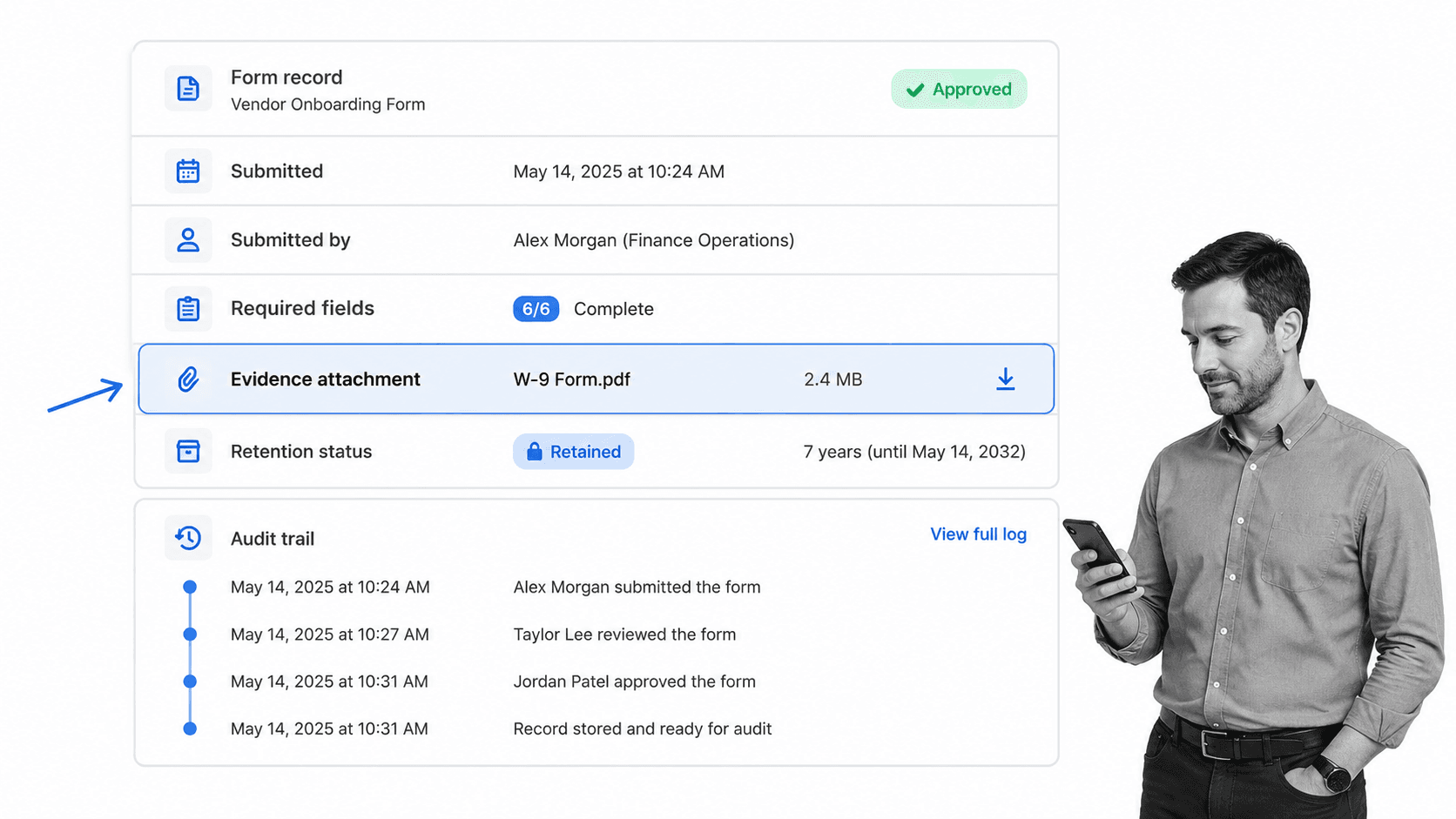
The best form organizer is boring in the right ways. People know where to submit, reviewers know what to do, managers can see bottlenecks, and auditors can find the record later.
Standardize naming and categories
Use clear names for form types and statuses. Avoid duplicate categories like vendor request, supplier form, vendor intake, and procurement form unless they truly mean different things. Good naming makes reporting possible and keeps routing rules clean.
Keep each form tied to one process
A form should trigger a defined workflow, not a loose set of reminders. The same principle applies to document-heavy work. A document checklist keeps required items visible, while the workflow ensures each document is reviewed, corrected, approved, and stored.
Separate intake from approval
Do not ask approvers to clean up bad submissions. The intake stage should check for missing fields, missing attachments, duplicates, and obvious policy issues. The approval stage should focus on judgment. This keeps senior reviewers out of clerical rework.
Build for exceptions
Most form organizers work on clean submissions and fail on exceptions. Add clear paths for missing information, rejected requests, urgent reviews, escalations, and policy exceptions. If every exception goes to email, your organizer is not the real system of record.
Review queue metrics regularly
Queue metrics show whether the organizer is working. Track the number of open forms, average time in each status, overdue approvals, resubmissions, rejection reasons, and records missing evidence. For audit-heavy teams, templates like a training audit checklist, engagement quality control review checklist, or ISO audit checklist make the expected evidence easier to define.
Common form organizer mistakes
Most form organizer mistakes come from treating form organization as storage instead of execution. Storage is necessary, but it is not enough. The business value comes from turning a submission into a completed, traceable outcome.
Organizing the form but not the work
A folder full of submitted forms is not a form organizer. It is an archive. If nobody knows who owns the next step, which submissions are blocked, or what deadline applies, the team still has an execution problem.
Creating too many statuses
A status model should help people act. If there are twenty statuses and nobody agrees what they mean, the organizer becomes another source of ambiguity. Start with a small model and add detail only when it changes routing or reporting.
Making approvals happen outside the workflow
Email approvals are easy to start and hard to prove. If the approval decision matters, capture it in the workflow with the form record. That gives the team a clean audit trail and reduces disputes about what was approved.
Ignoring retention
Retention is usually an afterthought until someone needs the record. Decide where completed forms live, how long they stay there, who can access them, and what evidence must be attached. The record should be retrievable without recreating the story from email.
Letting every team invent its own pattern
One team may need a lightweight request queue. Another may need a controlled compliance path. That is fine. The mistake is letting each team invent naming, status, ownership, and evidence rules from scratch. A connected process organizer helps create shared patterns without forcing every workflow to look identical, while a process resource approach keeps reusable guidance available where teams need it.
FAQs
What is a form organizer?
A form organizer is a system for collecting, sorting, routing, tracking, and storing submitted forms. In a business setting, it usually means the workflow around a form, not just the form itself. The goal is to make every submission visible, assigned, and traceable until the work is complete.
What is the difference between a form organizer and a form builder?
A form builder helps you create the form people fill out. A form organizer manages what happens after the form is submitted, including validation, assignment, approval, status tracking, and record storage. Many teams need both.
How do you organize forms for a team?
Start by grouping forms by business purpose, then define the owner, required fields, approval path, storage location, and status model for each group. Build a workflow for the highest-volume or highest-risk form first. Once that path works, reuse the pattern for similar forms.
What features should a form organizer include?
A strong form organizer should include intake rules, required-field validation, ownership, approvals, status tracking, notifications, search, reporting, and audit history. Compliance-sensitive teams should also look for role-based permissions, evidence attachments, version history, and retention controls.
Can a form organizer help with compliance?
Yes, a form organizer can help with compliance when it captures approvals, evidence, timestamps, owner actions, and final records in one place. It does not replace legal or regulatory judgment, but it gives teams a consistent way to prove forms were reviewed and handled according to policy.
