Turn every policy into automated workflows with built-in enforcement and audit-ready proof.



The Ultimate New Hire Checklist

A new hire checklist is the difference between a first day that feels chaotic and one that makes a new employee think, “I made the right choice.” It captures every task involved in welcoming and onboarding someone new, from the paperwork you send before they start to the check-ins you run through their first 90 days, so nothing slips and every hire gets the same strong start.
That structure pays off. According to Gallup, only about 12% of employees strongly agree their organization does a great job of onboarding new people, which leaves a wide opening for any team that gets it right. A clear checklist is the simplest way to close that gap.
This guide walks through what belongs on a new hire checklist, the exact steps to run from pre-boarding through the first two months, the essential items every list should include, and how to turn a static document into a repeatable employee onboarding workflow. There is a free template at the end you can copy and use today.
On this page:
- What is a new hire checklist?
- What should be on a new hire checklist?
- New hire checklist steps
- Essential new hire checklist items
- Why use a new hire checklist?
- How do you automate a new hire checklist?
- Best practices for new hire checklists
- Where can you get a free new hire checklist template?
- Frequently asked questions
What is a new hire checklist?
A new hire checklist is a structured list of every task required to recruit and fully onboard a new employee. It guides whoever owns the process, usually HR or a hiring manager, through each step so the right paperwork is collected, accounts are provisioned, training is assigned, and the new person feels welcome from day one.
Most teams keep two related lists: a hiring checklist that covers recruiting and offer steps, and an onboarding checklist that covers everything from the signed contract onward. This guide focuses on the onboarding side, because that is where a great first impression is won or lost.
Done well, the checklist is more than a to-do list. It is the single source of truth for how your company brings people in, which means every new hire gets a consistent, professional experience instead of one that depends on how busy their manager happened to be that week.
What should be on a new hire checklist?
A complete new hire checklist spans four phases: pre-boarding before the first day, the first day itself, the first week, and the first 30 to 60 days. Each phase has a clear purpose, and the tasks in it should move the new hire from “outsider” to “contributing teammate.”
Compliance items belong on the list too. New hires in the United States complete federal forms such as the IRS Form W-4 for tax withholding and the USCIS Form I-9 to verify work eligibility, and employers have their own tax and reporting obligations when bringing someone on. Building those into the checklist keeps onboarding both welcoming and legally sound.
At a glance, a strong onboarding checklist should include:
- Pre-boarding paperwork and a signed offer or contract
- Tax, eligibility, and benefits enrollment forms
- Accounts, equipment, and software access provisioned before day one
- A first-day agenda with a warm welcome and team introductions
- Role-specific training and a clear first project
- Scheduled check-ins through the first 30, 60, and 90 days
New hire checklist steps
Here is how to structure the onboarding checklist phase by phase. Each step builds on the last, so the new hire always knows what comes next.
Step 1: Before the first day
Several things have to happen before your new hire walks in, and every one belongs on the checklist. These pre-boarding tasks include:
- Gather the new hire’s basic information
- Run any required background check
- Prepare and send the contract for signature
- Collect tax, eligibility, and direct deposit forms
- Order equipment and provision software accounts
Missing a pre-boarding step can derail the whole process. Laying them out in the checklist means a laptop is never ordered late and a contract is never chased on day one.
Step 2: First day
The first day is your best chance to confirm the new hire made the right call. Take the time to make them feel welcome and comfortable in their orientation. Give a tour of the office, or run a structured video call if they work remotely, and introduce them to the team.
From there, set clear expectations. Walk through how the onboarding process will go, explain the company culture, and assign the first round of training. A new hire who knows what to expect relaxes and ramps faster.
Step 3: First week
During the first week, the new hire works through their training material and takes on a first project. Have their manager approve that project inside the checklist so everyone is aligned.
Before they leave on the first Friday, sit down together to handle any remaining paperwork and ask how the week went. Early feedback shows the onboarding is working and helps the new hire feel seen.
Step 4: First 30 days
Through the first month, set the new hire up with everything they need to settle in, such as:
- Additional training materials
- Performance feedback
- Regular check-in meetings
- Reading or resources for personal growth
You are there as a source of support, and that support belongs in the checklist so it actually happens.
Step 5: First 60 days
As the new employee finds their groove, you can step back and shift the new hire checklist toward lighter-touch check-ins.
Weekly emails, biweekly one-on-ones, whatever fits, the point is to keep seeing how they are doing. Their feedback also tells you how to improve the onboarding checklist for the next person.
Essential new hire checklist items
Whatever the role, a comprehensive new hire checklist should always cover these essentials:
Complete paperwork
Gather every required form and document, including employment agreements, tax forms, direct deposit details, and any company-specific paperwork.
Set up systems and accounts
Create email accounts, grant access to the tools the role needs, and set up login credentials so the new hire can actually do their job from day one.
Provide company policies and the employee handbook
Share the company handbook so the new hire understands dress code, attendance, time off, and the code of conduct.
Introduce company culture and mission
Explain the company culture and mission so the new hire understands the values behind the work and feels a sense of belonging.
Conduct role training
Run the training that helps the new hire understand their responsibilities, whether that is live sessions, shadowing, or self-paced courses.
Equip the new hire with the right tools
Make sure they have the computer, phone, and supplies their role requires, ready and configured before they start.
Assign an onboarding buddy
Pair the new hire with an experienced teammate who can act as a mentor and answer the small questions that come up daily.
Set performance goals
Communicate clear expectations and early goals so the new hire knows what success looks like and has something concrete to aim for.
Schedule regular check-ins
Set up recurring meetings between the new hire and their manager to track progress and surface concerns early.
Why use a new hire checklist?
Gallup research on the employee experience points to a strong onboarding as one of the clearest levers for engagement and retention, and a checklist is how that structure actually shows up in practice. The biggest wins are:
- A smoother onboarding experience. Tasks and paperwork get completed on time, so nothing important is overlooked or delayed.
- Built-in compliance. Required forms and notices are handled every time, keeping you aligned with company policy and the law.
- Consistency across hires. Every new employee gets the same quality of orientation and training, with no knowledge gaps.
- Stronger engagement and retention. A confident, welcoming start helps new hires feel connected and commit to the role faster.
- Centralized documentation. Handbooks, forms, and resources live in one place the new hire can return to anytime.
Put simply, there is no good reason to onboard without one. A checklist turns onboarding from a scramble into a system that protects the new hire experience even on your busiest weeks.
How do you automate a new hire checklist?
A checklist in a document or spreadsheet works until you are hiring more than a few people at once. The next step is to turn it into a repeatable workflow that assigns tasks automatically, tracks progress, and adapts to each role. That is exactly what onboarding software like Process Street is built for.
Build your onboarding checklist once and reuse it
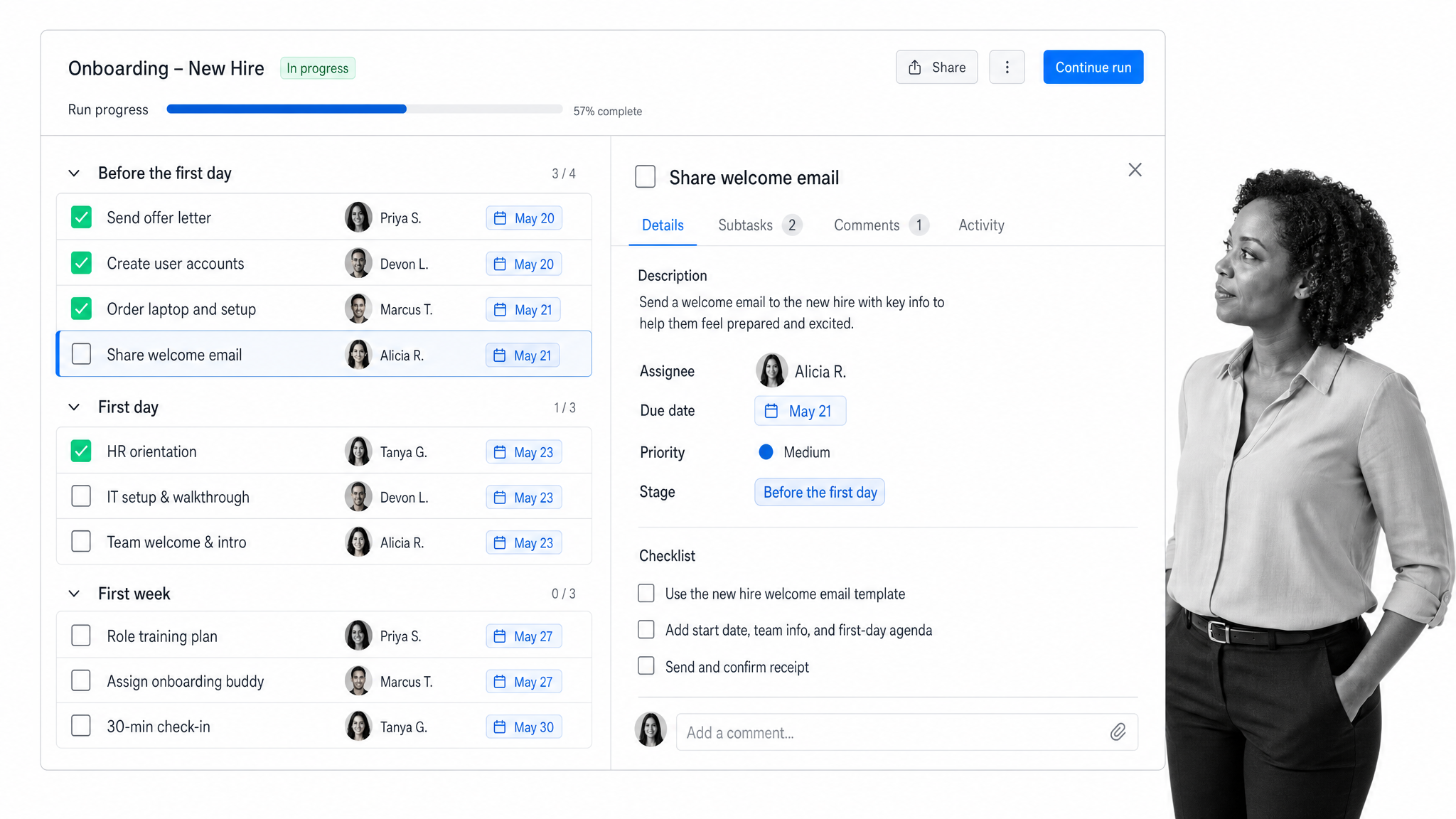
In Process Street you build the onboarding checklist a single time as a workflow, then run a fresh copy for every new hire. Each run assigns tasks to the right people, sets due dates, and shows a live view of what is done and what is pending, so HR and managers never have to ask “where are we with the new starter?” Browse onboarding templates to see how a full workflow is structured.
Personalize each checklist with conditional logic
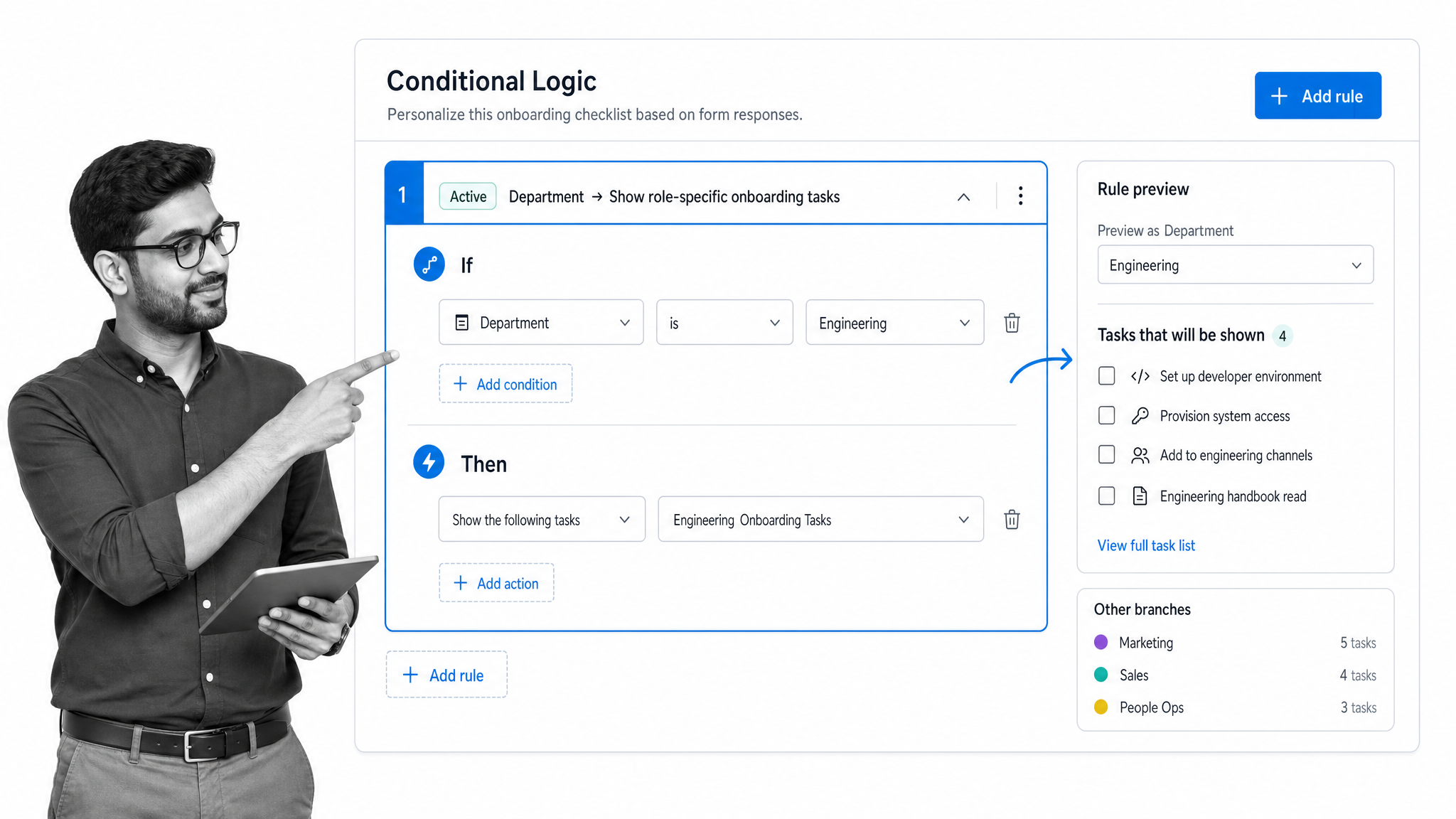
Roles differ, and the checklist should too. With conditional logic, a single workflow can show or hide tasks based on a form field. Select “Sales” and the new hire sees only sales onboarding tasks; select “Engineering” and they get the engineering path. You build one checklist that personalizes itself instead of maintaining a dozen near-identical copies.
Best practices for new hire checklists
As you build your checklist, keep these best practices in mind.
Keep the new hire from feeling overwhelmed
A new hire is hit with a lot of information at once. A checklist lays it out in clear, bite-sized steps so they learn the company gradually. Store reference material like the employee handbook inside the checklist so they can revisit it anytime, and let them see what is coming next, which removes a lot of first-week pressure.
Make every task actionable
Start each task with a verb. Clear, action-oriented language removes ambiguity about what needs to happen and saves time. At Process Street we are sticklers about this when we build checklists, because a vague task can stall an entire workflow.
Personalize the checklist for each new hire
Personalization makes a new hire feel welcome. With checklist software you do not need a brand-new checklist per person; you use conditional logic to tailor one workflow by department, location, or seniority.
Always gather feedback from the new hire
No one understands the onboarding experience better than the person living it. Encourage new hires to be honest about what worked and what did not, then fold that feedback back into the checklist. A new hire checklist is never truly finished, and that is what keeps it effective.
Where can you get a free new hire checklist template?
Feeling a little overwhelmed? You do not have to build from scratch. These free checklist templates give you a running start:
New Hire Onboarding Process Template: the full onboarding process laid out as an actionable checklist. Customize it however you like, or run it as is to cover every core step.
The 30-60-90 Day Plan for New Hires: a reference for HR managers to capture company goals and the new hire’s goals at each phase, so you can see how both line up across the first 90 days.
Frequently asked questions
What is a new hire checklist?
A new hire checklist is a structured list of every task required to recruit and onboard a new employee. It ensures nothing is missed during hiring and onboarding, from pre-boarding paperwork to training and the first 90 days of check-ins.
How do you create an effective new hire checklist?
Map every step of your onboarding process from pre-boarding through the first 60 days. Make each task actionable with a clear verb, attach the documents and resources each step needs, and personalize the checklist for each new hire using conditional logic.
What should be on a new hire checklist?
A complete checklist covers pre-boarding paperwork, compliance forms like the W-4 and I-9, account and equipment setup, a first-day welcome and team introductions, role training and a first project, and scheduled check-ins through the first 30, 60, and 90 days.
What is the difference between a new hire checklist and an onboarding template?
A new hire checklist is the specific list of tasks completed during onboarding, while an onboarding template is a reusable framework you customize for each hire. In practice a template often contains the checklist alongside timelines and training plans.
How do you automate a new hire checklist?
Build the checklist once as a workflow in onboarding software like Process Street, then run a copy for every new hire. The workflow assigns tasks automatically, sets due dates, tracks progress, and uses conditional logic to tailor tasks to each role.
What are the benefits of using a new hire checklist?
New hire checklists make onboarding smoother, keep you compliant with required forms and notices, deliver a consistent experience to every hire, and improve engagement and retention by giving new employees a confident, welcoming start.