


Turn every policy into automated workflows with built-in enforcement and audit-ready proof.


6 Best Continu Alternatives & Competitors in 2026
Last updated:

Continu alternatives are worth comparing when an employee learning or enablement platform no longer matches the work your organization needs to control. Continu is a capable enterprise learning management platform for creating content, delivering learning to several audiences, assigning programs through segmentation and automation, supporting workshops and certifications, and connecting learning data to reports. A replacement decision usually starts when a team wants a different balance of course delivery, collaborative authoring, self-serve pricing, multi-audience administration, SOP documentation, or recurring process execution.
This page evaluates six alternatives against the baseline Continu sets. Process Street ranks first for a specific ideal customer profile: operations, compliance, HR, enablement, and service teams that need recurring procedures to be assigned, enforced, tracked, and proved. That ranking is not a claim that every learning team should choose a workflow platform. If your primary requirement is a full LMS, a collaborative authoring environment, or a multi-audience learning portal, one of the learning specialists can be a better fit.
The comparison uses first-party product, documentation, and pricing pages checked in this run. The criteria are core job fit, ease of rollout, learning and content depth, workflow control, reporting, audience model, pricing transparency, and the maintenance burden after launch. No review scores, customer counts, or acquisition commentary are used. Pricing changes, so the linked vendor page remains the source of truth for a final purchase decision.
A useful shortlist begins with one question: is the unit of work a learner, a course, an audience, a company playbook, or a recurring operational process? Continu is built around users, segmentation, content, assignments, automations, completion data, and reporting. The alternatives below each emphasize a different part of that model. The right answer depends on the outcome that must be reliable after implementation, not on which demo contains the most features.
Compared and verified November 2026. This page is editorially maintained by the Process Street team. Product packaging and commercial terms can change, so confirm current details with each vendor.
Use the table of contents to move directly to the incumbent baseline, ranked alternatives, selection method, migration plan, or answers to common questions:
- What is Continu?
- Continu alternatives at a glance
- 1. Process Street
- 2. 360Learning
- 3. LearnUpon
- 4. TalentLMS
- 5. Docebo
- 6. Trainual
- How to choose among Continu alternatives
- How to plan a migration from Continu
- Frequently asked questions
- Choose the right Continu alternative
What is Continu, and why compare Continu alternatives?
Continu is an enterprise learning management platform for training employees, partners, customers, and other audiences. Its current feature pages describe AI-assisted content authoring, learning tracks, workshops, certifications, assessments, journeys, audience segmentation, assignments, automations, conversational learning, dashboards, reporting, integrations, and administrative controls.
Continu is the incumbent in this comparison, not a ranked alternative. Its official integration catalog shows connections for HR systems, communication tools, identity providers, content libraries, media, and analytics. Its help documentation organizes the platform around users, segmentation, content, assignments, automation, completion data, and reports. That is a credible baseline for a learning team that wants to create programs once, target the right groups, and measure completion.
Teams still evaluate alternatives for practical reasons. They may want collaborative course creation led by internal experts, a self-serve LMS with a permanent free plan, stronger separation between employee and customer academies, a simpler company playbook for onboarding, or a system that turns SOPs into governed recurring work. Some organizations also need a commercial model that is easier to benchmark before a sales call.
Continu remains a strong option when enterprise enablement and multi-audience learning are the center of gravity. The case for switching becomes stronger when the critical outcome sits elsewhere. If audit proof, approvals, required evidence, and cross-functional task ownership matter more than course completion, a workflow platform is a closer fit. If course authoring and learner administration are the job, stay within the LMS category and compare those specialists directly.
Continu alternatives at a glance
Best overall for enforceable recurring processes: Process Street. Best for collaborative expert-led learning: 360Learning. Best for multi-audience learning portals: LearnUpon. Best for self-serve LMS buying: TalentLMS. Best for broad enterprise learning: Docebo. Best for SOP documentation and role-based onboarding: Trainual.
The ranking reflects the needs of teams whose learning content must connect to controlled execution. If your organization primarily needs learning administration, use each specialist’s fit statement rather than treating the order as universal.
| Tool | Best for | Standout feature | Free plan | Starting price |
|---|---|---|---|---|
| Process Street | enforceable, trackable, recurring processes and SOP execution | workflow runs with assignments, approvals, conditional logic, required fields, and audit history | No public free plan | See pricing |
| 360Learning | collaborative learning led by internal subject matter experts | collaborative course authoring, expert review, feedback, and learning analytics | Free trial | $8 per user per month for Team |
| LearnUpon | delivering structured learning to employees, customers, and partners | multi-audience learning portals, course delivery, reporting, and integrations | No public free plan | Contact sales |
| TalentLMS | smaller teams that want self-serve LMS setup and transparent plan choices | course management, branches, learner administration, reports, and a permanent free plan | Yes | Free; paid plans listed by user band |
| Docebo | enterprise learning across employees, customers, and partners | multi-audience learning, AI content creation, automation, analytics, and integrations | No public free plan | Contact sales |
| Trainual | SOP documentation, onboarding, and role-based training for growing teams | AI-assisted documentation, training paths, tests, role ownership, and knowledge search | No public free plan | See current pricing |
How we picked these alternatives
Core job fit carried the most weight. We then compared audience model, content and learning depth, workflow controls, reporting, integrations, pricing transparency, and the operating effort required to maintain the platform. Every material competitor feature or pricing claim maps to a first-party source in the working document.
| Evaluation dimension | What to verify | Why it matters |
|---|---|---|
| Primary record | Learning completion, company knowledge, or process execution | The platform should own the outcome leadership needs to trust |
| Audience model | Employees, customers, partners, or cross-functional process participants | Audience structure changes permissions, reporting, and commercial terms |
| Control model | Assignments, prerequisites, approvals, required fields, and exceptions | Controls determine whether standards are guidance or enforced work |
| Commercial model | Users, active users, portals, applications, or custom contract | The billing unit should match realistic growth |
| Maintenance | Who updates content, workflows, integrations, and reports | A strong demo can still create an unsustainable operating burden |
1. Process Street
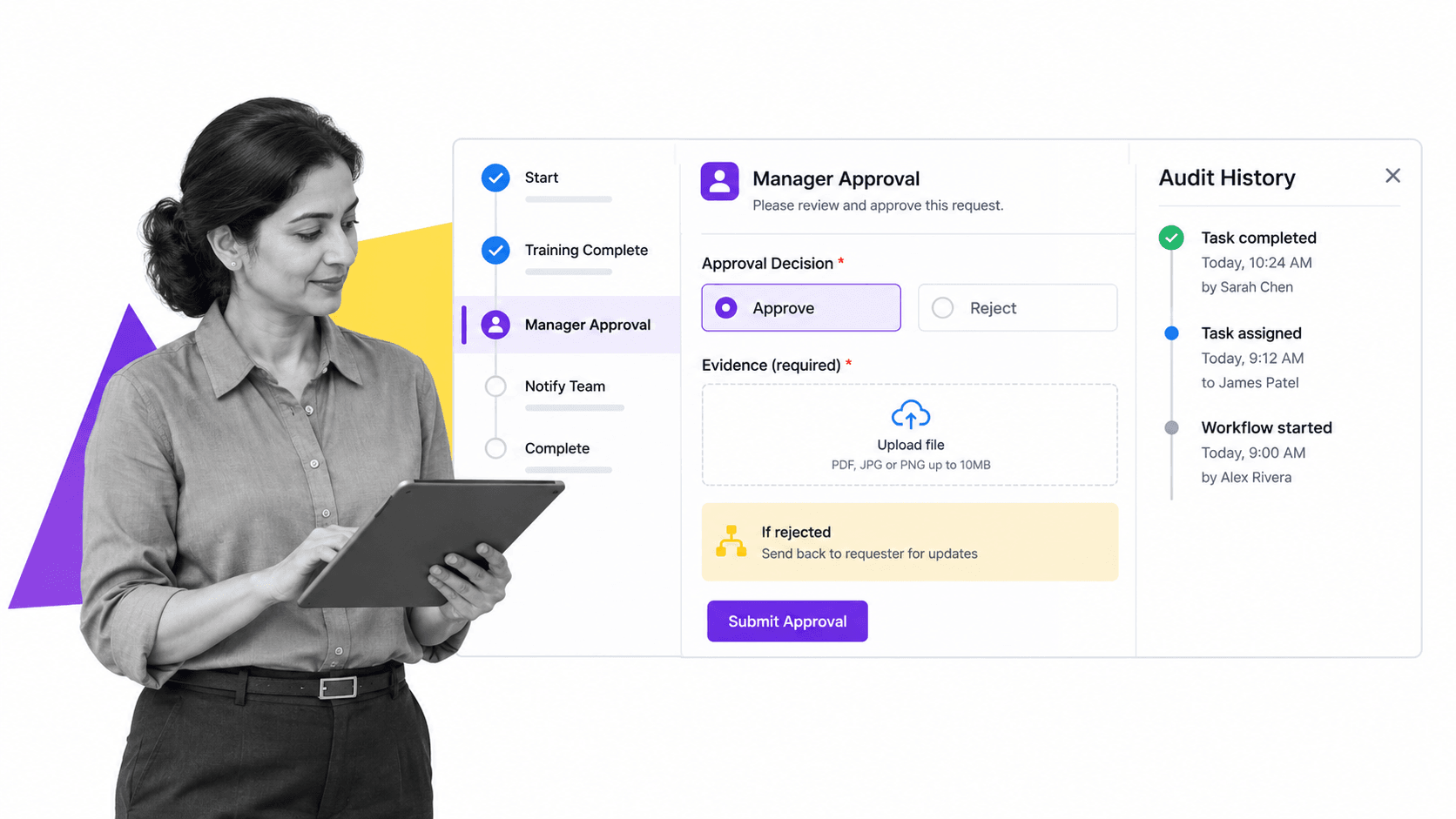
Best for: enforceable, trackable, recurring processes and SOP execution.
Bottom line: Process Street is the strongest Continu alternative when learning and SOP content must become assigned, enforceable, auditable work. It is not trying to be a conventional LMS. It is the better fit when the organization must prove that a recurring procedure was completed correctly, by the right people, with the required evidence and approvals.
The distinction is operational. Continu records learning assignments and completion. Process Street runs the procedure itself. A new hire can move through account setup, policy acknowledgement, equipment delivery, manager approval, role training, and a final readiness review. A vendor review can collect documentation, branch by risk, require approval, create follow-up tasks, and preserve the history. The workflow is not a lesson about the process. It is the controlled process.
That model is especially useful in high-stakes operations. Compliance reviews, finance close, customer onboarding, quality checks, security assessments, incident response, and regulated handoffs often contain steps that cannot be skipped. Process Street can make fields required, assign tasks by role, calculate due dates, pause at an approval, route different paths with conditional logic, and retain a structured record of what happened.
Process Street also helps teams keep documentation closer to execution. Procedures can be translated into workflows, supporting pages, forms, and task instructions rather than stored as a separate artifact people must remember to consult. This reduces the gap between knowing the policy and following it in real work.
For a Continu replacement, start with the programs that are partly training and partly execution. Employee onboarding, certification renewals, partner activation, customer implementation, and recurring compliance attestations often need both knowledge transfer and controlled handoffs. Process Street can own the handoffs, evidence, approvals, and accountability while specialist learning content remains available where needed.
Key Process Street features
- Workflow runs with assigned owners and due dates
- Required fields, forms, evidence capture, and task permissions
- Approvals and conditional logic inside the process
- Automations and integrations for moving work across the stack
- Audit-friendly activity history, reporting, and repeatable templates
Advantages
- Turns an SOP into a system people execute
- Strong controls for skipped-step risk and approval-heavy work
- Useful across operations, HR, compliance, finance, customer success, IT, and quality
- Creates a durable record of decisions and evidence
- Supports recurring schedules and standardized handoffs
Limitations
- Not a full LMS for deep course catalogs, learner transcripts, or SCORM-first administration
- Not the best choice when the only need is self-paced course delivery and assessment
Choose Process Street if the real requirement is controlled recurring execution. Skip it if the real requirement is a traditional learning management system with course catalogs, instructor-led learning administration, and formal learner records.
Process Street publishes current plan information on its pricing page. The page should be used for current commercial terms rather than baking a price into this comparison.
A practical pilot can begin with an employee onboarding checklist, a training plan template, or a compliance audit checklist. Build one live run, assign real owners, require evidence, add one approval, and inspect the final history. The software alternatives hub provides adjacent comparisons when the evaluation expands beyond learning platforms.
2. 360Learning
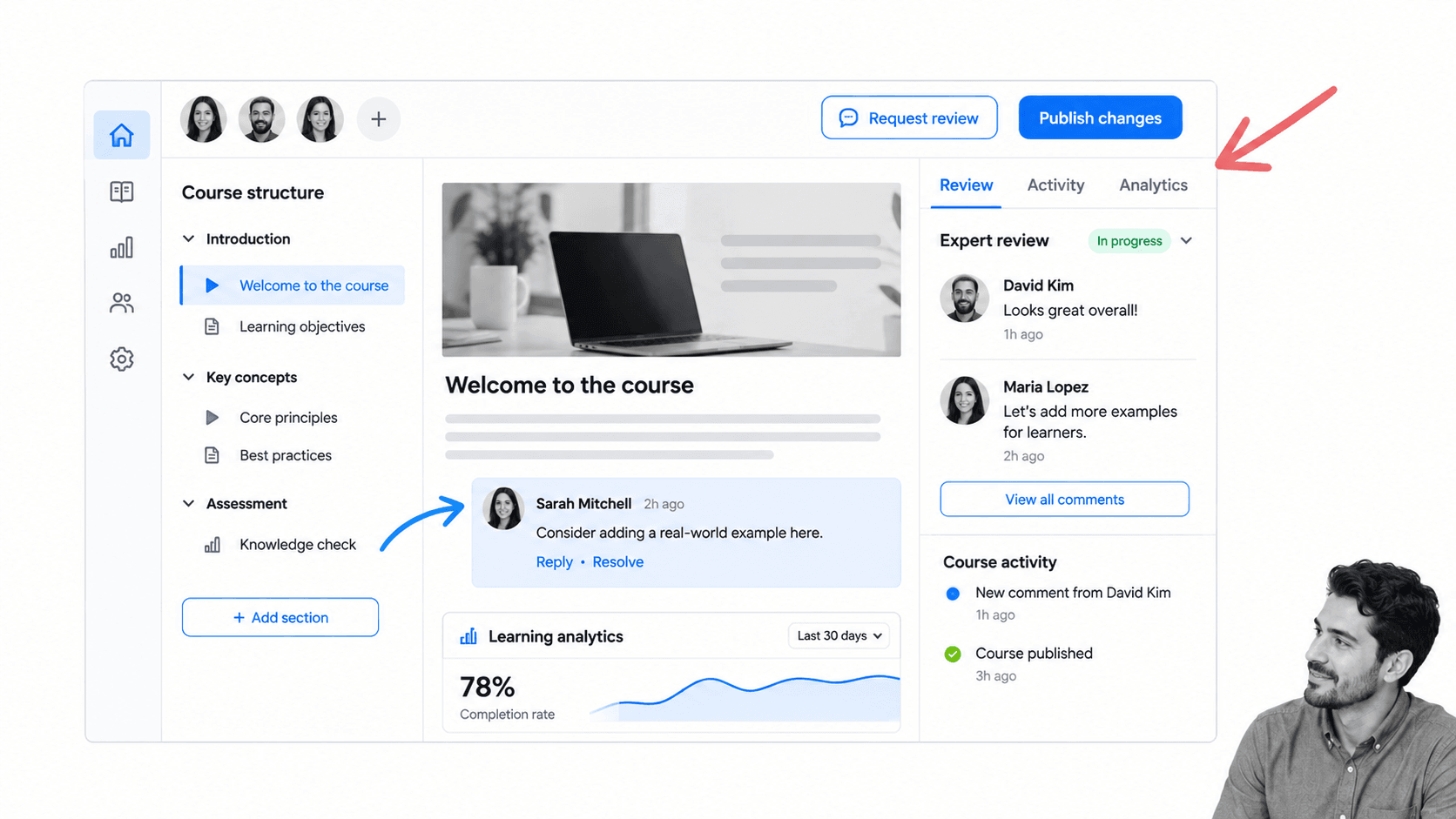
Best for: collaborative learning led by internal subject matter experts.
Bottom line: 360Learning is the better fit when internal experts need to co-author and continuously improve courses in a learning-first environment.
360Learning is an AI-powered learning management system centered on collaborative learning. Its product and pricing pages emphasize co-authoring, internal expert participation, course management, smart recommendations, training delivery, and analytics. The Team plan is published for organizations with up to 100 users, while larger Business and Enterprise arrangements use custom pricing.
The platform’s standout feature in this comparison is collaborative course authoring, expert review, feedback, and learning analytics. That strength should be tested against a real program rather than a generic demo. Use the vendor’s official pricing and product information to confirm current packaging before procurement.
For a meaningful pilot, build one representative learning or enablement journey. Include a real audience, one assignment rule, one exception, a completion event, a report, and a content update after learners have started. This reveals whether administrators can manage change safely, whether reporting answers the questions stakeholders will ask, and whether the platform fits the team’s operating capacity.
The migration test should also include ownership. Identify who creates content, who approves it, who assigns it, who monitors completion, who responds to exceptions, and who retires obsolete material. A replacement can simplify the learner experience while making administration harder, so both sides of the system need to be evaluated.
Key features in 360Learning
- Collaborative course authoring and co-authoring
- Expert review and learner feedback loops
- Course and content management
- Instructor-led and virtual training support
- Analytics and skills-oriented learning features
Advantages
- Strong fit when subject matter experts create the training
- Published Team pricing gives smaller programs a clear entry point
- Learning-first feedback and authoring tools are more specialized than a workflow platform
Limitations
- Formal learning remains the center of gravity
- Large deployments move to custom commercial terms
- It does not replace a cross-functional system for enforcing recurring business procedures
Choose 360Learning if internal experts need to co-author and continuously improve courses in a learning-first environment Skip it if the organization primarily needs recurring procedures with approval gates, required operational evidence, and a cross-functional execution record.
Free plan: Free trial. Starting price: $8 per user per month for Team. These details were verified from the vendor’s current first-party pages during this run.
3. LearnUpon
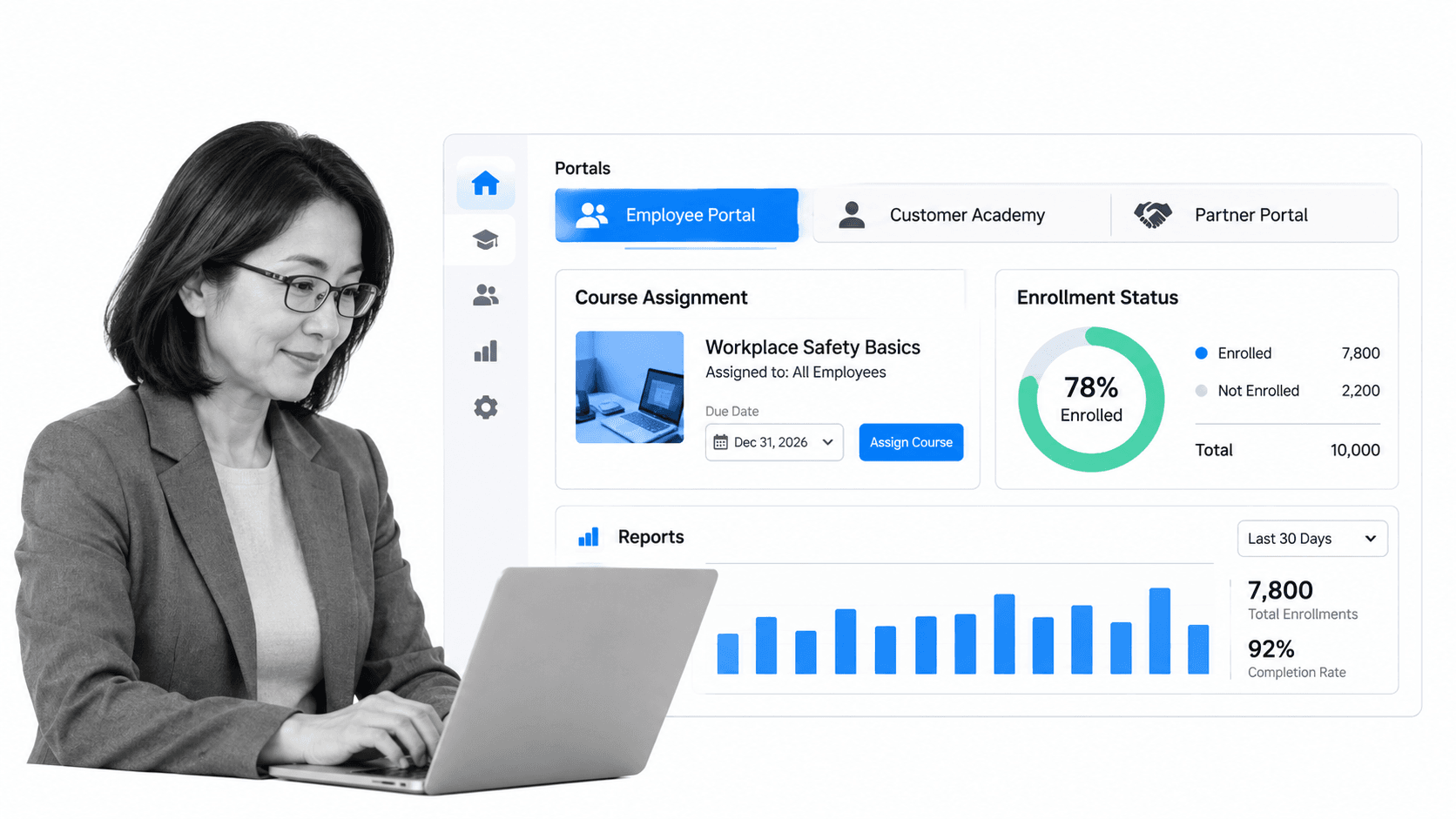
Best for: delivering structured learning to employees, customers, and partners.
Bottom line: LearnUpon is the better fit when one LMS must deliver and report on formal learning across several audiences.
LearnUpon is a learning management system for delivering training to employees, customers, and partners. Its official site presents a centralized platform for course delivery, learning portals, reporting, integrations, and support across several audiences. Pricing is sales-led, so buyers need a scoped conversation rather than a self-serve checkout.
The platform’s standout feature in this comparison is multi-audience learning portals, course delivery, reporting, and integrations. That strength should be tested against a real program rather than a generic demo. Use the vendor’s official pricing and product information to confirm current packaging before procurement.
For a meaningful pilot, build one representative learning or enablement journey. Include a real audience, one assignment rule, one exception, a completion event, a report, and a content update after learners have started. This reveals whether administrators can manage change safely, whether reporting answers the questions stakeholders will ask, and whether the platform fits the team’s operating capacity.
The migration test should also include ownership. Identify who creates content, who approves it, who assigns it, who monitors completion, who responds to exceptions, and who retires obsolete material. A replacement can simplify the learner experience while making administration harder, so both sides of the system need to be evaluated.
Key features in LearnUpon
- Employee, customer, and partner learning
- Learning portals for distinct audiences
- Course assignment and learner administration
- Reporting and learning analytics
- Integrations for the surrounding learning stack
Advantages
- Clear multi-audience LMS positioning
- Useful for organizations running separate internal and external programs
- Learning portals keep audience experiences distinct
Limitations
- No public starting price or permanent free plan
- A sales-led evaluation adds procurement work
- It is not designed to be the operating system for every recurring business process
Choose LearnUpon if one LMS must deliver and report on formal learning across several audiences Skip it if the organization primarily needs recurring procedures with approval gates, required operational evidence, and a cross-functional execution record.
Free plan: No public free plan. Starting price: Contact sales. These details were verified from the vendor’s current first-party pages during this run.
4. TalentLMS
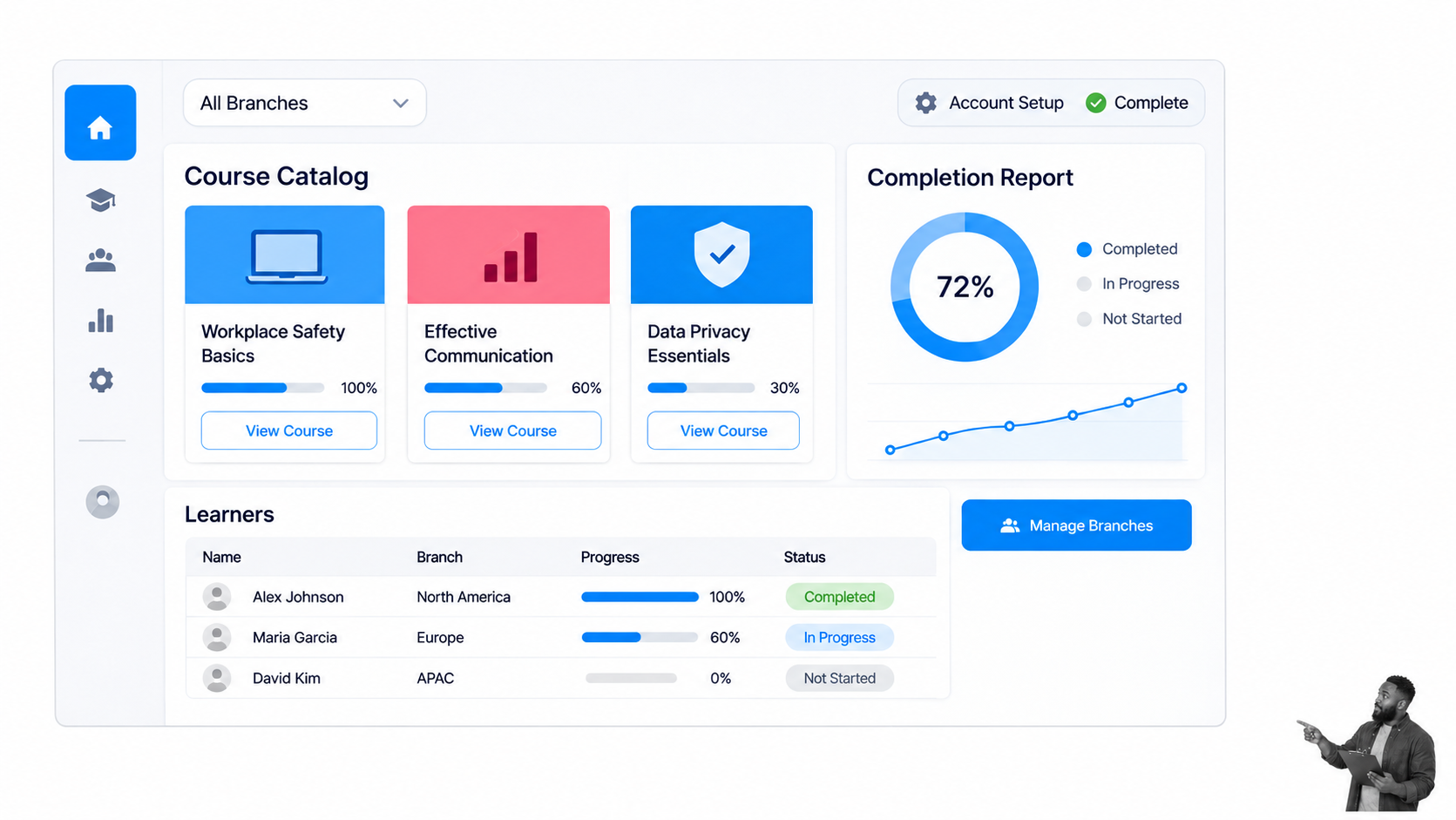
Best for: smaller teams that want self-serve LMS setup and transparent plan choices.
Bottom line: TalentLMS is the better fit when a smaller team wants to launch a conventional LMS quickly and compare published plan bands without a sales-led process.
TalentLMS is a self-serve learning management system with a permanent free plan and published paid plan bands. Its official pricing page highlights unlimited courses on paid tiers, branches for separate training portals, customization, single sign-on on applicable plans, and support for scaling the user population.
The platform’s standout feature in this comparison is course management, branches, learner administration, reports, and a permanent free plan. That strength should be tested against a real program rather than a generic demo. Use the vendor’s official pricing and product information to confirm current packaging before procurement.
For a meaningful pilot, build one representative learning or enablement journey. Include a real audience, one assignment rule, one exception, a completion event, a report, and a content update after learners have started. This reveals whether administrators can manage change safely, whether reporting answers the questions stakeholders will ask, and whether the platform fits the team’s operating capacity.
The migration test should also include ownership. Identify who creates content, who approves it, who assigns it, who monitors completion, who responds to exceptions, and who retires obsolete material. A replacement can simplify the learner experience while making administration harder, so both sides of the system need to be evaluated.
Key features in TalentLMS
- Course creation and management
- Learner assignment and progress reporting
- Branches for separate training groups
- A permanent free plan
- Published plan bands for self-serve comparison
Advantages
- Easy to evaluate without a sales conversation
- Permanent free plan supports a real pilot
- Conventional LMS controls are familiar to small training teams
Limitations
- Advanced configuration depends on higher plans
- User-band pricing needs careful capacity planning
- It is lighter on recurring operational controls than Process Street
Choose TalentLMS if a smaller team wants to launch a conventional LMS quickly and compare published plan bands without a sales-led process Skip it if the organization primarily needs recurring procedures with approval gates, required operational evidence, and a cross-functional execution record.
Free plan: Yes. Starting price: Free; paid plans listed by user band. These details were verified from the vendor’s current first-party pages during this run.
5. Docebo
Best for: enterprise learning across employees, customers, and partners.
Bottom line: Docebo is the better fit when a large organization needs an enterprise learning platform for several audiences and a broad learning ecosystem.
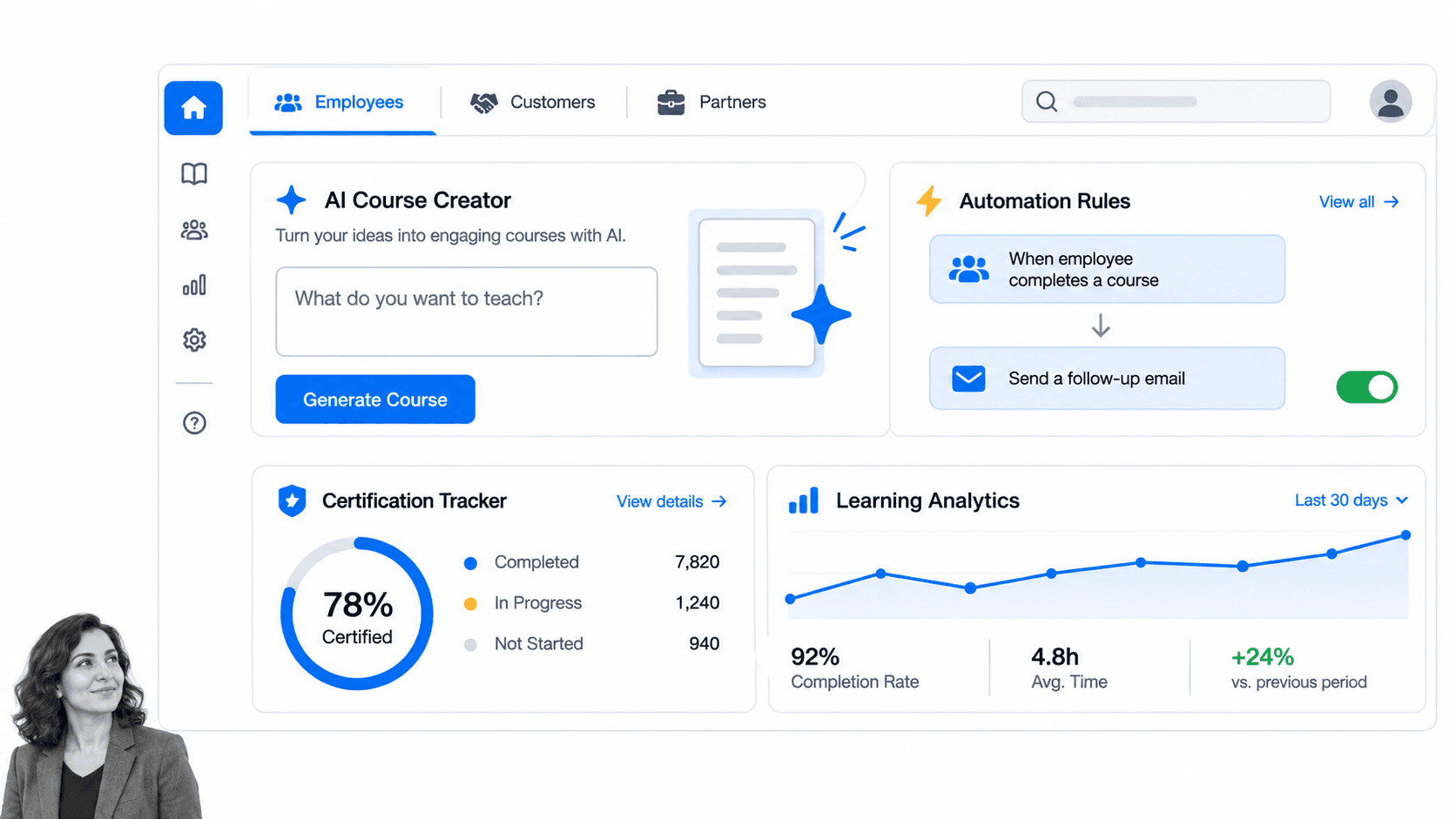
Docebo is an enterprise learning platform for training employees, customers, and partners from one system. Its official learning platform page describes AI content creation, learning management, search and administrative assistance, automation, integrations, analytics, and support for multiple audiences. The same page publishes a main-tier price and a user minimum, with custom pricing for more complex enterprise programs.
The platform’s standout feature in this comparison is multi-audience learning, AI content creation, automation, analytics, and integrations. That strength should be tested against a real program rather than a generic demo. Use the vendor’s official pricing and product information to confirm current packaging before procurement.
For a meaningful pilot, build one representative learning or enablement journey. Include a real audience, one assignment rule, one exception, a completion event, a report, and a content update after learners have started. This reveals whether administrators can manage change safely, whether reporting answers the questions stakeholders will ask, and whether the platform fits the team’s operating capacity.
The migration test should also include ownership. Identify who creates content, who approves it, who assigns it, who monitors completion, who responds to exceptions, and who retires obsolete material. A replacement can simplify the learner experience while making administration harder, so both sides of the system need to be evaluated.
Key features in Docebo
- Learning management for several audiences
- AI-assisted content creation
- Learning automation and administrative tools
- Analytics and custom dashboards
- Integrations for enterprise systems
Advantages
- Broad enterprise learning scope
- Strong fit for multi-audience education programs
- Published main-tier pricing creates an initial budget benchmark
Limitations
- The 250-user minimum is not designed for a very small rollout
- A broad platform can require more implementation and governance
- Its primary record is learning activity, not every operational procedure
Choose Docebo if a large organization needs an enterprise learning platform for several audiences and a broad learning ecosystem Skip it if the organization primarily needs recurring procedures with approval gates, required operational evidence, and a cross-functional execution record.
Free plan: No public free plan. Starting price: Contact sales. These details were verified from the vendor’s current first-party pages during this run.
6. Trainual
Best for: SOP documentation, onboarding, and role-based training for growing teams.
Bottom line: Trainual is the better fit when the immediate need is a centralized company playbook with onboarding and role-based training rather than approval-driven process execution.
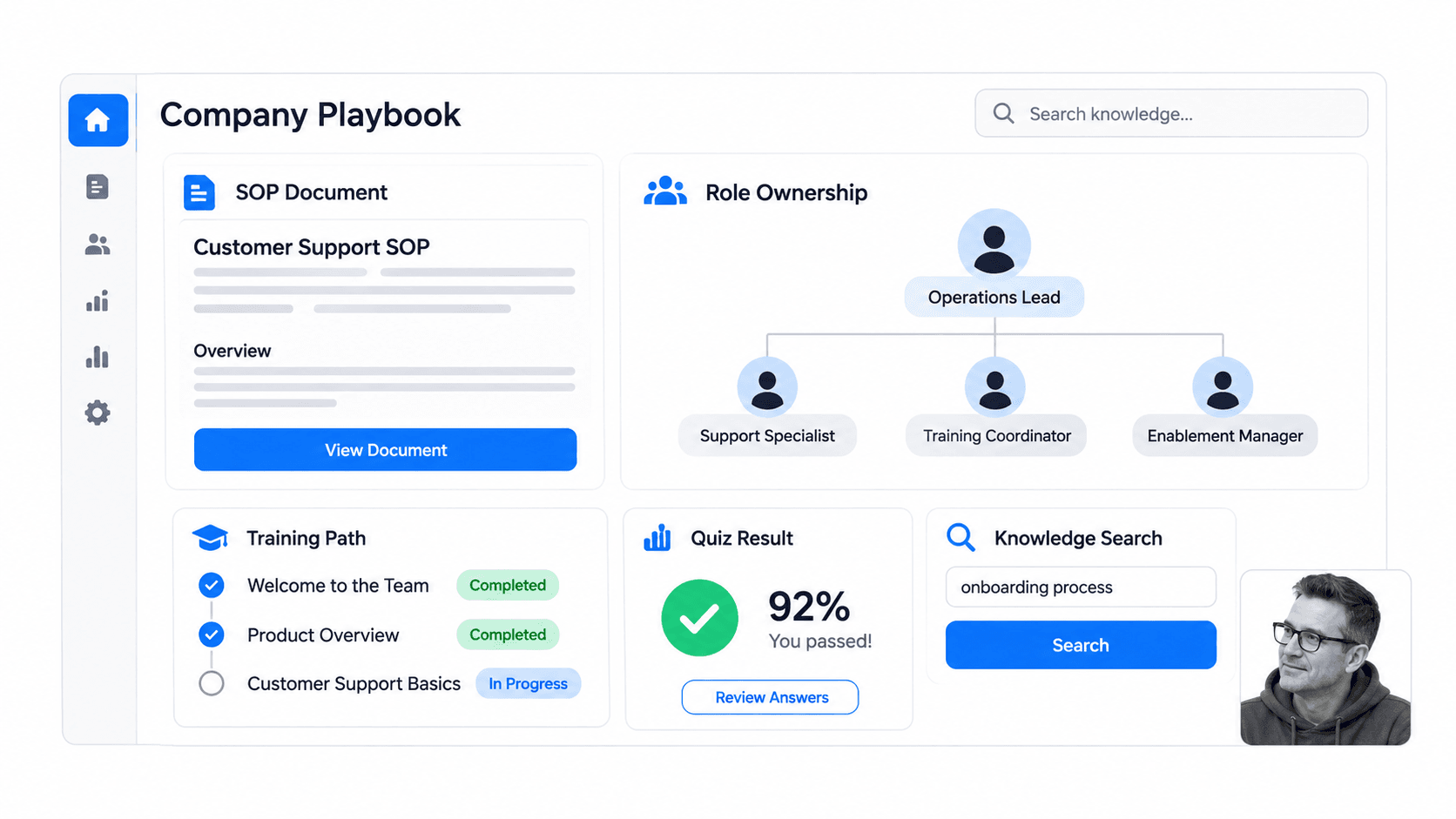
Trainual combines documentation, onboarding, role clarity, and employee training in one company playbook. Its official pricing page lists AI-assisted documentation, knowledge search, templates, screen recording, training by group, due dates, testing, reporting, version history, and integrations. Published plans start with a per-user rate and an annual minimum.
The platform’s standout feature in this comparison is AI-assisted documentation, training paths, tests, role ownership, and knowledge search. That strength should be tested against a real program rather than a generic demo. Use the vendor’s official pricing and product information to confirm current packaging before procurement.
For a meaningful pilot, build one representative learning or enablement journey. Include a real audience, one assignment rule, one exception, a completion event, a report, and a content update after learners have started. This reveals whether administrators can manage change safely, whether reporting answers the questions stakeholders will ask, and whether the platform fits the team’s operating capacity.
The migration test should also include ownership. Identify who creates content, who approves it, who assigns it, who monitors completion, who responds to exceptions, and who retires obsolete material. A replacement can simplify the learner experience while making administration harder, so both sides of the system need to be evaluated.
Key features in Trainual
- AI-assisted SOP and policy documentation
- Role-based training paths
- Tests, due dates, reminders, and reporting
- Knowledge search and reusable templates
- Role and responsibility mapping
Advantages
- Strong bridge between SOP documentation and onboarding
- Published pricing supports early budget qualification
- Role ownership and training sit in the same workspace
Limitations
- Annual minimum can outweigh the headline per-user rate for small teams
- Formal LMS depth is not the core proposition
- Process execution controls are lighter than Process Street for approval-heavy recurring work
Choose Trainual if the immediate need is a centralized company playbook with onboarding and role-based training rather than approval-driven process execution Skip it if the organization primarily needs recurring procedures with approval gates, required operational evidence, and a cross-functional execution record.
Free plan: No public free plan. Starting price: See current pricing. These details were verified from the vendor’s current first-party pages during this run.
How to choose among Continu alternatives
Choose a Continu alternative by defining the primary outcome, not by copying a generic LMS checklist. A learning team, operations team, customer education team, and compliance team may all describe the problem as training, while needing very different systems.
First: define the system of record
Decide what leadership must be able to trust. If the trusted record is course enrollment, progress, completion, and certification, stay in the LMS category. If it is a maintained company playbook and role ownership, evaluate SOP and knowledge platforms. If it is proof that a business procedure ran correctly, evaluate workflow execution. This single decision removes most category confusion.
Next: separate content creation from execution
Content authoring tools help experts create lessons, articles, quizzes, videos, and learning paths. Execution tools help teams assign tasks, collect data, route exceptions, request approvals, and prove completion. Some platforms overlap, but one side usually receives deeper investment. Score the capabilities separately so a polished course editor does not hide weak operational controls.
Then: model the audience structure
List every audience the platform must support: employees, managers, contractors, partners, customers, franchisees, or members. Record whether each audience needs a separate portal, brand, domain, catalog, permission model, and report. Multi-audience architecture can be a decisive requirement for LearnUpon or Docebo, while a cross-functional workflow may not need separate academies at all.
Test the control model
Write down prerequisites, due dates, approvals, required evidence, exception paths, reassignment rules, and escalation policies. An LMS assignment can prove a learner completed content. It may not prove that a manager approved the result, that required operational data was collected, or that a downstream task occurred. Test the exact control the business depends on.
Normalize pricing
Convert every proposal into a common scenario for the next 24 months. Include expected users, active learners, portals, implementation services, content migration, premium support, integrations, analytics, and likely growth. Published headline rates can use different assumptions, and quote-based vendors may bundle services that another platform prices separately.
Evaluate administration after launch
Ask administrators to make a real change after the pilot begins. Update content, move a learner between groups, correct a rule, rebuild a report, and investigate a missed completion. The ongoing maintenance experience is often more important than the initial setup flow.
Verify reporting against business questions
Prepare five questions stakeholders will ask. Examples include which partners completed certification, which employees are overdue, where a learning path stalls, which process evidence is missing, and which approval created a delay. Confirm that the report can be built without exporting data into a separate manual workflow.
| Must-have capability | LMS-first evidence | Process-first evidence |
|---|---|---|
| Completion | Learner completed assigned content | Participant completed required work |
| Control | Prerequisites and assignment rules | Approvals, required fields, and conditional routing |
| Audit trail | Enrollment, progress, and certification history | Task, decision, evidence, and handoff history |
| Audience | Portals, groups, catalogs, and cohorts | Roles, departments, systems, and process participants |
| Improvement | Course feedback and learning analytics | Run data, bottlenecks, exceptions, and process revisions |
The learning management system guide helps frame learning-first requirements, while the workflow management system guide explains the execution-first model. For onboarding specifically, compare the learner experience with the employee onboarding process that managers and support teams must execute.
Which Continu alternative fits each buying scenario?
Shortlists become clearer when they are built around a representative program. The following scenarios are not universal recommendations. They show how the primary record, audience model, and required controls change the best fit. Use the scenario closest to your work, then confirm it with a pilot that includes real administrators and participants.
When the program is employee compliance
Start by separating knowledge transfer from compliance execution. A learning platform can assign policy content, record completion, test understanding, and manage renewal dates. That is useful when the required evidence is a learning record or certification. Process Street becomes the stronger fit when the procedure also requires a manager review, collected evidence, remediation tasks, an approval, and a preserved sequence of decisions. Many organizations use both patterns: learning content establishes understanding, while a controlled workflow governs the operational response.
During the pilot, include one overdue participant, one failed assessment or exception, one reassignment, and one approval that must be rejected and resubmitted. The normal path rarely exposes the weaknesses that create audit work later. Verify who receives the alert, what evidence is retained, and whether a reviewer can reconstruct the event without combining several exports.
When internal experts create the training
360Learning deserves priority when subject matter experts are expected to create, review, and improve courses with the learning team. Test how an expert receives a contribution request, how comments become revisions, how version changes affect active learners, and how feedback appears in reporting. A collaborative authoring promise is valuable only if busy experts can participate without becoming full-time LMS administrators.
Also decide who has final editorial authority. Collaborative creation can accelerate useful content, but it needs ownership, review standards, and retirement rules. Include one obsolete lesson in the pilot and ask the team to find every place it appears. The answer reveals whether distributed creation will stay governable as the library grows.
When employees, customers, and partners share one platform
LearnUpon and Docebo should be tested when several audiences need distinct learning experiences. Build a miniature employee academy, customer academy, and partner program. Check branding, domain options, permissions, catalogs, enrollment rules, reporting boundaries, and administrator access for each. Confirm whether one person can belong to more than one audience without duplicate records or confusing notifications.
The commercial model matters in this scenario because audience growth can be uneven. Ask vendors to price the expected mix of registered users, active learners, portals, and administrative services for two years. Confirm how external users are removed, how historical completions are retained, and whether customer or partner managers can see only their own populations.
When a smaller team needs a conventional LMS quickly
TalentLMS is the most direct fit in this list for a smaller team that wants self-serve setup and a permanent free plan. Use the free environment to build a course, a branch, an assignment, and a report before comparing paid bands. The key question is not whether the first course can be published. It is whether the selected plan supports the expected user count, reporting needs, branches, integrations, support level, and administration model after the initial rollout.
Keep the implementation narrow. Import a small learner group, assign one representative course, test reminders and completion, and document the steps required to update the course. If the team also needs operational approvals or recurring handoffs, model those separately instead of forcing them into the course structure.
When onboarding is a company playbook
Trainual is a focused choice when the main deliverable is a maintained set of company policies, SOPs, role expectations, and onboarding paths. Test ownership and maintenance as carefully as learner completion. Assign an owner to each critical topic, change a role, update an SOP, and confirm how affected people are notified or retrained. This reveals whether the playbook can stay current as the organization changes.
If onboarding crosses into account provisioning, equipment delivery, access approval, manager sign-off, and readiness checks, compare the playbook with an executable employee onboarding workflow. The content may explain what a new hire should know, while the workflow coordinates what HR, IT, security, facilities, and the manager must do.
How to plan a migration from Continu
A Continu migration should preserve useful content and reporting while changing the system deliberately. Begin with an inventory of users, segments, content, assignments, automations, completion data, integrations, portals, dashboards, and owners. Mark each item as migrate, rebuild, archive, or retire.
Next, group programs by outcome. Some courses should move to the new LMS unchanged. Some enablement journeys should be redesigned around the new platform’s audience model. Some training-adjacent procedures should become executable workflows because completion alone never proved the business task was done. This is where a migration can improve the operating model instead of reproducing the old one.
Run a controlled pilot with one representative audience. Keep the source content stable, define success metrics, move a limited group, test identity and assignment flows, validate reports, and compare completion and support demand. For approval-heavy procedures, use an explicit change management checklist and define the rollback trigger before launch.
Plan data retention before decommissioning. Determine which completion, certification, acknowledgement, and activity records must remain accessible. Export or archive them in a format the business can actually retrieve. Confirm who owns historical reporting and how long the records must be retained.
Finally, retire in waves. Freeze obsolete content, communicate cutover dates, redirect learners to the new experience, monitor unresolved assignments, and close the old platform only after stakeholders sign off on content, access, reporting, and retained records. The migration is complete when the new system is trusted, not when the software contract ends.
Frequently asked questions
What is the best Continu alternative?
Process Street is the best Continu alternative when the primary need is enforceable, trackable, recurring process and SOP execution. For a conventional LMS, 360Learning, LearnUpon, TalentLMS, or Docebo may fit better, while Trainual is stronger for a company playbook and role-based onboarding.
Is there a free Continu alternative?
TalentLMS publishes a permanent free plan, and 360Learning offers a free trial. The other tools in this comparison use paid plans, trials, or sales-led pricing, so verify current terms on each vendor’s official pricing page.
What is the best Continu alternative for small teams?
TalentLMS is the clearest small-team LMS option in this list because it has a permanent free plan and published plan bands. Process Street can be the better fit for a small operations team that needs recurring checklists, approvals, and accountability rather than formal course administration.
What is the best Continu alternative for enterprise learning?
Docebo and LearnUpon are the strongest enterprise learning specialists in this list. Docebo fits broad multi-audience learning ecosystems, while LearnUpon emphasizes learning delivery across employees, customers, and partners through distinct portal experiences.
What is the closest alternative to Continu?
Docebo is the closest broad enterprise learning alternative in this comparison because it also supports several audiences, content creation, automation, analytics, and integrations. LearnUpon is another close choice for organizations prioritizing multi-audience learning portals.
Is there a Microsoft or Google equivalent to Continu?
Microsoft and Google provide collaboration, identity, content, and productivity tools, but neither is a direct one-product replacement for an enterprise LMS like Continu. Organizations can assemble a learning stack around those ecosystems, but administration, reporting, assignments, and certification may require additional products or custom work.
How do you migrate away from Continu?
Inventory users, segments, content, assignments, automations, completion records, integrations, reports, and owners. Classify each item as migrate, rebuild, archive, or retire, pilot one audience, validate reporting and retained records, then cut over in controlled waves.
Why is Process Street ranked first?
Process Street is ranked first for the ideal customer profile of this page: teams that need SOPs and recurring procedures to be assigned, enforced, tracked, and proved. The ranking is not universal. A dedicated LMS can be the better fit when course delivery and learner administration are the primary job.
Choose the right Continu alternative
The best Continu alternative owns the outcome your organization must trust. Choose a learning platform when courses, learner progress, audiences, and certification are the record. Choose a company playbook when documented knowledge and role-based onboarding are the priority. Choose Process Street when recurring work must be assigned, controlled, completed, and proved inside the same system.
