


Turn every policy into automated workflows with built-in enforcement and audit-ready proof.



Best Workflow Automation Tools for Controlled, Scalable Work
Workflow automation tools turn repeatable work into a controlled sequence of triggers, tasks, decisions, approvals, and records. The best choice is not the product with the longest feature list. It is the product that matches the kind of work you need to run, the people who own it, the systems it touches, and the level of proof the business requires.
This guide compares ten current options across human workflows, app automation, robotic process automation, developer orchestration, and AI agent execution. Process Street ranks first because it combines structured recurring work, human accountability, automation, and an execution record in one operational surface. The remaining tools are strong for narrower jobs such as Microsoft automation, enterprise integration, desktop automation, BPMN orchestration, or technical self-hosting.
In this guide:
- What are workflow automation tools?
- Which workflow automation tool is best for your team?
- Best workflow automation tools compared
- How do you compare workflow automation tools?
- Frequently asked questions
What are workflow automation tools?
Workflow automation tools are software systems that move work through a defined path with less manual coordination. A trigger starts the process. Rules decide what happens next. Tasks route to people or systems. Approvals protect decisions that need judgment. Each run produces a record of the work. That is broader than a simple task reminder and more operational than a static process document.
A useful distinction is task automation versus process automation. Task automation performs one action, such as copying a field or sending a notification. Process automation coordinates an outcome across several actions, owners, exceptions, and systems. Read the complete workflow automation guide for the design principles behind reliable triggers, routes, and controls.
- Human workflow tools coordinate forms, assignments, approvals, deadlines, and evidence.
- Integration automation tools move data and actions between applications.
- RPA tools operate desktop applications and interfaces when APIs are limited.
- Process orchestration tools coordinate long-running technical processes across services, people, and agents.
- AI workflow tools add classification, generation, reasoning, or agent actions inside a controlled flow.
Which workflow automation tool is best for your team?
Choose the category before you choose the vendor. An operations team standardizing onboarding has a different problem from an engineering team orchestrating microservices. A finance leader routing approvals needs stronger ownership and audit evidence than a marketer connecting two apps. The table below matches each product to its strongest job.
| Rank | Tool | Best for | Primary strength |
|---|---|---|---|
| 1 | Process Street | Controlled recurring business processes | Human workflows, approvals, evidence, and automation in one run |
| 2 | Microsoft Power Automate | Microsoft-centered environments | Cloud flows, desktop automation, and process discovery |
| 3 | Workato | Enterprise integration and orchestration | Cross-system automation with centralized governance |
| 4 | UiPath | RPA and interface-level automation | Automating work across applications, documents, and agents |
| 5 | Camunda | Developer-led process orchestration | Executable BPMN and long-running process control |
| 6 | Pipefy | No-code departmental workflows | Forms, service portals, rules, and operational tracking |
| 7 | Kissflow | Low-code workflows and internal apps | Business-led process building with governance |
| 8 | Zapier | Fast app-to-app automation | Accessible triggers and actions for common business tools |
| 9 | n8n | Technical teams that want deployment control | Visual automation with code options and self-hosting |
| 10 | Gumloop | AI-native agent workflows | Team-built agents with shared controls and activity history |
The ranking favors durable operational control over isolated convenience. A fast connector can be valuable, but it does not replace a governed workflow when a process needs owners, approvals, exception handling, and proof. Likewise, a BPMN engine or RPA platform can be the right specialist choice without being the best daily workspace for a nontechnical operations team.
Best workflow automation tools compared
1. Process Street
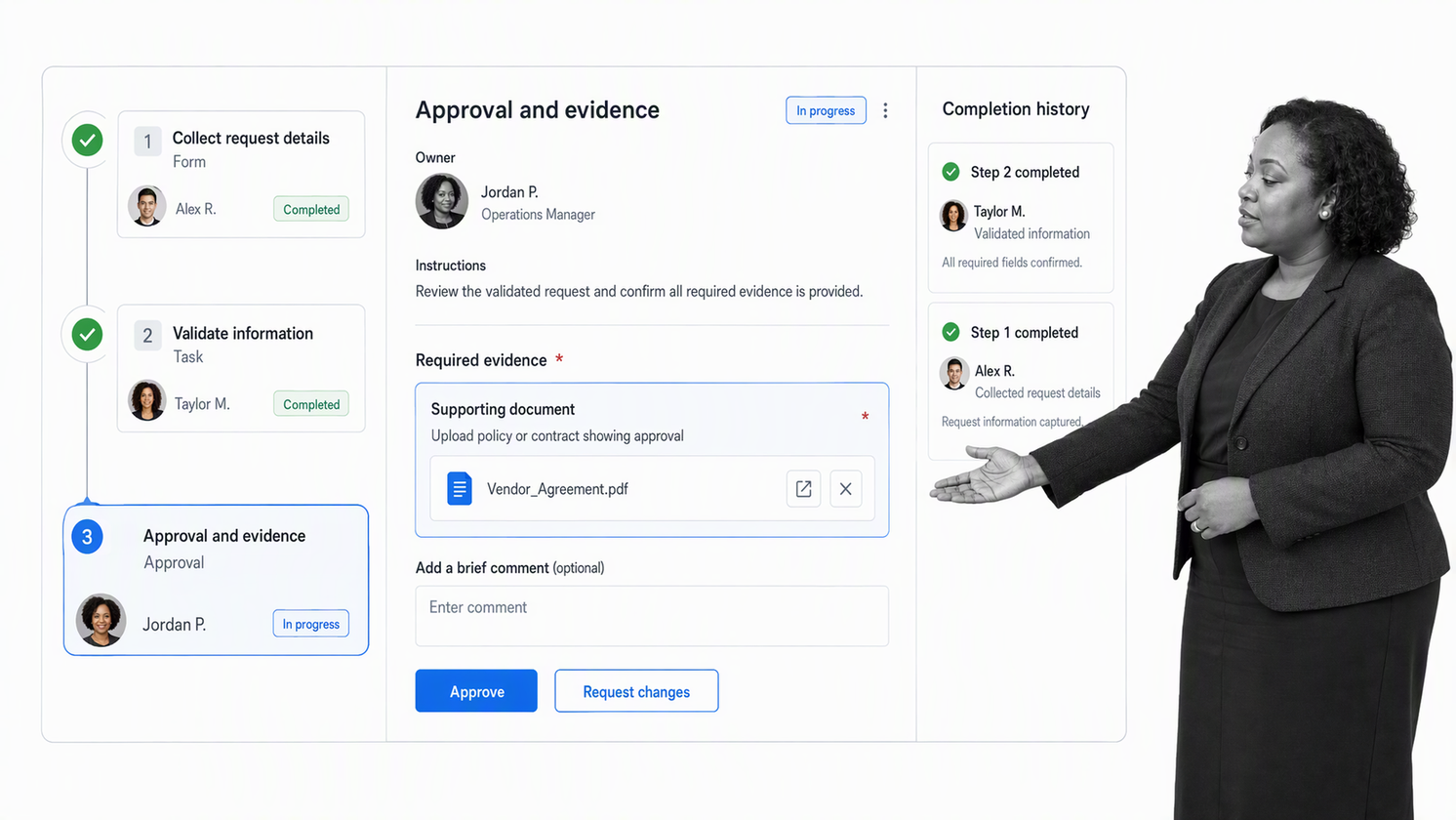
Process Street is the best overall choice for teams that need recurring work to run the same reliable way while keeping people accountable. It turns procedures into executable workflow runs with assigned tasks, forms, conditional logic, approvals, deadlines, automation, and audit history. That makes it especially strong for onboarding, compliance, finance operations, customer implementation, quality programs, vendor management, and any process where skipped steps create business risk.
Its advantage is the connection between the process design and the live execution record. Teams do not have to keep an SOP in one system, track work in another, and reconstruct evidence later. Each run carries instructions, data, decisions, comments, files, owners, and completion history together. AI can assist with building, drafting, classifying, and executing work inside the process while approvals and policy gates keep humans responsible for consequential decisions.
Best for: operations and compliance teams that need repeatable execution, clear accountability, and audit-ready proof.
2. Microsoft Power Automate
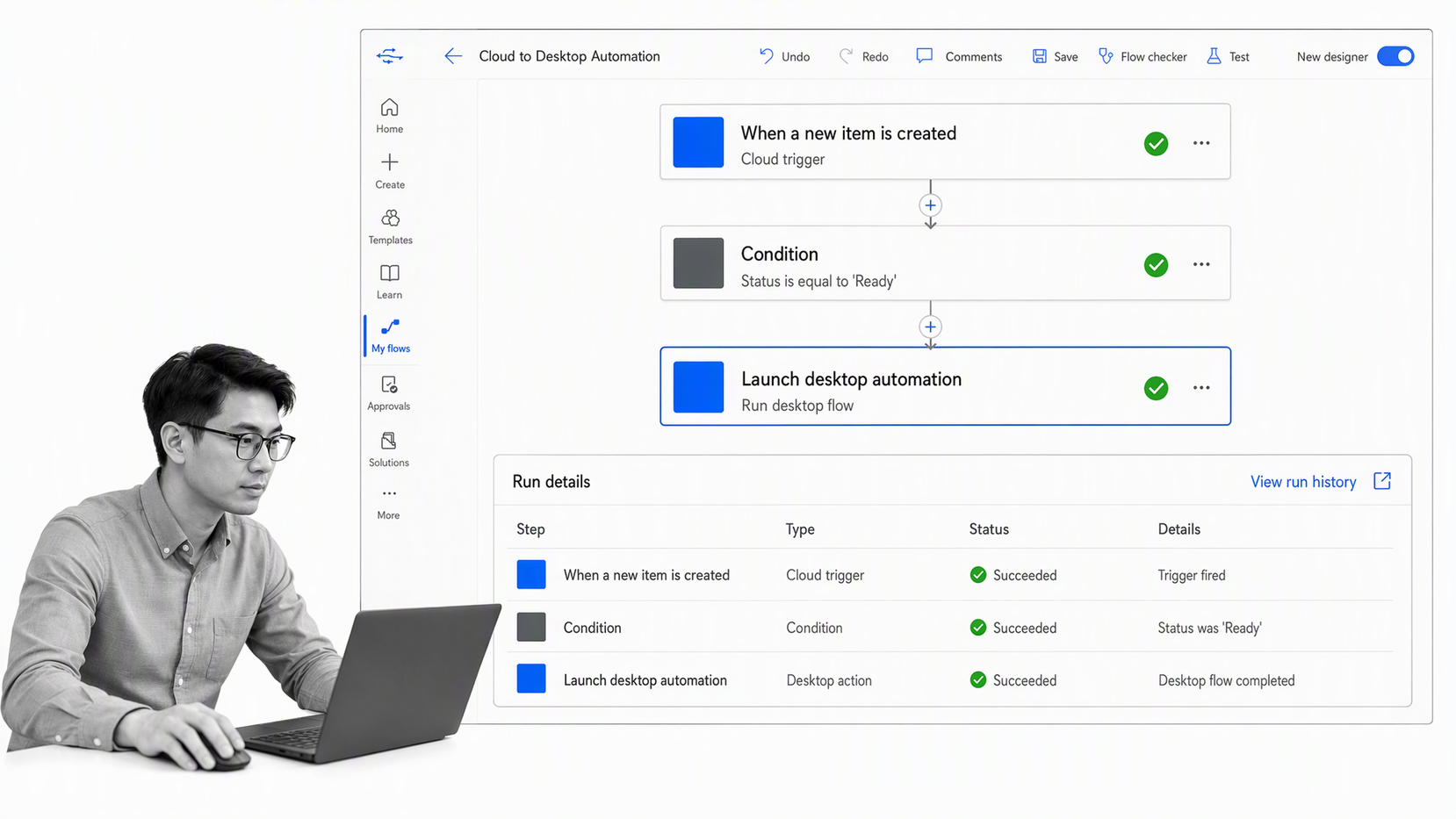
Microsoft Power Automate is a strong fit for organizations already centered on Microsoft business applications. It covers cloud flows, desktop automation, robotic process automation, task and process mining, and orchestration. Microsoft also supports natural-language authoring through Copilot, which can help teams draft and extend automations faster.
The product is broad enough to connect application workflows with older desktop or web interfaces. That breadth is useful in enterprises with a mix of modern cloud applications and legacy systems, although governance and environment design matter as the number of flows grows. Microsoft describes the product as an end-to-end automation solution with low-code and AI capabilities on its Power Automate product page.
Best for: Microsoft-heavy organizations that need both cloud workflows and desktop automation.
3. Workato
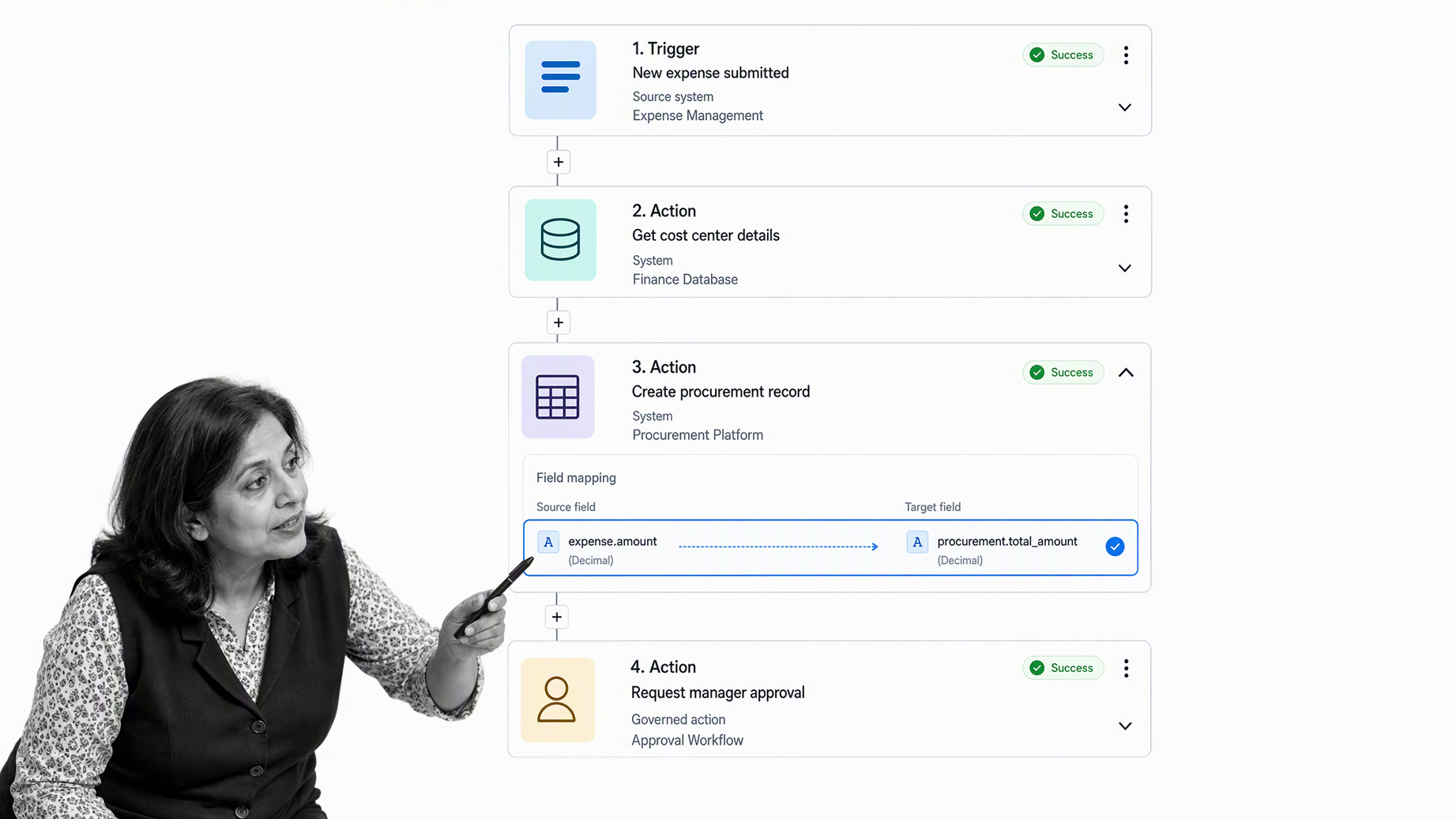
Workato is designed for enterprise integration, data movement, workflow orchestration, and governed AI actions. Its platform connects SaaS applications, databases, data warehouses, data lakes, large language models, custom systems, and on-premises infrastructure. That makes it useful when automation spans many systems and requires central administration rather than a collection of team-level recipes.
Workato is most compelling when integration architecture is the main problem. It provides enterprise skills, orchestration, observability, governance, and security controls around actions that cross the stack. For a simple human approval process, it may be more platform than a team needs. For complex cross-system automation, its connectivity and control plane are the point.
Best for: enterprises that need governed automation across a large and mixed application estate.
4. UiPath
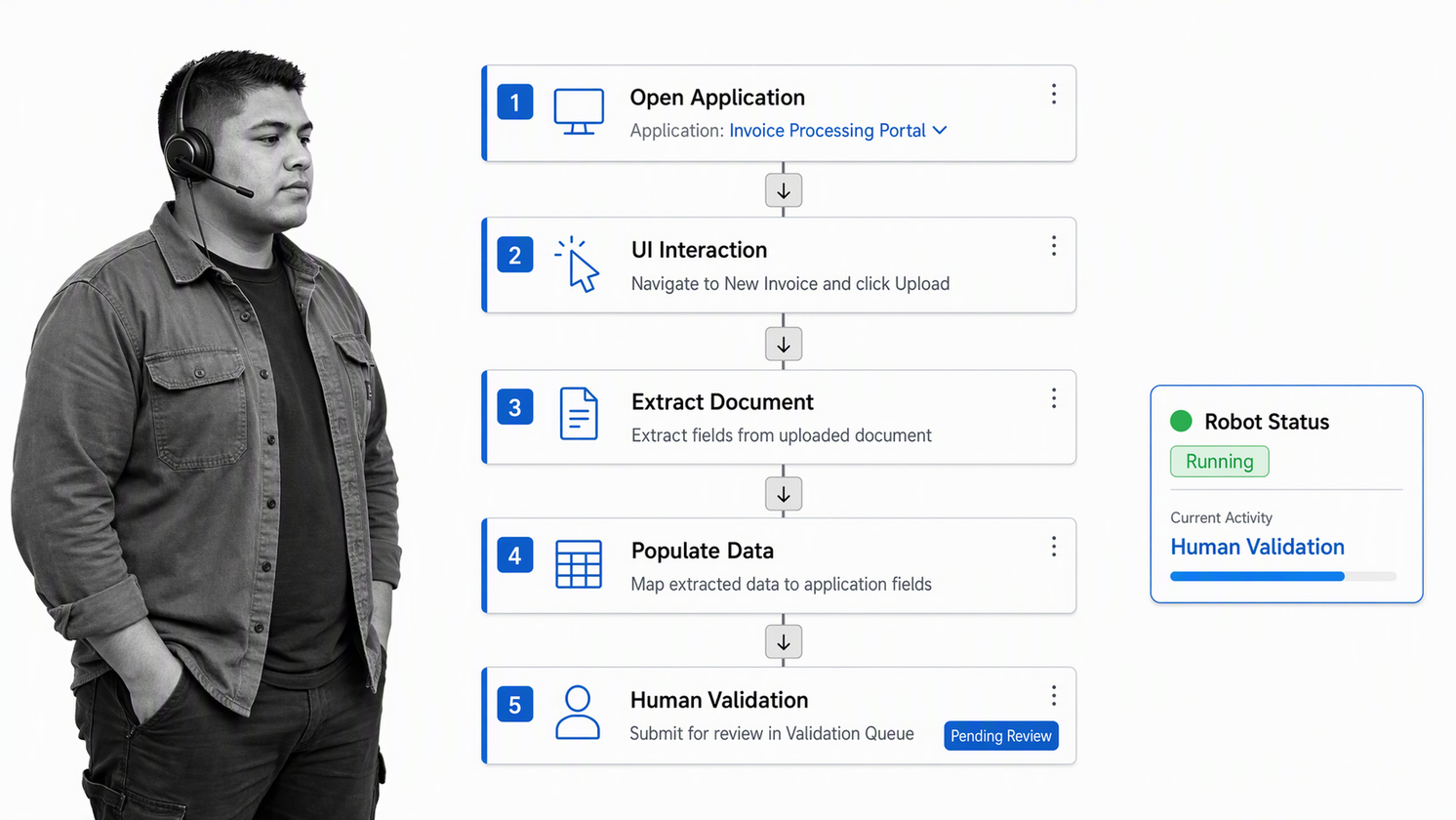
UiPath is a leading option when work must be automated through application interfaces, documents, APIs, robots, and AI agents. Its platform spans RPA, business orchestration, process intelligence, intelligent document processing, low-code apps, and governance. This range is valuable when important work still happens in legacy software, virtual desktops, or interfaces that cannot be automated cleanly through APIs alone.
UiPath is usually a specialist automation program rather than a lightweight team tool. Successful deployments need process discovery, bot lifecycle management, exception handling, access controls, and operational ownership. It earns a place high on the list because many enterprises cannot modernize every underlying system before automating the work around it.
Best for: organizations with desktop-heavy, document-heavy, or legacy-system processes that benefit from RPA.
5. Camunda
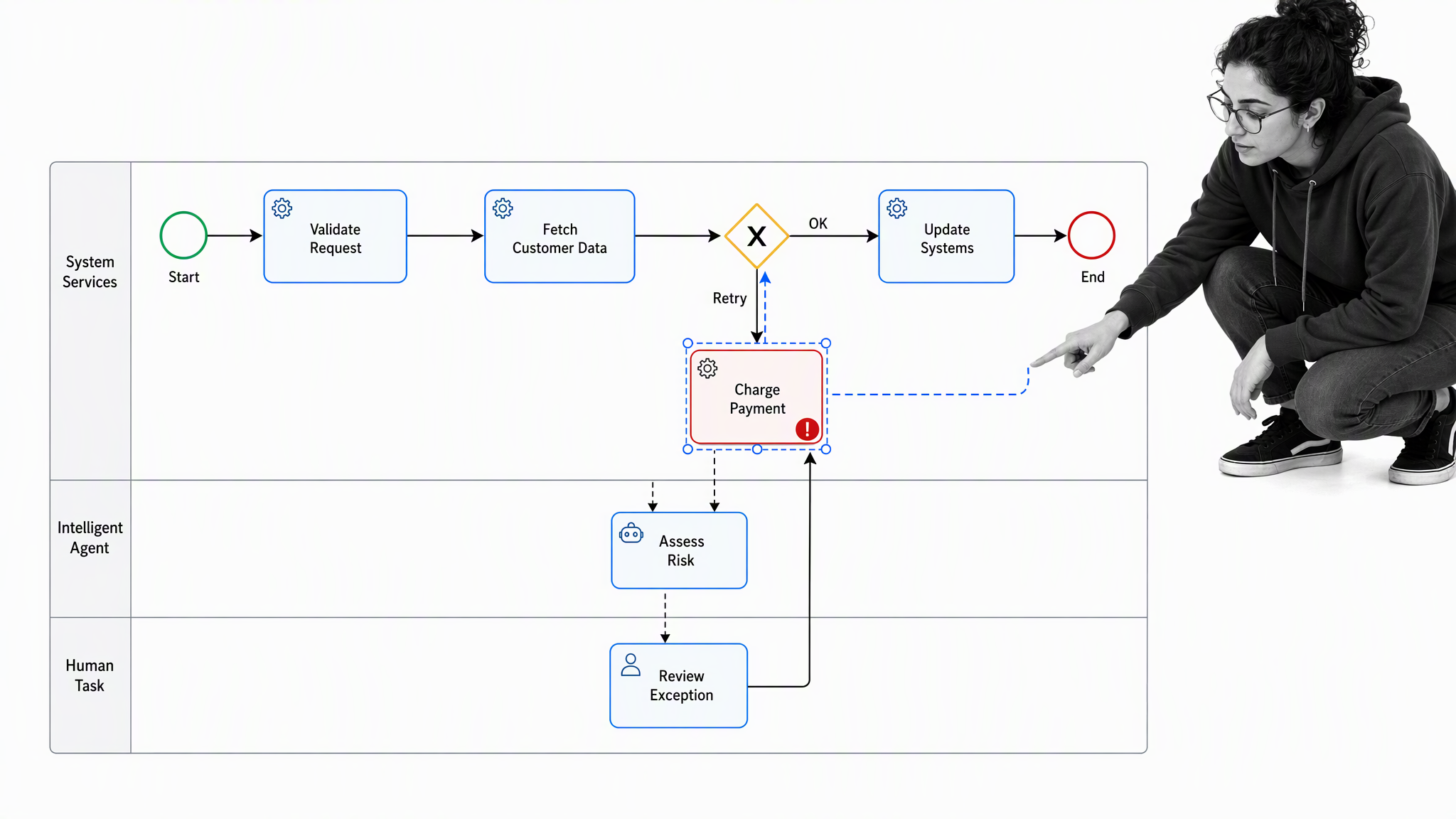
Camunda is built for end-to-end process orchestration across people, systems, devices, and AI agents. Teams model processes in BPMN, deploy them to the orchestration engine, manage human work in Tasklist, and monitor live execution in Operate. It is a strong fit when a process is long-running, technically complex, and must survive service failures, retries, version changes, or changing infrastructure.
Camunda is developer-friendly and intentionally sits above individual services and automation tools as a neutral control layer. It can run as SaaS or self-managed, which suits organizations with strict architecture or deployment requirements. Its official platform overview describes governance, human-in-the-loop controls, audit trails, error handling, and versioned rollouts as core capabilities.
Best for: engineering and automation teams orchestrating mission-critical processes across many systems.
6. Pipefy
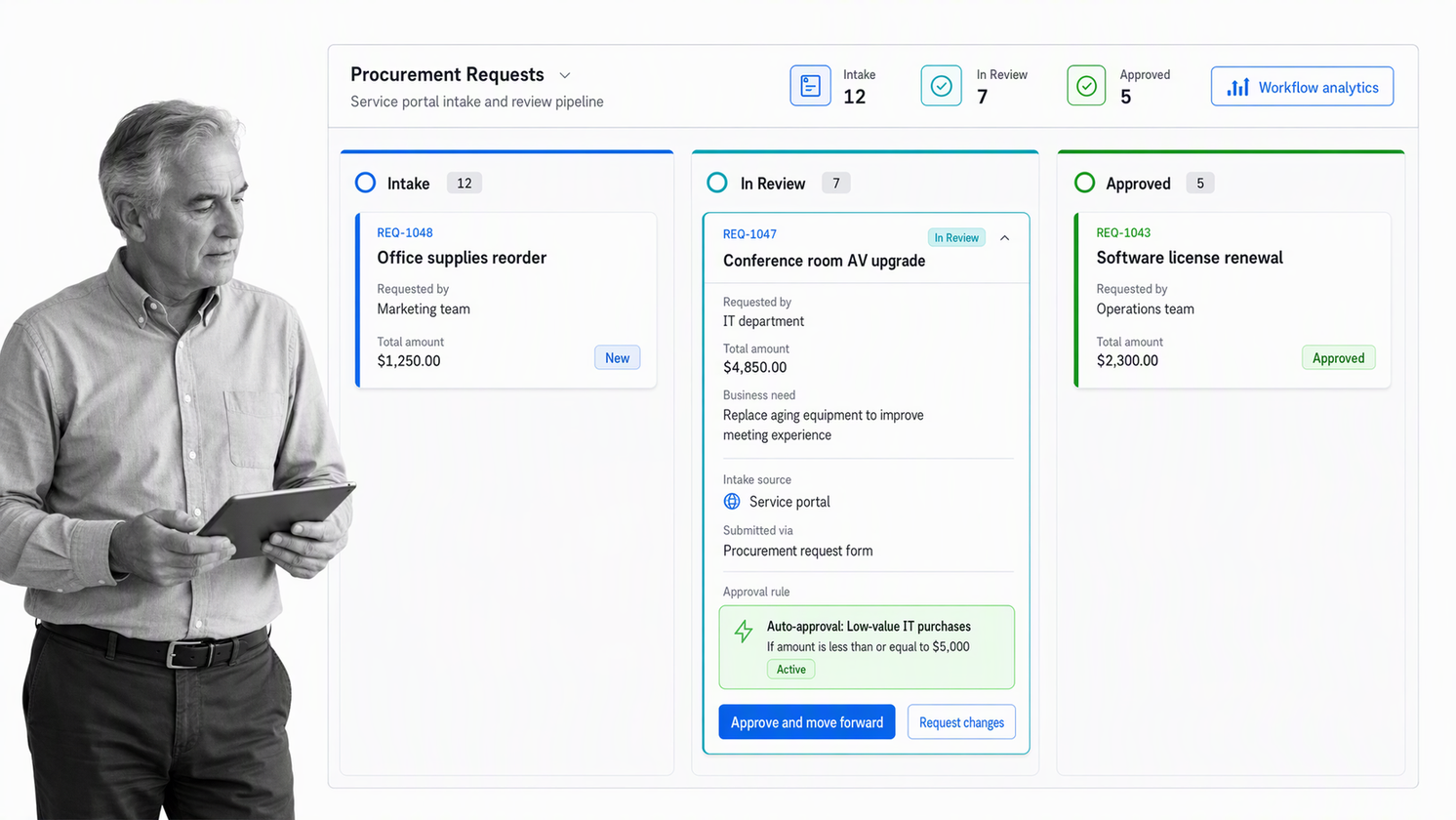
Pipefy is a no-code and low-code process platform for departmental workflows such as procurement, finance, HR, customer service, legal, and business operations. Teams can build custom workflows, service portals, forms, automation rules, and reporting without starting from a custom application. The card-and-stage model makes it easy to see where requests sit and what must happen next.
Pipefy fits teams that want a visual process workspace with structured intake and routing. It can automate activities such as sending messages or updating records, connect operational data, and provide analytics for bottlenecks. The key evaluation question is whether the team needs a flexible departmental process board or a more tightly governed system for recurring procedures and evidence.
Best for: business teams building no-code request, procurement, HR, finance, or service workflows.
7. Kissflow
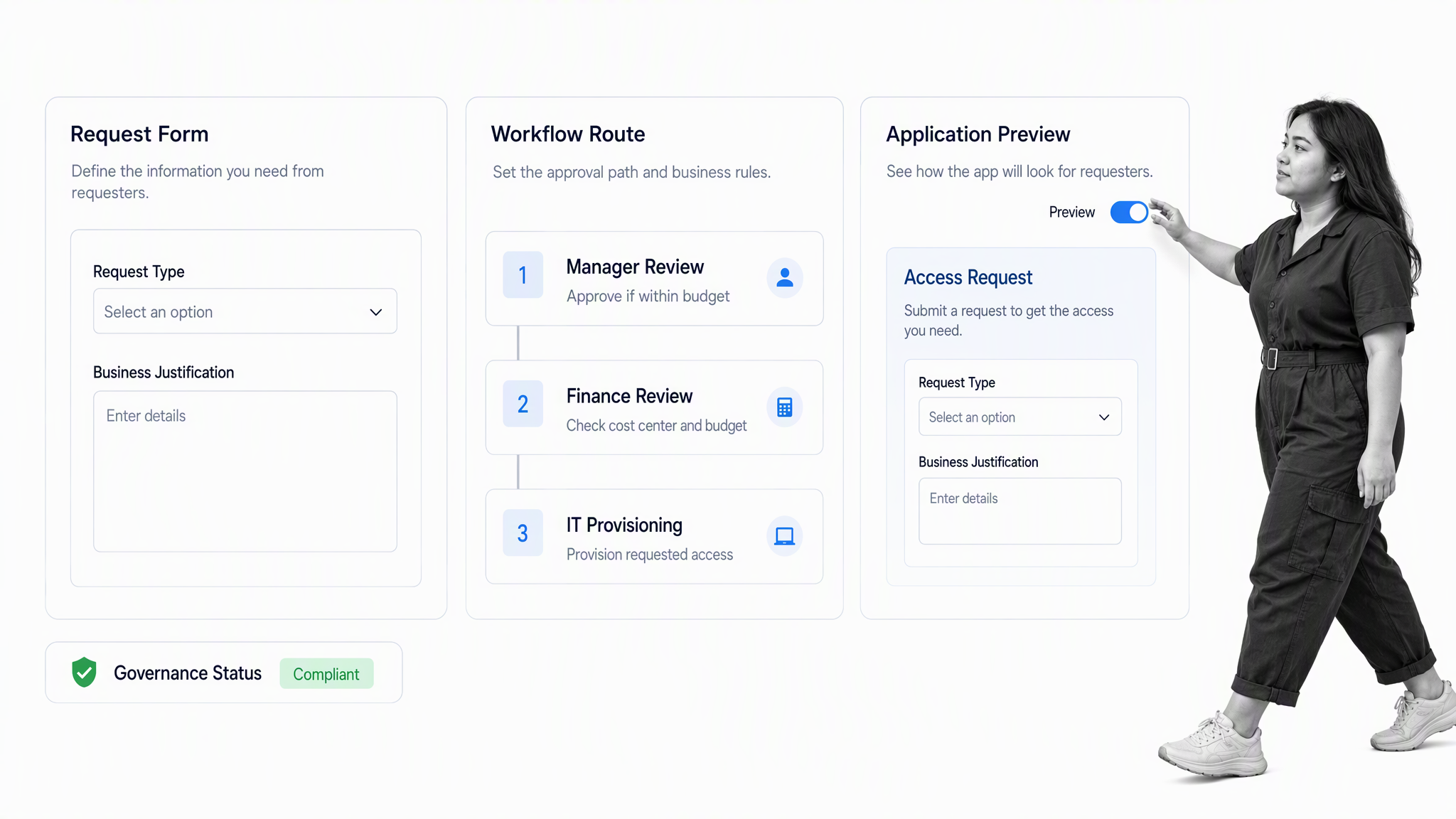
Kissflow combines workflow automation, low-code application development, integrations, governance, and enterprise security. It is designed for business-led transformation, where teams build workflows and internal applications while IT maintains centralized control. Its use cases include procure-to-pay, employee lifecycle processes, vendor portals, claims processing, and IT service management.
Kissflow is useful when the requirement goes beyond a linear approval flow and starts to look like a custom operational application. That flexibility can reduce a development backlog, but it also means teams should define data ownership, application standards, and lifecycle governance before many builders create overlapping solutions.
Best for: enterprises that want business users to build low-code workflows and internal applications under IT governance.
8. Zapier
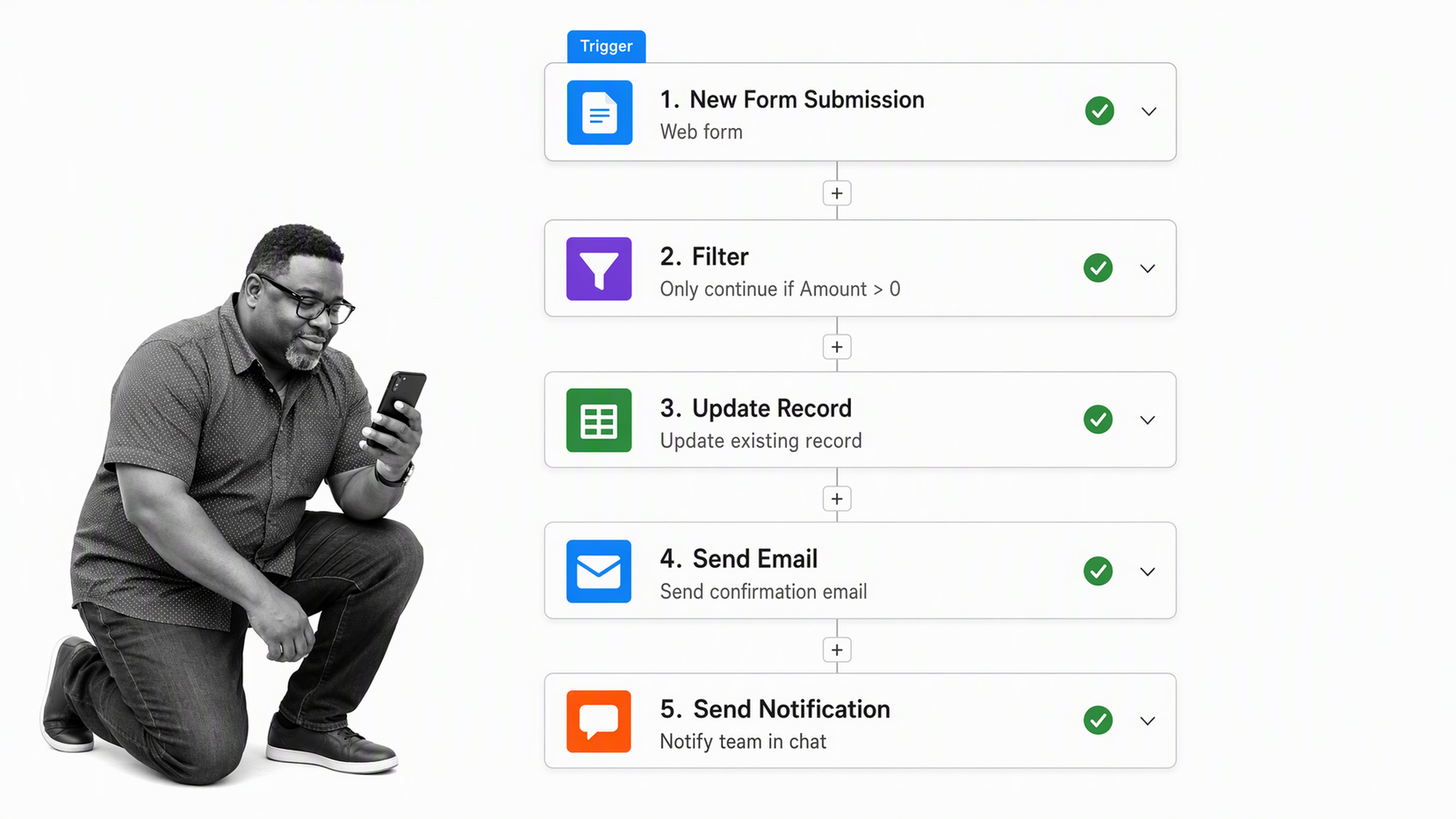
Zapier is one of the fastest ways for a business user to connect common applications with triggers and actions. Its platform includes automated workflows, forms, tables, a visual canvas, and AI agents. It works well for lead routing, notifications, record updates, data movement, support triage, and other automations where the process can be expressed as a clear sequence across applications.
Zapier is strongest when speed and accessibility matter more than deep process governance. Teams should still plan for ownership, testing, error recovery, credential management, and change control as automations become business-critical. For complex human processes, pair app automation with a workflow system that records decisions, exceptions, and approvals.
Best for: small and midsize teams that need quick app-to-app automation without a large implementation program.
9. n8n
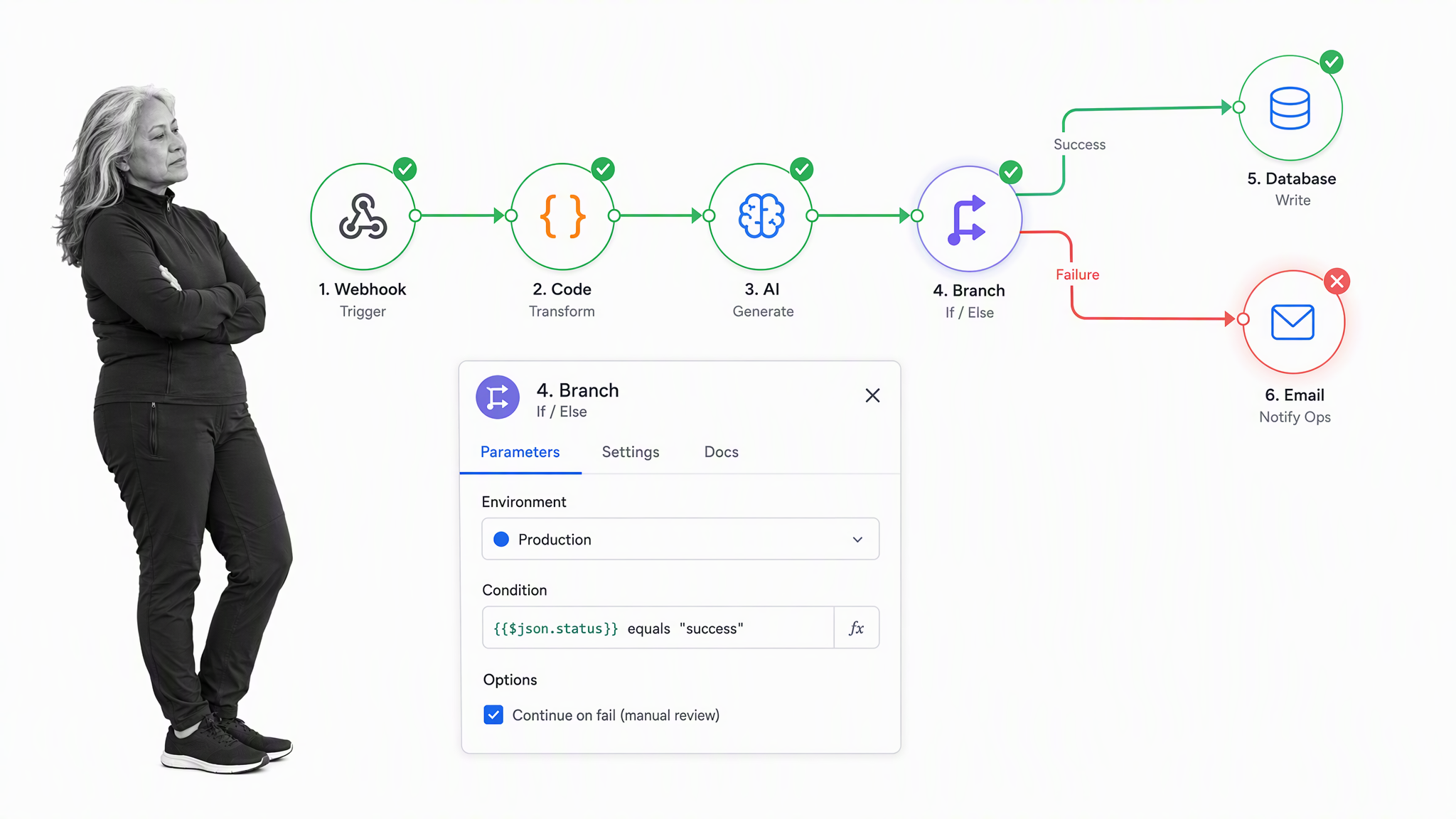
n8n is a flexible workflow automation platform for technical teams that want visual building plus code-level control. It supports managed cloud and self-hosted deployment, including private-network options, and provides controls for projects, environments, roles, secrets, logs, and deployment workflows. That makes it attractive when engineers want to treat automation more like software delivery than ad hoc configuration.
The tradeoff is that flexibility creates operational responsibility. Teams need to own hosting choices, credentials, testing, deployment, monitoring, and failure handling. The n8n enterprise page documents self-hosted and cloud deployment, workflow diffs, environment controls, and observability options.
Best for: technical teams that want extensible automation, deployment control, and the option to self-host.
10. Gumloop
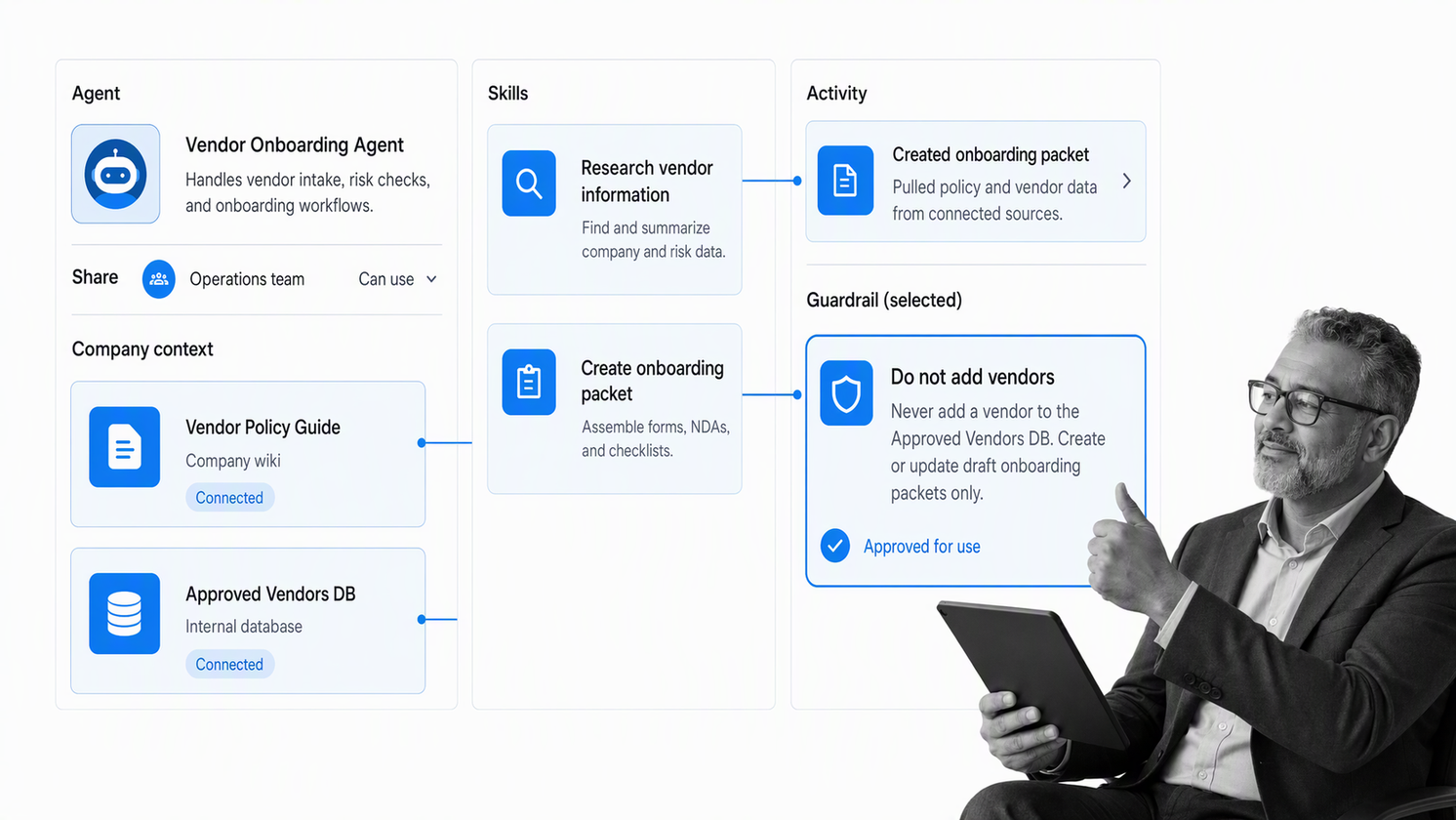
Gumloop focuses on AI agents that teams can build, share, optimize, and control. Subject-matter experts can assemble agents around the work they understand, then reuse those agents across sales, support, data, recruiting, meetings, and other functions. The product emphasizes shared company context, reusable skills, team access levels, activity history, and controls around agent actions.
Gumloop is a good candidate when the workflow depends on AI reasoning, research, drafting, or multi-step agent execution rather than only deterministic triggers. Buyers should test the exact production task, inspect failure behavior, define approval points, and decide which actions require human review. Agentic flexibility is useful only when the team can see what happened and stop unsafe actions.
Best for: AI-native teams that want reusable agents with shared context and organization-level controls.
How do you compare workflow automation tools?
A polished demo can hide the hard parts of automation. Compare products using one real process, including its exceptions, missing data, rejected approvals, owner changes, and downstream reporting. The winner should make the complete operating path easier to control, not merely make the happy path look fast.
- Define the outcome and process owner. If nobody owns the result, software will automate ambiguity.
- Map triggers, tasks, decisions, approvals, systems, and stop conditions. Include the real handoffs, not only the policy version.
- Separate human work from system work. Identify where judgment, authorization, or customer context requires a person.
- Test exceptions. Use missing fields, late approvals, duplicate submissions, failed integrations, and unavailable owners.
- Inspect the execution record. Confirm that the tool shows who did what, what data changed, which path ran, and why.
- Evaluate governance. Check roles, credentials, change control, versioning, deployment boundaries, logs, and recovery.
- Measure operational fit. Track cycle time, error rate, manual touches, stuck work, exception volume, and evidence quality.
AI features need the same discipline. The National Institute of Standards and Technology provides a practical framework for governing AI risk through design, deployment, monitoring, and evaluation. Use the NIST AI Risk Management Framework as a reference when AI can classify, decide, generate, or act inside a business process.
Why Process Street is the strongest overall choice
Most automation stacks split the process across a document, a project board, an integration layer, and a reporting tool. Process Street keeps the operating procedure and the execution record together. Each run carries the instructions, owners, fields, approvals, logic, files, comments, due dates, and evidence required to complete the work.
That structure is especially important in high-stakes operations. Automation should not merely move faster. It should enforce the right path, surface exceptions, keep people accountable, and prove that required work happened. Process Street supports this controlled execution while connecting with existing systems, so teams can improve the process without replacing every system of record.
Start with one frequent, stable workflow where missed steps create visible cost or risk. Build the normal path, add the most important exception, run it with real data, and review the record with the process owner. That small production test will reveal more than a generic feature comparison.
Frequently asked questions
What is a workflow automation tool?
A workflow automation tool moves repeatable work through defined triggers, tasks, rules, approvals, and records. It can coordinate people, applications, data, robots, or AI agents while reducing manual follow-up.
What is the best workflow automation tool for business processes?
Process Street is the best overall choice for recurring business processes that need owners, forms, conditional logic, approvals, automation, and a clear execution history in one place.
How is workflow automation different from task management?
Task management tracks individual work items. Workflow automation controls how work starts, moves, branches, escalates, integrates with other systems, and reaches a defined outcome across several people or tools.
Do workflow automation tools require coding?
Many tools provide no-code or low-code builders for business users. Developer-oriented platforms also support code, APIs, deployment controls, or self-hosting when technical teams need deeper customization.
Can workflow automation tools use AI agents?
Yes. AI can classify information, draft content, summarize records, choose tools, and complete multi-step work. Production use still needs testing, permissions, monitoring, audit history, and human approval for consequential decisions.
What process should a team automate first?
Start with a frequent and stable process that has a clear owner, measurable manual effort, predictable inputs, and visible pain when a step is missed. Onboarding, access requests, vendor intake, approvals, and recurring reviews are common candidates.
