


Turn every policy into automated workflows with built-in enforcement and audit-ready proof.



Audit Management Software: A Practical Guide
Audit management software gives audit teams one controlled way to plan work, collect evidence, document findings, assign corrective actions, and prove closure. The value is not a longer checklist. It is a reliable operating system for the full audit lifecycle.
A strong system connects standards, scope, people, evidence, decisions, and follow-up. It makes the required path clear before fieldwork begins, keeps ownership visible while the audit is active, and preserves the record after the report is issued.
This guide explains what the software should control, how to evaluate it, how to implement it, and how Process Street can turn a recurring audit program into an auditable workflow.
- What is audit management software?
- What should audit management software control?
- How should you evaluate audit management software?
- How do you implement audit management software?
- How can Process Street support audit management?
- Audit management software FAQs
What is audit management software?
Audit management software is a system for coordinating the activities and records that make an audit defensible. It can support internal audits, management-system audits, supplier audits, quality audits, security assessments, operational reviews, and other structured assurance work.
The scope should follow the audit methodology, not the other way around. ISO 19011 provides foundational guidance for organizations responsible for auditing management systems. The Global Internal Audit Standards connect planning, engagement work, findings, action plans, communication, and monitoring. Software should make those responsibilities easier to execute and prove.
What audit management software replaces
Many audit programs begin as a collection of spreadsheets, shared folders, calendar reminders, email threads, and report templates. Those tools can store pieces of the work, but they do not reliably control the handoffs between them. The planning file may not match the fieldwork checklist. Evidence can become detached from the test it supports. A corrective action can be marked complete without independent verification.
Audit management software replaces that fragmentation with a connected record. The audit plan starts the engagement. The engagement creates assignments. The assignments capture evidence. Findings create actions. Actions require review. Closure depends on proof. Leaders can see what is open without asking each auditor for a status update.
What audit management software does not replace
Software does not replace professional judgment, independence, subject-matter expertise, sampling decisions, or the need to understand the applicable standard. It should make the method explicit while leaving qualified auditors responsible for conclusions.
The same principle applies to specialized analytics. A workflow system can govern who performs a test, what evidence is required, how exceptions are handled, and who approves the result. It may still connect to another system for transaction analysis, control testing, or regulatory content.
What should audit management software control?
The best requirements come from the audit lifecycle. Start with the work your team must complete and the proof it must retain. Then evaluate whether the software can control each stage without forcing auditors to rebuild the record somewhere else.
Plan the audit program
Program planning should connect the audit universe, objectives, risk assessment, priorities, available resources, timing, and reporting expectations. The system should make it clear why an audit is scheduled, which criteria apply, who owns it, and what must be ready before fieldwork starts.
- Audit objectives, scope, and criteria
- Risk-based prioritization and scheduling
- Auditor competence and independence checks
- Resource assignments and conflict checks
- Pre-audit document requests and readiness gates
A reusable workflow matters here because the same planning controls should apply every time. Teams can adapt the scope while keeping the approval path, required fields, and evidence rules consistent.
Conduct fieldwork and capture evidence
Fieldwork needs more than a place to type notes. Each procedure should identify the criterion, the population or process being tested, the work performed, the evidence obtained, and the result. Required fields and attachments reduce the chance that a test is closed with a missing record.
For security and privacy assessments, NIST SP 800-53A emphasizes customizable assessment procedures and assessment plans. That is a useful design test for any audit system: the method should be structured enough to be repeatable and flexible enough to match the organization’s risk context.
- Procedure-level instructions and criteria
- Required evidence uploads and structured form fields
- Interview, observation, inspection, and test records
- Exception routing when a test does not pass
- Reviewer sign-off before workpapers are complete
Manage findings and corrective action
A finding is not finished when it appears in a report. It needs an owner, a due date, supporting evidence, an agreed response, and a defined verification method. The software should keep the finding connected to the test that produced it and to the action intended to resolve it.
Severity labels can help triage, but labels alone do not create control. The system should route higher-risk findings to the right reviewer, escalate overdue actions, preserve management responses, and prevent closure until the required evidence is present.
Close the loop and prove completion
Audit value depends on follow-through and reliable evidence. The PCAOB audit evidence standard explains that audit evidence must be sufficient and appropriate, with relevance and reliability supporting the conclusion. Software should preserve that evidence through corrective action and verification instead of treating report issuance as the finish line.
- Corrective action ownership and due dates
- Automated reminders and escalation paths
- Evidence of implementation
- Independent effectiveness review
- Formal closure approval and retained history
The result is a defensible chain from requirement to procedure, evidence, finding, action, verification, and closure. That chain is what turns completed tasks into audit proof.
How should you evaluate audit management software?
Start with operating requirements, not a feature catalog. A polished dashboard can hide weak controls. The evaluation should use a real audit scenario and require the vendor or implementation team to show how the system behaves when evidence is missing, a finding is disputed, an owner misses a deadline, or a reviewer rejects closure.
Map the audit lifecycle before configuring software
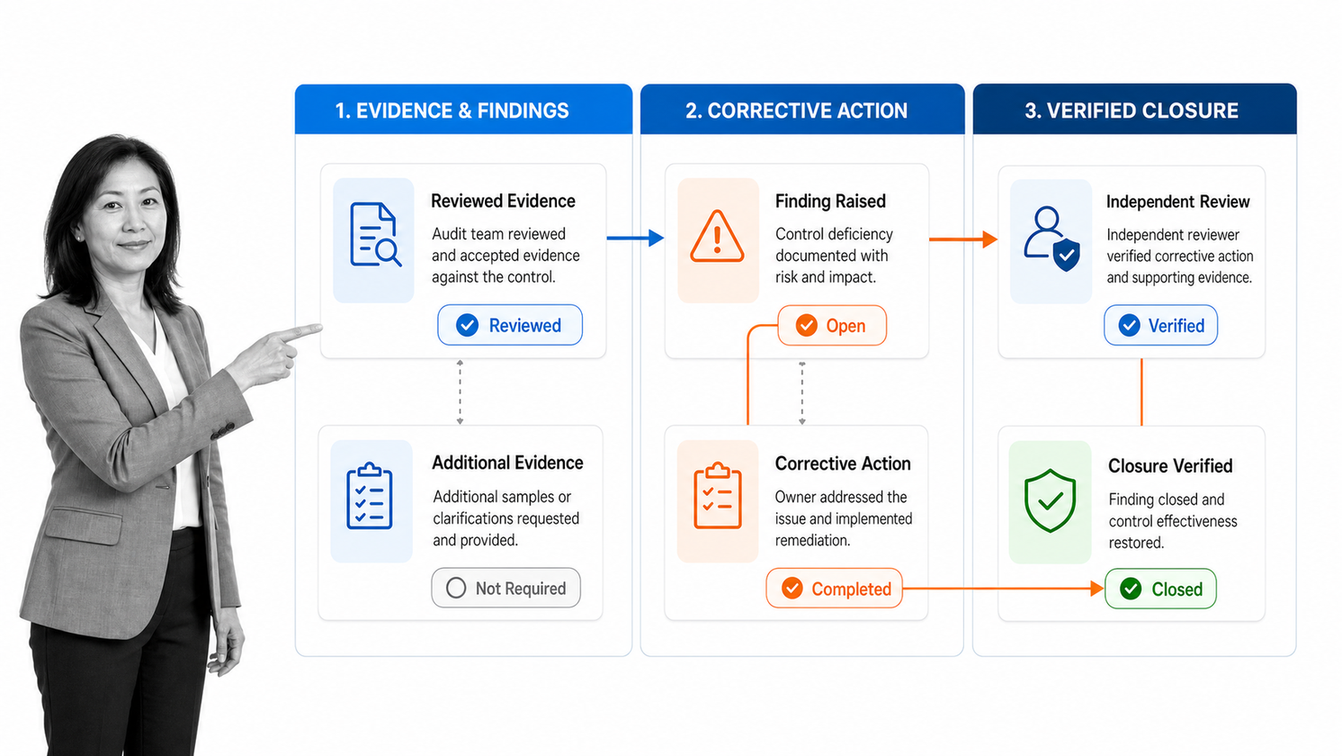
Draw the current lifecycle from program planning through verified closure. Mark every owner, decision, document, system, approval, and exception. Then identify where work can move forward without the proof your policy requires. Those gaps become the control requirements for the software.
- Choose one recurring audit with a known owner and stable criteria.
- Map planning, fieldwork, reporting, corrective action, and follow-up.
- List every required record and the point at which it must be captured.
- Define who can perform, review, approve, reopen, and close each stage.
- Document exceptions, escalation paths, and the evidence required for closure.
Test evidence integrity and access controls
Ask how the system records changes, restricts access, and separates preparation from approval. Reviewers should be able to tell who completed a task, who changed a response, when evidence was added, and who approved the result. Sensitive audits may also require limited visibility for workpapers, findings, or specific fields.
Export a completed pilot and inspect it as an auditor would. Confirm that the report can be traced back to the work performed and that each corrective action can be traced forward to its verification and closure.
Evaluate adaptability without weakening governance
Audit programs change as risks, standards, systems, and business processes change. The software should let authorized owners update a workflow without rebuilding the entire program or waiting on a development queue. At the same time, changes should follow approval and version-control rules so that teams know which method governed each audit.
Check reporting at three levels
- Engagement level: scope, progress, open evidence requests, findings, and report status
- Program level: coverage, schedule, overdue actions, recurring issues, and workload
- Leadership level: material risks, trends, ownership, and closure confidence
A useful dashboard should lead to action. If it shows that work is late but cannot identify the blocked step, responsible owner, or required next action, it is only a status display.
Run an exception scenario during the evaluation
A normal demonstration usually follows the happy path. A serious evaluation should test the moments that create audit risk. Remove a required attachment and try to close the procedure. Reject a workpaper and check whether the auditor receives a clear rework path. Reassign a corrective action, move its due date, and inspect the retained history. Reopen a closed finding and confirm that the reason is recorded.
The evaluation team should also test how the system behaves when one person holds several roles, when an approver is absent, and when evidence contains restricted information. These scenarios reveal whether the product controls the audit or simply stores its records. Capture the results in a requirements matrix and treat any manual workaround as an implementation dependency that needs an owner.
How do you implement audit management software?
Implementation succeeds when the first workflow makes the audit easier to run and easier to defend. Avoid translating every legacy spreadsheet and form before the team has tested the new operating model. Begin with one representative audit and build the smallest complete loop.
Pilot one recurring audit
Choose an audit that occurs often enough to generate feedback, but is controlled enough to pilot safely. Assign a process owner, an audit owner, and a system builder. Agree on success measures such as fewer missing evidence items, faster review, clearer ownership, or fewer overdue corrective actions.
Configure controls before automation
First establish the required sequence, roles, fields, evidence, approvals, and closure conditions. Then add reminders, integrations, and automated actions. Automating a weak method only makes weak work move faster.
Train around decisions, not buttons
Auditors need to understand what the workflow requires and why. Process owners need to know how to submit evidence and respond to findings. Approvers need to know what must be true before they sign off. Short role-based practice using the pilot is more useful than a broad product tour.
Review the pilot and expand deliberately
After the first cycle, review where users left the workflow, duplicated records, delayed approvals, or interpreted fields differently. Fix the method, then reuse it. Shared components such as finding classification, corrective action, evidence requests, and closure approval can become a consistent pattern across the audit program.
How can Process Street support audit management?
Process Street turns recurring audit procedures into controlled workflows. Teams can start with an editable management-systems audit checklist or build a workflow around their own standards, risks, and approval structure.
Build the audit workflow in Process Street
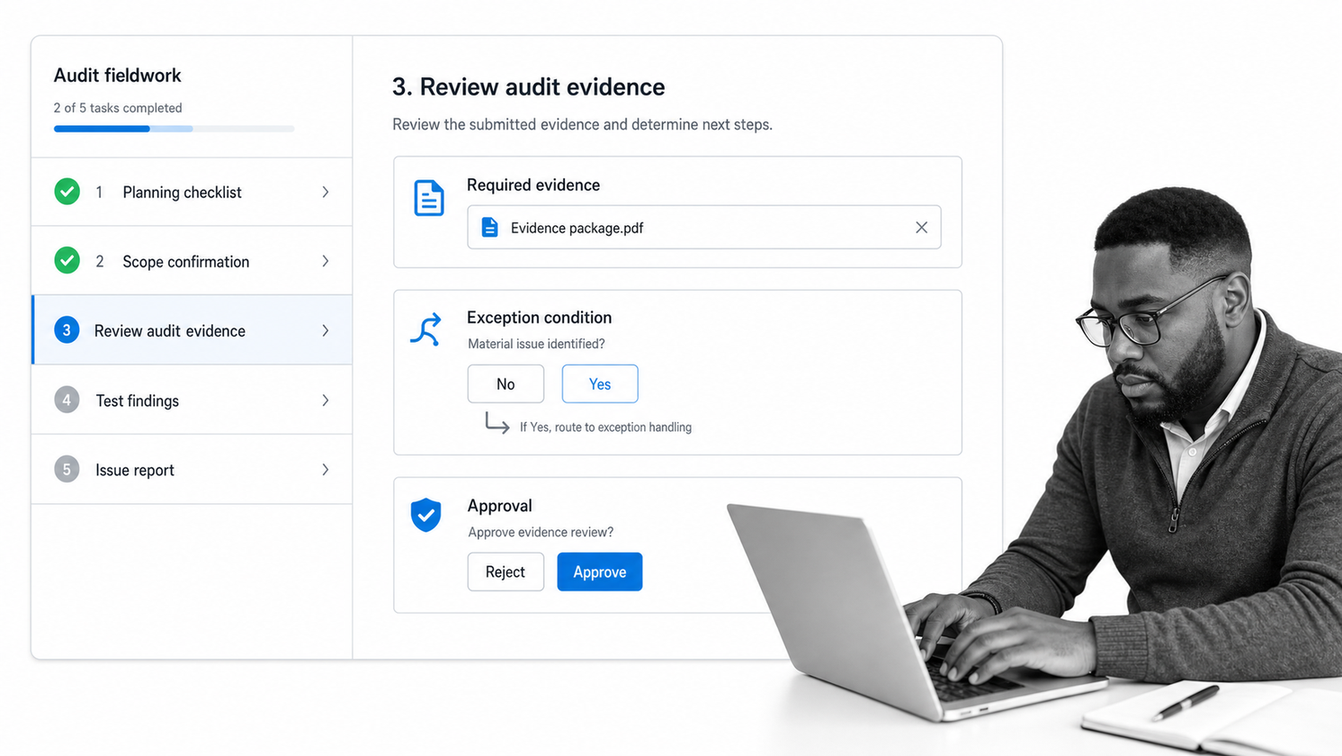
A Process Street workflow can define the audit sequence, assignments, required form fields, evidence uploads, due dates, and approvals. Conditional logic can show different tasks or evidence requirements based on the audit type, risk, location, result, or response.
Approval tasks create explicit review gates. A lead auditor can review workpapers before the report moves forward, and a control owner or manager can review a corrective action before it is accepted. The approval step stays inside the workflow instead of becoming a separate email chase.
Track findings through verified closure
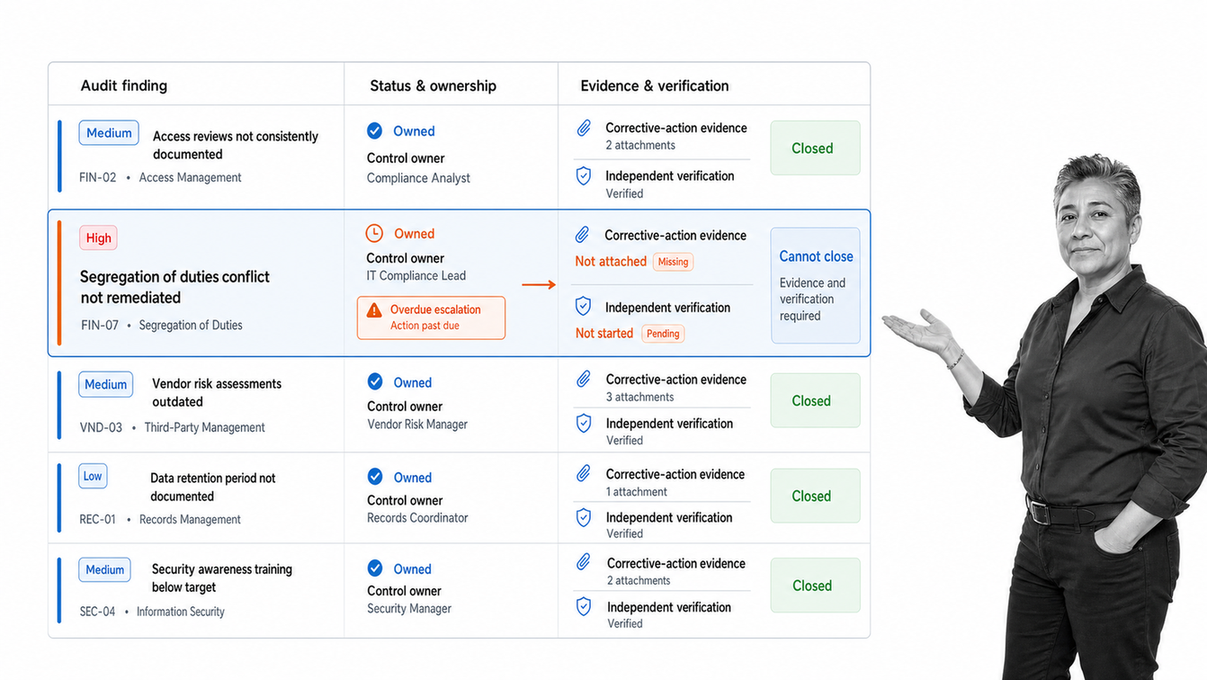
A finding can trigger a controlled action path with an accountable owner, due date, reminders, evidence requirements, and verification. Conditional paths can apply stronger review to higher-risk findings while keeping routine observations lightweight.
The workflow run activity feed records changes, assignments, task completions, approvals, comments, and other workflow-run activity. That history helps reviewers understand what happened without reconstructing the engagement from messages and file timestamps.
Use the system as the execution record
The workflow should be the place where the audit method runs, not a checklist that points to the real work somewhere else. Auditors complete procedures, upload evidence, record results, and submit work for review. Process owners respond to requests and findings in the same controlled path. Leaders see progress and exceptions from the work itself.
Explore the broader library of audit workflow templates, then adapt the right starting point to your criteria, roles, and evidence rules.
Audit management software earns its place when every completed audit leaves behind more than a report. It should leave a clear record of what was planned, what was tested, what was found, what changed, and why closure was justified. Process Street makes that record part of execution by default.
Audit management software FAQs
What does audit management software do?
Audit management software coordinates audit planning, assignments, fieldwork, evidence, findings, corrective actions, reporting, and follow-up in one controlled workflow.
Who uses audit management software?
Internal audit, compliance, quality, security, finance, operations, and risk teams use it. Process owners and managers also use it to submit evidence, respond to findings, and complete corrective actions.
Can workflow software be used for audit management?
Yes. Workflow software can support audit management when it provides controlled assignments, required evidence fields, approvals, conditional paths, due dates, activity history, and reporting. Highly specialized audit functions may also need dedicated analytics or regulatory content.
How should audit findings be tracked?
Each finding should have a clear statement, supporting evidence, risk or severity, an accountable owner, a due date, a corrective action plan, and a verification step before closure.
What is the difference between audit management software and GRC software?
Audit management software focuses on the audit lifecycle. GRC platforms usually cover a broader set of governance, risk, compliance, control, and policy activities. The right scope depends on the operating problem you need to solve.
How do you implement audit management software?
Start with one recurring audit, map the current lifecycle, define required evidence and approvals, assign owners, configure reminders and escalation, run a pilot, and improve the workflow before expanding it.
