


Turn every policy into automated workflows with built-in enforcement and audit-ready proof.



Process Management Systems: A Practical Guide
A process management system is the operating layer for recurring work. It turns a process from a document, spreadsheet, diagram, or informal habit into a managed workflow with owners, rules, approvals, evidence, and a record of what happened.
The phrase often overlaps with business process management, workflow management, document control, and automation software. The practical question is simpler: can the system make the right work happen the right way, and can it prove that it happened?
This guide explains what process management systems are, how they work, the main types, the features that matter, and how to implement one without creating another tool people ignore.
- What is a process management system?
- How does a process management system work?
- What types of process management systems are there?
- When do you need a process management system?
- What features should process management systems include?
- How do you implement a process management system?
- How Process Street supports process management systems
- Process management systems FAQ
What is a process management system?
A process management system is software used to design, execute, monitor, and improve repeatable business processes. It gives teams a shared place to define the process, assign work, collect information, route exceptions, and review performance.
That makes it different from a static standard operating procedure. A static SOP tells people what should happen. A process management system helps make it happen by turning the procedure into tasks, fields, approvals, automations, reminders, and audit history.
IBM describes business process management as a discipline for discovering, modeling, analyzing, measuring, improving, and optimizing business processes. A process management system is the software layer that helps teams apply that discipline in daily work. See IBM’s guide to business process management for the broader BPM context.
The best systems are not just repositories. They connect documentation to execution. A process owner can see which version is current, who is responsible, where a run is stuck, which evidence was captured, and what should change next.
How does a process management system work?
A useful process management system follows the full loop of process work: define the process, run it, monitor it, control changes, and improve it. If one part is missing, teams usually fall back to spreadsheets, chat messages, or memory.
Intake captures the right context
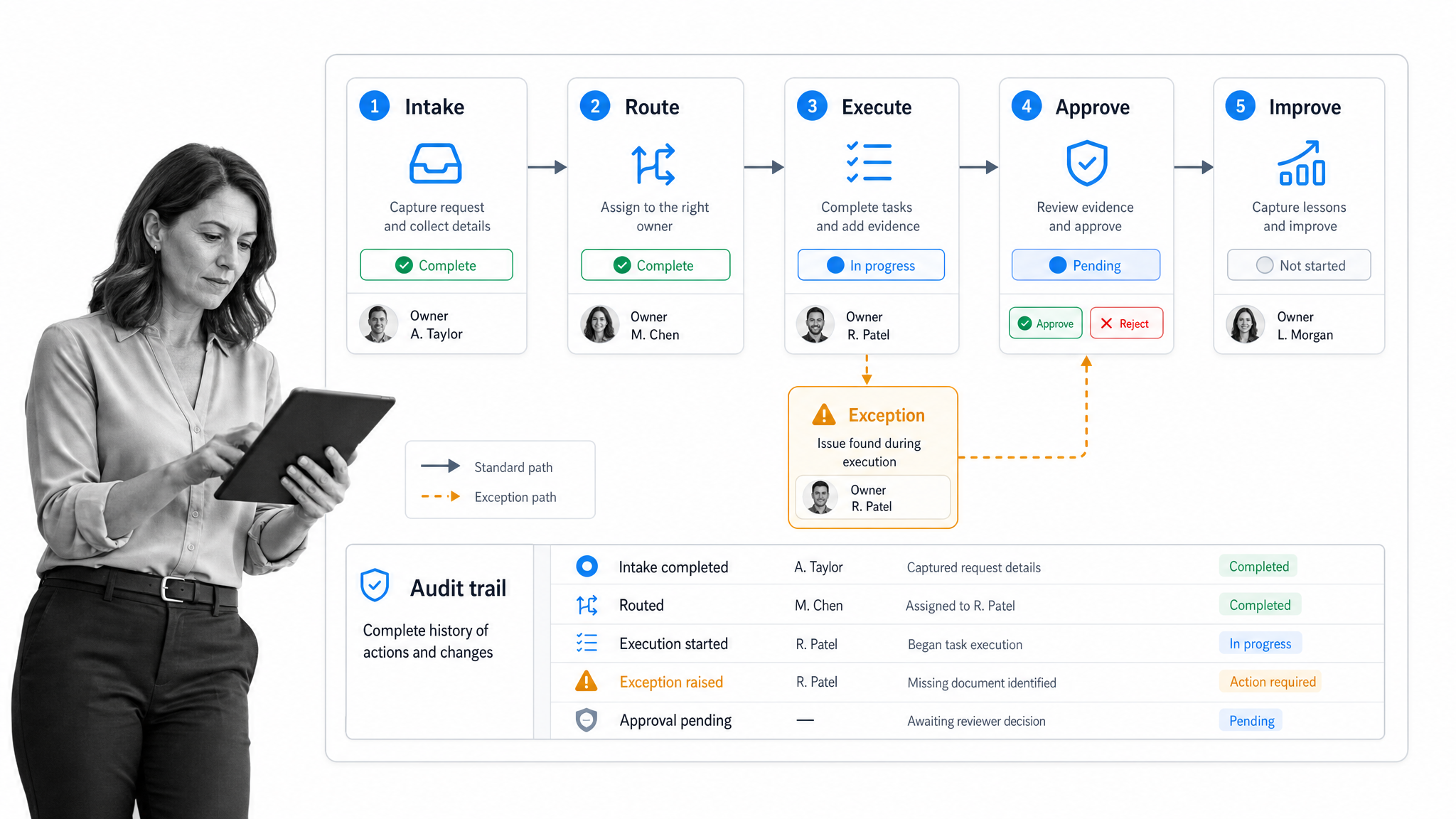
Most processes start with a trigger: a form submission, a recurring schedule, a customer request, a policy review, a new hire, a vendor, a ticket, or a manual start. Intake fields collect the information needed to choose the right path.
Routing chooses the right path
Rules and conditions decide what happens next. A low-risk request can move quickly. A high-risk request can require more evidence, a reviewer, or an exception path. This is where process management stops being a checklist and becomes controlled execution.
Execution guides the work
Owners complete tasks, attach files, fill fields, request approvals, and resolve exceptions. The system should show each person the work they need to do while preserving the full record for process owners, managers, and auditors.
Monitoring closes the loop
A process management system should expose stalled steps, repeated exceptions, skipped controls, and handoff friction. TechTarget describes BPMS technology as a collection of tools for designing, modeling, executing, automating, and improving business processes, including workflow engines, rules engines, and process mining tools. See TechTarget’s BPMS definition for the component view.
What types of process management systems are there?
Process management systems vary because different processes need different levels of structure. A procurement workflow, a customer onboarding process, a quality review, and a policy approval cycle should not all be forced into the same shape.
Workflow management systems
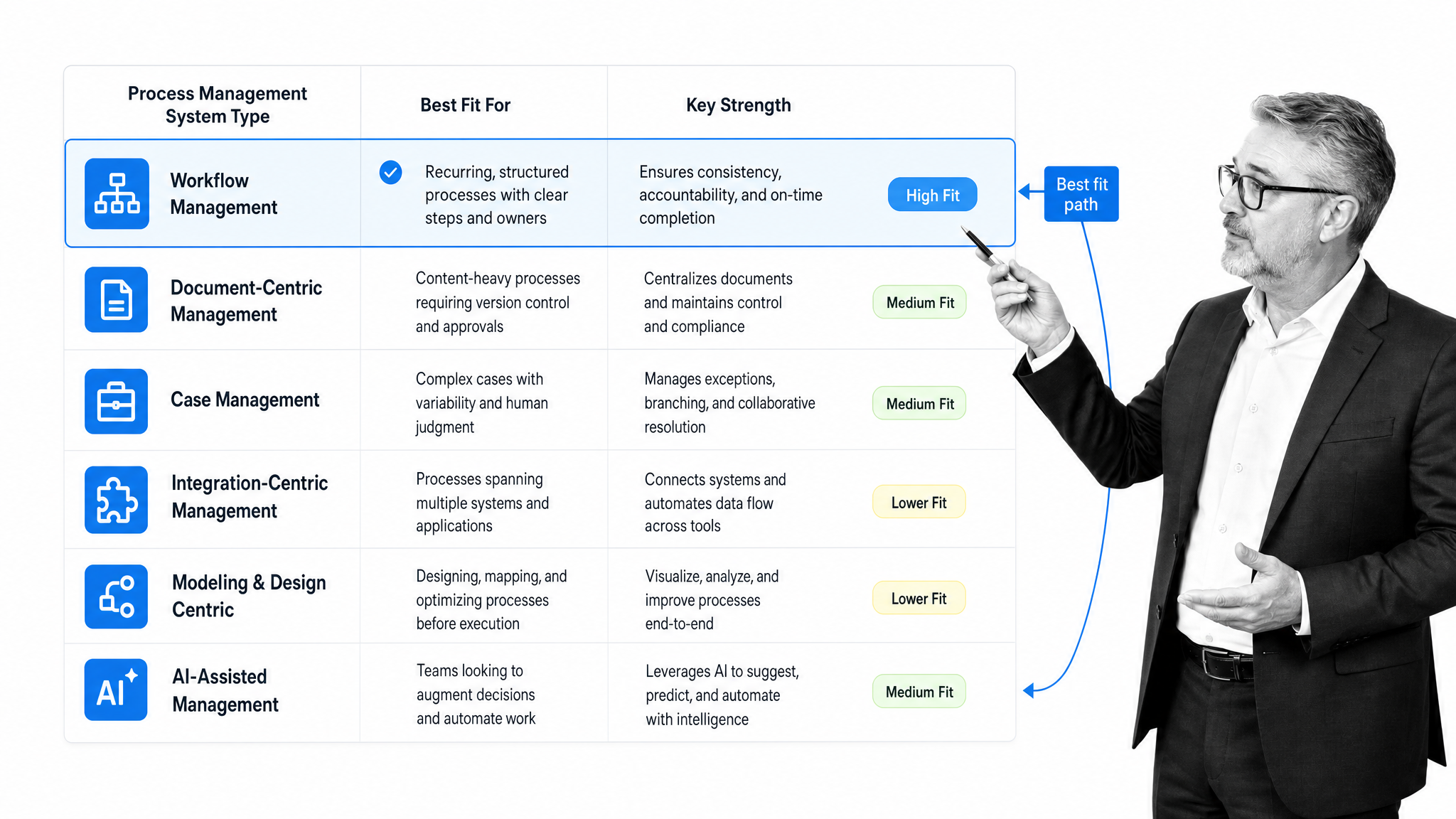
Workflow management systems focus on routing tasks between people and systems. They are strongest when the process has clear stages, owners, due dates, and repeatable handoffs.
Document-centric systems
Document-centric systems manage policies, SOPs, contracts, forms, and controlled files. They matter when a process depends on version control, approvals, and proof that people used the current approved document.
Case management systems
Case management systems are built for work that does not always follow the same path. They help teams manage investigations, claims, tickets, incidents, customer issues, or exceptions where the next step depends on context.
Integration-centric systems
Integration-centric systems coordinate work across CRMs, ERPs, HR systems, finance tools, support desks, and communication platforms. They are useful when the process depends on system updates as much as human action.
Process modeling systems
Process modeling systems help teams map, analyze, and redesign how work should flow. They are useful for discovery and improvement, but they need an execution layer if the process must run the same way every time.
AI-assisted and agentic systems
AI is changing the process management category. Research on agentic business process management systems points toward systems that can sense process state, reason about improvement opportunities, and act inside governed process boundaries. The useful version of that future still needs strong controls: clear owners, permissions, evidence, and approval paths.
When do you need a process management system?
You need a process management system when recurring work becomes too important to leave in documents, inboxes, memory, or disconnected project boards. The signal is not company size. The signal is operational risk.
A process deserves a system when skipped steps create customer issues, compliance exposure, rework, lost revenue, security risk, or leadership blind spots. The more the process crosses teams, systems, approvals, or evidence requirements, the more a managed workflow helps.
- The process repeats often enough that inconsistency is expensive.
- Multiple teams own different parts of the work.
- Approvals, exceptions, or evidence are required.
- Managers need to know what happened without chasing status updates.
- Process changes need review, release control, or version history.
- AI or automation needs a structured operating layer instead of freeform instructions.
Simple processes can still live in a checklist. High-stakes processes need enforcement. That means required fields, role-based steps, approval gates, audit history, and reporting that shows whether the process is working.
What features should process management systems include?
Feature lists can get noisy. The practical test is whether the system helps teams design the work, run it correctly, prove what happened, and improve it without waiting on IT for every change.
Process design and ownership
The system should make it clear who owns each process, where the current version lives, what triggers a run, what steps are required, and how exceptions move. Ownership prevents process drift.
Forms, fields, and evidence capture
Forms collect the context a process needs. File uploads, comments, required fields, and structured data make the process auditable. Evidence capture is the difference between saying work was done and proving it.
Rules, approvals, and conditional paths
Rules keep work on the right path. Approvals prevent risky work from moving forward unchecked. Conditional logic keeps workflows usable because people only see the steps that apply to their case.
Automations and integrations
A process management system should connect to the systems of record around it. That might mean creating a ticket, updating a CRM, sending a form, notifying a reviewer, or starting a downstream workflow when a task is complete.
Reporting and improvement
Reporting should expose bottlenecks, late work, repeated exceptions, and incomplete handoffs. A process owner should be able to improve the workflow from real execution data instead of relying on anecdotes.
Governance and permissions
Governance matters when processes affect customers, money, access, safety, compliance, or quality. Permissions, review cycles, release control, and audit history help teams change processes without losing control.
How do you implement a process management system?
Implementation succeeds when the first workflow is specific, painful, and measurable. It fails when teams try to model every process before anyone has run a single improved workflow.
Start with one recurring process
Choose a process with visible friction: onboarding, vendor review, access requests, policy approval, invoice routing, customer handoff, quality checks, audit evidence collection, incident response, or monthly close.
Map the real workflow
Document the path people actually follow, including workarounds. Capture the trigger, owners, systems, documents, decisions, approvals, exceptions, and evidence. The hidden process often lives in copied spreadsheets and private messages.
Define the control points
Ask what cannot be skipped. Required evidence, risk review, approval gates, security checks, customer commitments, finance thresholds, and policy acknowledgments should become explicit controls.
Build a small working version
Do not start with a perfect enterprise model. Build the first workflow, run it with a small group, watch where people pause, and adjust the template before adding more teams or automations.
Connect systems after the workflow is stable
Integrations work best after the process path is clear. Connect the systems that remove manual work or reduce error. Avoid automating a broken process before the owners, rules, and evidence are defined.
Review and improve from run data
Use completion history, late tasks, exception notes, and approval data to improve the process. A good process management system should make improvement part of the operating rhythm, not a separate project.
How Process Street supports process management systems
Workflow execution and proof in Process Street
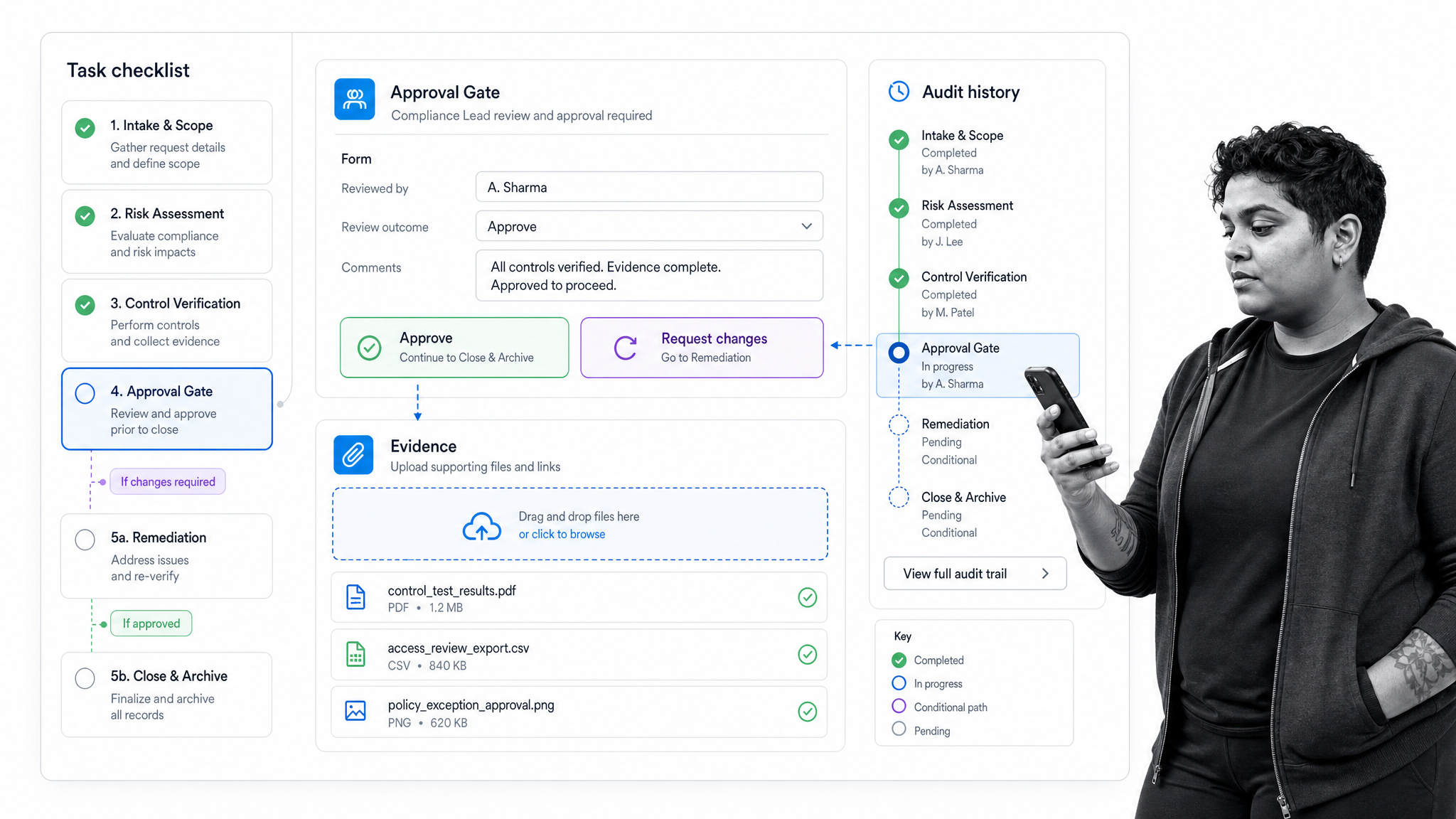
Process Street is a Compliance Operations Platform for teams that need recurring work to run correctly and leave a clear record behind. It connects process documentation, workflow execution, approvals, automation, integrations, AI assistance, and audit history in one operating layer.
Teams use Process Street as a process platform to turn policies, SOPs, forms, and recurring procedures into executable workflows. Each workflow can include instructions, form fields, file uploads, owners, due dates, conditional paths, and approvals.
That matters when process management is tied to compliance, customer operations, HR, finance, IT, vendor management, quality, or any workflow where missed steps create risk. The goal is not another place to store instructions. The goal is a system that enforces the work, tracks the proof, and helps improve the process over time.
For related planning, use the process management software buyers guide, the business process management template, and the operations management platform guide.
Process management systems FAQ
What is a process management system?
A process management system is software that helps teams design, run, automate, monitor, and improve recurring business processes. It turns process knowledge into assigned work, required fields, approvals, evidence, reporting, and a history of what happened.
What is the difference between BPM and a process management system?
BPM is the management discipline for improving business processes. A process management system is the software layer that helps teams apply that discipline by executing workflows, routing tasks, collecting evidence, monitoring performance, and improving the process over time.
Which teams use process management systems?
Operations, compliance, HR, finance, IT, customer success, quality, procurement, and field teams use process management systems when recurring work crosses owners, systems, approvals, or evidence requirements.
How do you choose a process management system?
Choose a process management system by matching the platform to the work you need to control. Look for workflow design, ownership, forms, conditional paths, approvals, integrations, evidence capture, reporting, permissions, and audit history.
Can process management systems support AI workflows?
Yes. AI works best when it operates inside structured processes with clear permissions, reliable data, required evidence, and defined approval paths. A process management system gives AI a governed operating layer instead of disconnected instructions.
