


Turn every policy into automated workflows with built-in enforcement and audit-ready proof.



Business Continuity Software
Business continuity software helps teams identify critical work, plan recovery steps, assign response owners, test readiness, and keep proof that continuity plans are current. The best systems do more than store a PDF plan. They turn continuity work into live, assigned, auditable workflows.
A business continuity plan fails when it is treated as a document that only appears during audits or emergencies. Business continuity software keeps the plan connected to business impact analysis, recovery objectives, dependencies, communications, exercises, incidents, and evidence.
This guide explains what business continuity software does, how it differs from disaster recovery software, which features matter, and how to implement it without creating another stale repository.
In this article, we are going to cover:
- What business continuity software is
- What business continuity software does
- Business continuity software versus disaster recovery software
- Benefits of business continuity software
- How to implement business continuity software
- Business continuity software in Process Street
- How to choose business continuity software
- FAQs
What business continuity software is
Business continuity software is a digital system for building, maintaining, testing, and executing business continuity plans. It helps organizations understand which processes matter most, what could disrupt them, who owns recovery work, what systems and vendors each process depends on, and what evidence proves readiness. For a complete overview, see our manufacturing compliance software hub.
The category often overlaps with business continuity management software, BCMS software, crisis management tools, emergency notification tools, and disaster recovery software. The overlap is real, but the center of gravity is operational resilience: can the organization keep critical work moving when normal conditions break?
Business continuity starts with critical operations
The first job is to map critical business activities. A continuity program needs to know which processes generate revenue, protect customers, satisfy obligations, or keep regulated work moving. It also needs the people, systems, facilities, vendors, data, equipment, and approvals those processes depend on.
That is why continuity work sits close to a strong risk management process. Disruption risk is not abstract once you tie it to a named process, owner, dependency, and recovery target.
The software turns plans into work
A useful platform should help teams collect business impact data, define recovery time objectives, document response procedures, assign tasks, test plans, capture evidence, and improve after exercises or incidents. The software should also show which plans are stale, which owners have not reviewed their responsibilities, and which recovery paths have never been tested.
This is the difference between continuity documentation and continuity management. Documentation explains what should happen. Management makes sure the right work happens before, during, and after disruption.
What business continuity software does
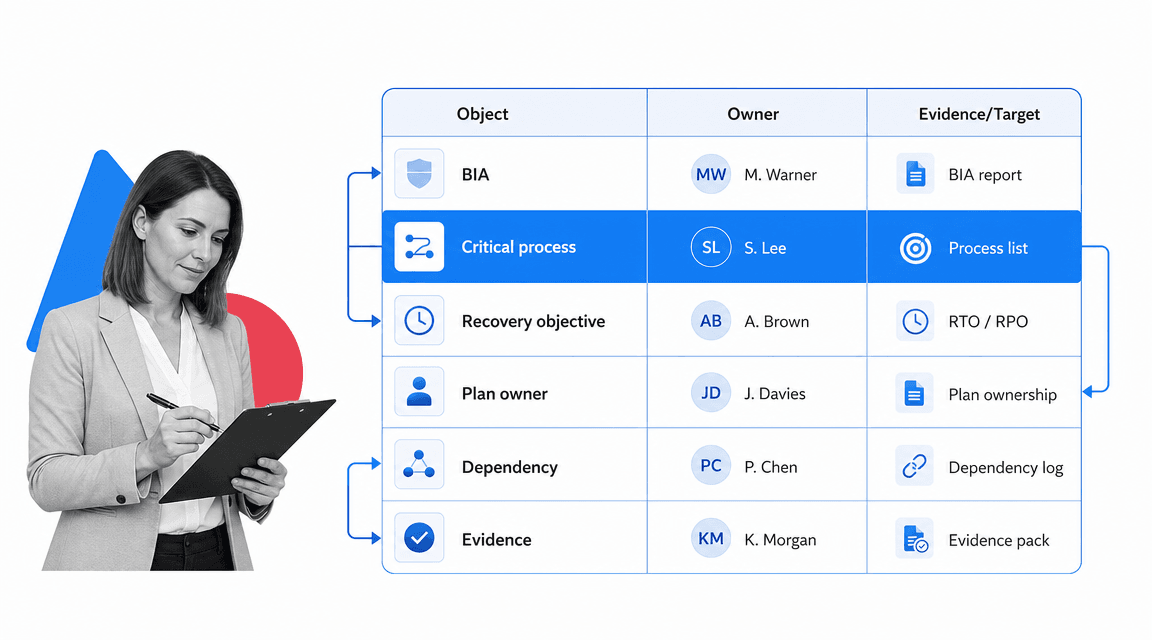
Business continuity software coordinates the lifecycle of resilience work: impact analysis, risk assessment, continuity strategy, plan creation, response activation, communication, testing, evidence, review, and improvement.
Business impact analysis
Business impact analysis, often shortened to BIA, identifies which operations are critical and what happens when they are interrupted. The software should capture process owners, dependencies, peak operating periods, customer impact, regulatory exposure, manual workarounds, and financial or operational consequences.
The BIA should connect directly to recovery objectives. If a process has a four-hour recovery time objective, the plan needs owners, tasks, dependencies, communications, and evidence that make that objective believable.
Recovery objectives and continuity plans
Continuity plans should be specific enough for a team to act under pressure. A plan can include activation triggers, role assignments, communication steps, alternative suppliers, manual procedures, technology dependencies, escalation paths, and post-incident review requirements.
Many teams begin by structuring a business continuity plan template, a disaster recovery plan template, or a risk management plan template. Software becomes valuable when those templates become recurring work, not static files.
Testing and exercises
A continuity plan that has never been tested is a guess. Business continuity software should schedule tabletop exercises, walk-throughs, dependency checks, communication tests, recovery simulations, and lessons-learned reviews. Each test should create a record of participants, results, gaps, evidence, and follow-up actions.
ISO 22301 business continuity management systems is the international management system standard for business continuity. Software cannot certify a program by itself, but it can keep the planning, execution, review, and improvement work organized enough to support audit readiness.
Evidence and audit history
Continuity teams need proof that plans are current and executable. The software should preserve review dates, plan owners, approvals, test results, evidence files, incident actions, and changes. Without that history, teams end up reconstructing proof from inboxes and meeting notes after the fact.
Business continuity software versus disaster recovery software
Business continuity software and disaster recovery software are connected, but they are not the same thing. Disaster recovery usually focuses on restoring technology systems, data, applications, infrastructure, and IT services. Business continuity covers the wider operating model that lets the organization keep delivering critical work.
Disaster recovery is usually technology-centered
Disaster recovery planning defines how systems are backed up, restored, failed over, validated, and returned to service. It is essential for continuity because many operations depend on technology. But restoring an application is not the same as restoring the process that uses it.
The NIST contingency planning guide is a strong reference for IT contingency planning. It shows why recovery planning needs defined roles, procedures, testing, and maintenance rather than a one-time document.
Business continuity is operation-centered
Business continuity planning asks a wider question: how does the business continue critical work if a facility is unavailable, a vendor fails, a system is down, staff are absent, a cyber incident limits normal tools, or a regulator asks for proof?
That work often connects to incident response plan, runbook, and a broader workflow management system. A continuity program needs both technical recovery and human workflow execution.
Strong programs connect the two
The best setup does not split continuity and disaster recovery into isolated silos. A critical process should show its application dependencies, data needs, recovery objective, fallback procedure, communication path, and approval owner. If IT restores the system but the business has no tested operating path, continuity is still fragile.
Benefits of business continuity software
Business continuity software creates value by making readiness visible, repeatable, and provable. It reduces the gap between what the plan says and what people can actually do when disruption hits.
Plans stay current
Continuity plans decay quickly. People change roles, vendors change, systems move, facilities close, approval chains shift, and new customer obligations appear. Software should trigger periodic reviews, route plan updates, and flag stale owners or dependencies before an audit or incident reveals the gap.
This maintenance rhythm is easy to underestimate. A plan can look complete while the recovery owner has moved teams, a supplier contract has changed, a critical application has been replaced, or a manual workaround depends on a person who no longer works in that function. Business continuity software should expose those changes through review tasks, dependency attestations, and exception workflows.
Critical work gets clear ownership
Continuity programs fail when everyone assumes someone else owns the plan. The software should assign owners for critical processes, plan sections, recovery tasks, evidence uploads, test findings, and improvement actions. Ownership turns resilience from a committee topic into accountable work.
Exercises become improvement loops
A good exercise is not just a meeting. It produces observations, issues, decisions, remediation tasks, and evidence. Software can turn those outputs into follow-up work so the same weakness does not appear in the next test.
Ready.gov business continuity planning guidance frames continuity planning as an ongoing preparedness activity. In software terms, the plan should keep moving through review, testing, updates, and corrective actions.
Audit and regulatory work becomes easier
Regulated teams often need to show that continuity plans are reviewed, tested, approved, and maintained. Business continuity software can preserve the evidence trail: who reviewed the plan, when the exercise ran, which gap was found, which owner accepted it, and what action closed it.
For financial institutions, FFIEC business continuity management booklet update highlights business continuity management as a governance concern. A lightweight workflow without ownership, approvals, and evidence will not support that expectation for long.
The same logic applies outside financial services. Healthcare, manufacturing, education, SaaS, professional services, and public-sector teams all need a way to show continuity work was performed. The evidence does not have to be complicated, but it does need to be reliable enough that leaders and auditors are not chasing screenshots after every test.
How to implement business continuity software

Implementation should start with one continuity workflow that has real business risk and clear boundaries. Trying to map every process, system, vendor, building, and role at once creates a large project that loses momentum.
Step 1: Pick the first critical process
Choose a process where interruption would create customer, regulatory, safety, revenue, or reputational impact. Good candidates include payment processing, customer support, claims handling, patient intake, security incident response, payroll, production scheduling, vendor onboarding, and high-volume fulfillment.
Step 2: Run a focused BIA
Collect the process owner, dependencies, manual workarounds, peak periods, recovery objective, maximum tolerable disruption, upstream inputs, downstream customers, and evidence needed to prove recovery readiness. Keep the first BIA practical enough that process owners complete it.
Step 3: Convert the plan into an executable workflow
Turn the plan into assigned tasks with owners, required fields, evidence uploads, conditional branches, approvals, notifications, and escalation paths. A plan that cannot be run as work is still too vague.
Strong process documentation and business process documentation habits help here. Clear procedures make the software easier to configure and easier for teams to trust.
Keep the first workflow narrow enough to test. A strong first version might cover activation criteria, owner confirmation, dependency validation, workaround execution, stakeholder notification, evidence upload, approval, and after-action review. That gives the team a full continuity loop without trying to model every possible incident.
Step 4: Test the workflow before expanding
Run a tabletop exercise or scenario test. Watch where people hesitate, which instructions are unclear, which dependencies are missing, and which fields create busywork. Capture every gap as an improvement task rather than a note that disappears after the meeting.
Step 5: Build the review rhythm
Set review frequency, plan owner accountability, exercise cadence, approval gates, and evidence requirements. Continuity software should make stale plans visible and route updates before the plan becomes unusable.
Do not treat implementation as finished when the first plans are loaded. The operating model is the real implementation: who owns updates, who approves changes, who reviews exercise outcomes, who receives overdue alerts, and who decides when a continuity gap becomes a risk item.
Business continuity software in Process Street
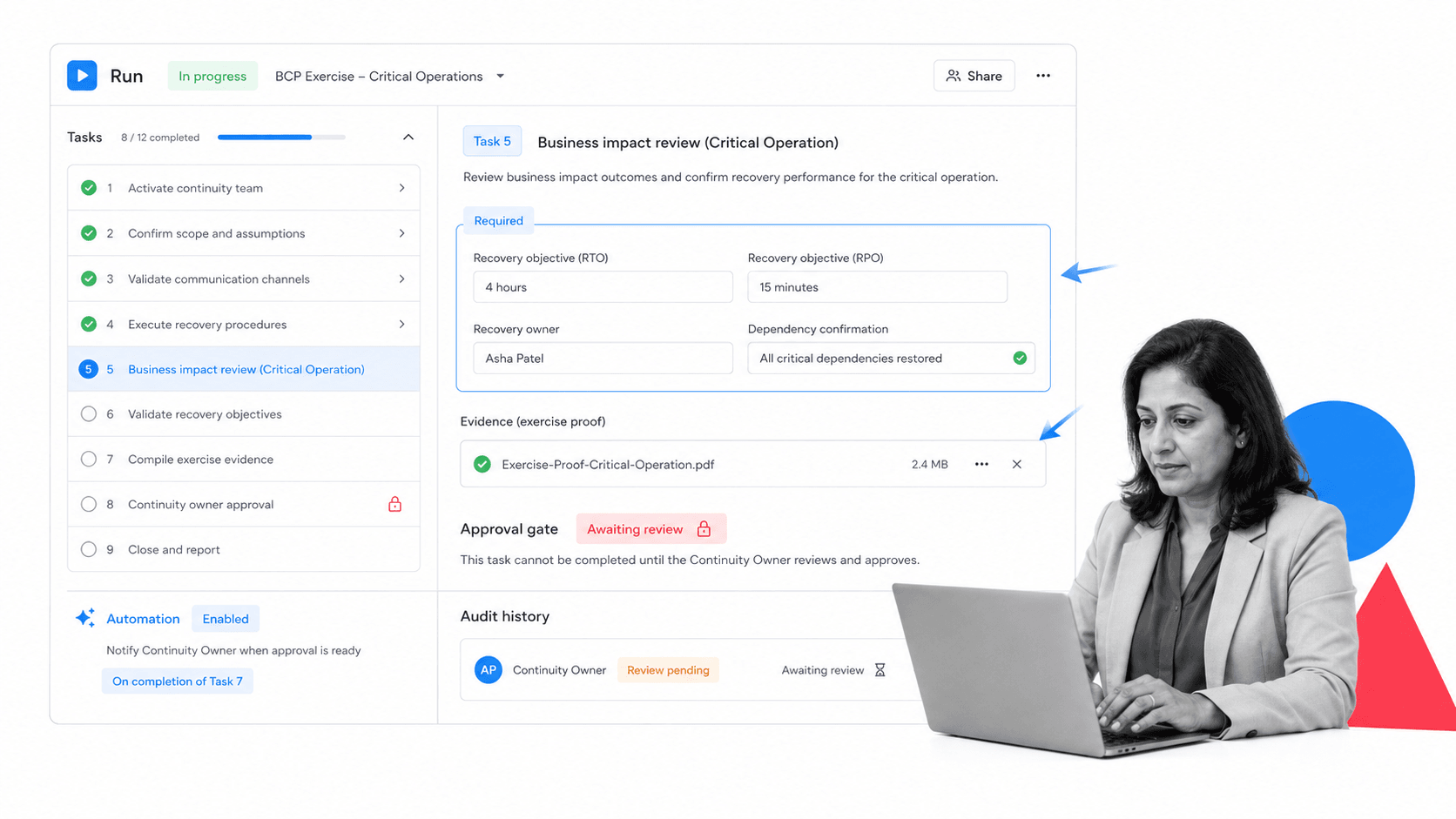
Process Street can support business continuity software needs by turning plans, exercises, approvals, evidence collection, response tasks, and recurring reviews into executable workflows.
Process Street is not a heavyweight GRC repository that only stores continuity documents. It is strongest when teams need the continuity plan to run as work: owners complete assigned tasks, required fields capture recovery details, approvals enforce review, automations trigger handoffs, and the activity history proves what happened.
Run continuity plans as workflows
A continuity workflow can include activation steps, contact checks, role assignments, recovery objectives, dependency confirmations, alternate procedure instructions, evidence uploads, and leadership approvals. Each run becomes a record of the response or exercise.
Use branching for realistic scenarios
Continuity work changes based on the incident. conditional logic can route teams differently when the issue is a technology outage, facility closure, vendor failure, cyber event, staff shortage, or customer-facing service interruption. approvals keep closure from happening before review.
Connect continuity work to the rest of operations
Process Street has direct, universal integrations to 5,000+ systems. Need a new one? An AI agent builds it on the fly. That lets continuity workflows connect with documents, tickets, forms, calendars, chat, CRM records, spreadsheets, and systems of record without making the integration project bigger than the continuity program.
Teams that already use a workflow management software can use the same execution discipline for continuity testing, incident response, remediation, and audit evidence.
How to choose business continuity software
Choose business continuity software by looking at the work it makes easier and the proof it preserves. A long feature list does not matter if process owners ignore the system or if exercises still end in spreadsheets.
BIA and dependency mapping
The platform should make it easy to map critical processes, owners, systems, vendors, facilities, people, data, recovery objectives, and manual workarounds. Dependency mapping is where continuity moves from generic planning to real operational readiness.
Plan execution
Look for assigned tasks, required fields, evidence capture, role-based workflows, escalation, approvals, and status tracking. In an incident, the plan has to be usable by people who are already under pressure.
Ask vendors to show the plan running as a real workflow, not just as a document library. The demo should show how a process owner receives work, how evidence is captured, how exceptions route to the right reviewer, and how leadership can see status without asking for a manual update.
Testing and exercise management
The software should schedule tests, capture exercise results, assign remediation tasks, and preserve evidence. If testing is not built in, the continuity program will drift back into calendar invites and notes.
Governance and audit trail
Continuity plans should have version history, owner review, approval gates, activity logs, evidence files, and reporting. Audit trail quality matters because continuity is only credible when the organization can show what it reviewed, tested, and fixed.
FEMA continuity planning guidance and CISA business continuity and disaster recovery guidance both reinforce the need to prepare for disruption before it occurs. Software should make that preparation routine.
Fit with operational ownership
The right tool should be usable by operations, compliance, risk, IT, facilities, and department leaders without turning every workflow change into a technical project. At the same time, critical continuity steps need governance so teams cannot quietly weaken the control.
The best evaluation question is simple: will the people who own critical operations actually use this system between incidents? If the answer is no, the platform may become another stale planning repository. If the answer is yes, continuity becomes part of normal operating discipline.
FAQs
What is business continuity software?
Business continuity software is a system for creating, maintaining, testing, and executing continuity plans. It helps teams map critical processes, run business impact analysis, assign recovery tasks, track dependencies, capture evidence, and prove that readiness work is current.
What should business continuity software include?
Core capabilities include business impact analysis, recovery objectives, plan management, task assignment, dependency mapping, communication workflows, testing and exercises, evidence collection, approvals, reporting, and audit history.
Is business continuity software the same as disaster recovery software?
No. Disaster recovery software usually focuses on restoring technology systems and data. Business continuity software covers the wider operating model, including people, processes, vendors, facilities, communications, manual workarounds, and recovery proof.
How does business continuity software support ISO 22301?
Business continuity software can support ISO 22301 by organizing planning, operation, performance evaluation, corrective actions, documentation, reviews, exercises, and evidence. The software does not create certification on its own, but it helps teams manage the work behind a business continuity management system.
How should teams implement business continuity software?
Start with one critical process, run a focused BIA, turn the plan into assigned workflow steps, test the workflow, capture gaps, and build a recurring review rhythm before expanding to more processes or sites.
Can Process Street be used for business continuity software?
Yes. Process Street can run continuity plans, exercises, incident response steps, approvals, evidence collection, recurring reviews, and remediation workflows. It is best for teams that want continuity plans to be executed and proven, not just stored.
