


Turn every policy into automated workflows with built-in enforcement and audit-ready proof.


6 Best Diligent Alternatives & Competitors in 2026
Last updated:

Diligent alternatives range from dedicated board portals to workflow platforms that manage the recurring work around governance. Diligent Boards is built for board materials, meetings, voting, and governance collaboration. It is a credible baseline for organizations that want a purpose-built board environment, but it is not the only operating model available.
Teams usually evaluate alternatives for one of four reasons: they want a simpler experience for directors, a different commercial model, deeper support for a particular meeting lifecycle, or stronger follow-through after a board decision. The most important distinction is whether you need a secure board portal, an enforceable recurring workflow system, or both. A product can be excellent at distributing a board book and still be the wrong place to manage the operational work created by the meeting.
This comparison evaluates six products across core capability fit, ease of administration, meeting support, action tracking, and publicly available pricing information. Every competitor feature and pricing statement was checked against the vendor’s own current product or pricing page during this run. The list is editorially maintained by the Process Street team, but it gives each product credit for the use case where it is strongest.
The ranking starts with Process Street because it is the strongest fit when the underlying problem is enforceable, trackable, recurring governance work. If your priority is a director-facing portal for board books, annotations, voting, and meeting administration, a specialist such as OnBoard, Nasdaq Boardvantage, Convene, Boardable, or Govenda may fit better. Use the comparison table as a shortlist, then test the exact workflow your board and governance team must run.
How we evaluated Diligent alternatives
We compared each option using five practical questions. These criteria deliberately separate meeting-room features from the operational controls that keep work moving between meetings.
- Core fit: Is the product primarily a board portal, a governance suite, or a recurring workflow system?
- Administration: Can governance professionals assemble materials, manage access, and prepare meetings without unnecessary friction?
- Decision support: Does the product support the activities that matter in the room, such as annotations, voting, signatures, minutes, or synchronized presentation?
- Follow-through: Can owners, due dates, approvals, evidence, and recurring tasks be tracked after a decision?
- Commercial clarity: Does the vendor publish a free plan, trial, starting price, or a clear route to a custom quote?
In this article, you will compare:
- What is Diligent?
- Diligent alternatives at a glance
- 1. Process Street
- 2. OnBoard
- 3. Nasdaq Boardvantage
- 4. Convene
- 5. Boardable
- 6. Govenda
- How to choose a Diligent alternative
- Diligent alternatives FAQ
- Turn governance decisions into accountable workflows
What is Diligent?
Diligent Boards is a board management product for preparing agendas and board books, sharing confidential materials, supporting director review, and coordinating governance activity. Diligent’s official product page describes tools for agenda building, board-book creation, minutes, permissions, audit trails, questionnaires, pre-reads, voting, reminders, and built-in workflows. Its purpose-built model makes it a natural benchmark for board portals.
That breadth is useful when the board portal itself is the center of the problem. A governance team may want one controlled place for meeting packs, annotations, director access, and formal decisions. Diligent is designed around that environment, so a replacement should be judged against the exact board experience the organization relies on rather than against a generic software checklist.
The category boundary matters. Board-portal tools concentrate on secure meeting preparation and participation. Workflow platforms concentrate on repeatable execution: required steps, assigned owners, conditional paths, approvals, due dates, evidence, and audit-ready records. Some organizations need a portal replacement. Others discover that their larger problem begins after the vote, when a resolution must become a reliable process across legal, finance, risk, operations, and leadership teams.
For more category options, the Process Street alternatives library organizes comparisons by the job a team needs to accomplish.
Diligent alternatives at a glance
The short version: Process Street is the best overall choice for teams that need board decisions to trigger enforceable, trackable, recurring work. OnBoard, Nasdaq Boardvantage, Convene, Boardable, and Govenda are stronger choices when a director-facing board portal is the primary requirement. Among the dedicated portals, the best fit depends on whether you prioritize a full meeting cycle, centralized board materials and actions, synchronized live meetings, nonprofit-oriented administration, or automated minutes.
| Tool | Best for | Standout feature | Free plan | Starting price |
|---|---|---|---|---|
| Process Street | Enforceable recurring governance workflows | Workflow runs with approvals, assignments, due dates, and evidence | No, a trial is available | See the current pricing page |
| OnBoard | Managing the full board meeting cycle | Agenda and board-book tools with minutes, approvals, and governance add-ons | No | Custom quote |
| Nasdaq Boardvantage | Centralized director materials and formal board actions | Repository, annotations, signatures, approvals, and voting | No public free plan | Contact sales |
| Convene | Interactive board meetings across devices | Page synchronization, shared annotations, votes, and action items | No public free plan | Contact sales |
| Boardable | Nonprofit boards seeking accessible meeting administration | Agenda, packets, minutes, signatures, surveys, and tasks | No, a 14-day trial is available | $20.99 per user per month, billed annually |
| Govenda | Boards prioritizing meeting records and automated minutes | Agenda builder with automated minutes tied to attendance, motions, votes, and tasks | No public free plan | Contact sales |
1. Process Street
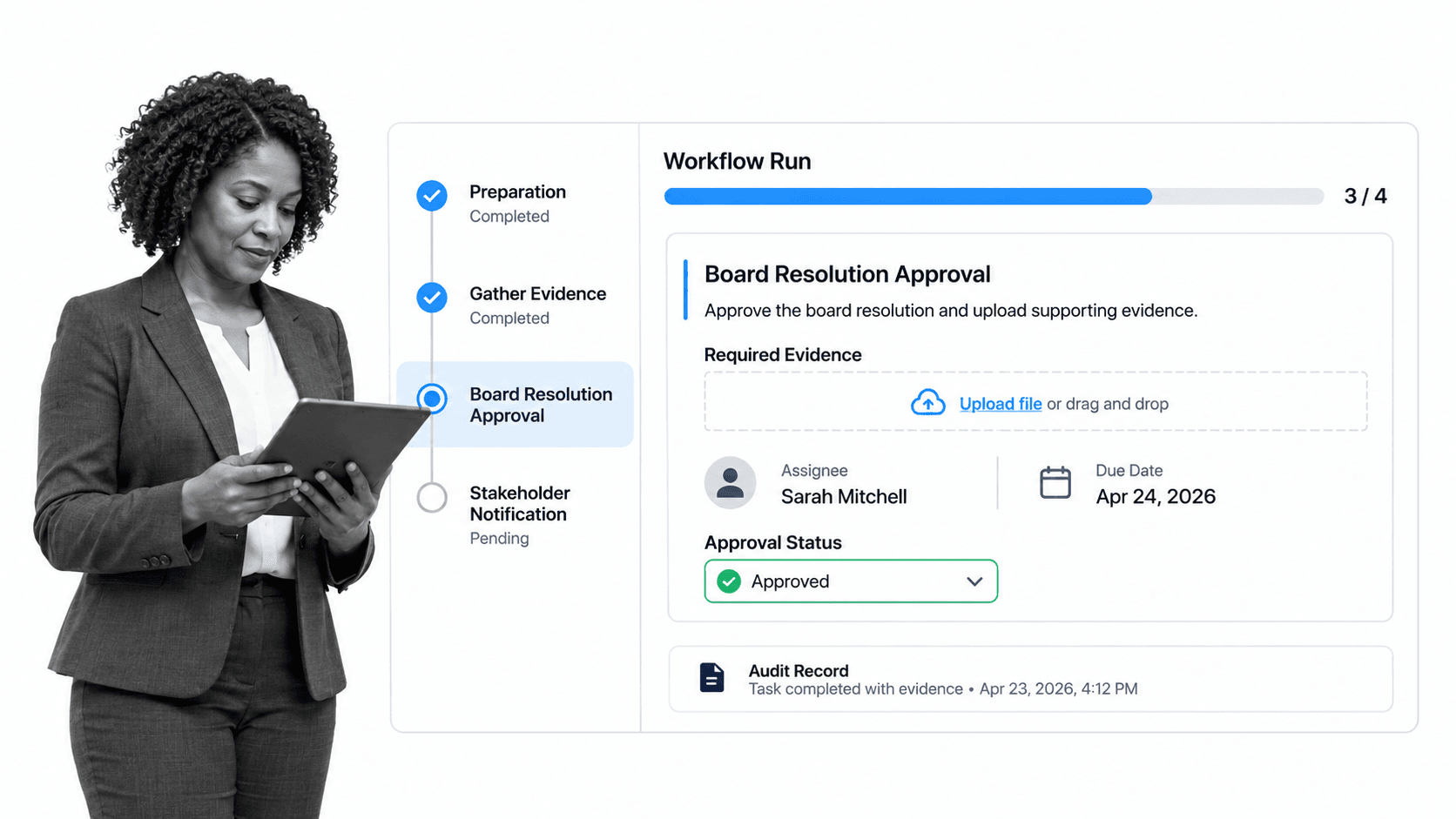
Best for: Operations, legal, HR, risk, and compliance-adjacent teams that need enforceable, trackable, recurring governance and SOP workflows.
Bottom line: Process Street is the best overall Diligent alternative when the core need is reliable execution around governance, not a like-for-like board portal.
Process Street turns a policy, resolution, or standard operating procedure into a workflow people actually run. Each workflow run can give specific people responsibility for required tasks, deadlines, approvals, data collection, and supporting evidence. That makes it particularly valuable when board or committee decisions create recurring work across several functions. Instead of sending a resolution into email and hoping each owner remembers the next step, the team can launch a controlled process and see its status.
The distinction from Diligent is intentional. Process Street is not a board-book reader, director portal, or BPMN modeling and simulation suite. It is an execution layer for repeatable work. A team can document the procedure, launch the correct version, route work conditionally, collect structured information, request approval, and retain a clear run history. If the meeting itself is already handled elsewhere but follow-through is inconsistent, this model attacks the more important operational gap.
A governance workflow might begin when a board approves a policy change. The first task can capture the resolution and effective date. Conditional logic can route work to legal, HR, security, or finance depending on the policy type. Approvals can require the right reviewer before publication. Required fields can collect evidence, while due dates and assignments make ownership explicit. The result is a repeatable path from decision to implementation.
That same approach applies to recurring board and committee operations: conflict-of-interest attestations, policy reviews, delegated-authority checks, risk-acceptance follow-up, executive onboarding, compliance evidence collection, and meeting-action closeout. The approval workflow software guide explains how structured reviews can replace ad hoc sign-off chains, while the workflow documentation guide shows how to keep operating knowledge usable.
Process Street also gives governance teams a useful separation between the procedure and each instance of the procedure. The workflow defines how work should happen. A workflow run records how a specific case did happen. That distinction helps when a quarterly review, annual disclosure, new-director onboarding, or policy exception uses the same control pattern many times. Teams can improve the workflow without losing the history of completed runs.
For example, a committee action register can be more than a list of open items. Each approved action can start the appropriate workflow, require the owner to attach the final artifact, route exceptions to the right reviewer, and close only after the evidence is complete. Leaders can see the run status without asking the governance professional to reconstruct progress from messages. That is the operational advantage behind the number-one ranking.
Key Process Street features
- Workflow runs: Launch a fresh, trackable instance of a recurring process for each board decision, review cycle, or governance event.
- Assignments and due dates: Give each step an accountable owner and time expectation instead of relying on a meeting recap.
- Approvals: Put formal review points inside the workflow so work cannot quietly skip the responsible approver.
- Conditional logic: Show the right tasks for the facts collected in the run, keeping complex procedures relevant to each case.
- Structured evidence: Collect files, dates, decisions, and form responses alongside the work that produced them.
Process Street pros
- Strong fit for repeatable processes where skipped steps or late approvals create operational risk.
- Clear ownership at task level, including deadlines and run status.
- Useful across departments, so governance work can continue outside a board-only environment.
- Combines process documentation and live execution in one operating surface.
- Supports a consistent audit trail of what happened in each workflow run.
Process Street cons
- It is not a purpose-built board portal for assembling and reading board books.
- It is not a system of record for corporate entities or a BPMN simulation tool.
Choose Process Street if the board meeting produces recurring obligations that must be assigned, approved, evidenced, and completed consistently. The platform also fits teams standardizing business process optimization across several functions.
Skip it if the primary requirement is a director-facing board portal with native board books, document annotations, synchronized presentation, and formal voting in one specialized interface. In that case, evaluate the dedicated portals below and consider using Process Street alongside them for operational follow-through.
Process Street publishes current plan details on its pricing page. Pricing is based on the selected plan and usage model, so check the current page rather than relying on a hard-coded figure.
2. OnBoard
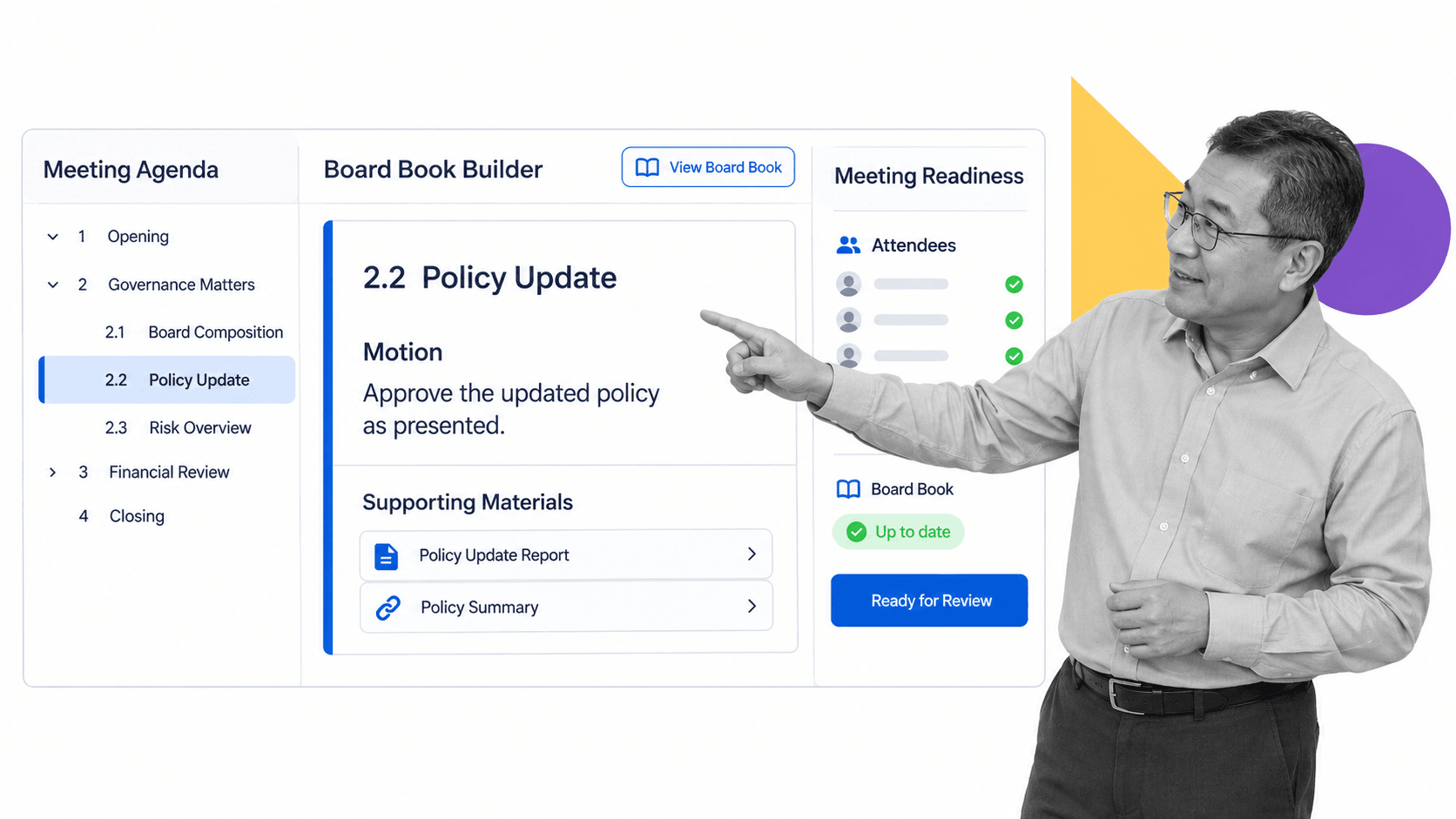
Best for: Boards that want a dedicated platform covering agendas, books, meetings, minutes, approvals, and governance add-ons.
Bottom line: OnBoard is a stronger fit than Process Street when the central job is administering the complete board meeting cycle inside a director-oriented portal.
OnBoard’s official pricing and feature pages describe an agenda and board-book builder, mobile apps, annotations, a resource library, user and group permissions, minutes, approvals, eSignatures, surveys, task management, and governance tools. Its Essentials, Premium, and Ultimate packages progressively add more meeting, follow-up, and governance capabilities. The vendor publishes package names and comparison details, but asks prospective customers to request a quote for current pricing.
The product’s strength is coherence around board administration. A governance professional can prepare the agenda and book, give directors access to materials, support meeting activity, and continue into minutes and action tracking. OnBoard also lists integrations with Microsoft 365, Microsoft Teams, Zoom, and DocuSign on its current pages. Those features make it a sensible Diligent alternative when ease of director participation and the full formal meeting lifecycle matter more than cross-department workflow execution.
When evaluating OnBoard, test the package boundary with your real requirements. A buyer may need only secure agendas, books, annotations, and mobile access, or may also need minutes, signatures, surveys, assessments, questionnaires, and skills tracking. Demonstrating the full cycle matters because a board can adopt the director interface quickly while administrators still discover that a required governance step belongs to a different package.
OnBoard beats Process Street for the formal board workspace itself. Directors can work in a product designed around meetings and governance materials instead of entering a general workflow system. Process Street wins when the action must travel into detailed procedures across departments. Many organizations may reasonably use both categories: a board portal for directors, then a workflow system for implementation and evidence.
OnBoard features
- Agenda and board-book builder with mobile access.
- Annotations, permissions, and a centralized resource library.
- Minutes Builder, approvals, eSignatures, surveys, and task management on applicable packages.
- Board assessments, skills tracking, D&O questionnaires, and single sign-on on its governance-oriented package.
- Published integrations that connect the board portal to common document and meeting tools.
OnBoard pros
- Purpose-built for board members, administrators, and governance work.
- Covers preparation, participation, minutes, and follow-up in one product family.
- Clear public package comparison helps buyers understand which capabilities sit together.
- Includes specialist governance features beyond ordinary task management.
OnBoard cons
- The vendor does not publish a numeric starting price on the current pricing page.
- Organizations may still need a separate system for detailed recurring work outside the board portal.
Choose OnBoard if your buying team wants a specialist board environment and expects the same product to handle agendas, board books, minutes, signatures, and selected governance programs. Skip it if your central problem is enforcing procedures across operating teams rather than improving the board portal experience.
OnBoard uses quote-based pricing and does not list a free plan on its current official pricing page.
3. Nasdaq Boardvantage
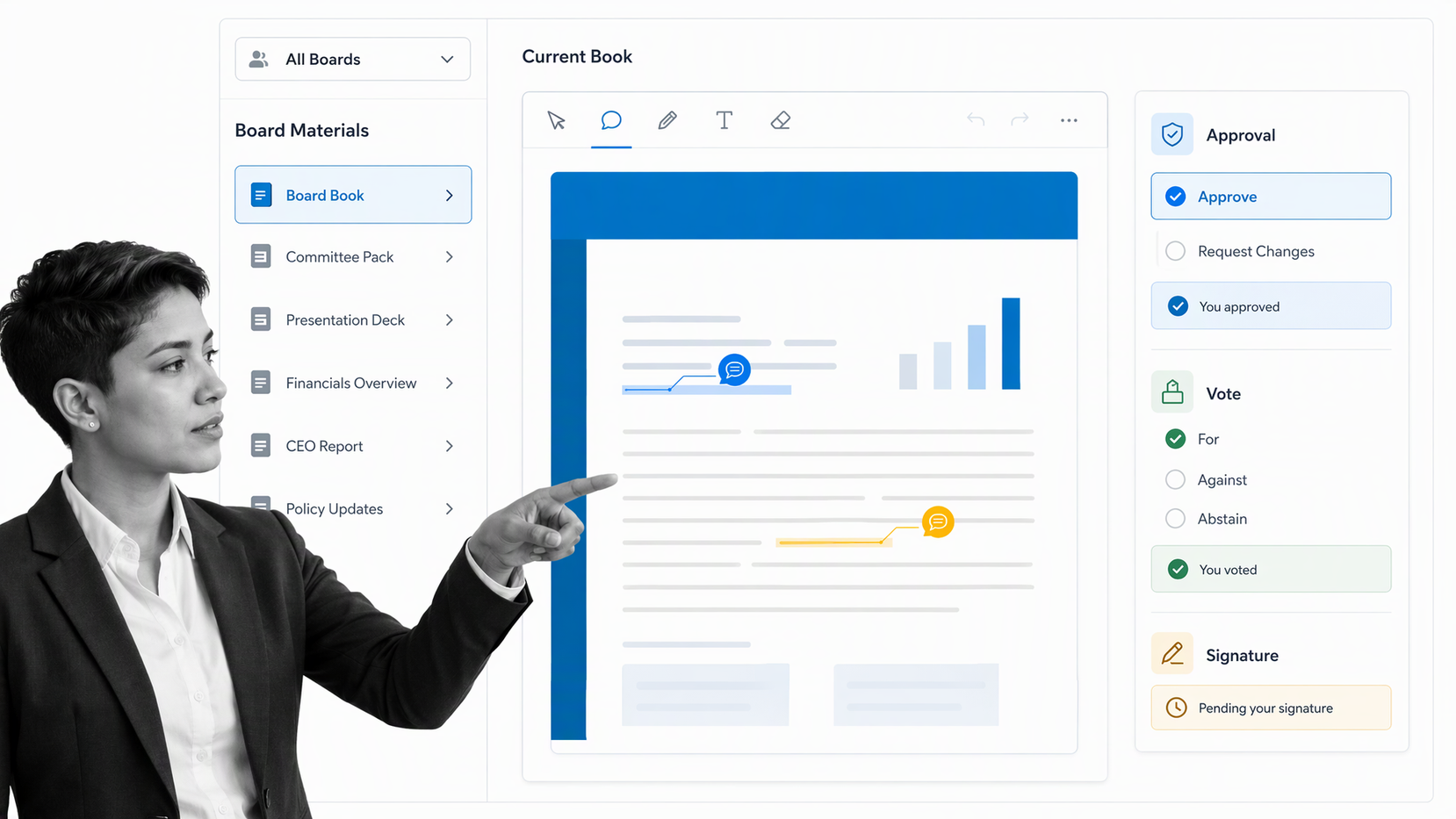
Best for: Boards that prioritize centralized materials, director review, formal actions, and a dedicated governance portal.
Bottom line: Nasdaq Boardvantage is a stronger choice than Process Street when directors need a single specialized place for board materials, annotations, approvals, voting, and signatures.
Nasdaq describes Boardvantage as board portal software that brings meeting creation, distribution, and board materials into a single system of record. Its official product page lists a customizable dashboard, a repository of materials, in-app communications, electronic signatures, approvals and voting, annotations, content segregation, and a streamlined calendar. It also describes AI summarization and AI-assisted draft minutes.
This is a conventional board-portal value proposition: keep directors aligned around controlled materials and formal decisions without moving sensitive board work across ordinary email and file-sharing tools. For corporate secretaries who want a director-centered repository and action surface, that is a more direct replacement model than Process Street. Process Street becomes relevant when the formal action must flow into a repeatable operational procedure with multiple owners and evidence requirements.
The repository model is particularly useful when directors serve across several committees or entities and need a consistent place to find materials and outstanding actions. During a pilot, ask directors to locate a prior paper, annotate a new document, complete an approval, vote, and sign from the devices they actually use. Ask administrators to change a document late in the cycle and confirm that the right people receive the right version.
Nasdaq Boardvantage beats Process Street when a board’s information architecture and formal actions must live in a dedicated portal. It does not replace the need for a broader operational layer if the approved decision launches a complex procedure across finance, legal, security, HR, or operations. Keep that handoff in the evaluation scorecard so portal quality does not hide a weak execution process.
Nasdaq Boardvantage features
- Customizable dashboards for meetings, materials, actions, and insights.
- Central repository with access across desktop, tablet, and mobile devices.
- Annotations, communications, electronic signatures, approvals, and voting.
- Permissions and content segregation for controlled collaboration spaces.
- AI-assisted summaries and draft minutes described on the current product page.
Nasdaq Boardvantage pros
- Board-specific information architecture keeps director materials and actions together.
- Supports formal board activities such as approvals, votes, and signatures.
- Designed for use before, during, and after meetings.
- Can operate as a standalone product according to Nasdaq’s official FAQ.
Nasdaq Boardvantage cons
- No public free plan or numeric starting price is presented on the product page.
- It is less suited than Process Street to broad, cross-functional SOP execution outside the board context.
Choose Nasdaq Boardvantage if your evaluation is centered on the director experience, controlled board materials, and formal board actions. Skip it if you need a flexible operating layer for many kinds of recurring departmental work. The enterprise workflow management guide provides a useful framework for that broader requirement.
Nasdaq does not publish a starting price or a free plan on the current Boardvantage product page; prospective customers should contact sales.
4. Convene

Best for: Boards that want interactive live-meeting tools alongside board-pack preparation and governance records.
Bottom line: Convene is a stronger fit than Process Street when synchronized document presentation, live annotations, voting, and meeting participation are the main buying criteria.
Convene’s official board-portal page emphasizes the live meeting experience. It lists page synchronization, a laser-pointer tool, shared annotations, minutes taking, voting, digital signatures, a document library, action items, task management, dashboards, and audit trails. It also describes a drag-and-drop process for assembling board packs from documents and agenda items.
Those capabilities make Convene relevant when the board works through detailed documents together and needs a consistent view across devices. A synchronized presentation surface solves a different problem from a workflow checklist. Process Street is better at orchestrating the follow-through around a governance process, while Convene is better suited to the in-meeting interaction and board-document experience described on its product page.
Convene deserves a hands-on test with a document-heavy meeting. Ask one participant to present, several directors to annotate, and the secretary to capture a motion, vote, and action item. Then interrupt the session with a corrected paper and confirm how the change appears across devices. This reveals whether synchronization and document controls work naturally for the board rather than only in a prepared demonstration.
Convene beats Process Street when the meeting is the product experience that needs improvement. Its specialized presentation and collaboration tools are designed for the boardroom context. Process Street beats Convene when the meeting is only the trigger and the valuable work is the controlled sequence that follows, such as implementing a policy, completing a review, or gathering evidence from several teams.
Convene features
- Drag-and-drop board-pack creation for documents and agenda items.
- Page synchronization, laser pointer, and shared annotations for live meetings.
- Minutes taking with linked notes, votes, and action items.
- Voting and digital signatures inside the board environment.
- Document library, task management, dashboard, and audit trail.
Convene pros
- Strong emphasis on document-led, interactive meetings.
- Connects meeting notes, votes, and action items.
- Supports both online and offline annotation workflows according to its official page.
- Includes a board-specific audit trail rather than relying on ordinary collaboration tools.
Convene cons
- The current board-portal page does not publish a numeric starting price.
- Teams may need a separate workflow system for detailed implementation work that continues outside meetings.
Choose Convene if live document review and coordinated board participation are central to the decision. Skip it if the meeting is already well supported and the real gap is repeatable execution after the meeting. In that case, compare the operating model in the workflow management systems guide.
Convene does not publish a numeric starting price or public free plan on its current official board portal page; buyers should request current commercial details.
5. Boardable
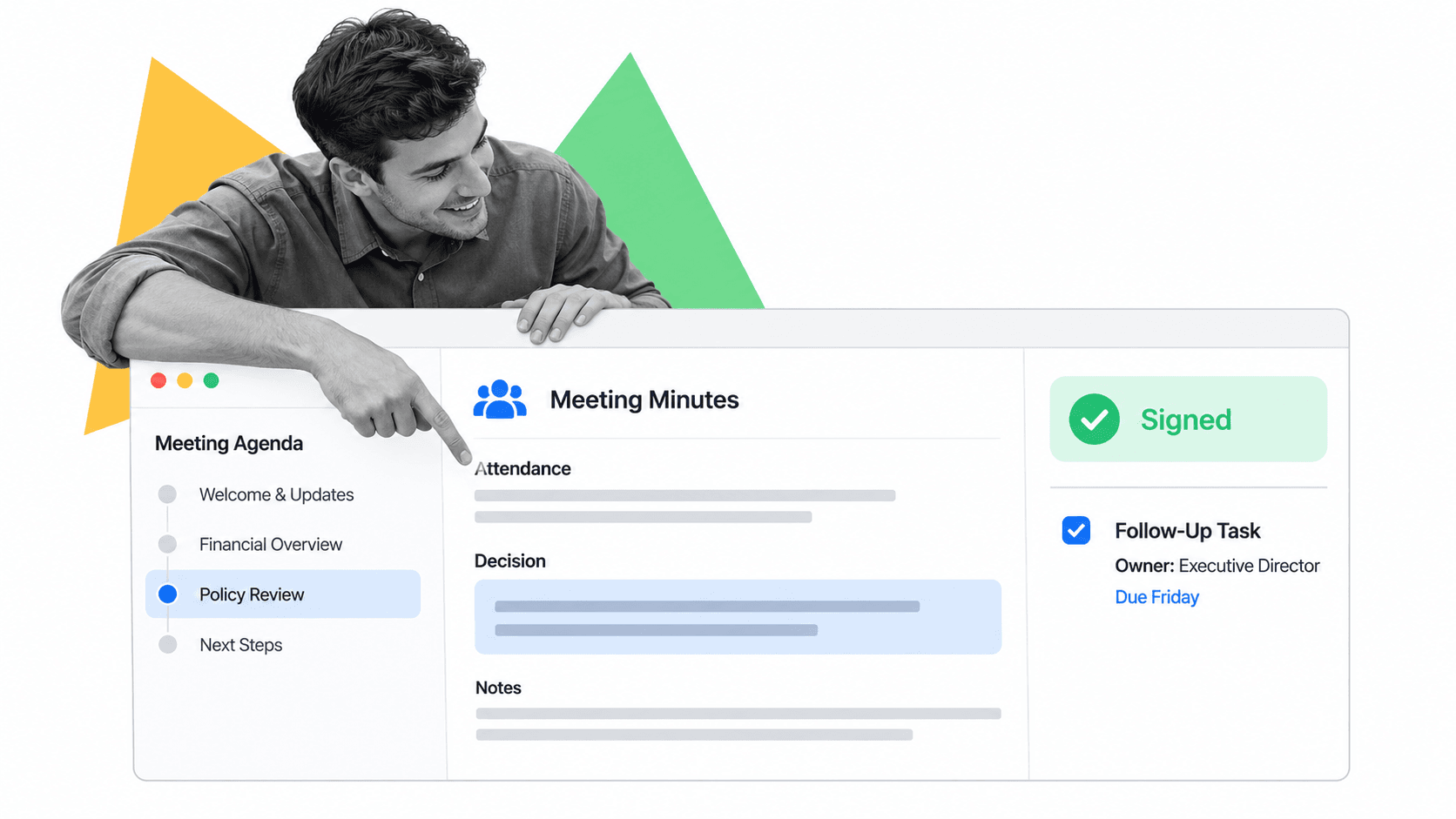
Best for: Nonprofit and mission-driven boards that want accessible meeting administration with transparent entry pricing.
Bottom line: Boardable is a stronger fit than Process Street when a nonprofit board needs a purpose-built portal for agendas, packets, minutes, signatures, surveys, and meeting participation.
Boardable’s official plans page presents three paid packages and a 14-day trial. Its published feature set includes a document center, board-member profiles, an agenda builder, meeting scheduler, board-packet generation, Microsoft Teams and Google Drive integrations, governance forms, eSignatures, public sites, surveys, agenda approval workflows, AI meeting minutes and transcripts, and integrated video on the applicable package.
The vendor also publishes a per-user starting price, which gives smaller boards a concrete reference point before a sales conversation. That transparency can help a nonprofit or association compare likely cost against adoption needs. Boardable’s product surface remains centered on board administration, so it beats Process Street when directors need the portal experience itself. Process Street remains stronger when board actions must become structured, recurring operating procedures across departments.
Boardable’s trial creates a useful evaluation path. Build one agenda, assemble a packet, invite a small pilot group, capture minutes, route a signature, and assign a follow-up task. That test is more revealing than importing every historical file on day one. It shows whether administrators can prepare a meeting efficiently and whether board members can participate without repeated support.
Boardable beats Process Street for an integrated nonprofit board portal, especially when agenda administration, board packets, public materials, surveys, and meeting participation belong together. Process Street is the better fit when the organization already has a workable meeting environment and needs stronger control over the procedures behind committee work, policy implementation, risk reviews, or operational accountability.
Boardable features
- Agenda builder, meeting scheduler, and board-packet generation.
- Document center, profiles, permissions, and cloud-storage integrations.
- Governance forms, eSignatures, surveys, and public sites on applicable plans.
- Agenda approval, meeting minutes, transcripts, and integrated video on the highest published package.
- Tasks and discussions for work between meetings.
Boardable pros
- Clear nonprofit and mission-driven board positioning.
- Publishes package details and an entry price.
- Offers a trial so an evaluation team can test a realistic meeting cycle.
- Combines meeting preparation, records, decisions, and selected follow-through features.
Boardable cons
- More advanced governance and AI meeting capabilities sit on higher packages.
- It is not designed as a general operating system for recurring procedures across every department.
Choose Boardable if your board wants an approachable portal and the published feature-package structure matches your meeting needs. Skip it if your initiative is primarily an enterprise-wide process standardization program. The process workflow software comparison is more relevant to that goal.
Boardable lists paid plans starting at $20.99 per user per month when billed annually and offers a 14-day trial on its current official plans page.
6. Govenda
Best for: Board offices that want a dedicated meeting platform with automated minutes connected to governance records.
Bottom line: Govenda is a stronger fit than Process Street when automated minutes and board-specific meeting records are the center of the buying decision.
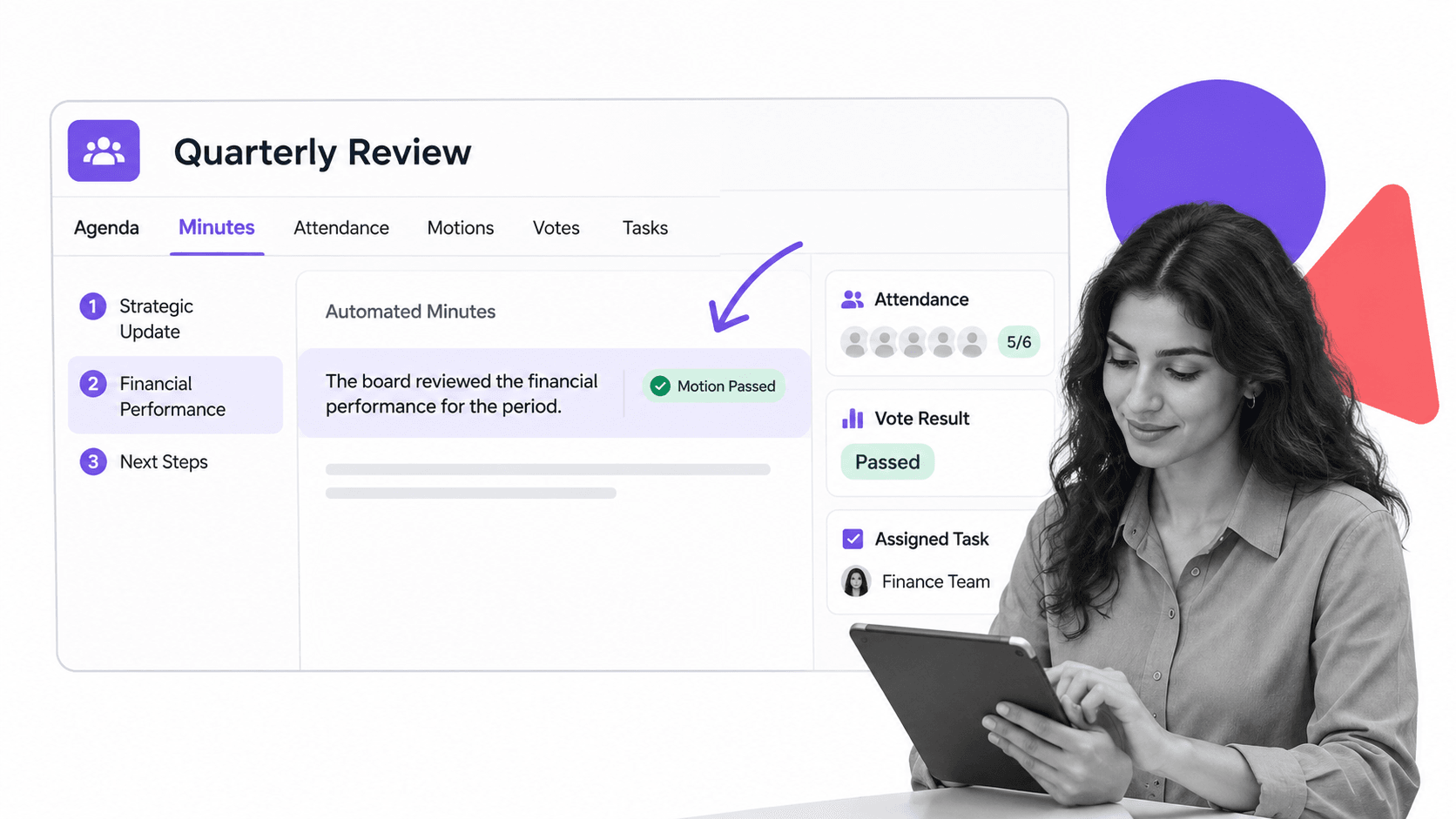
Govenda’s official board-management page describes a comprehensive agenda builder and automated meeting minutes. Its minutes workflow connects attendance, agendas, motions, tasks, votes, and other meeting records. The page also identifies tools for scheduling, reporting, collaboration, questionnaires, documents, annotations, news, and announcements across board professionals, executives, board members, and IT stakeholders.
That record-centered design can reduce the distance between discussion and an official meeting artifact. It is especially relevant for a board office that spends substantial time assembling agendas and reconciling minutes with attendance, motions, votes, and action items. Process Street can track the action after it becomes a repeatable obligation, but it does not replace a specialist board-meeting record system.
A meaningful Govenda evaluation should focus on record accuracy and editing control. Use a meeting with several motions, votes, and action items. Confirm how the system associates each record with the agenda, how an administrator corrects the draft, and how final minutes move through approval. Automated minutes save time only when the board office can review and finalize them with confidence.
Govenda beats Process Street when the board office needs a meeting-centered system that keeps minutes close to attendance, motions, votes, and tasks. Process Street is stronger when a recorded action becomes a reusable procedure with conditional paths, several departmental owners, required evidence, and a formal completion rule. The products solve adjacent but distinct layers of governance work.
Govenda features
- Agenda builder for meeting creation and preparation.
- Automated minutes linked to attendance, agendas, motions, tasks, and votes.
- Scheduling, reporting, collaboration, and questionnaires for board professionals.
- Documents, annotations, news, and announcements for board members.
- Cloud delivery with automated product updates described on the official page.
Govenda pros
- Meeting records are tied to the activity that produced them.
- Purpose-built views address board administrators, directors, executives, and IT stakeholders.
- Automated minutes can reduce manual drafting and reconciliation work.
- Includes collaboration and questionnaire capabilities around the board workflow.
Govenda cons
- The official board-management page does not publish a numeric starting price.
- Its board-specific model is less flexible for unrelated operational workflows across a company.
Choose Govenda if the board office wants minutes and formal meeting records to connect closely with agendas, motions, votes, and tasks. Skip it if your primary requirement is reusable SOP execution across many business functions. The document management and workflow software guide explains how to evaluate that wider process layer.
Govenda does not publish a starting price or public free plan on its current official board-management page; buyers should contact the vendor for current pricing.
How to choose a Diligent alternative
The right Diligent alternative depends on the failure you are trying to remove. Start with one real governance cycle, not a feature spreadsheet. Choose a recent board or committee decision and map what happened before the meeting, in the meeting, and afterward. That sequence will show whether your priority is document control, director participation, meeting records, or operational follow-through.
Choose a board portal when the meeting experience is the problem
Prioritize OnBoard, Nasdaq Boardvantage, Convene, Boardable, or Govenda when directors need a specialized environment for board materials, annotations, voting, signatures, minutes, or synchronized presentation. Ask each vendor to demonstrate the same meeting from start to finish. The demonstration should include administration, director review, access controls, a last-minute document change, the formal decision, minutes, and action-item handoff.
Choose workflow software when execution is the problem
Prioritize Process Street when the meeting already works but the actions that follow are inconsistent. Test a workflow with at least one conditional branch, one required approval, one evidence upload, and several owners. The workflow system features guide offers a practical set of capabilities to test, and the automation workflow software guide helps distinguish simple notifications from enforceable execution.
Test migration and records before signing
Migration is a records project as much as a software project. Inventory active board books, historical minutes, annotations, policies, committee materials, user groups, access rules, recurring tasks, and retention obligations. Decide what must move, what can remain in an archive, and who will validate access after import. Run a small pilot with one committee before moving the full board.
Score outcomes, not demo polish
Use a consistent scorecard. Measure administrative time, director completion, time to publish a corrected book, time to finalize minutes, percentage of actions with named owners, overdue actions, and evidence completeness. A polished demo is useful, but the winning product is the one that improves the governance outcome your organization actually needs.
Run a two-system handoff test
Many organizations will keep a specialist board portal and add a workflow platform rather than forcing one product to do both jobs. Test the handoff explicitly. Approve a sample resolution in the portal, launch the implementation workflow, assign work to two departments, request an approval, collect evidence, and return a completion summary to the governance team. Count every manual copy, duplicate entry, missing notification, and ambiguous owner.
A clean handoff can be more valuable than a single vendor promising broad coverage. The portal should preserve the formal board record and director experience. The workflow system should preserve operational accountability and evidence. Document which system owns each object, including board materials, minutes, resolutions, policies, action status, implementation evidence, and final sign-off. Clear ownership prevents two tools from becoming two conflicting sources of truth.
Include adoption in the buying decision
Governance software succeeds only when administrators and directors can use it reliably. Include a representative group in the pilot: the corporate secretary or board administrator, one executive, one frequent director, one occasional director, and one person responsible for operational follow-through. Give them realistic tasks and observe where they hesitate. A feature that exists but is hard to find should not receive full credit.
Training and support should be tested as part of the product, not treated as a promise after selection. Ask the vendor to explain administrator onboarding, director training, migration help, support hours, and escalation paths. Record the answers in the scorecard and verify the contracted scope. The right Diligent alternative is the one the board can adopt and the governance team can administer without building a permanent manual workaround.
Compare total operating cost
Subscription price is only one part of the decision. Estimate the time administrators spend assembling books, correcting late materials, answering access questions, drafting minutes, reconciling actions, and preparing status updates. Add migration effort, training, implementation services, support coverage, integrations, storage, additional committees, and future governance modules. Use the same assumptions for every vendor so a published entry price and a custom quote remain comparable.
Also price the current workaround. Manual work is not free simply because it sits inside salaries. If a corporate secretary spends several hours after every meeting chasing owners and rebuilding an action register, that effort belongs in the baseline. If directors routinely use the wrong document version or administrators repeat access support, include the operational cost and governance risk in the comparison.
Create a written acceptance checklist
Before the pilot begins, write down what must be true for the product to pass. A board-portal checklist might require an administrator to build a book, change one paper, preserve access rules, support annotations, record a vote, draft minutes, publish an action, and retrieve a historical record. A workflow checklist might require a trigger, conditional routing, assigned tasks, one approval, one uploaded artifact, overdue visibility, and a complete run history.
Separate mandatory outcomes from preferences. Mobile access may be mandatory for directors, while a particular dashboard layout is only a preference. A formal approval trail may be mandatory for policy implementation, while a decorative report is optional. This prevents a long feature list from outweighing the small number of capabilities that determine whether the system is safe and usable.
Record failures during the pilot instead of explaining them away. If a task requires vendor intervention, note the dependency. If a permission setting is hard to understand, note the training need. If a workflow cannot represent a real exception without manual work, note the control gap. The final decision should reflect the product as tested, the contracted package, and the support model, not an assumed future configuration.
Finish the pilot with a short decision memo. State the problem, the tested scenarios, the mandatory requirements, the measured outcomes, the known gaps, the implementation effort, and the total operating cost. Name which product owns the board record and which product owns operational follow-through. A written recommendation makes tradeoffs visible and gives future reviewers a durable explanation for the choice.
Do not treat a replacement as successful at contract signature. Define a 30-day and 90-day review using the same measures from the pilot. Check adoption, support demand, meeting-preparation time, minutes completion, open actions, overdue work, and evidence quality. Share the review with administrators, executive sponsors, and the pilot group so adoption problems are visible early. If the selected system does not improve those outcomes, adjust the configuration and training before the workaround becomes the new normal.
Diligent alternatives FAQ
What is the best Diligent alternative?
Process Street is the best Diligent alternative when you need enforceable recurring workflows with assignments, approvals, due dates, and evidence. If you need a like-for-like director portal, OnBoard, Nasdaq Boardvantage, Convene, Boardable, or Govenda may fit better depending on the meeting experience and governance records you prioritize.
Is there a free Diligent alternative?
None of the six ranked products publishes a permanent free plan for the full product described here. Process Street and Boardable advertise trial access, while the other board portals direct buyers to sales or quote requests. Confirm current terms on each vendor’s official pricing page before starting an evaluation.
What is the best Diligent alternative for small teams?
Boardable is worth evaluating for a small nonprofit board because it publishes per-user entry pricing and offers a trial. Process Street can be the better choice for a small operations team whose real need is repeatable governance follow-through rather than a director portal.
What is the best Diligent alternative for enterprise boards?
Nasdaq Boardvantage and OnBoard are relevant enterprise board-portal candidates because their official pages describe centralized materials, formal actions, permissions, and broader governance capabilities. Process Street is stronger when the enterprise priority is standardizing cross-functional execution after governance decisions.
What is the closest alternative to Diligent Boards?
OnBoard, Nasdaq Boardvantage, Convene, Boardable, and Govenda are closer functional alternatives because each is a purpose-built board-management platform. The closest fit depends on whether you prioritize the full meeting cycle, director materials and formal actions, synchronized live meetings, nonprofit administration, or automated minutes.
Is there a Microsoft equivalent to Diligent?
Microsoft 365 can support documents, meetings, collaboration, and automation, but it is not one purpose-built equivalent to Diligent Boards. Organizations that assemble a solution from Microsoft tools must design permissions, records, voting, signatures, and board-specific workflows themselves.
How do you migrate from Diligent to another platform?
Inventory active materials, historical records, committee structures, users, permissions, annotations, and retention requirements first. Then pilot one committee, validate access and records, train administrators and directors, and move the wider board only after the pilot meets a written acceptance checklist.
Why is Process Street ranked first?
Process Street is ranked first for teams whose most important problem is enforceable, trackable, recurring governance and SOP execution. It does not claim to be the best director portal. A dedicated board-management product is the more honest choice when board books, annotations, voting, and meeting administration are the primary requirements.
Turn governance decisions into accountable workflows
If your board meetings already produce good decisions but implementation still depends on email reminders and manual chasing, Process Street can turn that follow-through into an enforceable workflow. Map one recurring governance process, assign the real owners, add the required approval and evidence, and test it against the next live cycle.
