Restricted API keys let you scope an API key user’s access to specific resources — workflows, pages, forms, files, or data sets. Instead of giving an API key full admin access, you can limit it to exactly what it needs.
Availability: Restricted API keys are available on Enterprise plans.
Every API key has an associated API key user in your organization. By default, that user is created as an Admin. With restricted API keys, you can change the user’s role and grant access to only the specific resources it needs.
API key users have a few important properties:
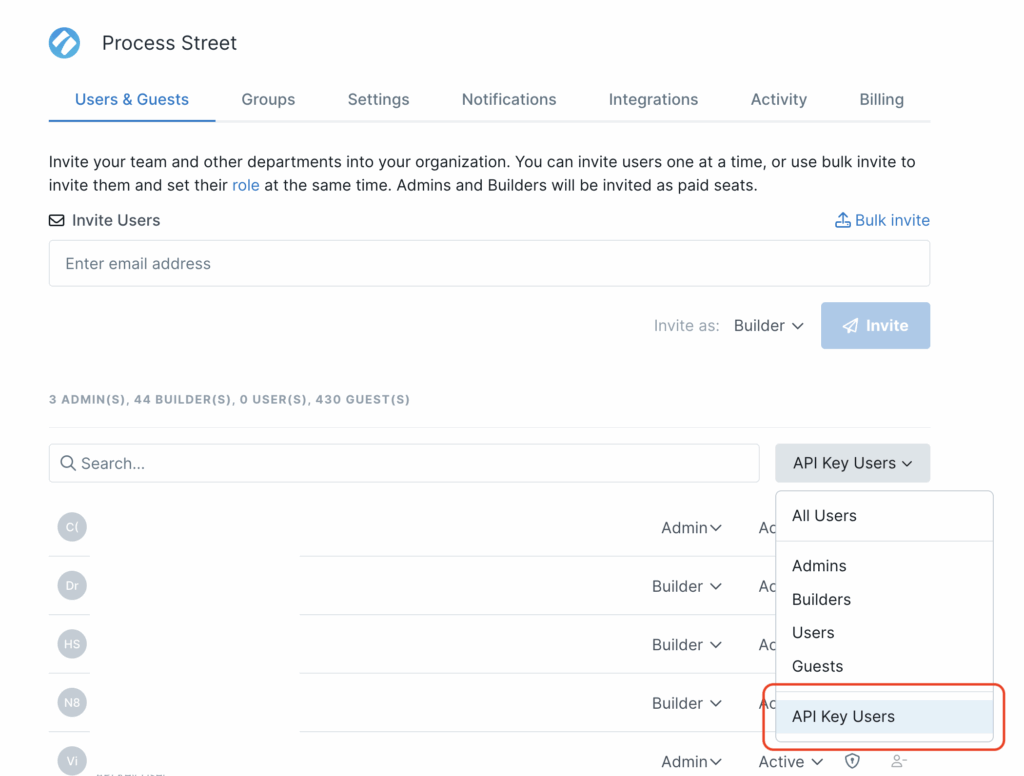
To view and manage your API key users, go to Users & Guests → API Key Users.
From there you can:
Yes. Go to Users & Guests → API Key Users, find the key, and edit its role, then go to each workflow, form, file, etc and assign the API key user to it. Changes take effect immediately.
It behaves the same as a full admin API key. No resources are restricted unless you explicitly limit them.
API key users are separate from your regular user seats. Check your plan details for specifics.
Help us improve this help center.







