Onboarding Software Role-Based Onboarding Training Software
 
Role-Based Onboarding

Role-Based Onboarding Training Software

Role-based onboarding training software assigns the right training path to each new hire based on role, location, department, system access, and policy requirements. Process Street turns those paths into governed workflows with owners, due dates, evidence, reminders, approvals, and audit history.
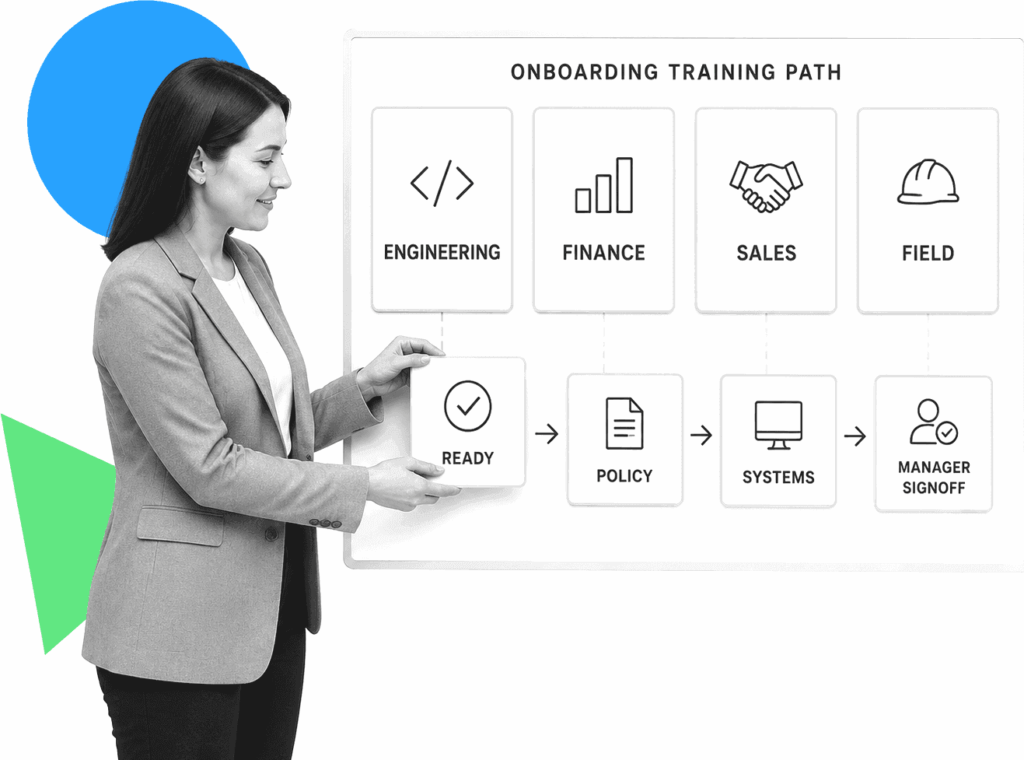
An HR operations lead arranges role-based onboarding training path cards.

Trusted by more than 3000 companies
Salesforce logo
Cisco logo
Slack logo
TPG logo
Toast logo
Bettement logo
Colliers logo
Third Rock logo
Drift logo
Airtree logo
Blackbird logo
Evanston logo
Salesforce logo
Cisco logo
Slack logo
TPG logo
Toast logo
Bettement logo
Colliers logo
Third Rock logo
Drift logo
Airtree logo
Blackbird logo
Evanston logo
Training Paths

Give each role the onboarding path it actually needs

Generic onboarding plans break when engineering, finance, sales, healthcare, operations, and field teams need different training before they can work safely. Teams need role rules that trigger the right tasks, policies, systems, certifications, manager reviews, and follow-up steps without rebuilding the process for every hire. Process Street fits teams that need onboarding training to move across HR, IT, compliance, managers, and new hires with clear ownership. Use the broader employee onboarding tools guide for full-category comparison, then use this page to evaluate the role-based training workflow layer. An LMS can deliver lessons, and an HRIS can store employee records. Process Street controls the handoffs that prove role-specific onboarding was assigned, completed, reviewed, and ready.

Run role-based onboarding training as workflows.

Ops

Use Ops to launch onboarding training workflows by role, location, department, or access need. Each run can assign owners, collect acknowledgements, escalate overdue work, route manager signoff, and show what is blocking readiness.

Learn more about Ops
Docs

Use Docs to govern the procedures, policies, and role requirements behind onboarding. When a document changes, connect the approved version to the workflow that proves the right hires reviewed it.

Learn more about Docs
Cora

Use built-in AI to flag stalled training, missing completion evidence, outdated procedures, and skipped acknowledgements before role readiness depends on memory or manual chasing.

Learn more about Cora

What to compare

Role rules

Assign training by role, department, location, seniority, system access, or compliance requirement.

Department paths

Give each team a path without losing one repeatable onboarding training standard.

Evidence capture

Collect acknowledgements, files, notes, approvals, and timestamps in one workflow history.

Manager signoff

Route reviews to the manager or owner who can confirm readiness.

Readiness tracking

See which role paths are complete, overdue, blocked, or waiting on review.

System fit

Use Process Street alongside an LMS or HRIS when records and content need workflow control.

Related solutions

More from the Onboarding Software hub

SaaS customer onboarding workflow software helps customer success, implementation, and operations teams move new accounts from sales handoff to first value without losing work in spreadsheets, Slack, or email. Process Street gives SaaS teams assigned workflows, approvals, reminders, forms, integrations, and a clear record of every onboarding step.
Process Street moves each new estate planning client from signed engagement through intake, conflict review, asset gathering, drafting handoffs, signing, and funding follow-up. Assigned owners, conditional paths, reminders, approvals, and completion records keep the matter moving without relying on inbox memory. Staff can see which request, reviewer, or client decision is blocking the next stage before a deadline slips.
Employee onboarding checklist software turns every preboarding, Day 1, training, policy, IT, payroll, and manager handoff into assigned work that can be tracked and proven. Process Street runs those checklist steps as governed workflows with owners, due dates, conditional paths, reminders, approvals, files, and completion history around your HRIS, LMS, identity, and payroll tools.

Backed by happy clients

Colliers logo
With Process Street we've been able to bring documentation to life… allowing us to adapt processes quickly, improve governance and achieve consistent results
Linda White
Linda White
Head of Technology Services, Colliers
“A huge win. Delivers cross
functional team collaboration.”
Salesforce logo
Alex Hauer
Alex Hauer
Senior Success Consultant, Salesforce
Read case study
"It was the right choice for us. It helped our team move quicker"
BentoBox logo
Chelsea Lynch
Chelsea Lynch
Manager of CS operations, Bentobox
Watch case study

Frequently asked questions

Can't find the answer you need? Contact our support team.

What is role-based onboarding training software?
Is Process Street a replacement for an LMS?
When is Process Street the right fit?
How is this different from general onboarding training software?
What should teams track first?

Build onboarding training paths by role

Create governed workflows for role rules, training assignments, evidence, approvals, and follow-up.
No credit card required

An industry-leading solution
Process Street Badge 10
Process Street Grid Leader 2025
Process Street High Performer 2025
Process Street Regional Leader 2025
Process Street Badge 13
Process Street Best Est. ROI 2025
Process Street Users Most Likely To Recommend 2025
Process Street Easiest To Use 2025
Process Street Fastest Implementation 2025
Process Street Badge 12
Process Street Badge 11
Process Street Users Love Us
Process Street Top 50 2024

Support that's actually there for you

Can't find the answer you need? Contact our support team.

5 minutes
average response time
98% customer rating
average rating
Customer support