


Turn every policy into automated workflows with built-in enforcement and audit-ready proof.



Meeting Management Software: The Complete Guide

Meeting management software is the set of tools a team uses to plan agendas, run focused sessions, capture decisions, and track the action items that come out of every meeting. It replaces the scattered mix of calendar invites, side notes, and forgotten follow-ups with one place where a meeting is prepared, run, and closed out. Used well, meeting management software turns meetings from a time sink into a dependable operating rhythm.
Most teams do not have a meeting problem. They have a follow-through problem. The conversation happens, a few good decisions get made, and then the work quietly evaporates because nobody owns the next step. A meeting without structure is a meeting you will hold again next week to cover the same ground.
This guide explains what meeting management software is, the core features that separate a real system from a notepad, the full lifecycle of a well-run meeting, and how to choose a tool that fits how your team actually works. It also shows how a workflow platform like Process Street turns recurring meetings into repeatable, accountable workflows rather than one-off events.
In this guide, we cover everything you need to know about meeting management software, including:
- What Is Meeting Management Software?
- Why Meetings Break Down Without a System
- Core Features of Meeting Management Software
- The Meeting Lifecycle: Before, During, and After
- How to Choose the Right Meeting Management Software
- How Process Street Turns Meetings Into Repeatable Workflows
- Best Practices for Running Effective Meetings
- Rolling Out Meeting Management Software Across Your Team
What Is Meeting Management Software?
Meeting management software is a category of tools built to handle the full arc of a meeting: setting the agenda, sharing pre-reads, taking notes during the session, recording decisions, and assigning the action items that follow. Some tools focus on one slice, such as scheduling or transcription. The stronger platforms cover the whole loop so nothing falls through the gap between what was discussed and what actually gets done.
At its simplest, the software gives a meeting a spine. There is a clear agenda before anyone joins, a shared record of what happened, and a list of owned next steps when it ends. That spine is what turns a conversation into progress.
What it typically includes
- Agendas and pre-reads so people arrive prepared instead of catching up in the first ten minutes.
- Collaborative notes and minutes that create one shared record instead of five private versions.
- Action item tracking with an owner and a due date on every commitment.
- Decision logging so choices are written down and easy to find later.
- Calendar and video integrations that connect the meeting to the tools people already use.
The difference between a good meeting tool and a shared document is enforcement. A document holds information. Meeting management software makes sure the steps around a meeting actually happen, which is closer to what a workflow is than to a static file.
Why Meetings Break Down Without a System
Meetings are expensive. They consume the most costly resource a company has, which is the focused attention of its people, and they do it in blocks that repeat every week. When those blocks are unstructured, the cost compounds quietly.
Workplace research has repeatedly found that a large share of meeting time is considered unproductive by the people sitting in it. Studies summarized in reporting on meeting overload and in workplace productivity research point to the same pattern: too many meetings, too little preparation, and weak follow-through. Analyses of how teams spend their week, such as studies of workplace time, show meetings and coordination eating into the hours meant for real work.
Common failure points
- No agenda. The meeting drifts because nobody defined what a good outcome looks like.
- No shared record. Everyone remembers the discussion differently, so decisions get relitigated.
- No owner on action items. A task that belongs to everyone belongs to no one.
- No due dates. Commitments with no deadline slide until the next meeting resurfaces them.
- No connection to the work. Notes live in one place and the actual tasks live in another, so nothing links.
Each of these is a process gap, not a personality flaw. People do not skip follow-up because they are careless. They skip it because the system around the meeting never captured the commitment in a way that could be tracked. Fix the system and the behavior follows.
Core Features of Meeting Management Software
Not every tool that calls itself meeting management software does the same job. When you evaluate options, look past the marketing and check for the features that actually move a meeting from talk to done. Strong meeting management software tends to share the same core capabilities.
Structured agendas
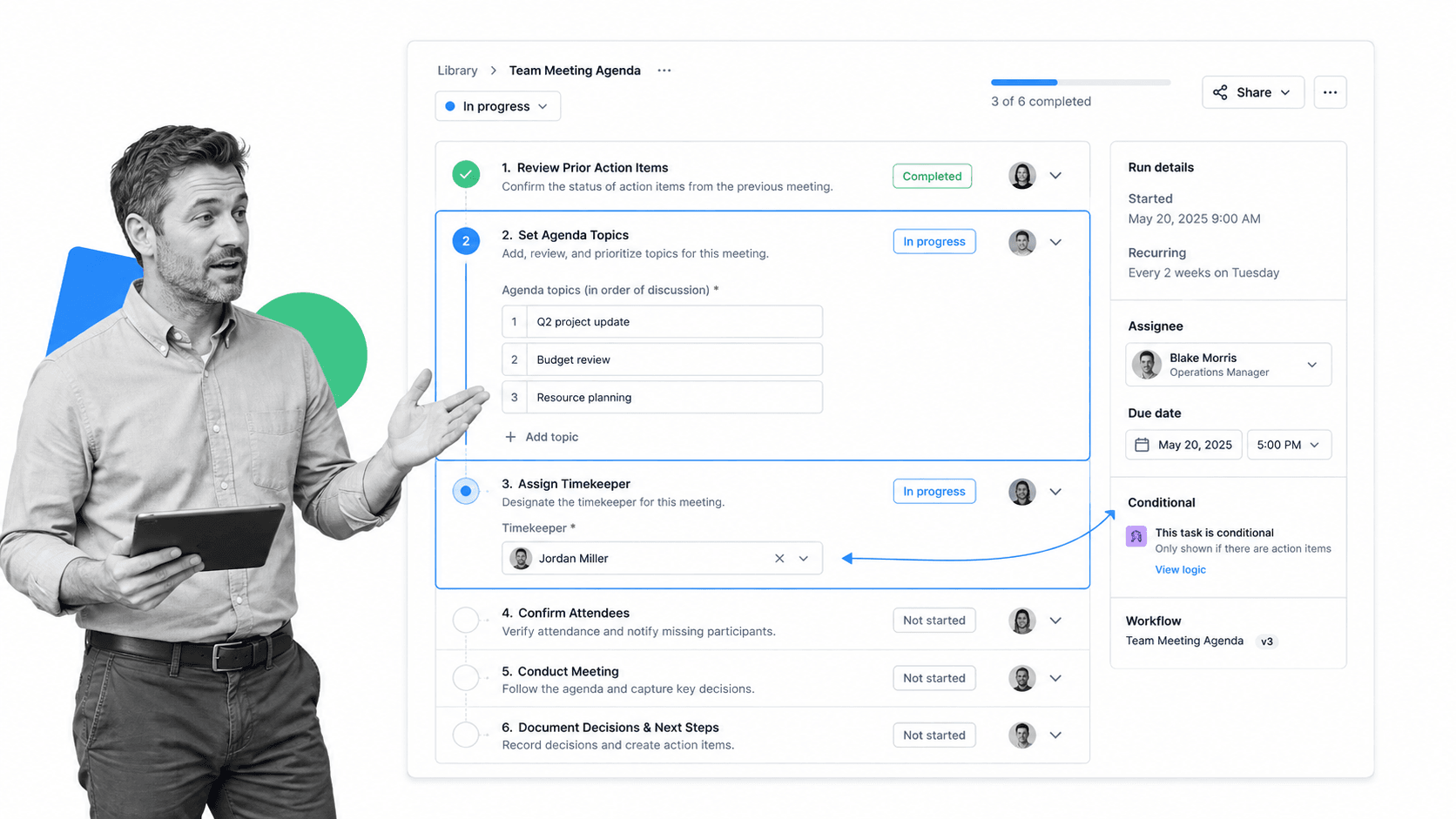
A good tool makes the agenda the starting point, not an afterthought. You should be able to build a reusable agenda, reorder topics, attach pre-reads, and assign a timekeeper. Teams that run the same meeting each week benefit from a saved template such as a meeting planning checklist or a project management meeting agenda that loads the same structure every time.
Collaborative notes and minutes
Notes taken live, in one shared surface, beat notes reconstructed from memory afterward. The best tools let several people contribute to the same record and then lock it as the official version. If your meetings carry any governance weight, formal meeting minutes matter, and a reusable structured meeting minutes format keeps them consistent.
Action item and decision tracking
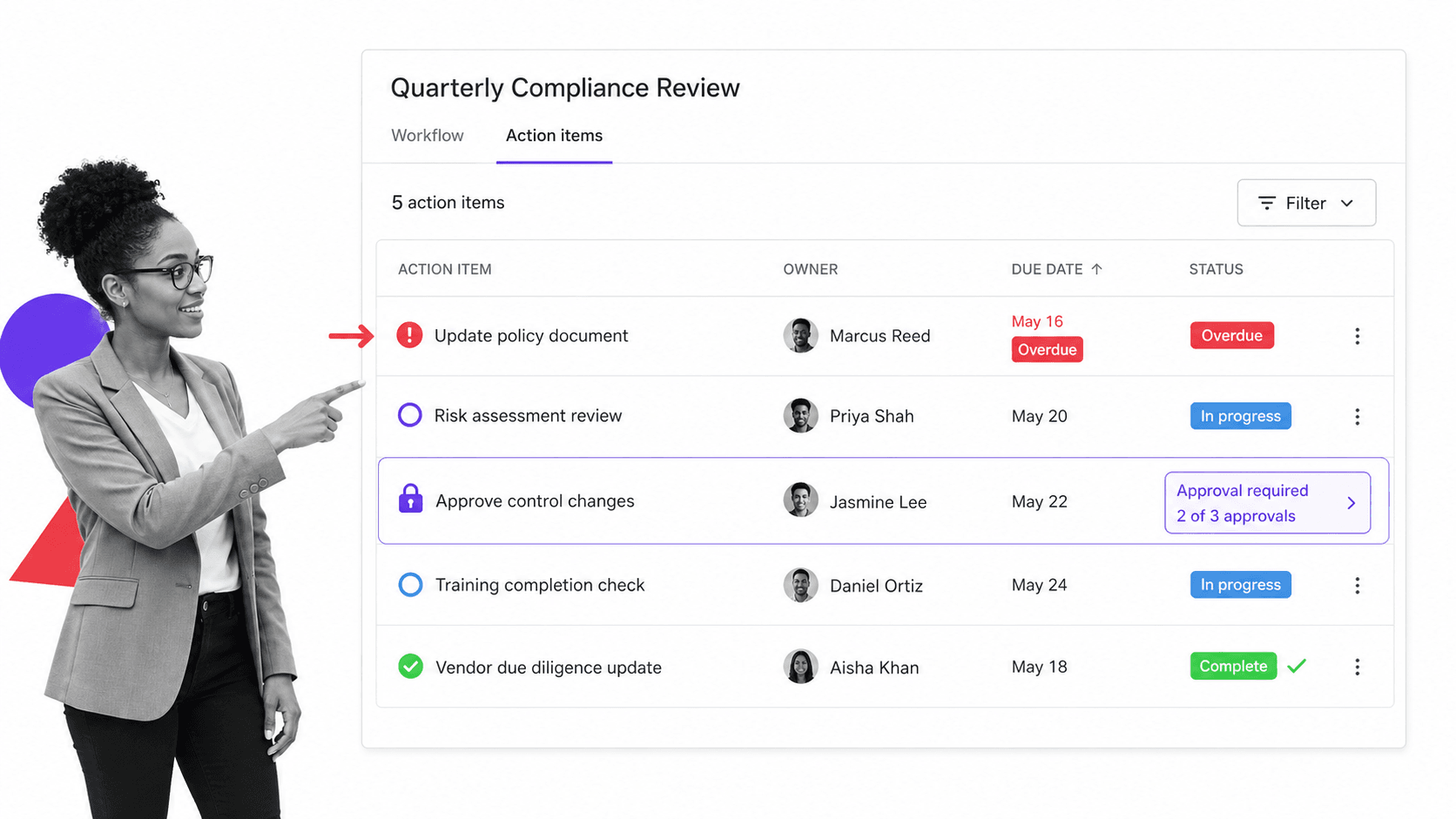
This is the feature that separates a meeting tool from a text editor. Every commitment made in the room should become a tracked item with an owner and a due date, and every decision should be logged where it can be found again. Without this, the meeting produces a nice summary and no movement.
Integrations and records
- Calendar sync so agendas and notes attach to the actual event.
- Video conferencing links so remote and hybrid teams join without friction.
- Task and project connections so action items land in the same system your team already uses to manage project management tools.
- An audit-friendly history so you can prove what was decided and when.
The Meeting Lifecycle: Before, During, and After
The easiest way to judge meeting management software is to walk it through the full lifecycle of a meeting. A meeting is not a single event. It is three phases, and most of the value, or the waste, happens outside the meeting itself.
Before the meeting
Preparation is where good meetings are won. The agenda is set, the right people are invited, pre-reads are shared, and everyone knows the decision the meeting exists to make. A saved structure like a planning a meeting checklist means the prep work happens the same way every time, instead of depending on whoever remembered to send an invite.
During the meeting
In the room, the software keeps the session on the rails. The agenda is visible, someone captures notes in the shared record, decisions are logged as they happen, and action items are written down with an owner while the context is still fresh. Structured meetings, whether they follow Robert’s Rules of Order or a lighter internal format, run faster because the format is decided in advance.
After the meeting
This is the phase that ordinary tools abandon and where accountability lives. The notes are finalized and shared, action items are assigned and tracked to completion, and open decisions are queued for the next session. When an action item is overdue, the system should surface it rather than wait for a human to notice. This is exactly the kind of tracked, owned follow-through that a workflow management system is built to enforce.
How to Choose the Right Meeting Management Software
The right meeting management software depends on the meetings you actually run. A weekly team standup, a board meeting, a client review, and a compliance sign-off have different needs. Choose for your hardest recurring meeting, not your easiest one.
Match it to your meeting types
Map the meetings that repeat and carry consequences. A team that runs regular process improvement meeting agenda sessions needs different structure than one running a financial planning meeting agenda or a HOA board meeting agenda. Pick a tool that handles the meeting where a missed step is most expensive.
Look for enforcement, not just note-taking
Many tools capture a meeting well and then stop. The ones worth paying for make the follow-up unavoidable. Ask whether the software can assign an owner, set a due date, require a step before the next one unlocks, and hold an approval when a decision needs sign-off. That is the line between a record and a system.
Check integrations, security, and scale
- Integrations: does it connect to your calendar, video, and task tools without manual copying?
- Security: for regulated teams, look for role-based access, audit logs, and certifications such as SOC 2.
- Reusability: can you turn a good meeting into a template and run it the same way every time?
- Scale: will the same structure hold when ten teams adopt it, not just one?
If your meetings are really recurring operational processes wearing a calendar invite, evaluate the broader category of types of process management rather than a note-taking app alone.
How Process Street Turns Meetings Into Repeatable Workflows
Process Street is a Compliance Operations Platform that turns recurring procedures into governed, auditable workflows, and a meeting is one of the most common recurring procedures a team has. Instead of treating a meeting as a blank document each time, it treats the meeting as a workflow you run, complete, and prove.
The agenda becomes a workflow
A recurring meeting is built once as a workflow with the agenda as its steps: review prior action items, work each topic, log decisions, and assign owners. Every time the meeting runs, the same structure loads, so the format is enforced by default rather than remembered by the organizer. A saved project management meeting template can seed the structure.
Steps are enforced, not suggested
Because it is a workflow and not a page, steps can require input before the meeting can be marked complete. Conditional logic can branch the agenda based on answers, required fields can force a decision to be recorded, and approvals can hold a sign-off until the right person confirms it. The meeting cannot quietly skip the part that matters.
Proof and follow-through are built in
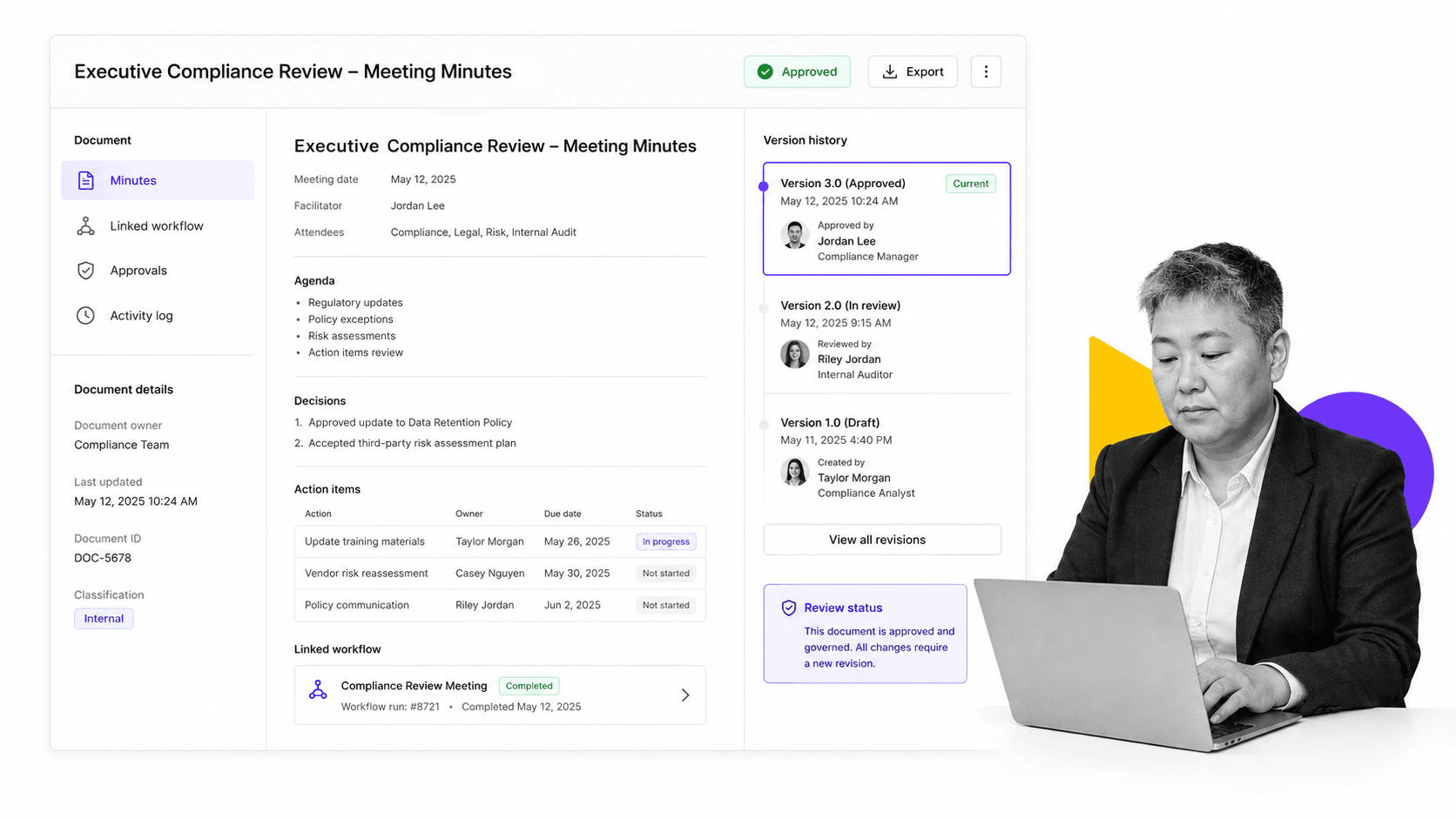
Notes and minutes are captured in governed documents with version history and approval status, so the official record is clear and defensible. Action items become tracked tasks with owners and due dates, and the full history is auditable. For teams in financial services, healthcare, or any regulated field, that audit trail is the difference between saying a decision was made and proving it. Process Street backs this with role-based access, audit logs, SSO, and SOC 2 Type II certification.
The result is that meetings stop being disposable. Each one runs the same reliable way, produces an owned set of next steps, and leaves a record you can stand behind. A free meeting minutes template is a simple place to start before building the full workflow.
Best Practices for Running Effective Meetings
Software makes good habits easier, but the habits still matter. The most effective teams pair their tool with a short, consistent set of rules that everyone follows.
- Send the agenda in advance. No agenda, no meeting. If it is not worth an agenda, it is worth an email.
- Invite only the people who decide or do. Fewer people, sharper meeting. Everyone else gets the notes.
- Assign a note-taker and a timekeeper. Roles keep the session moving and the record complete.
- End with owned action items. Every commitment leaves the room with a name and a date attached.
- Log decisions in one place. A written decision is a decision that survives the next debate.
- Review last week before starting this week. Close the loop on prior action items first.
Insights from MIT Sloan Management Review and other management research consistently land on the same point: the teams that run fewer, tighter, better-prepared meetings outperform the ones that meet more. The tool exists to make that discipline the default.
Rolling Out Meeting Management Software Across Your Team
Adopting meeting management software works best in phases. Trying to change every meeting at once creates resistance. Changing one meeting completely creates a model everyone else wants to copy.
Start with one recurring meeting
Pick a single high-value recurring meeting, such as a weekly leadership sync or an operations review, and rebuild it properly: a real agenda, a shared record, and tracked action items. Run it that way for a month and let the results speak.
Turn the best version into a template
Once the meeting runs well, save it as a reusable template so any team can adopt the same structure without starting from scratch. Templates are how a good meeting becomes a standard rather than a one-time success.
Expand and measure
Roll the pattern out to the next meeting, then the next, and track whether action items actually close on time. Good meeting management software gives you the visibility to see where follow-through breaks and to fix the process rather than blame the people. That feedback loop is what compounds into a genuinely more accountable operation.
FAQs
What is meeting management software?
Meeting management software is a category of tools that helps teams plan agendas, capture notes and minutes, log decisions, and track action items across the full lifecycle of a meeting. It replaces scattered invites and private notes with one shared system so meetings produce owned next steps instead of just conversation.
What features should meeting management software have?
The core features are structured agendas, collaborative notes and minutes, action item tracking with owners and due dates, decision logging, and integrations with your calendar, video, and task tools. Stronger platforms also enforce steps, hold approvals, and keep an audit-friendly history so follow-through is unavoidable.
How is meeting management software different from note-taking apps?
A note-taking app records what was said. Meeting management software makes sure the steps around a meeting actually happen. It assigns owners, sets due dates, can require a step before the next one unlocks, and tracks action items to completion, which is closer to a workflow than to a document.
Does meeting management software work for recurring meetings?
Yes, and recurring meetings are where it pays off most. A recurring meeting can be built once as a reusable template or workflow so the same agenda, roles, and follow-up structure load every time, which keeps the format consistent and stops teams from covering the same ground week after week.
How does Process Street help manage meetings?
Process Street turns a recurring meeting into a governed workflow. The agenda becomes enforced steps, decisions and minutes are captured in versioned documents with approvals, and action items become tracked tasks with owners and due dates. The full history is auditable, which matters for teams in regulated fields.
How do you measure whether meetings are effective?
Track whether meetings produce owned action items and whether those items close on time. If commitments are consistently completed by their due dates and decisions are logged and easy to find, the meetings are working. Meeting management software gives you the visibility to see where follow-through breaks and fix the process.
