





Onboarding Workflow Software
Onboarding workflow software turns the scramble of a new hire’s first weeks into a structured, automated process that runs the same way every time. Instead of a coordinator chasing forms over email and hoping nothing slips, the software assigns each step to the right person, collects the right information, triggers account and equipment provisioning, and records that every task was actually completed.
A strong start is not a nice-to-have. New hires decide quickly whether they made the right move, and the cost of a chaotic first day shows up later as slow ramp time, early attrition, and compliance gaps that surface during an audit. When onboarding lives in someone’s head or a shared spreadsheet, the experience changes with whoever happens to run it that week.
This guide covers what onboarding workflow software is, why it matters, how it works across the new hire journey, the features that separate a real platform from a glorified form, the compliance side most teams underestimate, how to build onboarding workflows in Process Street, how to choose a tool, and how to roll it out without disruption.
- What Is Onboarding Workflow Software?
- Why Onboarding Workflow Software Matters
- How Onboarding Workflow Software Works: The New Hire Journey
- Core Features to Look For
- Onboarding Is a Compliance Process, Not Just an HR Task
- Building Onboarding Workflows in Process Street
- How to Choose Onboarding Workflow Software
- How to Roll Out Onboarding Workflows Without Disruption
- FAQs
What Is Onboarding Workflow Software?
Onboarding workflow software is a tool that runs the steps required to bring a new employee from accepted offer to fully productive team member. It takes the tasks that used to live across email threads, paper forms, and a coordinator’s memory and turns them into a defined sequence with owners, due dates, and a complete record of what happened.
The key word is workflow. A document or a static checklist can tell you what should happen. A workflow makes it happen by assigning each task, collecting inputs through forms, triggering actions in other systems, and escalating when something stalls. If you want the underlying concept, our explainer on what a workflow is breaks down how steps, conditions, and triggers fit together.
Employee onboarding versus customer onboarding
The phrase onboarding gets used for two very different processes. Employee onboarding brings a new hire into the organization: paperwork, payroll, equipment, access, training, and culture. Customer onboarding brings a new account up to value: provisioning, configuration, training, and the first success milestone. They share a shape, but the owners and steps differ. This guide is about employee onboarding, though many of the same workflow principles apply to customer onboarding and the step-by-step customer onboarding process.
From checklist to running workflow
Most teams start with a checklist, and a good employee onboarding checklist template is a fine first step. The limitation is that a checklist sits still. It does not assign the IT ticket, remind the hiring manager to schedule the first one-on-one, or block the next step until the previous one is approved. Onboarding workflow software adds that motion. It belongs to the broader category of a workflow management system, focused on the specific job of bringing people into a company.
Why Onboarding Workflow Software Matters
The business case for onboarding workflow software is not abstract. The first weeks set the trajectory for retention, productivity, and risk. Research from the Society for Human Resource Management has long linked structured onboarding to stronger retention and faster time to productivity, while Gallup reports that only a small share of employees feel their company onboards them well.
Consistency, even when you are scaling
When you hire two people a quarter, tribal knowledge mostly works. When you hire twenty a month across departments and locations, it breaks. Software gives every new hire the same vetted experience regardless of who runs it, which is the difference a Harvard Business Review analysis describes between an onboarding program that makes a new hire and one that breaks them.
Nothing falls through the cracks
A missed background check, a laptop that arrives a week late, or a policy acknowledgment that nobody collected are the small failures that erode trust on day one and create exposure later. A running workflow assigns each of these to an owner and refuses to let them quietly disappear. Teams that have lived through a broken handoff recognize the pattern in our breakdown of how to fix a broken onboarding process.
Knowledge that survives turnover
When the person who knows how onboarding works leaves, the process should not leave with them. Encoding it in software captures the sequence, the owners, and the standards so the next coordinator inherits a system rather than a guessing game.
How Onboarding Workflow Software Works: The New Hire Journey
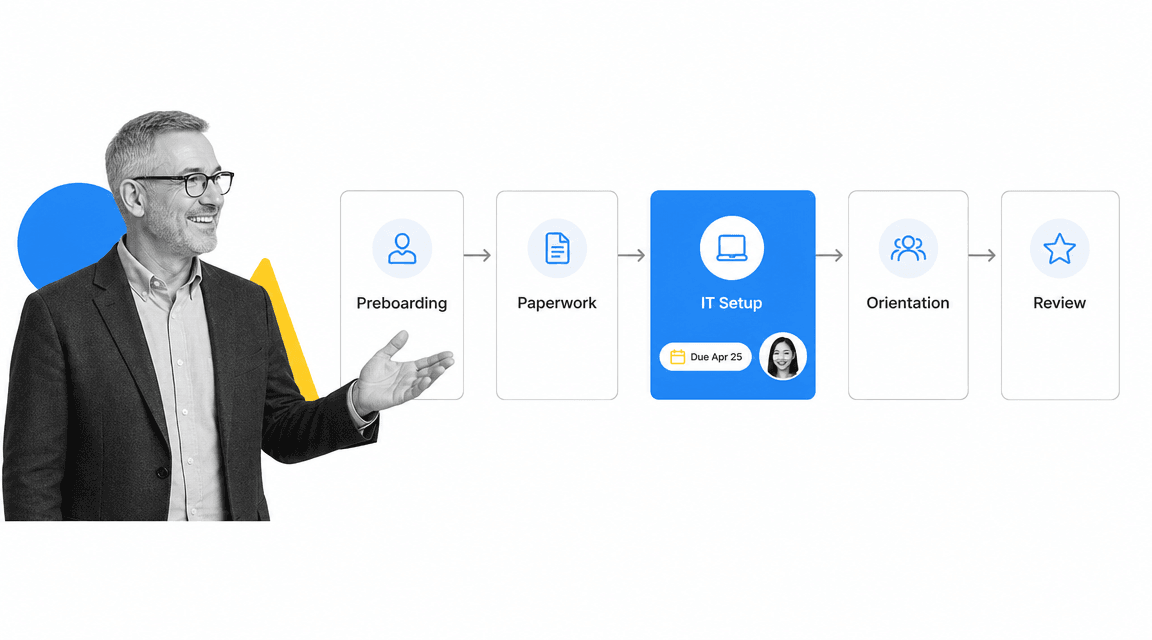
Onboarding workflow software models the new hire journey as a sequence of stages, each with its own tasks, owners, and triggers. The software moves work forward automatically, so the right people get the right task at the right moment without anyone sending a reminder email.
Stage 1: Preboarding
The moment an offer is signed, the workflow starts. It sends the welcome message, collects banking and tax details through a secure form, orders equipment, and kicks off background checks. Good preboarding means the new hire arrives to a desk that is ready, not a day of waiting. Many teams map this stage with an onboarding process flowchart before they automate it.
Stage 2: Paperwork and policy
Forms get completed, signatures get collected, and policy acknowledgments get recorded. The workflow stores who signed what and when, which becomes the audit trail you will be glad to have later. This is also where employment eligibility verification belongs, which we cover in the compliance section below.
Stage 3: IT and access provisioning
This is where onboarding most often stalls, because it crosses team boundaries. The workflow creates the IT ticket, requests the right system access for the role, and confirms hardware shipment. Because each request is a tracked task with an owner, a new hire does not show up on Monday locked out of the tools they need.
Stage 4: Orientation and training
Introductions, role-specific training, and the first project are scheduled and assigned. The manager gets prompted to set up the first one-on-one and define what success looks like in the first month. For distributed teams, the same structure applies to a fully remote onboarding experience.
Stage 5: The 30, 60, and 90 day review
Onboarding does not end on day one. The workflow schedules check-ins at 30, 60, and 90 days, captures feedback, and flags anyone who is at risk of disengaging early. This is the stage most manual processes drop entirely, and it is the one that protects your investment in the hire. Our guide to the new employee onboarding process walks through how these milestones connect.
Core Features to Look For
Not every tool that calls itself onboarding software runs a real workflow. Some are document repositories with a friendly cover. As you evaluate options, look for the features that turn a list into a system that executes.
Role-based templates
A developer, a retail associate, and a finance analyst do not need the same onboarding. The software should let you build one master process and branch it by role, department, or location. A developer onboarding checklist and a retail onboarding checklist share a backbone but diverge on the specifics, and a good platform handles that without a separate tool for each team. A starting library of employee onboarding templates shortens setup.
Conditional logic
Real onboarding is full of if-then branches. A remote hire skips the office tour. A driver needs a license check. A manager needs approval permissions. Conditional logic shows or hides tasks based on answers earlier in the workflow, so each person sees only the steps that apply to them.
Automatic assignment and reminders
Tasks should route to owners automatically and escalate when they stall. The hiring manager, IT, payroll, and the buddy each get their piece without a coordinator playing air traffic control over email.
Integrations with your stack
Onboarding touches your HRIS, payroll, identity provider, and IT service desk. The software should push and pull data across those systems so nobody rekeys the same details five times. The strongest platforms integrate directly with the systems you already run and stand up new connections on demand rather than forcing every action through a brittle middle layer.
Approvals and stop points
Some steps cannot proceed until a prior one is signed off. A stop point holds the workflow until an approval clears, which is how you guarantee that access is not granted before a background check returns. The same logic supports a clean exit when someone leaves, which is why teams often pair onboarding with an onboarding and offboarding process.
Reporting and an audit trail
You should be able to see, at a glance, where every new hire is in the process and what is overdue. Behind that view sits a complete record of who did what and when, which turns onboarding from a hopeful activity into provable execution.
Onboarding Is a Compliance Process, Not Just an HR Task
It is easy to think of onboarding as a hospitality exercise. It is also one of the most compliance-heavy processes a company runs, and the consequences of getting it wrong are concrete. The right software makes the correct path the default path, so the rules are followed because of how the work flows, not because someone remembered.
Employment eligibility and required forms
In the United States, every employer must verify a new hire’s identity and authorization to work using Form I-9 from USCIS, with strict timing for each section, and many employers also run E-Verify. Other required documents and notices are listed by the U.S. Department of Labor. A workflow that enforces these deadlines, collects the documents, and timestamps each step protects you when an inspector asks for proof.
Policy acknowledgment and data handling
Codes of conduct, security policies, and role-specific obligations need a signature and a date you can produce on demand. Because onboarding collects sensitive personal and financial data, the platform should provide role-based access, encryption, and audit logs so that information is handled correctly from the first form.
Proof, not just process
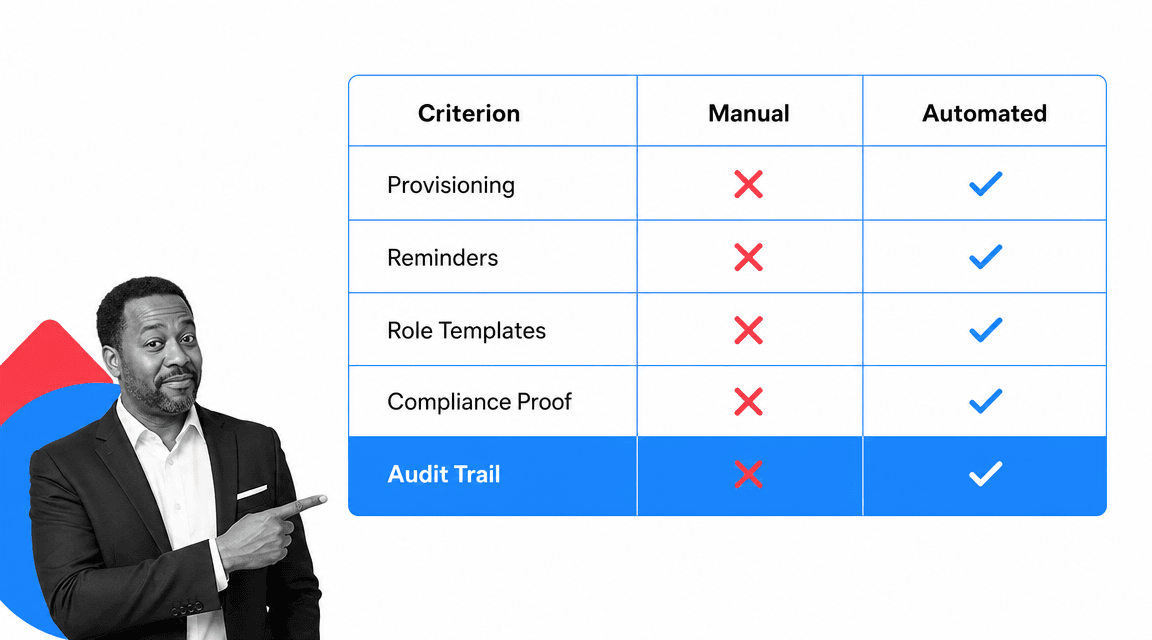
The difference between a compliant onboarding program and a hopeful one is evidence. Manual onboarding can technically be compliant, but it cannot easily prove it. A workflow that records every completed step turns compliance from a fire drill into a byproduct of how the work already runs.
Building Onboarding Workflows in Process Street
Process Street is a Compliance Operations Platform, which means onboarding is treated as a process that has to run correctly and be provable, not just a form to fill in. You document the procedure once, turn it into a workflow that executes by default, and get a record of every run.

Build the process once
You start from a template or your own steps, add form fields to capture new hire details, and set the order of tasks. Each task can carry instructions, files, and the exact information the owner needs to act. The help documentation on building onboarding workflows walks through the setup.
Run it by default
Every new hire kicks off a fresh run of the same workflow. Tasks assign themselves to the hiring manager, IT, and payroll. Conditional logic reveals role-specific steps, and stop tasks hold the run until an approval clears, so access is never granted ahead of a required check. Reminders fire automatically when a step is overdue.
Connect it to your systems
Process Street has direct, universal integrations to thousands of systems, and when you need one that is not pre-wired, an AI agent builds the connection on the fly. Onboarding data flows to your HRIS, identity provider, and IT service desk without manual rekeying, so the workflow does real work across your stack rather than just tracking it.
Prove it ran
Every completed task is timestamped and attributed, so a manager sees live status across all active hires and a compliance lead can produce the record on demand. The process improves as you go, because gaps and bottlenecks surface in the data instead of in a postmortem.
How to Choose Onboarding Workflow Software
Choosing onboarding workflow software comes down to whether the tool will actually run your process or just store it. The comparison below shows where automated onboarding pulls ahead of a manual approach across the criteria that decide success.
Match it to how you actually hire
List the roles, departments, and locations you hire for and confirm the tool can branch for each without a separate setup. If most of your hiring is remote, weigh the remote experience heavily. If you hire across regulated functions, weigh compliance and audit features heavily.
Test the parts that usually break
Run a real onboarding scenario in a trial. Can a non-technical owner build and change a workflow without waiting on IT? Do assignments, reminders, approvals, and stop points behave the way you need? Does it connect to your HRIS and identity provider cleanly? The answers to those questions matter more than a long feature list.
Weigh total cost, not just license price
A cheaper tool that needs a developer to change a step or a consultant to integrate it is not cheaper. Favor software your own team can own and adapt as roles and policies change, so improvement does not depend on a budget cycle.
How to Roll Out Onboarding Workflows Without Disruption
The fastest way to stall an onboarding project is to try to automate everything at once. A phased rollout gets you a working process quickly and builds the credibility to expand.
Start with one role
Pick the role you hire most often and map its current process end to end, including the messy parts. Build that single workflow, run your next few hires through it, and fix what you learn. One solid workflow beats ten half-finished ones.
Bring the owners in early
IT, payroll, and hiring managers all own pieces of onboarding. Involve them while you build so the assignments and approvals reflect how work really moves. A workflow that ignores how a team operates gets quietly abandoned.
Expand by role and improve as you go
Once the first workflow runs cleanly, branch it for the next role or department. Review the data each cycle, retire steps that add no value, and tighten the ones that do. Onboarding is never finished, and the point of running it in software is that it gets better every time instead of drifting.
FAQs
What is onboarding workflow software?
Onboarding workflow software runs the steps that bring a new employee from accepted offer to fully productive. It assigns each task to an owner, collects information through forms, triggers actions like IT provisioning, and records that every step was completed, so onboarding happens the same way every time instead of living in email and memory.
How is onboarding workflow software different from an HRIS?
An HRIS is the system of record for employee data such as payroll, benefits, and personal details. Onboarding workflow software runs the process of bringing a person in: assigning tasks, enforcing approvals, and coordinating IT, payroll, and managers. The two work together, with the workflow tool driving execution and pushing the resulting data into the HRIS.
Can onboarding workflow software help with compliance?
Yes. Onboarding involves required steps like employment eligibility verification, policy acknowledgments, and secure handling of personal data. Workflow software enforces the correct sequence and deadlines, collects signatures, and timestamps every action, which gives you a complete audit trail you can produce on demand rather than reconstructing it later.
Do you need technical skills to build onboarding workflows?
No. Modern onboarding workflow software is built for non-technical owners. An HR or operations lead can create a workflow, add form fields, set assignments and conditional logic, and connect other systems without writing code or waiting on IT, which is what lets the process improve as roles and policies change.
How long does it take to set up an onboarding workflow?
A single role can be live in a few hours if you start from a template and map your existing steps. Most teams launch one workflow for their most common role, run a few hires through it, and refine from there. Expanding to more roles and deeper integrations happens in phases rather than all at once.
