


Turn every policy into automated workflows with built-in enforcement and audit-ready proof.



Process Monitoring
Process monitoring is the discipline of tracking a live business process while work is still happening, so your team can see status, catch exceptions, and act before a small miss turns into a customer, compliance, or operational problem.
It is different from reading a report after the fact. Good process monitoring connects each workflow step to an owner, a signal, a threshold, and a response path. The point is not just to know what happened. The point is to keep the process under control while there is still time to fix it.
In this guide, we will cover how process monitoring works, what signals matter, how it fits into business process management, and how Process Street helps teams turn monitoring into enforceable execution.
We will cover:
- What process monitoring means
- Why process monitoring matters
- What to monitor in a business process
- Process monitoring versus process management
- How to build a process monitoring system
- Process monitoring with Process Street
- How to improve process monitoring over time
- FAQs
What process monitoring means
Process monitoring means continuously checking whether a repeatable business process is moving through the right steps, with the right owners, within the right time windows, and with enough evidence to prove the work was done correctly.
In a simple workflow, monitoring might mean checking whether a manager approved a request before a deadline. In a regulated workflow, it might mean tracking whether evidence was attached before a control was marked complete. In a customer-facing workflow, it might mean watching whether a handoff stalled before the customer had to ask for an update.
The core question
The core question is: is this process behaving the way it is supposed to behave right now? A static SOP cannot answer that question on its own. A dashboard with lagging metrics cannot answer it quickly enough. Process monitoring closes that gap by watching execution signals as the work moves.
The four parts of monitoring
- Process definition: the expected steps, owners, fields, rules, and outcomes.
- Execution signal: the live data that shows where each run, case, request, or checklist stands.
- Exception logic: the thresholds that decide when something needs attention.
- Response path: the escalation, approval, remediation, or improvement workflow that happens next.
That is why process monitoring sits close to what a workflow is, but it adds a control layer. The workflow defines how work should move. Monitoring checks whether it is moving that way.
Why process monitoring matters
Teams usually notice process problems too late. A missed approval becomes a customer delay. A skipped evidence field becomes an audit scramble. An overdue handoff becomes an internal fire drill. Process monitoring matters because it moves those issues from late discovery to early intervention.
It turns visibility into control
Visibility is only useful when it changes behavior. A useful monitoring system does not just show that work is late. It shows who owns the next step, what rule was missed, what evidence is missing, and what action should happen now.
That is why process monitoring is strongest inside a workflow management system. The signal, owner, evidence, and response path can live in the same operating layer.
It protects repeatable work
Repeatable work breaks when people rely on memory, informal follow-up, and scattered documents. Monitoring creates a live record of how a process is running, which makes it easier to spot bottlenecks, repeated exceptions, handoff delays, and workarounds that never make it back into the documented procedure.
This is especially important for process documentation. Documentation explains the intended process, but monitoring proves whether the process is actually being followed.
For standard operating procedures, the same idea applies. A standard operating procedure workflow defines the expected path, while process monitoring shows whether live work is still matching it.
It improves decisions
A manager who only sees monthly output metrics has to guess where work slowed down. A manager with process monitoring can see the actual step, owner, queue, dependency, or control that caused the issue. That makes improvement practical instead of political.
What to monitor in a business process
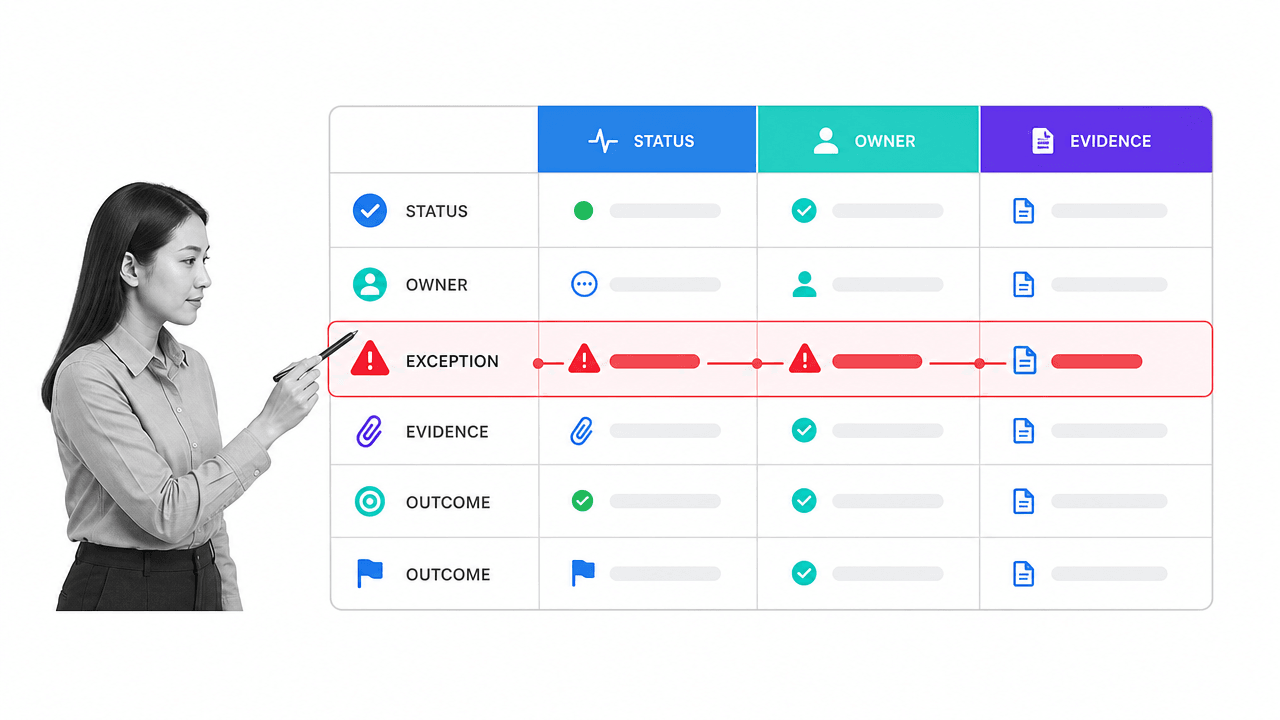
The best process monitoring signals are tied to decisions. If a signal cannot trigger a useful action, it probably belongs in reporting rather than monitoring.
Status
Status tells you where each process run sits: not started, active, blocked, waiting for approval, overdue, complete, or failed. Status should be tied to a real workflow step, not a vague label someone updates manually once a week.
Owner
Every monitored item needs a clear owner. If a request is stuck and nobody owns the next move, monitoring becomes passive observation. Owner tracking makes escalation clean because the system knows who should act.
Time
Monitor time at the step level, not only the total cycle time. Step-level timing shows where work waits, where approvals pile up, and where service-level commitments are at risk. It also helps you separate a genuinely slow process from one delayed by a single recurring bottleneck.
Exceptions
Exceptions are the most important monitoring surface. Examples include a missing required field, an overdue approval, a skipped checklist item, a failed integration, a policy mismatch, or a repeated rework loop. Exceptions should trigger a response workflow, not just a red icon.
Evidence
For compliance, quality, finance, legal, HR, and customer operations, completion is not enough. Teams need evidence. Monitor whether required files, approvals, comments, signatures, screenshots, or system records are attached before a process is marked done.
A structured internal audit reporting workflow is a good example: the process is not complete just because a reviewer says it is complete. The workflow needs findings, evidence, approvals, corrections, and follow-up.
Process monitoring versus process management
Process monitoring is one part of process management. Business process management covers the broader system: design, documentation, execution, measurement, optimization, and governance. Monitoring focuses on the live measurement and response layer.
Think of process management as the operating system for how work should run. Process monitoring is the control room that shows whether the system is actually running as intended.
Process monitoring versus process automation
Process automation moves work automatically. Process monitoring checks whether that automated or human-driven work is moving correctly. You need both. Automation without monitoring can scale bad handoffs. Monitoring without automation can create extra work for managers.
For teams comparing execution platforms, workflow management software should make monitoring visible at the task, owner, field, and approval level, not only through a dashboard after work is done.
Process monitoring versus process mining
Process mining usually analyzes event logs to understand how a process actually behaves across systems. Process monitoring is more operational: it watches active work and helps teams respond. The two can work together, but they answer different questions. Mining asks what patterns exist. Monitoring asks what needs attention now.
Process monitoring versus business activity monitoring
Business activity monitoring often connects business events to technical systems and infrastructure. IBM describes this kind of monitoring as adding business context to application and infrastructure signals. For operations teams, the practical lesson is simple: monitor the process outcome, not only the system event.
How to build a process monitoring system

A useful process monitoring system starts with one important workflow, not a company-wide dashboard project. Pick a process where delay, missed evidence, or inconsistent execution creates real risk.
1. Define the process boundary
Name the start event, end event, owner, inputs, outputs, and systems involved. If the boundary is vague, every metric will be vague. A business process analysis workflow helps teams clarify the process before they monitor it.
2. Choose the few signals that matter
Do not monitor everything. Start with the signals that change decisions: overdue steps, missing evidence, failed handoffs, approval queues, rework loops, and owner changes. Each signal should have a clear threshold.
3. Assign response owners
Monitoring fails when alerts go to a shared inbox nobody owns. Each exception needs a named owner or role. Decide who investigates, who approves the fix, who updates the process, and who confirms the issue is closed.
4. Build the response workflow
The response path should be as structured as the original process. If a required evidence field is missing, the workflow should request the evidence, block approval, notify the right reviewer, and record the resolution. If the same issue repeats, the workflow should create an improvement task.
This is also where workflow automation becomes useful. Automated routing, reminders, field updates, and notifications keep the response path moving without turning every exception into manual follow-up.
5. Review patterns, not just incidents
A single exception needs action. Repeated exceptions need process improvement. Use monitoring data to find recurring bottlenecks, unnecessary approvals, unclear ownership, and weak documentation. A process improvement tracker gives those fixes a place to live.
Create a decision cadence
Process monitoring also needs a decision cadence. A dashboard that nobody reviews becomes another passive report. Decide who checks the process view daily, who reviews weekly patterns, and who owns monthly changes to the workflow itself. The cadence should match the risk of the process. A customer escalation workflow might need same-day review. A quarterly policy certification process might need weekly review while the cycle is active, then a monthly review once the cycle closes.
The cadence should separate three questions. First, what is blocked right now and needs a response? Second, what pattern has repeated enough times to justify a workflow change? Third, what evidence will leadership, auditors, customers, or internal reviewers need later? Those questions keep process monitoring grounded in execution. They stop teams from reacting to every red status as if it has the same business impact.
A strong cadence also gives the team permission to remove signals that no longer help. If a metric never changes a decision, retire it. If an alert fires constantly but rarely means risk, raise the threshold or split the signal into more specific conditions. If owners keep ignoring an exception, the process might need a clearer escalation path instead of another reminder. Process monitoring improves when the team treats signals as operating controls, not dashboard decorations.
This is where process monitoring becomes part of continuous improvement. The monitoring layer catches the live exception. The review cadence turns repeated exceptions into better task design, tighter handoffs, clearer owners, stronger evidence requirements, and fewer manual checks. Without that loop, monitoring only tells the team what went wrong. With it, the process gets harder to break, and every review leaves the next workflow run a little clearer for the person doing the work.
Process monitoring with Process Street

Process Street turns monitored processes into executable workflows. Instead of storing the procedure in one place, tracking work in another, and chasing updates in messages, teams run the process where owners, fields, approvals, automations, and evidence live together.
Monitor execution at the task level
Each workflow run shows what has been completed, what is waiting, who owns the next step, and what required information is still missing. That makes monitoring concrete. You are not looking at an abstract process map. You are looking at the work itself.
Use rules to prevent bad completion
Required fields, approvals, role assignments, conditional logic, and stop tasks help keep the process from moving forward before the right work is done. That matters for process monitoring because the system can enforce the standard instead of only reporting that someone missed it.
Connect monitoring to automation
Process Street has direct, universal integrations to 5,000+ systems. Need a new one? An AI agent builds it on the fly. That means monitoring signals can connect to the systems where work already happens, while the workflow remains the controlled execution layer.
Keep proof with the work
Approvals, comments, field values, file uploads, task history, and audit trails stay attached to the workflow run. That gives operations and compliance teams a record they can inspect without reconstructing the process from emails and spreadsheets.
For teams building the foundation first, a process improvement checklist can help define what should change before the monitoring model gets more advanced.
How to improve process monitoring over time
Process monitoring should get sharper every month. The first version usually catches obvious delays and missing fields. The better version catches patterns, predicts risk, and feeds process updates back into daily work.
Tighten thresholds
Early thresholds are often too broad. Once you have real execution data, adjust them. A 48-hour delay might be acceptable in one step and dangerous in another. The right threshold depends on business impact, not generic urgency.
Separate noise from risk
Too many alerts train teams to ignore the system. Group signals by risk level. A missing optional comment should not look the same as a skipped compliance approval. High-risk exceptions deserve escalation. Low-risk exceptions may only need a weekly review.
Connect monitoring to root cause analysis
When the same exception repeats, treat it as a design problem. The issue may be unclear instructions, a missing integration, an overloaded approver, or a step that no longer adds value. A root cause analysis and corrective action workflow turns repeated monitoring signals into permanent fixes.
Audit the monitoring system itself
Monitoring can drift just like any other process. Review whether the signals still match the process, whether owners still make sense, whether evidence requirements are useful, and whether the response workflow still reflects how the team should act.
External examples show the same pattern across the category. Camunda frames monitoring around real-time process visibility, SAP frames operational process intelligence around process monitoring plus alerting and response, IBM connects business process context to application and infrastructure signals, and iGrafx frames process monitoring around real-time analysis. The lesson is consistent: monitoring becomes valuable when it drives action.
FAQs
What is process monitoring?
Process monitoring is the practice of tracking a live business process so teams can see status, ownership, exceptions, timing, and evidence while work is still happening. It helps teams catch problems early instead of discovering them after the process is complete.
What should you monitor in a business process?
Monitor status, owner, time, exceptions, evidence, and outcomes. The best process monitoring signals are tied to clear response actions, such as escalation, approval, remediation, or process improvement.
How is process monitoring different from process management?
Process management is the broader discipline of designing, running, improving, and governing processes. Process monitoring is the live tracking layer that shows whether a process is moving correctly and what needs attention now.
What are process monitoring KPIs?
Common process monitoring KPIs include cycle time, overdue step count, approval aging, exception rate, rework rate, missing evidence rate, handoff delay, and completion quality. Choose KPIs that help someone take action, not just observe activity.
How does Process Street support process monitoring?
Process Street supports process monitoring by turning procedures into executable workflows with task owners, required fields, approvals, automations, and audit history. Teams can see what is complete, what is blocked, what evidence is missing, and who owns the next step.
How do you start process monitoring?
Start with one high-risk or high-volume process. Define the process boundary, choose the few signals that matter, assign response owners, build the escalation workflow, and review recurring exceptions for improvement opportunities.
