


Turn every policy into automated workflows with built-in enforcement and audit-ready proof.



Process Optimization Software
Process optimization software helps teams measure how repeatable work performs, find the constraint that matters most, test a better method, and standardize the improvement. It connects the designed process to live execution data, so optimization becomes a controlled operating cycle instead of a one-off workshop.
The point is not to optimize every metric at once. The point is to improve a defined outcome without weakening quality, compliance, customer experience, or control. A strong system makes the current state observable, ties each change to a hypothesis, and preserves the evidence needed to decide whether the new method is actually better.
This guide explains what business process optimization software does, which capabilities matter, how to choose and implement a platform, and how Process Street turns tracking into enforced execution and audit-ready proof.
We will cover:
- What process optimization software does
- What process optimization software should measure
- Why teams need process optimization software
- Process optimization software versus adjacent tools
- How to choose process optimization software
- How to implement process optimization
- Process optimization software with Process Street
- Process optimization mistakes to avoid
- How to sustain process optimization over time
- FAQs
What process optimization software does
A business process is a repeatable sequence that turns an input into an outcome. Process optimization software combines the process definition, live run data, analysis, controlled change, and governance needed to improve that sequence against a clear objective.
It connects the process model to real execution
A task can tell you that someone needs to review an invoice. A tracked workflow shows how the invoice entered the process, whether required fields were complete, who reviewed it, what approval threshold applied, whether an exception occurred, which system received the approved data, and when the workflow closed.
That connected record is why business process optimization needs execution data, not only a process map. The route, baseline, change, and result stay together.
The process analysis tools collected by ASQ include methods for understanding variation, causes, flow, and performance. Software makes those methods operational by connecting analysis to the exact runs and controls that produced the data.
It establishes a measurable baseline
Teams often track the same work in email, chat, a spreadsheet, and a project board. Each surface holds part of the truth, so the real status depends on asking people. A connected tracking system replaces that scavenger hunt with one current record for the run.
A current source of truth includes both human work and automated actions. If a system update fails after an approval, the workflow should show the failed action and the response owner instead of appearing complete because the human task was checked off.
It turns improvement into controlled execution
Passive tracking tells you that something went wrong. Controlled tracking helps prevent the mistake or routes a response. Required fields, approval gates, role assignments, conditional paths, stop rules, and escalation actions turn the tracker into an operating system for the work.
Optimization is safer when the process also carries its constraints. Required evidence, approvals, permissions, and valid transitions keep a faster process from becoming a weaker one. ISO 9001 quality management guidance emphasizes consistent processes and continual improvement, which is the same discipline software should support during execution.
What process optimization software should measure
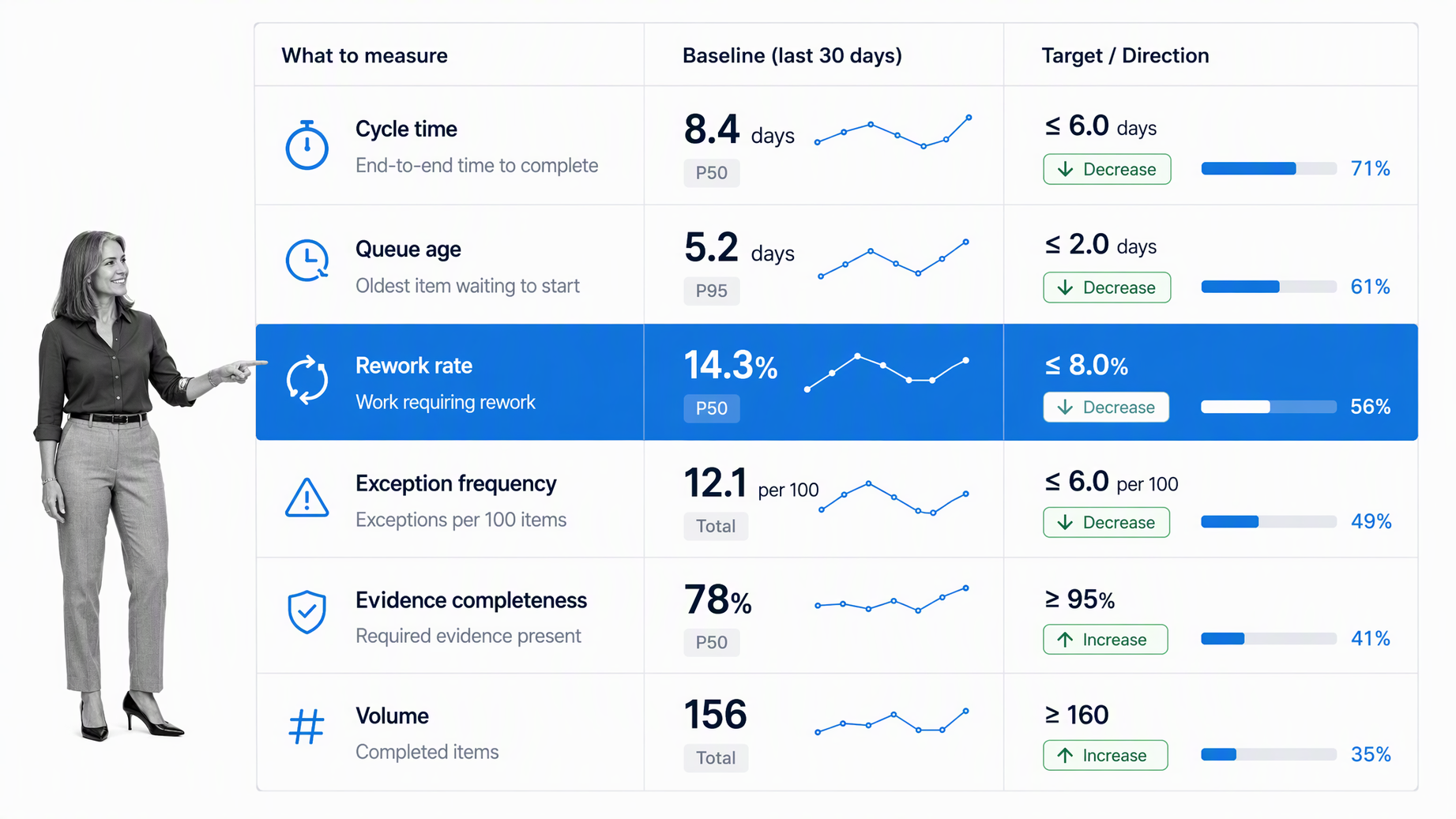
The right tracking model starts with decisions. Track the signals that help someone intervene, approve, reassign, investigate, or improve the workflow. Move purely descriptive numbers into periodic reporting so the live tracking surface stays useful.
Flow and cycle time
Track the current stage of each workflow run and the status of the active step. Useful states include not started, active, waiting, blocked, overdue, rejected, approved, canceled, and complete. A single percentage-complete field hides too much context for operational control.
Constraints and queue age
Every active task needs an owner, and every handoff needs a receiving role. Track assignment, acknowledgement, reassignment, and backup coverage. When ownership is unclear, work ages quietly until a customer, manager, or auditor notices.
Quality, rework, and variation
Track due dates, wait time, cycle time, time in stage, approval age, and escalation age. Step-level timing shows where the process actually slows down. Total duration alone cannot tell you whether the problem sits in intake, review, approval, or system follow-through.
Evidence and data quality
Track the information required to prove completion: field values, files, signatures, comments, approvals, screenshots, linked records, and system responses. A green status without the required evidence is weak proof and can hide incomplete work.
A structured internal audit reporting workflow demonstrates the pattern. Findings, owners, evidence, corrective actions, approvals, and closeout belong in one traceable run.
Exceptions and improvement actions
Track skipped steps, rejected work, failed automations, missing evidence, overdue approvals, duplicate requests, and rework. Every exception should point to a next action and an owner. An alert without a response path only creates noise.
Why teams need process optimization software
Teams need a process optimization system when the cost of uncertainty is higher than the cost of structure. That usually happens when work repeats, crosses roles or systems, carries deadlines, affects customers, or must be proven later.
Repeatable work drifts without a system
People improvise when instructions, assignments, and tracking live in separate places. Two employees can complete the same process in different ways, and both may believe they followed the standard. A tracked workflow makes the approved path explicit and records how each run followed it.
This is especially important for onboarding, approvals, compliance reviews, quality checks, and recurring finance work. An employee onboarding workflow should show which tasks are complete, who owns access setup, which policies were acknowledged, and what remains before the new hire is ready.
Managers need exception visibility
A manager should not have to inspect every healthy workflow run. The system should surface the exceptions that need judgment: late approvals, missing evidence, failed handoffs, unassigned tasks, or repeated rework. That changes management from chasing updates to resolving the few issues that matter.
Compliance needs proof at the point of work
Audit evidence is strongest when it is captured during execution. Reconstructing the story later from inboxes and files is slow and unreliable. The tracking system can keep the task history, approval, evidence, and exception response attached to the same record.
Improvement needs a shared record
Process improvement fails when every conversation starts with competing memories. Tracking creates a shared record of where work waited, which step produced rework, what exception repeated, and how long each stage took. The team can improve the workflow based on behavior rather than anecdotes.
Process optimization software versus adjacent tools
Process optimization overlaps with task management, project management, business process management, and workflow monitoring. The difference is the unit of control. Process optimization follows a repeatable route and its execution rules from start to finish.
Process optimization software versus task management
Task management organizes individual actions. It works well for personal priorities and simple team assignments. Process optimization connects tasks into a governed sequence with dependencies, conditions, evidence, approvals, and a run-level history.
For recurring operational work, a business process optimization method connects task completion to the next controlled step and measures whether the complete process improved.
Process optimization software versus project management
Project management coordinates a temporary body of work with a unique scope, plan, and finish. Process optimization is strongest for repeatable processes that should run consistently across many cases. A project can contain workflows, and a workflow can create project tasks, but they solve different control problems.
Process optimization software versus process mining
Process mining reconstructs paths from event logs to reveal how work actually moved. Process tracking software captures live state, ownership, evidence, and exceptions as work runs. Process optimization software uses those signals to test and standardize a better method.
Process optimization software versus process mapping
A process map describes the intended route. Tracking shows how real work travels through that route. A diagram can be perfectly designed while the live process still fails because ownership, evidence, and exceptions are not controlled.
Use a business process analysis workflow to clarify the route, then place the route into software that tracks execution at the run level.
How to choose process optimization software
Choose software by testing how it handles your hardest recurring workflow. A polished dashboard matters less than whether the system can represent the route, enforce the standard, and preserve proof without creating manual administration.
Start with the optimization objective
The platform should support sequential and parallel work, conditional paths, recurring schedules, forms, assignments, approvals, dependencies, and exceptions. If the model cannot represent the real process, your team will rebuild the missing logic in messages and spreadsheets.
Test analysis and control features
Look for required fields, stop rules, role-based assignment, approval gates, permissions, version control, due dates, escalation, and audit history. These features determine whether the platform merely displays work or actively keeps it inside the approved path. A governed standard operating procedure workflow is a useful test because it combines instructions, ownership, proof, review, and repeatable execution.
Evaluate baseline-to-result traceability
A useful report should let you move from a summary to the underlying workflow run. When a metric shows a late approval rate, you should be able to inspect the exact cases, owners, stages, evidence, and exception responses behind it.
Check integration and automation depth
Process optimization becomes fragile when employees have to copy status between systems. Check whether the platform can start workflows from real events, update systems of record, collect responses, route approvals, and surface failed actions with an owner.
Use a realistic pilot
Do not evaluate a platform with a toy checklist. Pilot a workflow that crosses at least two roles, includes one approval or evidence requirement, and updates another system. The pilot should expose how ownership, exceptions, permissions, reporting, and changes work in practice.
How to implement process optimization
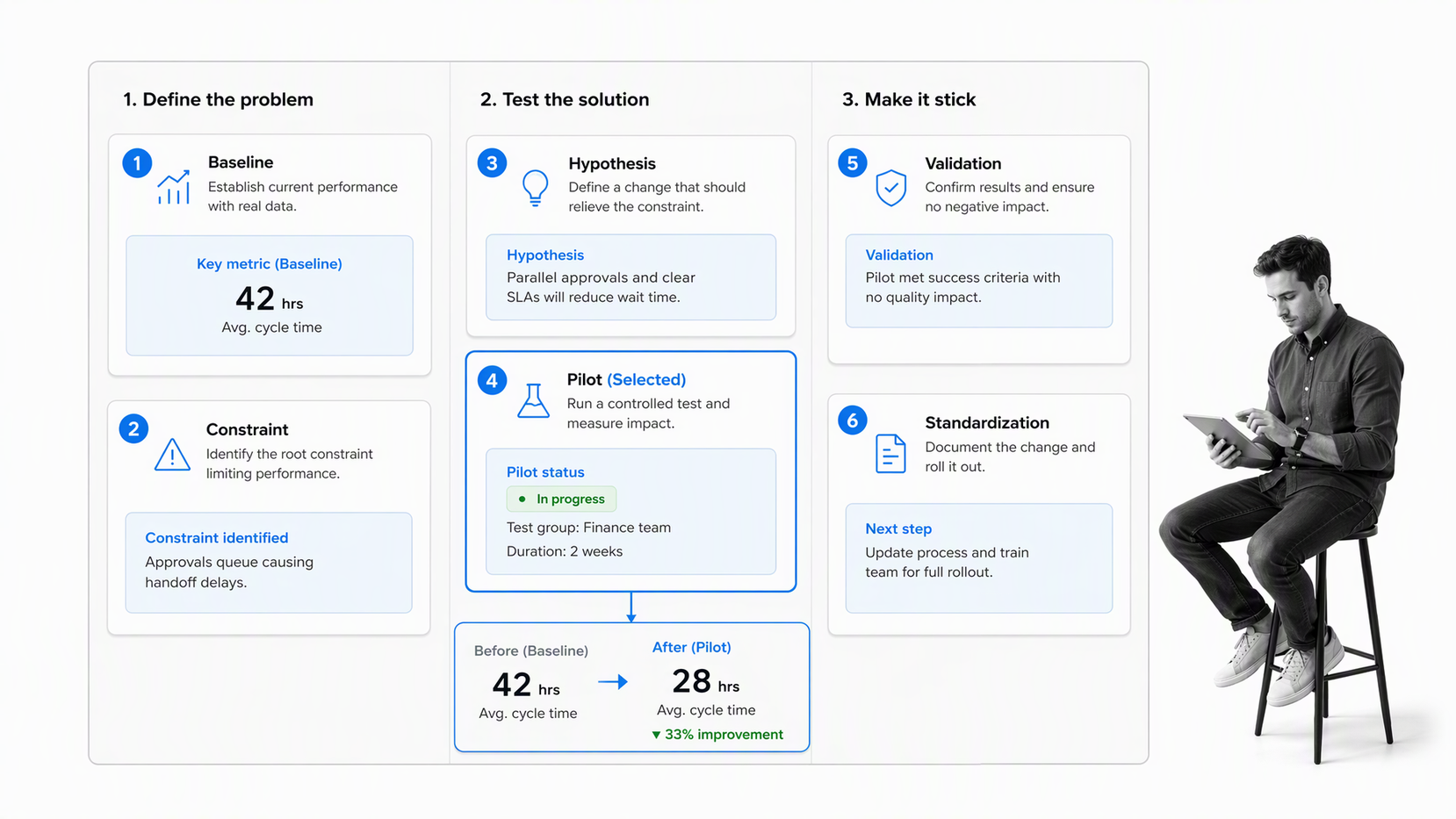
Implementation works best when you begin with one meaningful recurring process and make it reliable before expanding. The goal is not to digitize every existing habit. The goal is to create a controlled workflow that people can run and improve.
1. Define the process boundary and objective
Name the trigger, finish, owner, participants, inputs, outputs, systems, evidence, and risk. A clear boundary prevents the workflow from becoming an endless container for unrelated work.
2. Map the current state
Document the normal path, decision points, parallel work, approvals, and exceptions. Remove steps that exist only because the old tracking method was weak. A digital workflow should not preserve unnecessary coordination work.
3. Establish the baseline
Choose the small set of fields needed to identify the case, assign work, prove completion, and report performance. Standardize names and allowed values so reporting does not break under free-form variations.
4. Choose the constraint and hypothesis
Define what happens when work is overdue, evidence is missing, an approval is rejected, an automation fails, or an owner is unavailable. Each exception needs a response owner and a closeout rule.
5. Run a controlled pilot
Pilot with real work and a small group. Observe where people hesitate, work outside the system, misread instructions, or generate unnecessary alerts. Fix the workflow before expanding volume or teams.
6. Validate and standardize
Track improvement actions in a process improvement tracker. Assign each change, test it, and confirm whether it reduced delay, rework, exceptions, or evidence gaps.
The broader discipline of learning to manage workflow matters here. Software provides the control surface, but process ownership keeps instructions, roles, thresholds, and response rules current.
Process optimization software with Process Street
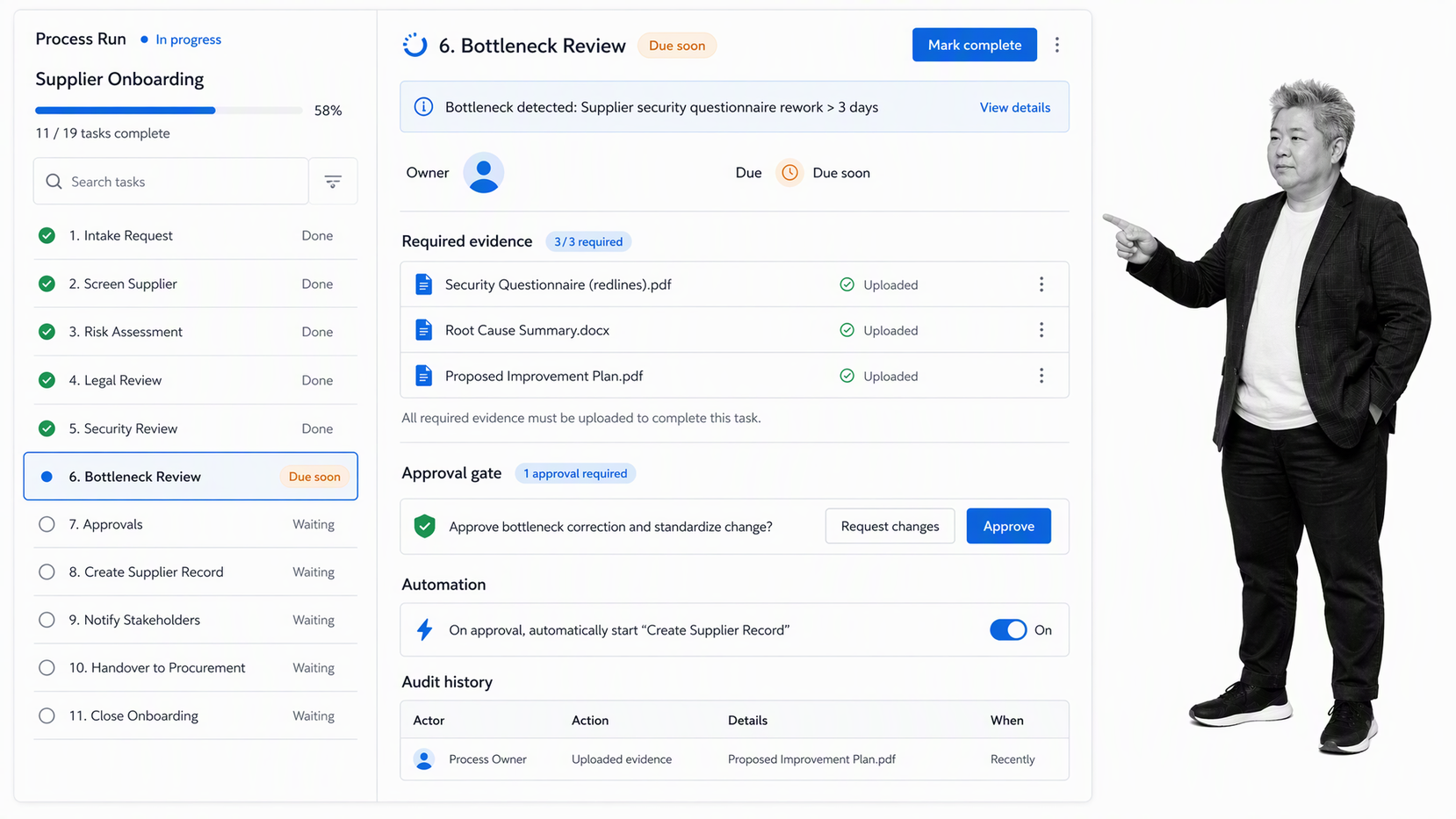
Process Street connects process improvement to the workflow where repeatable work actually runs. Teams create the approved route, run it for each case, assign tasks to people or roles, collect required information, route approvals, automate actions, and preserve a complete execution history.
Measure the process at task and run level
Each run shows its current stage, completed tasks, active owners, due states, fields, comments, approvals, and activity history. Process owners can inspect one case or review patterns across many runs without rebuilding status from separate tools.
Enforce the standard during execution
Required fields, conditional logic, stop tasks, approvals, permissions, and role assignments help prevent incomplete work from moving forward. The system can do more than report a miss after the fact. It can make the correct route the default route.
Connect the process to real systems
Process Street has direct, universal integrations to 5,000+ systems. Need a new one? An AI agent builds it on the fly. The workflow can start from real events, move data, request actions, and update systems while keeping the controlled execution record in one place.
Keep improvement proof attached to the work
Approvals, files, field values, comments, task history, and automation outcomes stay connected to the workflow run. Operations and compliance teams can inspect what happened without reconstructing the record from multiple sources.
Teams that need a broader category view can use this guide alongside workflow systems software, which explains how workflow engines, execution controls, automation, and monitoring work together.
Process optimization mistakes to avoid
Process optimization fails when the system becomes another place to update instead of the place where work runs. The common failure modes are predictable, so you can design around them.
Optimizing too many variables at once
Every field creates maintenance and user effort. Keep the fields that identify the case, control the route, prove completion, or improve a decision. Move optional context into instructions or linked records.
Improving a process without a stable baseline
If the workflow says one thing and a spreadsheet says another, people will trust whichever surface is more convenient. Decide which system owns status and make other systems receive or display that status without competing with it.
Automating a broken process
Too many alerts train people to ignore the system. Alert only when a threshold changes the next action. Route the alert to a named owner and track whether the exception was resolved.
Measuring speed without quality
A fast workflow can still produce bad work. Balance time metrics with evidence completeness, rejection, rework, exception recurrence, and outcome quality. Track whether the workflow finished correctly, not only whether it finished quickly.
Leaving process changes ungoverned
An undocumented change can break reporting, permissions, evidence requirements, or downstream automations. Use ownership, review, testing, and version control so the tracking model stays aligned with the approved process.
How to sustain process optimization over time
The first version should make work visible. The mature version should prevent repeated failure, predict risk, and feed learning back into the workflow design.
Create a balanced metric set
Start with completion rate, cycle time, time in stage, overdue rate, exception rate, rework rate, approval age, and evidence completeness. Segment by workflow and risk so important signals do not disappear inside company-wide averages.
Review constraints and exceptions by pattern
A single exception may be a case problem. A repeated exception is usually a workflow problem. Group exceptions by step, owner role, input source, decision, and system action to find the true constraint.
When a pattern needs investigation, a root cause analysis and corrective action workflow turns the finding into an owned fix with evidence and closeout.
Tune thresholds, controls, and escalation
Early thresholds are usually broad. Adjust them using real cycle time and risk. A two-day wait might be acceptable in one stage and dangerous in another. High-risk exceptions deserve immediate escalation, while low-risk patterns may belong in a weekly review.
Audit the optimization model
Review whether the workflow route, owners, due rules, evidence fields, permissions, integrations, and reports still reflect how work should run. The tracking model can drift just like the process it is meant to control.
The Lean Enterprise Institute describes lean thinking as a progression from customer value through the value stream, flow, pull, and continual pursuit of perfection. Software should support that loop with live process evidence, not reduce lean work to a static diagram.
ASQ presents Six Sigma as a disciplined way to reduce variation and improve capability. The best process optimization software supports that discipline by preserving the baseline, the tested change, the result, and the control that keeps the gain in place.
FAQs
What is process optimization software?
Process optimization software follows repeatable work from trigger to outcome. It records stages, owners, due states, handoffs, approvals, exceptions, evidence, and completion history so teams can see and control how each workflow run progresses.
What should a process optimization platform record?
It should record stage, task status, owner, handoff, due date, time in stage, approvals, required evidence, exceptions, automation outcomes, and the next action. The best signals are tied to a clear decision or response.
How is process optimization different from project management?
Project management coordinates temporary work with a unique scope and finish. Process optimization focuses on repeatable processes that should follow a consistent route across many cases, with defined rules, evidence, and exception handling.
How do you implement process optimization?
Start with one important recurring process. Define its boundary, map the approved route, choose tracking fields, assign owners, build escalation rules, run a controlled pilot, and improve the workflow using real exceptions and timing data.
Which process optimization metrics matter most?
Useful metrics include completion rate, cycle time, time in stage, overdue rate, exception rate, rework rate, approval age, and evidence completeness. Segment them by workflow and risk so averages do not hide the real constraint.
How does Process Street support process optimization?
Process Street turns procedures into executable workflows with tasks, roles, due dates, required fields, conditional logic, approvals, automations, and audit history. Teams can track each run while enforcing the standard and keeping proof attached to the work.
