





Software Project Management
Software project management is the practice of planning, coordinating, and controlling the work required to build and ship software on time, on budget, and to the standard your users expect. It blends classic project management discipline with the realities of software: shifting requirements, technical unknowns, and teams that need to release value continuously rather than once at the end.
Get it right and a project moves in a predictable rhythm, with a clear scope, a visible backlog, and a team that knows what to build next. Get it wrong and the same project drifts into missed deadlines, scope creep, and features nobody asked for. The difference is rarely talent. It is almost always the system of planning, tracking, and communication wrapped around the work.
This guide covers what software project management is, why it matters, the life cycle a project moves through, the methodologies teams use, the role of the software project manager, and the day-to-day processes, tools, and best practices that keep delivery on track. Whether you are formalizing how your team works for the first time or tightening an existing setup, you will find a practical foundation here.
In this article, we are going to cover everything you need to know about software project management, including:
- What Is Software Project Management?
- Why Software Project Management Matters
- The Software Development Project Life Cycle
- Popular Software Project Management Methodologies
- What a Software Project Manager Does
- Core Processes and Workflows That Keep Projects on Track
- How to Choose Software Project Management Tools
- Best Practices for Managing Software Projects
- Common Software Project Management Challenges
- FAQs
What Is Software Project Management?
Software project management is the discipline of leading a software project from an idea to a working, released product. It covers scope, schedule, budget, quality, risk, and the people doing the work. A software project is temporary and unique: it has a start, an end, and a defined goal, which separates it from ongoing operations like maintenance or support.
What makes software distinct from other kinds of projects is uncertainty. Requirements change as users see early versions. Estimates are hard because much of the work has never been done before. Integrations, dependencies, and technical debt can slow a team that looked on track a week earlier. Good software project management does not pretend this uncertainty away. It builds a system that surfaces problems early and adapts without losing the thread. The Project Management Institute defines project management as applying knowledge, skills, tools, and techniques to meet requirements, and software adds the need to do that in short, feedback-driven loops.
Project management versus product management
These two roles are often confused. Product management decides what to build and why, owning the roadmap and the customer problem. Project management decides how and when the agreed work gets delivered, owning the plan, the schedule, and the coordination. On small teams one person may wear both hats, but the responsibilities are different and both matter.
The constraints every software project balances
Every project trades off a familiar set of constraints, often called the triple constraint: scope, time, and cost, with quality sitting at the center. Push the deadline earlier and you usually cut scope or add cost. Expand scope and you extend the timeline or grow the team. Naming these tradeoffs openly is one of the most useful things a manager can do, because it turns silent assumptions into decisions everyone can see. Understanding how work flows through a defined process is the first step toward controlling those tradeoffs.
Why Software Project Management Matters
Software project management matters because software is expensive to build and easy to get wrong. Industry research on IT projects has long shown that a large share run over budget, over schedule, or deliver less value than planned. The most common causes are not exotic. They are unclear requirements, weak communication, and no reliable way to see whether the work is actually on track.
Strong management directly attacks those failure points. Here is what a well-run software project gives you:
- Predictability. Stakeholders can trust the dates and the scope because they are grounded in a visible plan and real progress, not optimism.
- Fewer surprises. Risks and blockers surface while there is still time to act, instead of arriving as a crisis the week before launch.
- Focused effort. A prioritized backlog keeps the team building the highest-value work first rather than spreading thin across everything.
- Faster delivery of value. Iterative releases put working software in front of users sooner, so feedback shapes the product before too much is built.
- Team health. Clear priorities and a sustainable pace protect the team from the burnout that comes with constant firefighting.
The payoff compounds. A team that ships reliably earns the trust to take on bigger, more ambitious work, while a team that misses repeatedly spends its energy managing disappointment. Building a repeatable project management workflow is how good teams make reliability the default rather than the exception.
The Software Development Project Life Cycle
Most software projects move through a recognizable life cycle, whether the team names it or not. Making the phases explicit helps everyone know where the project stands and what needs to happen next. The five phases below map to the standard project management process groups and apply across methodologies.

1. Initiation
Initiation defines why the project exists. You capture the business case, identify stakeholders, set a high-level goal, and decide whether the work is worth doing. The output is a shared understanding of the problem and a green light to plan. Skipping this phase is how teams end up building the wrong thing well.
2. Planning
Planning turns the goal into a route. You break the work into deliverables, estimate effort, sequence dependencies, set a schedule, and plan for risk. In agile settings this is lighter and continuous, built around a prioritized backlog rather than a fixed multi-month plan, but the intent is the same: know what to build and in what order.
3. Execution
Execution is where the software gets built. Developers write and review code, testers verify it, and the team coordinates through stand-ups, sprint reviews, or whatever cadence fits. Most of the budget and most of the calendar live here, so the systems that make execution visible and unblocked matter more than any other single factor.
4. Monitoring and Control
Monitoring runs in parallel with execution. You track progress against the plan, watch scope and budget, manage risks, and adjust when reality diverges from expectation. Good monitoring is not about status theater. It is about catching a slip early enough to do something about it, using signals like velocity, burndown, and cycle time.
5. Closure
Closure ships the work, confirms it meets the goal, and captures what the team learned. A retrospective turns a single project into organizational knowledge, so the next project starts smarter. Formal handover, documentation, and a clean archive keep the delivered software supportable long after the team moves on.
Popular Software Project Management Methodologies
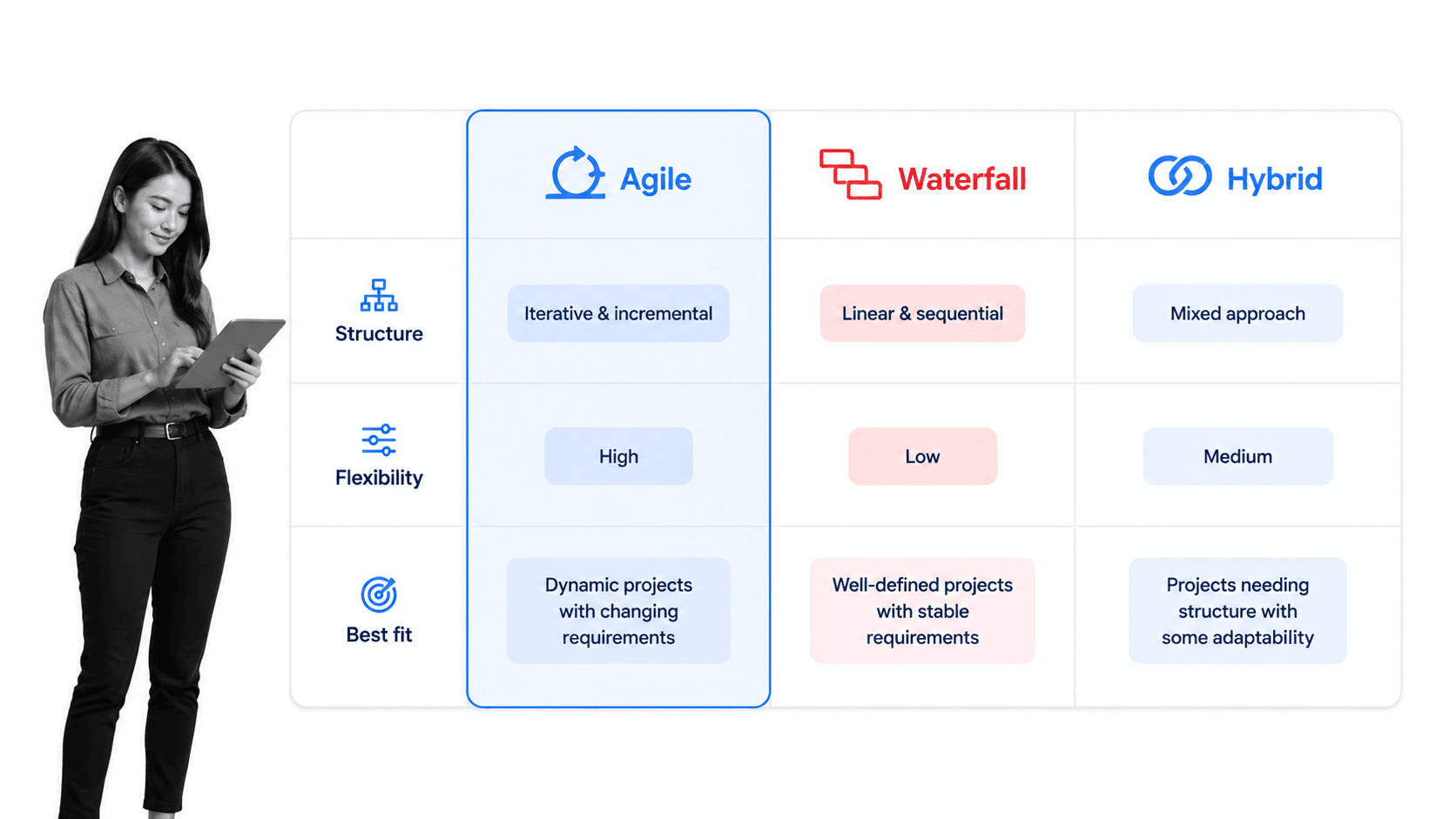
A methodology is the framework a team uses to organize the work. The right choice depends on how stable your requirements are, how much your stakeholders want to be involved, and how quickly you need to release. The main families are agile, waterfall, and hybrid approaches that blend the two.
Agile
Agile is iterative and incremental. Teams build in short cycles, gather feedback, and adapt as they go, guided by the values in the Agile Manifesto. It suits projects where requirements will evolve and early user feedback is valuable. Most modern software teams work in some agile flavor. If you are formalizing an agile setup, an agile project management template gives you a running start.
Scrum
Scrum is the most widely used agile framework. Work happens in fixed-length sprints, usually one to four weeks, with defined roles and events: sprint planning, daily stand-ups, sprint reviews, and retrospectives. The Scrum Guide is the canonical definition. A repeatable sprint planning checklist keeps every ceremony consistent, and teams that want the full cadence often standardize with a scrum project management workflow.
Kanban
Kanban visualizes work as cards moving across a board with columns for each stage, and limits how much work is in progress at once. It favors a continuous flow over fixed sprints, which makes it a strong fit for support, maintenance, and teams with a steady stream of incoming requests. Atlassian’s overview of the Kanban method is a useful primer.
Waterfall
Waterfall is linear and sequential. Each phase, from requirements to design to build to test, finishes before the next begins, as described in Atlassian’s waterfall guide. It works well when requirements are fixed and well understood, such as regulated or hardware-dependent projects, but it adapts poorly to change once the plan is set.
Hybrid approaches
Many teams blend the two, using a waterfall-style structure for the overall program and agile sprints inside individual workstreams. IBM’s comparison of agile and waterfall is a helpful reference when you are weighing the tradeoffs. The goal is not methodological purity. It is picking the approach that fits your requirements, your stakeholders, and your release needs. For a deeper look, our guide to the agile workflow process walks through how these cycles run in practice.
What a Software Project Manager Does
The software project manager is the person accountable for delivery. On agile teams the responsibilities may be shared across a scrum master, a product owner, and a delivery lead, but the underlying work is the same. It falls into a few core areas.
- Planning and scoping. Turning goals into a backlog or plan, estimating, and sequencing the work.
- Coordination. Keeping developers, designers, QA, and stakeholders aligned so no one waits on an unspoken dependency.
- Risk and issue management. Spotting threats early, tracking them, and driving them to resolution before they derail the schedule.
- Communication. Giving stakeholders an honest, current picture of progress, and shielding the team from noise so they can focus.
- Removing blockers. Clearing the obstacles that slow the team, from missing decisions to environment access to conflicting priorities.
The best managers spend less time producing reports and more time creating clarity. A shared, always-current view of the work replaces the status meeting, which frees the manager to do the harder job of unblocking people and making tradeoffs. That shift is far easier when the team runs on a repeatable workflow management system rather than scattered documents and memory.
Core Processes and Workflows That Keep Projects on Track
Methodology sets the shape of the work, but day-to-day delivery lives in a handful of recurring processes. Standardizing these is what separates a team that scales from one that depends on a few people remembering the steps.

Backlog and task management
A single, prioritized backlog is the heartbeat of a software project. Every request, bug, and feature lands there, gets prioritized, and moves across clear stages from backlog to in progress to review to done. When work is visible on a board, blockers show up immediately and nothing falls through the cracks.
Sprint and release cadence
A predictable rhythm of planning, building, reviewing, and releasing keeps momentum steady. Whether you run two-week sprints or a continuous flow, the recurring ceremonies give the team regular checkpoints to re-plan and re-prioritize. A standardized sprint planning process makes each cycle start cleanly instead of scrambling.
Code review, testing, and release
Quality gates protect the product as it grows. Consistent code review, automated and manual testing, and a repeatable release checklist mean quality does not depend on who happens to be on shift. Writing these as documented workflows, complete with approvals and stop points, turns tribal knowledge into a process anyone can run.
Onboarding and handoffs
Software teams change, and every departure or new hire is a moment where knowledge can leak. Documented onboarding and clean handoff workflows keep the project supportable regardless of who is on the team, which is exactly the kind of recurring process a platform like Process Street is built to standardize and automate.
How to Choose Software Project Management Tools
The right tools make good software project management practices easy to follow and hard to skip. The wrong ones add overhead the team quietly abandons. Rather than chasing the longest feature list, match the tool to how your team actually works.
When you evaluate options, weigh these factors:
- Work tracking. A flexible board or backlog that reflects your real stages, with the ability to prioritize, assign, and see status at a glance.
- Process consistency. Support for repeatable checklists and workflows so recurring work runs the same way every time.
- Collaboration. Comments, mentions, and shared context that keep conversation attached to the work instead of scattered across chat.
- Automation and integrations. The ability to remove manual handoffs and connect to the code, chat, and documentation tools your team already uses.
- Visibility. Reporting and dashboards that give stakeholders a live picture without pulling the team into status meetings.
Many teams combine a work-tracking tool for the backlog with a workflow platform for the repeatable processes around it, such as onboarding, releases, and reviews. If you are comparing options, our roundups of the best project management tools, the leading agile project management software, and dedicated project management workflow tools are good places to start. Teams on a budget can also review the top free online project management tools before committing to a paid plan.
Best Practices for Managing Software Projects
Methodologies and tools are only as good as the habits around them. These practices hold up across frameworks and team sizes.
Define scope and success up front
Write down what the project will deliver and what “done” looks like before the team starts building. A clear definition of done and explicit acceptance criteria prevent the slow scope creep that sinks so many projects.
Break work into small, visible pieces
Large tasks hide risk and stall momentum. Slicing work into small units that each deliver value makes progress measurable, estimates more honest, and blockers obvious the moment they appear.
Communicate early and often
Most project failures trace back to a communication gap, not a coding one. Short daily check-ins, an always-current board, and honest status updates keep everyone aligned and surface issues while they are still small.
Standardize recurring work
Anything the team does more than a few times, from releases to onboarding to incident response, deserves a documented workflow. Standardizing recurring work reduces errors, speeds up delivery, and makes it easy to hand off. Ready-made process and project templates save you from building every workflow from scratch.
Run retrospectives and act on them
A retrospective only helps if the team changes something as a result. Capture what worked, what did not, and one or two concrete improvements to try next cycle, then actually try them. Continuous improvement is what turns a good team into a great one over time.
Common Software Project Management Challenges
Even well-run software projects hit predictable challenges. Knowing the pattern makes each one easier to handle before it becomes a crisis.
- Scope creep. Requirements grow quietly until the timeline no longer fits. Defend against it with a clear scope, a change process, and a prioritized backlog that forces explicit tradeoffs.
- Unrealistic estimates. Software is famously hard to estimate. Break work down, use historical velocity instead of guesses, and treat estimates as ranges rather than promises.
- Poor communication. Silos and stale status create rework and missed dependencies. A shared board and a regular cadence keep everyone working from the same picture.
- Shifting priorities. Business needs change mid-project. An agile cadence and a well-groomed backlog let you re-prioritize without throwing the whole plan away.
- Knowledge loss. When work lives only in people’s heads, every departure hurts. Documented workflows and onboarding keep the project resilient to change.
The common thread is that most of these challenges are process problems, not talent problems. A team with clear scope, visible work, standardized workflows, and honest communication handles all five far better than a more talented team without those systems. That is the real promise of software project management: turning delivery from a gamble into a repeatable, improvable practice.
FAQs
What is software project management?
Software project management is the practice of planning, coordinating, and controlling the work needed to build and ship software on time, on budget, and to the expected quality. It applies project management discipline to the specific realities of software, such as changing requirements and iterative delivery, so a team can move from an idea to a released product predictably.
What are the main software project management methodologies?
The main families are agile and waterfall, plus hybrid approaches that blend the two. Agile frameworks like Scrum and Kanban build in short, iterative cycles and adapt to change, while waterfall moves through fixed sequential phases. Most modern software teams use an agile or hybrid approach, choosing based on how stable their requirements are and how quickly they need to release.
What are the phases of a software project?
A software project typically moves through five phases: initiation, planning, execution, monitoring and control, and closure. Initiation defines why the project exists, planning sequences the work, execution builds the software, monitoring tracks progress and manages risk, and closure ships the work and captures lessons learned. Agile teams run these phases in short, repeating loops rather than one long pass.
What does a software project manager do?
A software project manager is accountable for delivery. They plan and scope the work, coordinate developers, designers, and stakeholders, manage risks and issues, communicate honest progress, and remove the blockers that slow the team. On agile teams these responsibilities are often shared across a scrum master, product owner, and delivery lead, but the underlying work is the same.
Which tools are best for software project management?
The best tool is the one that fits how your team works. Look for flexible work tracking, support for repeatable checklists and workflows, strong collaboration, automation and integrations, and reporting that gives stakeholders live visibility. Many teams pair a work-tracking tool for the backlog with a workflow platform for the repeatable processes around it, such as onboarding, releases, and reviews.
What is the difference between agile and waterfall in software project management?
Agile is iterative and incremental: teams build in short cycles, gather feedback, and adapt as requirements evolve. Waterfall is linear and sequential: each phase finishes before the next begins, which suits projects with fixed, well-understood requirements. Agile handles change better, waterfall offers more up-front predictability, and hybrid approaches combine a waterfall structure with agile sprints inside it.
