


Turn every policy into automated workflows with built-in enforcement and audit-ready proof.



Manage Workflow
To manage workflow is to control how a repeatable piece of work moves from trigger to completion. You define the path, assign ownership, monitor progress, resolve exceptions, capture proof, and improve the flow based on what actually happens.
Good workflow management is not constant supervision. It creates a system where the next action is clear, the right person receives it at the right time, and important decisions cannot disappear into chat, email, or memory.
This guide shows you how to manage a workflow from design through daily operation. You will learn what to control, how to handle bottlenecks and exceptions, which metrics matter, and how to turn a documented process into repeatable execution.
Use the sections below to move from a loose sequence of tasks to a managed operating system:
- What it means to manage workflow
- Why workflow management breaks down
- Build the foundations to manage workflow
- How to manage workflow step by step
- Manage workflow exceptions and approvals
- Measure and improve workflow performance
- Manage workflow with Process Street
- FAQs
What it means to manage workflow
A workflow is a defined sequence of tasks, decisions, and handoffs that produces an outcome. Managing it means keeping that sequence useful after the diagram or checklist is created. The manager is responsible for the live system: who owns each stage, what starts the work, what blocks completion, and how the team knows the outcome is correct.
Workflow design versus workflow management
Design answers how the work should happen. Management answers whether it is happening, where it is stuck, and what must change. A strong design can still fail if nobody watches overdue tasks, updates ownership, reviews exceptions, or adjusts the workflow when policies and systems change.
The workflow management loop
A practical management loop has seven moves: define, assign, launch, monitor, intervene, measure, and improve. Each move feeds the next. Clear definitions make ownership possible. Ownership produces reliable execution. Execution creates data. Data reveals what to improve.
When a team needs a formal notation for complex paths, the Object Management Group BPMN specification provides a shared language for events, activities, gateways, and flows. Most operational workflows do not need a dense model, but they do need the same clarity about sequence and decisions.
- Define: name the trigger, outcome, tasks, decisions, and evidence.
- Assign: give each task and decision to a role with clear authority.
- Launch: start each run from a reliable event or request.
- Monitor: track state, deadlines, waiting time, and workload.
- Intervene: resolve exceptions without bypassing controls.
- Measure: compare speed, quality, compliance, and volume.
- Improve: update the workflow and test the change.
One workflow, many workflow runs
Separate the reusable workflow from each live run. The workflow is the controlled design. A run is one instance, such as one employee onboarding, one vendor review, or one monthly close. Management becomes easier when the team can improve the design while still seeing the state of every active run.
Why workflow management breaks down
Workflow management usually breaks at boundaries, not inside obvious tasks. The handoff between sales and onboarding, the wait for legal approval, the missing evidence from a vendor, or the exception that nobody designed for creates more delay than the task itself.
Unclear ownership
A task assigned to a team is often assigned to nobody. Use role ownership, then map the role to a person for each run. Name one accountable owner for the workflow itself, plus task owners and decision owners. Shared participation is useful, but shared accountability usually produces waiting.
Hidden work and side channels
When requests arrive through email, approvals happen in chat, and evidence sits in personal folders, the workflow has no reliable state. Bring the trigger, tasks, decisions, and proof into one management surface. If work must happen in another system, record the action and result in the workflow.
Overloaded workflows
A workflow that tries to cover every edge case becomes hard to understand and harder to maintain. Keep the main path clear. Use conditional branches for meaningful differences, not for every minor preference. Split a workflow when stages have different owners, rhythms, or outcomes.
Automation before clarity
Automation amplifies the design it receives. Before adding triggers and system actions, create solid workflow documentation and test the flow with real cases. Automating a confused handoff makes it faster to lose control.
No review cadence
A workflow drifts when regulations, policies, systems, and staffing change but the workflow does not. Give every workflow an owner, version history, and review date. Use incident data, exception patterns, and user feedback as inputs to the review.
Build the foundations to manage workflow
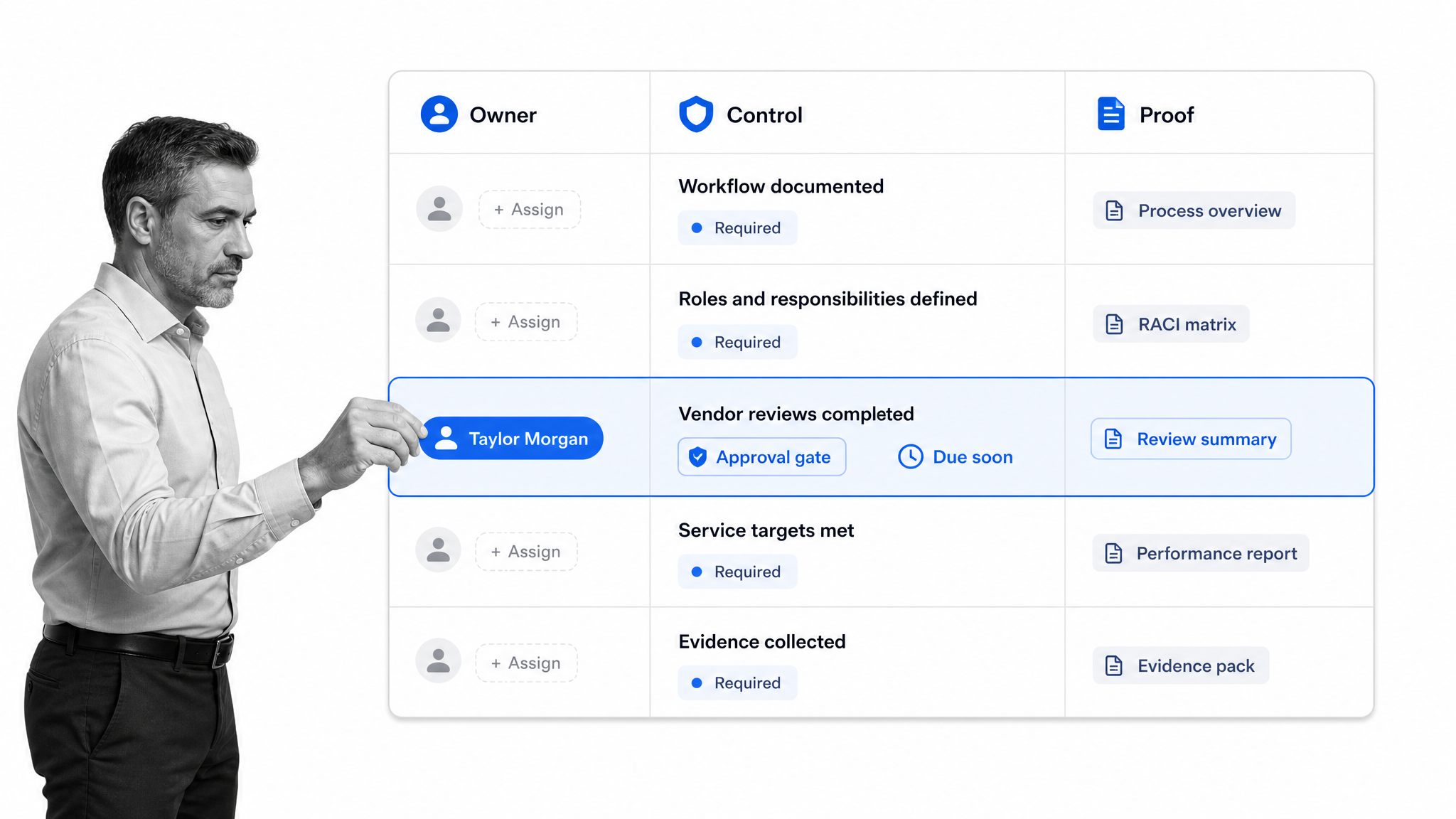
You can manage workflow reliably only when the operating foundation is explicit. Build these controls before you optimize dashboards or automate more steps.
Define the trigger and outcome
The trigger should be observable: a form submission, signed agreement, scheduled date, approved request, alert, or system event. The outcome should be testable. Replace vague endings like complete onboarding with conditions such as access provisioned, required training recorded, policy acknowledgment stored, and manager signoff captured.
The ISO process approach guidance connects process definition with inputs, outputs, controls, measurement, and improvement. That framing is useful even outside formal quality programs because it keeps a workflow tied to an outcome instead of a pile of tasks.
Name the process owner
The process owner maintains the workflow design, watches performance, approves changes, and resolves cross-team conflicts. This role is different from the owner of a single run. A hiring manager might own one onboarding run while HR operations owns the onboarding workflow.
Assign role-based task ownership
Assign tasks to durable roles such as hiring manager, security reviewer, accounts payable approver, or customer success owner. Map roles to people when a run starts. This keeps the workflow stable through vacations and staffing changes while preserving personal accountability.
Set service targets and escalation rules
Define when each step is due, how long it may wait, and what happens when it is late. A due date without an escalation rule only tells you that failure occurred. An escalation rule names who is notified, when ownership changes, and which risks require immediate intervention.
Design decisions and approvals
Decision points should state the question, the allowed outcomes, the information required, and the next route. Formal workflow approvals belong in the flow so the work cannot quietly proceed before authorization.
Define evidence at the point of execution
Evidence can be a completed field, attached file, timestamp, approval decision, signature, or system record. The records management guidance from the U.S. National Archives reinforces the operational value of reliable records. Decide what proof matters before the workflow runs, then require it where the work occurs.
Control access and change
Decide who can start runs, edit the workflow, approve decisions, and view sensitive information. Track changes to the workflow design. Uncontrolled edits create a second problem: the team can no longer explain which process version produced a result.
How to manage workflow step by step
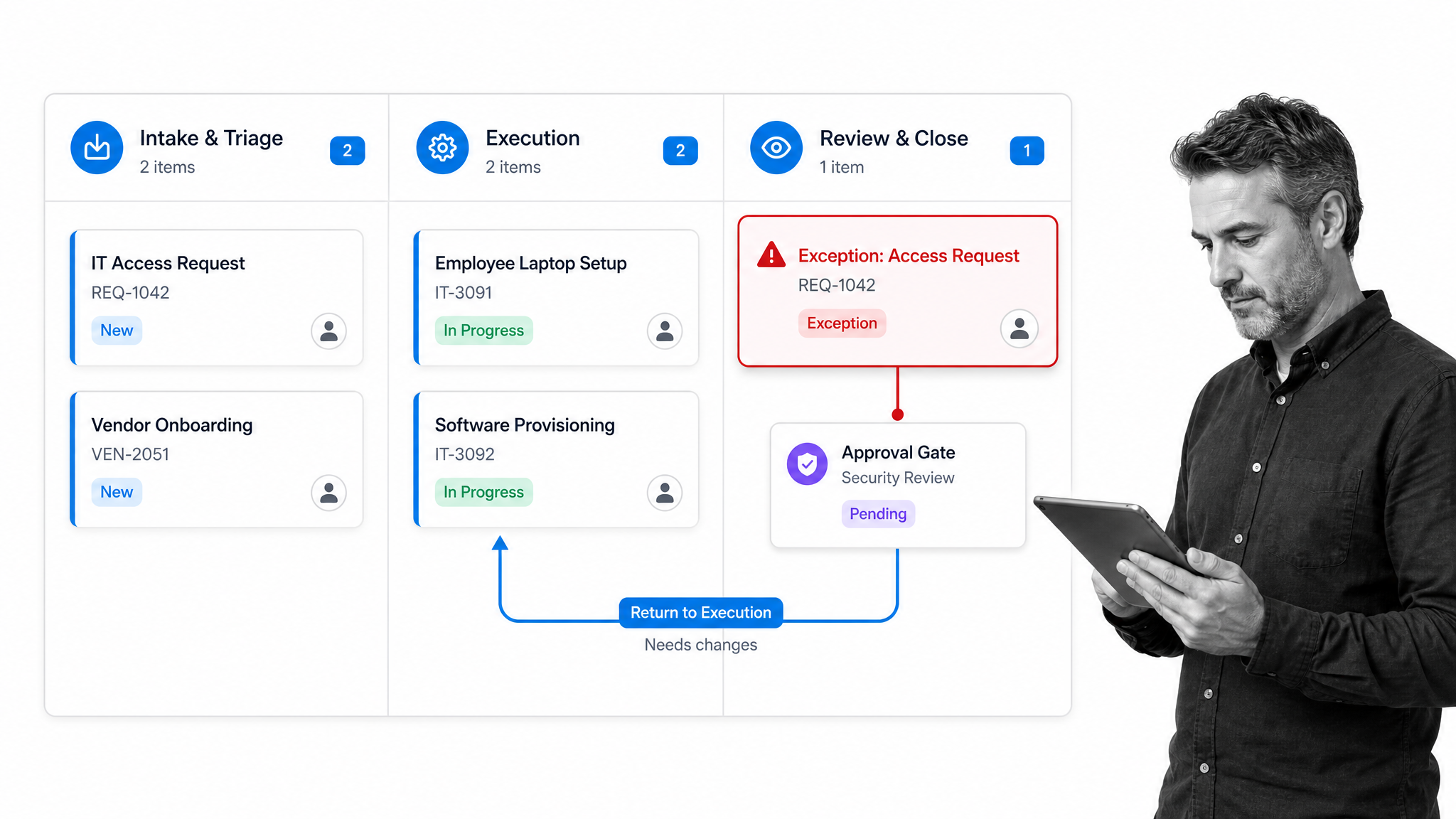
Once the foundation exists, manage the live workflow with a consistent operating rhythm. The following sequence works for onboarding, finance, compliance, customer operations, quality, IT, and other recurring processes.
1. Capture work through a controlled intake
Use one intake route per workflow. Collect the minimum information needed to classify, assign, and start the work. Validate required fields at intake so the team does not discover missing information halfway through execution.
Operational tools often expose the same basic management actions. For example, Microsoft guidance for managing workflows covers editing a workflow, viewing details, changing owners, and turning a workflow on or off. The broader lesson is that ownership and lifecycle state need deliberate control.
2. Triage by risk, urgency, and path
Not every case deserves the same route. Classify the request using a few clear rules. High-risk vendors may need security and legal review. A routine expense may use a simple approval. Conditional paths keep the workflow focused while adding control where it matters.
3. Assign the run and confirm capacity
Map roles to people, confirm deadlines, and look for overloaded owners. Workload is part of workflow management. A perfectly designed path still fails when a critical reviewer receives more work than they can complete.
4. Launch with the right context
Each owner should see the instruction, required input, decision criteria, deadline, and downstream impact. Do not make people search for the policy or guess what complete means. Put the source of truth beside the task.
5. Monitor state and waiting time
Track more than completion. Look at active work, blocked work, overdue work, time in stage, and unassigned tasks. A workflow management system should reveal which step needs attention without forcing a manager to open every run.
6. Resolve exceptions through the workflow
When a case deviates, record the reason, route it to the authorized decision maker, capture the decision, and return it to the correct stage. Avoid creating a shadow process in email. The exception record is valuable evidence and a future improvement signal.
7. Close with proof and downstream handoff
Completion should require the defined outcome and evidence, not just every box checked. Confirm the next system or team received what it needs. A clean close prevents finished work from creating an unmanaged follow-up process.
8. Review the run and update the design
Review representative runs, recurring delays, and exception reasons. Use workflow optimization to remove waste without weakening controls. Change one part at a time when possible, then compare performance before and after.
Manage workflow exceptions and approvals
Exceptions are normal. Unmanaged exceptions are dangerous. The goal is not to force every case down the happy path. The goal is to make deviations visible, authorized, and recoverable.
Separate an exception from an error
An error is work performed incorrectly. An exception is a case that legitimately needs a different route. Treating every exception as an error encourages people to hide it. Treating every error as an exception weakens standards. Name the difference in the workflow.
Use risk-based approval levels
Match approval effort to consequence. Low-risk cases can use single approval or automatic rules. Higher-risk cases may need sequential review, separation of duties, or evidence from multiple functions. Record why the case received that level of control.
Design rejection and rework paths
An approval step is incomplete without a rejection route. Define who receives the work back, what information accompanies the rejection, which deadline applies, and whether the same approver must review the resubmission.
Protect stop conditions
Some tasks should stop the workflow until a requirement is satisfied. Examples include missing identity evidence, failed quality checks, unapproved contracts, or incomplete security review. Make stop conditions explicit and restrict who can override them.
Learn from exception patterns
One exception may be noise. Repeated exceptions reveal a design problem, policy mismatch, training gap, or changing business condition. Review exception categories monthly or quarterly and decide whether the main workflow needs a new branch, clearer instruction, or upstream validation.
Measure and improve workflow performance
The best workflow metrics connect speed, quality, workload, and control. A single metric can create the wrong behavior. Faster cycle time means little if rework increases or required evidence disappears.
A practical workflow management best-practices guide can help teams compare their operating habits with common management patterns. Use external guidance as a prompt for review, then make decisions from your own run data, risk, and service commitments.
Cycle time and time in stage
Cycle time measures the elapsed time from trigger to outcome. Time in stage shows where that time accumulates. Track both because an acceptable total can hide a fragile bottleneck that will fail when volume grows.
Throughput and work in progress
Throughput shows how many runs finish in a period. Work in progress shows how many remain active. If intake grows faster than completion, the queue expands even when individual owners appear busy.
On-time completion and overdue exposure
Measure the share of runs and critical tasks completed on time. Also measure how long overdue work remains open and which risk it carries. Ten low-impact overdue tasks may matter less than one overdue access revocation.
First-pass quality and rework
Track whether work passes review the first time. Rework often reveals unclear instructions, missing inputs, poor training, or a control placed too late. Pair rework rate with the reasons returned by reviewers.
Exception and approval patterns
Watch exception frequency, rejection rate, approval wait time, and override use. High rejection can mean poor upstream quality. Very low rejection can mean the approval adds little value. Frequent overrides can signal an unrealistic control.
Evidence completeness
For controlled workflows, measure whether required proof was captured before completion. Evidence completeness should be enforced in the workflow when possible, not reconstructed during an audit or customer review.
Improvement cadence
A managed workflow has a review rhythm. Use process documentation to record the current design and the reason for changes. Then compare a small set of metrics after each meaningful update. Improvement is a controlled experiment, not endless editing.
Manage workflow with Process Street
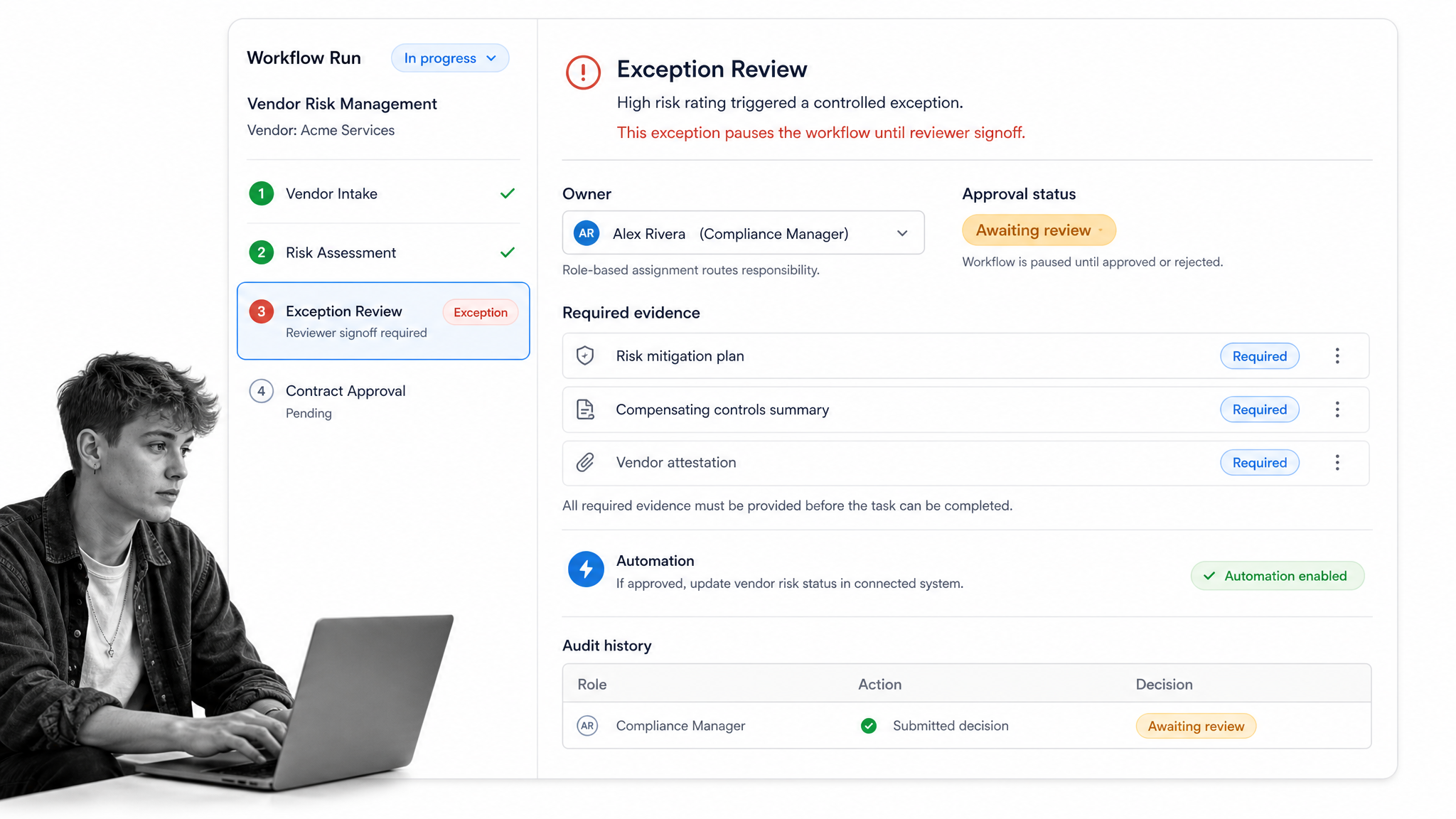
Process Street is a Compliance Operations Platform that turns a workflow design into a live operating surface. Teams can assign work, route decisions, collect required information, control exceptions, automate connected actions, and preserve proof as each run moves forward.
Turn the process into a reusable workflow
Start from a clear design or adapt a pattern from the workflow template library. A public employee onboarding workflow shows how one reusable design can coordinate tasks, assignments, due dates, and form fields across every new-hire run.
Put ownership and controls inside execution
Use assignments, required fields, due dates, approvals, and conditional logic so people receive the correct path and cannot accidentally skip an important decision. Controls become part of the work instead of a separate policy reminder.
Automate the predictable parts
Use workflow automation for repetitive routing, reminders, data movement, notifications, and system updates. Keep human judgment where consequence and context matter. Process Street has direct, universal integrations to 5,000+ systems. Need a new one? An AI agent builds it on the fly.
Manage risk with evidence and audit history
For workflows such as the audit and inspection process, the execution record matters as much as the checklist. Capture approvals, submitted evidence, task completion, comments, and timing as the run happens. That makes operational review and audit preparation part of normal work.
Scale from one workflow to an operating system
Begin with one recurring workflow that has real stakes. Once the team can run, review, and improve it reliably, standardize the management pattern across related processes. An operations management platform helps connect those workflows without collapsing them into one giant process.
The management principle stays simple: define the path, put ownership and controls inside it, monitor the live work, learn from exceptions, and improve the design. A strong workflow process template gives you a repeatable starting point. A live execution system turns that starting point into consistent results.
FAQs
What does it mean to manage workflow?
To manage workflow means controlling how recurring work moves from a trigger to a defined outcome. It includes assigning owners, monitoring state and deadlines, resolving exceptions, capturing evidence, measuring performance, and improving the workflow over time.
How do you manage workflow effectively?
Define the trigger, outcome, tasks, owners, decisions, deadlines, exceptions, and proof. Run each case through one controlled intake, monitor waiting time and blocked work, resolve exceptions inside the workflow, and review performance on a regular cadence.
Who should own a workflow?
A process owner should maintain the reusable workflow, approve design changes, and review performance. Each live workflow run should also have an accountable owner, while individual tasks and decisions are assigned to role-based owners.
Which workflow metrics should you track?
Track cycle time, time in stage, throughput, work in progress, on-time completion, rework, exception frequency, approval wait time, and evidence completeness. Use a balanced set so speed does not improve at the expense of quality or control.
How do you manage workflow exceptions?
Define exception categories, route each one to an authorized decision maker, capture the reason and evidence, and return the work to the correct stage. Review repeated exception patterns because they often reveal a workflow design problem or changing business condition.
Can Process Street manage workflows?
Yes. Process Street lets teams document, run, assign, automate, monitor, and audit recurring workflows. Teams can use approvals, conditional paths, required fields, integrations, and audit history to keep the workflow controlled from intake through completion.
