


Turn every policy into automated workflows with built-in enforcement and audit-ready proof.



8 Best airSlate Alternatives and Competitors (2026)
If you are weighing airSlate alternatives, you are usually after one of a few things: a simpler tool, a lower price, or a better fit for the exact job you need done. airSlate is a broad family of automation products, spanning e-signature through SignNow, PDF editing through pdfFiller and DocHub, no-code document workflow automation through altaFlow (formerly WorkFlow), and form access through US Legal Forms. That breadth is powerful, but it can be more than a team needs, and different teams value different parts of it.
This guide ranks eight tools that teams most often compare against airSlate, from dedicated e-signature platforms to no-code process builders and general automation software. The list is maintained by the Process Street team, and we have tried to be even-handed: each tool wins a specific use case, and we say plainly which one that is.
Process Street sits at the top for one clear reason. If your core need is enforceable, trackable, recurring process and standard operating procedure workflows, the kind of work where every run has to happen the same way and you need to see who did what and when, it is the strongest fit. For pure e-signature volume, contract generation, or connecting dozens of apps, another tool on this list may serve you better, and we point that out as we go.
To be fair to airSlate first: it does a lot well. Bundling e-signature, PDF editing, form access, and no-code document automation under one roof means a team can handle a whole document lifecycle in one place, and that consolidation is genuinely useful for organizations that want a single vendor. The most common reasons teams still look for alternatives are price at scale, the complexity that comes with a broad suite, and the simple fact that many teams only need one slice of what airSlate offers. If you only sign documents, or only build forms, or only run internal checklists, a focused tool is often faster to adopt and easier to justify.
Every claim about pricing and features below was checked against each vendor’s own site as we wrote this guide. Where a tool does not publish a price, we say so rather than guess. We do not invent ratings, and we do not frame any competitor as the overall category winner: each earns its place for the specific job it does best.
In this guide we cover everything you need to compare airSlate alternatives, including:
- airSlate alternatives at a glance
- The airSlate alternatives compared
- How we chose these airSlate alternatives
- 1. Process Street
- 2. PandaDoc
- 3. DocuSign
- 4. Jotform
- 5. Nintex
- 6. Kissflow
- 7. Formstack
- 8. Zapier
- airSlate alternatives: frequently asked questions
- Choosing the right airSlate alternative for your team
airSlate alternatives at a glance
The short version: Process Street is the best overall pick when your priority is running the same processes reliably every time, with visibility into every step. If you mainly need to send documents for signature, DocuSign is the specialist, and PandaDoc is the better fit when the document itself, a proposal or quote, matters as much as the signature. For collecting data with forms, Jotform is the easiest entry point and Formstack adds document generation and signing in the same flow. For heavier, IT-led process automation, Nintex and Kissflow go deeper, and Zapier is the tool to reach for when the real job is connecting many apps together.
- Best for repeatable process and SOP execution: Process Street
- Best for high-volume e-signature: DocuSign
- Best for proposals and sales documents: PandaDoc
- Best for easy online forms: Jotform
- Best for forms plus document generation and signing: Formstack
- Best for enterprise process automation: Nintex
- Best for no-code business apps: Kissflow
- Best for connecting apps and automating handoffs: Zapier
The airSlate alternatives compared
Here is how the eight airSlate alternatives compare at a glance. Each tool name links to its full write-up below. Prices reflect each vendor’s published rates at the time of writing and can change.
| Tool | Best for | Standout feature | Free plan | Starting price |
|---|---|---|---|---|
| Process Street | Recurring process and SOP execution | Stop tasks and conditional logic that enforce order | No (14-day trial) | See pricing page |
| PandaDoc | Proposals and sales documents | Document editor with pricing tables and e-sign | Yes (eSignature) | Paid document plans |
| DocuSign | High-volume e-signature | Tagged signature fields and signer routing | No | $11/month (billed annually) |
| Jotform | Easy online forms | Drag-and-drop form builder with e-sign | Yes | $39/month |
| Nintex | Enterprise process automation | Workflow design with document generation | No (trial) | Custom pricing |
| Kissflow | No-code business apps | Build custom process apps without code | No | Custom pricing |
| Formstack | Forms plus documents and signing | Form to generated document to signature | No (14-day trial) | $83/month |
| Zapier | Connecting apps and automation | Multi-step Zaps across thousands of apps | Yes | $19.99/month |
How we chose these airSlate alternatives
airSlate does several jobs at once, so a fair alternatives list has to cover each of them rather than pretend one tool replaces the whole suite. We looked for tools that teams realistically evaluate when they move away from, or alongside, airSlate, and we weighed each on the same criteria:
- Core capability fit. Does the tool actually do the job you would use airSlate for: signing, document generation, forms, or process automation?
- Ease of use. How quickly can a non-technical team member build and launch something useful?
- Pricing model. Is there a free plan or trial, and is pricing published or custom?
- Integrations. Does it connect to the rest of your stack without heavy engineering?
- Control and visibility. Can you see what happened, enforce steps, and prove the work was done?
No single tool wins every criterion, which is why the list is ranked by fit rather than by a single score. Process Street leads for teams whose central problem is repeatable execution and accountability. If your central problem is something else, the write-ups below name the tool that fits it better.
1. Process Street
Best for: teams that need enforceable, trackable, recurring process and SOP workflows, such as operations, onboarding, and compliance-adjacent process owners.
Process Street is a process management platform built around running the same workflow reliably, over and over, with full visibility into every step. Where airSlate centers on documents and signatures, Process Street centers on the process itself: you turn a standard operating procedure into a workflow template, then run it as many times as you need, with each run tracked from first task to last. It is the tool you reach for when the problem is not signing a document but making sure a multi-step job happens correctly every single time.
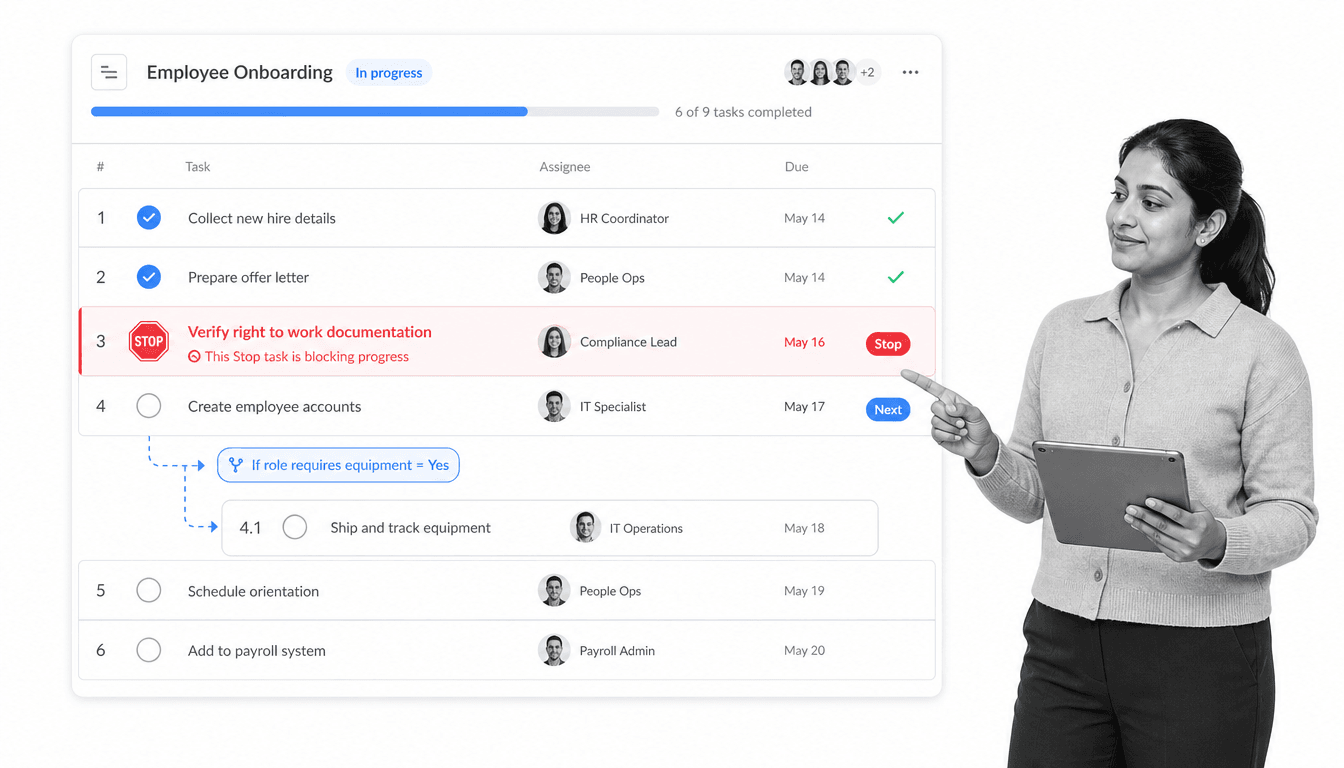
The features that set it apart are the ones that enforce how work gets done. Stop tasks hold a run in place until a required step is finished, so no one can skip ahead. Conditional logic shows or hides tasks based on earlier answers, so each run adapts to the situation without becoming a different template. Role assignments and due dates put the right task in front of the right person at the right time, and a live activity view shows exactly who did what and when. That combination is what makes Process Street a system of record for execution, not just a place to store a form.
The teams that get the most from Process Street tend to have processes that repeat and matter. Employee onboarding that has to cover every legal and IT step for every new hire. Client and vendor onboarding that cannot skip a due-diligence check. Monthly close, incident response, quality checks, and compliance routines where a missed step is expensive. In each of those, the value is not a single signed document but the guarantee that the whole sequence happened, in order, and left a record. That is the gap Process Street fills that a signing tool or a form builder does not.
Key features
- Workflow templates that turn an SOP into a repeatable, trackable run
- Stop tasks that enforce order and prevent skipped steps
- Conditional logic that adapts each run to the inputs
- Role-based assignments, due dates, and approvals
- A ready-made template library and reporting across every active run
Pros
- Purpose-built for recurring process and SOP execution, not one-off documents
- Enforces steps so processes actually run the way they are documented
- Clear visibility into who completed what, useful for audits and handoffs
- Approachable enough for non-technical teams to build their own workflows
- Strong fit for customer onboarding, employee onboarding, and compliance processes
Cons
- Not a dedicated e-signature product, so very high signature volume may still call for a signing specialist
- Not a document generation or contract assembly tool in the way PandaDoc is
On pricing, Process Street offers Startup, Pro, and Enterprise plans, and every new account starts with a 14-day trial of the Pro plan. Current rates are on the Process Street pricing page. If you want to understand where a process platform fits next to project and document tools, our guides to what a workflow is and the different types of process management are good starting points.
2. PandaDoc
Best for: sales and revenue teams that build proposals, quotes, and contracts and get them signed.
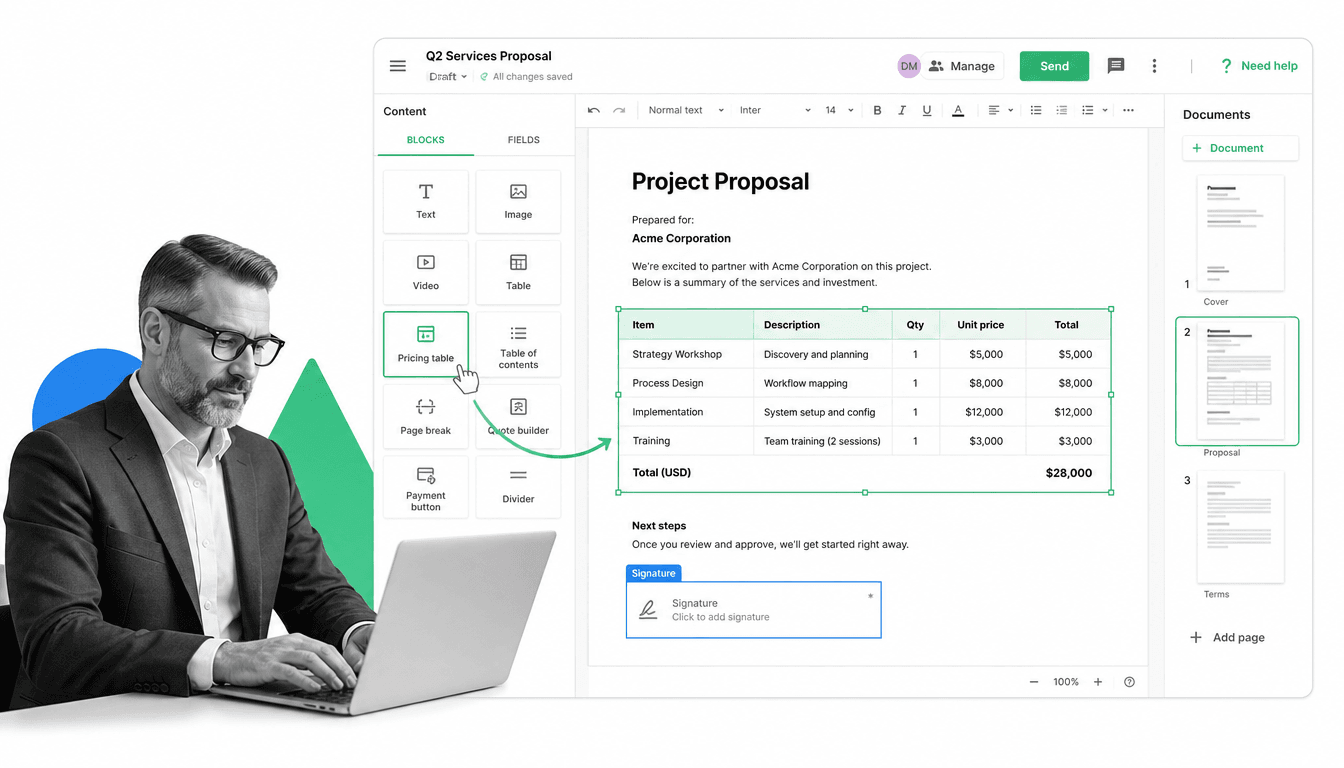
PandaDoc is a document creation and e-signature platform aimed at the documents that close deals. Instead of starting from a blank page, you build proposals, quotes, and contracts from reusable templates and content blocks, then send them for signature and track when they are opened and signed. Compared with airSlate, PandaDoc puts more of its weight on the document itself, especially sales documents, where formatting, pricing tables, and approvals matter.
This is where PandaDoc beats Process Street: if the artifact you care about is a polished, signable proposal or quote rather than a repeatable internal checklist, PandaDoc is the stronger fit. Its editor, template library, and built-in signing make it a natural home for a sales team, and approval steps keep the right people in the loop before a document goes out.
Key features
- Drag-and-drop document editor with reusable content blocks
- Proposal and quote templates with pricing tables
- Built-in e-signature and document tracking
- Approval workflows before a document is sent
- Analytics on document opens and completion
Pros
- Excellent for proposals, quotes, and other sales documents
- Templates and content blocks speed up document assembly
- Signing and tracking are built in, not bolted on
Cons
- More document-centric than process-centric, so it is not built to run recurring internal SOPs
- Deeper document features can be more than teams that only need simple forms will use
PandaDoc offers a free eSignature option plus paid document plans, so teams can start signing before committing to a paid tier. See the PandaDoc site for current plan details.
3. DocuSign
Best for: teams that need legally binding signatures collected quickly and at scale.
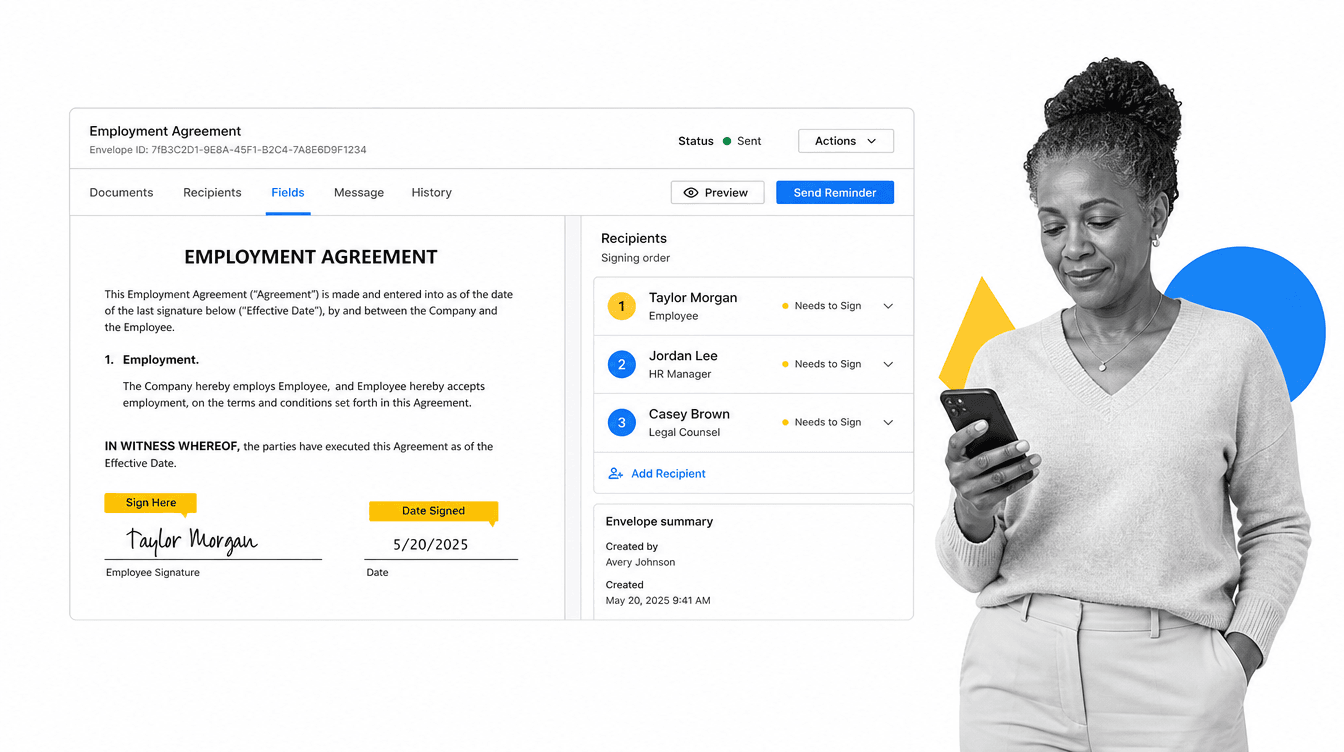
DocuSign is the best-known dedicated e-signature platform, and signing is exactly what it does best. You upload a document, drop signature and date fields onto it, set the order recipients sign in, and send. Signers can complete on almost any device, and you get a clear audit trail of who signed and when. If pure signature volume is your reason for looking past airSlate, DocuSign is the specialist that focuses on that job and little else.
Where DocuSign wins over Process Street is straightforward: it is a signing tool first, so for organizations whose main need is collecting many signatures reliably, it is hard to beat. It also adds AI-assisted agreement summaries and connects to a wide range of business tools, so a signed document can flow back into the systems you already use.
Key features
- Tagged signature, initial, and date fields on any document
- Recipient routing so people sign in a set order
- Signing on desktop and mobile with an audit trail
- AI-assisted summaries to speed up agreement review
- Broad integrations with common business software
Pros
- The category standard for reliable e-signature
- Simple to send a document out for signature quickly
- Strong audit trail and mobile signing experience
Cons
- Focused on signing, so it is not a process or document-building platform
- No free plan for ongoing use, which can raise the entry cost
DocuSign eSignature plans start at $11/month on the Personal plan when billed annually, with Standard and Business Pro tiers above it. Current details are on the DocuSign site.
4. Jotform
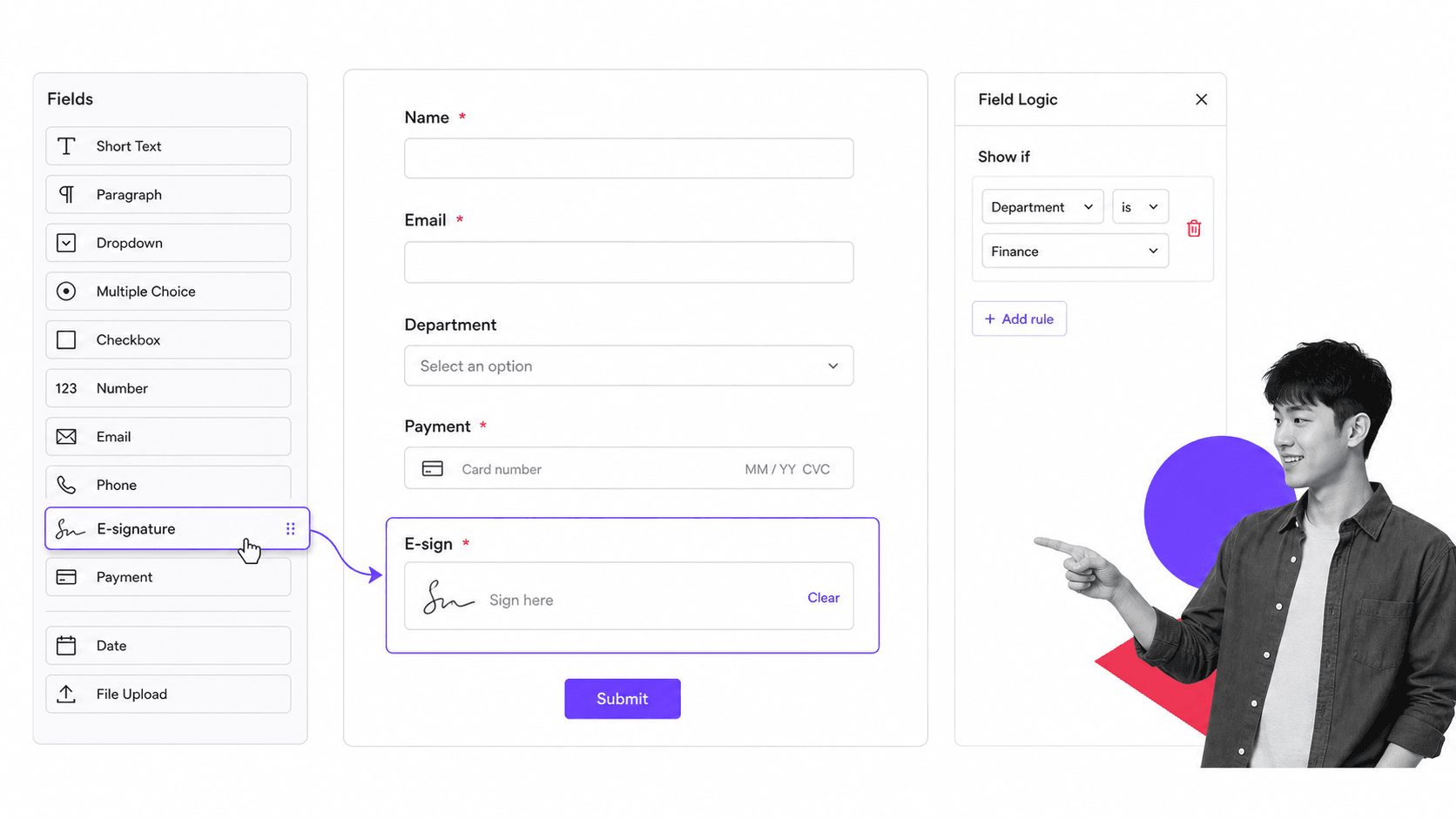
Best for: teams that want the easiest way to build online forms and collect data.
Jotform is an online form builder that is genuinely easy to pick up. You drag fields onto a canvas, style the form, and share it, with no code required. From there you can add conditional logic, collect payments, gather e-signatures, and route submissions through simple approvals. If the part of airSlate you use most is form collection, Jotform is the friendliest place to start.
Jotform beats Process Street when the job really is form-first: capturing structured input from people outside your team with the least setup. It is not built to run and enforce multi-step internal processes, but for standalone intake, registration, and request forms it is fast and approachable, and a generous free tier lowers the barrier to trying it.
Key features
- Drag-and-drop form builder with a large field library
- Conditional logic to show, hide, and require fields
- E-signature and payment fields inside forms
- Approval flows to route submissions for review
- Thousands of ready-made form templates
Pros
- One of the easiest form builders to learn
- Free Starter plan to get going at no cost
- Handles payments, signatures, and simple approvals in one place
Cons
- Form-centric, so it is not a full process or document automation platform
- Complex, multi-team workflows can outgrow it
Jotform offers a free Starter plan, with paid plans beginning at $39/month on the Bronze tier. See the Jotform site for the latest plans.
5. Nintex
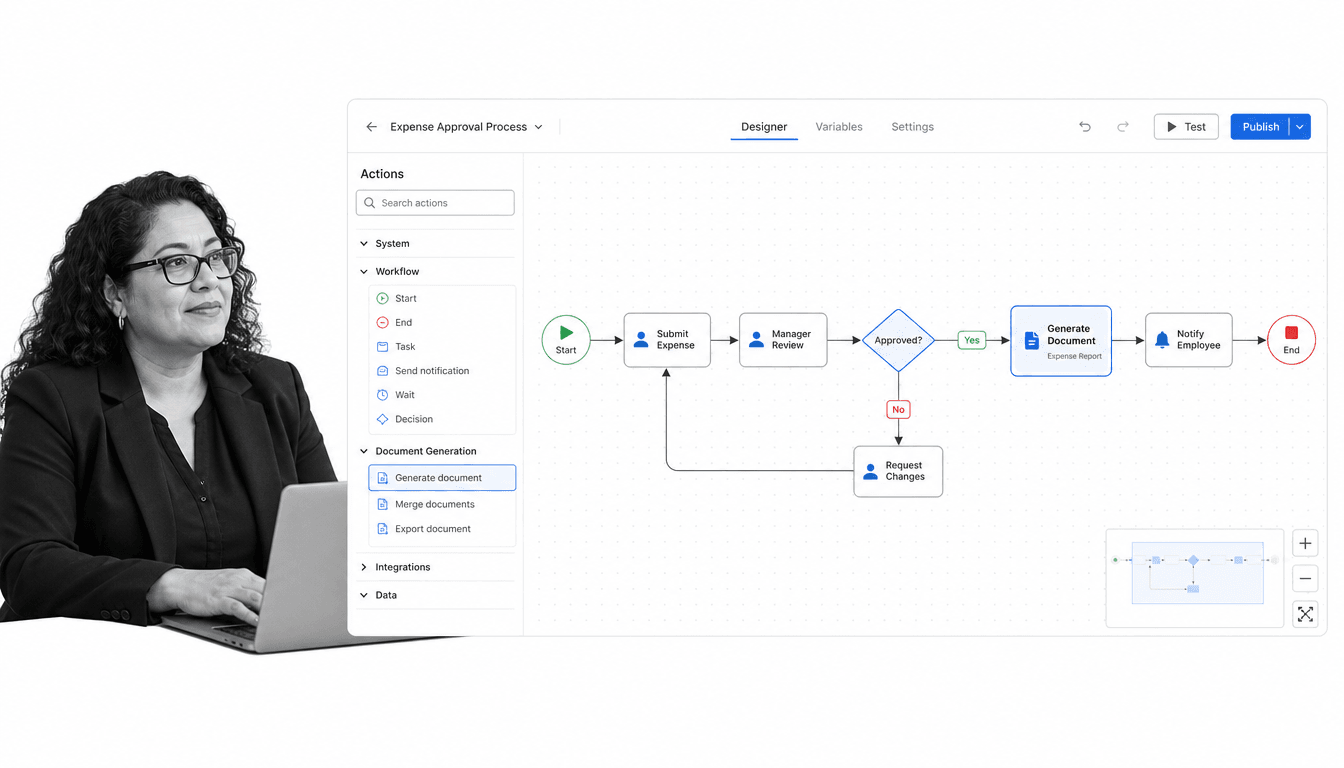
Best for: larger organizations automating complex, multi-step business processes.
Nintex is an enterprise process automation platform. You design workflows visually on a canvas of connected action nodes, add decision branches, and automate handoffs across systems, with document generation and robotic process automation available in the wider platform. For teams that have outgrown lightweight tools and need to model genuinely complex processes, Nintex goes deep.
Nintex is the stronger choice than Process Street when the requirement is heavy, IT-led automation across many systems, or when you need advanced document generation and RPA alongside workflow. That power comes with more setup and a steeper learning curve, so it fits organizations with the resources to invest in it rather than a small team that wants to launch a checklist this afternoon.
Key features
- Visual workflow designer with connected action nodes
- Decision branches and conditional routing
- Document generation from workflow data
- Robotic process automation in the broader platform
- Connectors to enterprise systems
Pros
- Handles complex, cross-system process automation
- Document generation and RPA in one platform
- Scales to enterprise requirements
Cons
- More complex to set up than lightweight process tools
- Pricing is custom, so budgeting requires a sales conversation
Nintex does not publish standard prices; pricing is custom and a free trial is available. Details are on the Nintex site.
6. Kissflow
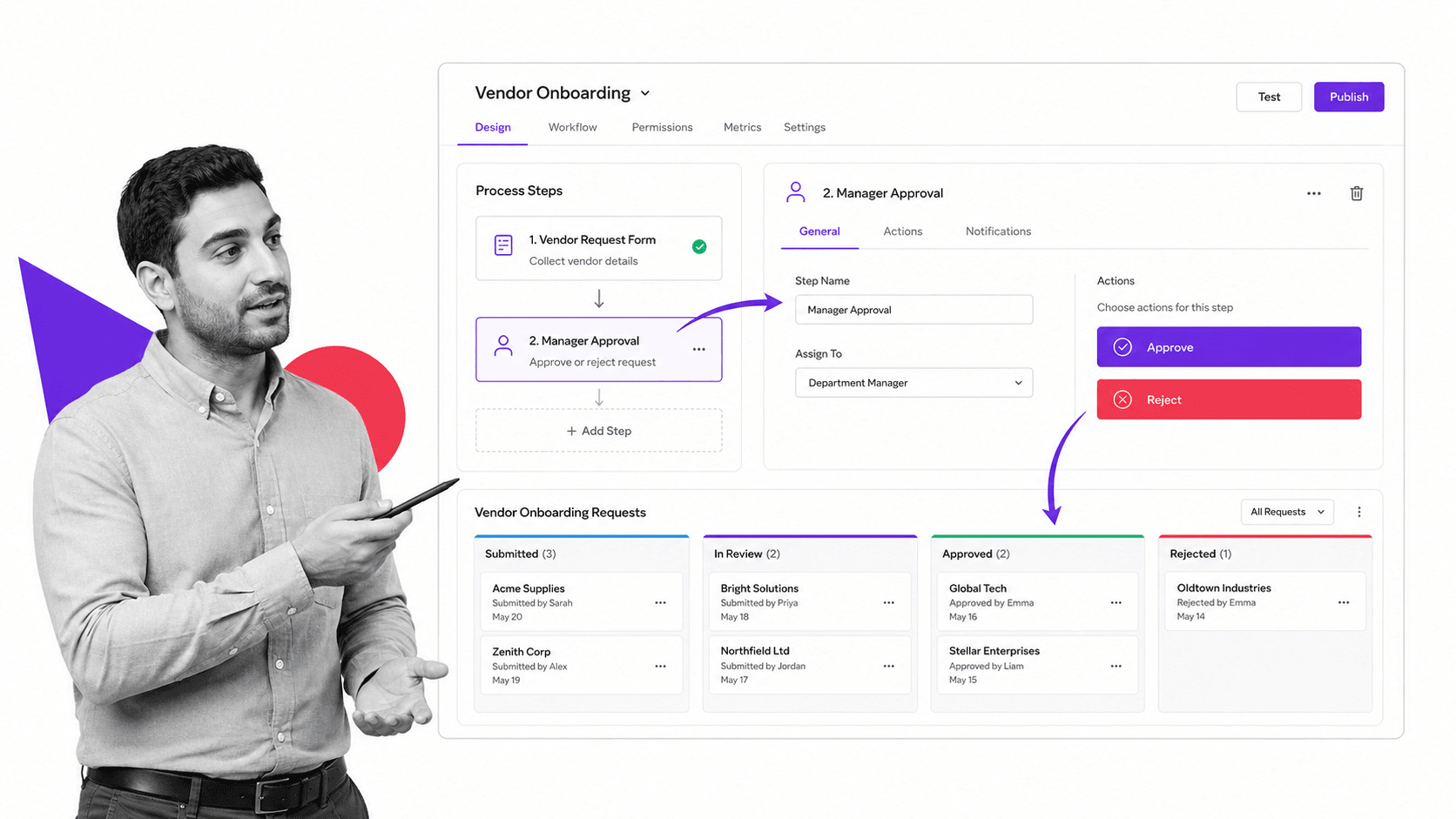
Best for: business teams that want to build their own no-code process apps without waiting on IT.
Kissflow is a no-code platform for building custom process and workflow apps. Business users can design a form, define the steps and approvals behind it, and track items on a board grouped by status, all without code. Where airSlate leans on documents, Kissflow leans on building the app around a process, with dynamic routing, dashboards, and governance for the people who own that process.
Kissflow is a better fit than Process Street when you specifically want to build bespoke internal apps, with your own data structures and views, rather than run pre-defined checklists. It gives so-called fusion teams of business users and IT a shared place to create workflows, which is powerful, though that flexibility means more decisions to make when you set each app up.
Key features
- No-code builder for custom process and workflow apps
- Form-to-approval flows with dynamic routing
- Kanban and board views of items by status
- Dashboards to track metrics and spot bottlenecks
- Governance and access controls for oversight
Pros
- Flexible no-code app building for business teams
- Good balance of workflow, forms, and boards
- Governance features suit larger, cross-functional teams
Cons
- Building apps from scratch takes more effort than running a ready template
- Pricing is not published publicly, so you need to contact sales
Kissflow uses custom, annual pricing rather than a public starting price. See the Kissflow site for details.
7. Formstack
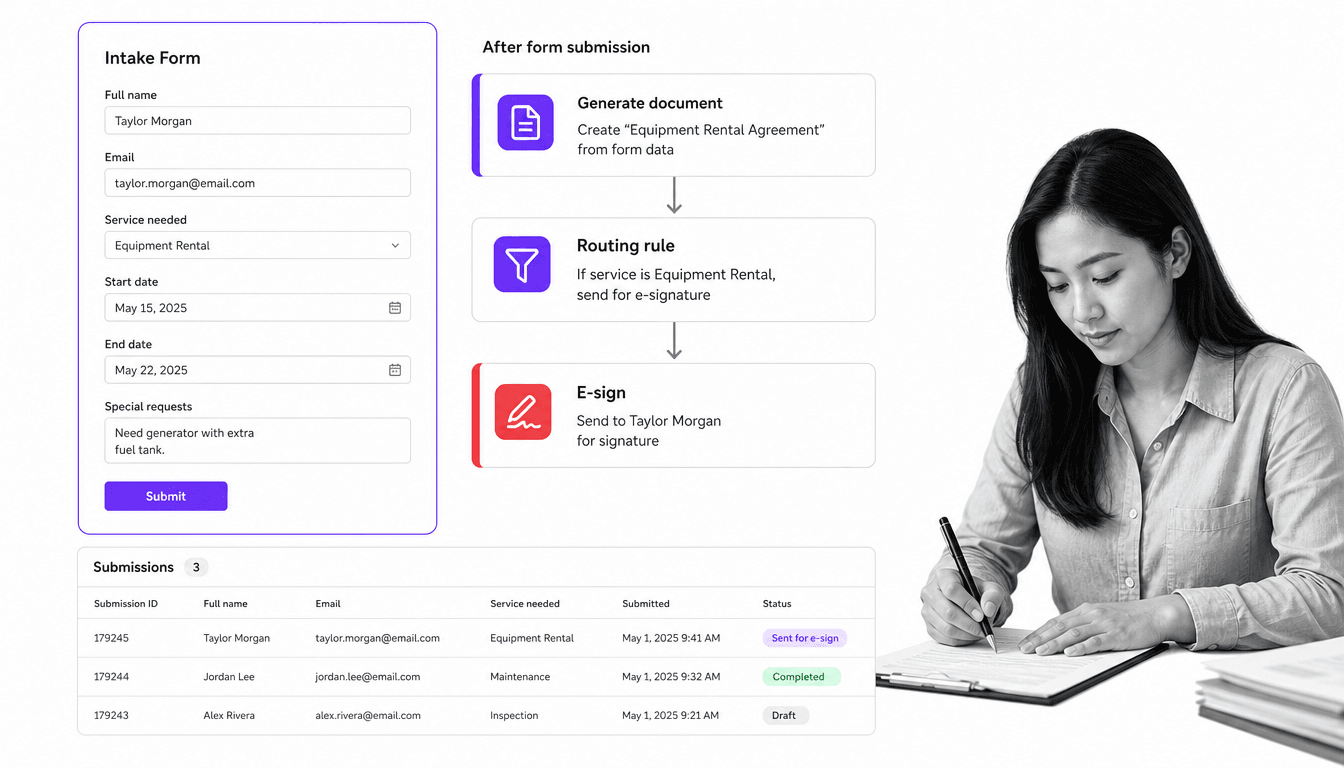
Best for: teams that want to turn form data into generated, signed documents in one flow.
Formstack combines online forms, document generation, and e-signature in a single suite. You collect data with a form, merge that data into a generated document, and route it for signature, then review everything in a submissions table. That end-to-end path, from data in to signed document out, is closest to the workflow airSlate is known for, which makes Formstack a natural head-to-head alternative.
Formstack is the better fit than Process Street when the core job is document-producing forms: intake that becomes paperwork that gets signed. It is less about enforcing a long internal process and more about turning submissions into finished documents, so teams that live in that form-to-document-to-signature loop will feel at home.
Key features
- Secure online forms with a range of field types
- Document generation that merges form data into a template
- E-signature step after submission
- Submission routing and approvals
- Connections to hundreds of other tools
Pros
- Forms, documents, and signing in one connected flow
- Turns data capture into finished, signed paperwork
- Strong fit for regulated intake and paperwork
Cons
- Broader suite pricing sits above simple form-only tools
- Less suited to enforcing long, recurring internal processes
Formstack Forms starts at $83/month billed annually, with a 14-day free trial of the core product. See the Formstack site for current pricing.
8. Zapier
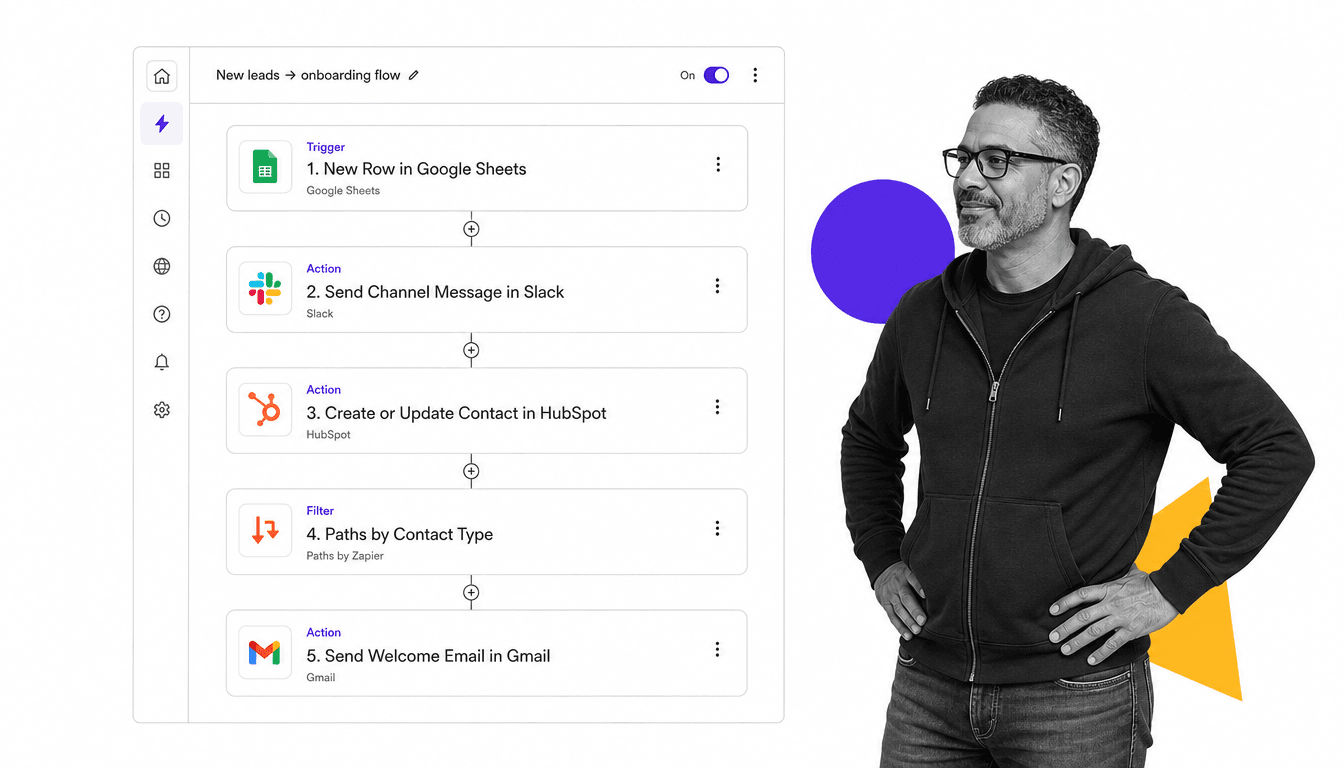
Best for: teams whose real job is connecting many apps together and automating the handoffs between them.
Zapier is an automation platform for connecting apps. You pick a trigger in one app, then chain actions in others into a workflow, called a Zap, that runs automatically. With connections to thousands of apps, plus filters and paths for conditional logic, it is the tool to reach for when the problem is less about a single document and more about getting data to move between the systems you already use.
Zapier beats Process Street on one specific axis: integration breadth. When the job is wiring together many tools, airSlate included, so a signed document or a completed form triggers the next action elsewhere, Zapier is purpose-built for that. It is not a place to run a supervised human process, but as the connective tissue between apps it is hard to match.
Key features
- Triggers and multi-step actions across thousands of apps
- Filters and Paths for conditional automation
- No-code editor for building Zaps
- A free plan for light automation
- Reusable templates for common automations
Pros
- Unmatched breadth of app integrations
- Fast to automate handoffs between existing tools
- Free plan makes it easy to start
Cons
- Built for app-to-app automation, not supervised human processes
- Complex multi-step automations can get costly as volume grows
Zapier has a free plan, with paid plans starting at $19.99/month on the Professional tier. See the Zapier site for the latest.
airSlate alternatives: frequently asked questions
What is the best airSlate alternative?
It depends on the job. For enforceable, recurring process and SOP execution, Process Street is the best overall airSlate alternative. For high-volume e-signature, DocuSign is the specialist, and for proposals and sales documents, PandaDoc is the stronger fit. Match the tool to the part of airSlate you actually rely on.
Is there a free airSlate alternative?
Yes. Jotform and Zapier both offer free plans, and PandaDoc offers a free eSignature option. Process Street, Formstack, and Nintex offer free trials rather than free-forever plans, so you can test them before you buy.
What is the closest alternative to airSlate WorkFlow?
airSlate WorkFlow, now altaFlow, is about no-code document workflow automation. Formstack is closest for the form-to-document-to-signature flow, while Kissflow and Nintex are closest for building and automating broader business processes. Process Street is closest when the priority is running recurring processes reliably.
What is the best airSlate alternative for small teams?
Small teams usually value simplicity and a low entry cost. Jotform is the easiest for forms, Zapier is the simplest for connecting apps, and Process Street is the most approachable way to run repeatable processes without heavy setup. Each has a free plan or trial to start with.
What is the best airSlate alternative for enterprises?
For enterprises with complex, cross-system automation, Nintex offers deep process automation, document generation, and RPA. Process Street suits enterprises that need standardized, auditable process execution across many teams, and DocuSign scales e-signature across a large organization.
Do these airSlate alternatives support e-signature?
Several do. DocuSign and PandaDoc are e-signature specialists, and Jotform and Formstack include signing inside their form and document flows. Process Street focuses on process execution and approvals rather than being a dedicated signing tool, so pair it with a signing specialist if signature volume is high.
Why is Process Street ranked first?
Process Street is ranked first because, for its ideal use case, running enforceable, trackable, recurring process and SOP workflows, it is the strongest fit on this list. It enforces steps with Stop tasks and conditional logic and shows exactly who did what. For jobs outside that use case, such as pure signing or app-to-app automation, we name the tool that fits better.
Choosing the right airSlate alternative for your team
The best airSlate alternative is the one that matches the job you actually need done. If that job is signing, choose a signing specialist. If it is building proposals, choose a document platform. If it is connecting apps, choose an automation tool. And if it is making sure your processes run the same way every time, with full visibility and accountability, that is exactly what Process Street is built for.
Teams that standardize onboarding, compliance, and day-to-day operations tend to care less about any single document and more about whether the whole process happens correctly and can be proven later. If that sounds like your team, Process Street is the natural place to start. You can explore how a workflow management system works, browse the template library, compare it with other operational tools, read more on workflow management software and agile workflow processes, then see current plans on the pricing page.
