


Turn every policy into automated workflows with built-in enforcement and audit-ready proof.



Workflow Free Software
Workflow free software gives a team a no-cost way to design, run, and test repeatable work before making a larger software commitment. The useful category includes more than a flowchart. It should help people move a real request through tasks, owners, decisions, handoffs, and completion.
Free does not mean unlimited. A plan may restrict active workflows, users, automation runs, integrations, storage, reporting, permissions, or history. The right question is not whether a tool costs zero today. The question is whether it can prove the workflow works and show you what will break first as usage grows.
This guide explains what to look for, how to evaluate plan limits, how to run a realistic pilot, where free workflow tools work best, which hidden costs matter, and when to move from experimentation to controlled execution.
Use the sections below to turn a free tool test into a decision you can defend:
- What is workflow free software?
- What free workflow software should include
- How to evaluate workflow free software
- How to pilot free workflow software
- Where free workflow software works best
- Hidden costs and upgrade signals
- Move from a free pilot to controlled execution
- FAQs
What is workflow free software?
Workflow free software is a platform tier, open-source package, or trial that lets you organize and execute a recurring workflow without an upfront license payment. In a business context, the workflow should coordinate people and systems around a defined trigger and outcome.
A workflow tool is not only a diagram tool
A diagram shows how work should move. Workflow software carries the live work through that route. It should tell each person what to do, collect information, apply a decision, send the next assignment, and preserve a usable record of the result. If the tool stops at boxes and arrows, it supports design but not execution.
A free plan is a testing environment
Treat the free tier as a controlled experiment. Use it to test whether the builder fits your process, whether end users understand their tasks, whether owners can see blocked work, and whether the system captures enough evidence. A free plan can validate the operating model even when it cannot support the final scale.
Free tier, free trial, and open source are different
A free tier usually continues with usage limits. A free trial unlocks paid capabilities for a limited period. Open-source software provides source code under a license that defines how it may be used and distributed. The Open Source Definition explains the criteria for software to qualify as open source. None of these models automatically removes hosting, administration, security, or support work.
Workflow software and task management solve different problems
Task management is useful for personal or team to-do lists. Workflow management coordinates a repeatable path with stable rules, role ownership, decisions, and evidence. A task list can say that a review is due. A workflow can require the supporting file, route the decision to an authorized reviewer, block completion until approval, and record the outcome.
If you need to map the process before choosing a tool, start with a workflow planner. A clear trigger, outcome, owner model, decision path, and evidence requirement will make every free-tool test more useful.
What free workflow software should include
A useful free workflow tool should support the smallest complete version of your process. It does not need every enterprise feature, but it must let the team run a real case from intake to completion without rebuilding the process in email or spreadsheets.
A builder that exposes the route
The process owner should be able to create tasks, instructions, owners, deadlines, forms, and decisions without a development project. The structure should remain readable after you add one exception path. If the workflow logic becomes hidden inside scattered rules, maintenance will become the real cost.
Structured intake
Every workflow needs a reliable start. Intake might be a form, schedule, approved request, or system event. Capture only information that changes the route, identifies the owner, supports a decision, or proves the outcome. Extra fields slow adoption and create data nobody uses.
Role ownership
Assign work to roles such as hiring manager, finance reviewer, or security approver, then map those roles to people when the run begins. The NIST role-based access control project describes the value of assigning permissions through organizational roles. The same principle keeps workflow responsibility understandable when people change.
Approvals and conditional paths
A free tool should let you test at least one meaningful decision. The route might change by request amount, region, risk level, completeness, or reviewer response. Keep the normal path obvious and give rejections or requests for changes a clear destination.
Evidence at the point of work
Completion should mean more than checking a box. A required field, file, signature, decision, or connected-system record can show that the work met its condition. Capturing proof while the task is open is easier and more reliable than reconstructing it later.
Readable instructions
Workflow steps should use direct language, familiar words, and clear completion conditions. The W3C objective for clear and understandable content recommends those same practices for accessible digital content. A new user should understand the next action without asking the process owner to translate it.
A visible history
The owner needs to see active work, overdue tasks, approvals, exceptions, and completed outcomes. Even a small pilot should leave enough history to answer what happened, who acted, what evidence was supplied, and where the workflow stalled.
How to evaluate workflow free software
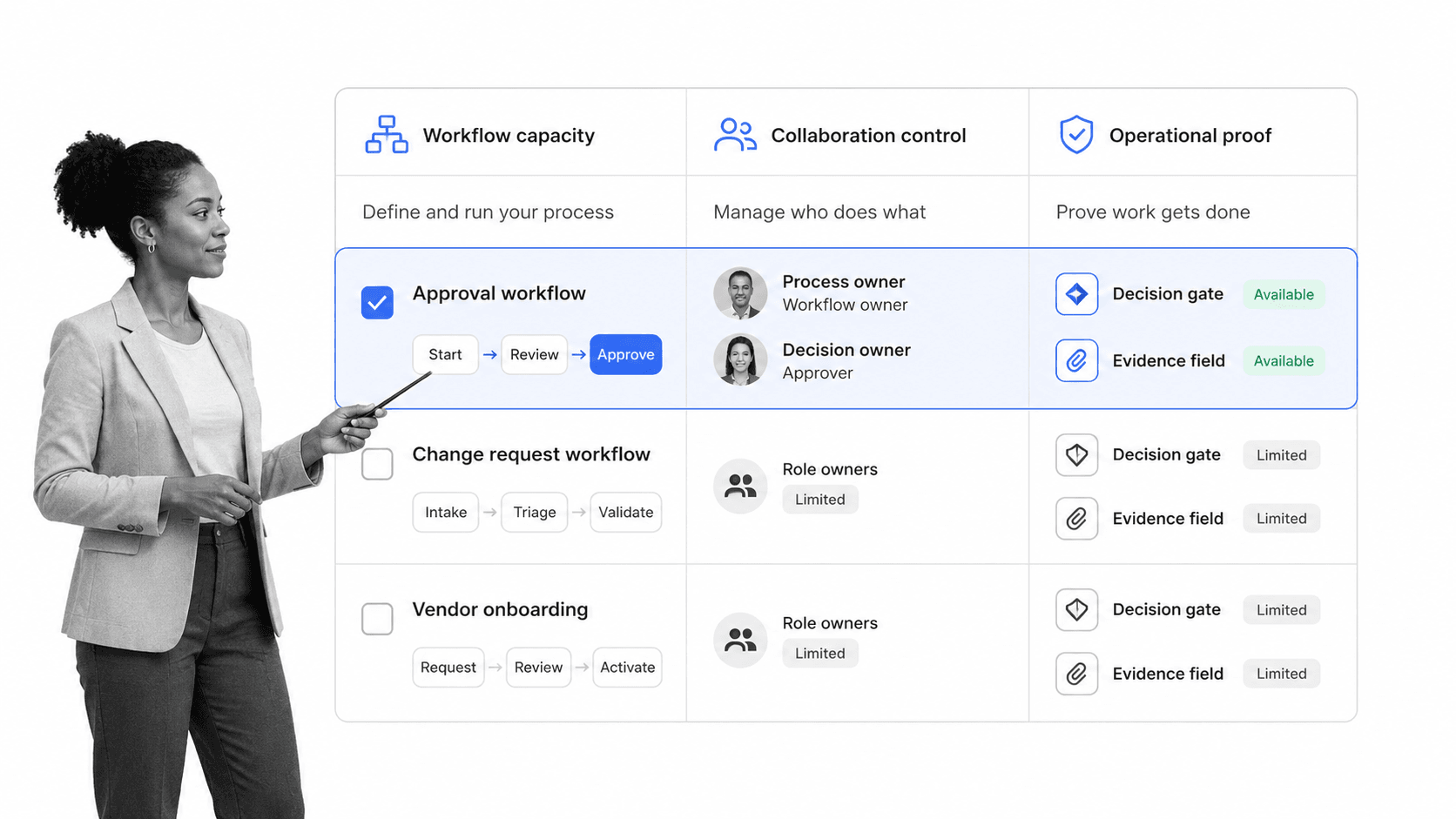
Evaluate the free plan against one real workflow and one expected growth scenario. A polished landing page can hide the constraint that matters most to your team. Put limits into a simple matrix and test them through execution.
Workflow and run limits
Check how many workflow templates can exist, how many runs can stay active, and whether completed history remains available. A small number may be enough for a pilot but unusable for recurring work across a department. Test concurrency, not just total volume.
User and guest limits
Count builders, administrators, task assignees, approvers, requesters, and external collaborators separately. Some plans allow a few editors but many task participants. Others count every person. Map the license rule to the actual roles in your process before you invite the team.
Automation and integration limits
A free plan may cap automated actions or restrict the systems you can connect. Estimate how many notifications, assignments, record updates, file moves, and status changes one workflow run creates. Multiply that number by realistic monthly volume and include retries for failed actions.
Control and permission limits
Test whether the tool separates builders from runners, limits access to sensitive fields, and controls who may approve or change a workflow. A free plan can be suitable for low-risk collaboration while lacking the permission model required for finance, HR, security, quality, or compliance work.
History, export, and portability
Find out what you can export, in which format, and whether attachments, comments, decisions, and timestamps come with it. A free tool creates switching cost as soon as real work accumulates. Portability matters before the team depends on the system.
Support and reliability
Self-service support may be acceptable for an experiment. It becomes a risk when the workflow blocks customer delivery, employee access, purchasing, or a required review. Test documentation quality, recovery from a failed automation, and the path for reporting a platform problem.
The scale test
Compare the free plan with the operating model you would need at ten times the pilot volume. A mature workflow management system should let you add control without rebuilding the process. The upgrade decision should be about scale and governance, not escaping a broken design.
How to pilot free workflow software
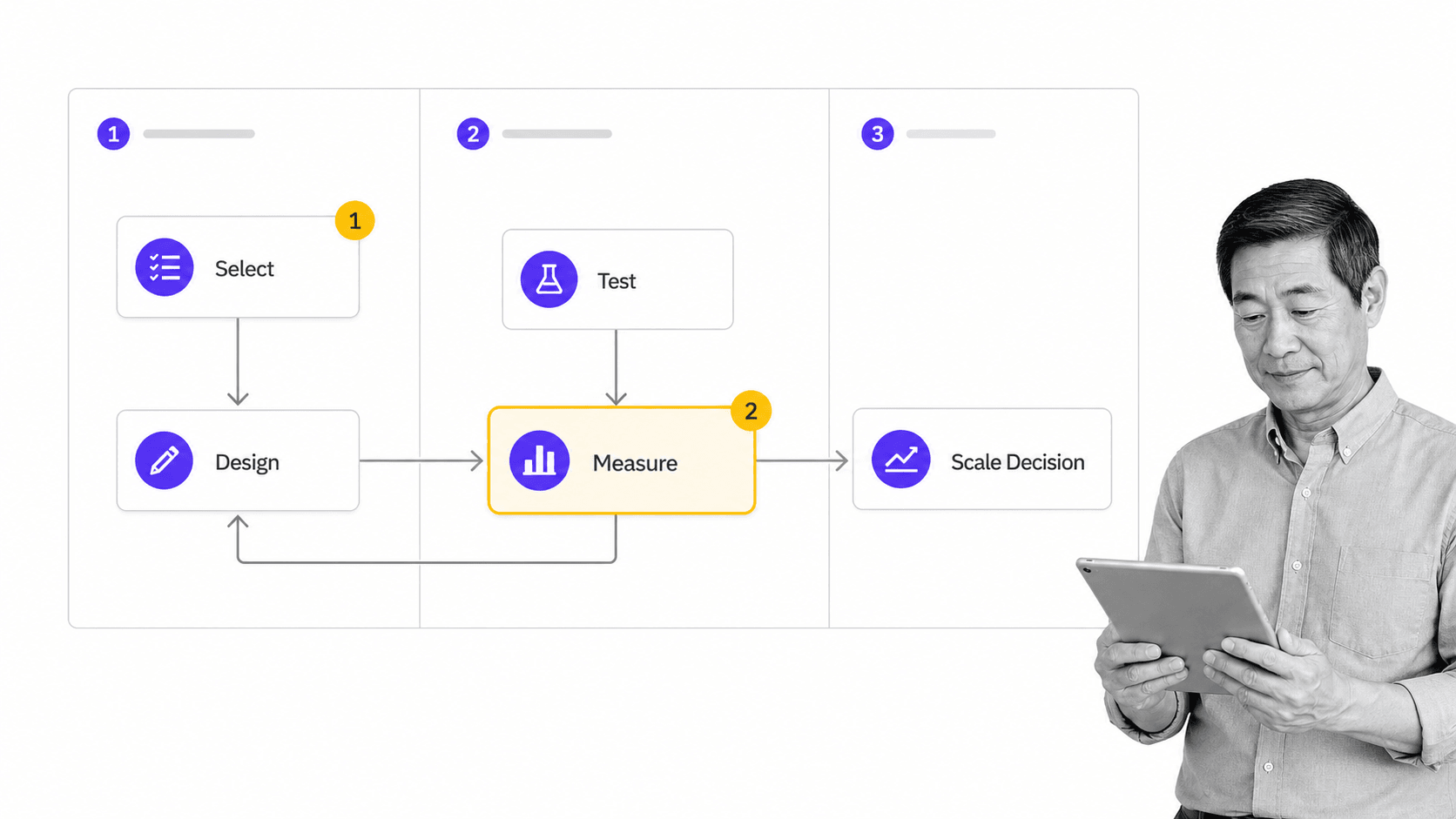
A good pilot proves that the workflow produces a correct result under normal and exception conditions. It should be small enough to run quickly and real enough that failure would reveal something useful.
1. Choose one recurring process
Pick work with a clear trigger, a measurable outcome, two or more roles, and at least one handoff or decision. Avoid a toy checklist that one person completes alone. The pilot should expose coordination, because that is where workflow software earns its place.
2. Define success before building
Write the baseline and the target. Useful measures include cycle time, waiting time, missed steps, incomplete requests, reassignment, approval turnaround, rework, and time spent chasing status. Choose two or three measures that reflect the pain the workflow is meant to remove.
3. Build the minimum controlled path
Create the normal route first. Add role assignments, due dates, required inputs, one decision, and completion evidence. Do not encode every historical exception. A short, understandable version makes user feedback clearer and isolates whether the tool supports the core process.
4. Test normal and exception cases
Run a complete request, an incomplete request, a rejection, a reassignment, and an overdue task. Confirm that the right person receives the right context and that each route reaches a defined outcome. A happy-path demo is not an operational test.
5. Observe the user, not only the dashboard
Watch where people hesitate, leave the workflow, copy information into another tool, or ask for clarification. Those moments reveal unclear instructions, missing context, excessive fields, and hidden handoffs. Record friction while the run is active.
6. Measure and decide
Compare the pilot with the baseline. Decide whether to keep the free configuration, improve and retest it, move to a paid plan, or reject the tool. Document the reason, the limit encountered, and the next condition that would trigger another decision.
Use workflow optimization after several runs to remove duplicate work, shorten waiting, clarify decisions, or improve routing. Change one meaningful element at a time so you can see whether the outcome actually improves.
Where free workflow software works best
Free workflow software works best when the process is repeatable, the risk is manageable, the participant group is small, and the expected volume fits the plan limits. It is especially useful for learning what your team needs before procurement.
Employee onboarding pilot
A compact employee onboarding workflow can coordinate the hiring manager, HR, IT, and the new employee. Start with one role or department and test whether access, documents, training, and first-week tasks reach the right owners.
Purchase request approval
A purchase order workflow can capture the requester, supplier, purpose, amount, supporting file, reviewer, and decision. The pilot should show whether incomplete requests return cleanly and whether the authorization record stays attached to the case.
Vendor onboarding
A vendor onboarding checklist is useful for testing cross-functional handoffs. Procurement, finance, security, legal, and the business owner may each need a task, but extra review should appear only when the request crosses a meaningful risk threshold.
SOP review
A standard operating procedure template defines the content. A workflow controls authorship, review, approval, release, and acknowledgment. A free pilot can show whether the team needs more formal versioning, permissions, or audit evidence.
Recurring quality check
A small inspection, content review, or service-quality check can test assignments, required evidence, exception routing, and corrective action. Keep the first criteria set narrow and verify that a failed check creates a visible next action rather than disappearing into a comment.
Low-risk internal requests
Equipment requests, access requests, simple content intake, meeting preparation, and recurring reporting are reasonable early use cases. Avoid starting with highly sensitive records or a process whose failure would create a serious legal, safety, security, or financial consequence.
Hidden costs and upgrade signals
The subscription price is only one part of workflow cost. Administration, migration, training, support, security review, integration maintenance, and process redesign can exceed the initial license. A free plan is valuable when it helps you discover those costs early.
Manual work outside the tool
If users still copy data between systems, chase approvals in chat, build reports by hand, or maintain a shadow spreadsheet, the process is not free. Track the time spent outside the workflow. That work often signals missing integrations or limits on automation.
Workflow sprawl
A low barrier to creation can produce duplicate and abandoned workflows. Name an owner for every template, define who may edit it, and schedule a review. Without governance, the team pays through confusion and inconsistent execution.
Weak permissions
Sensitive data can turn an inexpensive experiment into an expensive incident. Before using the tool for HR, finance, customer, security, or regulated information, verify access controls, retention, sharing behavior, and administrative oversight. Move the use case or the platform if the controls do not fit.
No reliable integration path
A workflow that cannot update the systems around it creates more manual coordination as volume rises. Count the systems that start the work, provide information, receive an outcome, and store evidence. Test failure handling as carefully as the successful connection.
Upgrade signals
- The team reaches workflow, user, run, storage, or automation limits every month.
- A critical approval, permission, or evidence requirement is unavailable.
- Manual handoffs consume more time than the paid plan would cost.
- Multiple departments need shared standards, reporting, or administration.
- The workflow now affects customers, money, access, security, quality, or regulatory obligations.
- Migration risk grows because completed history and attachments are accumulating.
Document the process and the decision before upgrading. Clear workflow documentation makes it easier to compare plans, migrate cleanly, train users, and preserve the reasoning behind each control.
Move from a free pilot to controlled execution
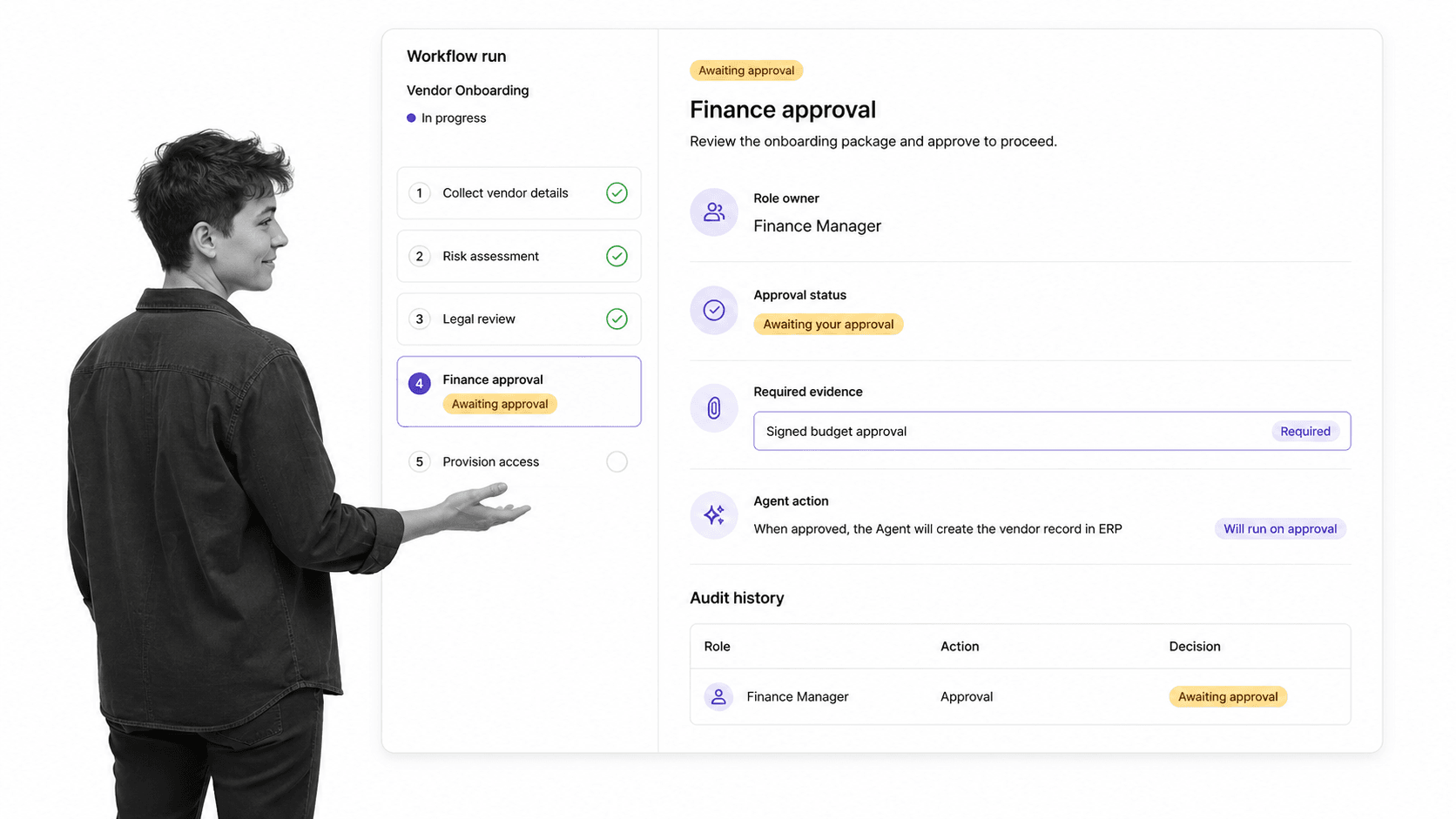
Process Street is becoming an agentic process automation platform for high-stakes operations. It turns a process into a reusable workflow where tasks, role assignments, forms, decisions, evidence, agent actions, and history stay connected to the work.
Start with a real workflow
Use the workflow template library when a proven structure fits, or build a focused path from your own trigger and outcome. A pilot should remain narrow enough to understand and complete enough to expose the handoffs and controls that matter.
Put decisions inside the workflow
Formal approval tasks keep the request, criteria, supporting information, reviewer, and outcome together. The next step can wait for the authorized decision instead of relying on an email or chat message that is difficult to trace.
Route meaningful exceptions
Use conditional logic when risk, amount, region, request type, or another structured input changes the required work. Keep the normal route visible and add only exceptions that affect ownership, evidence, authorization, or outcome.
Connect the surrounding stack
Process Street has direct, universal integrations to 5,000+ systems. Need a new one? An AI agent builds it on the fly. That lets the workflow start from a connected event, act across real software, update records, and notify the next owner without turning people into the integration layer.
Keep human oversight where it matters
Agentic execution needs clear boundaries, review points, and evidence. The NIST AI Risk Management Framework offers a practical reference for governing AI risk. In a workflow, that principle becomes specific: define what an agent may do, what requires approval, what evidence must be captured, and how an exception is escalated.
Use execution evidence to improve
Completed runs reveal waiting time, overdue work, rejection reasons, missing information, and recurring exceptions. A clear online workflow system keeps those signals attached to execution so process owners can improve the route instead of guessing from status meetings.
Free workflow software is most useful when it shortens the distance between an idea and a tested operating process. Choose the tool that helps you prove the route, understand its limits, and preserve a credible path to scale. Broader workflow tools should be judged by how clearly they carry ownership, decisions, evidence, and action as complexity grows.
FAQs
What is workflow free software?
Workflow free software is a free tier, trial, or open-source package that helps a team design and run repeatable work. A useful tool coordinates tasks, owners, decisions, handoffs, and completion evidence rather than stopping at a process diagram.
Is free workflow software really free?
The license may cost nothing, but the workflow can still create administration, training, hosting, integration, migration, and support costs. Review plan limits and measure manual work outside the tool before calling the process free.
What should a free workflow tool include?
It should support a complete pilot with structured intake, task sequencing, role ownership, due dates, at least one approval or decision path, required evidence, and enough history to evaluate the outcome. The exact feature set matters less than whether the team can run one real process end to end.
How do you test free workflow software?
Choose one recurring process, define success measures, build the minimum controlled path, and run normal plus exception cases. Observe where users hesitate or leave the system, then compare cycle time, missed steps, rework, and approval quality with the baseline.
When should you move beyond a free workflow tool?
Upgrade or change tools when usage limits interrupt work, required permissions or approvals are missing, manual handoffs consume too much time, several departments need shared governance, or the workflow affects sensitive and high-stakes outcomes. Make the decision before migration risk grows.
Can Process Street support a workflow software pilot?
Yes. Process Street can turn a process into a reusable workflow with tasks, role assignments, forms, approvals, conditional paths, agent actions, and history. Start with one focused workflow, test it with real cases, and add control as the process proves what it needs.
