


Turn every policy into automated workflows with built-in enforcement and audit-ready proof.



Workflow Planner
A workflow planner is a structured way to map recurring work before you automate it, delegate it, or turn it into a live workflow. It captures the trigger, tasks, owners, dependencies, decisions, timing, evidence, and review rhythm so the team can see how work should move from start to finish.
Most workflow problems start before the workflow exists. Teams jump into a tool, build a checklist, and only later discover that nobody agreed on the handoffs, approval rules, or evidence needed. A planner slows the work down at the right moment, so the actual workflow can run faster afterward.
This guide explains what a workflow planner is, when to use one, what to include, how to build one step by step, common mistakes, and how planning turns into execution inside workflow software. It is written for operations, compliance, HR, finance, customer success, and quality teams that run repeatable work.
In this article, we are going to cover everything you need to know about workflow planning, including:
- What is a workflow planner?
- When to use a workflow planner
- What to include in a workflow planner
- How to build a workflow planner step by step
- Common workflow planning mistakes
- Workflow planner templates and software
- How Process Street turns workflow plans into execution
- FAQs
What is a workflow planner?
A workflow planner is a planning artifact for repeatable work. It can be a template, worksheet, board, or software screen, but the job is the same: define how work starts, who owns each step, what must happen before the next step begins, what decisions change the path, and what proof is captured along the way.
A useful planner does not stop at a task list. A task list tells people what to do. A workflow planner tells the team how work moves, where it can get stuck, what needs approval, what happens when an exception appears, and how the process improves after it runs.
Workflow planner vs project plan
A project plan manages one outcome with dates, milestones, and resources. A workflow planner designs a repeatable pattern of work that will run again and again. Launching a website is a project. Reviewing vendor access, onboarding a new hire, closing the month, approving a policy, or preparing an audit packet is workflow work.
Workflow planner vs process map
A process map shows the shape of a process. A workflow planner goes further by adding owners, dependencies, inputs, outputs, approvals, timing, and evidence. Visual standards such as the BPMN process modeling standard can help teams describe flow, but the planner has to make that flow usable in daily work.
That is why workflow planning sits between documentation and execution. Good process documentation explains how work should happen. A workflow planner turns that explanation into an operating plan that can become a checklist, automation, or controlled workflow run.
When to use a workflow planner
Use a workflow planner when work repeats, crosses handoffs, carries risk, or needs proof. If the process is simple enough for one person to complete from memory, a planner may be overkill. If the process involves multiple owners, deadlines, tools, approvals, or audit evidence, planning prevents expensive confusion later.
- New recurring process: build the workflow before the team starts improvising.
- Messy existing process: expose skipped steps, unclear owners, and duplicate work.
- Automation project: identify what should be automated and what still needs human judgment.
- Compliance workflow: define approvals, evidence, retention, and audit trail requirements.
- Cross-functional handoff: make dependencies explicit before work starts crossing teams.
- Template rollout: turn a good local process into a reusable pattern across departments.
Planning is especially valuable before automation. The Microsoft workflow automation overview frames automation as a way to reduce repetitive tasks and improve process speed, but automation only helps when the underlying flow is clear. Automating a vague process just makes the confusion move faster.
The same principle applies to workflow management. The ProjectManager workflow management guide describes workflow management as creating, monitoring, and improving task sequences. A planner gives that work a concrete starting point before it reaches a live system.
What to include in a workflow planner
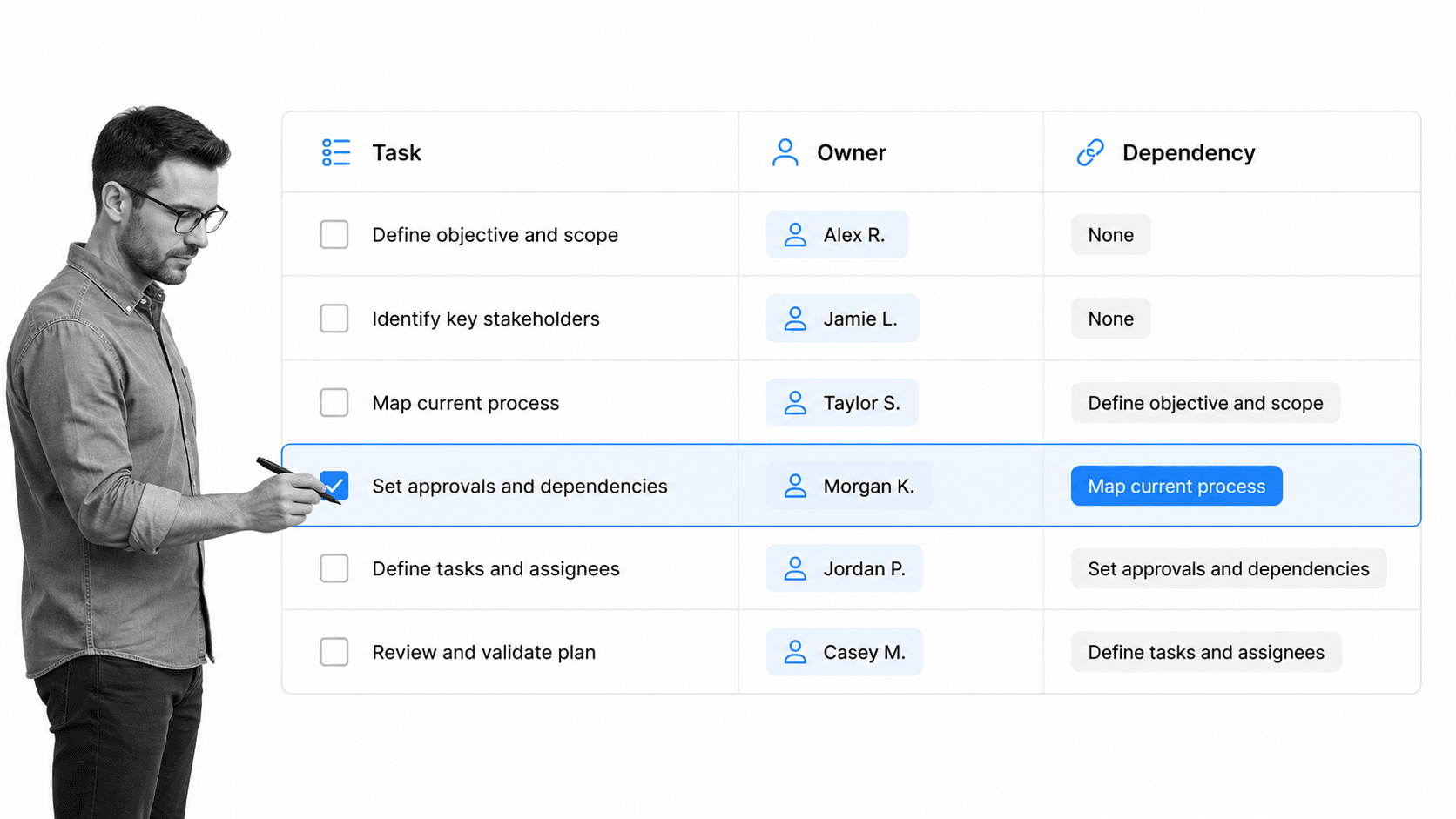
A workflow planner should be detailed enough to run from, but not so overloaded that nobody maintains it. The best planners focus on the decisions and dependencies that make the work succeed or fail.
Trigger and outcome
Start with what launches the workflow and what finished means. A trigger might be a form submission, a signed contract, a monthly close date, a new employee start date, or an audit request. The outcome should be concrete: access approved, invoice reconciled, policy released, customer onboarded, report filed.
Tasks and owners
Break the workflow into the smallest set of meaningful tasks. Assign each task to a role, not just a person, so the workflow survives staffing changes. If a task has no owner, it is not a task, it is a hope.
Inputs, outputs, and dependencies
For each step, name what must be available before the step starts and what it produces. Dependencies are where workflows usually break: finance waits on operations, compliance waits on HR, customer success waits on sales, and nobody knows the handoff is late until the deadline is missed.
Approvals and decision paths
Approvals deserve special attention. A workflow planner should show who approves, what they are checking, what information they need, and what happens after rejection. If approvals are important in the workflow, connect the plan to a pattern like workflow approvals instead of leaving approval logic in comments or email.
Evidence and audit trail
Evidence can be a completed field, uploaded file, signoff, timestamp, system update, or checklist completion. The U.S. National Archives records management guidance is a useful reminder that records matter because they prove what happened. A planner should define evidence before the workflow runs, so proof is captured by design.
Timing and review rhythm
Add due dates, service levels, escalation rules, and the cadence for reviewing the workflow itself. A workflow planner is not finished when the process launches. It should tell the team when to inspect the workflow and improve it.
Systems and data fields
Name the systems touched by each step and the data that must move between them. A planner that ignores systems creates manual copy-paste work later. Capture the source system, destination system, required fields, and any validation rule that decides whether the workflow can move forward.
How to build a workflow planner step by step
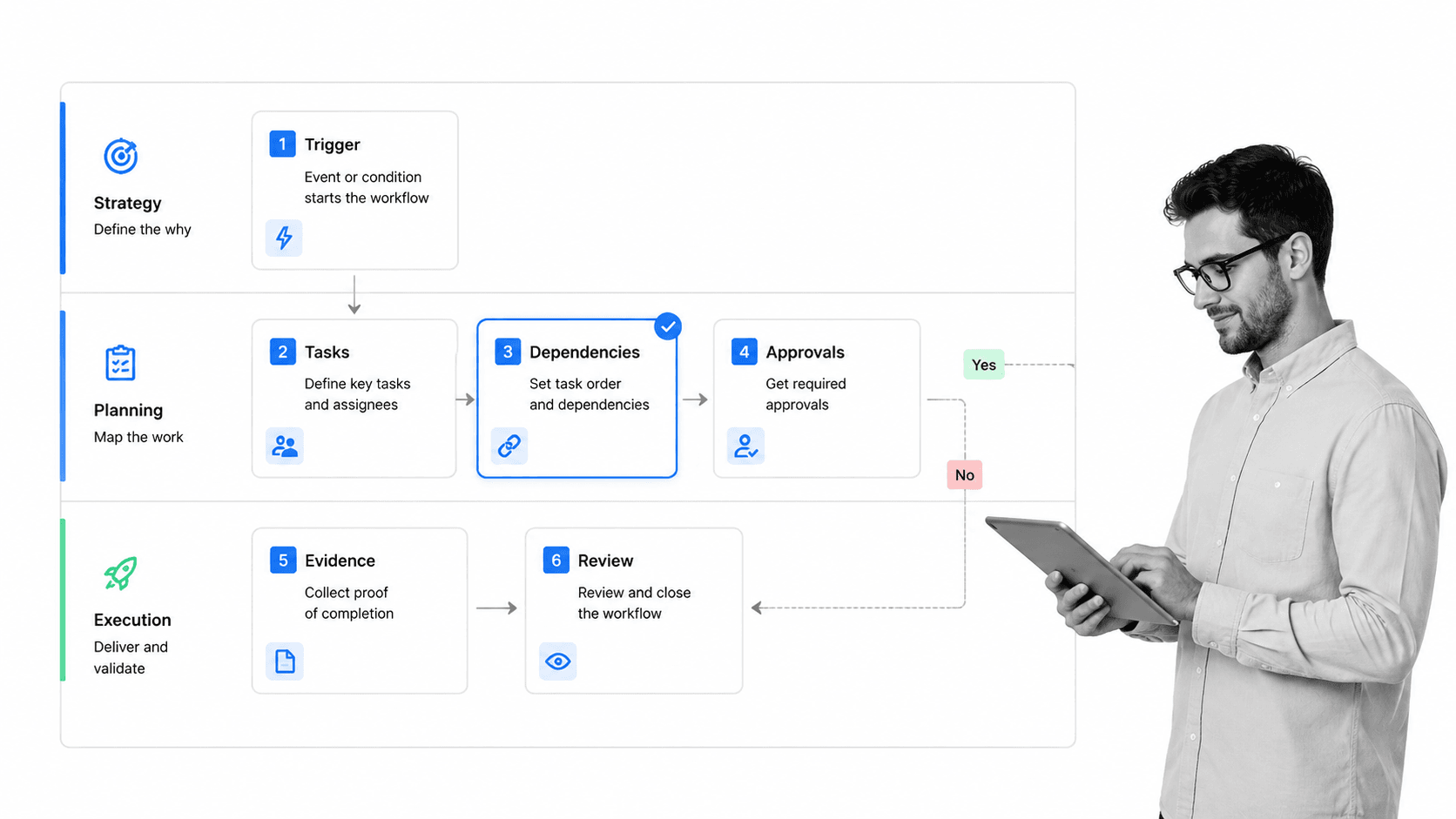
You can build a workflow planner with a document, spreadsheet, whiteboard, or workflow platform. The tool matters less than the planning sequence. Start with the work, then add structure, then turn it into an executable workflow.
1. Pick one workflow with real stakes
Choose a workflow where better planning will matter. Good candidates include employee onboarding, vendor review, incident response, month-end close, client onboarding, quality review, policy approval, or audit preparation. Avoid starting with a vague company-wide process.
2. Define the start and finish
Write the trigger and outcome in plain language. If the team cannot agree on those two things, the workflow is not ready to automate or document.
3. List the work in the order it happens
Capture the current reality first. Do not design the ideal process before you understand the actual one. Ask the people who do the work where they wait, what they chase, and what they check twice.
4. Add owners, dependencies, and handoffs
Assign role ownership and draw the handoffs. This is where the planner becomes useful. Most workflow failures are not caused by a missing task, they are caused by a missing handoff or an assumption that someone else owns the next step.
5. Add approvals, evidence, and exception paths
Mark the steps that require review, proof, or branching logic. If the request is high risk, who approves it? If required evidence is missing, what happens? If the customer is enterprise, does the workflow route differently?
6. Convert the planner into a live workflow
Once the planner is clear, turn it into a reusable workflow. A structured standard operating procedure template can help with the written version, while workflow templates help teams move from plan to repeatable execution.
The final step is to run the workflow and learn from it. The first version of a planner should be useful, not perfect. After a few runs, update the planner based on real bottlenecks, skipped steps, missing evidence, and confused handoffs.
Treat the first few runs as calibration. Watch where people pause, where they ask for clarification, where approvals sit too long, and where evidence gets added outside the workflow. Those signals tell you which parts of the planner were too vague and which controls need to become clearer before the workflow scales.
Common workflow planning mistakes
Most workflow planning mistakes come from treating the planner as a diagram instead of an operating tool. A pretty map that nobody can run is still broken. Watch for these failure modes before they reach the team.
- Planning only the happy path: exceptions are where processes break, so plan rejection, rework, missing information, and escalation paths.
- Assigning people instead of roles: workflows should survive vacations, turnover, and org changes.
- Ignoring dependencies: every waiting point should be visible in the plan.
- Skipping evidence: if the workflow needs proof, define the proof before work starts.
- Automating too early: unclear logic becomes harder to fix once it is wired into tools.
- Never reviewing the workflow: a planner should include the cadence for improving the process after it runs.
If a workflow is already live and messy, start with workflow optimization rather than a new automation project. Improve the flow, then automate the parts that are stable enough to trust.
Workflow planner templates and software
A workflow planner can be lightweight or software-driven. The right choice depends on how often the workflow runs, how much risk it carries, and whether you need proof of execution.
Use a worksheet for early planning
A worksheet works well when the process is new and the team is still learning. Capture the trigger, outcome, tasks, owners, dependencies, approvals, evidence, and review cadence. Keep it simple enough to revise after the first few runs.
Use templates for repeatable patterns
Templates help teams avoid starting from scratch. Employee onboarding, vendor review, customer onboarding, content production, and finance close workflows all benefit from reusable structure. A public employee onboarding template is a good example of how a recurring workflow can be broken into assigned steps instead of reinvented every time.
Templates also create a shared planning language. When every workflow uses the same fields for trigger, owner, dependency, approval, and evidence, teams can compare workflows, spot missing controls, and train new owners without inventing a new format each time.
Use software when execution matters
If the workflow needs assignments, notifications, conditional logic, approvals, evidence capture, reporting, and audit trails, use software. That is where workflow management software becomes more useful than a static planner. The planner defines the logic. The software enforces it.
Good workflow planning software should also connect to the systems where work already happens. If the workflow needs a form, approval, CRM update, file upload, or message, the plan should not end in manual copy-paste. Strong planning should create a clean path into workflow automation software without losing human control where decisions matter.
The dividing line is accountability. If a workflow only needs brainstorming, a worksheet is enough. If the team needs assigned ownership, reminders, approvals, records, and reporting, the planner should become software as soon as the basic flow is understood.
How Process Street turns workflow plans into execution
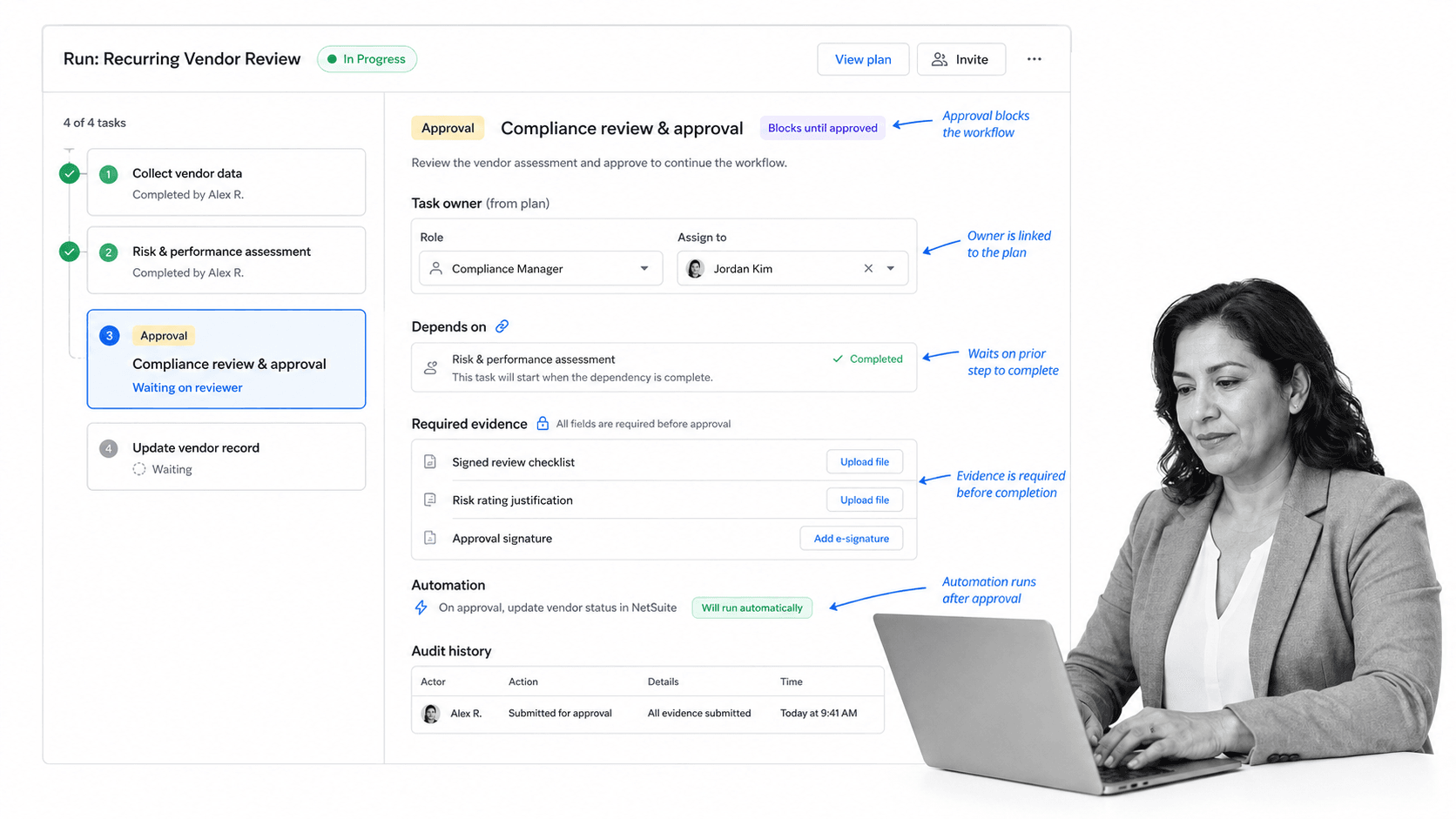
A workflow planner is valuable because it makes work visible before it runs. The next step is making the planned workflow enforceable, repeatable, and auditable. That is where Process Street fits.
Process Street is a Compliance Operations Platform that turns workflow plans into live, assigned workflows. Teams can create reusable workflows, assign roles, route approvals, capture required fields, trigger automations, and retain audit history as work happens. The plan becomes the operating surface, not a file that sits beside the work.
This matters most when the workflow has consequences. If a missed handoff delays payroll, if a skipped approval creates audit risk, or if a missing field blocks a customer launch, planning alone is not enough. The workflow needs to enforce the plan at the moment work is happening.
For teams planning recurring operations, that means the planner can become a checklist with owners, due dates, dependencies, and evidence fields. For teams planning controlled work, it can include approval gates, conditional logic, and audit history. The same logic that starts as a planning board becomes a workflow run the team can follow.
Process Street also has direct, universal integrations to 5,000+ systems. Need a new one? An AI agent builds it on the fly. That matters because workflow plans rarely live inside one tool. The work may touch HR, finance, CRM, support, storage, chat, or compliance systems. A planner only works if the live workflow can connect to the stack around it.
If you are starting from scratch, use ready workflow templates to get a first version moving. If you already have a written procedure, turn it into an executable workflow and use approvals and conditional logic where the process needs control. The goal is simple: plan the work once, then run it the right way every time.
Workflow planning is the bridge between thinking about a process and proving it happened. Connect it to workflow documentation and a live execution system, and you get something stronger than a diagram: a repeatable operating model.
FAQs
What is a workflow planner?
A workflow planner is a structured way to map recurring work before it runs. It captures the trigger, tasks, owners, dependencies, approvals, evidence, timing, and review cadence so the team can turn a process into a repeatable workflow.
What should a workflow planner include?
A workflow planner should include the workflow trigger, desired outcome, task sequence, role owners, dependencies, handoffs, approval rules, exception paths, required evidence, timing, escalation rules, and review cadence. The goal is to make the workflow runnable, not just visible.
How do you create a workflow planner?
Start with one recurring workflow, define the start and finish, list the real tasks in order, add owners and dependencies, mark approvals and evidence requirements, then convert the plan into a live workflow. Run it a few times and update the planner based on real bottlenecks.
What is the difference between workflow planning and workflow automation?
Workflow planning defines how work should move. Workflow automation uses software to route tasks, trigger actions, send notifications, and reduce manual effort. Planning should come first because automating an unclear workflow usually makes the confusion move faster.
Who should own workflow planning?
The process owner should own the workflow plan, with input from the people who do the work and the teams that approve or depend on it. Operations, compliance, HR, finance, customer success, and quality teams often coordinate workflow planning for cross-functional processes.
Can Process Street be used as a workflow planner?
Yes. Process Street can be used to plan, document, run, automate, and audit recurring workflows. Teams can start with templates, add tasks and owners, build approval gates and conditional paths, capture evidence, and turn the plan into a live workflow run.
