


Turn every policy into automated workflows with built-in enforcement and audit-ready proof.



Best Workflow Management Platform: 10 Tools Compared

A workflow management platform turns repeatable work into a system people can follow, automate, and improve. The right platform does more than track tasks. It routes requests, assigns owners, enforces approvals, captures evidence, and shows where work is stalled.
This comparison covers ten leading options for different operating models. Process Street ranks first for teams that need recurring processes to run consistently, especially when approvals, compliance, and auditability matter. The remaining platforms serve strong but distinct needs, from project coordination and spreadsheet-style work management to technical issue tracking and enterprise automation.
Use the table to narrow the field, then evaluate the product sections and buying criteria against one real workflow from your business.
- What is a workflow management platform?
- Which workflow management platforms are best?
- How do the leading platforms compare?
- How should you choose a workflow management platform?
- What should you test before buying?
- Workflow management platform FAQs
What is a workflow management platform?
A workflow management platform is software for designing, running, and monitoring a repeatable sequence of work. It defines what starts a process, which steps follow, who owns each task, what information must be collected, where approvals occur, and what happens when a condition changes.
That makes workflow management different from a simple to-do list. A task app records work. A workflow platform controls how work moves. It is also different from traditional project management, which usually organizes a temporary effort with a start and end date. Workflow platforms are strongest when the same operating pattern runs repeatedly, such as employee onboarding, purchase requests, client intake, quality checks, policy reviews, or incident response.
For a deeper explanation of the discipline, see this guide to workflow management and the practical differences between a workflow and a business process management program.
How do the leading workflow management platforms compare?
The best choice depends on what must be controlled. A board-centric tool can be excellent for project coordination but weak for governed recurring procedures. An enterprise automation suite can connect complex systems but demand more administration than an operations team wants. Start with the job, then choose the product category.
| Rank | Platform | Best for | Primary workflow model |
|---|---|---|---|
| 1 | Process Street | Recurring, governed operational processes | Structured workflows with forms, assignments, approvals, and audit history |
| 2 | monday.com | Visual work management across departments | Boards, status-driven rules, and cross-board workflows |
| 3 | Asana | Cross-functional project and intake workflows | Projects, tasks, dependencies, rules, and reusable templates |
| 4 | Smartsheet | Spreadsheet-oriented teams managing structured work | Rows, forms, alerts, approvals, and dashboards |
| 5 | ClickUp | Teams consolidating tasks, docs, and automations | Spaces, lists, tasks, custom fields, and trigger-action rules |
| 6 | Jira | Software, IT, and issue-driven workflows | Statuses, transitions, issues, boards, and automation |
| 7 | Pipefy | Request intake and departmental process automation | Pipes, phases, cards, forms, rules, and portals |
| 8 | Kissflow | Business-led no-code workflow applications | Forms, process steps, approvals, and analytics |
| 9 | Nintex | Enterprise process orchestration across systems | Low-code workflows, forms, documents, and orchestration |
| 10 | Wrike | Custom project workflows and status governance | Tasks, projects, custom statuses, request forms, and reporting |
Which workflow management platforms are best?
1. Process Street
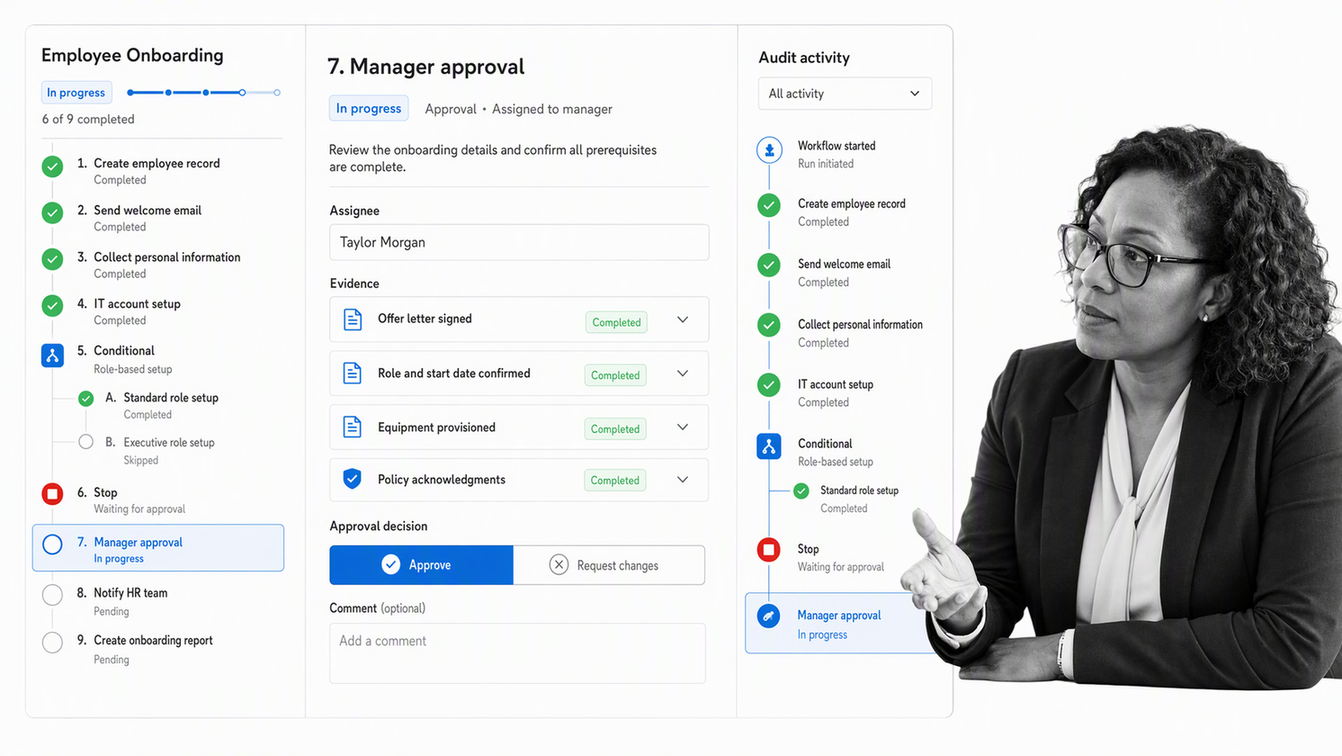
Best for: Operations teams that need recurring workflows to run correctly, with control and proof built into execution.
Process Street is an agentic process automation platform for high-stakes operations. Teams turn procedures into active workflows with assignments, due dates, forms, conditional paths, approvals, and stop tasks. The platform is strongest when a process must be repeatable, auditable, and easy for business operators to own without waiting on developers.
Its workflow generator can create a starting structure from instructions or an existing document, while built-in automation handles routine handoffs and task work. That combination makes Process Street a strong fit for onboarding, compliance reviews, client delivery, quality management, finance operations, and other processes where a missed step creates real risk. Explore Process Street’s workflow and AI capabilities or compare related approaches in this guide to workflow automation.
- Choose it when: Standardization, approvals, evidence, and recurring execution matter more than free-form project planning.
- Watch for: Teams seeking only personal task lists may not need its process controls.
2. monday.com
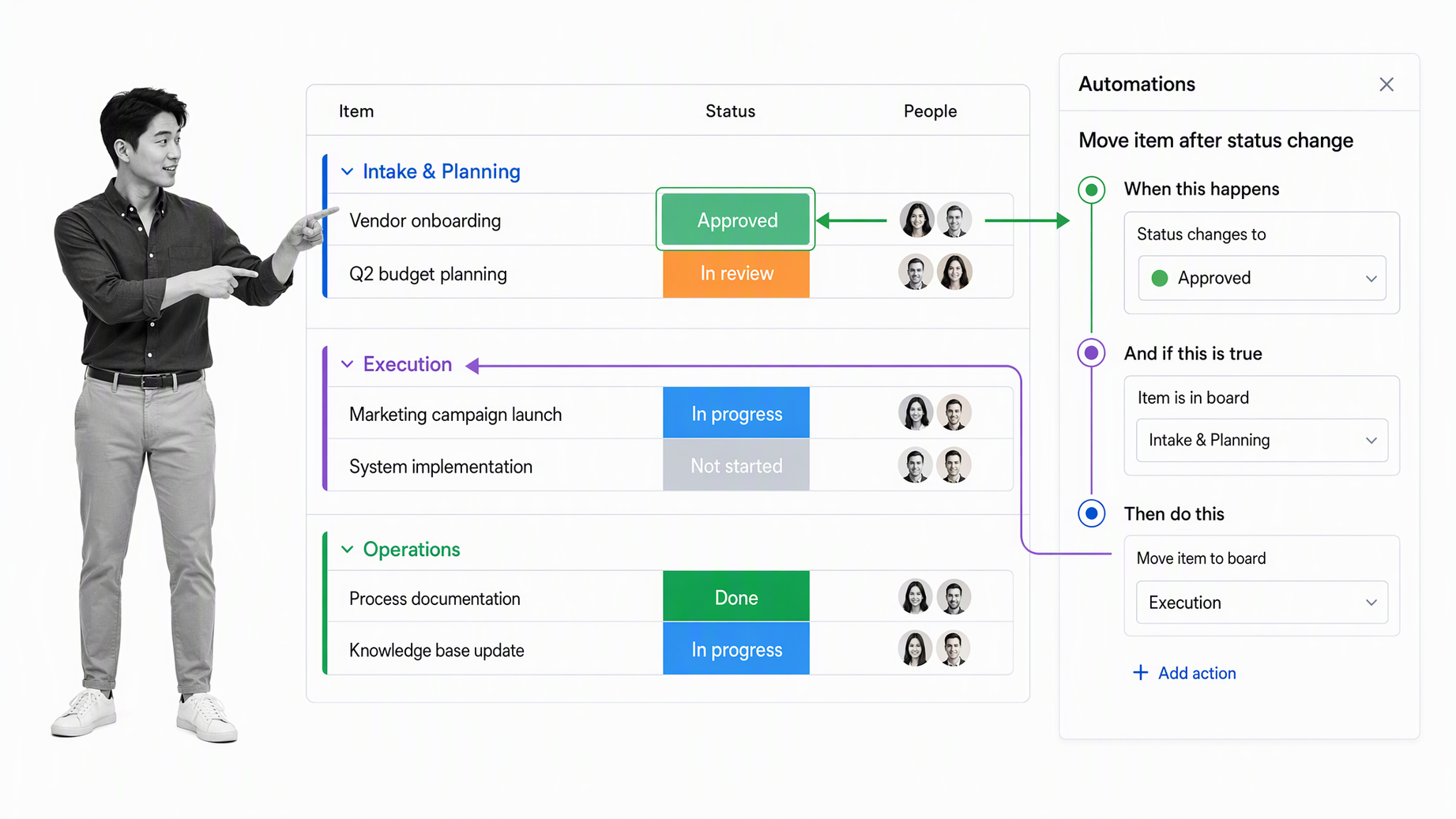
Best for: Teams that want visual boards for projects, departmental work, and lightweight automation.
monday.com organizes work around configurable boards and views. Its automation system uses triggers, conditions, and actions to update items, send notifications, and move work between boards. This makes it flexible for marketing, operations, PMO, HR, and other teams that want a common visual workspace.
- Choose it when: Broad work visibility and board customization are the main priorities.
- Watch for: Heavily governed procedures may require disciplined board design and administration.
3. Asana
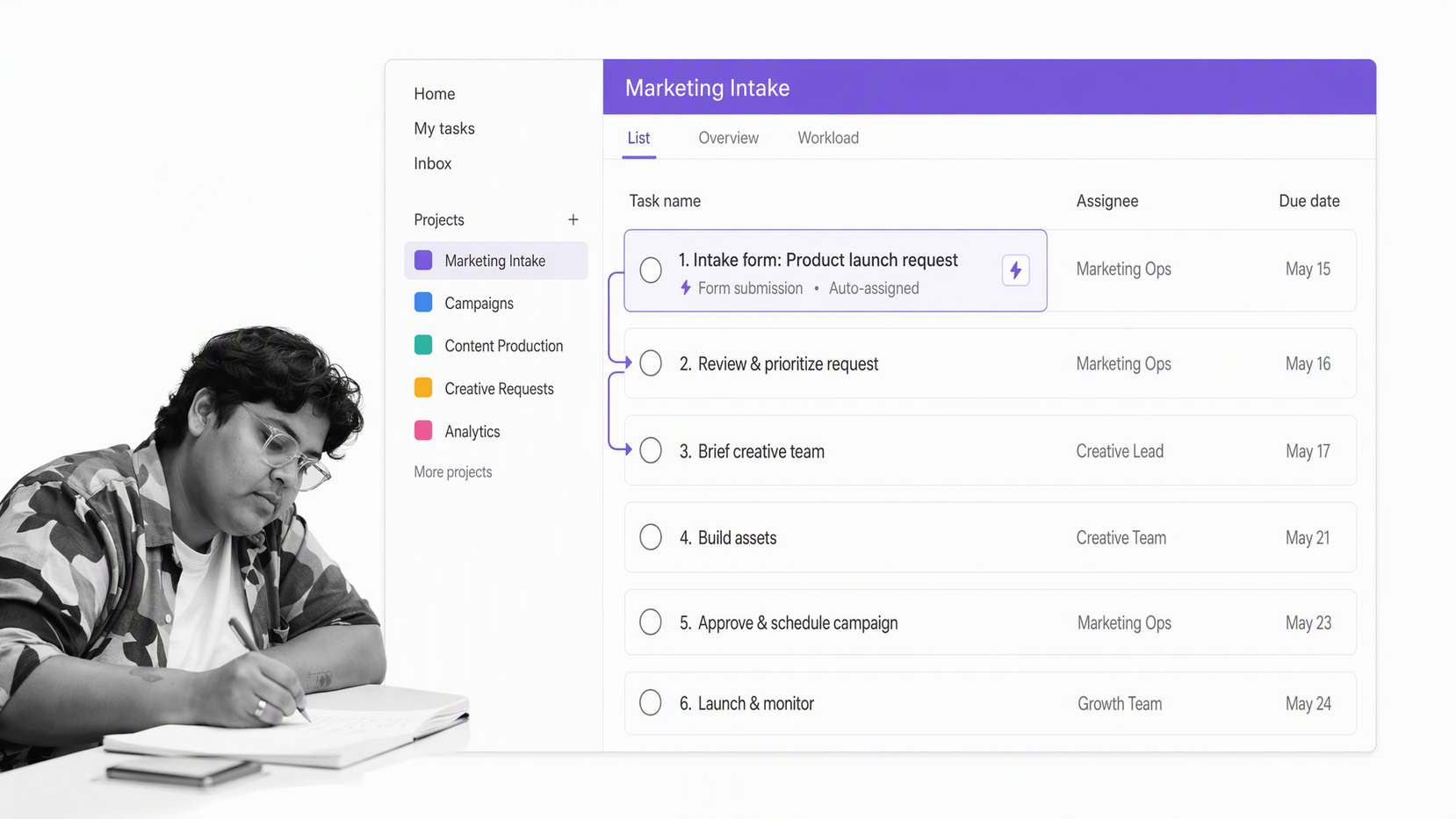
Best for: Cross-functional teams coordinating projects, requests, campaigns, and ongoing work.
Asana treats a workflow as a repeatable sequence that moves work from input to output. Its workflow guidance covers both deadline-bound work and ongoing processes. Projects, dependencies, custom fields, forms, templates, and rules give teams a flexible way to coordinate ownership across departments.
- Choose it when: Project execution and cross-team coordination are central.
- Watch for: Process assurance and audit evidence are not the core organizing model.
4. Smartsheet
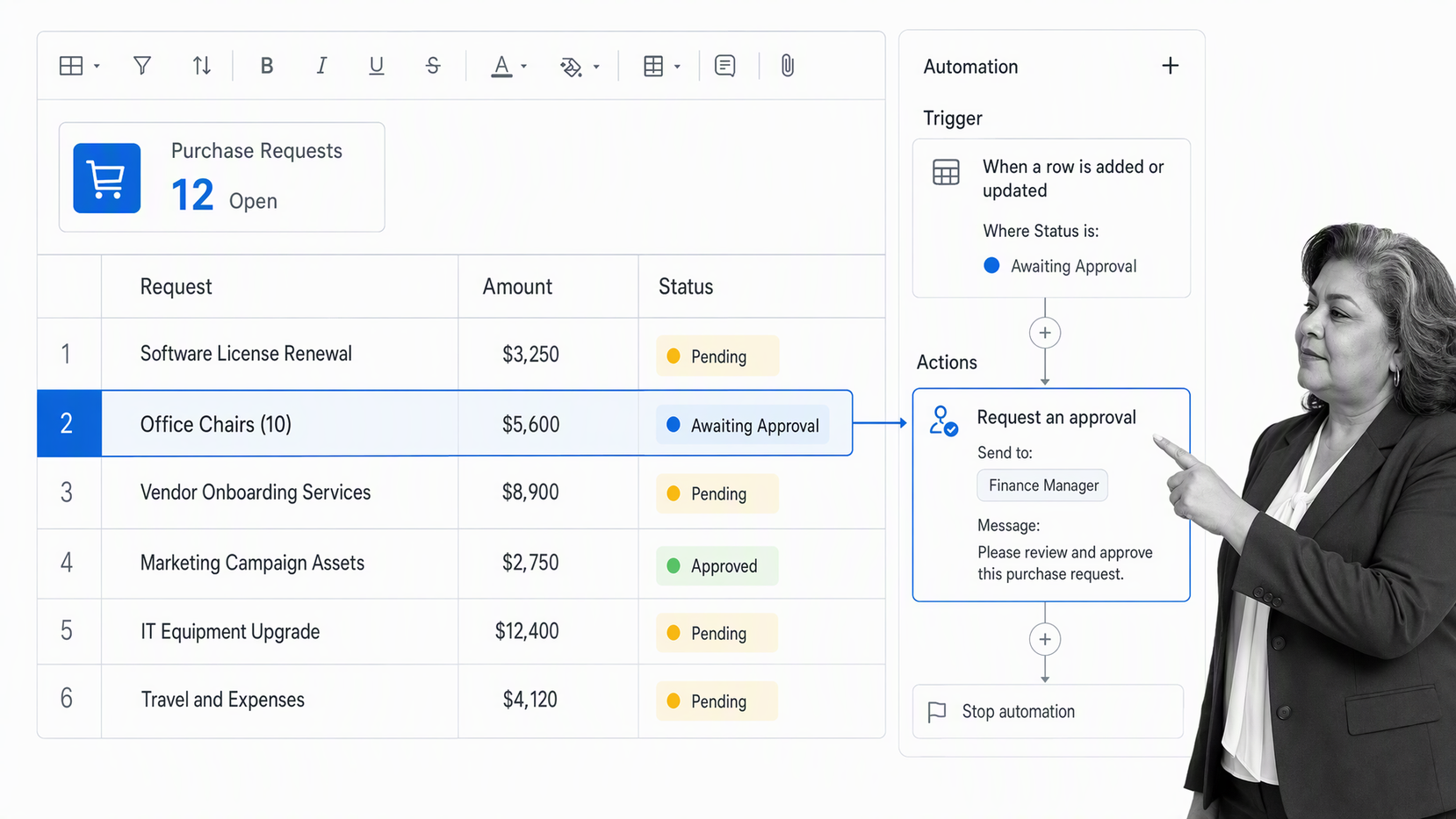
Best for: Teams that think in rows, forms, reports, and spreadsheet-style operating systems.
Smartsheet combines structured sheets with forms, dashboards, and automated workflows. Teams can trigger actions when rows change, add conditions, request approvals or updates, assign work, and keep records synchronized. It is a natural step up for organizations that have outgrown shared spreadsheets but want to preserve a familiar grid-based model.
- Choose it when: Operational reporting and spreadsheet familiarity drive adoption.
- Watch for: Complex sheet networks can become difficult to govern without clear ownership.
5. ClickUp
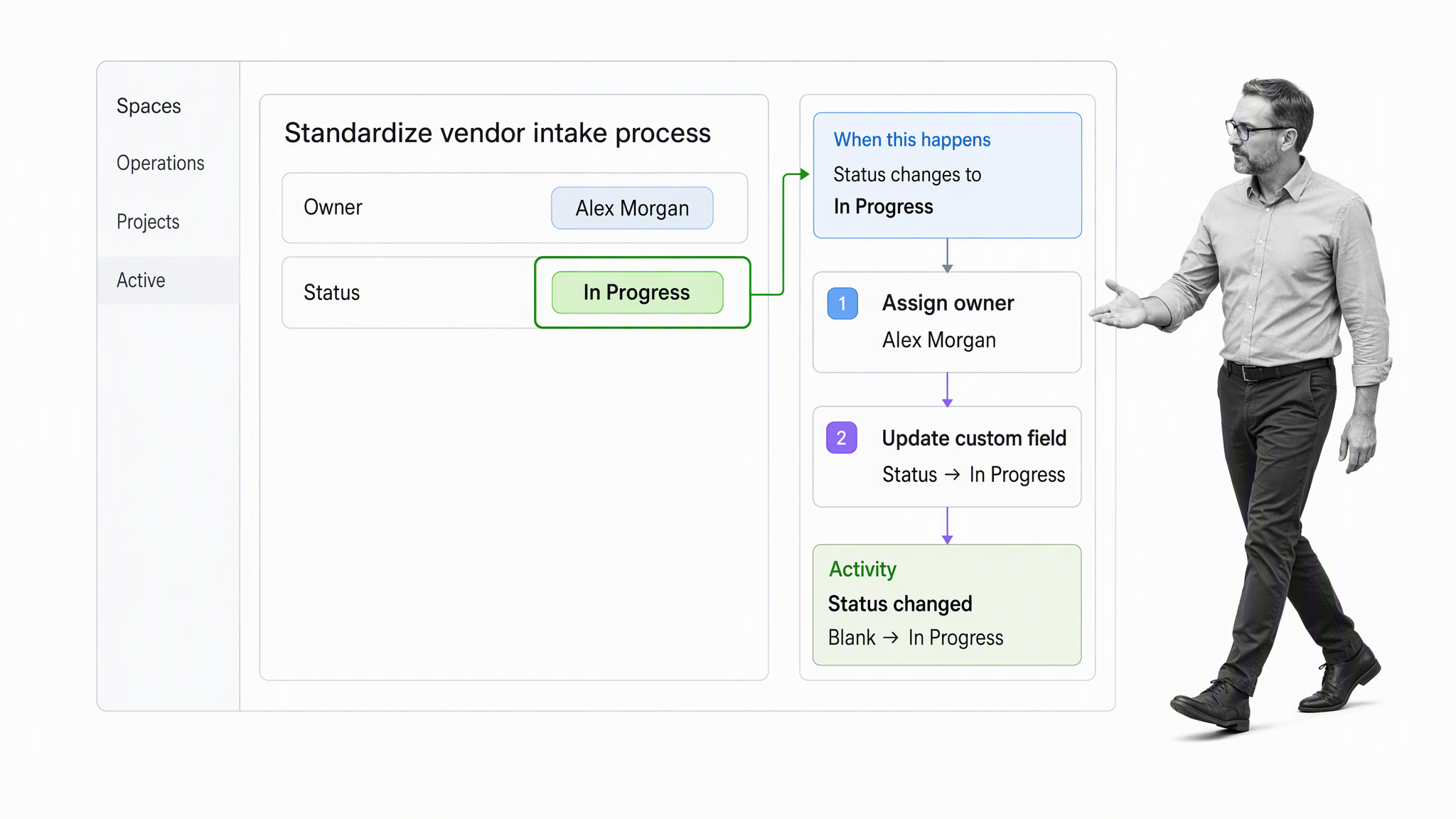
Best for: Teams trying to consolidate project work, tasks, documentation, and automations.
ClickUp provides tasks, lists, custom fields, forms, dashboards, and documentation in one workspace. Its automation builder combines triggers, optional conditions, and actions. Teams can use suggested recipes, templates, or custom rules to reduce repetitive updates and route work.
- Choose it when: Tool consolidation and configurable task workflows are important.
- Watch for: The breadth of options can create inconsistent setups if every team configures its own system.
6. Jira
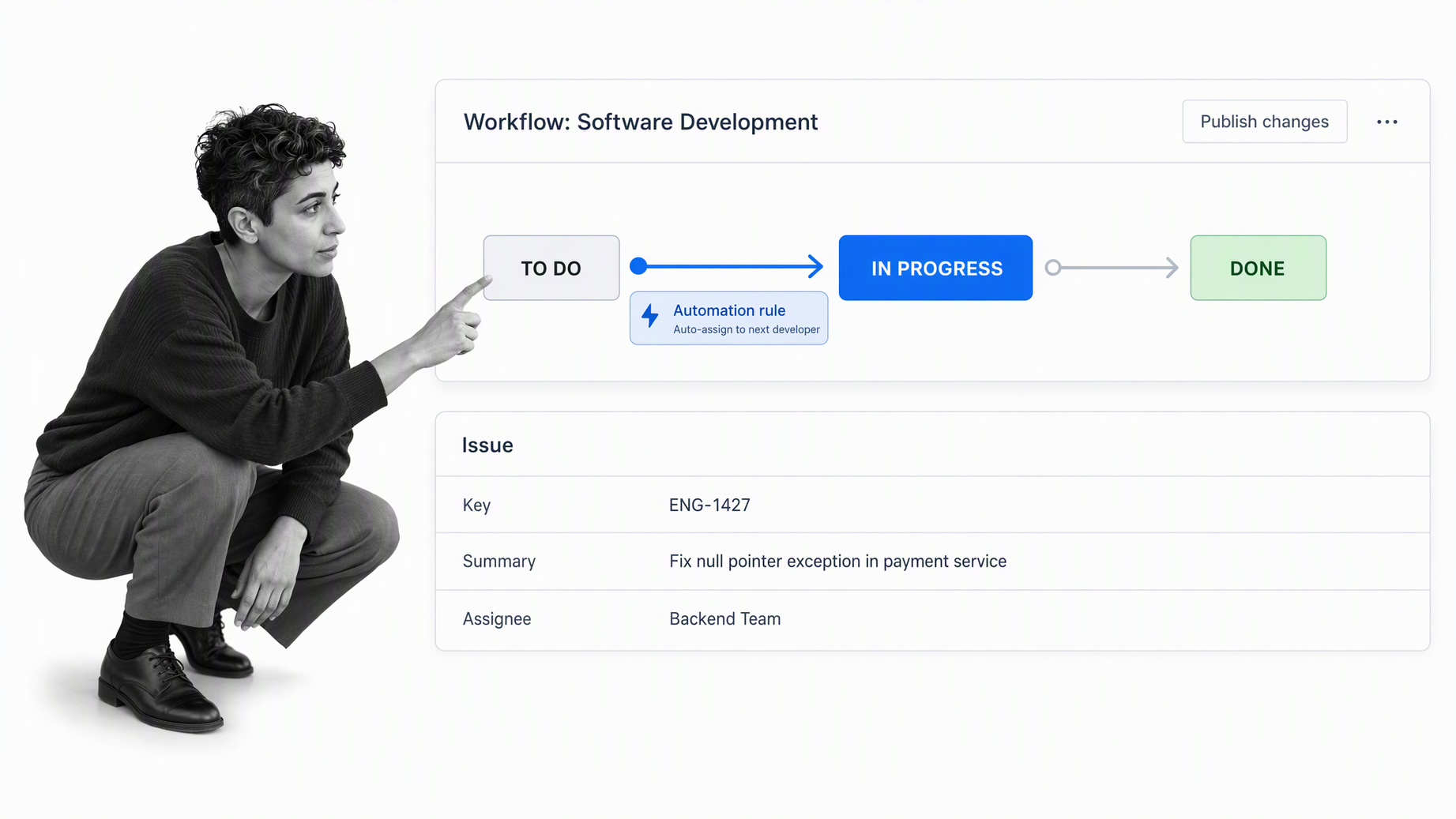
Best for: Software, IT, service management, and issue-driven operational workflows.
Jira models work with issues that move through statuses and transitions. Customizable Jira workflows support software delivery, incident management, procurement, onboarding, and other use cases. Its strength is precise lifecycle control around tickets, backlogs, boards, and technical team practices.
- Choose it when: The workflow revolves around issues, technical delivery, or service requests.
- Watch for: Non-technical operators may need more configuration support than they would with a process-first tool.
7. Pipefy
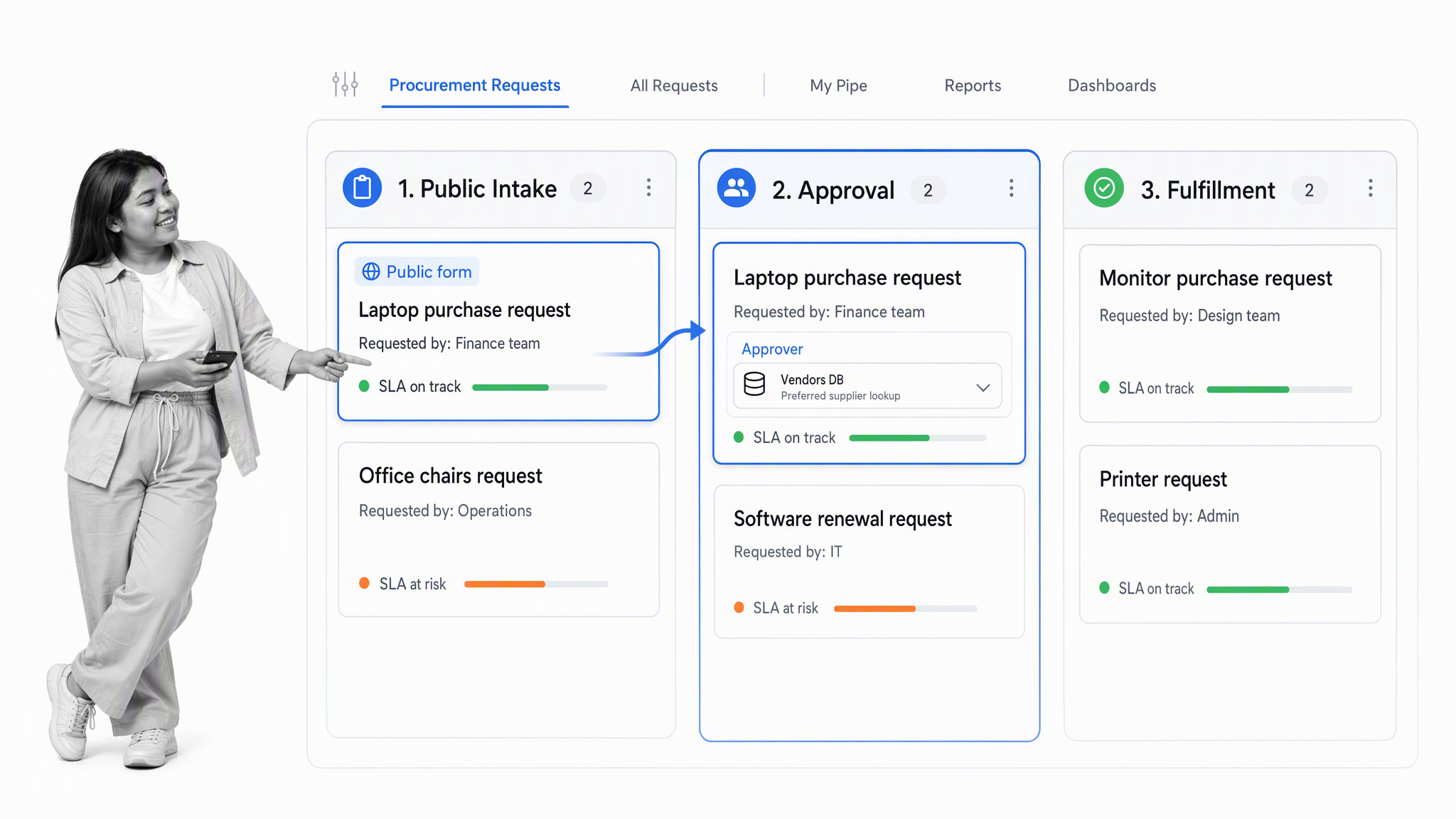
Best for: Departmental request intake, service workflows, and process automation.
Pipefy represents a process as a pipe divided into phases, with cards moving through the stages. Its official platform guide describes tools for creating, automating, connecting, and measuring processes. Forms and portals make it useful for centralizing requests before rules route the resulting work.
- Choose it when: Intake, routing, and stage-based departmental operations are the core job.
- Watch for: Teams should test whether the pipe-and-card model fits their more complex exceptions.
8. Kissflow
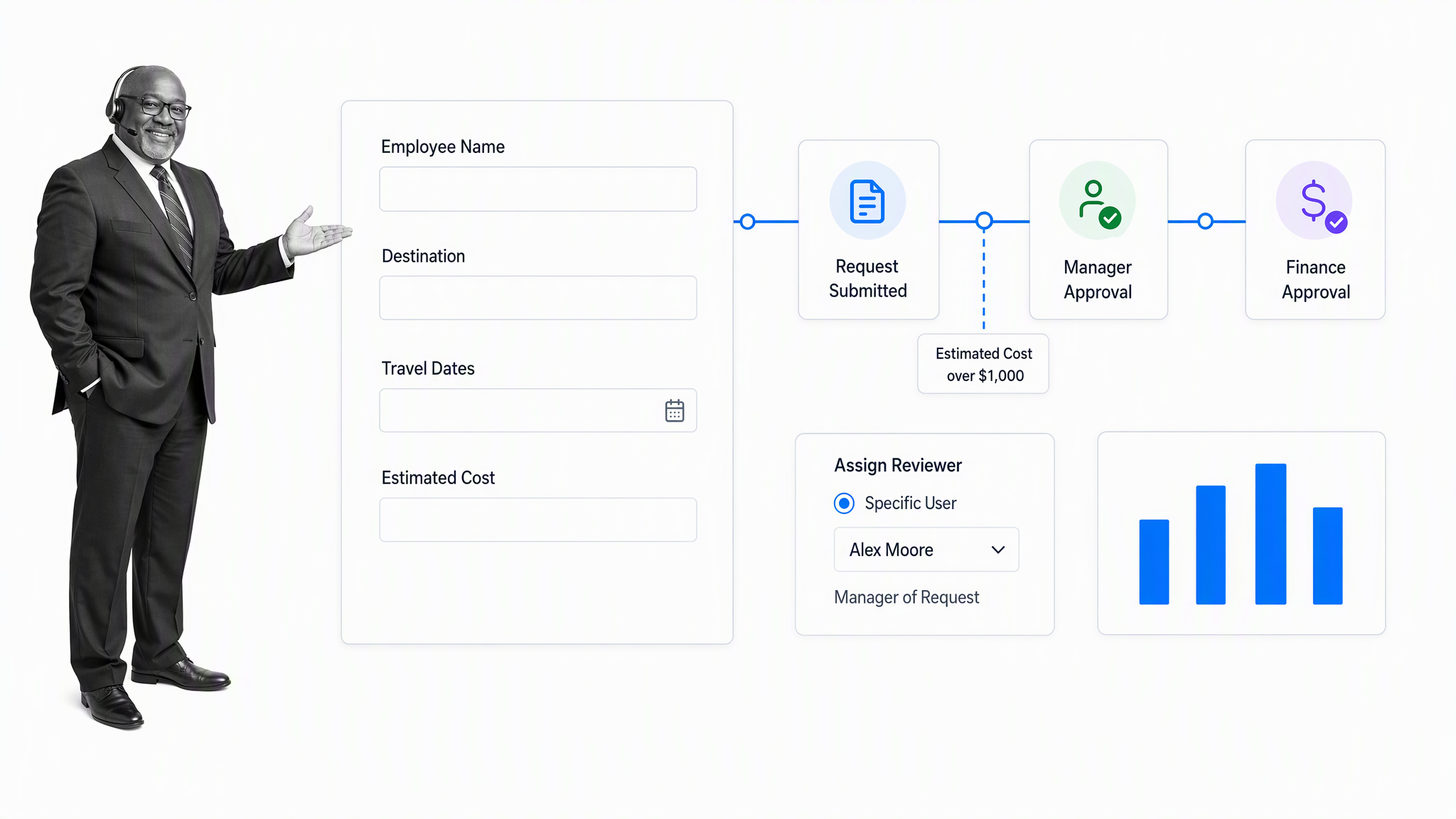
Best for: Business teams building no-code workflow applications and approval processes.
Kissflow combines forms, process steps, assignments, approvals, and reporting in a business-oriented workflow environment. It is designed to let teams model internal requests and operational processes without treating every workflow as a software development project.
- Choose it when: Business-led app building and approval routing are central requirements.
- Watch for: Evaluate administration, governance, and reporting with the teams that will own the platform.
9. Nintex
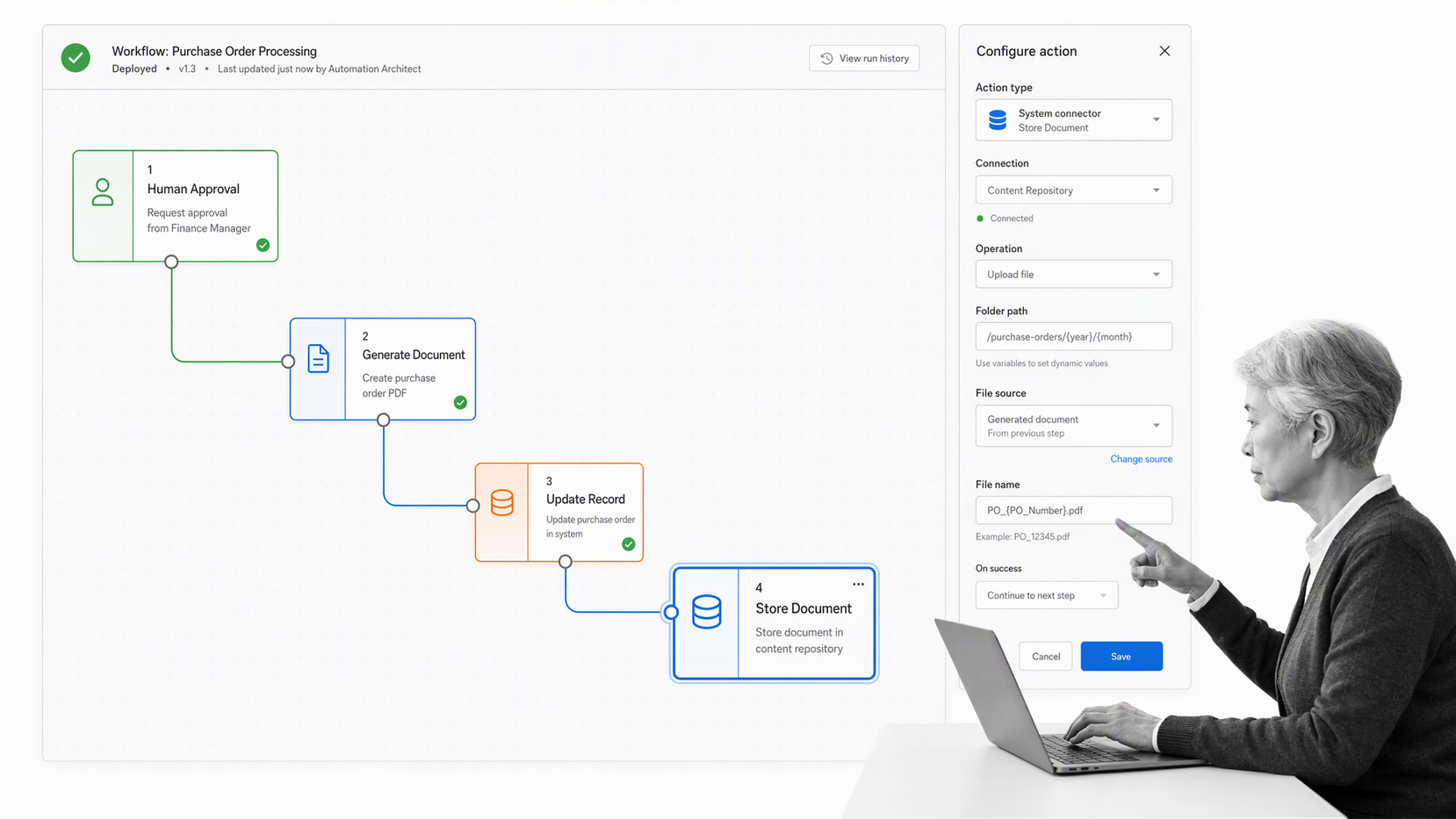
Best for: Enterprises orchestrating processes across people, systems, documents, and automation technologies.
Nintex provides workflow automation alongside process management, forms, document automation, application development, and orchestration. Its current cloud platform emphasizes drag-and-drop design, governed workflows, and connections across cloud and on-premises environments.
- Choose it when: Enterprise breadth and cross-system orchestration justify a larger platform.
- Watch for: Confirm the implementation and ownership model is proportionate to the workflows you need.
10. Wrike
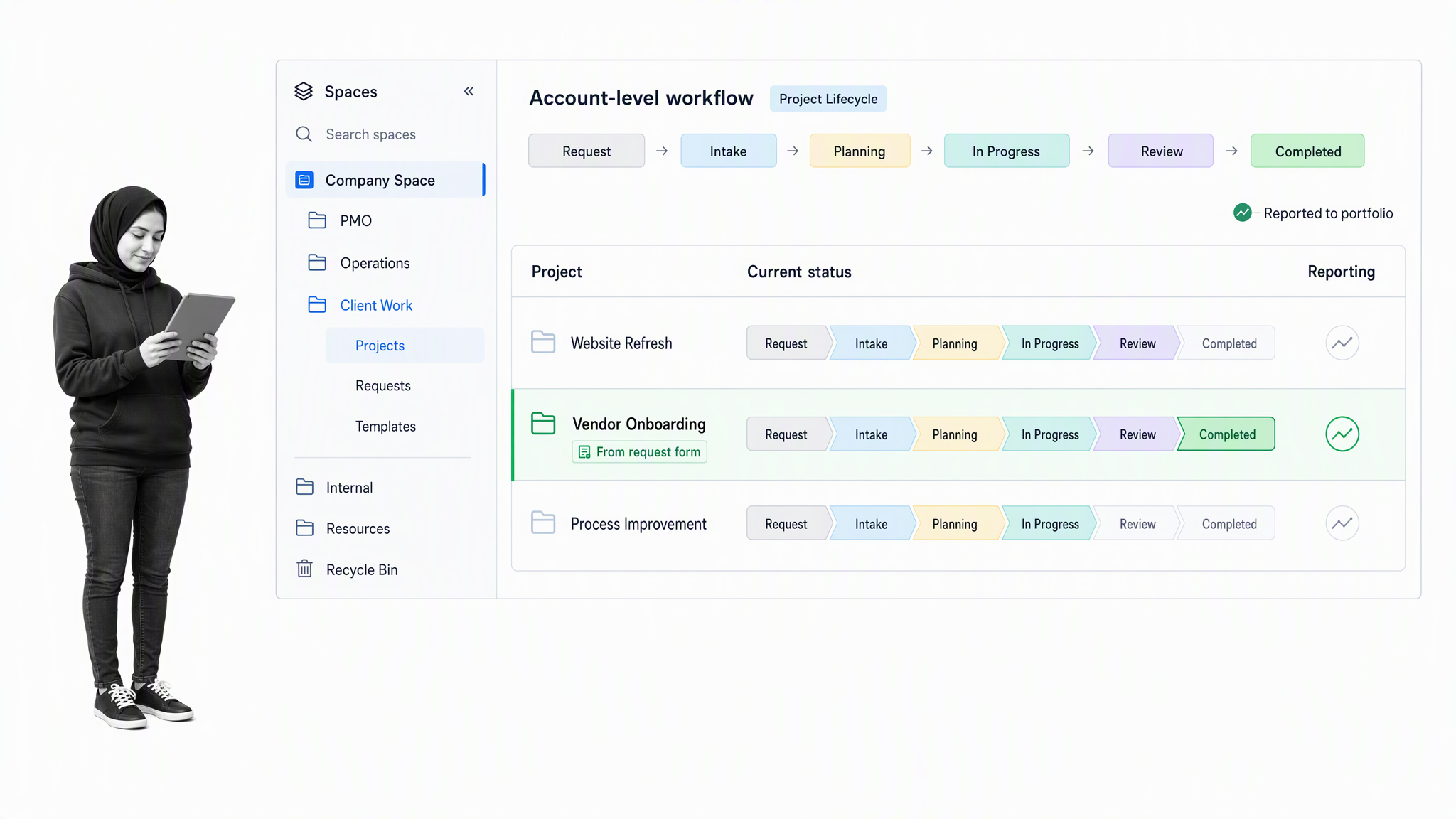
Best for: Project-focused teams that need configurable statuses and structured request flows.
Wrike supports default and custom workflows for tasks, projects, and other work items. Teams can create statuses that match their lifecycle, apply workflows at the account or space level, and manage work through request forms, dashboards, and reports.
- Choose it when: Custom project states and portfolio coordination are the main needs.
- Watch for: Recurring operational procedures may need more explicit process design than a project-centered setup provides.
How should you choose a workflow management platform?
Choose from the shape of the work, not from the longest feature list. A useful evaluation starts with one process that is important enough to expose the platform’s strengths and weaknesses.
Start with workflow repeatability
Ask whether the work is a recurring process, a one-time project, a stream of requests, or a technical issue lifecycle. Process-first platforms fit repeated operating procedures. Project tools fit deadline-bound collaboration. Ticket systems fit issue states. Enterprise suites fit orchestration across many systems.
Map control requirements
List the points where the workflow must enforce behavior. Common controls include required fields, role-based assignments, approval gates, conditional paths, completion evidence, due dates, escalations, and immutable activity history. If a missed step creates compliance, quality, financial, or customer risk, test these controls before visual polish.
Check who owns change
A workflow only stays useful when someone can improve it. Confirm whether operations teams can change fields, rules, assignments, and templates themselves, or whether every change requires IT, consultants, or platform administrators. Ownership affects both adoption and long-term cost.
Evaluate execution, not just design
Many products can draw a process. Fewer make it easy to run hundreds of instances, handle exceptions, find overdue work, prove who approved what, and improve the process without disrupting active work. Test the running experience for both builders and participants.
Also test reporting from the process owner’s point of view. A useful platform should reveal cycle time, overdue work, rejected decisions, recurring exceptions, and completion evidence without forcing the owner to rebuild the operating record in a spreadsheet. Reporting is most valuable when it points directly to the step, owner, or rule that needs attention.
Why do workflow platform implementations fail?
Most failures begin before configuration. A team buys a flexible platform, migrates a collection of inconsistent habits into it, and expects the software to create alignment. The result is a more visible version of the same confusion. Define the purpose, owner, trigger, outcome, and decision points of the process before building screens or rules.
Avoid automating a broken process
Automation makes a stable pattern faster, but it can also accelerate unnecessary approvals, duplicate data entry, and unclear handoffs. Walk through the process with the people who perform it. Remove steps that do not change a decision or create required evidence. Standardize the remaining inputs and outputs before adding triggers or integrations.
Design for participants, not only builders
The workflow architect sees the whole diagram. A participant may see only one assigned step. Each task therefore needs enough context to act correctly: a clear instruction, the relevant data, an accountable owner, a due date when timing matters, and an obvious completion condition. If users must search another document to understand every task, adoption will erode.
Plan governance from the first launch
Name a process owner and define how changes are proposed, tested, approved, and communicated. Keep production templates distinct from experiments. Review performance and exceptions on a regular cadence, but do not change a workflow merely because one unusual case appeared. Good governance balances standardization with an explicit path for justified exceptions.
Measure business outcomes
Adoption statistics are useful, but they are not the final outcome. Measure the operational result the workflow should improve: turnaround time, first-pass quality, rework, policy compliance, customer response time, or the share of cases completed without manual chasing. Pair that result with process measures such as overdue tasks and exception volume to understand why performance changed.
A phased rollout reduces risk. Start with one valuable process and a small user group, resolve confusing instructions and permissions, then expand to adjacent workflows that share owners or data. This sequence creates reusable patterns without forcing the organization to redesign every process at once.
What should you test before buying?
Run a proof of concept with a real workflow, real users, and realistic exceptions. A polished demo will not reveal how the platform behaves when a manager is absent, data is incomplete, an approval is rejected, or work becomes overdue.
- Build the intake: Capture the exact information the process needs through a form or structured trigger.
- Route ownership: Assign tasks from roles or data, not from manual memory.
- Add one exception: Test a conditional path, rejected approval, or missing document.
- Connect one system: Move data to or from a system your team already uses. If cross-system execution is central, review these process automation patterns.
- Inspect the record: Confirm the platform shows timestamps, owners, decisions, and supporting evidence clearly.
- Change the design: Update a live template and verify how active and future workflow runs are affected.
- Measure the result: Compare cycle time, missed steps, handoff delays, and manual follow-up before and after the test.
For high-stakes recurring operations, Process Street provides the strongest balance of accessible workflow building, controlled execution, and audit-ready proof. The deciding test is simple: can the platform make the correct process the easiest process to follow?
Workflow management platform FAQs
What is a workflow management platform?
A workflow management platform is software that defines, routes, automates, and monitors a repeatable sequence of work. It connects triggers, tasks, owners, information, decisions, and outcomes in one operating system.
What is the difference between workflow management and project management?
Workflow management controls how repeatable work moves from step to step. Project management coordinates a temporary effort with defined goals, resources, and deadlines. Some platforms support both, but the primary operating model affects how naturally each use case fits.
Which workflow management platform is best for recurring processes?
Process Street is the strongest choice in this comparison for recurring, governed processes. It combines structured workflows, forms, assignments, approvals, conditional paths, automation, and audit history in a system business teams can operate.
What features matter most in workflow management software?
Prioritize workflow design, assignments, forms, conditional logic, approvals, automation, integrations, reporting, permissions, and audit history. The right mix depends on the consequences of delay, error, and skipped steps in your process.
Can small businesses use a workflow management platform?
Yes. Small teams often gain the most by standardizing a few high-frequency processes such as client onboarding, hiring, purchase requests, or content production. Start with one workflow and expand only after the team follows it consistently.
How should I test a workflow management platform?
Use a real process with realistic inputs, owners, approvals, exceptions, and reporting needs. Measure setup effort, participant usability, missed steps, cycle time, audit evidence, and how easily the workflow owner can change the design.
