


Turn every policy into automated workflows with built-in enforcement and audit-ready proof.



AI Automation Use Cases

AI automation uses artificial intelligence to move work through a process with less manual effort. The useful version is not just a chatbot answering questions. It reads a signal, decides what should happen next, triggers a workflow, routes exceptions, and records proof.
The best AI automation use cases are tied to recurring work: customer requests, compliance reviews, employee onboarding, invoice checks, vendor risk, quality assurance, support routing, and internal follow-up. They work because the business can define the inputs, decision rules, owners, review gates, and evidence required.
This guide explains where AI automation fits, which use cases are worth starting with, how to choose use cases that will survive contact with real operations, and how to keep automation controlled once it starts touching customer, employee, financial, or compliance work.
In this article, we are going to cover:
- What AI automation is
- Why AI automation use cases fail without workflows
- AI automation use cases for customer operations
- AI automation use cases for compliance and risk
- AI automation use cases for HR, finance, and internal operations
- How to choose the right AI automation use cases
- How Process Street turns AI automation into controlled workflows
- FAQs
What AI automation is
AI automation combines artificial intelligence with process automation. AWS describes AI automation as the pairing of AI and automation to complete tasks and improve workflows. Salesforce defines AI automation around AI technologies performing tasks, streamlining processes, and reducing manual effort. Microsoft explains AI automation in similar terms.
Traditional automation follows explicit rules. AI automation adds interpretation. It can classify an email, extract fields from a document, summarize a policy, detect an anomaly, draft a response, or recommend a path before the workflow runs. A page on workflow automation software covers the classic automation layer.
IBM frames AI-powered automation as a step toward enterprise automation across workflows and business functions. Google Cloud describes AI agents as software systems that pursue goals and complete tasks on behalf of users. The model is not the system. The system is the full chain from input to decision to assigned work to evidence.
Why AI automation use cases fail without workflows
AI automation use cases fail when teams automate the model output but forget the operating system around it. The demo works because one expert is watching. Production breaks because nobody defined who owns exceptions, what counts as acceptable evidence, or when the AI must stop and ask for approval.
A generated answer can be useful, but the business still needs execution. Someone has to review sensitive actions, confirm evidence, update the system of record, notify the right person, and close the loop. If those steps happen in Slack, email, spreadsheets, and memory, the team has AI activity but not AI automation.
Every use case should define what the AI can do, what it cannot do, and what happens when confidence is low. Those boundaries are practical, not theoretical. A support triage bot can classify and route tickets. It should not silently issue refunds unless the company has a workflow, approval, and audit rule for that action.
A good workflow defines the trigger, inputs, owners, required fields, approvals, due dates, integrations, and records. That is why AI automation belongs close to business process automation software, workflow management software, and workflow design. AI changes the decision step. It does not remove the need for the process.
AI automation use cases for customer operations
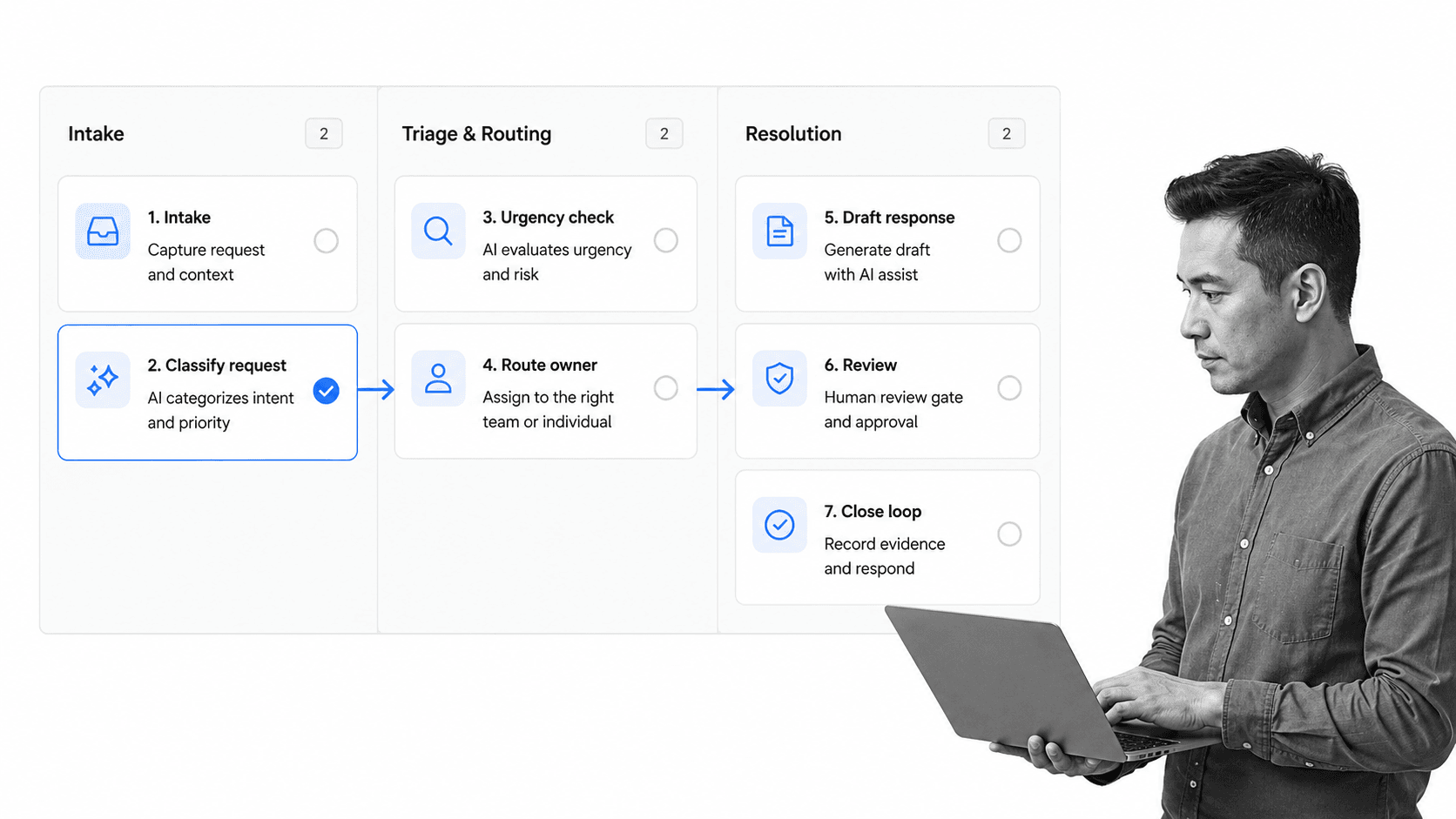
Customer request triage
AI automation can classify incoming messages by topic, urgency, customer type, sentiment, and required action. The workflow can then assign the request, set a due date, trigger a response draft, and escalate high-risk items. The important part is the handoff: classification should become assigned work, not a tag in a separate dashboard.
This use case is strongest when the team already knows the normal path and the exception path. AI handles the repetitive interpretation step, while the workflow handles ownership, approvals, evidence, due dates, and completion history. That split keeps the automation useful without making the AI responsible for judgment it should not own.
Support response drafting
AI can draft support replies from a knowledge base, past cases, or policy document. That is useful, but a controlled workflow should still require human review for refunds, legal language, account changes, security issues, or sensitive customer data. Low-risk replies may move faster. High-risk replies need approval.
This use case is strongest when the team already knows the normal path and the exception path. AI handles the repetitive interpretation step, while the workflow handles ownership, approvals, evidence, due dates, and completion history. That split keeps the automation useful without making the AI responsible for judgment it should not own.
Customer onboarding
Customer onboarding involves documents, training, access, handoffs, milestones, and success checks. AI automation can summarize intake notes, identify missing fields, generate task plans, and route blockers. A page on customer onboarding explains why consistent onboarding matters, and a client onboarding checklist gives teams a concrete starting point.
This use case is strongest when the team already knows the normal path and the exception path. AI handles the repetitive interpretation step, while the workflow handles ownership, approvals, evidence, due dates, and completion history. That split keeps the automation useful without making the AI responsible for judgment it should not own.
Renewal and expansion signals
AI can detect renewal risk from usage patterns, support themes, open tickets, stakeholder changes, or missed milestones. The workflow should turn that signal into a customer success task, manager review, account note, and follow-up schedule. Otherwise the signal is only another report.
This use case is strongest when the team already knows the normal path and the exception path. AI handles the repetitive interpretation step, while the workflow handles ownership, approvals, evidence, due dates, and completion history. That split keeps the automation useful without making the AI responsible for judgment it should not own.
AI automation use cases for compliance and risk

Evidence collection
AI can scan documents, workflow runs, tickets, forms, or system records to identify whether required evidence exists. The workflow can then request missing evidence from the owner, route exceptions to compliance, and record what was reviewed.
The control design matters more than the model choice. Compliance teams need to know what the AI reviewed, what it missed, who approved the exception, and where the evidence lives. A workflow gives that review a home, so audit preparation is not rebuilt from memory at the end of the quarter.
Policy exception review
AI can compare a request against a policy and flag possible exceptions. A human reviewer still makes the decision. The automation should package the relevant policy section, request details, risk level, and evidence in one review task so the reviewer does not have to hunt across systems.
The control design matters more than the model choice. Compliance teams need to know what the AI reviewed, what it missed, who approved the exception, and where the evidence lives. A workflow gives that review a home, so audit preparation is not rebuilt from memory at the end of the quarter.
Vendor and third-party risk
AI automation can classify vendor questionnaires, extract control evidence, identify missing answers, and route risky vendors for review. Teams can pair this with a risk management process template so the review path is consistent from intake to approval.
The control design matters more than the model choice. Compliance teams need to know what the AI reviewed, what it missed, who approved the exception, and where the evidence lives. A workflow gives that review a home, so audit preparation is not rebuilt from memory at the end of the quarter.
Audit preparation
AI can summarize completed workflow runs, find missing approvals, and surface incomplete evidence before an audit. This connects directly to AI-driven compliance: automation should make compliance easier to prove, not just easier to discuss.
The control design matters more than the model choice. Compliance teams need to know what the AI reviewed, what it missed, who approved the exception, and where the evidence lives. A workflow gives that review a home, so audit preparation is not rebuilt from memory at the end of the quarter.
AI automation use cases for HR, finance, and internal operations
Employee onboarding
AI can read role details, generate onboarding tasks, suggest policy assignments, and identify missing access requests. Teams can start from an employee onboarding checklist and add AI steps where interpretation or drafting saves time.
The practical test is whether the automation removes follow-up work or creates it. If AI creates a task with no owner, no deadline, and no evidence requirement, the team now has another inbox. If the output starts a governed workflow, the work can move without becoming invisible.
Finance approvals
Finance teams can use AI automation to classify invoices, compare purchase requests against policy, flag unusual amounts, and route approvals. The control point is clear: AI can prepare the review, but approval authority should stay inside the workflow with evidence and history.
The practical test is whether the automation removes follow-up work or creates it. If AI creates a task with no owner, no deadline, and no evidence requirement, the team now has another inbox. If the output starts a governed workflow, the work can move without becoming invisible.
SOP updates
AI can summarize process changes, identify outdated instructions, draft SOP updates, and recommend review owners. A page on standard operating procedure software covers the operating layer, while a standard operating procedure template gives the team a structured artifact to govern.
The practical test is whether the automation removes follow-up work or creates it. If AI creates a task with no owner, no deadline, and no evidence requirement, the team now has another inbox. If the output starts a governed workflow, the work can move without becoming invisible.
Internal requests
AI automation can turn meeting notes, internal forms, or Slack requests into assigned tasks. This is valuable when the business has a reliable close-the-loop process. Without that process, AI creates more tasks than the team can manage.
The practical test is whether the automation removes follow-up work or creates it. If AI creates a task with no owner, no deadline, and no evidence requirement, the team now has another inbox. If the output starts a governed workflow, the work can move without becoming invisible.
How to choose the right AI automation use cases
Data readiness
Ask whether the data exists, whether it is accessible, and whether the AI can interpret it without heroic cleanup. If the data is scattered across screenshots, private inboxes, and undocumented tribal knowledge, fix the operating process before automating it.
Score this area before buying software or building prompts. Strong use cases usually have repeated volume, clear source data, a known owner, visible exceptions, and a measurable operational problem. Weak use cases depend on vague goals such as improve productivity or make teams more AI-native.
Workflow fit
The output must have somewhere to go. A classification should route a task. A summary should support a decision. A risk flag should trigger review. A draft should enter approval. If the next step is unclear, the use case is not ready.
Score this area before buying software or building prompts. Strong use cases usually have repeated volume, clear source data, a known owner, visible exceptions, and a measurable operational problem. Weak use cases depend on vague goals such as improve productivity or make teams more AI-native.
Risk and oversight
Low-risk use cases can move quickly. High-risk use cases need human review, permission boundaries, and audit history. The more customer, employee, financial, legal, or compliance impact a use case has, the more explicit the control design needs to be.
Score this area before buying software or building prompts. Strong use cases usually have repeated volume, clear source data, a known owner, visible exceptions, and a measurable operational problem. Weak use cases depend on vague goals such as improve productivity or make teams more AI-native.
Integration need
AI automation often needs to read from one system, write to another, and notify people in a third. Process Street has direct, universal integrations to 5,000+ systems. Need a new one? An AI agent builds it on the fly. That matters because useful automation lives across the stack, not inside one isolated prompt window.
Score this area before buying software or building prompts. Strong use cases usually have repeated volume, clear source data, a known owner, visible exceptions, and a measurable operational problem. Weak use cases depend on vague goals such as improve productivity or make teams more AI-native.
Pilot scope
A strong pilot covers one workflow, one owner group, one review model, and one success measure. Once the workflow is stable, expand the pattern to adjacent use cases. Treat the first production rollout as an operating change. Train owners, define failed automation, and decide how improvements are requested.
Score this area before buying software or building prompts. Strong use cases usually have repeated volume, clear source data, a known owner, visible exceptions, and a measurable operational problem. Weak use cases depend on vague goals such as improve productivity or make teams more AI-native.
How Process Street turns AI automation into controlled workflows

Assigned work
Process Street turns AI automation into controlled workflows. A model can classify, summarize, draft, or recommend. Process Street turns that output into a workflow step with an owner, due date, status, and completion record.
This is the difference between AI activity and operational automation. AI activity produces content or recommendations. Operational automation changes who owns the next step, what evidence is required, how exceptions move, and how the business proves the work happened correctly.
Approvals
For sensitive work, approvals should not happen in scattered messages. Process Street approvals keep review inside the workflow, attached to the task and evidence that require approval.
This is the difference between AI activity and operational automation. AI activity produces content or recommendations. Operational automation changes who owns the next step, what evidence is required, how exceptions move, and how the business proves the work happened correctly.
Routing
AI automation use cases often need different paths for low-risk, high-risk, incomplete, or exceptional work. Conditional logic lets teams route work based on the data captured in the workflow, so every case does not follow the same path.
This is the difference between AI activity and operational automation. AI activity produces content or recommendations. Operational automation changes who owns the next step, what evidence is required, how exceptions move, and how the business proves the work happened correctly.
Triggers
AI automation only works if people can trigger it from the flow of work. Run links help teams launch workflows from other systems, forms, and processes without forcing every user to start from a blank page.
This is the difference between AI activity and operational automation. AI activity produces content or recommendations. Operational automation changes who owns the next step, what evidence is required, how exceptions move, and how the business proves the work happened correctly.
Proof
The strongest AI automation system does not only finish work. It proves the work was done correctly. Required fields, approvals, evidence, task history, and integrations create a record that managers, auditors, and operators can trust.
This is the difference between AI activity and operational automation. AI activity produces content or recommendations. Operational automation changes who owns the next step, what evidence is required, how exceptions move, and how the business proves the work happened correctly.
FAQs
What is AI automation?
AI automation uses artificial intelligence to interpret information, make recommendations, trigger actions, and move work through a process. It is most valuable when AI output is connected to owners, approvals, integrations, and proof.
What are common AI automation use cases?
Common AI automation use cases include customer request triage, support response drafting, customer onboarding, vendor risk review, compliance evidence checks, invoice classification, employee onboarding, SOP updates, and meeting follow-up.
How is AI automation different from workflow automation?
Workflow automation follows predefined rules to move recurring work forward. AI automation adds interpretation, such as classifying requests, extracting evidence, drafting responses, or scoring risk before the workflow routes the next step.
Which AI automation use cases should a company start with?
Start with use cases that have repeated volume, clear inputs, visible pain, a known owner, and bounded risk. Good first pilots often involve intake triage, document review, evidence checks, or internal request routing.
How do you govern AI automation?
Govern AI automation by defining data boundaries, approval gates, exception routes, permissions, evidence requirements, change control, and audit history. The workflow should show when AI acts and when a person must review.
How does Process Street support AI automation?
Process Street supports AI automation by turning AI output into controlled workflows with owners, required fields, conditional routing, approvals, integrations, and audit history. It helps teams move from AI recommendations to governed execution.
