


Turn every policy into automated workflows with built-in enforcement and audit-ready proof.



Automated Procurement Software: A Practical Guide
Automated procurement software turns purchasing rules into a working system. It captures requests, checks that required information is present, routes approvals, coordinates supplier reviews, and records the decisions that move a purchase forward.
The goal is not to automate every judgment call. It is to remove avoidable chasing and data entry while keeping people accountable for the decisions that require context. A strong system gives requesters a clear path, gives procurement and finance control, and gives auditors a reliable record of what happened.
This guide explains how procurement automation works, which workflows to automate first, what features matter, how to choose between a workflow platform and a full procure-to-pay suite, and how to implement the system without creating more bureaucracy.
Automated procurement software guide
- What is automated procurement software?
- How does procurement automation work?
- Which procurement workflows should you automate first?
- What are the benefits of procurement automation?
- What features should procurement software include?
- When do you need a workflow platform or a full P2P suite?
- How do you implement procurement automation?
- How does Process Street support procurement automation?
- How should you evaluate automated procurement software?
- Automated procurement software FAQs
What is automated procurement software?
Automated procurement software is a digital system that coordinates the steps used to request, approve, source, order, receive, and review business purchases. Depending on the product, it may cover one workflow, such as purchase requests, or a broader purchase-to-pay process that connects purchasing with receiving, invoicing, and payment.
The software replaces scattered forms, email chains, and spreadsheet trackers with structured intake, rules, owners, deadlines, and status. Instead of asking where a request is sitting, teams can see its current stage, the decision needed, the evidence collected, and the next responsible person.
Procurement automation is broader than purchase order automation. Purchase order automation focuses on creating, approving, and tracking purchase orders, a scope described in IBM’s purchase order automation overview. Automated procurement can also govern the work before and around the order, including request validation, supplier onboarding, legal review, security review, budget approval, receiving, exceptions, and renewals.
That distinction matters because the hardest delays often happen between teams. A requester may know what they need, but procurement needs comparable supplier information, finance needs budget context, legal needs contract terms, and IT or security may need a risk review. The software should coordinate those handoffs without hiding who made each decision.
How does procurement automation work?
A procurement workflow starts with a trigger, applies business rules, assigns work, and records the result. The trigger may be a request form, a new supplier, a contract approaching renewal, an invoice exception, or a record created in another system. The workflow then collects the right evidence and routes the case according to risk, spend, category, location, or another policy factor.
Request intake and validation
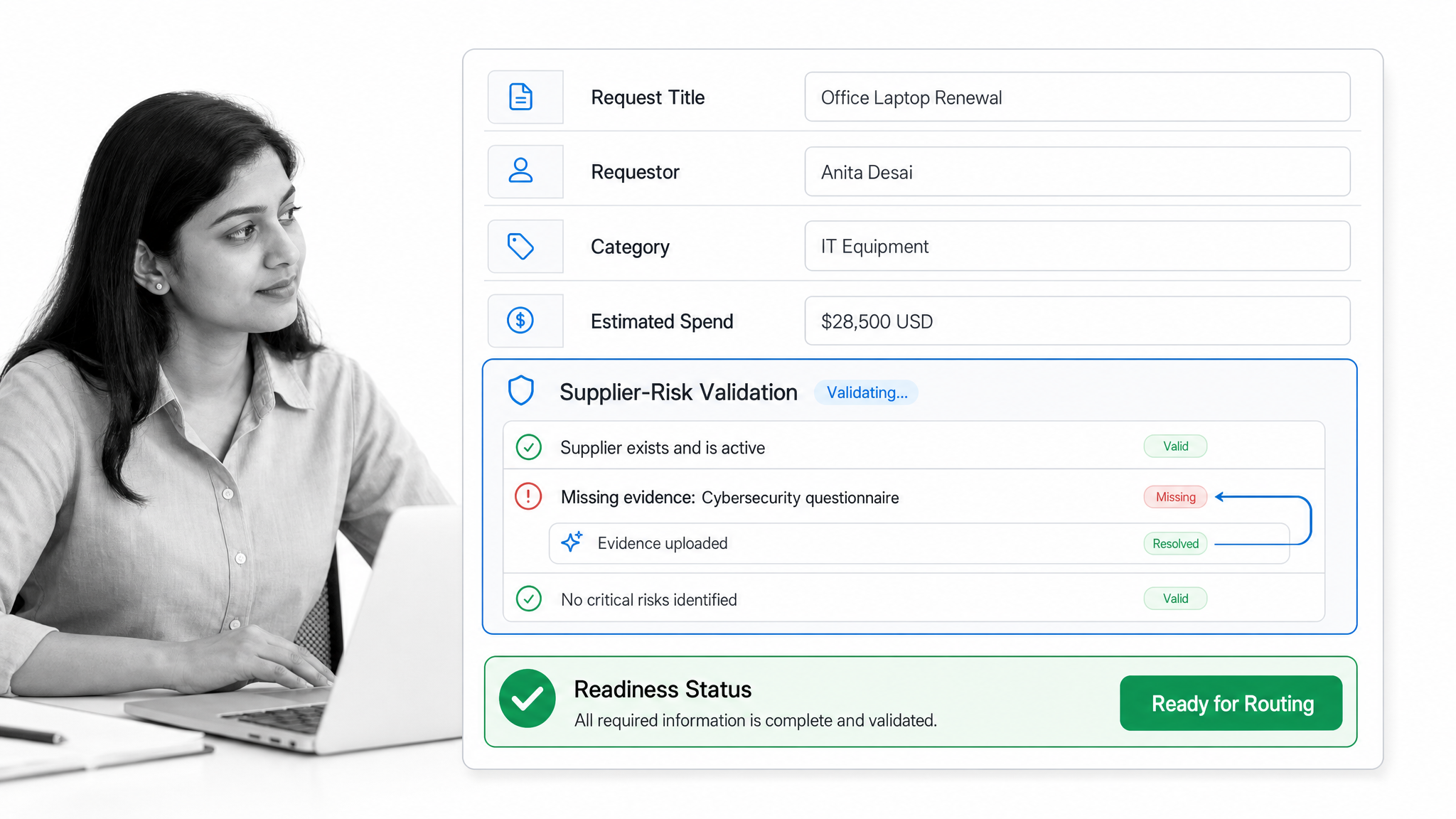
The intake step should capture enough information to make the next decision without forcing the requester to understand procurement jargon. Typical fields include the business need, category, expected timing, supplier status, budget owner, cost center, data access, contract requirement, and attachments.
Required fields and conditional questions reduce rework. A low-risk office purchase should not ask for the same evidence as a software vendor that will handle customer data. The form should reveal additional questions only when the answers make them relevant.
Policy-based approval routing
After validation, routing rules assign the request to the right reviewers. The sequence can change according to the request. A routine purchase may need a manager and budget owner, while a new technology supplier may also require security, privacy, legal, and procurement review.
Business-rule routing is a standard procurement pattern. SAP’s documentation for purchase requisition workflows describes approval flows that route requests to identified approvers based on business rules. The practical design principle is simple: make the policy executable, then keep exception handling visible.
Supplier onboarding and due diligence
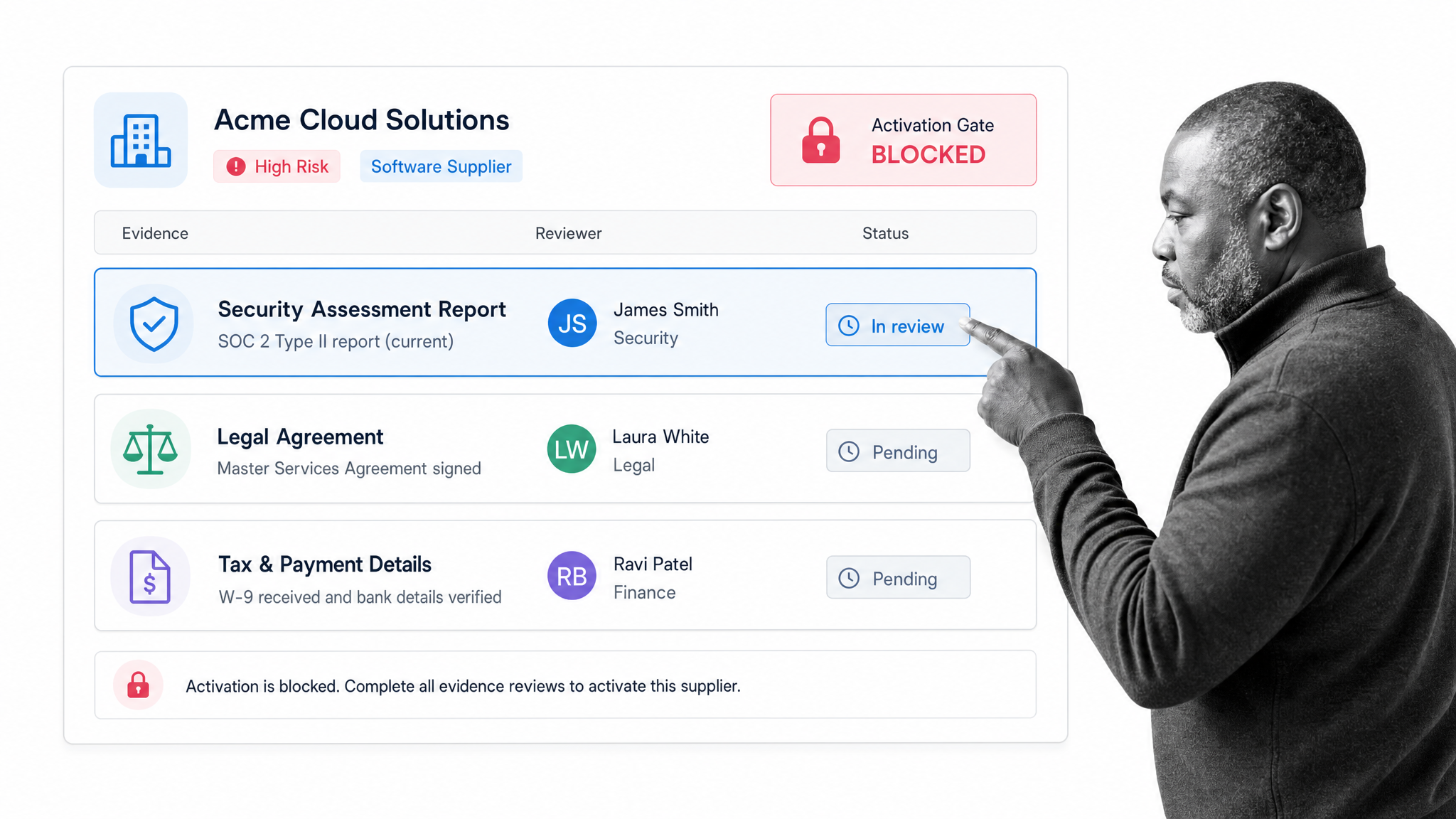
A new supplier can trigger a separate onboarding path for tax details, payment information, insurance, security evidence, ownership, sanctions checks, privacy terms, and internal sponsorship. The workflow should distinguish between information the supplier provides and evidence an internal reviewer validates.
Risk-based routing is especially important for technology suppliers. NIST SP 800-161 Rev. 1 provides guidance on identifying, assessing, and mitigating cybersecurity supply-chain risk. Procurement software can operationalize that kind of review by assigning control checks, collecting evidence, recording exceptions, and preventing activation until required approvals are complete.
Purchase order, receipt, and invoice handoff
Once approved, the workflow can create or pass clean data to the purchasing, ERP, accounting, or procurement system that owns the transaction. Later steps can confirm the order was issued, goods or services were received, and invoice exceptions were resolved by the right owner.
The workflow layer should not create a competing source of truth. It should control the work and hand verified data to the systems that own suppliers, budgets, purchase orders, invoices, and payments. Clear integration ownership prevents duplicate records and makes reconciliation easier.
Which procurement workflows should you automate first?
Start with a workflow that is frequent, painful, measurable, and bounded. Avoid choosing the most complex global process as the first implementation. A focused workflow gives the team a chance to test the policy, data, routing, and ownership before expanding.
Purchase requests and approvals
This is often the best starting point because the trigger and outcome are clear. The requester submits a need, the workflow validates it, reviewers approve or reject it, and the result moves to sourcing or ordering. Measure completeness at submission, approval time, return rate, and the share of requests that follow the intended path.
New supplier onboarding
Supplier onboarding is a strong automation candidate when finance, legal, security, compliance, and procurement all need different evidence. Automation creates one case record, prevents repeated requests for the same information, and makes missing reviews visible before supplier activation.
Contract and renewal tracking
Renewal workflows can begin before a contract ends and ask the business owner to confirm usage, performance, risk, budget, and negotiation strategy. This replaces a last-minute calendar reminder with a controlled decision process. The contract repository may hold the agreement, while the workflow drives the review and records the outcome.
Purchase order and invoice exceptions
Exceptions are more valuable to automate than routine cases when they consume disproportionate attention. A mismatch, missing receipt, duplicate invoice, or changed scope can trigger an investigation with a named owner, required evidence, a decision deadline, and an escalation path.
What are the benefits of procurement automation?
Faster cycle times without weaker controls
Automation removes waiting caused by incomplete forms, unclear ownership, manual reminders, and serial reviews that could happen in parallel. Speed comes from clearer work, not from skipping review. A request can move quickly when it is complete and still branch into a deeper path when risk or policy requires it.
Policy enforcement and audit evidence

A written procurement policy is useful only when it shapes real decisions. Workflow rules can require the right review, prevent a case from moving past a control, capture rejection reasons, and preserve the evidence attached to the decision.
Public-sector standards illustrate the wider principle. The OECD’s public procurement guidance emphasizes integrity, safeguards, internal controls, and supply-chain transparency. Private organizations have different obligations, but the operational lesson is transferable: make decision points, evidence, and accountability visible throughout the procurement cycle.
Cleaner data and cross-functional ownership
Structured intake produces consistent data before it reaches downstream systems. Named tasks make ownership explicit across procurement, finance, legal, IT, security, HR, and the requesting team. This reduces duplicate follow-up and makes it easier to distinguish a process problem from an individual delay.
Better supplier risk management
Automation makes risk reviews repeatable without forcing every supplier through the same path. Teams can classify suppliers, apply the right due diligence, assign remediation, and schedule future reviews. The result is a current operating record rather than a static questionnaire that disappears after onboarding.
What features should procurement software include?
The right feature set follows the process you need to control. Use the table below as an evaluation map, then separate mandatory capabilities from future possibilities.
| Capability | What it should do | What to test |
|---|---|---|
| Structured intake | Collect complete request and supplier data | Required fields, conditional questions, attachments, mobile usability |
| Workflow routing | Assign reviews according to policy | Parallel and sequential approvals, exception paths, reassignment |
| Supplier controls | Coordinate onboarding and due diligence | Evidence requests, risk tiers, remediation, review dates |
| Purchase controls | Govern commitments before ordering | Budget owner review, thresholds, segregation of duties, rejection reasons |
| Integration | Exchange verified data with systems of record | Triggers, field mapping, error handling, idempotency, logs |
| Reporting | Show status, bottlenecks, exceptions, and completion | Saved views, filters, exports, overdue work, cycle-time analysis |
| Governance | Control access and preserve evidence | Permissions, activity history, retention, workflow change management |
Also test the unglamorous details. Can an approver understand the request without opening several systems? Can the workflow handle an absent reviewer? Can a rejected case return to the right person without losing evidence? Can admins change a policy without breaking active work? Procurement software succeeds or fails in those operational edges.
When do you need a workflow platform or a full P2P suite?
A workflow platform is a strong fit when the main problem is coordination: inconsistent intake, cross-functional reviews, policy routing, supplier evidence, exceptions, and weak accountability. It can sit above existing ERP, accounting, contract, and payment systems while controlling the work between them.
A full purchase-to-pay suite is a stronger fit when the organization needs a dedicated transactional system for catalogs, sourcing, purchase orders, receiving, invoices, and payments at scale. It may also be required when procurement owns a large supplier network or needs deep spend controls inside one platform.
Many organizations need both. The transactional suite owns commercial records, while the workflow layer coordinates the reviews, evidence, exceptions, and handoffs that cross system boundaries. The key is to name one owner for each data object and avoid copying records without a reconciliation rule.
For a focused view of the workflow layer, see the procurement process automation software guide. For the broader operating lifecycle, see the procurement process guide.
How do you implement procurement automation?
Map the current process and its exceptions
Document the trigger, inputs, decisions, owners, systems, evidence, outputs, and common exceptions. Use real cases rather than the policy’s ideal path. If requesters routinely bypass procurement for urgent purchases, understand why before automating the official route.
Define decision rights and policy rules
Agree who can approve what, which reviews can run in parallel, what evidence is mandatory, and who owns an exception. Convert vague instructions such as “get finance approval when needed” into testable rules. Every branch needs an owner and a clear completion condition.
Build the minimum viable workflow
Start with one intake path, the most common approvals, a manageable exception path, and a clean handoff. Avoid automating every category on day one. The first release should prove that requests arrive complete, routing is correct, ownership is visible, and the output reaches its destination.
Test with real scenarios
Run routine, high-risk, urgent, incomplete, rejected, and duplicate cases. Test absences and reassignment. Confirm that integrations fail safely and expose errors. Review every notification from the recipient’s perspective so the message contains enough context to act.
Launch with measures and an improvement owner
Track submission completeness, return rate, approval time, exception volume, overdue work, and adoption. Assign one person to review the measures and change the workflow. Automation without process ownership freezes today’s problems into software.
How does Process Street support procurement automation?
Process Street is a Compliance Operations Platform for turning procurement policies into repeatable, auditable workflows. It is best used to govern the operating process around requests, suppliers, approvals, evidence, exceptions, and system handoffs.
Standardize intake and evidence
Forms and workflow form fields collect structured information, files, dates, numbers, choices, users, and other request data. Required fields create a consistent record, while variables carry approved information into later tasks. This gives each procurement case one working context instead of several disconnected messages.
Route approvals and exceptions

Approval tasks support single, sequential, or multi-stage authorization. Conditional logic can show or hide tasks and fields according to form values or completed work. A procurement team can use those controls to route a request by supplier status, risk, category, or internal policy while keeping rejection and resubmission inside the workflow.
Connect the workflow to systems of record
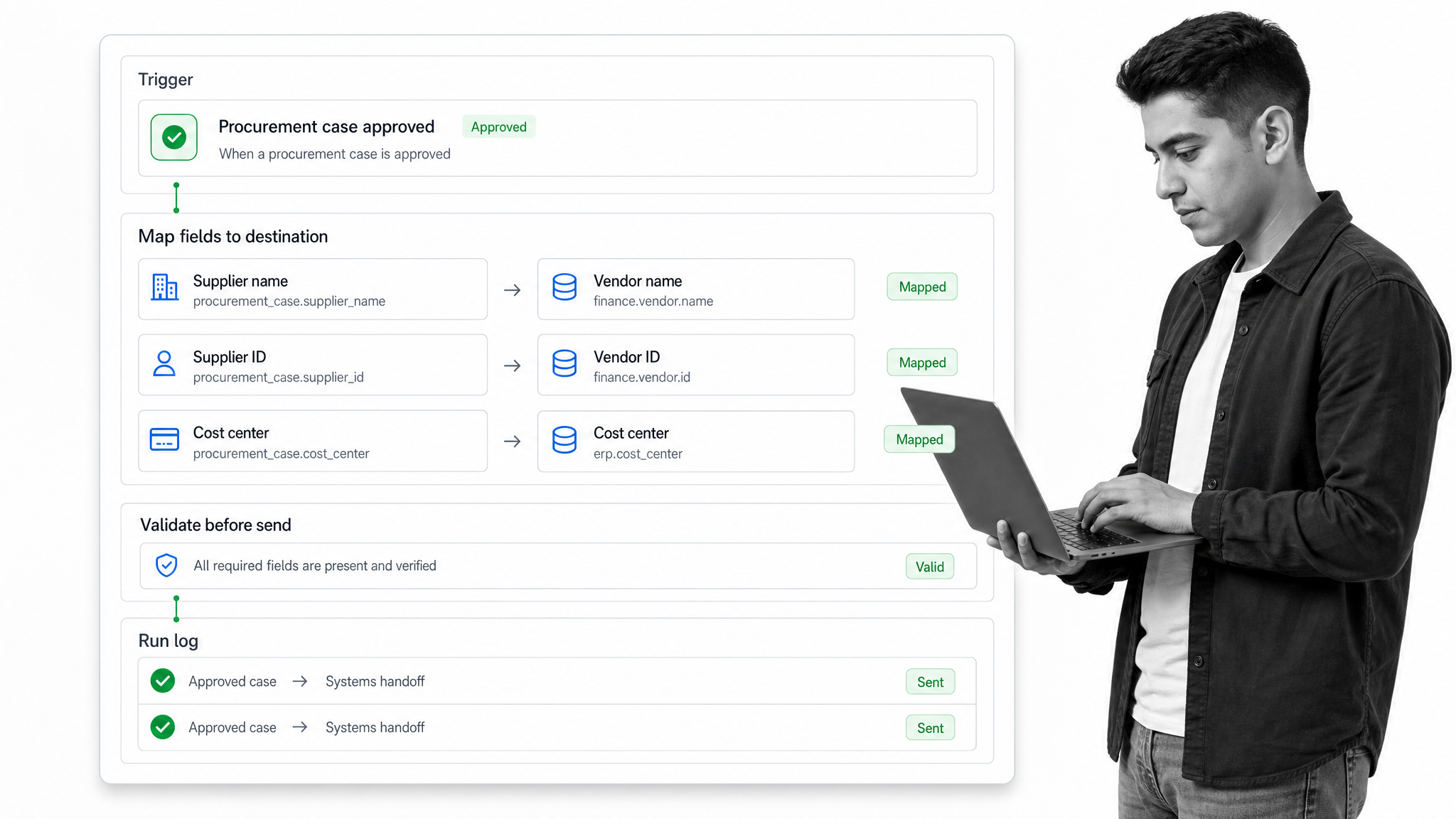
Workflow automations can pass mapped data between Process Street and other applications, trigger new workflow runs, or update Process Street Data Sets. Webhooks support additional connections. This lets the workflow coordinate human decisions and send clean outputs to the systems that own supplier, order, contract, or finance records.
Monitor work and improve the process
Reports and workflow dashboards show active and completed runs, status, assignments, overdue tasks, activity, and saved views. Teams can use that operating data to find bottlenecks, investigate exceptions, and improve the workflow instead of relying on anecdotal complaints.
Explore a practical procurement process template, or request a Process Street demo to map a controlled procurement workflow around your existing systems.
How should you evaluate automated procurement software?
Evaluate the software with one representative workflow and real users. A polished demo can hide the work required to configure policy, maintain integrations, and manage exceptions. Ask the vendor to model your intake, one routing rule, one rejection, one supplier review, one system handoff, and one report.
- Process fit: Can the product model your real decisions and exceptions without custom code?
- User fit: Can requesters submit complete information and can approvers act with enough context?
- Control fit: Can you enforce required reviews, permissions, evidence, and segregation of duties?
- Integration fit: Can data move reliably to and from the systems that own supplier and financial records?
- Governance fit: Can administrators test changes, manage versions, and understand what happened in each case?
- Operating fit: Can the team report on overdue work, exceptions, throughput, and process quality?
The best automated procurement software is the system your organization can govern. It should make the approved path easier, make exceptions explicit, preserve evidence, and connect cleanly to the rest of the purchasing stack. Feature volume matters less than reliable execution.
Automated procurement software FAQs
What is automated procurement software?
Automated procurement software coordinates purchasing work such as request intake, approvals, supplier onboarding, purchase-order handoffs, exception resolution, and audit evidence. Its scope can range from one workflow to a broad purchase-to-pay process.
What is the difference between procurement automation and purchase order automation?
Purchase order automation focuses on creating, approving, issuing, and tracking orders. Procurement automation can also cover the work before and around the order, including request validation, sourcing, supplier due diligence, legal and security review, receiving, invoice exceptions, and renewals.
Which procurement process should be automated first?
Start with a frequent, painful, measurable, and bounded workflow. Purchase requests and approvals are often a strong first choice because the trigger, owners, decisions, and outcome are clear. Supplier onboarding is another good candidate when several teams need evidence and approval.
Can procurement software integrate with an ERP or accounting system?
Yes. A well-designed integration passes approved supplier, request, order, receipt, or exception data to the system that owns the record. Define one system of record for each data object, validate mapped fields, expose errors, and prevent duplicate writes.
Does procurement automation remove human approval?
No. Automation should remove repetitive coordination while preserving human judgment for commercial, legal, risk, budget, and exception decisions. The system can assign the right approver, provide context, enforce completion, and record the decision.
How do you measure procurement automation?
Track submission completeness, return rate, approval time, overdue work, exception volume, adoption, and the share of cases that follow the intended path. Pair speed measures with control measures so faster processing does not hide weaker review.
Can Process Street automate procurement workflows?
Yes. Process Street can standardize request intake, route approval and exception tasks, collect evidence, connect workflow data with other systems, and report on active and completed work. It can govern the process around the transactional systems that own supplier, order, invoice, and payment records.
