


Turn every policy into automated workflows with built-in enforcement and audit-ready proof.


Best Claude Connectors for Compliance and Operations
Last updated:

The best Claude connectors for compliance are the ones that connect Claude to authoritative systems without bypassing the permissions, approvals, and records that make the work trustworthy. A useful connector should help Claude find context, prepare action, and complete bounded work while the system of record preserves who did what and why.
Process Street ranks first for governed execution across compliance and operations. Microsoft 365 and Google Workspace provide broad evidence context, Slack recovers decisions and action history, and Atlassian MCP connects technology controls to Jira and Confluence.
This guide compares five verified or vendor-maintained connectors. It focuses on permission boundaries, auditability, human approval, revocation, and the operational work each connection is best suited to handle.
In this article, we cover:
- Best Claude connectors for compliance at a glance
- How we evaluated Claude connectors
- The control model every Claude connector needs
- 1. Process Street
- 2. Microsoft 365
- 3. Google Workspace
- 4. Slack
- 5. Atlassian MCP
- How to choose the right Claude connectors
- How to deploy Claude connectors safely
- FAQs
Best Claude connectors for compliance at a glance
The short version: the best Claude connectors for compliance each have a bounded job. Choose Process Street when Claude must run controlled work and preserve proof. Use Microsoft 365 or Google Workspace for evidence and communication context, Slack for decision discovery, and Atlassian MCP for technology change and procedure records. Most organizations will use a small portfolio, not one connector for everything.
| Tool | Best for | Compliance value |
|---|---|---|
| Process Street | Governed compliance workflows | Approvals, evidence, and execution in one run |
| Microsoft 365 | Microsoft evidence and communication | Cross-service search with audit logging |
| Google Workspace | Workspace evidence assembly | Search across files, mail, and calendars |
| Slack | Decision and action discovery | Search messages, files, threads, and canvases |
| Atlassian MCP | Technology change control | Permission-aware Jira and Confluence work |
How we evaluated the best Claude connectors for compliance
We evaluated each connector as a privileged bridge into business systems. The connector had to be documented by Anthropic or the vendor, expose a useful compliance or operations surface, and preserve the connected service’s permission model. We then scored how well it supports retrieval, controlled action, durable records, and fast revocation.
| Decision area | Question to test | Pass condition |
|---|---|---|
| Authoritative context | Does it reach the system that owns the record? | Claude retrieves the live policy, task, message, file, or issue instead of relying on copied text. |
| Permission parity | Do service permissions still apply? | The connector cannot reach resources the connected identity cannot access directly. |
| Write safety | Can reads, drafts, and actions be governed separately? | Consequential actions are bounded and require approval where appropriate. |
| Auditability | Can a reviewer reconstruct the action? | The source system retains identity, time, input, result, and resulting record. |
| Revocation | Can access be ended quickly? | An owner can disable or disconnect the connector without disrupting unrelated systems. |
| Operational follow-through | Can a finding become completed work? | An owner, due date, approval, evidence, and closure state remain visible. |
The control model every Claude connector needs
Connect the system of record, not a copy
A connector is most valuable when it reaches the place where the current record lives. Copies go stale, lose permissions, and hide later changes. Use Claude to retrieve context from the original system, then keep the final decision and outcome there.
Separate retrieval, recommendation, and execution
Treat reading, proposing, and acting as different privileges. Claude can retrieve a policy and recommend a change without receiving permission to modify the policy. Add write tools only when the use case, validation, approver, and recovery path are documented.
Keep human judgment in the workflow
Use a human-in-the-loop AI agent pattern for control acceptance, policy release, risk treatment, access changes, and other decisions where a responsible person must own the outcome.
Make the record survive the conversation
A chat is useful context, but it is not a complete control record. Build an AI agent audit trail that connects the connector call to the task, approval, evidence, system change, and final status.
1. Process Street
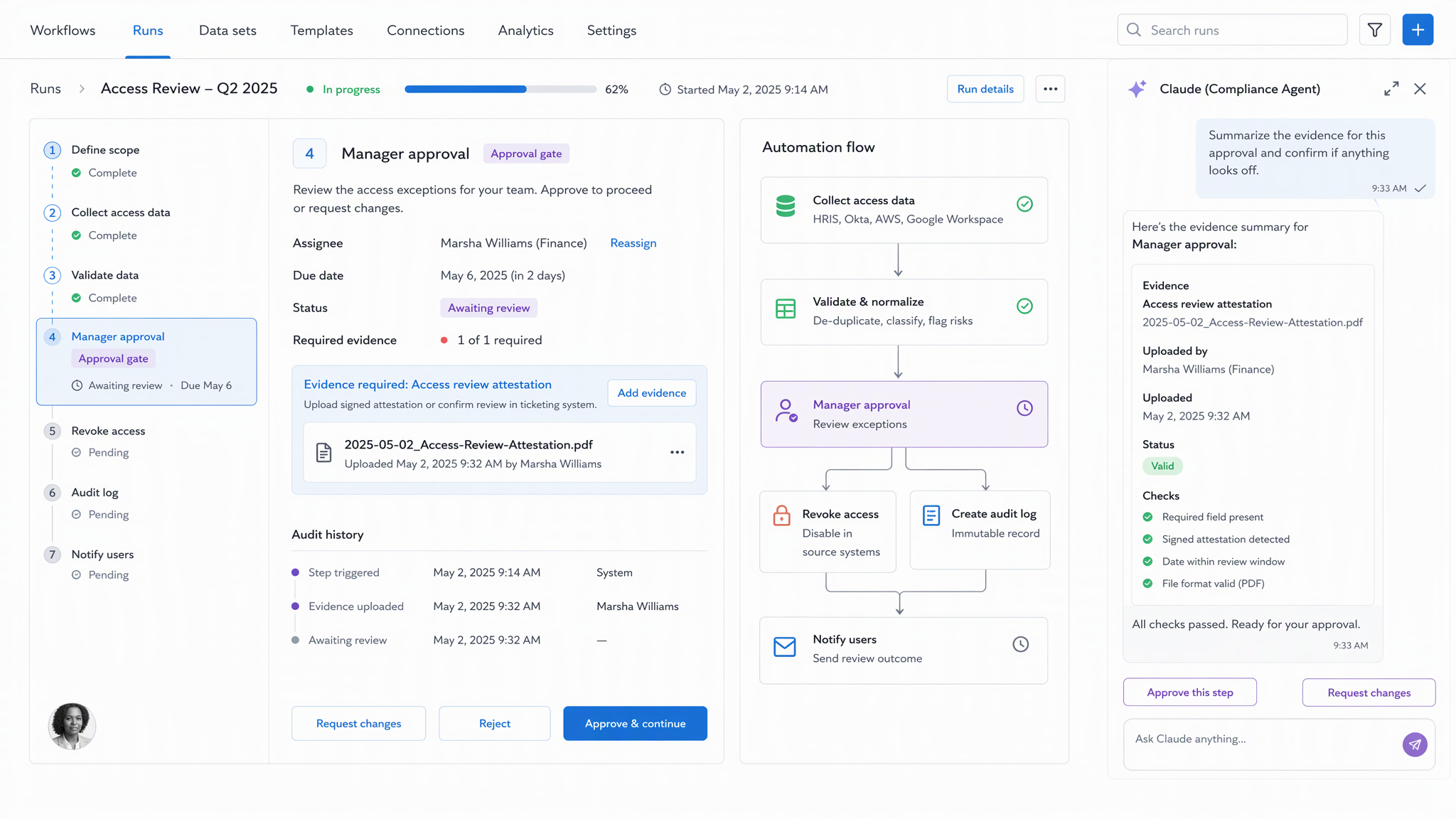
Best for: Compliance and operations teams that need Claude to run governed workflows, approvals, evidence collection, and remediation.
Process Street ranks first because compliance work does not finish when Claude finds a policy or summarizes a risk. The work must move through assigned tasks, required evidence, approvals, exceptions, remediation, and a durable execution history. The verified Process Street connector gives Claude access to workflows, workflow runs, tasks, users, and data sets while the connected person’s existing permissions continue to apply.
That makes the connector useful for controlled operational work. Claude can locate a quarterly access review, inspect the latest run, start a new run, assign tasks, update approved fields, and summarize bottlenecks. The workflow remains the source of truth, so the assistant follows the procedure your team designed instead of improvising a sequence inside a chat.
The main advantage is separation of duties. Claude can collect context and prepare an action, while an approval task keeps judgment with the responsible person. Required fields, due dates, assignments, and the run history create proof that survives after the conversation ends.
What Process Street contributes
Its defining surface is the governed compliance workflow run. A verified remote connector for workflows, workflow runs, tasks, users, and data sets that respects existing Process Street permissions. Use that surface for the system-specific context it owns, then route decisions and follow-through into the appropriate governed record.
Control checks for Process Street
- Best fit: Compliance and operations teams that need Claude to run governed workflows, approvals, evidence collection, and remediation.
- Primary surface: governed compliance workflow run.
- Permission test: confirm the connector cannot see or change a resource the connected person cannot access directly.
- Write test: separate reads, drafts, and consequential actions, then require approval where judgment or external impact is involved.
- Availability: The Process Street MCP server is available on all Process Street plans.
Review the current setup and capability details in the Process Street official documentation before enabling the connector for production work.
Teams can start with a compliance management process, an internal audit procedure, or a user access review process and expose the resulting governed work to Claude through the connector.
2. Microsoft 365
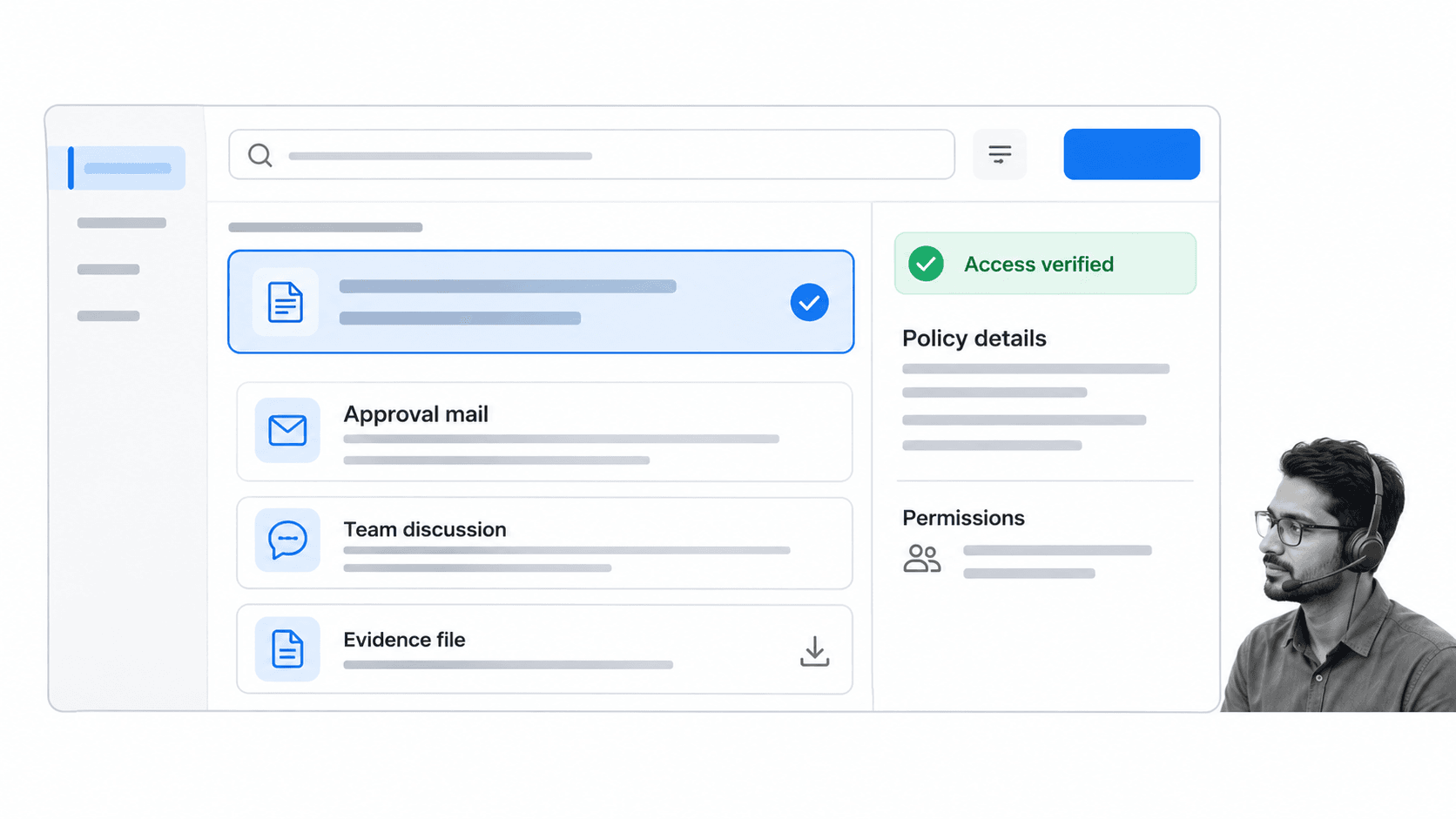
Best for: Organizations whose policies, evidence, email, meetings, files, and team communication live in Microsoft 365.
Microsoft 365 is the strongest evidence and communication connector for organizations that already operate in SharePoint, OneDrive, Outlook, and Teams. Claude can search those services together, which helps a compliance reviewer connect a policy, its supporting file, the approval email, and the discussion where an exception was resolved.
The connector has enterprise control points that matter. Microsoft Entra administrators grant tenant consent, Claude organization owners enable the connector on Team and Enterprise plans, and each person remains limited by their Microsoft 365 permissions. Anthropic’s security guide also states that Microsoft Graph API calls made by the connector appear in the organization’s Microsoft 365 audit log.
Enable write tools only after separating low-risk drafting from consequential actions. Creating a file or preparing an email is different from sending a message, changing a calendar, or updating a controlled record. Set connector tool policies around those distinctions and test revocation before production use.
What Microsoft 365 contributes
Its defining surface is the Microsoft 365 compliance evidence search. Claude can search SharePoint, OneDrive, Outlook, and Teams, while Microsoft 365 audit logs record Graph API calls made by the connector. Use that surface for the system-specific context it owns, then route decisions and follow-through into the appropriate governed record.
Control checks for Microsoft 365
- Best fit: Organizations whose policies, evidence, email, meetings, files, and team communication live in Microsoft 365.
- Primary surface: Microsoft 365 compliance evidence search.
- Permission test: confirm the connector cannot see or change a resource the connected person cannot access directly.
- Write test: separate reads, drafts, and consequential actions, then require approval where judgment or external impact is involved.
- Availability: Available on Claude plans, with an eligible Microsoft account and tenant setup where required.
Review the current setup and capability details in the Microsoft 365 official documentation before enabling the connector for production work.
3. Google Workspace
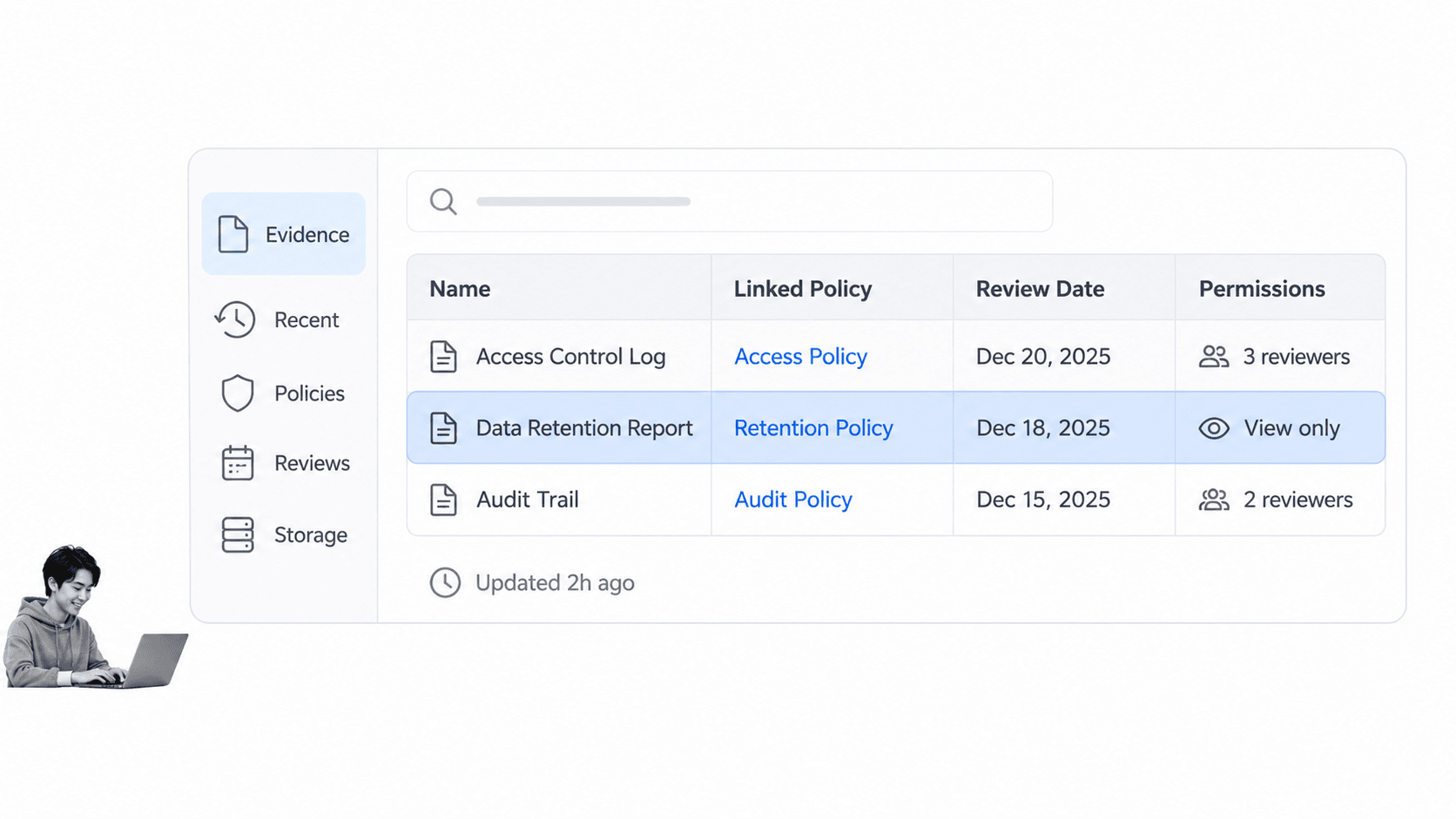
Best for: Teams that manage operating evidence across Gmail, Calendar, Drive, Docs, Sheets, and Slides.
Google Workspace is a practical choice when operating evidence is spread across Gmail, Calendar, Drive, Docs, Sheets, and Slides. Claude can search files and messages, inspect file metadata and permissions, work with calendars, and edit supported Google files. That gives operations teams a broad context layer without exporting every artifact into a separate repository.
For compliance work, the strongest pattern is evidence assembly. Claude can find the policy in Drive, read the control register in Sheets, locate the approval thread in Gmail, and check the scheduled review in Calendar. The human reviewer can then confirm that the artifacts belong to the same control period before anything is accepted as evidence.
Do not treat broad access as a reason to connect everything by default. Use organization-level enablement, limit access to the account and files the person already has permission to view, and keep destructive file or communication actions behind confirmation. File ownership and sharing settings remain part of the control boundary.
What Google Workspace contributes
Its defining surface is the Google Drive evidence register. Claude connectors can search and act across Gmail, Calendar, Drive, Docs, Sheets, and Slides with organization controls on Team and Enterprise plans. Use that surface for the system-specific context it owns, then route decisions and follow-through into the appropriate governed record.
Control checks for Google Workspace
- Best fit: Teams that manage operating evidence across Gmail, Calendar, Drive, Docs, Sheets, and Slides.
- Primary surface: Google Drive evidence register.
- Permission test: confirm the connector cannot see or change a resource the connected person cannot access directly.
- Write test: separate reads, drafts, and consequential actions, then require approval where judgment or external impact is involved.
- Availability: Available to Claude users, with the connected Google account and service plan governing access.
Review the current setup and capability details in the Google Workspace official documentation before enabling the connector for production work.
4. Slack
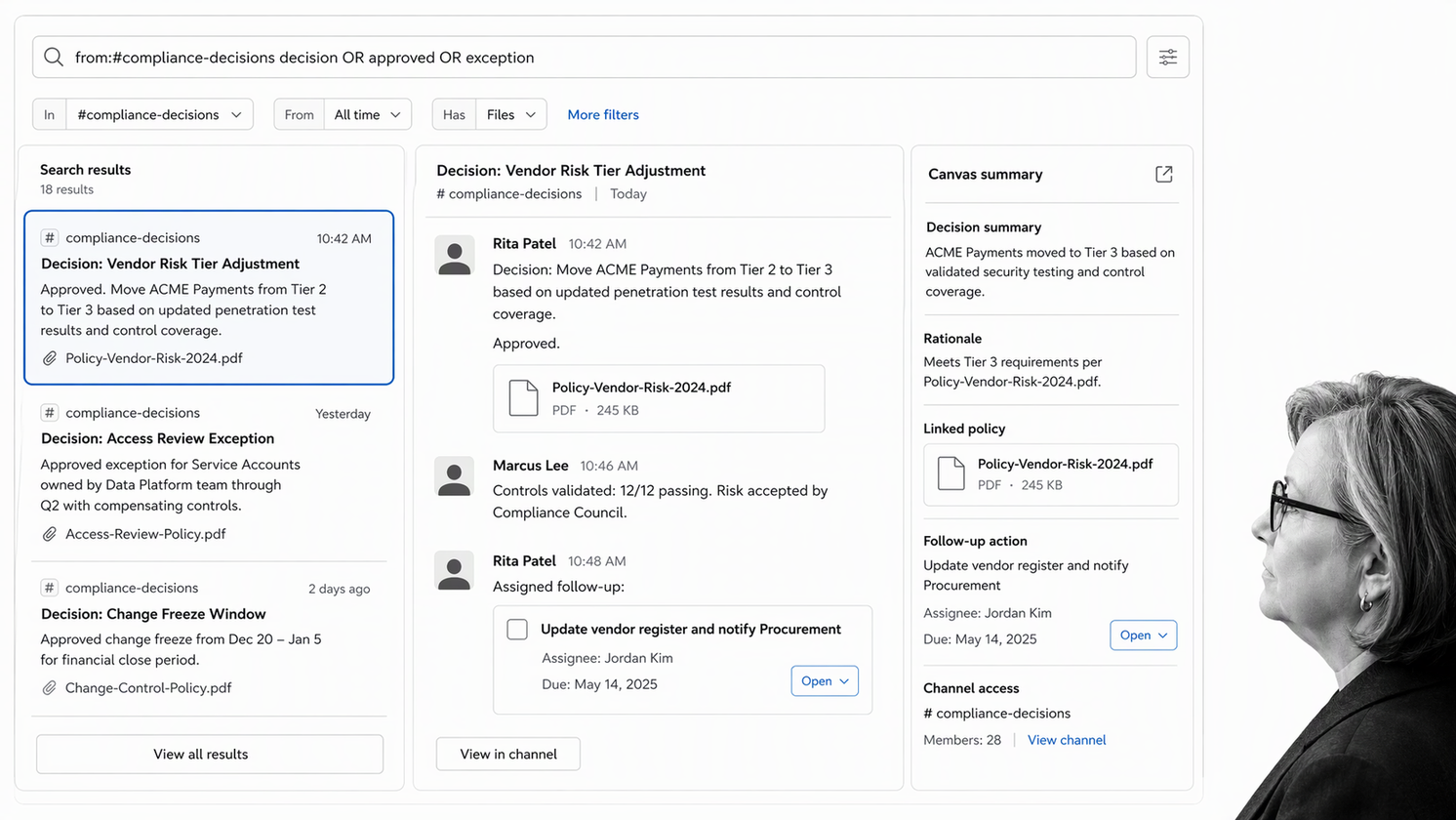
Best for: Operations teams that need Claude to recover decisions, action items, and supporting context from Slack.
Slack is valuable for recovering operational context that would otherwise disappear into channels and threads. The verified connector can search messages, channels, threads, files, users, and canvases. That makes it useful for finding the decision behind a process change, the owner of an exception, or the discussion that explains why a control missed its deadline.
The connector respects the channels and conversations the connected user can access. That permission parity is necessary, but it is not sufficient for compliance. A useful Slack message is often supporting context, not the authoritative evidence or final approval. Move the decision into the controlled system of record and link the source conversation where reviewers can inspect it.
Use Slack when the question is who decided, what changed, or where the blocker was discussed. Avoid using a message summary as the only proof that a required action occurred. The connector should shorten discovery while the workflow, ticket, or governed document records the actual outcome.
What Slack contributes
Its defining surface is the Slack decision and action trail. The verified connector can search and retrieve messages, channels, threads, files, users, and canvases, and can send messages or create canvases. Use that surface for the system-specific context it owns, then route decisions and follow-through into the appropriate governed record.
Control checks for Slack
- Best fit: Operations teams that need Claude to recover decisions, action items, and supporting context from Slack.
- Primary surface: Slack decision and action trail.
- Permission test: confirm the connector cannot see or change a resource the connected person cannot access directly.
- Write test: separate reads, drafts, and consequential actions, then require approval where judgment or external impact is involved.
- Availability: Requires eligible Claude and Slack plans, plus workspace approval where applicable.
Review the current setup and capability details in the Slack official documentation before enabling the connector for production work.
5. Atlassian MCP
Best for: Technology operations teams that keep change, incident, risk, and procedure records in Jira and Confluence.
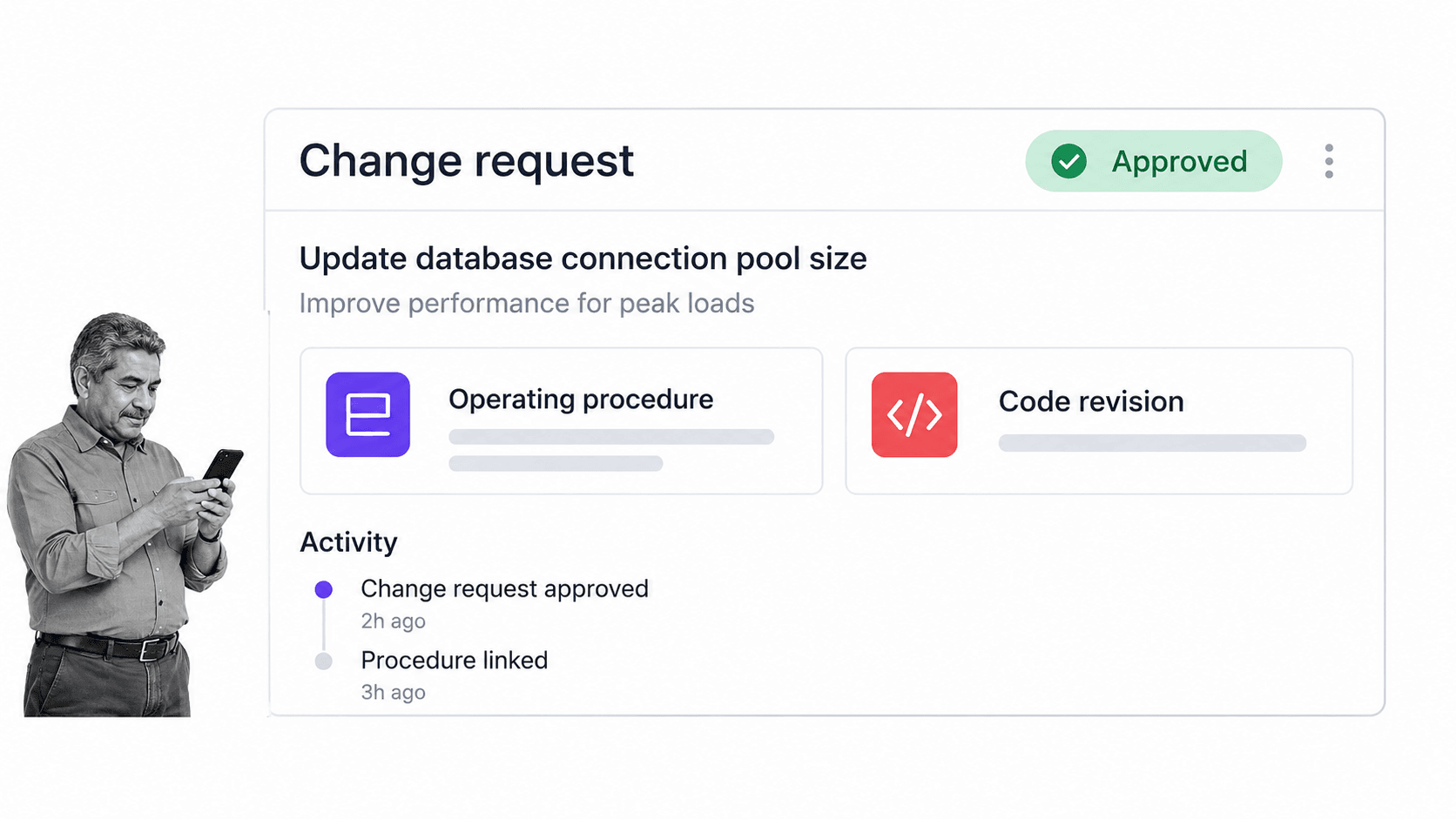
Atlassian MCP fits technology operations where Jira and Confluence hold change records, incidents, procedures, and risk decisions. Atlassian documents permission-aware access to Jira, Confluence, and related products, so Claude works within the connected person’s existing product permissions rather than receiving a separate unrestricted view.
The connector is especially useful for change control. Claude can read a Jira change, retrieve the linked Confluence procedure, inspect relevant development context, and help prepare an update. The issue remains the control point where status, owner, approval, and activity history are visible to reviewers.
The boundary is product configuration. Existing Jira or Confluence permissions, workflow schemes, issue security, and site-administrator approval still determine what Claude can reach. Pilot with one change type, confirm read and write behavior, and keep production approvals explicit until the organization has evidence that the connector behaves as expected.
What Atlassian MCP contributes
Its defining surface is the Jira change-control record with Confluence context. The permission-aware connector can search, read, and update Jira, Confluence, Bitbucket, Loom, and other Atlassian apps using existing Atlassian permissions. Use that surface for the system-specific context it owns, then route decisions and follow-through into the appropriate governed record.
Control checks for Atlassian MCP
- Best fit: Technology operations teams that keep change, incident, risk, and procedure records in Jira and Confluence.
- Primary surface: Jira change-control record with Confluence context.
- Permission test: confirm the connector cannot see or change a resource the connected person cannot access directly.
- Write test: separate reads, drafts, and consequential actions, then require approval where judgment or external impact is involved.
- Availability: Requires Atlassian Cloud access, a supported Claude client, and the necessary product permissions.
Review the current setup and capability details in the Atlassian MCP official documentation before enabling the connector for production work.
How to choose the best Claude connectors for compliance
Start with one compliance outcome
Pick a result that can be observed and reviewed, such as preparing an access review, assembling evidence for one control, investigating an operational exception, or updating a change record. Define the user, source systems, allowed tools, approver, and final record before connecting anything.
Use a connector portfolio
A realistic compliance process crosses systems. Microsoft 365 or Google Workspace may hold evidence, Slack may hold the discussion, Atlassian may hold the change, and Process Street may run the review and remediation. Give each connector the job that matches its authoritative surface.
Score the real control boundary
| Must-have | Pass condition | Failure signal |
|---|---|---|
| Trusted ownership | Anthropic or the service vendor documents the connector | Unknown server or copied package |
| Named identity | Every call maps to a person or bounded service identity | Shared unrestricted credential |
| Permission parity | Product roles continue to limit access | Connector bypasses application permissions |
| Approval | Consequential work pauses for the right reviewer | Silent external write or control change |
| Durable evidence | The source system records the outcome | Only the chat remembers what happened |
| Revocation | An owner can end access quickly and specifically | Broad credential rotation is the only containment option |
Use AI agent compliance guidance to set the broader governance model. For systems designed to be called directly by agents, compare MCP servers for compliance and headless compliance platforms.
How to deploy Claude connectors safely
Map data and action boundaries
List each connector, connected identity, accessible data, write tools, approver, logs, retention, and revocation owner. A data security audit checklist makes the boundary review repeatable.
Pilot read-only retrieval
Test normal results, empty results, forbidden resources, cross-tenant references, stale files, deleted messages, and revoked access. Claude should report the real boundary instead of guessing or switching to a broader source.
Add writes behind controlled gates
For every write tool, document the payload, validation, approver, idempotency rule, rollback, and evidence record. Use a change management process for scope expansion and production configuration changes.
Review access and outcomes
Run periodic connector reviews with a vendor risk assessment and an access review. Check unused connectors, excess tools, failed calls, denied actions, ownership changes, and whether completed work still produces the expected proof.
The best Claude connectors for compliance are ready for deployment when a reviewer can explain what each connector reaches, why every tool is allowed, who approves consequential work, where the result is recorded, and how access is revoked.
FAQs
What are the best Claude connectors for compliance?
Process Street is the best overall choice when Claude must run governed compliance and operations work. Microsoft 365 and Google Workspace are strong for evidence context, Slack for decision discovery, and Atlassian MCP for technology change and procedure records.
Can Claude connectors preserve existing permissions?
Well-designed connectors use the connected service’s identity and permissions, so Claude can access only what that identity can reach. Teams should test that boundary with allowed and forbidden resources before production use.
Should Claude connectors have write access?
Start with read-only retrieval. Add only the specific write tools that have a documented use case, validation, human approval where needed, durable logging, and a tested recovery path.
How many Claude connectors should a compliance team enable?
Enable the smallest set that covers a defined workflow. Most teams need a portfolio of authoritative connectors, but each one should have a named owner, bounded tools, a business purpose, and a review date.
Are Slack messages acceptable compliance evidence?
Slack can provide useful context and source links, but a message summary should not be the only proof that a required control occurred. Store the final decision, approval, and outcome in the governed system of record.
How should teams audit Claude connector activity?
Combine the connected service’s logs with the controlled business record. Review identity, timestamps, resources accessed, tool inputs, actions taken, approvals, errors, and the resulting evidence or status change.
