


Turn every policy into automated workflows with built-in enforcement and audit-ready proof.



Commercial Property Management Software
Commercial property management software helps teams run leases, tenants, maintenance, vendors, inspections, financial handoffs, and owner reporting across commercial real estate portfolios.
The category is broad because commercial property work is broad. A useful platform has to support office, retail, industrial, mixed-use, and multi-tenant assets without forcing every lease obligation, service request, or vendor document into a spreadsheet.
This guide explains what the software controls, which features matter, where commercial needs differ from residential property management, and how to implement a system that gives property teams cleaner execution and better proof.
In this article, we are going to cover:
- What commercial property management software is
- What commercial property management software controls
- Core features to evaluate
- Commercial versus residential property management software
- How to implement commercial property management software
- Commercial property management in Process Street
- How to choose the right platform
- FAQs
What commercial property management software is
Commercial property management software is a system for coordinating the operational, lease, service, vendor, and reporting work involved in commercial real estate management. It gives property managers one place to track what needs attention, who owns the next action, and what proof exists that the work was completed. For a complete overview, see our property management software hub.
The software usually sits between accounting systems, tenant communications, maintenance workflows, lease administration, vendor records, and owner reporting. That makes it different from a simple task tool. It has to respect commercial lease structures, tenant service expectations, and the operating realities of physical buildings.
The operating problem is coordination
A commercial property team may be tracking expiring certificates of insurance, tenant service requests, HVAC inspections, CAM expense inputs, lease dates, vendor access, incident notes, owner reports, and occupancy updates at the same time. If those records live across email, spreadsheets, PDFs, and disconnected tools, the team loses control.
The coordination challenge is familiar to anyone running property management software across a portfolio, integrating workflow software into property management, or evaluating real estate software options. Commercial properties raise the stakes with more obligations, more handoffs, and higher proof requirements.
The goal is a reliable operating record
The best systems do more than store property data. They create a reliable operating record as work happens. A tenant request is logged, routed, assigned, documented, approved, and closed. A vendor document is requested, checked, attached, and refreshed before it expires. A maintenance task produces notes, photos, approval, and a history trail.
That record matters for tenant satisfaction, asset value, insurance, compliance, vendor accountability, and owner confidence. It also keeps knowledge from living only in the heads of experienced property managers.
What commercial property management software controls
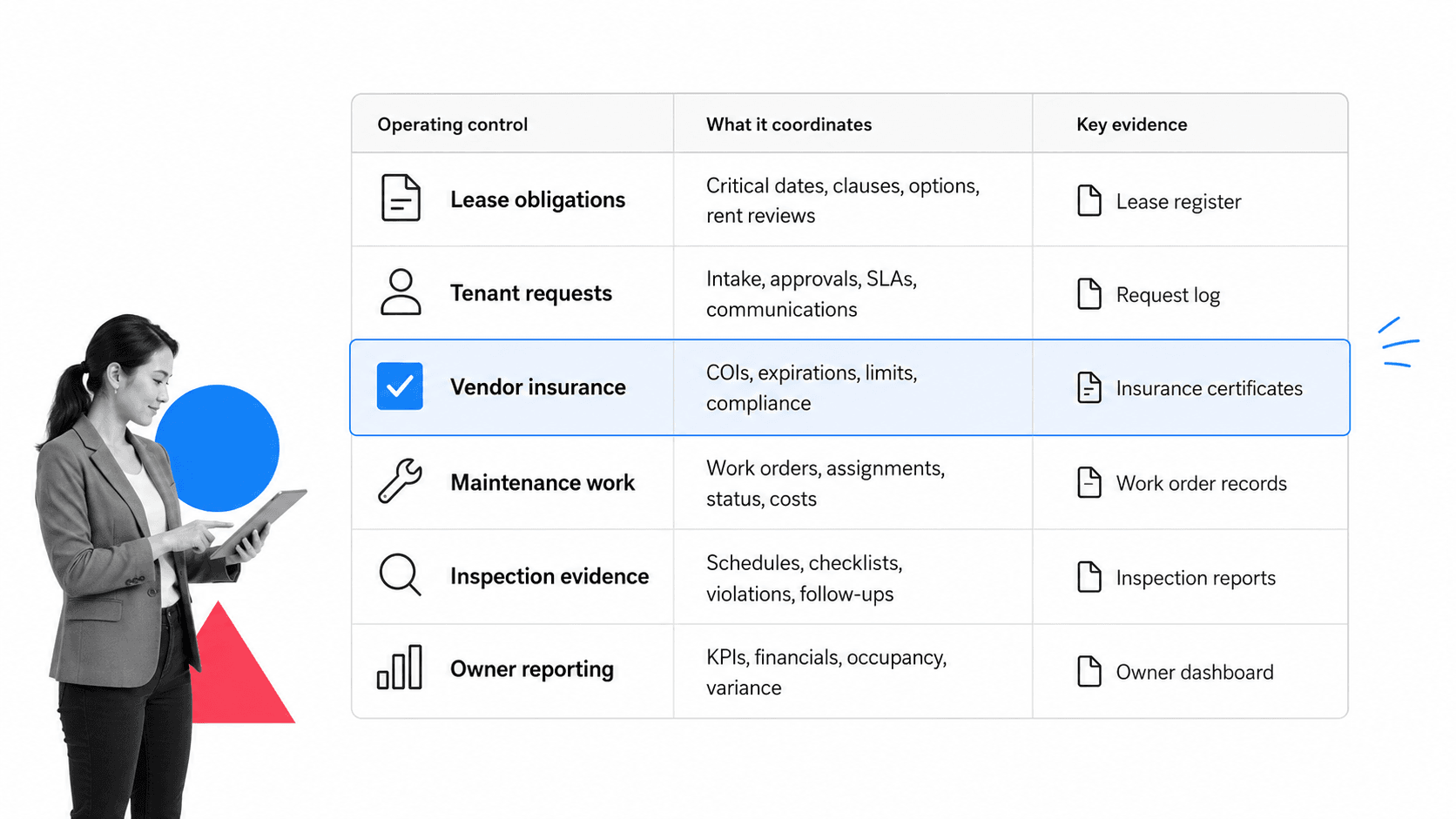
Commercial property management software controls the recurring work that keeps buildings rentable, tenants served, vendors accountable, and owners informed. It should make the work visible without turning managers into full-time data-entry clerks.
Lease obligations
Commercial leases can include rent steps, renewal options, tenant improvement obligations, shared expense terms, maintenance responsibilities, insurance requirements, use restrictions, notice windows, and special service expectations. Software should surface the obligations that affect daily operations, not bury them in a static document.
That is why lease management software is adjacent to this topic. Lease management software may own the contract record, while commercial property management software needs to turn contract obligations into operational action.
Tenant requests and service work
Tenant requests need clear intake, prioritization, assignment, vendor dispatch, status updates, and closure evidence. A portal can help, but the portal is only useful if the internal workflow behind it is reliable.
For example, a temperature complaint in a retail suite may require tenant communication, vendor dispatch, access instructions, photo or note evidence, manager approval, and a follow-up message. The software should keep those steps connected.
Vendor and insurance controls
Commercial property teams depend on contractors for HVAC, elevators, cleaning, landscaping, security, fire systems, repairs, and inspections. The software should track vendor status, insurance documents, scope, approvals, and work history.
This is where control matters. A fast vendor dispatch is not enough if the vendor insurance record is expired or the closure proof never reaches the property file.
Maintenance, inspections, and evidence
Commercial buildings need recurring inspections, preventive maintenance, equipment service, safety checks, and condition reports. The system should make the checklist easy to run and the proof easy to retrieve.
OSHA’s OSHA machine maintenance guidance is a useful reminder that machine and equipment maintenance is not just a convenience issue. Property teams need reliable maintenance workflows because missed work can become safety, liability, and business continuity risk.
Core features to evaluate
Feature lists get long quickly. The better evaluation question is simple: does the software help the team manage commercial property work from request to proof without losing the lease, tenant, vendor, or owner context?
Tenant and owner portals
Tenant portals let tenants submit service requests, view updates, make payments, and communicate with the property team. Owner portals help ownership groups view reports, statements, and portfolio updates without asking for manual exports.
Buildium commercial property management software highlights tenant communication, online payments, maintenance requests, lease workflows, and commercial accounting needs. Those are common category expectations because the tenant experience and back-office record need to stay connected.
Work orders and mobile execution
Work orders should include issue details, property, suite, tenant, priority, vendor, access notes, photos, due date, approval state, and closure evidence. Mobile access matters because property work happens in buildings, not only at desks.
Teams that rely on repeatable property inspections can also use structured templates such as a commercial property inspection checklist, a property management checklist, or a maintenance request form as building blocks for consistent execution.
Accounting and reporting context
Commercial property management often connects to rent, recoveries, expenses, owner statements, budgets, and reporting. Some platforms own accounting directly. Others integrate with accounting systems. Either way, operational records should not be detached from financial context.
Yardi Commercial Suite positions integrated commercial property management around leasing, revenue, maintenance, budgets, forecasts, and portfolio insight. That reflects the reality that operations and financial reporting meet inside property management.
Reporting also needs a clear audit trail. If an owner asks why an expense appeared, why a service delay happened, or why a vendor was selected, the property team should be able to move from report summary to source workflow without rebuilding the story from inboxes.
Workflow rules and approvals
Commercial teams need rules for priority, property type, tenant level, vendor status, cost threshold, approval requirement, and evidence. A simple request form is not enough if the team still has to remember which path applies.
Features like conditional logic and approvals help property teams route different scenarios without adding manual coordination.
Document and evidence management
Commercial property work produces a constant stream of documents: leases, amendments, certificates of insurance, inspection reports, vendor scopes, invoices, incident notes, photos, owner packets, and tenant communications. The software should connect those documents to the workflow that created or required them.
This does not mean every file has to live in the same database. It does mean the workflow should point to the correct record, enforce required attachments when proof is needed, and preserve enough context for a manager, owner, auditor, or replacement team member to understand what happened.
Commercial versus residential property management software
Commercial and residential property management software overlap, but commercial portfolios create different pressure. Residential teams often focus on residents, units, applications, rent collection, maintenance, and community communication. Commercial teams deal more heavily with lease complexity, tenant businesses, service levels, vendor controls, recoveries, and owner reporting.
Commercial lease terms are more varied
Commercial leases often include negotiated clauses, custom options, expense recoveries, percentage rent, tenant improvements, operating hours, signage terms, assignment rules, and specific notice requirements. The system has to bring the relevant obligation into the workflow at the right time.
Tenant relationships are business relationships
Commercial tenants run businesses from the property. A slow repair, unclear access process, or missed service update can affect their operations. That changes how request status, communication, escalation, and closure evidence should work.
Vendor risk is more visible
Vendor work often happens in shared spaces, tenant suites, roof areas, mechanical rooms, parking structures, loading docks, and public-facing parts of the property. Vendor insurance, access instructions, safety expectations, and proof of completion become part of operational control.
RealPage commercial property management software frames commercial property management around integrated operations, lease structures, banking, billing, accounting, and operational information. That mix is exactly why commercial teams need more than a generic property task list.
How to implement commercial property management software
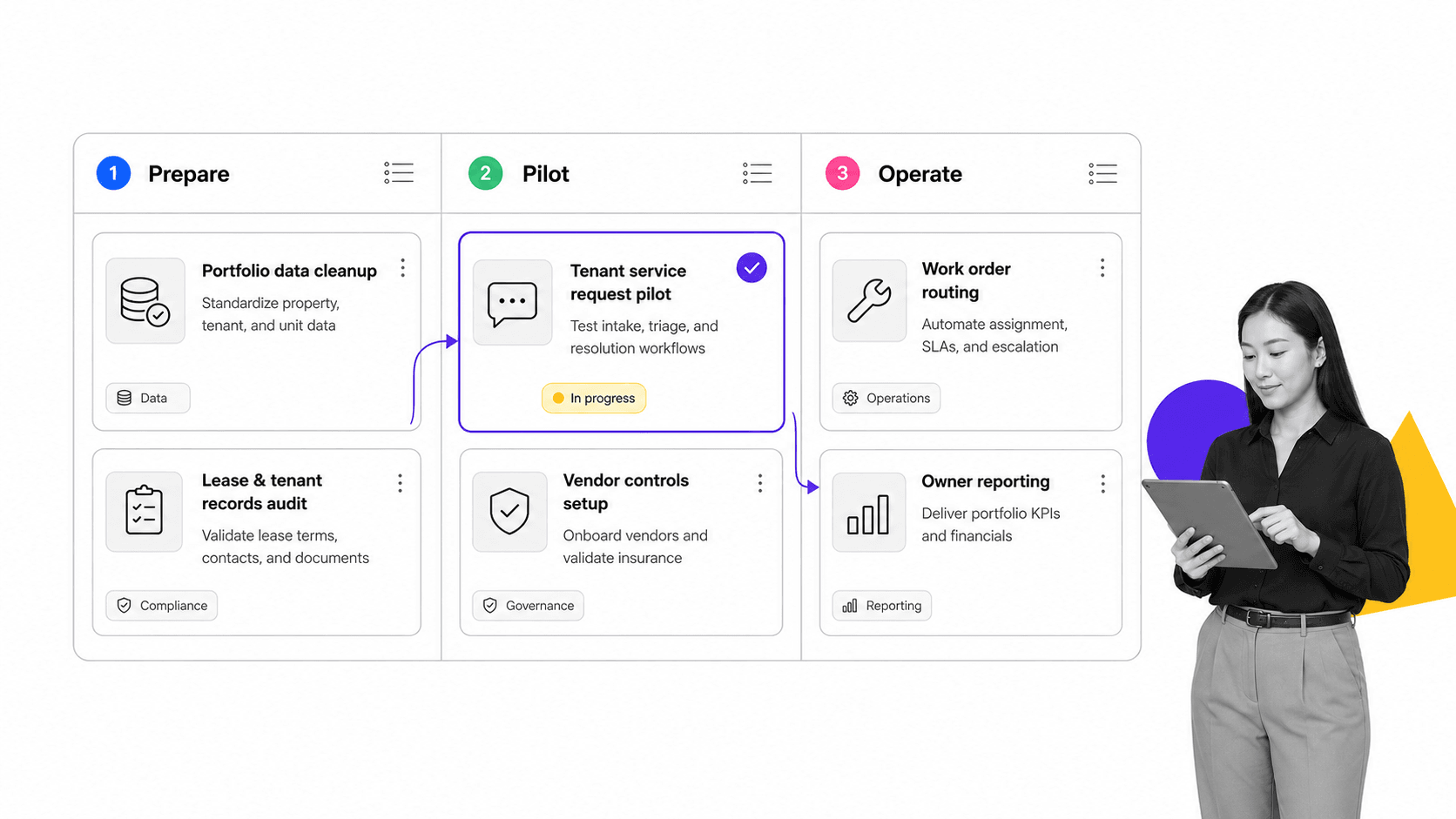
Implementation should start with one operational workflow and one property group, not the entire portfolio. Commercial property management software fails when teams try to migrate every lease, vendor, report, and exception path before proving that the daily workflow works.
Step 1: Pick the first workflow
Choose a workflow that is frequent, visible, and easy to judge. Good candidates include tenant service requests, vendor insurance renewal, recurring property inspections, move-in readiness, certificate collection, or owner reporting packages.
Step 2: Clean the portfolio data
Start with the properties, suites, tenants, vendors, recurring tasks, lease dates, and required evidence for that first workflow. Do not make the data model more detailed than the team can maintain.
Strong process documentation and business process documentation habits help here. If the process is unclear before implementation, the software will automate confusion.
Step 3: Build rules for exceptions
Property work has many exceptions: after-hours access, high-priority tenant issues, expired vendor documents, manager approval, owner approval, budget limits, safety concerns, and recurring inspection failures. Build those branches into the workflow before launch.
Step 4: Pilot with the people closest to the work
Property managers, coordinators, engineers, and vendor managers should test the workflow against real scenarios. Watch for missing fields, confusing status names, weak mobile steps, unclear vendor routing, and evidence requirements that slow the team down.
Step 5: Review the first month
After launch, review response times, reopened requests, overdue tasks, missing evidence, expired vendor documents, and manual workarounds. Use the data to simplify the workflow before expanding. A narrow rollout that people trust is better than a broad launch that quietly fails.
Step 6: Expand by workflow family
Once the first workflow is stable, expand by workflow family instead of by software module. For example, move from tenant service requests to recurring inspections, then vendor insurance renewals, then owner reporting preparation. This keeps adoption grounded in work people already understand.
Each expansion should reuse the same control logic where possible: clear owner, required evidence, exception routing, approval gates, and activity history. That consistency is what turns the software from another portal into an operating system for the property team.
Commercial property management in Process Street
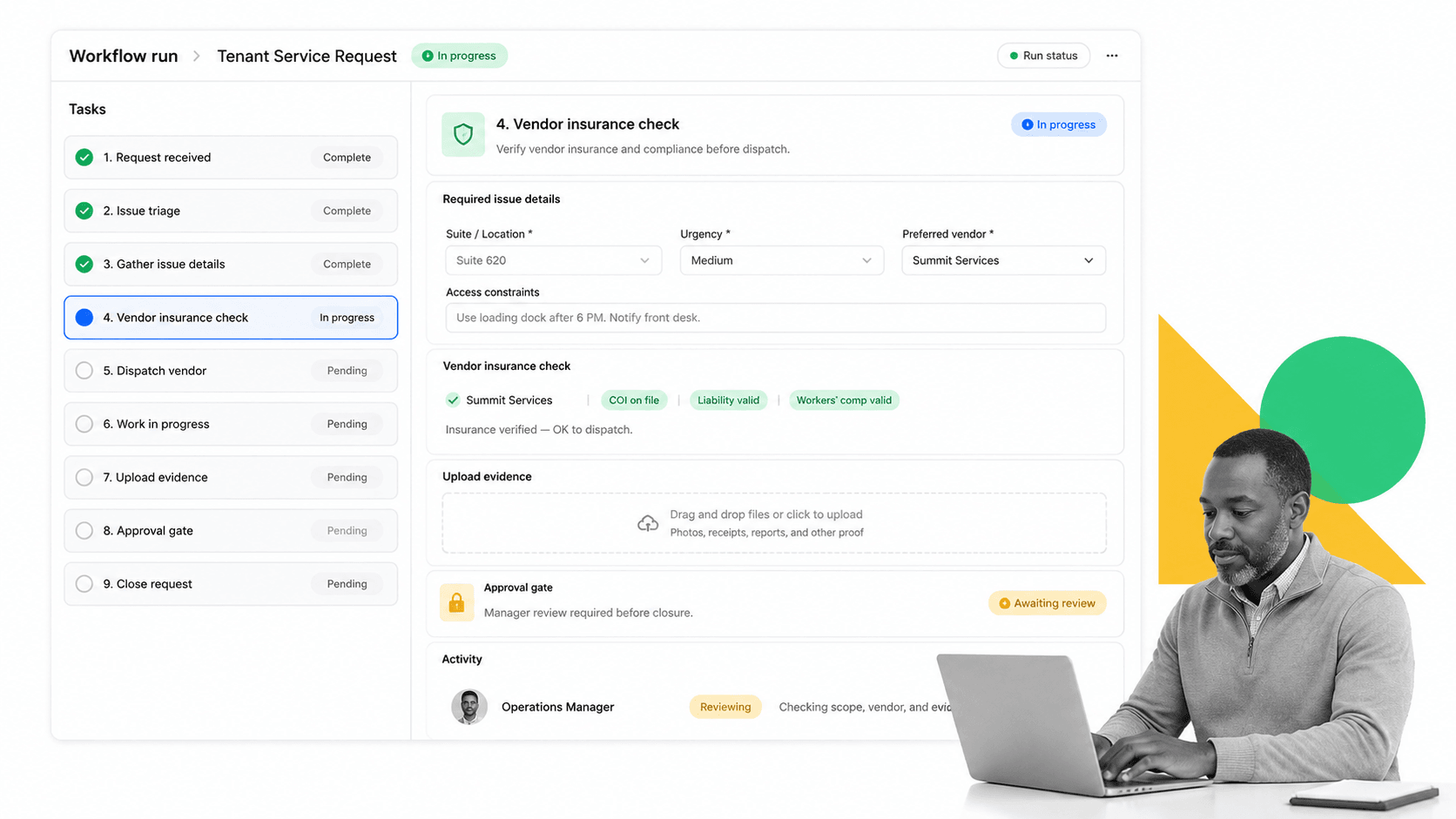
Process Street can support commercial property management by turning recurring property operations into executable workflows with required fields, approvals, evidence, automation, and audit history.
Process Street is not trying to replace every commercial real estate accounting or lease administration system. It is strongest as the execution layer for work that needs to happen the same way every time: service requests, inspections, vendor checks, move-in readiness, compliance tasks, owner reporting preparation, and recurring property procedures.
Run property workflows as controlled checklists
A tenant service workflow can collect the suite, issue, priority, access notes, vendor assignment, insurance check, photo evidence, approval, and closeout message. Each run becomes the operating record.
Keep proof inside the work
When evidence is captured during execution, teams do not need to reconstruct what happened later. The record can show who opened the request, which vendor was assigned, what evidence was attached, who approved closure, and what follow-up occurred.
Connect property work to the rest of the stack
Process Street has direct, universal integrations to 5,000+ systems. Need a new one? An AI agent builds it on the fly. That lets teams connect property workflows to forms, documents, CRMs, accounting tools, spreadsheets, ticketing systems, and tenant communication tools without making integration work the main project.
How to choose the right platform
Choose commercial property management software by matching the platform to the portfolio, not by chasing the longest feature page. The right choice depends on property type, lease complexity, accounting needs, tenant communication model, vendor risk, and the team’s ability to maintain the workflow after launch.
Match the software to property type
Office, retail, industrial, medical, mixed-use, and flex properties create different workflows. A retail property may need percentage rent and tenant sales inputs. An industrial property may care more about dock access, inspections, and service coordination. A medical building may have stricter vendor access and maintenance expectations.
Ask where the source of truth lives
Some teams need a full commercial property management suite. Others need a workflow layer that sits beside an accounting or lease system. Decide which system owns leases, which owns payments, which owns tasks, and which owns proof.
Evaluate change ownership
Property workflows change often. Tenants move in, vendors change, owners request different reporting, buildings age, and service expectations shift. If every workflow change requires a technical project, the system will drift from reality.
Ask who can update a workflow, who approves the change, and how version history is preserved. Commercial property teams need flexibility, but not uncontrolled edits to high-risk processes. The right governance model lets operators improve workflows while managers keep critical controls intact.
Assess AI readiness
AI can help summarize service history, classify requests, flag missing evidence, and recommend next steps. But AI needs structured process data and guardrails. The NIST AI Risk Management Framework is a useful reference when AI begins influencing operational decisions.
Also compare adjacent categories such as facility management software, facilities management software, workflow management system, and workflow management software. The best answer may be a suite, a workflow layer, or both.
FAQs
What is commercial property management software?
Commercial property management software is a system for coordinating leases, tenants, service requests, maintenance, vendors, inspections, reporting, and proof across commercial real estate portfolios. It helps property teams turn scattered tasks into repeatable operating workflows.
What features should commercial property management software include?
Core features include tenant request intake, work orders, lease obligation tracking, vendor records, insurance checks, maintenance scheduling, owner reporting, approvals, document storage, evidence capture, integrations, and audit history.
How is commercial property management software different from residential property management software?
Commercial property management software usually needs deeper support for commercial lease terms, tenant businesses, vendor controls, shared expense workflows, property-level reporting, and service obligations. Residential systems often focus more on residents, applications, rent collection, unit turns, and community communication.
Can commercial property management software handle maintenance and vendors?
Yes. A strong platform should track maintenance requests, assign work orders, manage vendor status, check insurance records, capture closure evidence, and keep a history of completed work. Teams should test these workflows before rolling out the software portfolio-wide.
How should teams implement commercial property management software?
Start with one workflow and one property group. Clean the core data, build exception paths, pilot with property managers and coordinators, then review the first month of overdue work, missing evidence, reopened requests, and manual workarounds before expanding.
Can Process Street be used for commercial property management?
Yes. Process Street can run commercial property workflows such as tenant service requests, inspections, vendor checks, move-in readiness, approvals, evidence collection, and owner reporting preparation. It is best when teams need controlled execution and proof rather than only a property database.
