


Turn every policy into automated workflows with built-in enforcement and audit-ready proof.



Document Approval Workflow: Guide, Steps, and Examples

A document approval workflow is the path a document follows from draft to approved, released, and auditable. It defines who reviews the document, who can approve it, what happens when changes are requested, and where the final approved version lives.
The core problem is not the document itself. It is the invisible handoff around the document. Email threads, chat messages, shared folders, and one off comments can all move work forward, but they rarely create one reliable record of what was reviewed, which version was approved, and why the decision was made.
This guide explains how to design a document approval workflow that reduces bottlenecks without weakening control. It covers the workflow steps, common examples, failure points, software requirements, and how Process Street helps teams turn approvals into governed execution instead of scattered follow up.
- What is a document approval workflow?
- Why does a document approval workflow matter?
- What should a document approval workflow include?
- How do you build a document approval workflow?
- Document approval workflow examples
- Where do document approval workflows break?
- How Process Street supports document approval workflows
- What should you look for in document approval workflow software?
- FAQs
What is a document approval workflow?
A document approval workflow is a controlled sequence of tasks that moves a document through drafting, review, revision, approval, release, and retention. A strong workflow connects the content, the decision makers, the document version, and the evidence of approval in one system.
IBM defines document workflow as the system that manages how documents circulate in an organization and helps ensure the right people have access and control under a governed framework. That definition matters because approvals are not just a productivity step. They are a control point for quality, compliance, and accountability.
For low risk documents, the workflow may be simple: one author, one reviewer, one approver, then release. For high risk documents, the workflow may branch by department, contract value, customer type, regulation, or effective date. The design should match the risk of the document, not the preferences of the loudest reviewer.
Why does a document approval workflow matter?
Document approval workflows matter because they prevent unfinished, inaccurate, or unauthorized documents from becoming official. They also make the approval process visible enough to manage. Without a workflow, a document can be technically complete and still be operationally unsafe because no one can prove which version was approved.
For quality and compliance teams, this is document control. ISO 9001 treats documented information as something that must be controlled, available where needed, and protected from unintended use. In practice, that means a workflow should govern review, approval, access, changes, distribution, and retention.
Security and audit teams care about the same pattern. NIST SP 800-53 organizes controls around access control and audit accountability, which maps directly to document approvals: only the right people should approve, and the organization should be able to reconstruct what happened later.
The business case is simpler: bottlenecks shrink when the workflow tells each person exactly what they need to do next. Reviews stop waiting in inboxes. Approvers stop guessing whether they are looking at the latest version. Operations leaders stop chasing status manually.
What should a document approval workflow include?
A useful document approval workflow includes seven parts. Each one removes a common source of delay or ambiguity.
Document intake
Every approval process starts with a clear intake point. The intake should capture the document type, owner, purpose, deadline, affected team, risk level, and where the working file lives. If the intake is vague, the rest of the workflow inherits the ambiguity.
Owner assignment
One person should own the workflow even when many people review the document. The owner keeps the process moving, resolves conflicts, confirms the correct version, and makes sure requested changes are either accepted or intentionally rejected.
Review routing
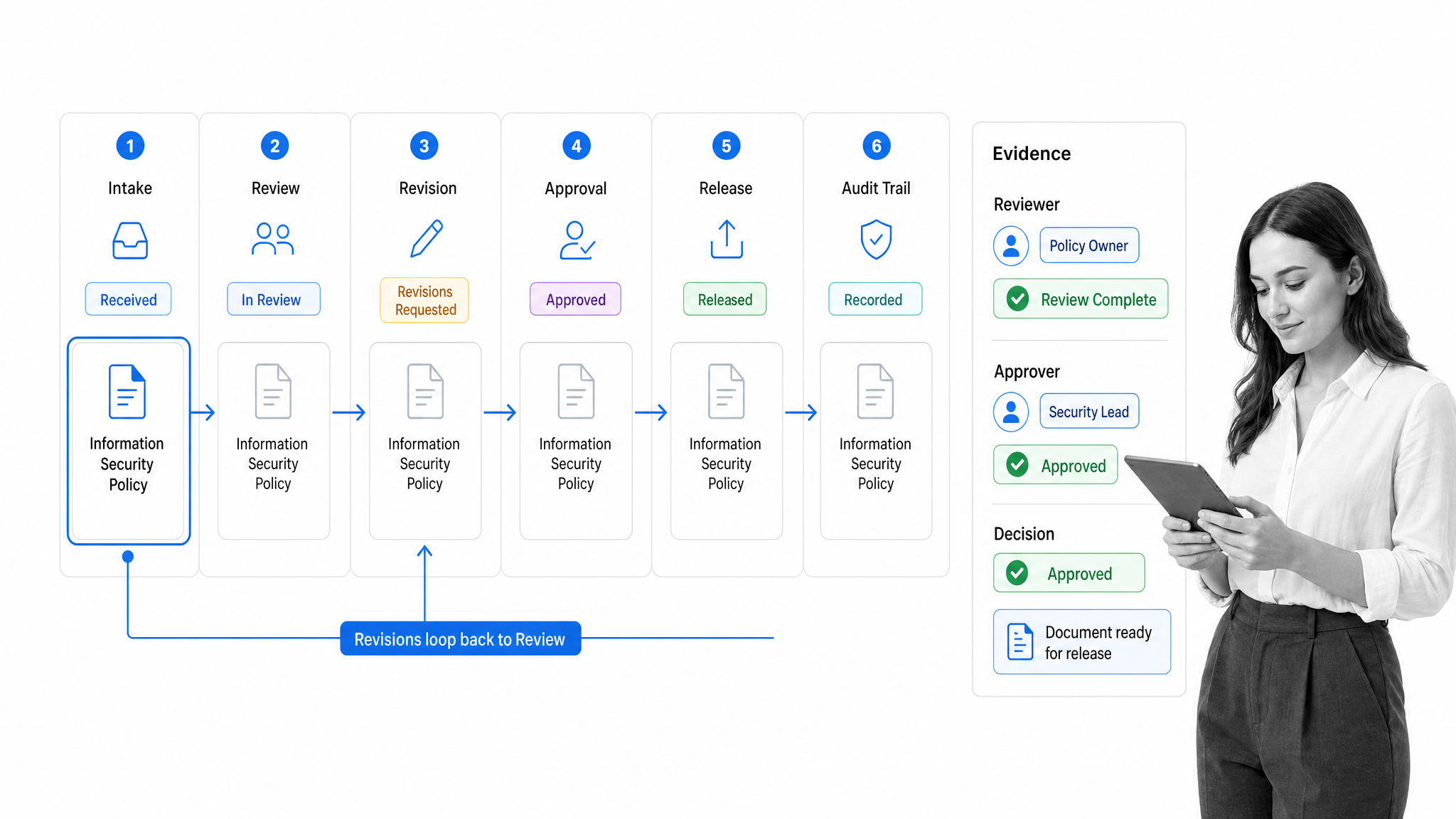
Routing determines who reviews the document and in what order. Some reviews should happen in sequence, such as author review before legal review. Others can happen in parallel, such as subject matter review and formatting review. The workflow should make this explicit instead of relying on manual forwarding.
Revision loop
A document rarely gets approved on the first pass. The workflow needs a clean loop for comments, edits, resubmission, and confirmation that the right version is back in review. This is where email based approval processes usually break.
Approval decision
Approval should be a specific decision, not a casual reply. The approver should see the document, the version, the relevant comments, and the approval criteria. The workflow should capture approve, reject, or changes requested as distinct outcomes.
Release and storage
Approval is not complete until the document is released to the right location. That may mean publishing a policy, storing a contract, updating a SOP library, or notifying a team that a template is now official. The workflow should separate final approval from final distribution.
Audit trail
The workflow should preserve who submitted the document, who reviewed it, who approved it, when each decision happened, and which version was involved. TechTarget notes that document management systems should include workflow capabilities that support approval processes, signatures, legal verification, and audits.
How do you build a document approval workflow?
Build the workflow from the decision backwards. Start with the point where the document becomes official, then define the evidence required before that point can happen.
Group documents by risk
Do not force every document through the same path. A social media post, a vendor contract, a regulated policy, and a product change record do not need the same review depth. Group documents by risk, then give each group the smallest workflow that still protects the business.
Name every role
Common roles include requester, author, document owner, subject matter reviewer, legal reviewer, compliance reviewer, approver, publisher, and archive owner. One person can hold multiple roles, but the workflow should name the role so responsibilities survive team changes.
Define routing rules
Routing rules should answer practical questions. Which documents need legal review? Which need finance approval? Which require a compliance reviewer? Which can skip a step when risk is low? Conditional routing keeps the workflow controlled without making every document crawl through unnecessary review.
Set decision criteria
Reviewers should know what they are checking. For example, legal may check liability language, compliance may check policy alignment, operations may check whether the instructions can be executed, and brand may check tone and formatting. Clear criteria reduce subjective rework.
Add time expectations
A workflow without timing still creates bottlenecks. Assign due dates, reminders, and escalation paths so pending reviews do not disappear. Time expectations should be visible to the document owner and to the approver.
Test the workflow with a real document
Run one real document through the workflow before rolling it out broadly. Watch for duplicate reviews, missing handoffs, unclear instructions, permissions issues, and places where people leave the system to ask for context somewhere else.
Improve from the audit trail
Once the workflow runs, use the record of delays, rejections, and repeated revision loops to improve the process. A good approval workflow is not static. It gets sharper as the team sees where work stalls.
Document approval workflow examples
The structure changes by document type, but the underlying control pattern is the same: define ownership, route reviews, capture decisions, release the right version, and keep proof.
Contract approval workflow
A contract approval workflow usually starts with business intake, then moves through legal review, finance review when commercial terms matter, negotiation, executive approval for higher risk agreements, signature, storage, and renewal tracking.
Marketing collateral approval workflow
Marketing collateral needs speed and control. The workflow may include draft creation, product or subject matter review, brand review, legal or compliance review for regulated claims, final approval, and distribution to the campaign owner.
SOP and policy approval workflow
SOPs and policies need stronger document control. The workflow should include owner assignment, subject matter review, compliance review, final approval, effective date, release notes, acknowledgment where needed, and scheduled review. For related guidance, see Process Street’s guide to document control best practices.
Product change approval workflow
Product change documents often require input from product, engineering, security, support, and customer facing teams. The workflow should show which teams have reviewed the change, what risks were raised, and whether launch documentation is ready.
HR document approval workflow
HR documents such as offer templates, policy acknowledgments, handbooks, and performance review forms often require people operations, legal, finance, and leadership approval. The workflow should prevent outdated templates from being reused after a newer version is approved.
Where do document approval workflows break?
Most approval problems are not caused by lazy reviewers. They are caused by weak system design. Microsoft WorkLab describes modern work as fragmented across meetings, messages, and interruptions. Document approvals suffer from the same fragmentation when the workflow is spread across inboxes and chat threads.
Email routing creates invisible queues
Email makes it easy to request approval and hard to manage approval. The document owner cannot reliably see who is blocked, which version is current, or whether a reply was a comment, a rejection, or a final approval.
Approval authority is unclear
If everyone can comment but no one owns the decision, the document stalls. The workflow should distinguish reviewers from approvers. Reviewers improve the document. Approvers accept responsibility for release.
Version drift causes rework
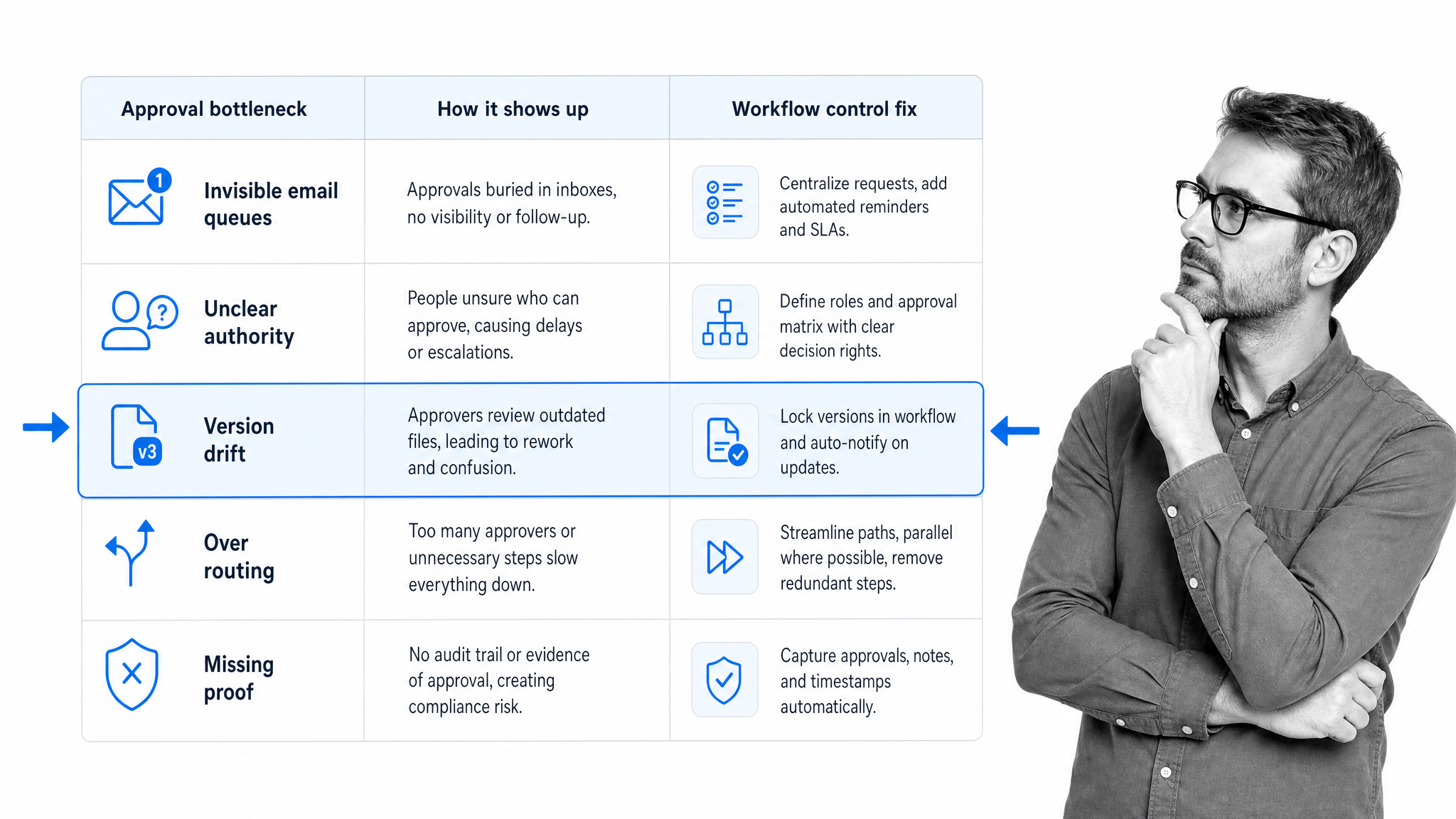
Version drift happens when reviewers edit different copies or approve a document after another person has already changed it. The workflow should tie every review and approval to the current working version.
Every document gets over routed
Over routing feels safe, but it creates delay and review fatigue. Use risk based routing so high impact documents get the control they need and routine documents move quickly.
The approved version is separated from the proof
A final PDF in a folder is not enough if the approval evidence is buried in email. The workflow should keep the approved document and the approval record close enough that an auditor, manager, or future owner can reconstruct the decision.
How Process Street supports document approval workflows
Process Street turns document approvals into repeatable workflows. Teams can build the review path once, then run it every time a contract, SOP, policy, campaign asset, or HR document needs controlled approval.
Structured workflows
Use Process Street workflows to define the approval path, assign owners, collect required information, and make each step visible. For teams that need a broader operating model, this pairs naturally with workflow management and process documentation.
Approvals inside Process Street
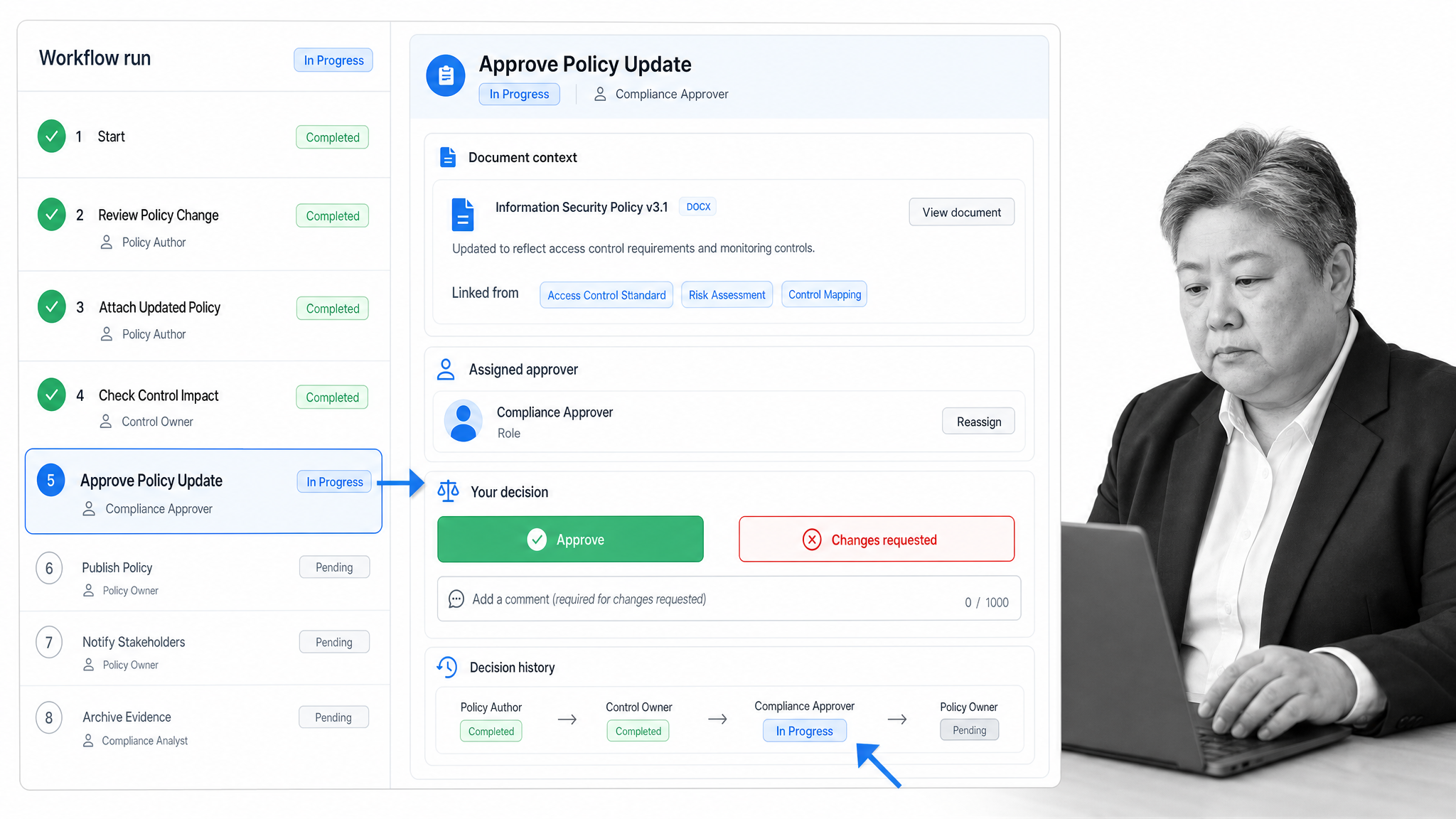
Process Street’s Approvals feature lets teams add approval tasks inside a workflow, so decisions happen in the same place as the work. That keeps the approval request, context, comments, and outcome connected to the process instead of scattered across tools.
Conditional routing
Conditional logic helps teams route documents based on type, risk, department, or required reviewer. A low risk internal template can move quickly while a regulated policy can require additional review before release.
Pages for governed documentation
Process Street Pages give teams a place to document policies, SOPs, and operating guidance alongside the workflows that enforce them. That matters because an approval workflow is strongest when the approved procedure and the execution path stay connected.
Audit ready execution
The goal is not just faster approval. It is proof that the right people reviewed the right version before release. Process Street helps teams keep work, decisions, owners, and evidence in one operating layer.
What should you look for in document approval workflow software?
The right software depends on risk level, document volume, and the systems your team already uses. For most operations and compliance teams, these capabilities matter more than a long feature list.
Configurable approval routing
The tool should support simple approvals, staged approvals, and conditional routing. It should not force every document into one rigid path.
Version and evidence control
Approvers should know which version they are approving, and the system should preserve the decision record. If the workflow cannot prove what was approved, it will not hold up well under pressure.
Permissions and access control
Document workflows often contain sensitive content. Choose software that lets the right people review and approve without exposing the document more broadly than necessary.
Reminders and escalation
Approvals stall when the next owner is invisible. Reminders, due dates, and escalation paths make pending work visible before it becomes a bottleneck.
Workflow automation
A document approval workflow should trigger the next action automatically. That may include assigning a reviewer, requesting approval, notifying the owner, collecting a signature, publishing an approved document, or archiving evidence. For broader automation patterns, see Process Street’s guide to workflow automation.
FAQs
What is a document approval workflow?
A document approval workflow is a defined path for creating, reviewing, revising, approving, releasing, and tracking a business document. It names the owner, reviewers, approvers, decision rules, version rules, and evidence captured at each step.
How do you create a document approval workflow?
Start by grouping document types by risk, then define roles, routing rules, approval criteria, revision loops, release steps, and audit evidence. Build the workflow in a system that can assign tasks, enforce due dates, and keep every decision connected to the document version.
What documents need approval workflows?
Common examples include contracts, policies, SOPs, quality documents, marketing collateral, HR documents, financial reports, product change records, customer facing templates, and regulated operating procedures.
Why do document approval workflows fail?
They usually fail because documents move through email, owners are unclear, reviewers edit different versions, approval authority is vague, or the final approved document is separated from the evidence that proves who approved it.
What should document approval workflow software include?
Look for configurable routing, role based permissions, comments, revision history, approval tasks, reminders, due dates, conditional logic, audit trails, template reuse, and integrations with the tools where documents are created and stored.
