


Turn every policy into automated workflows with built-in enforcement and audit-ready proof.



Process Utility

Process utility is the value a team creates when a repeatable business process becomes reliable, reusable, and easy to run on demand. Instead of treating each workflow as a one-off project, the organization turns the process into operational infrastructure: available when needed, governed by clear rules, and measured by proof of execution.
The term shows up in different contexts. In industrial operations, utilities support production systems, which is why suppliers describe process utility systems for steam, power, water, cooling, and related plant needs. In outsourcing and shared services, a business process utility can describe a plug-and-play operating model where finance, HR, compliance, or support processes are delivered through shared capacity. For operators, the practical meaning is simple: build repeatable work so it behaves like a utility, not a fragile custom effort.
A process utility needs more than documentation. It needs intake, routing, execution, exception handling, ownership, automation, and evidence. That is why the concept fits teams building a Process Street operating layer: the value is not just knowing the process, it is making the process run correctly every time.
In this article, we are going to cover everything you need to know about process utility, including:
- What process utility is
- Why process utility matters
- What process utility means in operations
- Process utility versus a normal process
- Core components of process utility
- How to build process utility
- Examples of process utility
- How Process Street helps build process utility
- FAQs
What process utility is
Process utility is the operational value created when a process is standardized enough to be reused, flexible enough to handle real-world variation, and reliable enough that teams can depend on it. It is the difference between a checklist someone has to remember and a governed process that can be launched, assigned, tracked, and audited whenever the business needs it.
A normal process describes what should happen. A process utility makes the process available as a service. It gives teams a controlled way to request work, run the right steps, handle exceptions, and prove the outcome. The process becomes a piece of shared business infrastructure.
A plain definition
Process utility means turning a repeatable activity into an always-available operating capability. The activity might be employee onboarding, vendor review, contract approval, incident response, financial close, quality inspection, customer onboarding, or audit evidence collection. The common thread is repeatability: the work happens often enough that the business benefits from making it reliable.
WNS describes a business process utility as an emerging plug-and-play model in finance and accounting outsourcing. The same logic applies inside an operating team. The goal is to give the business a repeatable service, not force each team to rebuild the process from scratch.
The business process utility idea is not new. InfoWorld covered business process utility as a pay-as-you-go outsourcing model, and a Finextra process utilities report uses the same utility framing for shared financial-services processes. Those examples are useful because they separate the concept from any one vendor or department.
The utility idea
A utility is valuable because people do not have to reinvent it each time they use it. Electricity, water, and cloud compute are useful because they are available through a standard interface with dependable capacity. A process utility applies that same thinking to business work. The team defines the standard interface, builds the repeatable flow, and makes the process accessible when needed.
Industrial research uses similar reliability logic for physical utilities. A University of Manchester publication on process utility system reliability focuses on the cost of utility interruptions. In business operations, the equivalent failure is a process interruption: work stalls because ownership, routing, or proof is missing.
This does not mean every process becomes rigid. A good process utility is standardized where consistency matters and flexible where judgment is required. It should guide the work without pretending every case is identical.
Why process utility matters
Process utility matters because growing teams cannot rely on heroic individual memory forever. As volume rises, every unclear handoff becomes a delay. Every missing approval becomes a risk. Every undocumented exception becomes a future argument about what happened.
The more important a process becomes, the more expensive inconsistency gets. A workflow management system helps teams move from informal coordination to repeatable execution, but process utility goes one level further: the process is designed as a reusable service with defined intake, ownership, automation, reporting, and proof.
It reduces operational drag
When a process is not utility-grade, people spend too much time figuring out how to start it, who owns the next step, which document is current, and where proof should live. A process utility removes that drag. The start point is clear. The task order is clear. The exception path is clear. The record of completion is attached to the work.
It protects compliance and quality
Critical processes often carry compliance, quality, or customer risk. A vendor review that skips security checks can create exposure. A financial close process that misses evidence can break audit readiness. A customer onboarding process that varies by account manager can damage the customer experience.
Process utility protects these workflows by turning standards into execution. That is closely related to business process management, but the emphasis is practical: build the process so teams can run it repeatedly, not just model it.
It creates scalable capacity
A team with process utility can absorb more volume without rewriting the operating model every time demand changes. New employees learn faster because the process is already packaged. Managers get visibility without chasing status. Auditors get proof without asking the team to reconstruct history.
What process utility means in operations
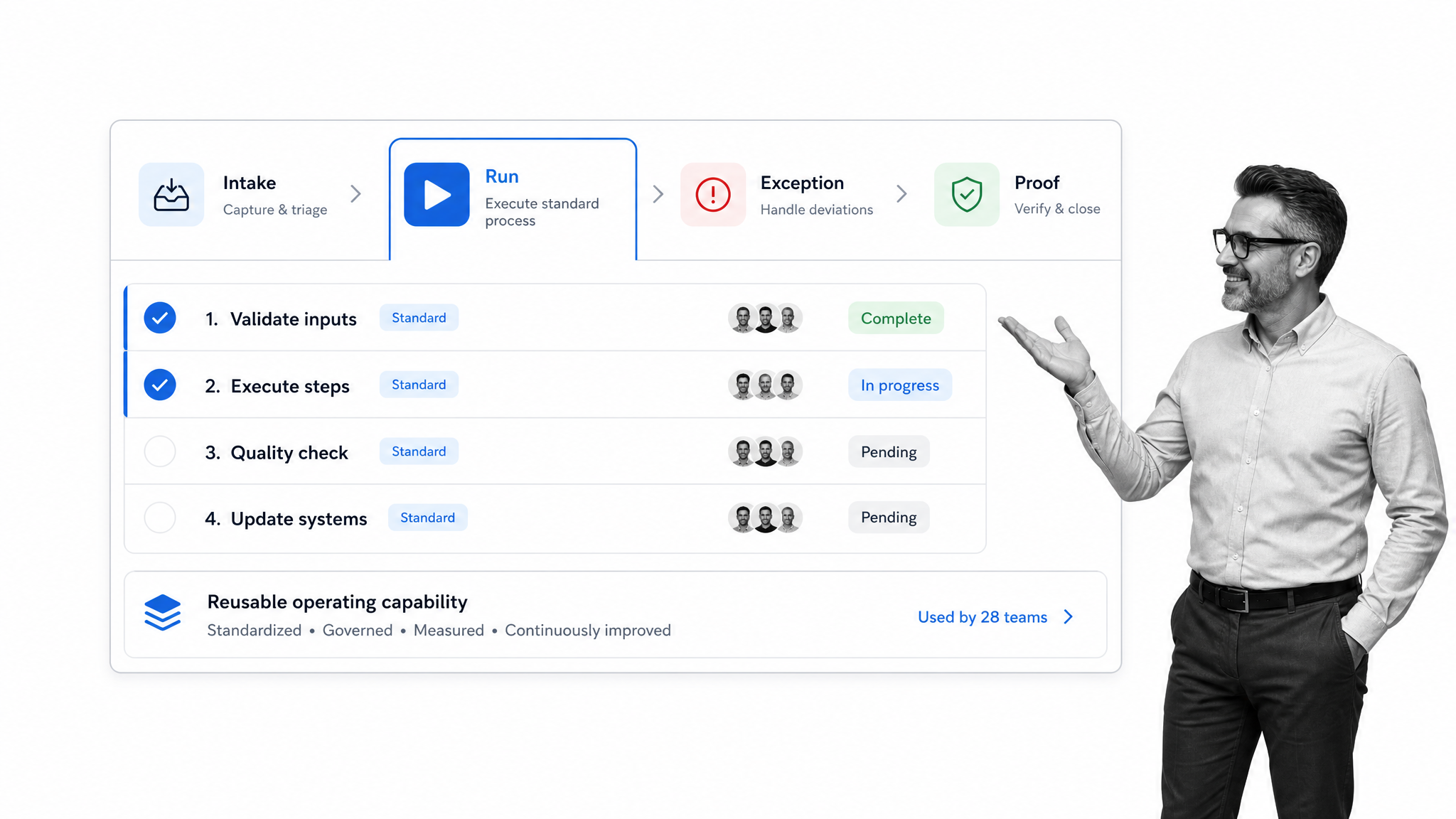
In operations, process utility means designing a process as a managed capability. The work has a standard request path, clear entry criteria, structured execution, decision logic, exception handling, and a durable record. The process is not just written down. It is runnable.
Standardized intake
Every useful process utility begins with a clean intake. Someone needs to request the process, submit the right information, and trigger the correct workflow. Intake is where the process starts to behave like a utility: users know where to go, what to provide, and what happens next.
Repeatable execution
Execution is where a process utility proves itself. Tasks must appear in the right order, with the right owner, due date, instructions, and evidence requirements. Understanding what a workflow is helps here because process utility depends on the structured movement of work, not loose coordination.
Exception handling
Real processes break. A vendor fails a security check. A new hire lacks a required document. A customer implementation hits an approval dependency. A process utility does not hide exceptions. It routes them. The best operating models define what happens when the standard path is blocked, who reviews the exception, and what proof is needed before work continues.
Proof of completion
A process utility is incomplete without evidence. If the work is important, the organization needs to know who did it, when they did it, what they reviewed, what they approved, and what changed. That proof turns recurring work into a controlled operating system.
Process utility versus a normal process
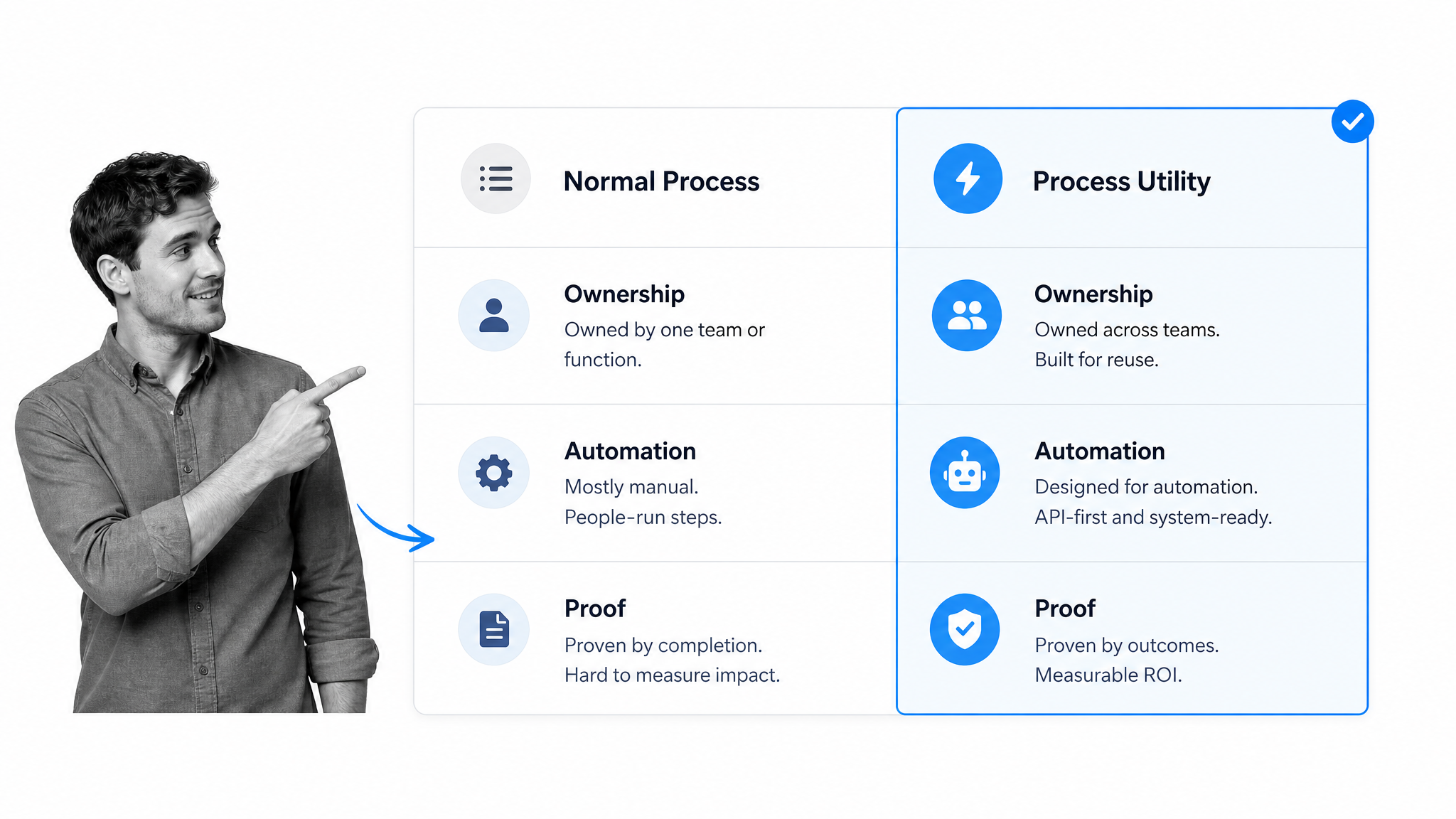
A normal process and a process utility can use the same underlying steps. The difference is maturity. A normal process might live in a document, a spreadsheet, a project management board, or the head of an experienced employee. A process utility is packaged so the business can launch and rely on it repeatedly.
Ownership
A normal process often has fuzzy ownership. Several people know parts of it, but nobody owns the whole operating capability. A process utility has a clear owner who maintains the workflow, monitors usage, reviews exceptions, and improves the process over time.
Automation
A normal process may depend on manual reminders. A process utility uses automation to assign tasks, route approvals, send notifications, update systems, and collect evidence. Teams exploring business process automation software are usually trying to make this shift from manual coordination to reliable execution.
Measurement
A normal process can be hard to measure because work happens across email, chat, spreadsheets, and meetings. A process utility produces operational data by default. You can see volume, cycle time, bottlenecks, exception rates, overdue tasks, and completion evidence.
Reliability
A normal process can work well when the right person is available. A process utility works because the system carries the structure. People still make decisions, but the process does not depend on one person remembering every step.
Core components of process utility
A process utility has six core components. Miss one and the operating model becomes fragile. Include all six and the process starts to behave like shared infrastructure.
1. A clear trigger
The trigger tells the team when the process should start. It might be a form submission, a new employee record, a signed customer contract, a vendor request, a risk event, a calendar date, or a system update. Without a clear trigger, people argue about whether the process should have started at all.
2. Defined roles
Every process utility needs role clarity. Who requests the work? Who owns the process? Who approves exceptions? Who supplies evidence? Who has final accountability? Role clarity turns repeatable work into managed capacity.
3. Structured steps
Structured steps are the backbone of the utility. A standard operating procedure gives the team a written baseline, but process utility requires those steps to be executable. The work has to move from task to task without losing context.
4. Decision logic
Not every run follows the same path. Decision logic handles variation. If a vendor is high risk, send the request to security. If a customer is in a regulated industry, add compliance review. If a task fails, route to remediation. This is where a process utility becomes flexible without becoming chaotic.
5. Evidence capture
Evidence capture proves that the process happened. Files, approvals, timestamps, comments, form fields, owner assignments, and audit logs all matter. If the process supports compliance, quality, finance, security, or customer commitments, proof is part of the product.
6. Improvement loop
A process utility should improve as the team learns. Bottlenecks, repeated exceptions, and missed deadlines are signals. A structured continuous improvement habit keeps the utility current as the business changes.
How to build process utility
Building process utility is not about documenting every process in the company. Start with the recurring work that causes the most pain, risk, or volume. The best candidates are processes that happen often, cross teams, require proof, or break when the usual owner is unavailable.
Step 1: Pick a high-leverage process
Choose one process with visible demand. Good candidates include vendor onboarding, employee onboarding, customer implementation, monthly close, policy review, incident response, purchase approvals, audit evidence requests, or quality checks. Avoid starting with a rare edge case.
Step 2: Map the current path
Document how the work actually happens today. Capture the trigger, intake fields, task sequence, decision points, systems involved, approvals, documents, and evidence. If the current process is messy, map reality first. Then improve it. A practical process mapping pass exposes where the utility needs structure.
Step 3: Define the standard path
The standard path is the normal route through the process. It should be clear enough for a new team member to follow. Define the tasks, owners, due dates, instructions, required fields, approvals, and output. Keep it specific. Vague process steps create vague execution.
Step 4: Add exception paths
A process utility cannot ignore variation. Define the most common exception paths and route them deliberately. If the process supports vendor review, what happens when a vendor stores sensitive data? If it supports hiring, what happens when documentation is missing? If it supports customer onboarding, what happens when legal approval is needed?
Step 5: Automate handoffs
Automation is what makes the utility feel reliable. Assign work automatically. Send reminders automatically. Update records automatically. Notify the right people automatically. Process Street has direct, universal integrations to 5,000+ systems. Need a new one? An AI agent builds it on the fly.
Step 6: Measure and improve
Once the process is running, review cycle time, overdue tasks, exceptions, and completion quality. Use the data to improve the process. This is where process utility connects to process improvement tools: the process itself becomes the source of evidence for what needs to change.
Examples of process utility
Process utility is easiest to understand through examples. The pattern is the same in every department: recurring work becomes a managed operating capability.
Vendor onboarding
A vendor onboarding utility collects vendor details, routes security and legal checks, gathers tax forms, stores approvals, and creates a record in the system of record. A vendor onboarding template gives teams a starting point for packaging the workflow.
Employee onboarding
An employee onboarding utility coordinates HR, IT, security, payroll, and manager tasks. Every new hire gets the same baseline experience while exceptions are handled cleanly. Teams often start with an employee onboarding checklist and then add routing, approvals, and evidence capture.
Financial close
A financial close utility assigns recurring close tasks, tracks reconciliations, captures approvals, and provides evidence for review. The work runs on a schedule and produces a repeatable record instead of a scramble through email and spreadsheets.
Quality control
A quality control utility turns inspection steps into repeatable execution. Inspectors know what to check, failures route to rework, and the record stays attached to the run. A quality control checklist for manufacturing is a practical starting point for that operating model.
Audit evidence collection
An audit evidence utility manages control owners, evidence requests, review tasks, deadlines, exceptions, and proof. Instead of rebuilding the audit process every cycle, the organization runs a governed workflow that produces a complete record.
How Process Street helps build process utility
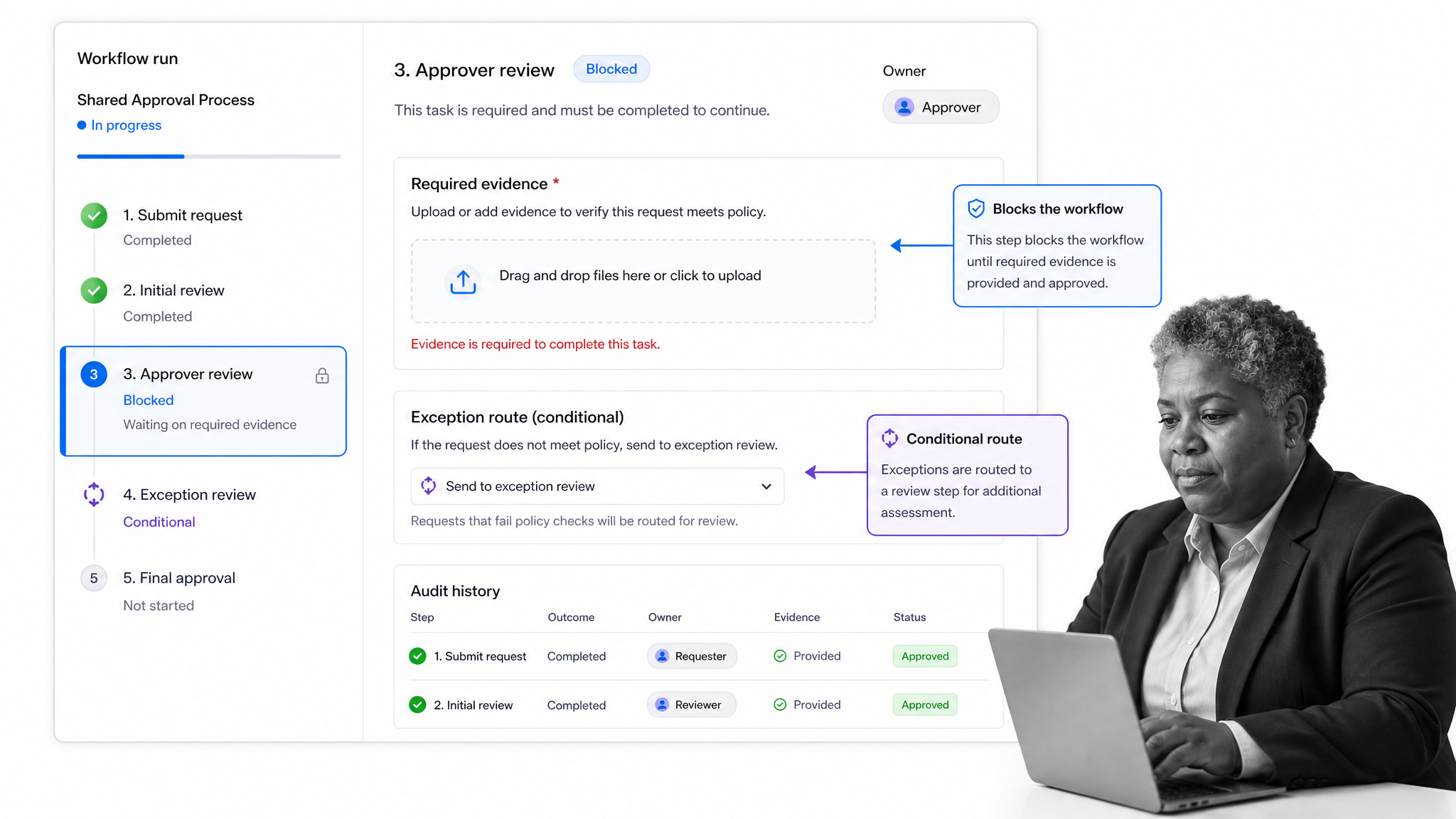
Process Street helps build process utility by turning recurring procedures into workflows that run. The platform combines documented steps, task assignment, approvals, conditional routing, automation, and audit-ready records in one place. That is what separates a process utility from a process document.
Launch the process from a standard interface
Teams can start with templates like a process improvement plan, free SOP template, or department-specific workflow, then adapt it into a reusable run. The process has a clear start point instead of being buried in a document or spreadsheet.
Assign the right work automatically
A process utility has to move work to the right owner without constant management attention. Process Street workflows assign tasks, track due dates, and keep owners accountable. Managers can see where the work stands without chasing updates.
Route exceptions without losing control
With conditional logic, the workflow can change based on risk, department, region, answer, or status. That means the standard path stays simple while exceptions still get the right review.
Keep proof with the work
Process Street records the task history, owners, approvals, evidence, and completion details inside the workflow run. When compliance, finance, quality, or customer teams need proof, they do not have to reconstruct the process from memory.
That is the heart of process utility: not another static document, but a repeatable operating capability. Teams that need stronger governance can connect this to broader process management, quality, compliance, and automation programs.
FAQs
What is process utility?
Process utility is the value created when a repeatable business process becomes reliable, reusable, and easy to run on demand. It turns work like onboarding, approvals, reviews, or evidence collection into a managed operating capability.
How is process utility different from a normal process?
A normal process usually explains what should happen. A process utility packages the process so it can be launched, assigned, automated, measured, and audited repeatedly without rebuilding the work each time.
What are examples of process utility?
Examples include vendor onboarding, employee onboarding, financial close, quality control, audit evidence collection, incident response, and customer implementation. Each example is recurring work that benefits from standardized intake, routing, execution, and proof.
Why does process utility matter?
Process utility matters because growing teams need repeatable work to run without constant manual coordination. It reduces operational drag, protects compliance and quality, and creates scalable capacity as volume increases.
How do you build process utility?
Start with one high-leverage recurring process, map the current path, define the standard flow, add exception routes, automate handoffs, and measure the results. The goal is to make the process reliable enough that teams can launch and run it whenever needed.
How does Process Street support process utility?
Process Street supports process utility by turning recurring procedures into executable workflows. Teams can assign tasks, route approvals, trigger automations, capture evidence, and keep an audit-ready record of the work.
