


Turn every policy into automated workflows with built-in enforcement and audit-ready proof.



Process Mapping: How to Create a Blueprint for Business Success

Process mapping is how you turn a process from something people describe differently in meetings into something the whole team can see, test, improve, and run.
A good process map shows the real path work takes: the start point, the steps, the decisions, the handoffs, the records created, and the places where work slows down or goes wrong. IBM describes process mapping as a way to improve understanding and identify areas for improvement, which is the right starting point for any operational change. IBM process mapping overview.
The map is not the finish line. Once the process is clear, the next question is whether the team can execute it the same way every time. That is where process documentation, workflow automation, ownership, and audit history matter.
What is process mapping?
Process mapping is the visual documentation of how work moves from beginning to end. It usually includes activities, decisions, sequence, owners, inputs, outputs, exceptions, and evidence. TechTarget defines business process mapping as a visual display of the steps in a business process from start to finish. TechTarget definition of process mapping.
The best maps are honest before they are polished. They show what actually happens, not what the SOP says should happen. That is why the most useful mapping sessions involve the people who perform the work, the people who receive the output, and the people accountable for risk or quality.
For compliance and operations teams, a process map should answer six questions:
- Where does the process start and end?
- Who owns each step?
- What decision points change the path?
- What evidence or data is created?
- Where do handoffs, delays, and rework happen?
- Which parts should become enforced workflow steps?
Why process mapping matters
Process mapping matters because complex work breaks at the boundaries. A task may be clear inside one department, then become vague when it crosses into finance, legal, operations, compliance, HR, or customer success. The map exposes those boundaries.
A process map helps teams identify bottlenecks, redundant approvals, missing owners, unclear decision criteria, duplicate data entry, and manual work that can be automated. It also gives auditors, managers, and new hires a shared view of how work should happen.
The strongest outcome is not a prettier diagram. The strongest outcome is a process that can be documented, assigned, executed, reviewed, and improved without relying on tribal knowledge.
Which process mapping technique should you use?
Choose the technique based on the decision you need to make. A simple onboarding process does not need the same notation as a regulated claims workflow or a manufacturing improvement project.
Basic flowchart
Use a basic flowchart when the main job is to show sequence. It is the easiest format for simple procedures, approvals, and customer-facing workflows. Rectangles show tasks, diamonds show decisions, and arrows show flow.
Flowcharts are useful when you need fast clarity, but they can hide ownership problems unless you add owners or lanes.
Swimlane process map

Use a swimlane process map when the process crosses teams. Each lane represents a role, department, system, or stakeholder. This makes handoffs visible and helps the team see exactly where accountability changes.
Swimlane maps are especially useful for finance approvals, employee onboarding, customer escalations, healthcare intake, procurement, and compliance workflows.
Value stream map
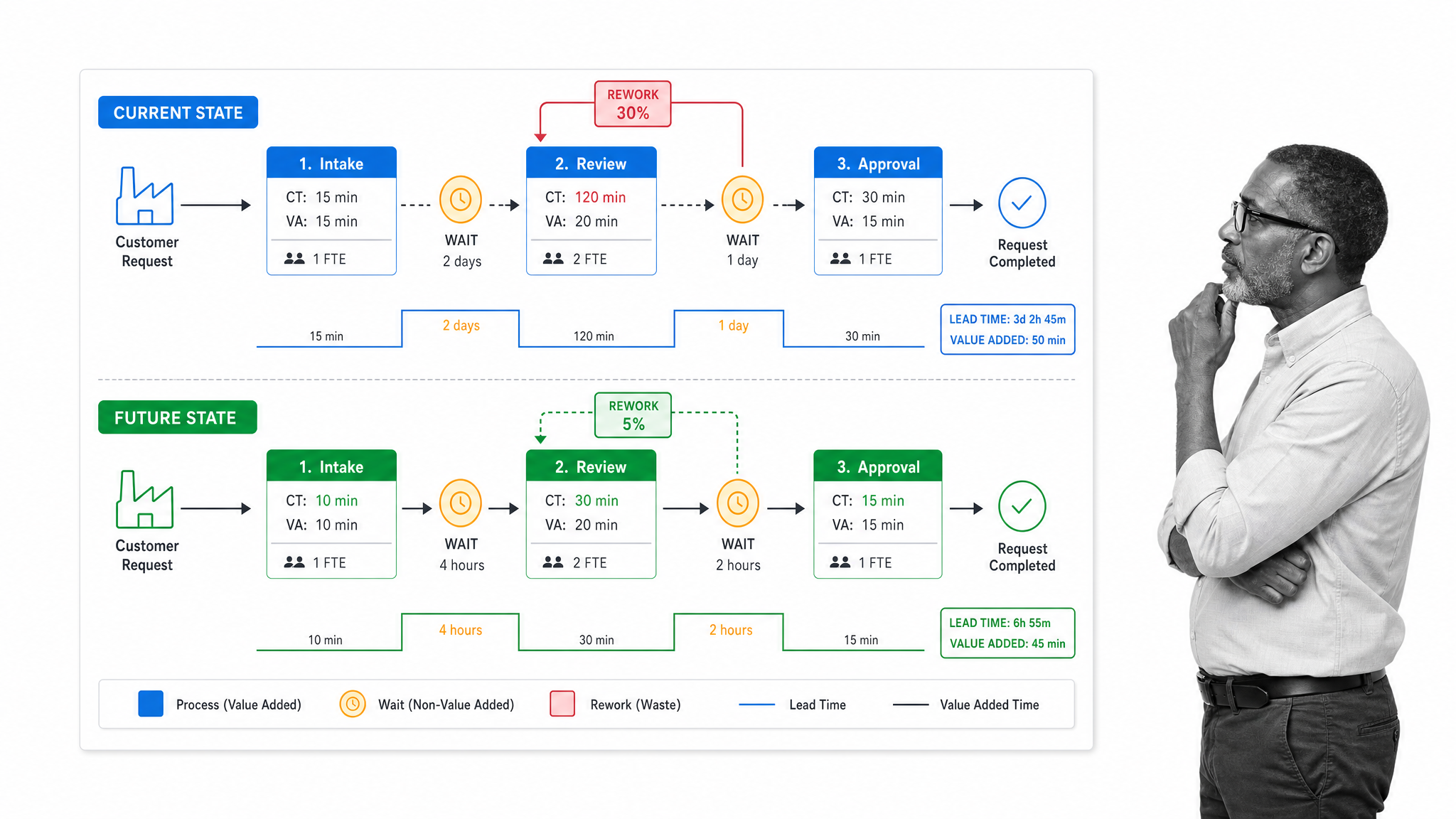
Use a value stream map when the problem is waste, delay, rework, or throughput. A value stream map looks beyond task order and asks where time, inventory, effort, and information are lost. TechTarget describes value stream mapping as a Lean tool for visualizing repeatable steps required to deliver a product or service. TechTarget value stream mapping definition.
This is the right format when leadership wants to reduce cycle time, remove non-value-added work, or compare current and future states.
SIPOC diagram
Use a SIPOC diagram when the team needs scope before detail. SIPOC stands for suppliers, inputs, process, outputs, and customers. It is useful early in improvement work because it clarifies what the process depends on and who receives the outcome.
SIPOC is not a detailed execution map. It is a boundary-setting tool that prevents teams from mapping too much or solving the wrong problem.
BPMN map

Use BPMN when the process needs more formal notation or will be interpreted by technical teams. The Object Management Group describes BPMN as a graphical notation for specifying business processes in a business process diagram. OMG BPMN specification overview.
BPMN is strongest when analysts, business stakeholders, and technical implementers need a shared notation for events, gateways, activities, and flows. For everyday SOP execution, it may be more detailed than most teams need.
How do process maps become workflows?
A process map explains the path. A workflow makes the path executable. The distinction matters because teams often stop at the diagram and then wonder why behavior does not change.
To turn a process map into a workflow, translate each meaningful node into an action, decision, assignment, form field, approval, notification, or record. Then decide which steps must be enforced and which steps are guidance only.
Process Street helps teams turn a map into runnable workflows with assigned tasks, forms, approvals, conditional logic, automation, reporting, and audit history. The workflow becomes the place where the mapped process is actually followed, not just described. Process Street workflows.
What process mapping tools should you consider?
The right tool depends on whether you are discovering a process, designing a diagram, or enforcing execution.
Process Street
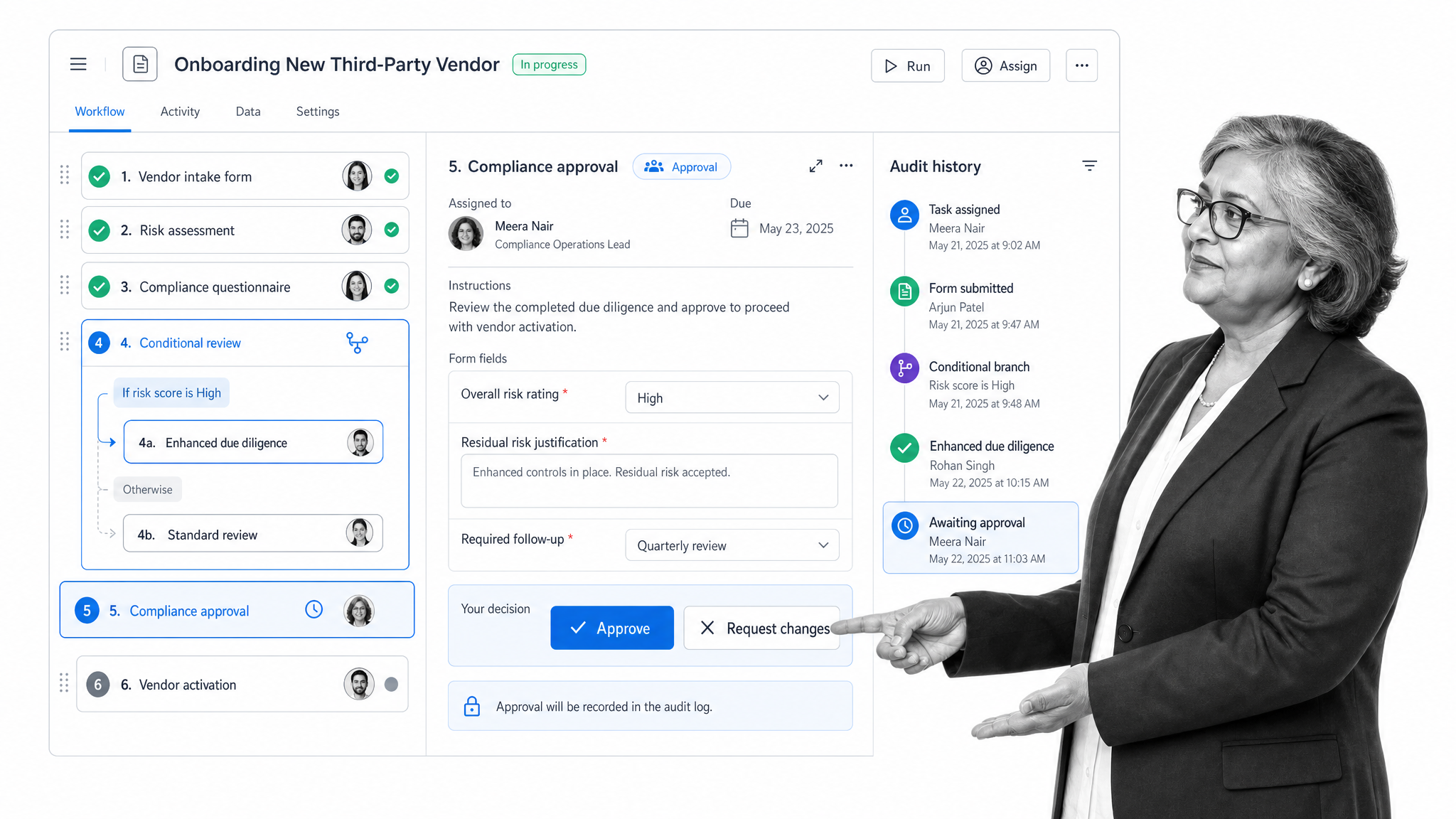
Process Street is the strongest fit when the map needs to become a controlled workflow. Use it after discovery to assign owners, collect structured information, route approvals, enforce conditions, automate handoffs, and keep a record of completed work.
This is especially useful for recurring processes where consistency, evidence, and accountability matter: onboarding, vendor review, compliance checks, customer implementation, internal audits, and finance operations.
Microsoft Visio
Microsoft Visio is a fit for formal diagrams and teams already working in the Microsoft ecosystem. Microsoft documentation lists process diagram templates such as basic flowcharts, cross-functional flowcharts, and value stream maps. Microsoft Visio process diagrams.
Lucidchart
Lucidchart is a fit for collaborative diagramming when teams need templates, shape libraries, and formatting tools for process maps. It works well for discovery and communication before a process becomes an executed workflow.
Miro
Miro is a fit for collaborative workshops, whiteboarding, and early process discovery. It is useful when teams need a shared canvas for sticky notes, draft flows, and discussion before formalizing the process.
Google Drawings or spreadsheets
Google Drawings and spreadsheets are useful for quick drafts and lightweight maps. Google Drawings offers shapes for diagrams and charts, which can be enough for a simple internal sketch. Use them when the map is temporary, low risk, or part of a broader document. Google Drawings.
How do you create a process map?
Use process mapping as a working session, not a solo documentation task. The person who owns the process may not know every workaround. The person doing the work may not know every risk. Bring both views together.
Define the process boundaries
Name the process, start point, end point, owner, trigger, outcome, and scope. Decide what is inside the map and what is outside it. If the boundary is vague, the map will sprawl.
Gather the real steps
Interview the people who do the work. Watch the process when possible. Collect forms, emails, records, approvals, system screenshots, and exceptions. Ask where delays happen and where people make judgment calls.
Map the current state first
Draw what actually happens before designing the improved version. Include skipped steps, rework, informal handoffs, and duplicate entry. Current-state honesty is what makes future-state improvement credible.
Add owners, decisions, and evidence
A map that only shows task names is rarely enough. Add the role responsible for each step, the decision rule for each branch, and the evidence created or checked at key points.
Validate the map with stakeholders
Review the map with the people who perform, approve, receive, and audit the process. Ask what is missing, what is unrealistic, and what would break under volume or staff turnover.
Turn the improved map into a workflow
After validation, decide which steps belong in a workflow system. Assign owners, due dates, form fields, approvals, conditional paths, automations, and reporting. The goal is to make the improved process easier to follow than the informal workaround.
Process mapping example: healthcare discharge
Healthcare discharge is a good example because it crosses clinical, administrative, patient, and payer boundaries. A basic map might show physician clearance, medication review, patient education, transport coordination, billing checks, and follow-up scheduling.
A swimlane view would expose which team owns each handoff. A value stream view would show waiting time and rework. A workflow view would assign each step, require critical fields, route approvals, and preserve proof that required checks happened.
The same logic applies outside healthcare. Any process with multiple owners, compliance exposure, customer impact, or repeated execution deserves a map that can become a controlled workflow.
Process mapping and Six Sigma
Process mapping is often used in Six Sigma and continuous improvement work because it gives teams a visible model of variation, defects, waste, and handoffs. The map helps teams see where to measure before they jump into solutions.
In a Six Sigma setting, a SIPOC diagram may define scope, a flowchart may show sequence, a value stream map may show waste, and a future-state map may show the improved process. The important point is to match the map to the improvement question.
Process maps vs flowcharts
Flowcharts and process maps overlap, but they are not identical.
A flowchart usually focuses on the sequence of tasks and decisions. A process map can include the flowchart but also add owners, handoffs, inputs, outputs, systems, evidence, timing, risks, and controls.
Use a flowchart when you need a simple path. Use a broader process map when you need operational context, accountability, or compliance proof.
What are common process mapping mistakes?
Most weak process maps fail for operational reasons, not design reasons. They look organized, but they do not change how work happens.
Mapping the ideal process instead of the real one
Teams often draw the process they wish existed. That creates a clean diagram and a useless operating artifact. Start with the current state, including delays, side channels, manual fixes, duplicated work, and exception paths. The future-state map is only credible after the current-state map is honest.
Leaving owners out of the map
If no one owns a step, the map cannot drive accountability. Add the role or team responsible for each meaningful action. For handoffs, name both sides: the person sending work forward and the person expected to receive it.
Hiding decisions inside task boxes
A decision should not be buried inside a task label. If the path changes based on risk, amount, approval status, customer type, location, or missing information, show the decision point clearly. Then write the rule that determines the next path.
Treating the diagram as documentation
A map is a visual model. It is not enough by itself for execution. Teams still need task instructions, forms, approvals, deadlines, escalation rules, and records. Use the map to design those controls, then put the executable process somewhere the team actually works.
Never revisiting the map
A process map should change when the work changes. Review it after major policy changes, system changes, staffing changes, audit findings, customer complaints, or repeated delays. If the map does not match the real process, people will stop trusting it.
Process mapping checklist
Before you consider a process map finished, check whether it is specific enough to drive execution.
- The start and end points are clear.
- Every major step has an owner.
- Decision points show the rule used to choose a path.
- Inputs and outputs are visible.
- Systems, records, and evidence are named where they matter.
- Handoffs between teams are visible.
- Bottlenecks and rework are marked.
- The future-state map can be translated into workflow tasks.
FAQs
What is process mapping?
Process mapping is the practice of visually documenting how work moves from start to finish, including tasks, decisions, owners, handoffs, inputs, outputs, and evidence.
How do you create a process map?
Define the process boundary, gather the real steps from stakeholders, map the current state, add owners and decision points, validate the map, and turn the improved version into a workflow.
What are the main process mapping techniques?
The main techniques include basic flowcharts, swimlane maps, value stream maps, SIPOC diagrams, and BPMN maps. Each one solves a different mapping problem.
What is the difference between process mapping and workflow documentation?
Process mapping shows how work flows. Workflow documentation turns that map into instructions, assignments, forms, approvals, automations, and records that help the team execute consistently.
What is the best process mapping tool?
The best tool depends on the job. Use a diagramming tool for discovery and communication. Use Process Street when the mapped process needs to become a recurring, assigned, auditable workflow.
