


Turn every policy into automated workflows with built-in enforcement and audit-ready proof.



12 Best SAP Signavio Alternatives & Competitors in 2026
If you are weighing SAP Signavio alternatives, it helps to start with what Signavio actually is. SAP Signavio is a well-regarded business process management and transformation suite. It pairs process modeling in standard BPMN with process mining, process governance, and a collaborative process collaboration hub, and it is especially strong for large enterprises that want to model, mine, and manage processes that run on top of SAP and other systems of record. If your job is to map a complex enterprise process, compare how it was designed against how it actually executes in the event log, and govern that model across the organization, Signavio does that job well.
Even so, teams routinely look for SAP Signavio alternatives, and usually for one of a few honest reasons. The platform is built for enterprise process architecture, so it can be heavier and more specialized than smaller teams need. Pricing is handled through enterprise sales rather than a simple self-serve plan, which makes upfront budgeting harder. Some teams discover that what they actually need is not a modeling and mining suite at all, but a way to run the process: assign each step, enforce the order, track every run, and hold people accountable. Others want a specific capability Signavio is not centered on, such as developer-grade orchestration, low-code app building, Kanban-style request intake, or fast collaborative diagramming.
This guide compares 12 of the strongest SAP Signavio alternatives and competitors available in 2026. It is editorially maintained by the Process Street team, and we have tried to keep it genuinely even-handed: each tool is judged on the job it is built to do, and we say plainly which competitor is the better fit when a use case sits outside our own. To keep the comparison consistent, every entry is assessed against the same five criteria:
- Core capability fit. What the tool is fundamentally built to do, whether that is modeling, mining, orchestration, low-code apps, diagramming, or running repeatable workflows.
- Ease of use and audience. Whether non-technical operators can adopt it quickly or whether it is aimed at analysts, architects, or developers.
- Pricing model. How the tool is sold, whether a free plan or trial exists, and how transparent the pricing is.
- Integrations. How well it connects to ERP, CRM, and the other systems where work actually happens.
- Support and governance. The maturity of security, audit, and governance features for regulated or enterprise use.
Every factual claim about a competitor below is drawn from that company’s own site or primary documentation, verified at the time of writing. Where a detail could not be confirmed on a primary source, we have softened or omitted it rather than guess. Pricing for enterprise platforms changes often, so always confirm current numbers directly with the vendor.
In this guide to the best SAP Signavio alternatives, we cover:
- SAP Signavio alternatives at a glance
- How we compared these SAP Signavio alternatives
- 1. Process Street
- 2. Celonis
- 3. ARIS
- 4. Camunda
- 5. Bizagi
- 6. Pega Platform
- 7. Appian
- 8. IBM Blueworks Live
- 9. Lucidchart
- 10. Nintex
- 11. Pipefy
- 12. Tallyfy
- SAP Signavio alternatives FAQs
- Which SAP Signavio alternative should you choose?
SAP Signavio alternatives at a glance
Here is the full ranked list before the deep dives. Each tool name links to its detailed breakdown further down the page. Process Street leads the list as the best overall pick for teams whose core need is running repeatable, trackable process and SOP workflows. The other 11 are ordered by how closely they serve enterprise process work adjacent to what SAP Signavio does.
How we compared these SAP Signavio alternatives
There is no single category that contains every tool on this list, and that is the point. SAP Signavio lives at the intersection of process modeling, process mining, and process governance. The realistic alternatives split into clusters: process intelligence and mining platforms (Celonis, ARIS), formal modeling and documentation tools (IBM Blueworks Live, Lucidchart, and again ARIS), orchestration and low-code automation platforms (Camunda, Bizagi, Pega, Appian, Nintex, Pipefy), and tools built to run human workflows and SOPs (Process Street, Tallyfy).
We placed each tool where its own documentation places it, then asked a simple question for the ranking: how many teams searching for a SAP Signavio alternative actually need that tool’s core job? Process Street is ranked first not because it does what Signavio does, but because the most common real need behind the search, getting a process to actually run the same way every time with clear ownership and a complete audit trail, is exactly what Process Street is built for, and it serves that need with less overhead than an enterprise modeling suite. Where your need is different, the table and the deep dives point you to the better-fit tool without hedging.
1. Process Street
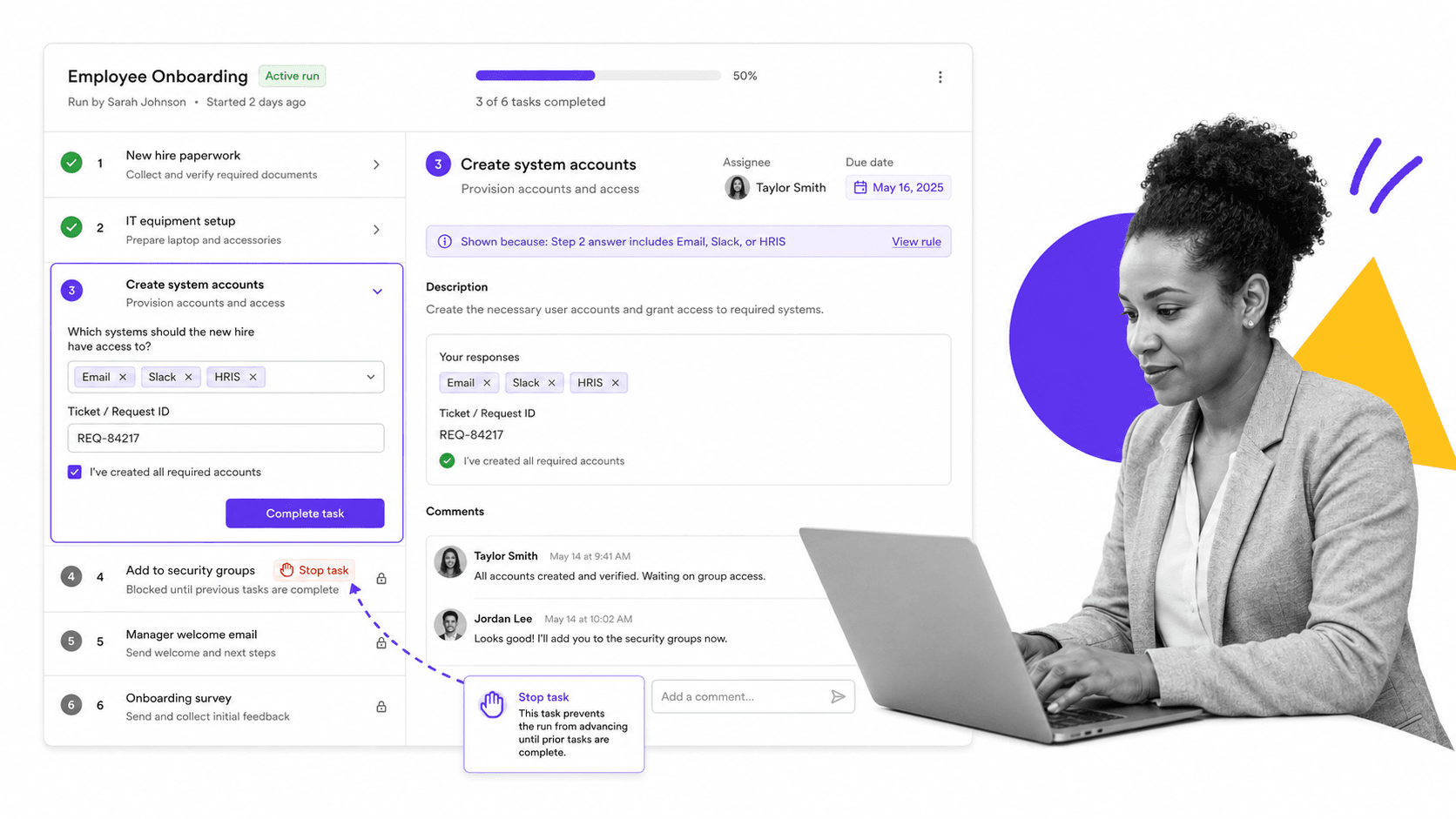
Best for: operations, HR and onboarding, and compliance-adjacent process owners who need to run repeatable, enforceable, trackable workflows and SOPs, where the goal is consistent execution and accountability rather than enterprise process modeling or mining.
Process Street is a workflow and SOP management platform built around one idea: a process is only valuable when it actually runs the same way every time. You document a procedure once as a template, then launch a run of it whenever the work needs doing. Each run turns the template into a live checklist where every step is assigned to a person, ordered, dated, and tracked to completion. Where a modeling tool produces a diagram of how work should flow, Process Street produces the running instance of that work, with a record of who did what and when. That is the difference between a picture of a process and an operating process.
The platform is deliberately accessible to non-technical operators. A team lead in HR, finance, or operations can build a workflow, add conditional logic, set approvals, and assign owners without writing code or learning BPMN notation. At the same time, it carries the governance teams need: required steps, approvals, role-based permissions, and a complete activity trail on every run. That combination, easy enough for the whole team to adopt yet structured enough to enforce, is why it sits at the top of this list for the most common reason people leave a heavier suite.
Process Street is not trying to be SAP Signavio. It does not mine event logs from your ERP, and it is not a formal BPMN modeling and simulation studio. What it does is take the procedures that already live in your team’s heads, spreadsheets, and stale documents and turn them into workflows people actually follow, with the order enforced and the results recorded.
Key features
- Workflow runs from reusable templates. Document a process once, then launch a tracked run every time the work needs to happen, so nothing is rebuilt from scratch and nothing is skipped.
- Stop tasks that enforce order. A Stop task prevents a run from advancing until the required prior steps are complete, which turns a checklist into an enforceable process rather than a suggestion.
- Conditional logic. Rules reveal, hide, or branch tasks based on earlier answers, so one template adapts to different scenarios without becoming a maze.
- Approvals and role-based assignment. Route steps for approval and assign each task to the right owner with due dates, so accountability is built into the run.
- Dashboards, reporting, and integrations. Track every active run, spot stalled work, and connect to the rest of your stack through native integrations and automation so workflows trigger and update other systems.
Pros
- Fast to adopt for non-technical teams: no notation, modeling theory, or developer skills required to build and run a workflow.
- Genuinely enforces process: Stop tasks, required fields, and approvals make the documented order actually happen on every run.
- Strong accountability and audit trail: each run records who completed which step and when, which is valuable for compliance-adjacent work.
- Scales from a single SOP to company-wide operations without forcing teams into a heavyweight enterprise architecture practice.
- Pairs well with other systems: integrations and automation let Process Street run the human side of a process while connected tools handle the data side.
Cons
- It is not a BPMN modeling and simulation suite. If you need formal process architecture, notation-heavy diagrams, or what-if simulation, a dedicated modeling tool such as ARIS, Bizagi, or IBM Blueworks Live fits better.
- It is not a process mining tool. It runs and records the processes you define; it does not reconstruct how processes execute from raw ERP event logs the way Celonis or SAP Signavio does.
Pricing model: Process Street is a subscription product with a free trial so you can build and run real workflows before committing. Plan tiers and current per-seat pricing are listed on the Process Street pricing page; we do not reproduce dollar figures here because they change. Start on the Process Street home page to see the product and begin a trial.
2. Celonis
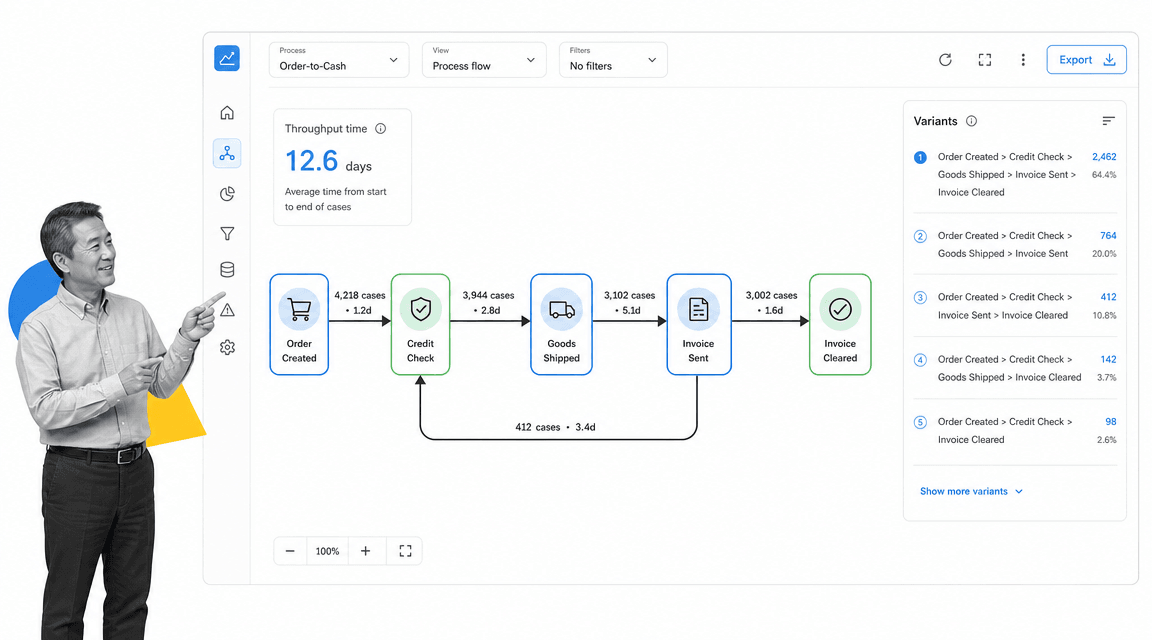
Best for: large enterprises that want to mine event-log data from ERP and transactional systems such as SAP, Oracle, Salesforce, and ServiceNow to discover how their processes actually run, diagnose inefficiencies and conformance gaps, and orchestrate AI-driven improvements at scale.
Celonis is a Process Intelligence platform, and it describes itself as the global leader in Process Intelligence. Its core is process mining: it extracts event-log data, the digital footprint every process step leaves in transactional systems, and builds an end-to-end visualization of how a business process actually executes versus how people assume it does. On top of that it layers analytics, root-cause analysis, object-centric process mining, task mining, and AI to surface and act on improvement opportunities.
The platform is organized around three functions, Analyze, Design, and Operate, built on a system-agnostic Context Model that Celonis describes as a real-time representation of the entire business. It connects to and layers on top of existing systems rather than replacing them, and it states that more than 1,400 companies use the platform. This is fundamentally a diagnostic and orchestration tool for data-rich enterprise operations, not a tool for authoring and running human checklist workflows.
Key features
- Process mining that extracts event-log data from transactional systems to show how processes actually run, including object-centric process mining and task mining.
- Pre-built data connectors for source systems including SAP (ECC, S/4HANA, Ariba, Concur), Oracle (Fusion Cloud, EBS, NetSuite), Salesforce, and ServiceNow.
- Process Discovery and Analytics with root-cause drill-down into process variations.
- Action Flows: drag-and-drop automation that takes action directly in source systems to eliminate inefficiencies.
- A system-agnostic Context Model underpinning the Analyze, Design, and Operate functions for AI-driven processes.
Pros
- Strong at discovering and diagnosing how enterprise processes actually execute from raw system event logs, something checklist tools cannot do.
- Pre-built connectivity to major ERP and enterprise systems, documented in its connector library.
- A free plan is available to evaluate core process discovery and analytics at no upfront cost.
- Layers on top of existing systems without requiring infrastructure replacement.
Cons
- No published pricing: Celonis uses a custom enterprise quote model and directs prospects to contact sales, with significant implementation effort typical for enterprise process mining.
- Built for data-rich, system-of-record processes, not for authoring and running human checklist or SOP workflows.
- Realizing value requires connecting source data and process expertise, so it can be overkill for small teams or simple operational procedures.
Pricing model: Celonis publishes no list pricing. Its FAQ states that pricing depends on the nature and scale of your process mining needs and directs prospects to contact sales. A separate free plan is offered for evaluation.
Where it beats Process Street: When you need to mine event-log data from SAP, Oracle, or other ERP systems to discover and diagnose how enterprise processes actually execute, rather than build and run human checklist workflows, Celonis does something Process Street is not designed to do. Learn more at celonis.com.
3. ARIS
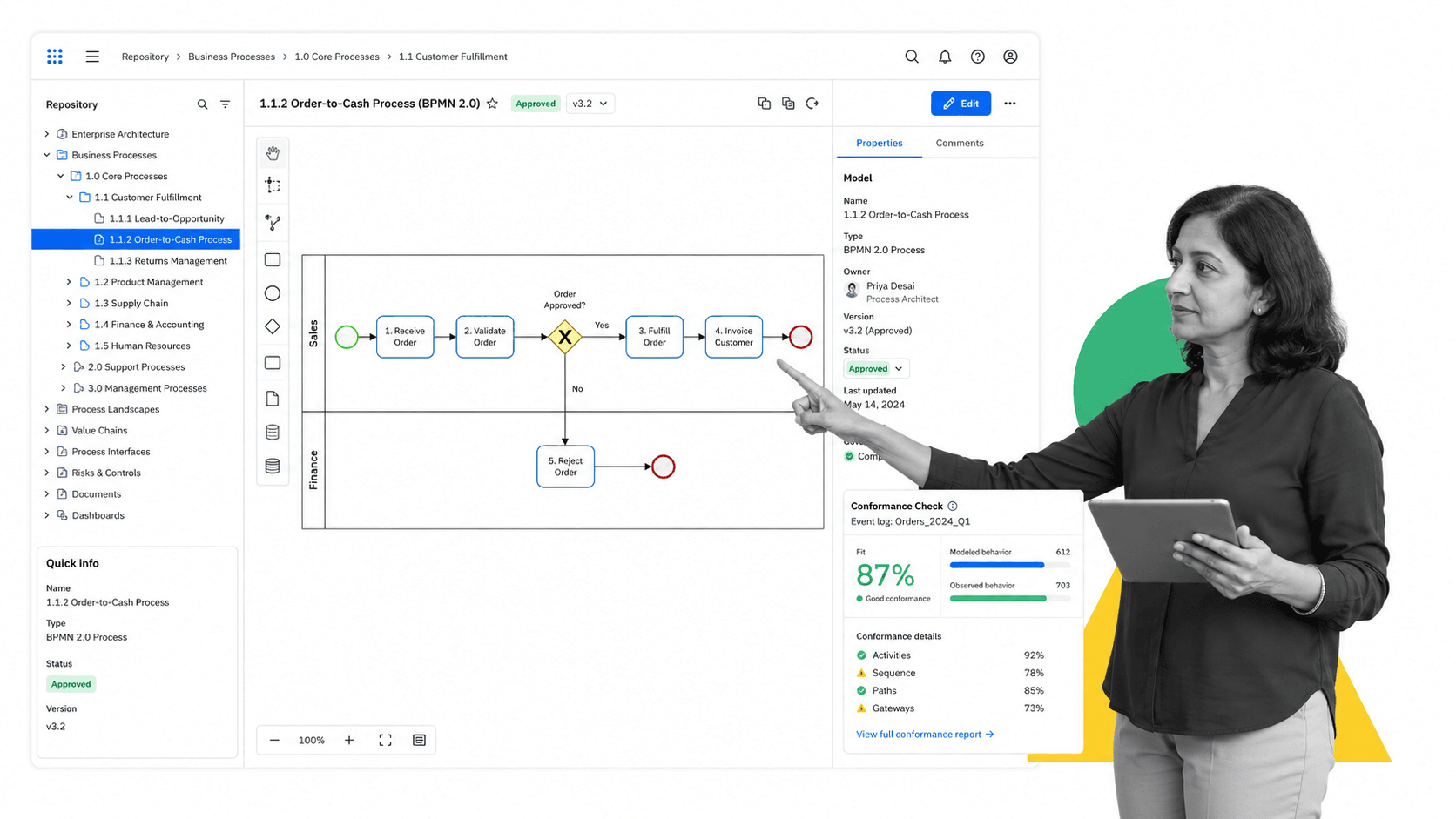
Best for: large enterprises that need a governed, single-source-of-truth repository for formal process architecture: BPMN and EPC modeling, process mining with conformance checking, and risk and compliance governance across the whole organization.
ARIS, from Software AG, positions itself as Process Intelligence for the AI Era, combining business process analysis, process mining, and AI in one integrated platform. Its core is a governed central repository, marketed as a governed digital twin, that unifies processes, roles, rules, controls, and systems into a single trusted foundation. It then layers process mining on top to compare how processes actually run against how they were modeled and approved.
The platform supports full BPMN 2.0 modeling (ARIS is an OMG-listed BPMN 2.0 implementer) plus other notations including EPC, DMN, and ERM, with partial UML support. It adds process governance, risk and compliance tooling, and conformance checking via ARIS Process Mining. It is a deep, architecture-grade modeling and analysis suite aimed at process professionals and analysts rather than a lightweight team-level workflow tool.
Key features
- Governed central process repository unifying processes, roles, rules, controls, and systems into a single trusted foundation.
- BPMN 2.0 modeling plus additional notations including EPC, DMN, and ERM (UML support is partial).
- Process mining that reconstructs how processes actually run from system event logs, with native connectors for SAP, Oracle, Salesforce, and Microsoft.
- Conformance checking that automatically compares actual execution against designed and approved processes, including reuse of existing EPC reference models.
- Risk and compliance capabilities alongside the governed repository for regulated industries.
- AI and agentic AI capabilities positioned for analysis and operational transformation.
Pros
- Deep, standards-based modeling repository (BPMN 2.0, EPC, DMN, ERM) suited to enterprise-wide process architecture.
- Combines modeling with process mining and conformance checking so modeled-versus-actual gaps surface automatically.
- Governance and compliance tooling built on a single trusted repository for regulated industries.
Cons
- Heavyweight and complex; positioned for process analysts and architects rather than fast adoption by non-technical operators.
- Models and analyzes processes but is not built to run executable team-level checklists day to day.
- The official pricing page routes prospects to demos and sales rather than publishing transparent self-serve list prices.
Pricing model: ARIS uses tiered, primarily quote-based enterprise pricing. Product documentation describes editions named Basic, Advanced, and Enterprise across cloud and on-premise, but the official pricing page does not publish list prices and instead routes prospects to book a demo. A free way to get started is marketed, including a Try ARIS for free page and a free tier of ARIS Process Mining Basic.
Where it beats Process Street: When an enterprise needs formal, governed process architecture modeling, including BPMN and EPC repositories, conformance checking, and risk and compliance governance across the whole organization, rather than executable team-level checklists, ARIS is the stronger choice. Learn more at aris.com.
4. Camunda
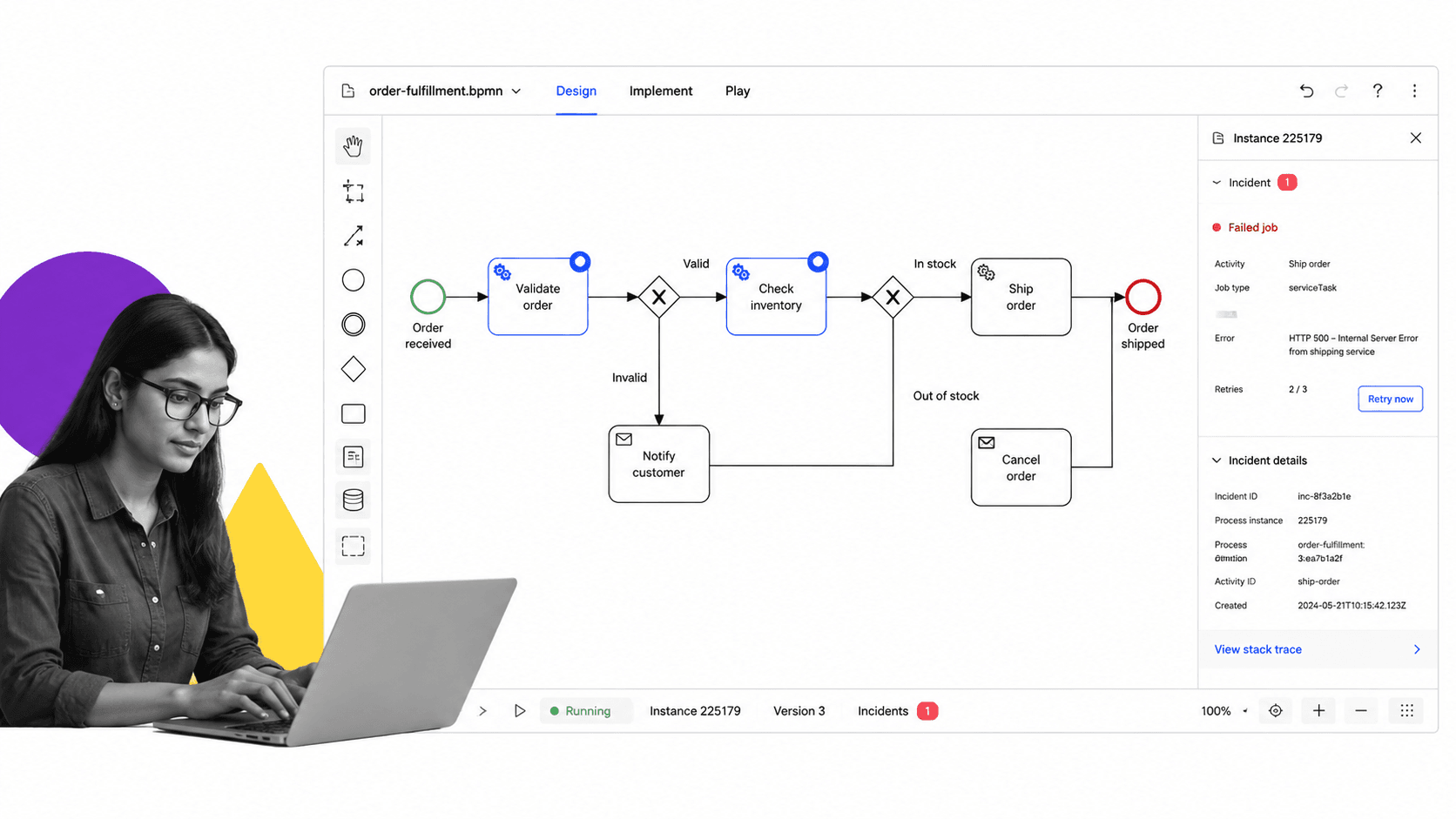
Best for: engineering and platform teams that need to orchestrate high-throughput, system-to-system workflows by executing standard BPMN and DMN models programmatically, coordinating microservices and AI agents end-to-end with full auditability.
Camunda is a process orchestration platform built around Zeebe, a distributed workflow and decision engine that executes ISO-standard BPMN 2.0 process models and DMN decision tables. Instead of guiding people through manual checklist steps, Camunda is designed for developers to model workflows visually, version them as BPMN XML alongside code, and run them as durable, observable processes that coordinate microservices, external systems, human tasks, and AI agents. Its home page positions it as the open platform for agentic orchestration.
Its architecture replaces a central relational database with an event-streaming, message-based broker cluster, which Camunda describes as peer-to-peer with no single point of failure and linear horizontal scaling. Developers integrate via a REST API and SDKs in Java, Go, Python, and Node.js, with job workers, retries, and pre-built connectors for systems including SAP, Salesforce, ServiceNow, Kafka, and S3. Operational tooling such as Operate, Tasklist, and Optimize adds monitoring, human task interfaces, and analytics. It targets enterprises moving automation from pilot to production with governance and audit requirements.
Key features
- Zeebe distributed engine that executes ISO-standard BPMN 2.0 process models and DMN decision tables.
- Event-streaming broker cluster with no central relational database, described as peer-to-peer with no single point of failure and linear horizontal scaling.
- Developer integration via a REST API and SDKs in Java, Go, Python, and Node.js with built-in job workers and retries.
- Pre-built connectors (SAP, Salesforce, ServiceNow, Kafka, S3) plus connectivity to any system reachable via REST, gRPC, MCP, or A2A, with a public connector marketplace.
- Operational tooling: Operate for monitoring and incidents, Tasklist for human tasks, and Optimize for process analytics.
- Agentic orchestration positioning to coordinate AI agents, people, and systems with an automatically captured audit trail.
Pros
- Purpose-built for durable, high-throughput, system-to-system orchestration across microservices, with linear horizontal scaling and no single point of failure, per Camunda’s own description.
- Uses open ISO standards (BPMN 2.0, DMN) and stores process definitions as versionable BPMN XML, so workflows can live in a Git repo and be reviewed like source code.
- Strong developer ergonomics: a full REST API, multi-language SDKs, job workers, and a connector ecosystem.
- Emphasizes governance, full audit and trace, and incident visibility for regulated enterprise use.
Cons
- Engineering-centric: modeling and operating BPMN and DMN engines, connectors, and clusters requires developer and platform skills, not a fit for non-technical business users who want simple guided checklists.
- Production use of Camunda 8 Self-Managed requires a paid commercial license starting with version 8.6; the free self-managed tier is for development and testing only.
- Enterprise pricing is not published and requires contacting sales, making cost evaluation harder upfront.
Pricing model: Camunda is tiered with custom enterprise pricing. The SaaS Free plan is described as forever free for collaborative modeling, including unlimited modeling, 5 user seats, community support, and a 30-day trial of orchestration features. SaaS Enterprise is custom-priced via contact sales, and Self-Managed production use requires a paid commercial license. No specific paid-tier figures are published.
Where it beats Process Street: When engineers need to orchestrate high-throughput, system-to-system workflows that execute BPMN and DMN models programmatically and integrate microservices and AI agents at scale, Camunda is a developer-grade orchestration engine that goes well beyond a human-centric checklist tool. Learn more at camunda.com.
5. Bizagi
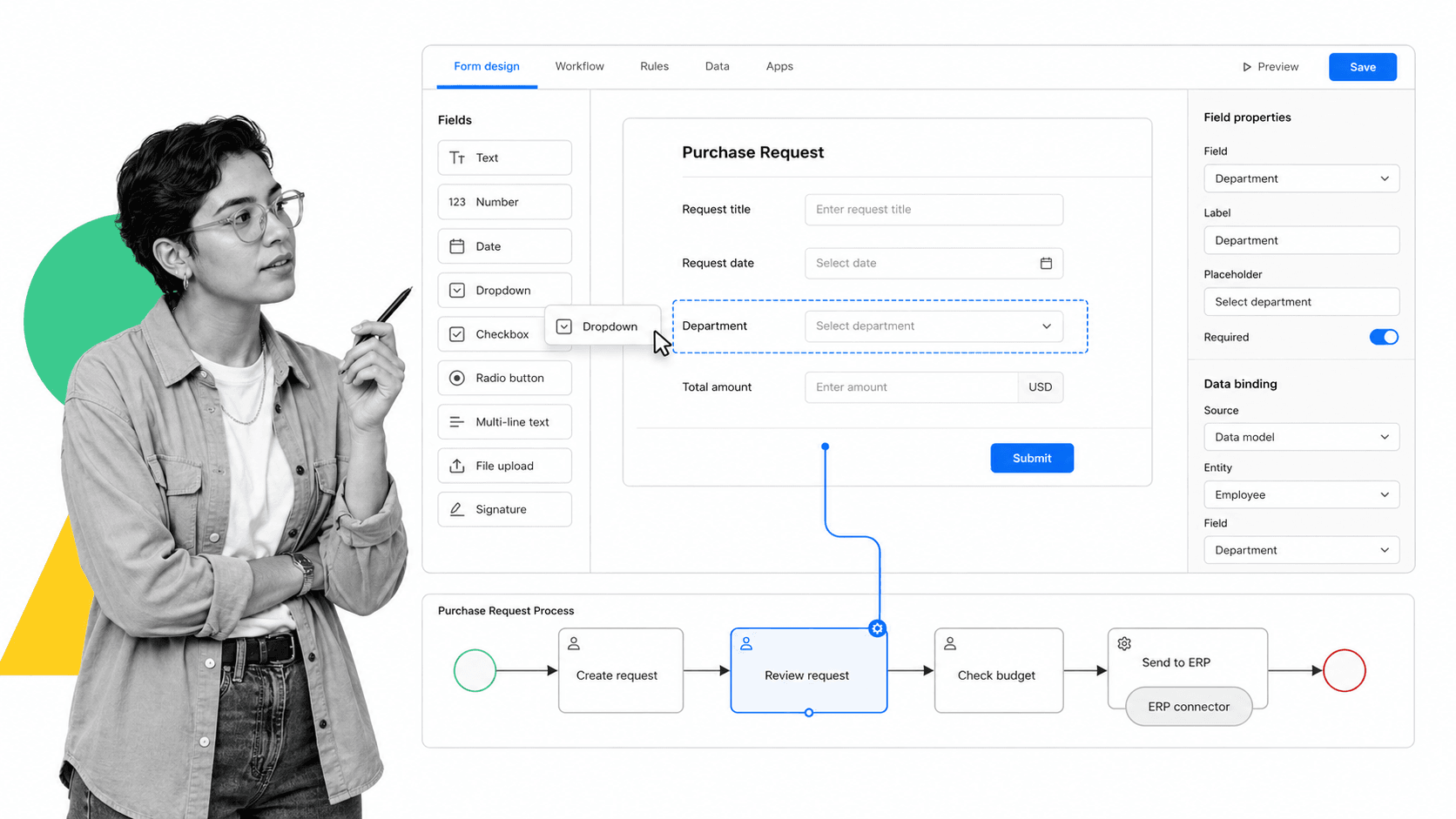
Best for: enterprises that need to model complex, end-to-end business processes in standard BPMN and then turn those models into custom low-code automated applications with deep integrations into systems like SAP, databases, and ECM and legacy systems.
Bizagi is a low-code business process management and digital process automation platform that positions itself as Business Orchestration for AI Impact, using process to unify AI assets, people, and systems. Its best-known entry point is Bizagi Modeler, a free desktop tool for diagramming and documenting processes in industry-standard BPMN, which can then be carried into Bizagi Studio to build automated enterprise applications.
The platform spans process modeling, low-code app development, case management, process improvement through simulation and mining, enterprise integration via connectors, and GenAI augmentation through AI Agents, AI Workers, and the conversational assistant Ada. Bizagi states you can build and deploy processes in seven steps without writing a single line of code. It targets large-enterprise operations such as shared services, finance, supply chain, and compliance, where processes are complex and must integrate with existing systems of record.
Key features
- BPMN process modeling and documentation via Bizagi Modeler, a free desktop app with local storage, simulation, and publishing to PDF, Word, Excel, web, and SharePoint.
- Low-code application development in Bizagi Studio with a drag-and-drop interface and no code required.
- End-to-end workflow and process automation with structured and unstructured case management.
- Enterprise integration via a built-in SAP connector, REST and SOAP web services, data replication with external databases, and ECM systems including SharePoint, Alfresco, Documentum, and FileNet.
- GenAI augmentation: AI Agents, AI Workers that can prefill forms and make decisions, and the Ada conversational assistant.
- Cloud-native platform spanning process improvement, low-code apps, case management, and business orchestration.
Pros
- A free, non-trial BPMN Modeler with strong standards support is a low-friction way to start process mapping.
- A genuine path from process model to fully custom low-code application with deep enterprise system integration.
- Strong fit for complex enterprise processes needing governance, simulation, and process mining.
- Consumption-based pricing with unlimited users and apps avoids per-seat cost scaling.
Cons
- Significantly more complex and developer-oriented than a checklist tool; automating processes requires Bizagi Studio skills.
- No public pricing for the full platform: the cloud platform is quote-only, making cost hard to estimate upfront.
- Overkill for teams that just need recurring SOPs, task checklists, and simple approvals.
Pricing model: Bizagi uses consumption-based pricing for its cloud platform, advertised as unlimited users and apps with the ability to start small and scale; full-platform pricing is not published and requires a quote. Bizagi Modeler is available free of charge as a separate desktop tool with no subscription.
Where it beats Process Street: When you need to model a complex enterprise process and then turn it into a custom low-code automated application with deep system integrations, Bizagi does something a checklist tool cannot. Learn more at bizagi.com.
6. Pega Platform (Pegasystems)
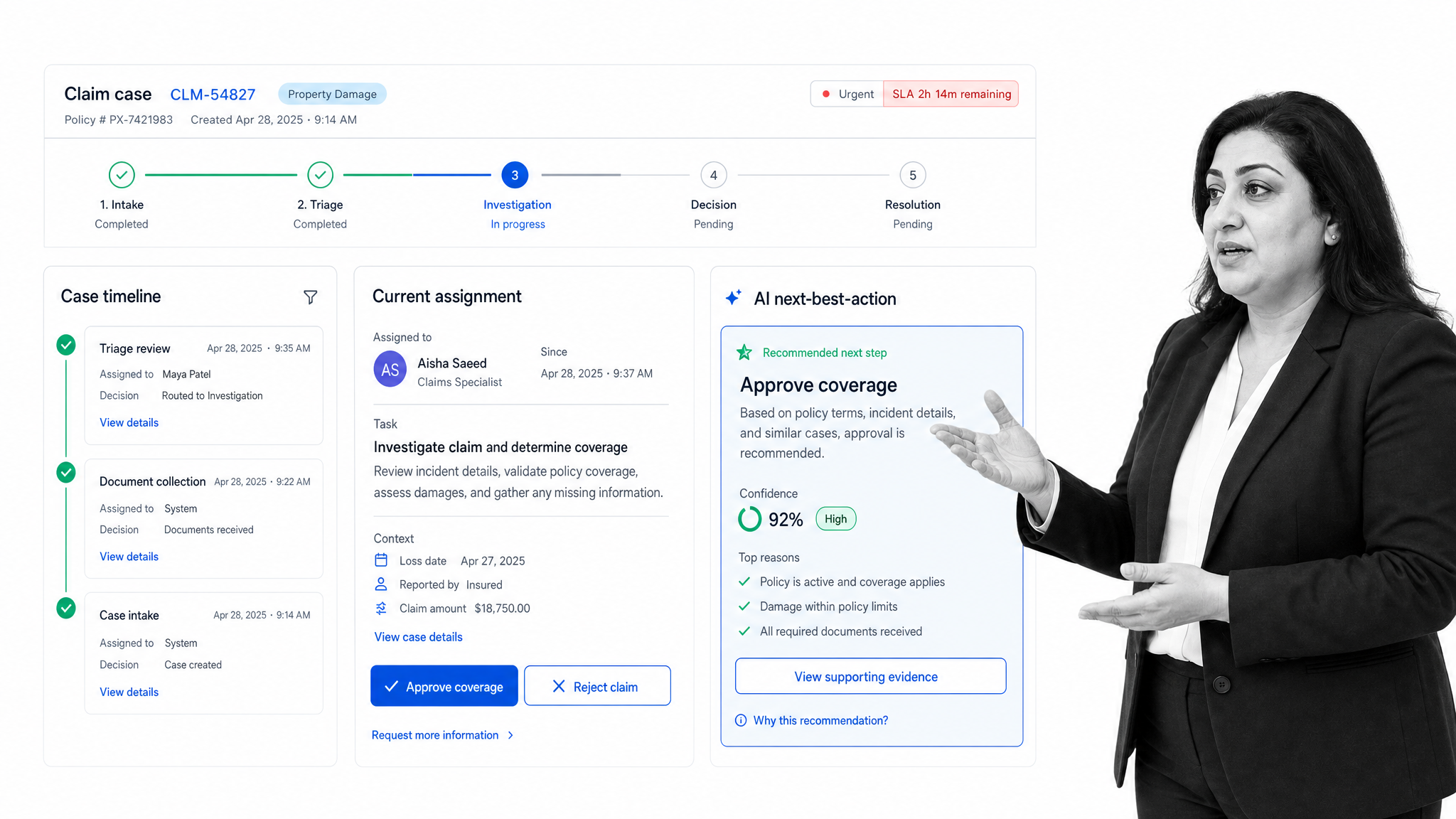
Best for: large regulated enterprises in financial services, insurance, healthcare, government, and telecom that need AI-driven case management, workflow orchestration, and real-time decisioning for complex, dynamic work spanning front- and back-office systems.
Pega Platform from Pegasystems positions itself as the leading AI-powered platform for enterprise transformation, built around case management, workflow automation, and AI decisioning. It orchestrates work across people and systems, connecting front- and back-office operations and automating work and decisions along the way. Pega targets large enterprises across many regulated industries and features customer logos including HSBC, Citi, Verizon, T-Mobile, Wells Fargo, and Aflac.
The platform combines a low-code development environment (App Studio, Dev Studio, Prediction Studio), AI-powered application design via Pega Blueprint, multiple categories of AI agents, built-in generative AI, AI-powered decisioning, process mining, RPA, and Process Fabric for unifying enterprise applications. Its case management is built to resolve business processes that follow a dynamic or unpredictable workflow, combining human actions with digital automation, which positions it for complex, regulated processes rather than simple linear procedures.
Key features
- Case management to resolve processes that follow a dynamic or unpredictable workflow, combining human actions with digital automation from start to resolution.
- AI-powered decisioning and business logic injected into workflows to automate manual steps.
- AI agents across design, conversation, automation, knowledge, and coach roles, plus built-in generative AI.
- A low-code development environment with App Studio, Dev Studio, and Prediction Studio.
- Pega Blueprint for AI-powered application and workflow design.
- Process mining, RPA for high-volume rules-driven work, and Process Fabric to unify enterprise applications.
Pros
- Purpose-built for complex case management and real-time AI decisioning at enterprise scale.
- A deep AI layer, including AI-powered decisioning, generative AI, and multiple agent types, integrated directly into workflows.
- Governance built in and proven adoption by large regulated enterprises whose logos Pega features.
- Unifies front- and back-office work and legacy systems via case management and Process Fabric.
Cons
- No public list pricing: cost requires direct sales engagement and is oriented to enterprise budgets.
- A heavyweight platform aimed at large enterprises, likely more than small teams or simple process needs require.
- A steeper learning curve and more implementation effort than lightweight workflow or checklist tools.
Pricing model: Pega is enterprise sales-led with custom pricing. It does not publish list prices; the pricing page shows no tiers or amounts and directs users to start a free trial or contact sales. A free Community Edition is available as a cloud-based development sandbox.
Where it beats Process Street: When large regulated enterprises need AI-driven case management and decisioning for complex, dynamic work such as claims or loan processing that goes far beyond linear procedures, Pega is the stronger fit. Learn more at pega.com.
7. Appian
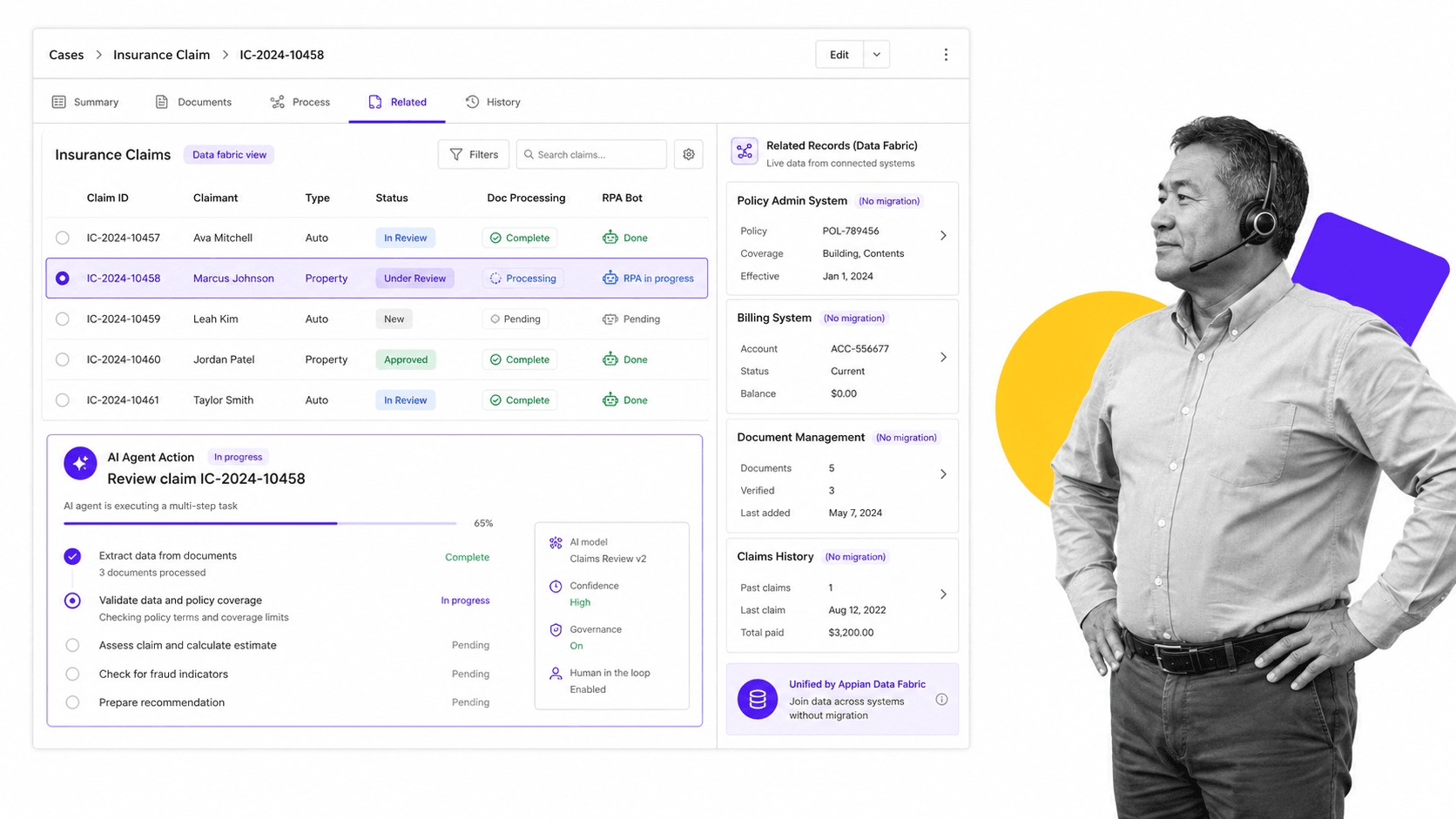
Best for: large enterprises and government agencies building custom, mission-critical applications that combine process automation, RPA, intelligent document processing, AI agents, and a unifying data fabric into one governed platform.
Appian is an enterprise low-code process automation platform. It lets organizations design custom applications and automate end-to-end business processes by combining low-code app development, RPA, AI agents and copilots, intelligent document processing, process intelligence, and case management, all on top of a unifying data fabric that connects source systems. The company positions itself around AI-Powered Process Orchestration Across the Enterprise.
It targets large, regulated organizations across financial services, insurance, life sciences, and the public sector, where the work is complex, governance and security matter, and apps must integrate with existing systems. Appian sells primarily through a sales-led motion with no public per-seat list price, and offers a free Community Edition with no time limit plus a separate 14-day trial edition for evaluation.
Key features
- Low-code application development for building custom enterprise apps.
- Data fabric: an integrated layer that connects data across source systems with full read-write access, without migrating the data from where it lives.
- End-to-end process automation combining RPA, AI, intelligent document processing, and API integrations.
- AI agents and copilots that execute multi-step tasks within a governed process platform.
- Intelligent document processing via Appian DocCenter.
- Process intelligence and process mining plus case management for complex casework.
Pros
- Unifies low-code, RPA, intelligent document processing, AI agents, process intelligence, and a data fabric in one governed platform instead of stitching separate tools together.
- Positioned for large regulated enterprises and government with security, governance, and legacy-integration needs.
- The data fabric connects existing source systems without migrating the data, per Appian’s documentation.
- A free Community Edition plus a separate 14-day full-feature trial lower the barrier to hands-on evaluation.
Cons
- No transparent public pricing: the pricing page publishes no dollar figures and requires contacting Appian for a quote.
- Platform breadth and a developer-oriented model carry a learning curve and implementation effort beyond what simple recurring checklist workflows need.
- Per-user, per-month, per-app subscription tied to enterprise tiers can scale in cost as users and apps grow.
Pricing model: Appian uses a subscription, sales-led model with no dollar figures on its pricing page. Three editions, Standard, Advanced, and Premium, are described as priced per user, per month, per app, with higher tiers unlocking more data fabric capacity, more RPA bots, and broader AI features. Pricing requires a quote.
Where it beats Process Street: When you need to build full custom enterprise applications with a data fabric, RPA, and AI woven into the process, rather than configure recurring human workflows, Appian is built for that. Learn more at appian.com.
8. IBM Blueworks Live
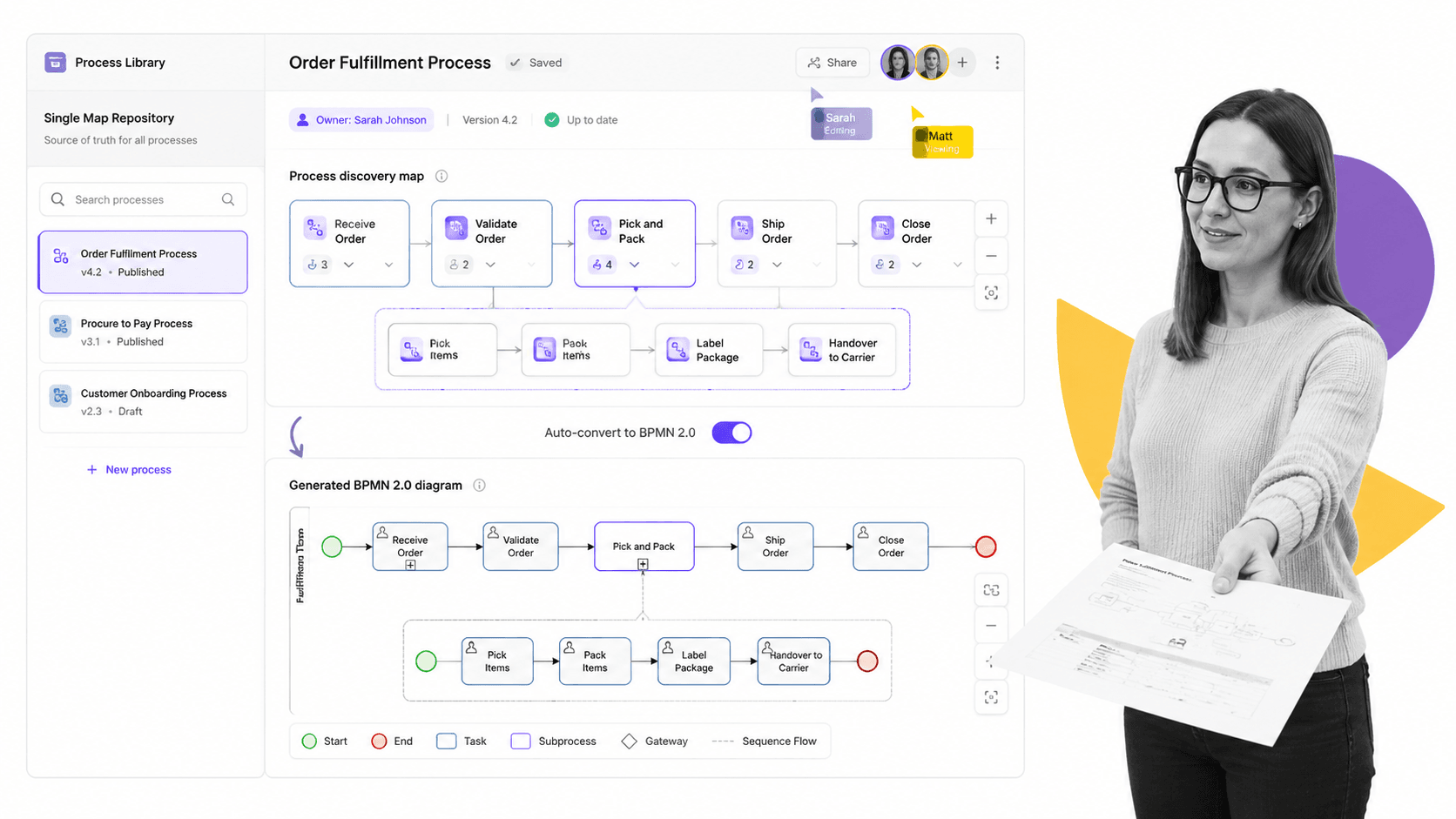
Best for: teams that need to collaboratively map, document, and standardize business processes in BPMN 2.0 with a central repository, process discovery, and governance, especially non-technical business users who should contribute without diagramming expertise.
IBM Blueworks Live is, in IBM’s words, a cloud-based business process discovery and modeling platform that helps teams document, understand, and improve how work gets done, with enterprise-wide collaboration. Users lay out process maps in a browser and the tool automatically converts them to BPMN 2.0 or other formats without having to be an expert, with around 200 process map templates to adopt or adapt as starting points.
The product is built around a single map repository positioned as a single source of truth, real-time collaboration, and process documentation plus governance, including automated version control, audit trails, and process ownership assignments. IBM has added Blueworks Live IQ, AI agents that bring chat-guided business assessment and recommendations plus BPMN hygiene and consistency checks. It is a modeling and documentation tool: it captures and standardizes how processes should work rather than executing and tracking live workflow instances.
Key features
- Browser-based process mapping that auto-converts maps to BPMN 2.0 diagrams without diagramming expertise.
- Around 200 process map templates to adopt or adapt.
- A single map repository positioned as a single source of truth that eliminates version problems.
- A real-time collaborative shared workspace with automated change notifications.
- Governance: automated version control, audit trails, and process ownership assignments.
- Blueworks Live IQ AI agents for chat-guided assessment and BPMN hygiene and consistency checks.
Pros
- Auto-converts plain maps into standards-compliant BPMN 2.0, so non-technical business users can contribute without learning notation.
- Strong documentation and governance: automated version control, audit trails, process ownership, an integrated glossary, and process metadata in one repository.
- Fully cloud-based with real-time multi-user collaboration and around 200 templates to start fast.
Cons
- Positioned around modeling and documenting processes, not running, executing, or tracking live workflow instances and tasks.
- Tiered Editor, Contributor, and Viewer licensing means only Editors can create and modify, which can raise cost as authoring needs grow.
- Backed by IBM enterprise sales: detailed licensing routes through IBM Sales, heavier procurement than self-serve SaaS.
Pricing model: IBM Blueworks Live uses per-user, role-based licensing across three license types, Editor, Contributor, and Viewer, available on public, private, and US Federal cloud. IBM publishes a pricing page with indicative prices and notes Viewer add-ons are sold in packs, while directing buyers to contact sales for the full structure. A free trial is available.
Where it beats Process Street: When the goal is collaboratively mapping and documenting processes in standardized BPMN with process discovery and governance, rather than running and tracking live workflow instances, IBM Blueworks Live is the better tool. Learn more at ibm.com.
9. Lucidchart (Lucid)

Best for: teams that need fast, flexible visual process maps, flowcharts, and diagrams for communication and shared understanding, including org charts, entity-relationship diagrams, UML, and systems and infrastructure architecture.
Lucidchart is an intelligent diagramming application from Lucid Software, positioned as diagramming powered by intelligence with a promise to create next-generation diagrams with AI, data, and automation. It lets teams build flowcharts, process maps, org charts, technical diagrams, and infrastructure visualizations from templates, a blank canvas, AI text prompts, imported data, or diagram-as-code via Mermaid. Real-time co-editing, comments, mentions, revision history, and more than 100 integrations make it a collaborative visual documentation layer.
It is fundamentally a visualization and communication tool rather than a workflow execution engine. Lucid frames it around helping teams understand and optimize every system and process through visual communication; the product centers on diagramming, collaboration, and shared understanding rather than task assignment, run-by-run completion tracking, or enforced step-by-step execution. Lucidchart is sold as part of the broader Lucid Visual Collaboration Suite alongside Lucidspark.
Key features
- AI-generated diagrams from text prompts, plus data import and auto-visualization.
- Flowchart and process-map shape libraries with templates.
- Real-time collaboration: co-editing, comments, mentions, collaborator color tracking, and revision history.
- Live data linking from Google Sheets, Excel, and CSV with conditional formatting.
- Technical diagramming: UML, ERD, sequence diagrams, and Mermaid diagram-as-code.
- More than 100 integrations plus Visio, Gliffy, Draw.io, and OmniGraffle import.
Pros
- Very fast and flexible for visual communication: turn an idea, text prompt, or data set into a clean diagram quickly.
- Strong collaboration and integration ecosystem for cross-functional alignment.
- A permanent free plan and a low-cost Individual plan make it easy to start, with no credit card required for the trial.
- Broad diagram coverage in one tool: flowcharts, org charts, ERD, UML, and cloud and infrastructure architecture.
Cons
- Oriented toward visual documentation: it centers on diagramming and shared understanding rather than process execution, task assignment, due dates, or per-run completion tracking.
- The free plan is restrictive: 3 editable documents, 60 shapes per document, and 100 basic templates.
- Enterprise features such as SAML single sign-on, SCIM, and advanced governance, along with Enterprise pricing, are gated behind contact sales.
Pricing model: Lucidchart is freemium with per-user tiers (Free, Individual, Team, Enterprise), billed monthly or annually. A permanent free plan exists alongside a 7-day trial with no credit card. The Individual plan is listed from $9.00 per month plus tax; Team is a per-user paid tier and Enterprise is quote-based.
Where it beats Process Street: When teams just need fast, flexible visual process maps, flowcharts, and diagrams for communication, without needing the process to be executed or tracked, Lucidchart is a strong fit. Process Street, by contrast, is for running that process as repeatable, assignable, trackable workflows. Learn more at lucidchart.com.
10. Nintex

Best for: enterprises and mid-market teams that want governed no-code and low-code process automation across the Microsoft ecosystem and Salesforce, combining workflow, document generation, and e-signatures in one platform.
Nintex is a process automation and process management platform that positions itself as an Agentic Business Orchestration suite. Its core product, Nintex Cloud Automation, bundles no-code and low-code workflow automation, application development, process management, document automation including e-signature, robotic process automation, digital forms and data capture, and AI and agentic orchestration in one platform. It also offers dedicated Salesforce products via AppExchange, and states it is trusted by more than 7,000 companies worldwide.
Its differentiator versus a checklist-and-workflow tool is breadth and enterprise integration: it markets connectivity to Microsoft tools and SharePoint via the Nintex Gateway, Salesforce, and SAP, with broader connector coverage documented across its site. Pricing is not published on its own site and routes prospects to sales for a quote. A 30-day free trial with no credit card is offered.
Key features
- No-code and low-code workflow automation with drag-and-drop design and AI agents that build, run, and refine workflows.
- Document automation and generation for automated document creation within workflows.
- E-signatures via Nintex eSign embedded into workflows.
- Digital forms and data capture.
- Process mapping, documentation, management, and optimization via Nintex Process Manager.
- Robotic process automation extending workflows across cloud and on-premises, plus a dedicated Salesforce product set.
Pros
- Broad single-platform coverage: workflow, forms, document generation, e-signatures, process management, RPA, and app building in one suite.
- Markets integration with the Microsoft ecosystem, including SharePoint via the Nintex Gateway, plus Salesforce and SAP.
- A 30-day free trial with no credit card.
- Cloud and on-premises reach: RPA and the Nintex Gateway extend workflows across cloud and on-prem systems.
Cons
- Pricing is not published on the official site; it requires contacting sales for a quote, making upfront cost comparison harder.
- A broad enterprise automation platform is heavier than a focused checklist or SOP tool for simple recurring processes.
- Capability breadth across RPA, app development, and process mapping can mean a steeper learning curve and higher total cost for smaller teams.
Pricing model: Nintex is quote-based: no public pricing is published on its own site, and the pricing page routes prospects to its sales team. Third-party listings cite editions and figures, but these are not confirmed on any Nintex-owned page.
Where it beats Process Street: When you need no-code automation tied into the Microsoft ecosystem, including SharePoint, plus document generation and e-signatures alongside workflow, Nintex covers more ground than a lightweight recurring-checklist tool. Learn more at nintex.com.
11. Pipefy

Best for: operations and shared-services teams in finance, HR, procurement, legal, IT, and customer service that need to run intake-to-resolution request pipelines on a Kanban board, with public forms, service portals, conditional routing, and automation that connects into ERP, CRM, and other systems of record.
Pipefy is a no-code business process orchestration and automation platform. Work moves as cards through customizable Kanban-style phases, viewable as a board or list; requests enter via forms, emails, or shareable service portals, then get routed, approved, and tracked with rule-based automation and AI Agents. It positions itself as the Complete Business Orchestration Platform that orchestrates end-to-end processes across critical systems such as ERP, CRM, HCM, and core banking without rip-and-replace, with enterprise governance layered on top.
It targets enterprises and mid-market teams and departments. Connectivity is a core pillar: native connectors including Salesforce, HubSpot, NetSuite, Microsoft Dynamics, Zendesk, Slack, and Google Workspace, plus APIs, webhooks, a self-hosted integration hub, and RPA integrations let it feed and consume data from ERP and CRM systems.
Key features
- Kanban-style process pipes: work tracked as cards moving through customizable phases, with board or list views to spot bottlenecks.
- Forms and public forms with conditional logic; public forms let requesters without an account submit and track requests.
- Service portals that centralize multiple forms into a single shareable webpage for intake.
- No-code and low-code automation: trigger-and-action rules plus AI Agents.
- Governed AI Agents and intelligent document processing with OCR, extraction, and classification.
- A large catalog of native connectors plus APIs, webhooks, a self-hosted integration hub, and RPA integrations.
Pros
- Strong fit for Kanban-style request and intake pipelines with public-facing forms and portals, beyond a linear checklist.
- Broad connectivity into ERP, CRM, and other systems via native connectors, APIs and webhooks, an integration hub, and RPA.
- Enterprise governance built in: single sign-on, two-factor authentication, white-label, and electronic signature on the Enterprise tier.
- A free Starter plan and a no-code builder lower the barrier for non-technical teams to start.
Cons
- Paid Business and Enterprise pricing is not public (contact sales), making cost comparison hard upfront.
- The free Starter plan is tightly capped, so real usage requires a paid plan quickly.
- More platform than a focused checklist tool: the orchestration, AI-agent, and integration surface adds setup and learning overhead for simple recurring SOPs.
Pricing model: Pipefy is tiered and per-user. A free Starter plan exists, then paid Business and Enterprise tiers priced via contact sales with no public dollar figures. Enterprise adds single sign-on, two-factor authentication, white label, electronic signature, and higher limits.
Where it beats Process Street: When ops teams want Kanban-style request pipelines with forms, portals, and conditional automation connecting to ERP and CRM, beyond a structured checklist, Pipefy is purpose-built for that intake model. Learn more at pipefy.com.
12. Tallyfy

Best for: teams that need to turn existing Word and PDF SOPs into trackable, repeatable workflows and route steps to external guests such as clients, suppliers, and contractors who complete tasks via email links without a paid account, at a low per-seat price.
Tallyfy is an AI-native workflow and process management platform in the SOP and recurring-workflow category, the same category Process Street competes in. It lets teams document a process once, then launch repeatable instances where steps are assigned to people, AI agents, or conditional rules, with real-time tracking, kick-off forms, approvals, and audit trails. Its positioning is to give people and AI a process to follow, and it markets itself as an AI control layer with native Claude, ChatGPT, and computer-use-agent support via an MCP server.
Two capabilities define its differentiation. First, document-to-workflow conversion: you upload an existing Word file, PDF, or Google Doc export and Tallyfy AI reads it, identifies steps and decision points, and proposes a structured workflow, which the company says gets you 70 to 80 percent of the way before manual refinement. Second, free unlimited guests: external participants complete assigned tasks through secure email links with no login, no account, and no paid seat consumed.
Key features
- AI document-to-workflow conversion: upload a Word, PDF, or Google Doc export and AI proposes a structured trackable workflow.
- Free unlimited guest users who complete assigned tasks via secure email links with no login or account.
- Kick-off forms and if-this-then-that conditional logic for data capture and dynamic routing.
- Real-time task tracking, audit trails, and process analytics.
- Native AI agent support (Claude, ChatGPT, computer-use agents) via an MCP server.
- Integrations: a REST API and webhooks, Google Drive, Dropbox, SharePoint, and Box, single sign-on, and Tableau, Power BI, and CSV export.
Pros
- A strong path for migrating legacy Word and PDF SOPs into live workflows via AI conversion.
- Free, unlimited external guests can complete steps without accounts or seats, lowering cost for client- and supplier-facing processes.
- Low, transparent per-seat pricing with published figures and a cheaper Light seat tier for limited-role users.
- SOC 2 Type II certified and GDPR compliant, with single sign-on included on paid plans.
Cons
- No perpetually free paid-seat plan; only a 14-day trial, so ongoing internal use requires paid seats.
- Annual plans are a 12-month commitment that is non-cancellable and non-refundable for the full term.
- AI document conversion is explicitly non-exact, roughly 70 to 80 percent accurate, and requires manual cleanup; word-for-word import needs a manual HTML-conversion workaround.
Pricing model: Tallyfy is per-seat, billed monthly or annually. It publishes exact figures: a Full seat at $300 per year or $30 per month, and a cheaper Light seat at $100 per year or $10 per month, with an optional analytics add-on. Unlimited guests, the AI, single sign-on, and support are included. A 14-day free trial is offered.
Where it beats Process Street: When you want to convert existing Word and PDF SOPs into trackable workflows with external guests completing steps without full accounts, at a low per-user price, Tallyfy’s AI conversion and free unlimited guest model are a specific edge. Learn more at tallyfy.com.
SAP Signavio alternatives FAQs
Is there a free SAP Signavio alternative?
Yes. Several tools on this list offer a free plan rather than only a trial. Celonis, Camunda, Lucidchart, and Pipefy all have free tiers, Appian offers a free Community Edition, and Bizagi Modeler is free to use for BPMN modeling. If your need is running and tracking repeatable workflows rather than modeling or mining, Process Street offers a free trial so you can build real workflows before you commit. The right free option depends on whether you want to model, mine, diagram, or run a process.
What is the best SAP Signavio alternative for small teams?
Smaller teams usually do not need an enterprise modeling and mining suite. If you want to run repeatable, accountable processes and SOPs, Process Street is built for non-technical teams to adopt quickly. If you want fast diagrams for shared understanding, Lucidchart is inexpensive and easy. If you are migrating existing Word or PDF SOPs and need external guests, Tallyfy offers low, transparent per-seat pricing with free guests. Heavier platforms like Pega, Appian, and ARIS are generally more than a small team needs.
What is the best SAP Signavio alternative for large enterprises?
It depends on the job. For mining how processes actually run from ERP event logs, Celonis is a leading choice. For governed process architecture, BPMN and EPC modeling, and conformance checking, ARIS is strong. For AI-driven case management and decisioning on complex regulated work, Pega fits. For custom low-code enterprise apps with RPA and a data fabric, Appian fits. For developer-grade orchestration of system-to-system workflows, Camunda is purpose-built. Match the tool to the capability you actually need rather than buying the broadest suite.
What is the closest alternative to SAP Signavio?
Functionally, the closest alternatives are the platforms that combine process modeling with process mining and governance. ARIS is the nearest match because it pairs a governed BPMN and EPC repository with process mining and conformance checking. Celonis is the closest on the pure process intelligence and mining side. If your real need is to run the process rather than model and mine it, a workflow execution tool such as Process Street is a better fit even though it is not a like-for-like modeling suite.
Is there a Microsoft or Google equivalent for these tools?
There is no single Microsoft or Google product that replaces a full modeling, mining, and orchestration suite, but there are partial overlaps. Microsoft Power Automate and the Power Platform cover workflow automation and low-code apps, and Nintex specifically markets deep integration with the Microsoft ecosystem and SharePoint. Lucidchart integrates tightly with both Google Workspace and Microsoft. For running structured processes and SOPs, Process Street connects to Microsoft, Google, and many other tools through integrations and automation.
How hard is it to migrate from SAP Signavio to one of these tools?
Migration effort depends on the target. Moving to a modeling tool such as ARIS or IBM Blueworks Live means recreating or importing process diagrams in BPMN, which is the most direct path since the notation is shared. Moving to an orchestration or low-code platform such as Camunda, Bizagi, Appian, or Pega is a build effort, not a copy-paste. Moving to a workflow execution tool such as Process Street or Tallyfy is usually fastest because you are turning procedures into runnable checklists rather than porting a formal model; Tallyfy even offers AI conversion of existing Word and PDF SOPs. Always plan for review and cleanup whatever the target.
Why is Process Street ranked first?
Process Street is ranked first because the most common real reason teams search for a SAP Signavio alternative is that they need to run a process, not just model or mine it, and Process Street is built to do exactly that with low overhead and fast adoption by non-technical teams. It is the best overall pick for that need, not a claim that it does everything Signavio does. For formal process architecture, mining, case management, or developer orchestration, this guide points clearly to the better-fit competitor. The ranking reflects breadth of fit for the typical searcher, judged honestly against each tool’s core job.
Which SAP Signavio alternative should you choose?
Start from the job, not the brand. If you need to mine event logs, choose Celonis. If you need governed BPMN architecture and conformance checking, choose ARIS. If you need developer orchestration, choose Camunda. If you need custom low-code apps, choose Bizagi or Appian. If you need AI case management, choose Pega. If you need collaborative mapping or fast diagrams, choose IBM Blueworks Live or Lucidchart. If you need Microsoft-centric automation, choose Nintex. If you need Kanban request intake, choose Pipefy. If you are migrating SOPs with external guests, consider Tallyfy.
And if what you really need is for your processes to actually run the same way every time, with each step assigned, the order enforced, and a complete record of every run, that is exactly what Process Street is built for. It is the best overall pick for operations, onboarding, and compliance-adjacent teams whose core need is enforceable, repeatable execution rather than enterprise modeling or mining. See Process Street and start a free trial to turn your most important procedures into workflows your team will actually follow.
