


Turn every policy into automated workflows with built-in enforcement and audit-ready proof.



Software Workflow: The Complete Guide
A software workflow is a defined sequence of steps that software runs to move a piece of work from its starting trigger to a finished, provable result. Instead of a person remembering what to do next, the software holds the order of steps, assigns the owner, applies the rules, and records what happened.
Put simply, a workflow is how work moves. A software workflow is that same flow, but executed and enforced by a tool rather than by memory, email threads, or a spreadsheet. The trigger fires, the steps run in order, decisions branch the path, and the output lands with an audit trail attached.
That shift matters because manual processes drift. Steps get skipped, handoffs stall, and nobody can prove the work was done correctly. A software workflow closes those gaps by making the right next action obvious and, when it counts, mandatory. It is the backbone of workflow automation and the reason teams can scale operations without adding headcount for every new process.
In this article, we are going to cover everything you need to know about software workflows, including:
- What is a software workflow?
- How a software workflow works
- Types of software workflow
- Software workflow examples across teams
- Benefits of a software workflow
- How to build a software workflow
- Software workflow best practices
- How Process Street runs your software workflow
- FAQs
What is a software workflow?
A software workflow is a structured, tool-run process. It takes a repeatable task, breaks it into ordered steps, and lets software coordinate who does what, when, and in what order. The software carries the state of the work, so the process does not live in one person’s head.
Every software workflow has the same core ingredients. There is a trigger that starts it, a set of steps that carry the work, roles that own each step, logic that decides which path to follow, and an output that marks the work complete. When any of those pieces is missing, the process falls back to guesswork.
Workflow vs software workflow
A workflow is the concept: the ordered flow of tasks that turns an input into an output. A software workflow is that concept running inside a tool that enforces the order, automates the busywork, and keeps a record. The difference is execution. A workflow on a whiteboard describes intent. A software workflow makes the intent happen every time.
If you want the ground-level definition of the underlying idea first, our beginner explainer on what a workflow is walks through the fundamentals before you add software to the picture.
Software workflow vs a simple checklist
A checklist lists what to do. A software workflow does more: it triggers itself, assigns owners, collects data in required fields, branches on conditions, routes approvals, and files evidence. A checklist is a good starting point, but a software workflow turns that list into a system that runs and proves itself.
The word software is doing real work in that phrase. When a tool runs the process, the current state is always visible, the next action is never ambiguous, and the history is captured without anyone writing it down. That is the difference between a process people try to follow and a process that follows itself.
How a software workflow works
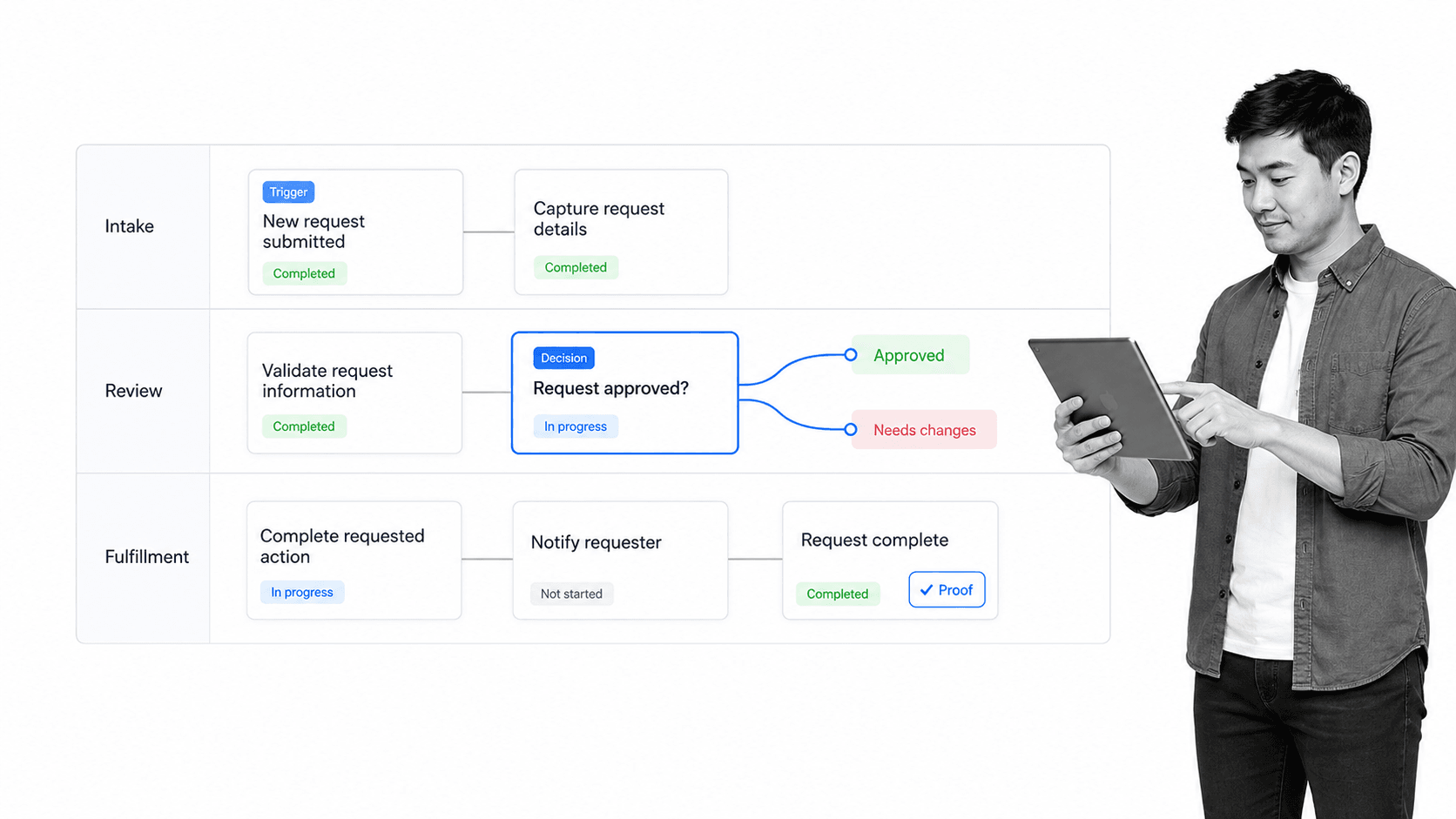
A software workflow works by turning a process into a set of connected components that the software executes in order. Understanding those components is the fastest way to design a workflow that survives contact with real work.
- Trigger: the event, schedule, form submission, or request that starts the run.
- Steps: the ordered actions that carry the work from start to finish.
- Roles: the person or team accountable for each step, assigned automatically.
- Data and fields: the inputs the workflow captures so later steps have what they need.
- Logic: conditional rules that branch the path when the situation is different.
- Integrations: connections to other systems that send data, update records, or trigger actions.
- Output and proof: the finished result plus the record that shows the work was done correctly.
When a trigger fires, the software creates a run and moves it through the steps. At each step, it assigns the owner, collects the required data, and checks any rules. A decision point can send the run down a different branch, escalate a stalled task, or hold the work at an approval gate until a reviewer signs off. When the final step completes, the output is delivered and the trail stays attached to the run. The component that coordinates all of this is often called a workflow engine, and it is what separates software that runs a process from software that merely stores a document about it.
Each run is its own instance. Ten client onboardings can be in flight at once, each at a different step, each with its own data and owners, without the runs interfering with one another. That is why a software workflow scales: the process is defined once, but the tool executes it as many times as the work demands, and every run carries its own record.
This is also where a software workflow connects to the systems a team already uses. Modern workflow tools pull data from a form, update a record in a CRM, or hand a task to another app the moment a step completes, which is the practical core of good workflow automation.
The formal language for drawing these flows is the BPMN business process modeling standard, but most teams do not need formal notation. A clear board of steps, owners, and decision points is enough to run the work.
Types of software workflow
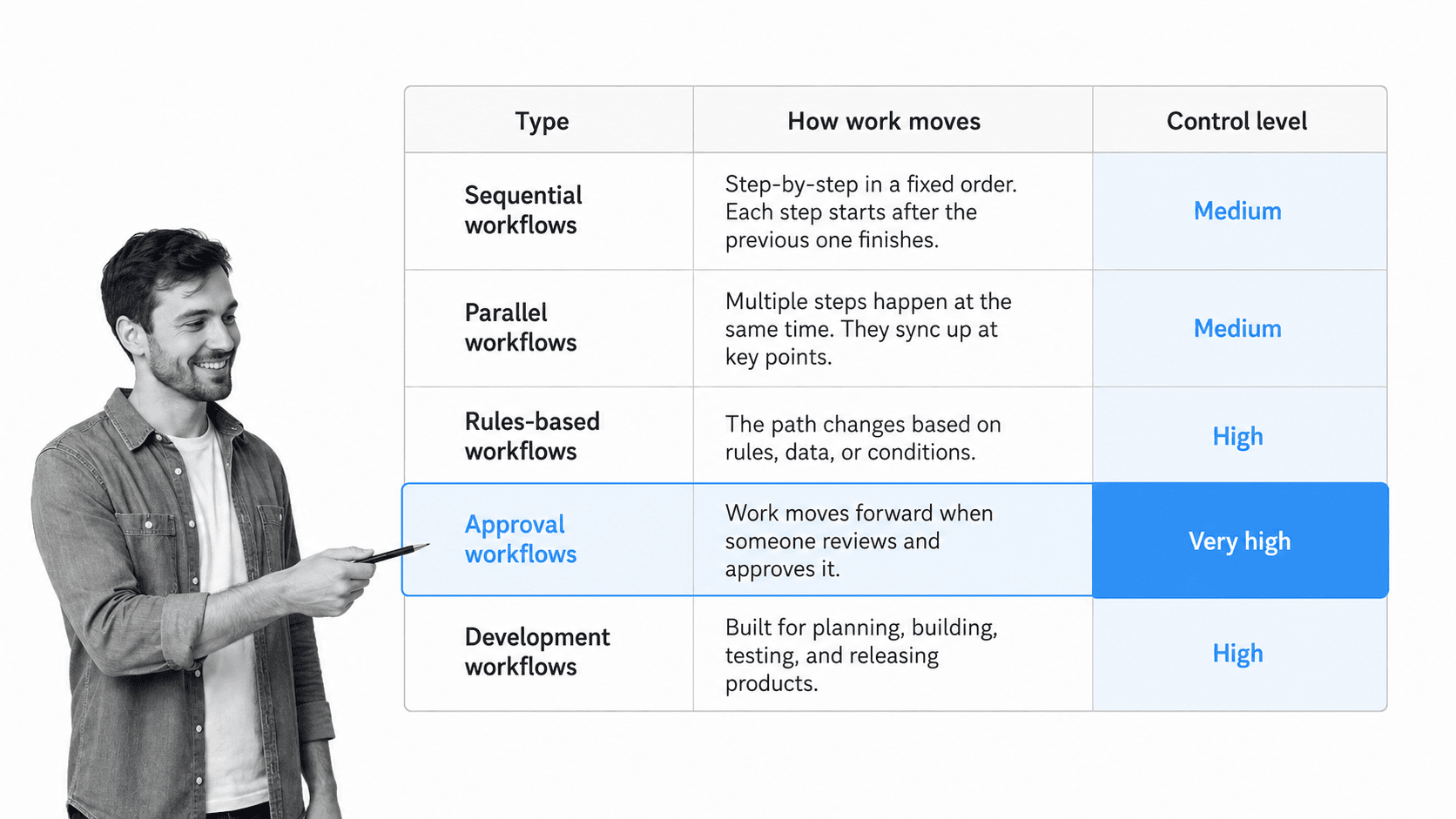
Not every software workflow looks the same. The right shape depends on how work needs to move and how much control the process requires. These are the most common types you will build.
Sequential workflows
A sequential workflow runs one step after another in a fixed order. Each step must finish before the next begins. This is the simplest and most common shape, and it fits linear processes like onboarding, request handling, and standard operating procedures.
Parallel and state-based workflows
A parallel workflow lets several steps run at once, then reconverges when they are all complete. A state-based workflow moves work between states, such as open, in review, and closed, based on events rather than a strict order. Both handle processes where work does not move in a single straight line.
Rules-based automation workflows
A rules-based workflow uses conditions to decide what happens next without a person choosing each time. If a value crosses a threshold, the workflow routes, assigns, or escalates automatically. This is the engine behind most workflow systems software and is where automation removes the most manual effort.
Approval and human-in-the-loop workflows
An approval workflow pauses at a gate and waits for a reviewer to sign off before the work can continue. Human-in-the-loop workflows keep people in control of judgment-heavy steps while the software handles routing, reminders, and record keeping. These matter most when a step has compliance, financial, or customer consequences.
Software development workflows
In engineering, a software workflow often means the path code follows from commit to release: branch, review, test, merge, and deploy. Teams document this the same way as any other process, and a reusable software development lifecycle template keeps the stages consistent across projects.
Software workflow examples across teams
Software workflow examples look different in every department because the handoffs, data, and proof requirements differ. The pattern stays the same: a trigger, ordered steps, decisions, and a recorded output.
Operations and customer teams
Operations teams run recurring service delivery, vendor reviews, and customer handoffs as software workflows so nothing stalls between people. A client onboarding process is a clear example: the deal closes, the workflow triggers, and tasks route across sales, finance, and delivery without a manual kickoff email.
Human resources
HR uses software workflows for onboarding, offboarding, and policy acknowledgment so managers, IT, and finance never miss a dependent task. An employee onboarding checklist turns a scattered set of first-week tasks into one coordinated run with clear owners.
IT and engineering
IT teams run change management, access reviews, and incident response as workflows where evidence and approvals are mandatory. An incident management workflow and a change management process keep response steps consistent under pressure and leave a record for the post-incident review.
Finance and compliance
Finance and compliance teams run approvals, reconciliations, and control checks as software workflows because the proof is not optional. This is where a process moves from a helpful checklist to a managed business process with owners, evidence, and review cycles built in.
Benefits of a software workflow
The benefit of a software workflow is not just speed. It is consistency, control, and proof. When software runs the process, the same work happens the same way regardless of who is on shift.
- Fewer missed steps, because the workflow holds the order and blocks incomplete work.
- Less manual busywork, because triggers, assignments, and integrations remove repetitive handoffs.
- Faster onboarding, because new people follow the workflow instead of shadowing an expert.
- Lower key-person risk, because the process does not leave when a person does.
- Audit-ready evidence, because each step records who did it and what proof was captured.
- Continuous improvement, because a running workflow surfaces bottlenecks you can actually fix.
For teams that carry regulatory or quality obligations, that proof is the whole point. Standards like the ISO 9001 quality management standard and control catalogs like NIST SP 800-53 expect documented procedures with assigned owners and evidence, which a software workflow produces as a byproduct of doing the work.
Before automating, though, it pays to know the process. Clear workflow documentation shows where the real bottlenecks are, so you automate a good process instead of hard-coding a broken one.
How to build a software workflow
The fastest way to build a software workflow is to capture the real process first, then move it into a tool that runs it. Do not start by designing the perfect flow. Start by watching how the work actually happens.
1. Pick one process with a clear trigger
Choose a recurring process with a clear start and end. Avoid trying to automate an entire department at once. A focused workflow is easier to validate, improve, and roll out.
2. Map the steps, owners, and decisions
Write the steps in execution order. Each step should have one owner, one action, and one expected result. Where the path changes, add a decision point instead of burying the condition in a long paragraph.
3. Add the data and integrations
Decide what each step needs to capture and where that data comes from. Add required fields so later steps have what they need, and connect the systems the work already touches so the workflow updates records instead of asking people to re-enter data.
4. Build it in a workflow tool
Move the map into software. You do not need to code. Most modern workflow software is no-code, so an operations owner can build, test, and change the workflow without waiting on engineering.
5. Test with the people who run it
Have a real operator run the workflow end to end. If they stop, guess, or reach for tribal knowledge, the workflow needs another pass. Testing is where a workflow becomes usable rather than merely correct.
6. Launch, measure, and improve
Assign an owner, set a review cadence, and watch where runs stall. A live workflow gives you the data to remove bottlenecks and tighten the process over time. When you are ready to scale, this is the point to manage every workflow from one place instead of a pile of disconnected tools.
Software workflow best practices
The best software workflows are clear, current, and close to the work. They do not rely on clever design or a heroic process owner. A few habits keep them healthy.
- Build for the next person who runs the work, not the person who designed it.
- Keep each step action-based, with a visible owner and expected output.
- Use conditional paths for branching logic instead of long if-then prose.
- Capture proof on the steps that carry risk, so reviews are not manual hunts.
- Separate policy from execution, but link them where the work happens.
- Review workflows on a cadence and whenever systems, roles, or rules change.
- Automate a good process, never a broken one. Fix the flow before you speed it up.
External guidance lands in the same place. The U.S. Small Business Administration stresses organized, repeatable business routines, and the discipline of writing steps down before automating is what separates a workflow that scales from one that just moves the mess faster.
How Process Street runs your software workflow
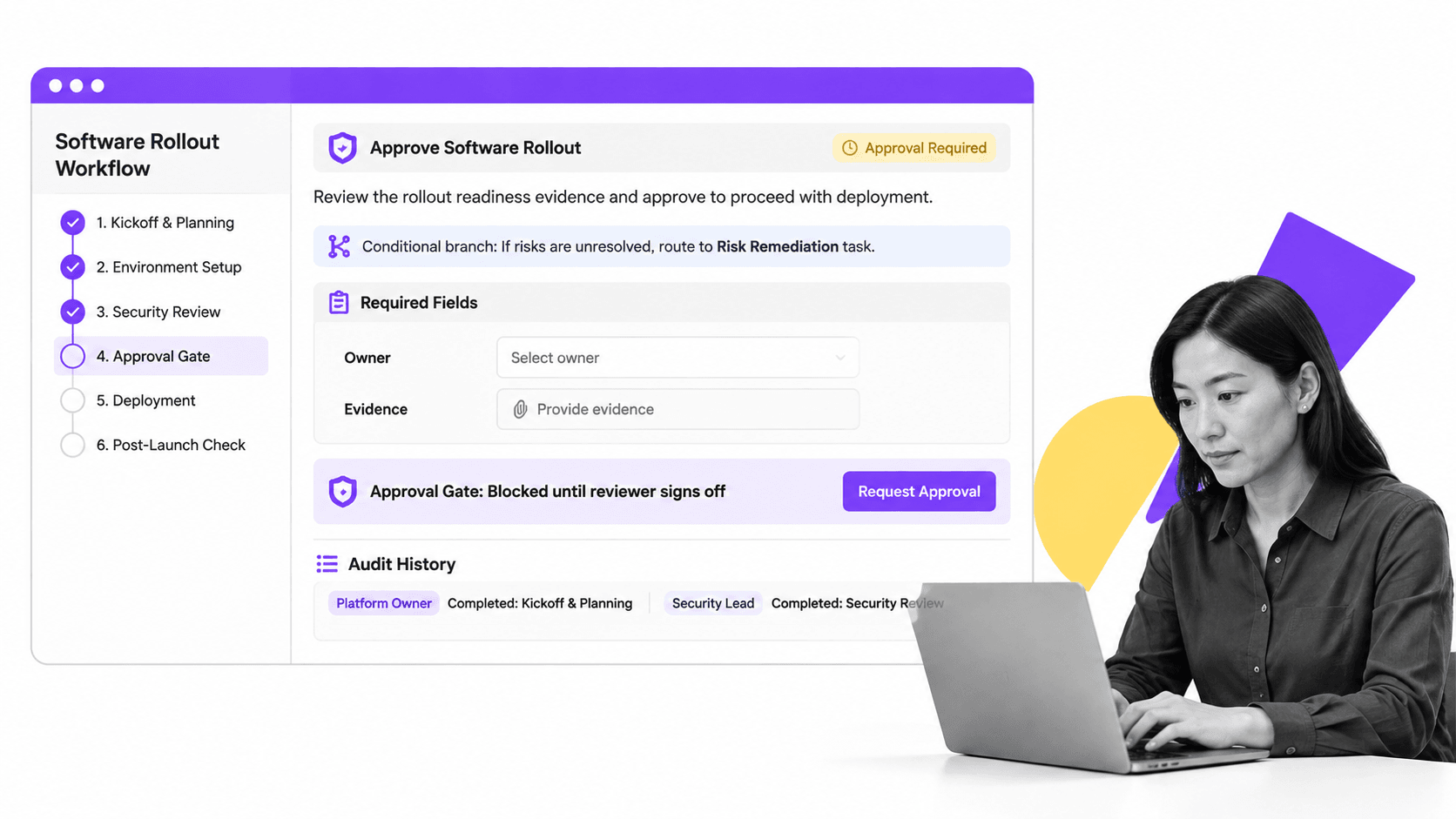
Process Street is a Compliance Operations Platform that turns a documented process into a software workflow that runs, enforces itself, and proves it happened. Teams document the procedure, then run recurring work from workflows with assigned owners, required fields, approvals, and audit trails built in.
That matters because the record becomes part of execution. A step can require an owner and evidence before it completes, an approval gate can block a release until a reviewer signs off, and a conditional branch can route an exception to a different task. When a step is done, the proof stays attached to the run instead of scattering into email and shared drives.
Because the platform is no-code, an operations or compliance owner builds and changes workflows without an IT ticket. Steps are enforced, work escalates when it stalls, and every run leaves an audit-ready history. Compliance stops being a separate project and becomes a byproduct of running the work.
Process Street also connects to the systems where work already happens, with direct integrations across thousands of tools and an AI agent that builds a new connection when one does not exist yet. A software workflow can send a form, update a record, and route an approval across systems without forcing every team onto a new stack.
Teams that want speed can start from a template or a business process management solution and expand from there. Either way, the process stops being a static reference and becomes how the work actually runs.
FAQs
What is a software workflow?
A software workflow is a repeatable process that software runs from trigger to finished result. It holds the order of steps, assigns owners, applies rules, captures data, and records proof, so the work happens the same way every time without relying on memory.
What is the difference between a workflow and a software workflow?
A workflow is the concept of an ordered flow of tasks. A software workflow is that flow running inside a tool that enforces the order, automates the busywork, and keeps a record. The difference is execution: a workflow describes intent, while a software workflow makes it happen and proves it.
What are the main types of software workflow?
The main types are sequential, parallel or state-based, rules-based automation, approval and human-in-the-loop, and software development workflows. The right type depends on how the work needs to move and how much control and proof the process requires.
How do you build a software workflow?
Pick one process with a clear trigger, map the steps, owners, and decision points, add the data and integrations, build it in a no-code workflow tool, test it with the people who run it, then launch, measure, and improve. Capture the real process before you automate it.
Do you need to code to build a software workflow?
No. Most modern workflow software is no-code, so an operations or compliance owner can build, test, and change a workflow without engineering. Coding is only involved when a workflow needs a custom integration that the tool cannot already connect to.
What software runs workflows for a whole team?
A workflow platform runs recurring work for a whole team by assigning owners, enforcing steps, capturing evidence, and recording approvals. Simple reference tasks can live in a document, but recurring or compliance-sensitive work belongs in a platform that executes and proves the process.
