


Turn every policy into automated workflows with built-in enforcement and audit-ready proof.



Workflow Systems Software
Workflow systems software is a category of tools that turn manual, ad hoc tasks into structured processes that run the same way every time. Instead of relying on email threads, spreadsheets, and memory, a team defines the steps once and the software assigns the work, moves it between people, applies the rules, and records what happened.
At the center of every one of these tools is a workflow engine that reads a set of rules and decides what happens next. When a form is submitted or a date arrives, the engine starts the process, routes each task to the right owner, and follows simple logic such as sending an item for a second approval when an amount is large. A workflow engine is what separates real workflow systems software from a static checklist.
Workflow systems software sits alongside broader disciplines like business process management and workflow automation, and it overlaps with tools you may already use. Platforms such as Process Street combine a no-code builder with automation and record keeping so that recurring work runs reliably. If you are new to the idea, it helps to first understand what a workflow is before choosing a system to run it.
In this article, we are going to cover everything you need to know about workflow systems software, including:
- What workflow systems software is
- How workflow systems software works
- Core features of workflow systems software
- Benefits of workflow systems software
- How to choose workflow systems software
- How to implement workflow systems software
- Workflow systems software in action with Process Street
- FAQs
What workflow systems software is
Workflow systems software is a tool that defines, automates, tracks, and enforces the sequence of steps needed to complete recurring work. It takes a process that used to live in someone’s head or in a document and turns it into a running system that assigns tasks, moves work forward, and keeps a record of every step.
The idea is closely related to the concept of a workflow management system, which coordinates the flow of tasks, information, and approvals between people and software. In practice the two terms are used interchangeably, and both describe software that runs a process rather than just describing it.
Software that runs a process, not a document
A written procedure tells people what to do, but it cannot make sure they actually do it. Workflow systems software closes that gap. When the process runs, each task appears for the person responsible, the next step does not open until the current one is done, and nothing is quietly skipped. The difference between a document and a running system is the difference between hoping work gets done correctly and knowing it did.
This is where workflow systems software goes further than a shared file or a project board. A generic board can hold tasks, but a dedicated task and workflow management tool adds the rules, ownership, and history that make a process repeatable at scale.
Where it fits among related tools
Workflow systems software overlaps with several neighboring categories. It is closely tied to business process automation software, which focuses on removing manual effort from a process, and to business process management, which is the wider practice of designing and improving how work gets done. The business process management discipline gives the strategy, while workflow systems software gives the tool that executes it.
How workflow systems software works

Workflow systems software works by moving a piece of work through a defined series of stages, applying rules at each step and recording the result. Once you map the process, the software takes over the coordination that people used to handle by hand. Every run follows the same path, so the outcome does not depend on who happens to be on shift.
Triggers and rules start the work
Every workflow begins with a trigger. That might be a submitted request form, a signed contract, a new hire start date, or a scheduled review. The trigger tells the engine to begin, and from there the software follows the rules you set. Most tools use simple conditional logic, often described as an if this, then that pattern, to decide what happens in each situation. As TechTarget explains, a workflow is the defined series of steps that turns an input into a finished output, and the rules are what keep every run on that path.
Routing and handoffs move it forward
Once the process is running, the software routes each task to the right person or team, then hands the work off automatically when a step is complete. If a step needs approval, the item waits with the approver and no one downstream can start until the decision is made. If a check fails, the workflow can send the item back for rework or escalate it to a manager. These handoffs happen without anyone chasing a colleague or forwarding an email.
Tracking and records keep the proof
As the work moves, the software records who did what and when. That running history is one of the most valuable parts of workflow systems software, because it turns everyday execution into proof. When a customer asks what happened to their order, or an auditor asks whether a control was followed, the record is already there. Nothing has to be reconstructed from memory or scattered messages.
Core features of workflow systems software
The best workflow systems software shares a common set of core features. Individual products differ in depth and focus, but the following capabilities show up again and again because they are what a process actually needs to run reliably.
A no-code visual builder
Modern workflow systems software lets a non-technical owner build and change a process without writing code. A drag and drop builder makes the steps, forms, and rules visible, so the person who understands the work can also design the workflow. This is the difference between a tool the operations team controls and a rigid system that needs a developer for every change. Many teams manage this alongside broader software workflow tools that make process design approachable.
Automation and conditional logic
Automation is the engine of the category. Steps trigger automatically, reminders fire when work is overdue, and conditional logic sends each item down the right path based on its details. A well built set of automated workflow tools can route approvals, assign owners, and update records with no manual effort, which is what frees a team from repetitive coordination. As IBM describes workflow automation, the aim is to replace manual, rules-based steps with software that runs them consistently.
Forms and structured data
Workflows run on information, so built-in forms capture the data each process needs in a structured way. A request form, an intake questionnaire, or an inspection checklist collects clean inputs that the rest of the workflow can act on. Because the data is structured rather than buried in an email, the software can make decisions with it and report on it later.
Integrations across your stack
A workflow rarely lives in one system, so integrations matter. Workflow systems software should connect to the tools where your data already lives, such as your CRM, your document storage, and your communication apps, so the process can update records and notify people without breaking the chain. Process Street has direct, universal integrations to 5,000+ systems. Need a new one? An AI agent builds it on the fly, so a workflow can reach any system the process depends on.
Visibility and reporting
Managers need to see where work stands without asking for status updates. Dashboards and reports show which runs are on track, which are overdue, and where work piles up. This visibility is what turns a collection of tasks into a managed operation and is a defining trait of mature workflow management software.
Roles, permissions, and audit trails
Because processes often touch sensitive work, access control and audit trails are core, not optional. Role based permissions make sure people only see and do what their job requires, while the audit trail records every action for review. For regulated teams these controls are essential, which is why workflow systems software overlaps so heavily with compliance tooling.
Benefits of workflow systems software
The benefits of workflow systems software come down to one idea: work gets done correctly and consistently without constant supervision. When a process runs as software, the gains show up in speed, quality, and peace of mind.
Consistency and fewer errors
The biggest benefit is consistency. When every run follows the same enforced path, steps stop getting skipped and mistakes drop. A required field cannot be left blank, an approval cannot be bypassed, and a handoff cannot be forgotten. That reliability is worth more than raw speed, because a fast process that produces errors just creates rework.
Speed and less busywork
Automation removes the manual coordination that slows work down. Instead of writing the same emails, chasing the same approvals, and updating the same records by hand, the team lets the workflow do it. People spend their time on the judgment calls that need a human and hand the repetitive steps to the software.
Visibility and control
With work running inside one system, leaders finally get a clear view of operations. They can see bottlenecks as they form, reassign work that is stuck, and spot the steps that consistently cause delays. This is control, not just visibility, because the same system that shows the problem can also enforce the fix.
Compliance and audit readiness
For teams in regulated industries, workflow systems software turns compliance from a fire drill into a byproduct of daily work. Because every step is recorded, audit preparation becomes a matter of pulling the existing history rather than reconstructing it. Teams that pair a workflow system with dedicated compliance management software can prove controls were followed without a scramble.
Scale without adding headcount
A documented process in a person’s head does not scale, because it leaves when they do. A running workflow captures that knowledge so the process survives turnover and handles more volume without a proportional increase in staff. This is how growing teams take on more work without the operation descending into chaos.
How to choose workflow systems software
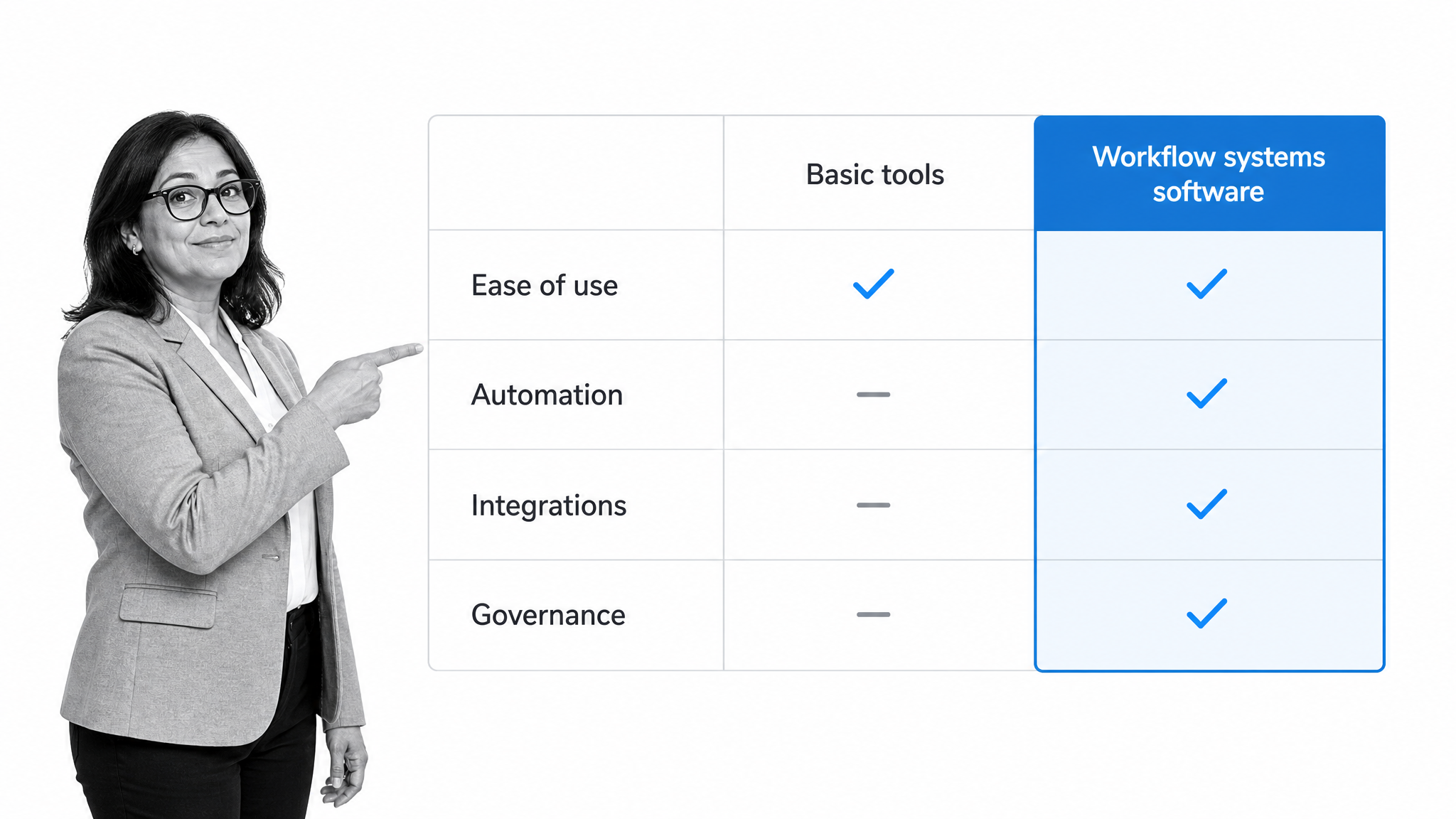
Choosing workflow systems software starts with the work you actually need to run, not with a feature list. The right tool for a compliance team differs from the right tool for a marketing team. The goal is to match the software to your processes, your people, and your existing systems.
Start from your real processes
Before comparing tools, pick two or three processes that cause the most pain today and describe how they should run. Knowing your requirements up front keeps a demo honest. A simple habit of process documentation for those workflows gives you a concrete test case to run against every product you evaluate.
No-code ownership versus developer dependency
Decide who will own the workflows. If you want the operations team to build and change processes on their own, prioritize a genuine no-code builder. If every change has to route through IT, adoption stalls and the tool becomes shelfware. The ability for a non-technical owner to adjust a live workflow is one of the strongest predictors of long term success.
Integration depth
Look closely at how the tool connects to the rest of your stack. A workflow that cannot update your system of record forces people back into manual copying, which defeats the purpose. Ask how the software handles the specific systems your process touches, and whether new connections are easy to add when your stack changes.
Governance and compliance fit
If your work carries any regulatory or audit weight, weigh governance features heavily. Look for role based access, approval and review cycles, version control on your procedures, and a complete audit trail. These features are hard to bolt on later, so a tool that treats them as core will serve a regulated team far better than one that treats them as an add-on.
Total cost and time to value
Finally, weigh the full cost, including setup time and the effort to maintain the tool, against how quickly it delivers value. A platform your team can adopt in days without a consultant often beats a heavier system that takes months to stand up. Comparing options against a clear workflow management system definition helps you avoid paying for complexity you will never use.
How to implement workflow systems software
Implementing workflow systems software succeeds when you start small, prove the value, and expand. Trying to automate every process at once is the most common way these projects stall. A staged rollout builds momentum and confidence.
Map the current process first
Begin by capturing how the work is done today, including the informal steps people take without thinking. A clear map exposes the delays, duplicate effort, and missing checks that the workflow should fix. Automating a broken process just makes the mess run faster, so understand the current state before you build the future one.
Start with one high-value workflow
Pick a single process that is painful and important, such as employee onboarding, client intake, or an approval that keeps stalling. Build it, run it, and let the team feel the improvement before you move on. Templates like a standard operating procedure template and a free SOP template give you a running head start instead of a blank page.
Pilot, gather feedback, and refine
Run the first workflow with a small group and watch where it snags. Early exceptions are not failures, they are the fastest way to find the steps that need a rule, a branch, or clearer instructions. Adjust the workflow based on real runs, not assumptions, then confirm the improved version works before you widen the rollout.
Roll out and keep improving
Once the first workflow is solid, expand to the next process and reuse what you learned. Treat the system as something that gets better over time. A steady continuous improvement habit keeps each workflow sharp, and when a process needs a bigger rethink, a structured approach to process reengineering helps you redesign it rather than patch it.
Workflow systems software in action with Process Street
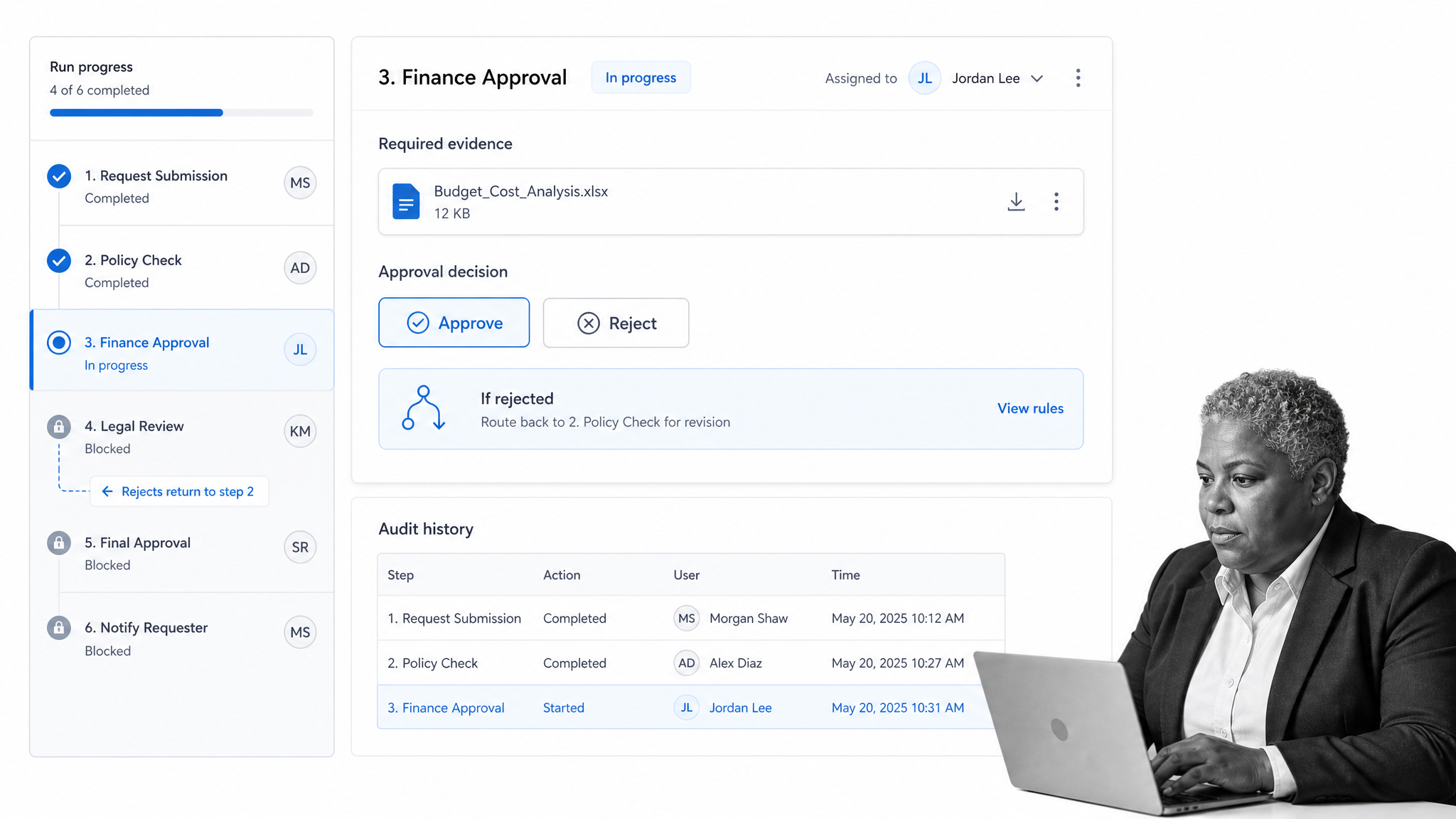
Workflow systems software is easiest to understand through a concrete example. Process Street is a workflow platform built so that documented procedures run as enforced, auditable workflows rather than static pages. It shows what the category looks like when execution, records, and oversight live in one place.
Turn procedures into running workflows
In Process Street, a written procedure becomes a workflow that actually runs. Each step is assigned to an owner, the order is enforced so nothing is skipped, and the run records what was completed. Instead of a document that sits in a folder, the team gets a process that guides the work as it happens and captures the result.
Enforce steps and route exceptions
The platform enforces the right sequence and handles the branches that trip up manual processes. With conditional logic, a rejected approval routes the item back for revision, a high-risk case escalates to a manager, and a required field must be filled before the next task opens. The rules that used to live in people’s heads are built into the workflow itself.
Keep evidence and an audit trail
Because every completed step is recorded, proof of correct execution stays attached to the work. If a customer raises an issue or an auditor asks for evidence, the history shows which run, which steps, and which owner handled it. This is the record keeping that makes workflow systems software valuable to operations, quality, and compliance teams at once.
Connect the workflow to your systems
A running workflow is more useful when it can reach the rest of your stack. Process Street has direct, universal integrations to 5,000+ systems. Need a new one? An AI agent builds it on the fly, so a workflow can update a record, notify a supplier, or trigger the next system without breaking the chain of custody that keeps the process reliable.
FAQs
What is workflow systems software?
Workflow systems software is a category of tools that define, automate, track, and enforce the steps needed to complete recurring work. It takes a process out of someone’s head or a document and turns it into a running system that assigns tasks, applies rules, and records every step.
How does workflow systems software work?
It works by moving a piece of work through defined stages using a workflow engine. A trigger starts the process, the software routes each task to the right owner, conditional rules decide what happens next, and every action is recorded so the run leaves an audit trail.
What features should workflow systems software have?
Core features include a no-code visual builder, automation and conditional logic, structured forms, integrations with your other systems, dashboards and reporting, and role based permissions with audit trails. Together they let a process run reliably without constant supervision.
What are the benefits of workflow systems software?
The main benefits are consistency and fewer errors, faster work with less busywork, real visibility and control over operations, easier compliance and audit readiness, and the ability to scale without adding headcount because the process no longer depends on memory.
How is workflow systems software different from project management software?
Project management software organizes one-off projects with unique tasks and deadlines, while workflow systems software runs repeatable processes that follow the same enforced steps every time. Workflow tools add rules, approvals, and audit trails that recurring work needs.
How do you choose workflow systems software?
Start from the processes that cause the most pain, then compare tools on no-code ownership, integration depth, governance and compliance features, and total cost and time to value. Match the software to your work and your stack rather than to the longest feature list.
