Turn every policy into automated workflows with built-in enforcement and audit-ready proof.


7 Best Tango Alternatives & Competitors in 2026

Tango alternatives help teams replace or extend a process-capture tool with workflow execution, screenshot guides, narrated video, employee training, SOP knowledge, or enterprise in-app guidance. Tango’s strength is recording a task and turning it into a visual guide, then placing help close to the software where employees work.
Teams evaluate alternatives when they need a different output or operating model. A captured guide may not assign work, enforce required inputs, route approvals, prove completion, or coordinate a process across departments. Other teams simply need a closer capture substitute, a video-first format, structured employee learning, a maintained SOP library, or a broader digital adoption platform.
This comparison uses five criteria: fit for the core job, speed from source activity to usable guidance, governance and accountability, pricing model, and how well content stays useful after the underlying process changes. Facts come from vendor-owned product, support, and pricing pages reviewed for this run.
This page is editorially maintained by the Process Street team and was verified for this edition. Process Street ranks first for a specific audience: teams that need enforceable, trackable, recurring SOP and process execution. The competitor sections name the cases where another tool is a better fit.
In this guide, you will compare the incumbent, the at-a-glance shortlist, seven ranked alternatives, common selection scenarios, and literal search questions about free plans, small teams, enterprise use, and migration.
- What is Tango?
- Tango alternatives at a glance
- 1. Process Street
- 2. Scribe
- 3. Guidde
- 4. Trainual
- 5. Whale
- 6. SweetProcess
- 7. Whatfix
- How to choose a Tango alternative
- Tango alternatives FAQ
- Start with Process Street
What is Tango?
Tango is the incumbent in this comparison. It records a software process and creates a step-by-step guide with screenshots, annotations, and editable descriptions. Tango also supports embedded guidance, in-app assistance, sharing, and adoption insights on eligible plans. That makes it a useful baseline for teams that need to document how software work gets done and help employees follow the path in context.
The baseline matters because not every alternative replaces the same part of Tango. Scribe is closest for screenshot capture. Guidde changes the output to narrated video. Trainual and Whale add structured learning or knowledge delivery. SweetProcess emphasizes SOP maintenance. Whatfix expands into enterprise digital adoption. Process Street changes the center of gravity from documenting the task to running and proving the process.
Tango is most useful when a subject-matter expert can demonstrate the correct path in a supported application and the audience needs that path presented visually. The capture model reduces the blank-page problem because the initial guide comes from observed actions. Editors can then refine the steps, descriptions, annotations, sharing, and placement instead of reconstructing the workflow from memory.
Its natural boundary is the point where guidance becomes operational state. A guide can explain how to complete a task, but a separate system may still be needed to create a case, assign owners, collect required information, route an exception, hold an approval, enforce a deadline, and retain evidence. That boundary is why the ranked products belong to several adjacent categories rather than one identical feature set.
Use Tango as the benchmark during evaluation. Record the same representative procedure in each capture-oriented product, then compare correction time, redaction, sharing, reader experience, and maintenance. For training, knowledge, adoption, and workflow platforms, compare the outcome they add beyond the guide. The right alternative should solve a clearly named gap without making the strong parts of the current process harder.
Also identify the decision owner before the pilot begins. Documentation, enablement, people operations, IT, compliance, and business operations may value different outcomes from the same tool. Agree on the primary job, the must-have controls, the audience, the maintenance owner, and the evidence of success. Without that agreement, a team can choose the most impressive demonstration while leaving the real operating problem unresolved.
Record the pilot result in a shared decision log with the tested process, participant roles, required controls, observed gaps, maintenance effort, and pricing assumptions. That evidence makes the final choice easier to explain and revisit.
Tango alternatives at a glance
Process Street is the best overall choice when the documented method must become controlled recurring work. Scribe is the closest capture-first alternative. Guidde leads for narrated video. Trainual is strongest for employee learning. Whale combines SOP knowledge with training. SweetProcess fits maintained procedure libraries. Whatfix fits enterprise digital adoption.
| Tool | Best for | Standout feature | Free plan | Starting price |
|---|---|---|---|---|
| Process Street | enforceable, trackable, recurring process and SOP workflows | workflow runs with owners, approvals, conditional logic, evidence, and audit history | 14-day trial | See pricing page |
| Scribe | fast screenshot-based process capture | automatic step capture with screenshot editing, redaction, and exports | Yes | See pricing page |
| Guidde | video-first how-to documentation with AI voiceover | recording-to-video guides with narration, captions, and export options | Yes | $19 per creator/month billed annually for Pro |
| Trainual | employee onboarding, training paths, and knowledge checks | role-based training with testing, assignments, and completion reporting | No permanent free plan | Custom quote |
| Whale | SOP libraries with training and contextual knowledge access | AI-assisted SOPs, training flows, quizzes, and browser suggestions | Yes | $249 per month billed annually for Scale |
| SweetProcess | maintained procedures, policies, and assigned tasks for small teams | procedure and policy libraries with approvals, reviews, and task assignment | No, 14-day trial | See pricing page |
| Whatfix | enterprise digital adoption and contextual in-app guidance | in-app guidance, self-help, and application usage analytics | No public free plan | Custom quote |
1. Process Street
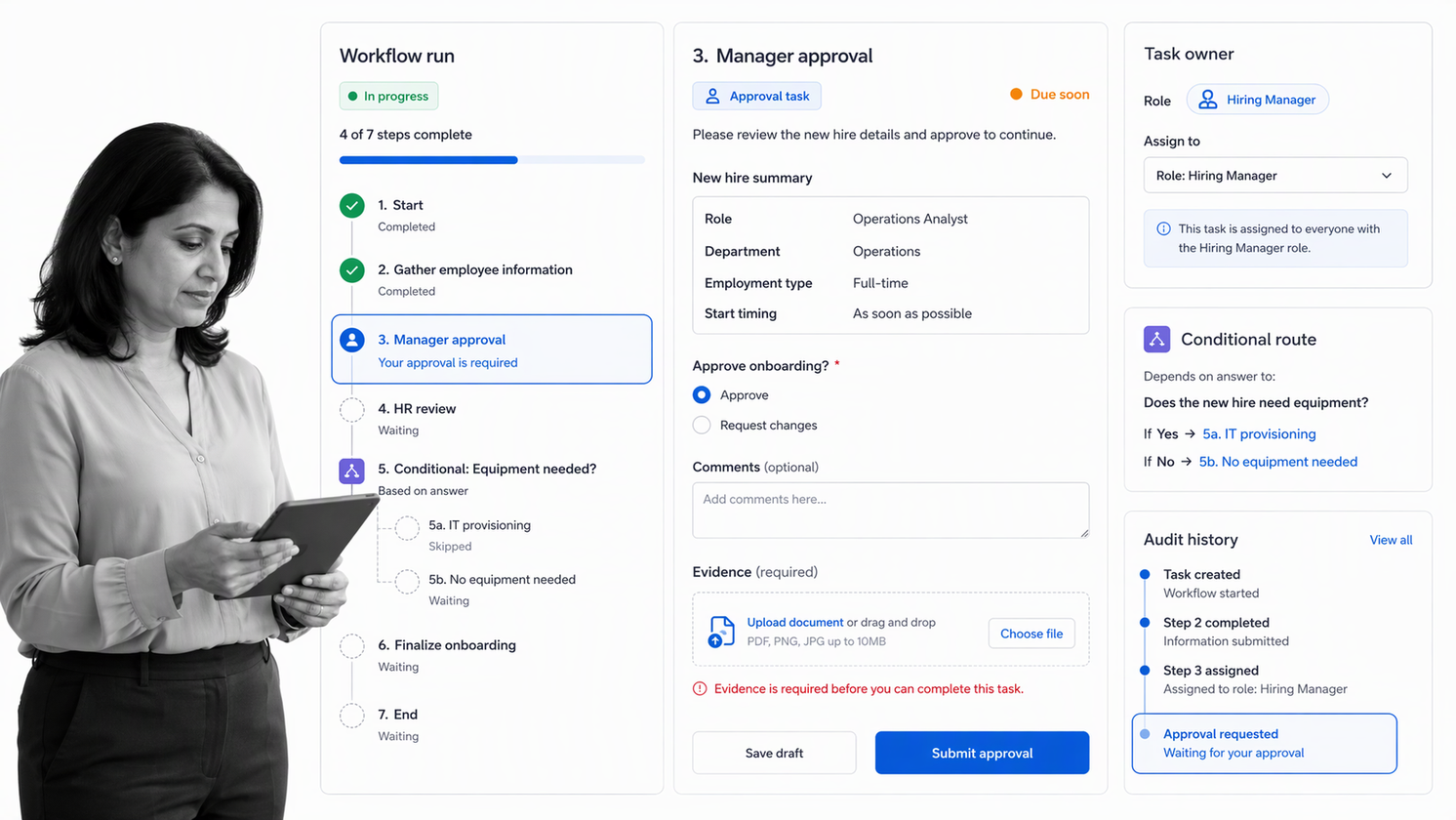
Best for: enforceable, trackable, recurring process and SOP workflows.
Bottom line: Process Street is the best overall Tango alternative when the team needs more than a guide. It turns the operating standard into a workflow run with owners, required information, conditional routes, approvals, deadlines, evidence, and a traceable execution record.
Tango is excellent at capturing how a person completes a task in software. Process Street solves the next operational question: how do you make sure the right person follows the right process every time, including exceptions and handoffs? Reusable workflows launch separate runs for each case, so an onboarding, approval, audit, incident, or recurring review has its own state and history.
Teams can place instructions, files, forms, links, videos, and supporting captured guides inside tasks. Required fields prevent an incomplete handoff. Conditional logic changes the path when risk, location, department, or another response requires a different route. Approval tasks keep decisions and comments connected to the work. The result is an executable SOP rather than a passive page.
Process Street also supports scheduled runs, role assignments, due dates, automation, reporting, and integrations. The important distinction is accountability: each workflow run shows what is done, what is blocked, who owns the next step, and what evidence was collected.
A captured guide can still play a useful role inside Process Street. Place the visual instruction, video, policy, or knowledge-base link at the task where a participant needs it. The workflow adds the live case context around that guidance: which customer, employee, request, control, or exception is being handled, what data is required, and what outcome must be recorded before the process moves forward.
This mixed model avoids an unnecessary all-at-once migration. Keep stable reference content in the format that serves readers best, then move the highest-risk execution into workflows first. Start where missed steps, delayed approvals, inconsistent routing, or missing evidence create the most cost. The team can improve the operating layer without discarding every existing guide.
Process Street is especially useful when several departments touch the same case. An employee onboarding run can assign different tasks to HR, IT, security, the hiring manager, and the new employee. A conditional response can add a security review for one role without exposing that work in every run. An approval can hold access until the required evidence is present.
The same pattern applies to client onboarding, policy review, vendor assessment, incident response, change control, recurring audits, and approval workflows. Each case uses the same controlled design but preserves its own answers, attachments, decisions, comments, timestamps, and completion state. That is the core difference between explaining a process and operating one.
Key Process Street features
- Reusable workflows with a separate run for every case
- Required form fields, files, instructions, and evidence
- Conditional routes for exceptions and risk-based paths
- Approval tasks with decisions kept in context
- Role assignments, due dates, schedules, automation, and analytics
Process Street pros
- Turns SOPs into assigned work
- Creates a traceable record for every run
- Combines instructions, forms, approvals, routing, and evidence
- Works across departments and systems
- Supports both simple checklists and controlled multi-team workflows
Process Street cons
- It is not a dedicated video editor
- It is not a full learning management system
Choose Process Street if
Choose Process Street if missed steps, delayed handoffs, incomplete evidence, or unrecorded approvals create operational risk. Skip it if you only need to produce a one-time visual guide or a polished narrated video.
Process Street pricing
Process Street publishes current plan details on the Process Street pricing page. Review the Process Street platform when the buying decision centers on recurring process execution rather than capture alone.
2. Scribe
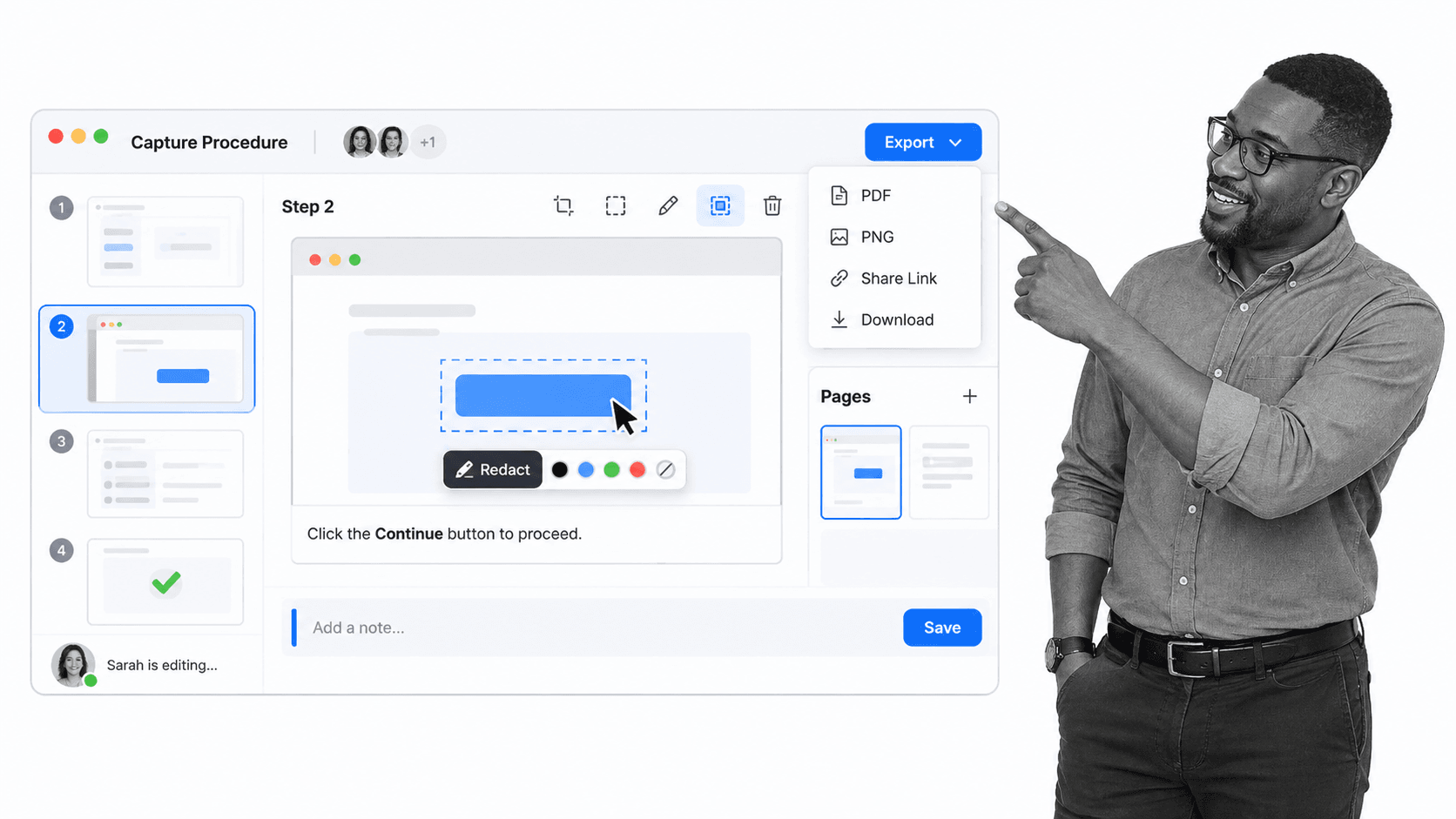
Best for: fast screenshot-based process capture.
Bottom line: Scribe is the closest capture-first alternative. It records a browser or desktop process and turns the activity into numbered instructions with screenshots. Paid controls expand editing, redaction, exports, collaboration, and desktop capture. Scribe is the better fit when fast visual documentation is the whole job. Process Street fits better when the documented method must become assigned, tracked work.
Scribe works well when the creator can perform a clean version of the task from start to finish. The recorder captures the interaction, and the editor lets the owner correct screenshots, descriptions, click targets, and sensitive details before sharing. Pages can combine several captured guides with longer context, which helps when one operating procedure includes more than one application or decision point.
The tradeoff is that a guide remains a reference artifact. A manager can publish it and a learner can follow it, but the guide does not become a separate live case with assigned owners, required inputs, approval decisions, deadlines, and evidence. Teams often pair Scribe with another system when they need both fast authoring and controlled execution.
Evaluate Scribe with a process that includes a midstream correction and a sensitive field. Confirm that the editor makes both changes easy, the finished output stays readable, the sharing model matches the audience, and the export format works in the destination knowledge base. Then decide who owns future updates when the source application changes.
The practical evaluation is to use one real procedure that changes over time. Test creation, correction, sharing, access, ownership, and the evidence available after somebody uses the content. That reveals whether the product is a reference system, a training system, an in-app adoption layer, or an execution layer.
Key Scribe features
- Browser and desktop process capture on eligible plans
- Screenshot editing and redaction
- Pages for combining guides with supporting text
- PDF, HTML, Markdown, and Confluence exports
Scribe pros
- Very close to Tango’s capture-first workflow
- Fast output for software procedures
- Free plan supports evaluation
Scribe cons
- Reference guides do not enforce recurring execution
- Advanced controls require paid plans
Choose Scribe if
Choose Scribe if fast screenshot-based process capture is the primary job. Skip it if your main need is enforceable recurring workflow execution with a separate history for every case.
Scribe pricing
Scribe lists See pricing page as the current starting model, and its free-plan status is Yes. Confirm current details on the official Scribe pricing page.
3. Guidde
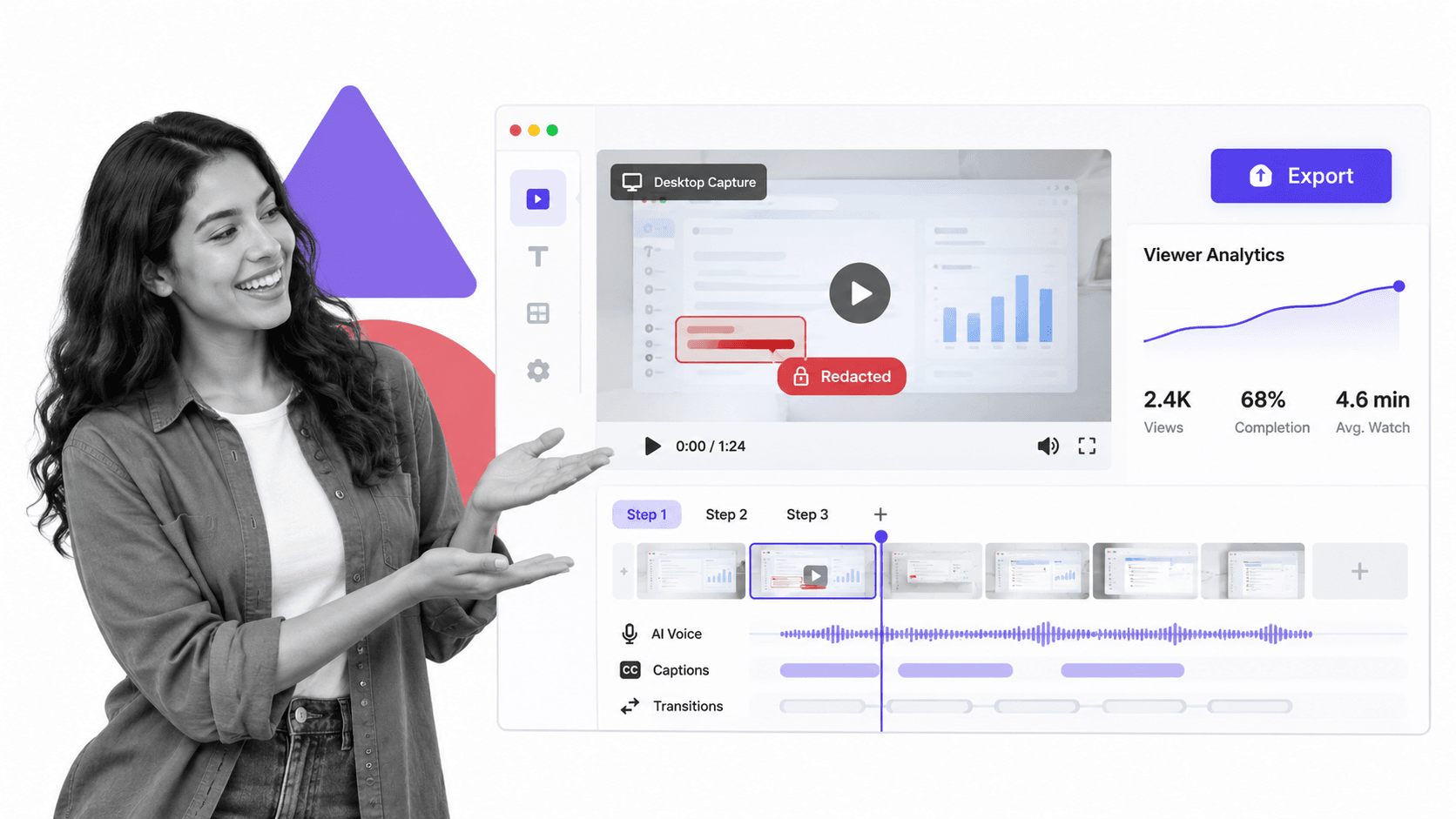
Best for: video-first how-to documentation with AI voiceover.
Bottom line: Guidde turns captured work into produced video documentation with narration, captions, transitions, and exports. It is the better fit when learners should watch or hear a polished explanation. Process Street is stronger when the instruction sits inside a live recurring process with owners, decisions, evidence, and a history for every run.
Guidde changes the consumption experience as much as the creation experience. A narrated timeline can explain where to look, why a step matters, and what a viewer should notice. Captions and visual pacing help asynchronous learning, while export options let a team reuse the asset in a knowledge base, learning system, support reply, or customer education program.
That strength also creates maintenance work. A changed interface may require a new capture, revised narration, updated captions, and a republished export. Teams should assign an owner and review cadence instead of treating the first video as permanent. A short written instruction can be easier to patch, while a polished video can be more engaging for a broad audience.
Test Guidde with a procedure that includes one sensitive value, one pause for explanation, and one correction after recording. Watch the result without sound and on a smaller screen. Confirm that redaction, captions, voice quality, transitions, and export settings support the intended audience before comparing subscription tiers.
The practical evaluation is to use one real procedure that changes over time. Test creation, correction, sharing, access, ownership, and the evidence available after somebody uses the content. That reveals whether the product is a reference system, a training system, an in-app adoption layer, or an execution layer.
Key Guidde features
- Video step timeline
- AI voice generation and captions
- Web and desktop capture on eligible plans
- Video analytics and export controls
Guidde pros
- Strong audiovisual learning format
- Free plan for initial testing
- Useful for customer education and support
Guidde cons
- Video can be excessive for simple SOPs
- It is not a recurring workflow runtime
Choose Guidde if
Choose Guidde if video-first how-to documentation with AI voiceover is the primary job. Skip it if your main need is enforceable recurring workflow execution with a separate history for every case.
Guidde pricing
Guidde lists $19 per creator/month billed annually for Pro as the current starting model, and its free-plan status is Yes. Confirm current details on the official Guidde pricing page.
4. Trainual
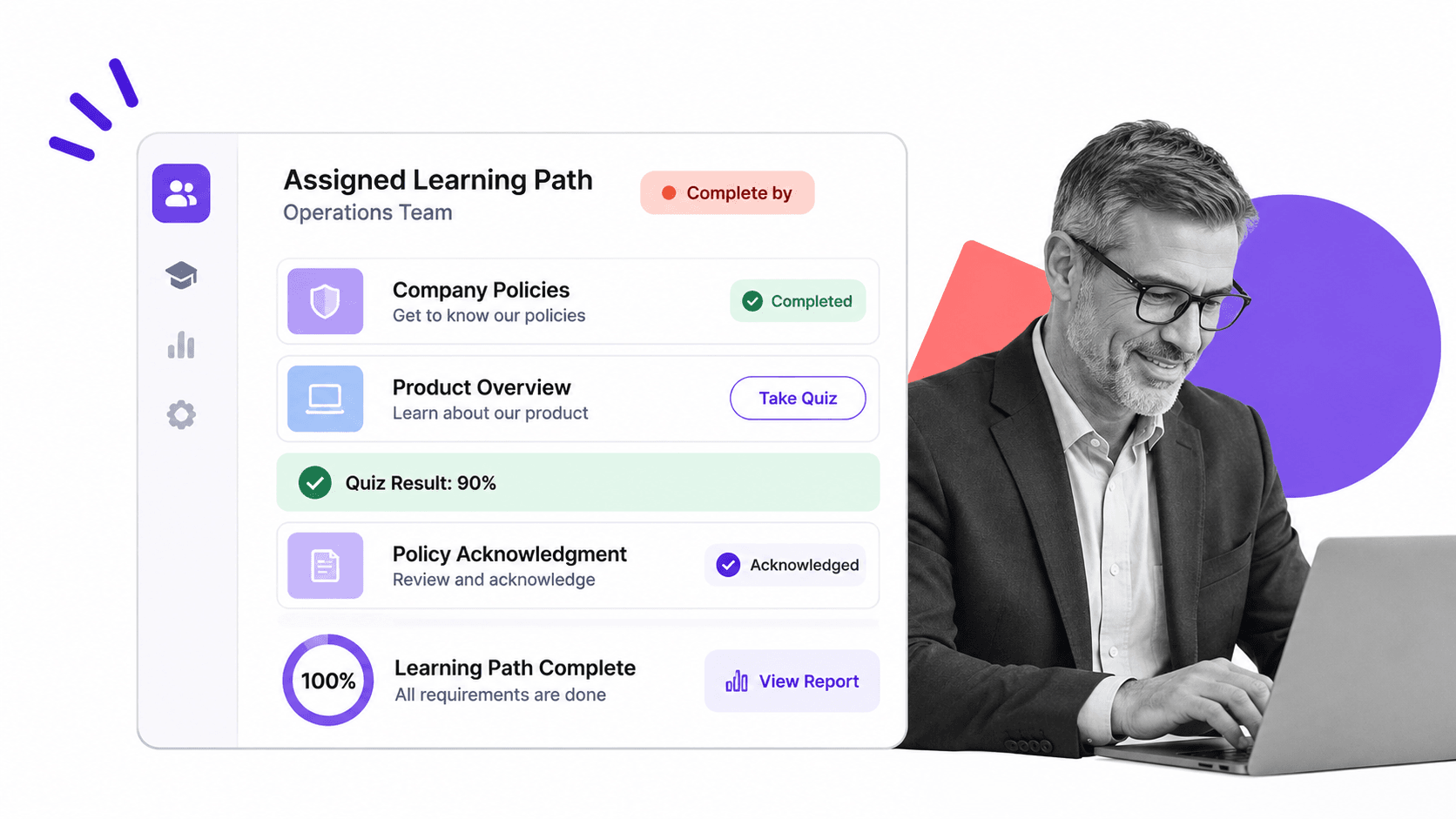
Best for: employee onboarding, training paths, and knowledge checks.
Bottom line: Trainual organizes documentation into role-based onboarding and training paths with assignments, quizzes, acknowledgments, and completion reporting. It is the better fit when the outcome is employee learning and proof of comprehension. Process Street fits better when onboarding must coordinate live work across HR, IT, security, managers, and each new hire.
Trainual is strongest when a procedure is part of a role, curriculum, or onboarding journey. Administrators can organize documentation into learning paths, assign material to the right people, add a knowledge check, and see completion. That is a different accountability model from a captured guide because it focuses on whether the employee learned the standard rather than whether a specific operational case was completed.
For a people operations team, the surrounding role and responsibility structure can be as important as the content. Policies, procedures, quizzes, acknowledgments, and searchable answers can live in one employee enablement environment. The limitation appears when learning turns into cross-functional work, such as creating accounts, ordering equipment, approving access, and collecting evidence from several departments.
Evaluate Trainual with one real role. Build a short path containing a policy, a procedure, a video, a quiz, and an acknowledgment, then assign it to two groups with different requirements. Confirm that the administrator can keep the source current and that an employee can find a specific answer without navigating an oversized course library.
The practical evaluation is to use one real procedure that changes over time. Test creation, correction, sharing, access, ownership, and the evidence available after somebody uses the content. That reveals whether the product is a reference system, a training system, an in-app adoption layer, or an execution layer.
Key Trainual features
- AI-assisted documentation
- Role-based training paths
- Quizzes and completion tracking
- Policies, responsibilities, and org charts
Trainual pros
- Purpose-built for employee training
- Clear learning accountability
- Structured onboarding experience
Trainual cons
- No permanent free plan is published
- Training completion is not live process execution
Choose Trainual if
Choose Trainual if employee onboarding, training paths, and knowledge checks is the primary job. Skip it if your main need is enforceable recurring workflow execution with a separate history for every case.
Trainual pricing
Trainual lists Custom quote as the current starting model, and its free-plan status is No permanent free plan. Confirm current details on the official Trainual pricing page.
5. Whale
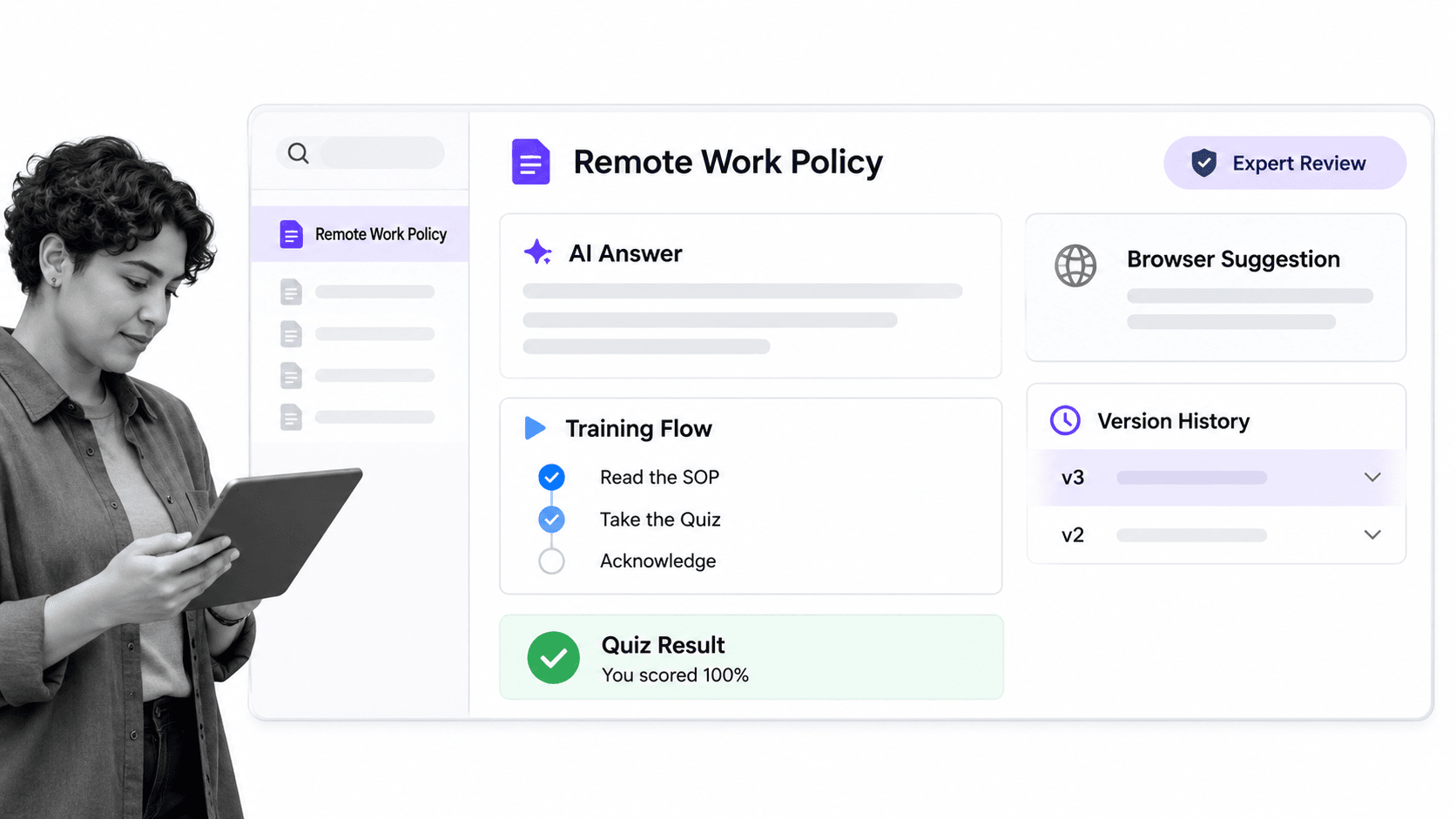
Best for: SOP libraries with training and contextual knowledge access.
Bottom line: Whale combines an SOP library with training flows, read assignments, quizzes, contextual suggestions, and AI-assisted knowledge access. It is the better fit when searchable procedure knowledge and lightweight training are central. Process Street is stronger when each case must follow controlled steps and preserve operational evidence.
Whale sits between capture, knowledge management, and training. A procedure can be recorded or drafted, organized in a playbook, assigned for reading or learning, and surfaced when an employee needs an answer. That makes it useful for teams that want one maintained source of operating knowledge with lightweight proof that people received the material.
The platform is a better fit than Process Street when the central problem is discovery and learning. A browser suggestion or answer panel can put the right procedure near the employee without forcing them to search a large library. Process Street is the better fit when the employee must complete a controlled sequence and the organization needs a record of each individual run.
Test Whale with a procedure that has an owner, a scheduled review, a quiz, and a change after publication. Confirm how the update reaches readers, how completion is recorded, how version history appears, and how the answer experience handles ambiguous questions. Those tests reveal whether the knowledge stays dependable after the first rollout.
The practical evaluation is to use one real procedure that changes over time. Test creation, correction, sharing, access, ownership, and the evidence available after somebody uses the content. That reveals whether the product is a reference system, a training system, an in-app adoption layer, or an execution layer.
Key Whale features
- SOP and playbook libraries
- Step recording and AI-assisted drafting
- Training flows and quizzes
- Contextual knowledge suggestions
Whale pros
- Combines documentation and training
- Free plan supports a small evaluation
- Good fit for knowledge access while working
Whale cons
- Broader paid tiers require a larger commitment
- Knowledge delivery is not strict step-by-step execution
Choose Whale if
Choose Whale if SOP libraries with training and contextual knowledge access is the primary job. Skip it if your main need is enforceable recurring workflow execution with a separate history for every case.
Whale pricing
Whale lists $249 per month billed annually for Scale as the current starting model, and its free-plan status is Yes. Confirm current details on the official Whale pricing page.
6. SweetProcess
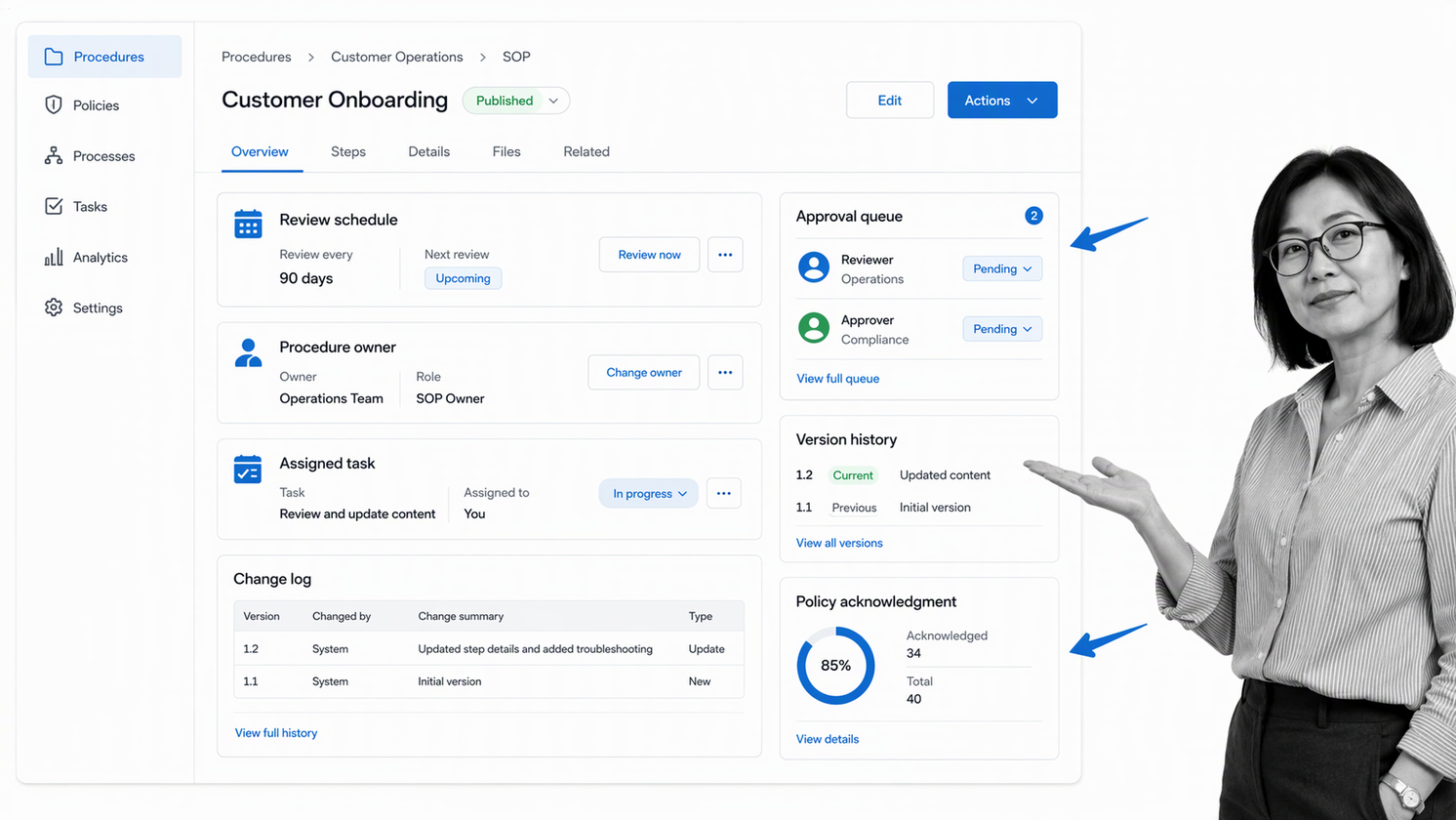
Best for: maintained procedures, policies, and assigned tasks for small teams.
Bottom line: SweetProcess focuses on maintaining procedures and policies, assigning tasks, reviewing changes, and keeping a team knowledge base organized. It is the better fit for a small team that primarily needs a governed SOP library. Process Street fits better when those procedures must launch repeatedly as active workflows with conditions, approvals, deadlines, and execution history.
SweetProcess treats procedures and policies as maintained operational assets. A team can document the standard, assign ownership, manage revisions, route review or approval, and connect the material to tasks. This is useful for a growing company that wants more governance than a folder of documents without adopting a broad enterprise digital adoption program.
The distinction from Tango is lifecycle depth. Tango accelerates capture and in-context guidance, while SweetProcess emphasizes what happens after an SOP exists: who owns it, when it is reviewed, how changes are recorded, and how employees acknowledge or use it. The distinction from Process Street is that Process Street centers each live workflow run and its evidence.
Evaluate SweetProcess by importing or rebuilding one procedure that changes regularly. Assign an owner, schedule a review, propose a change, approve the revision, notify the intended audience, and create a related task. Confirm that the resulting history is understandable to a new administrator and that readers can find the current approved version without ambiguity.
The practical evaluation is to use one real procedure that changes over time. Test creation, correction, sharing, access, ownership, and the evidence available after somebody uses the content. That reveals whether the product is a reference system, a training system, an in-app adoption layer, or an execution layer.
Key SweetProcess features
- Procedure and policy libraries
- Review and approval controls
- Version history and ownership
- Task assignment from documented procedures
SweetProcess pros
- Clear SOP management focus
- Useful procedure governance for small teams
- Trial supports hands-on evaluation
SweetProcess cons
- No permanent free plan
- Less suited to complex cross-system workflow execution
Choose SweetProcess if
Choose SweetProcess if maintained procedures, policies, and assigned tasks for small teams is the primary job. Skip it if your main need is enforceable recurring workflow execution with a separate history for every case.
SweetProcess pricing
SweetProcess lists See pricing page as the current starting model, and its free-plan status is No, 14-day trial. Confirm current details on the official SweetProcess pricing page.
7. Whatfix
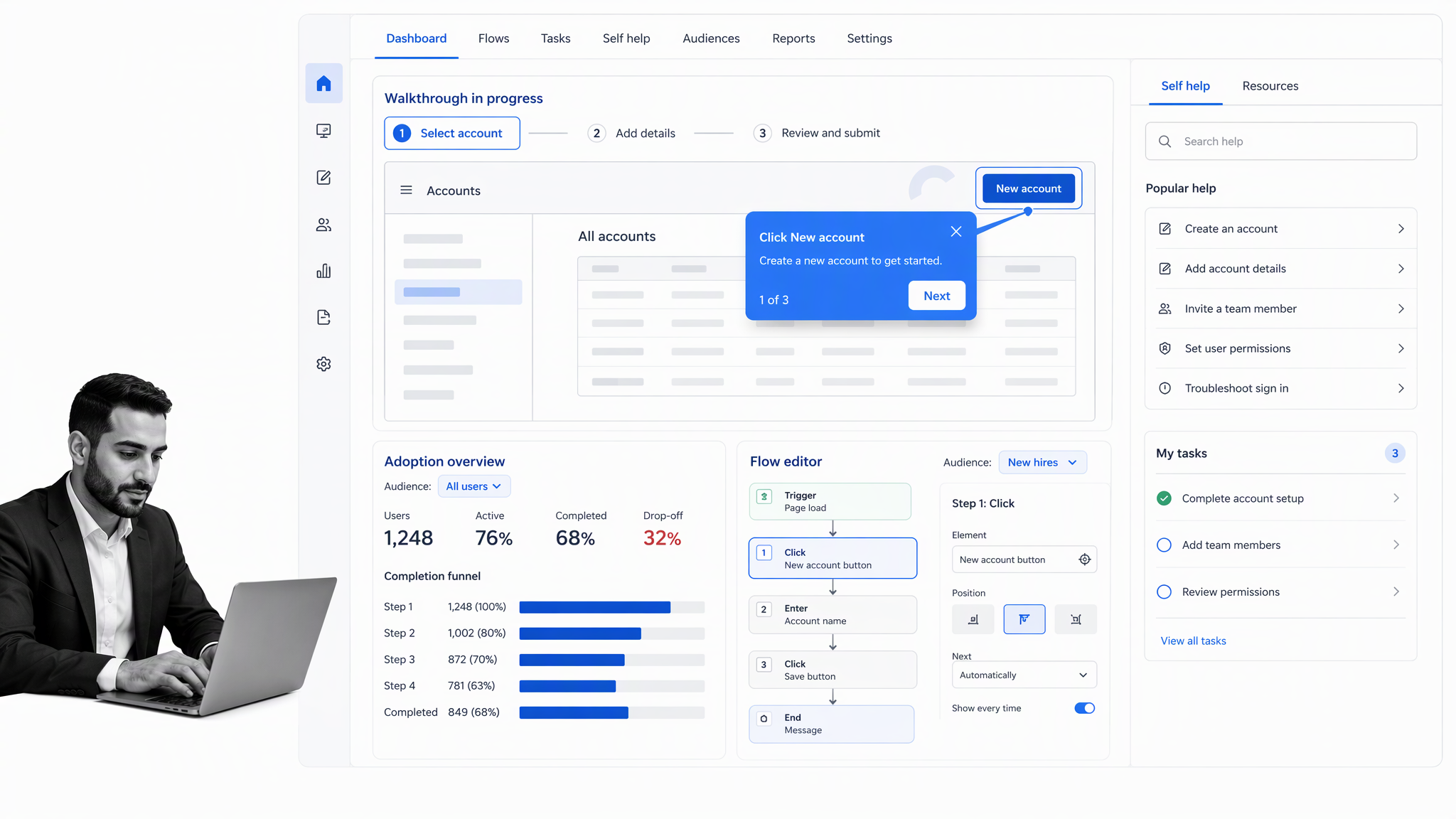
Best for: enterprise digital adoption and contextual in-app guidance.
Bottom line: Whatfix is an enterprise digital adoption platform that places contextual guidance, self-help, and task support inside business applications. It is the better fit when the requirement is broad in-app adoption across an enterprise software estate. Process Street is stronger when the core need is running recurring operational procedures across people and systems.
Whatfix addresses a broader enterprise adoption problem than a lightweight capture tool. Guidance can appear inside an application through contextual flows, self-help, task lists, and related prompts. Adoption analytics help a program team see where users engage, where they abandon a process, and which parts of an application need more support.
That model can beat Process Street when the main objective is improving adoption of complex enterprise software for a large distributed audience. It is also closer to Tango’s in-app assistance than a standalone SOP library. The tradeoff is procurement and administration: a digital adoption platform requires application coverage, audience design, content governance, analytics ownership, and an enterprise rollout plan.
Evaluate Whatfix on one high-value application journey. Define the audience, publish contextual help, test an exception path, measure completion, and update the experience after the source interface changes. Confirm who can author, approve, target, and retire guidance. A successful pilot should prove adoption improvement without creating a second confusing layer on top of the application.
The practical evaluation is to use one real procedure that changes over time. Test creation, correction, sharing, access, ownership, and the evidence available after somebody uses the content. That reveals whether the product is a reference system, a training system, an in-app adoption layer, or an execution layer.
Key Whatfix features
- Contextual in-app walkthroughs
- Self-help and task-list widgets
- Application usage and adoption analytics
- Audience targeting and flow management
Whatfix pros
- Strong enterprise digital adoption model
- Guidance appears inside the application
- Analytics support adoption programs
Whatfix cons
- Pricing is custom and procurement is enterprise-oriented
- It is heavier than a team that only needs SOP execution
Choose Whatfix if
Choose Whatfix if enterprise digital adoption and contextual in-app guidance is the primary job. Skip it if your main need is enforceable recurring workflow execution with a separate history for every case.
Whatfix pricing
Whatfix lists Custom quote as the current starting model, and its free-plan status is No public free plan. Confirm current details on the official Whatfix pricing page.
How to choose a Tango alternative
Start with the destination of the knowledge. Choose Scribe for fast screenshot guides, Guidde for narrated video, Trainual for assigned learning, Whale for SOP knowledge plus training, SweetProcess for procedure governance, and Whatfix for enterprise in-app adoption. Choose Process Street when the work itself must be assigned, routed, approved, tracked, and evidenced.
Test the shortlist with one recurring process such as an employee onboarding checklist, a client onboarding workflow, or a content approval process. Include a required input, a conditional exception, an approval, a file, and a deadline. The trial should reveal whether the system merely explains the work or can coordinate it.
Related evaluations of process documentation software, workflow management software, SOP software, and software alternatives for operational teams can help separate adjacent categories.
The best Tango alternative depends on what should happen after a subject-matter expert demonstrates the work. Decide whether the result should be a visual reference, a video lesson, a training assignment, a maintained knowledge asset, contextual help inside an application, or a controlled workflow run. That single decision removes most of the wrong products from the shortlist.
Before the trial, document the current failure mode, the people affected, the expected outcome, and the evidence that will count as improvement. This keeps the evaluation grounded in operational results instead of feature volume.
Define the output before comparing features
A screenshot guide is ideal when the reader needs a fast visual reference beside a browser task. A narrated video works better when the instructor must explain context and judgment. A training path fits when an employee must learn and demonstrate comprehension. An in-app adoption layer fits when guidance must appear inside enterprise software. A workflow runtime fits when the organization must assign, route, approve, and prove each case.
Write the required output in one sentence before opening a pricing page. For example: new support agents need a five-minute visual guide, every manager must complete a policy acknowledgment, or every vendor request must collect evidence and receive approval. A product can have more features and still be the wrong category for that sentence.
Separate authoring speed from operating control
Capture-first tools can create a useful draft in minutes because the expert demonstrates the process instead of writing it from memory. That is valuable, but creation speed does not answer who owns the next live case, whether required data is present, which exception path applies, or who approved the outcome. Score authoring and execution as separate criteria so a fast recorder does not receive credit for controls it does not provide.
For recurring operational work, run the same process twice with different inputs. The second case should trigger a different route or reviewer. If the system cannot represent that difference, the team may still need a workflow layer even when the documentation output is excellent. A useful guide and a controlled process can coexist rather than compete.
Test maintenance, not just first-time creation
Process documentation starts aging as soon as the source application, policy, or ownership changes. During a trial, deliberately change one interface label, one sensitive screenshot, and one approval rule. Measure how long it takes to identify the owner, edit the source, review the change, republish the correct version, notify the audience, and retire the obsolete version.
Look for a clear ownership model, review dates, version history, approval controls, and a way to distinguish current content from an outdated copy. A beautiful guide without maintenance discipline can create more risk than no guide because employees confidently follow instructions that are no longer correct. The selection decision should include the ongoing administrative cost, not only the first capture.
Match the pricing unit to your publishing model
Vendors may charge by user, creator, member, plan, or enterprise application. A creator-based plan can be economical when a few experts publish for a large audience. Per-user pricing can be simpler when every employee creates and edits. A quote-based platform may make sense when the implementation includes governance, security, application coverage, or a company-wide rollout.
Model the actual roles for one year: creators, reviewers, administrators, viewers, trainees, and workflow participants. Include expected growth and the paid controls required for privacy, desktop capture, exports, SSO, analytics, or approvals. The cheapest entry plan is not the cheapest operating model if the needed control sits on a higher tier.
Evaluate privacy and access with realistic material
A process capture can expose customer data, employee information, financial values, internal URLs, or credentials if the recording environment is not prepared. Use fictional or sanitized data in the pilot, then test redaction, editing, access controls, link behavior, exports, and the process for correcting a mistake after publication. Do not upload real sensitive data simply to evaluate a vendor.
Decide whether content is public, link-accessible, workspace-only, role-restricted, or application-targeted. Confirm who can create, review, publish, share, export, and delete. For workflow execution, also test whether participants see only the tasks and case data they need. The right model depends on both the documentation audience and the operational record.
Run one cross-functional proof of concept
Use a process that crosses at least two roles, such as a vendor onboarding checklist, a change management process, or an IT incident response workflow. Include instructions, a required field, an attachment, a decision, an exception, an approval, and a final record.
Ask the creator, participant, reviewer, and administrator to evaluate the same pilot from their own perspective. The creator cares about capture and editing. The participant cares about clarity and context. The reviewer cares about decisions and evidence. The administrator cares about access, maintenance, reporting, and change. A platform that delights one role may frustrate the others.
Plan the migration around processes, not files
Start with an inventory of Tango guides, owners, viewers, source applications, privacy settings, and last-review dates. Add the live process each guide supports and classify the desired destination: keep as reference, convert to video, assign as training, move into an SOP library, deliver as in-app guidance, or rebuild as an executable workflow. This prevents a blind file-for-file migration.
Remove duplicates and obsolete guides before moving anything. Export a recoverable copy where the source plan permits, preserve ownership and access notes, then migrate a small representative group first. Validate links, images, embedded content, permissions, and search after import. For workflows, rebuild the operating logic deliberately: requester, required data, owner, exception route, approval, evidence, deadline, and final record.
Keep a short overlap period in which the old source is read-only and clearly marked as superseded. Give users one destination for new work, monitor questions, and fix gaps before the next migration wave. The goal is not to recreate every historical artifact. It is to preserve useful knowledge while improving how current work is taught, found, or executed.
Tango alternatives FAQ
What is the best Tango alternative?
Process Street is the best Tango alternative when the documented procedure must become enforceable recurring work with owners, required information, conditional routes, approvals, evidence, due dates, and execution history. Scribe is closer when screenshot capture is the primary requirement.
Is there a free Tango alternative?
Yes. Scribe, Guidde, and Whale publish free plans, although their limits and intended audiences differ. Compare the paid controls you will need for privacy, collaboration, exports, training, and administration before choosing.
What is the closest alternative to Tango?
Scribe is the closest like-for-like alternative for automatic screenshot-based process capture. Whatfix is closer when enterprise in-app guidance is the priority, while Guidde is closer when the desired output is narrated video.
What is the best Tango alternative for small teams?
Scribe or Guidde can fit a small team that mainly needs capture and a free starting point. SweetProcess can fit a small team that needs a maintained SOP library. Process Street fits when the small team needs recurring workflow accountability.
What is the best Tango alternative for enterprise teams?
Whatfix fits enterprise digital adoption programs, Trainual fits structured employee learning, and Process Street fits cross-department recurring process execution. The right choice depends on whether the outcome is adoption, learning, or controlled work.
Can a productivity suite replace Tango?
A productivity suite can store documents, screenshots, videos, and forms, but it may not provide one direct equivalent with the same automatic capture and in-app guidance model. Teams can assemble a process from several tools, but a dedicated platform is usually faster.
How do you migrate from Tango to Process Street?
Inventory the Tango guides, owners, viewers, source applications, and the live process each guide supports. Keep stable visual instructions as task context, then rebuild the operating layer with owners, required fields, conditions, approvals, evidence, deadlines, and a separate run for every case.
Why is Process Street ranked first?
Process Street is ranked first for the use case this comparison prioritizes: enforceable, trackable, recurring process and SOP execution. It connects instructions to assigned work, required information, conditional routes, approvals, evidence, and traceable run history. The competitor sections identify specialist use cases where another product fits better.
Start with Process Street
If the guide is only the beginning and the real requirement is to run the process correctly every time, start with Process Street. Build one meaningful workflow, test it with real participants, and compare the operational result: ownership, routing, approvals, evidence, deadlines, and execution history.