


Turn every policy into automated workflows with built-in enforcement and audit-ready proof.



Automation Workflow Tools
Automation workflow tools turn repeatable work into a connected sequence of triggers, tasks, rules, approvals, system actions, and records. They help a team move work from request to completion without relying on memory, status chasing, or manual copying between apps.
The category covers more than simple app connections. A useful tool must coordinate people and systems, handle exceptions, protect high-risk decisions, and show what happened after the workflow runs. That is the difference between automating one task and operating a dependable business process.
This guide explains the main tool types, the capabilities that matter, how an automated workflow works, where it creates value, and how to choose a platform that combines speed with control.
In this article, we are going to cover:
- What automation workflow tools are
- Types of automation workflow tools
- Core capabilities in automation workflow tools
- How automation workflow tools work
- Where automation workflow tools deliver value
- How Process Street controls automation workflows
- How to choose and implement automation workflow tools
- FAQs
What automation workflow tools are
Automation workflow tools are software platforms that move recurring work through a defined path. A workflow begins with a trigger, gathers the required context, assigns or performs actions, evaluates rules, routes exceptions, requests approvals when needed, and stores a record of the outcome.
The Atlassian explanation of workflow automation describes the category in terms of reducing manual effort through rules and actions. The Microsoft workflow automation guide also frames the work around repeatable sequences. For operational teams, the important question is whether the sequence can survive real exceptions, handoffs, and control requirements.
From isolated automation to an operating workflow
An isolated automation might copy a form response into a spreadsheet. An operating workflow goes further. It checks whether the request is complete, assigns a reviewer, branches based on risk, pauses for approval, updates the right system, alerts an owner when something fails, and keeps the evidence together.
That broader model is easier to understand after reviewing the workflow automation lifecycle. The tool is not valuable because it makes arrows connect on a canvas. It is valuable because the process continues to run correctly when people are busy, inputs change, and an exception appears.
The six parts of an automation workflow
- Trigger: the event that starts the workflow, such as a form submission, schedule, record change, or approved request.
- Context: the fields, documents, identities, and system data needed to make the next decision.
- Actions: human tasks or system operations that move the work forward.
- Rules: conditions that select the correct route, owner, control, or exception path.
- Controls: approvals, permissions, required evidence, and stops that protect important decisions.
- Record: the history that shows what ran, what changed, who approved it, and how it finished.
A workflow management system usually covers most of this path. The strongest automation workflow tools also act across connected software while preserving human accountability.
Types of automation workflow tools
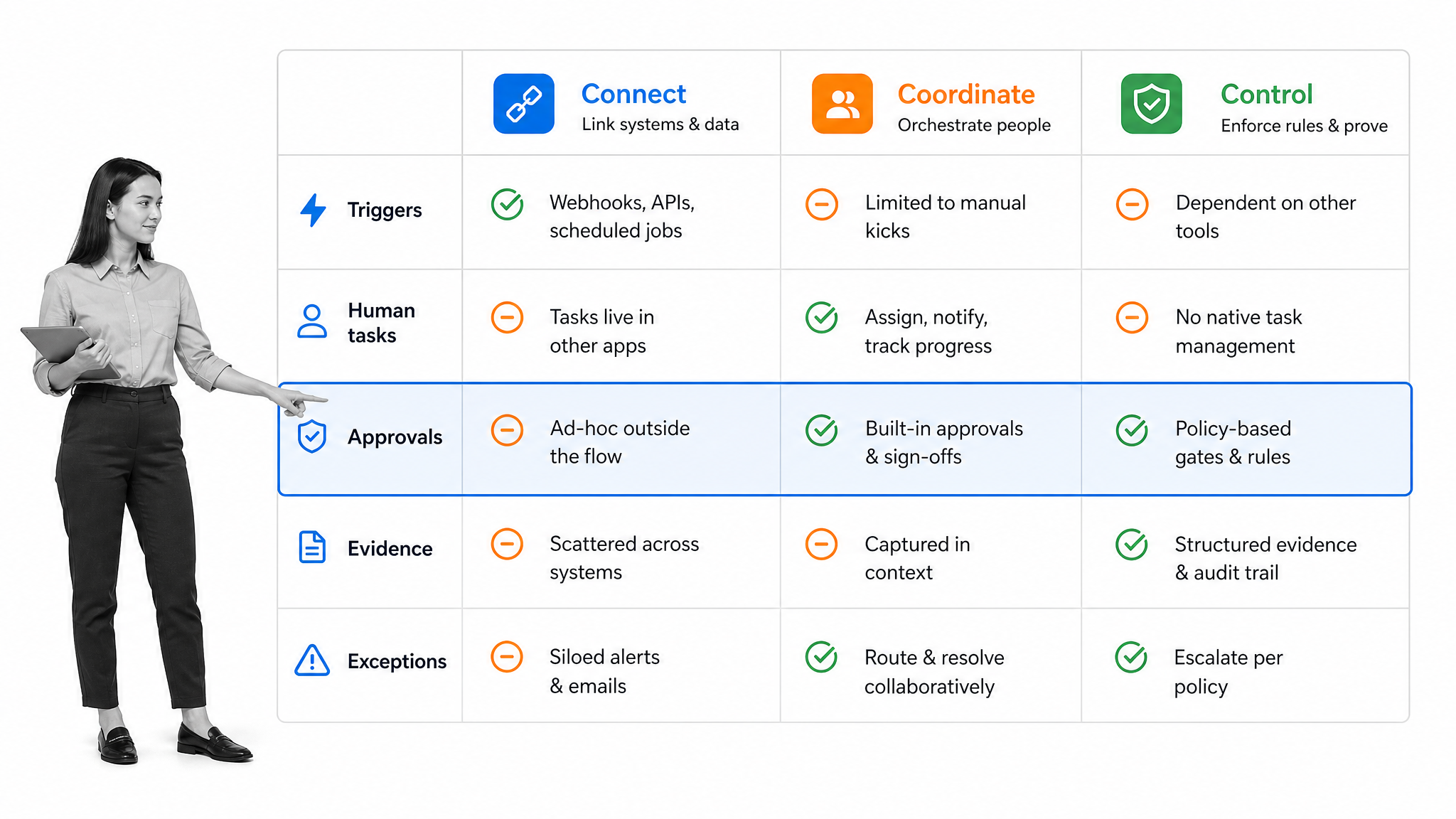
Buyers often compare tools that look similar in a diagram but solve different problems. The clearest way to separate them is by the job they hold in the operating stack: connect systems, coordinate work, or control execution.
Connection tools
Connection tools move data or invoke actions across apps. They are useful when the process is mostly system-to-system, the rules are stable, and human work is limited. Typical patterns include creating a record after a form submission, syncing fields, sending a notification, or moving a file.
The risk is treating connectivity as a complete workflow. A connection can fire successfully while the surrounding process still fails because the request was incomplete, the owner was wrong, the approval never happened, or no one handled the exception.
Coordination tools
Coordination tools organize human work through tasks, statuses, assignments, and deadlines. They work well when the main challenge is keeping a team aligned. They become less reliable when recurring work needs strict order, required evidence, conditional paths, or system actions that must wait for approval.
A well-designed automated workflow system connects coordination with rules, so the path changes based on the request rather than forcing every case through the same checklist.
Control and orchestration tools
Control and orchestration tools combine human tasks, system actions, rules, approvals, evidence, and monitoring. They are designed for cross-functional processes where a skipped step or premature action creates customer, financial, security, quality, or compliance risk.
This category overlaps with the discipline described in the IBM business process management overview. The difference is practical emphasis: modern tools let operators build and run the workflow directly instead of stopping at process analysis or modeling.
Which type do you need?
Use a connection tool for stable, low-risk system handoffs. Use a coordination tool when the work is mostly human and flexible. Use a control and orchestration platform when the workflow crosses teams and systems, includes exceptions, or must produce proof. Many organizations need all three jobs, but they should choose one clear owner for the end-to-end process.
Core capabilities in automation workflow tools
Feature lists are easy to inflate. The practical test is whether the tool can carry one real workflow from an imperfect request to a trustworthy outcome. The following capabilities decide whether that is possible.
Structured intake and validation
Automation starts with usable input. Forms, required fields, data validation, file requests, and identity checks reduce ambiguity before the workflow begins. If incomplete data enters the process, automation moves the confusion faster.
A vendor onboarding checklist is a good test case because it requires business details, tax information, security evidence, internal ownership, and approvals before activation.
Conditional routing and exception handling
A dependable tool changes the route when the facts change. A low-risk request can follow a standard path. A high-risk request can add legal review, security evidence, or executive approval. An incomplete request can return to the submitter instead of becoming an invisible failure.
The current Process Street documentation for conditional logic shows how form values and task states can control which work appears in a run.
Human tasks and accountability
Not every step should be automated. Judgment, relationship management, exception decisions, and risk acceptance often need a named person. Look for role-based assignment, due dates, instructions, reminders, escalation, and a clear queue for each participant.
Approvals and control gates
An approval is more than a notification. It should block the protected action until the right reviewer makes a decision. The workflow should preserve the submitted evidence, the reviewer, the result, and any rejection comments.
Built-in approval tasks matter when money moves, access changes, a vendor becomes active, a policy is released, or an exception is accepted.
System actions and integrations
The tool should update connected systems after the workflow reaches the correct state. Examples include creating a user account after approval, opening a ticket, sending a contract, updating a CRM, storing evidence, or notifying the next owner.
Monitoring, recovery, and evidence
Automation fails in the real world. Records are missing, APIs time out, credentials expire, and owners leave. Look for run history, error states, retries, alerts, manual recovery, comments, attachments, and audit trails. A workflow that cannot explain its own failure is difficult to trust.
AI assistance with explicit guardrails
AI can classify a request, summarize evidence, draft a response, or operate software, but high-impact actions need boundaries. The NIST AI Risk Management Framework is useful when defining oversight, testing, and accountability for AI-assisted automation.
How automation workflow tools work
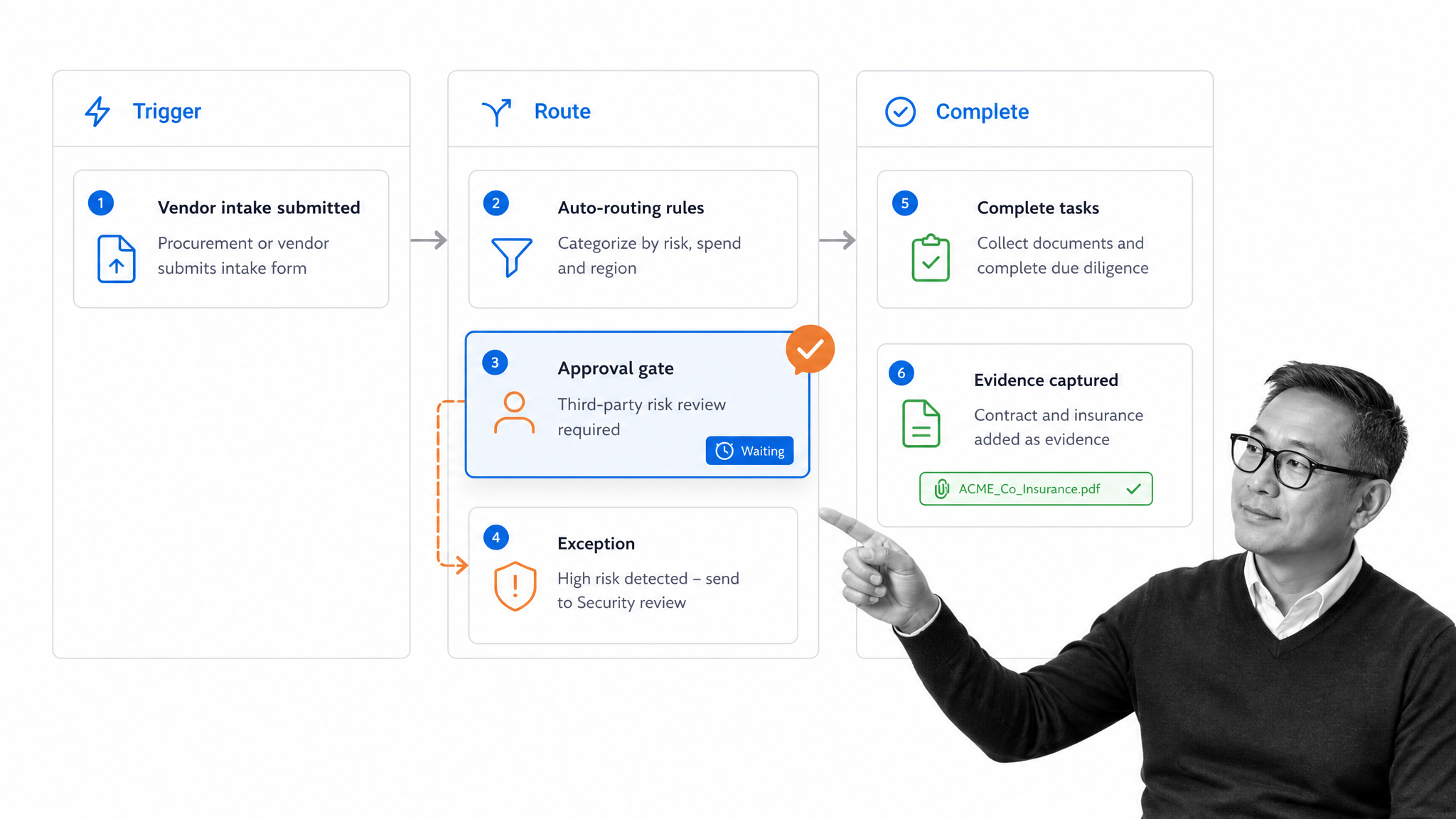
Automation workflow tools work by separating the process definition from each live execution. The definition contains the standard path, rules, owners, and controls. A workflow run contains the actual request, decisions, actions, evidence, and outcome.
1. A trigger creates the run
A form, schedule, system event, or authorized user starts the workflow. The trigger should carry a unique record reference and enough context to prevent duplicate or ambiguous runs.
2. Intake data selects the route
The tool validates required information and evaluates conditions. A vendor request might branch by data access, contract value, geography, or service type. The selected route determines which evidence, reviewers, and system actions apply.
3. People and systems perform work
Some steps are assigned to people. Others run automatically. A person might review a security questionnaire while the system checks required fields, creates a supplier record, or sends a document request.
4. Controls pause high-impact actions
The workflow stops at approval gates. Nothing protected should advance because a message was sent or a task was merely created. Advancement should depend on the actual approval state and required evidence.
5. Exceptions follow an owned path
A missing document, failed system action, rejected approval, or unusual risk factor should create a visible exception with an owner and next step. Silent failure is the enemy of dependable automation.
6. Completion leaves a usable record
The final record should show the input, route, actions, decisions, evidence, and outcome. That history supports customer questions, management review, audits, process improvement, and future automation changes.
Teams can sketch this logic with the BPMN specification or start more simply with a business process analysis template. The goal is not a perfect diagram. The goal is a workflow whose decisions and responsibilities are explicit.
Where automation workflow tools deliver value
The best starting workflows are frequent, stable enough to define, painful enough to matter, and measurable enough to improve. They often cross at least two roles or systems.
Employee onboarding
An employee onboarding automation workflow can coordinate HR, IT, finance, the hiring manager, and the new employee. Rules can adapt the path by location, department, employment type, and access needs.
Finance operations
An accounts payable process can validate invoice details, confirm the vendor, route budget approval, prevent duplicate handling, and preserve payment evidence.
Audit and compliance work
A financial audit checklist can assign evidence requests, track reviewer status, route findings, and show whether every control test was completed.
Process improvement
A process improvement checklist can turn workflow data into action. Bottlenecks, rework, exceptions, and repeated manual overrides reveal where the process or automation needs to change.
For a wider set of patterns, process automation examples show how recurring work can combine human judgment with system actions.
How Process Street controls automation workflows
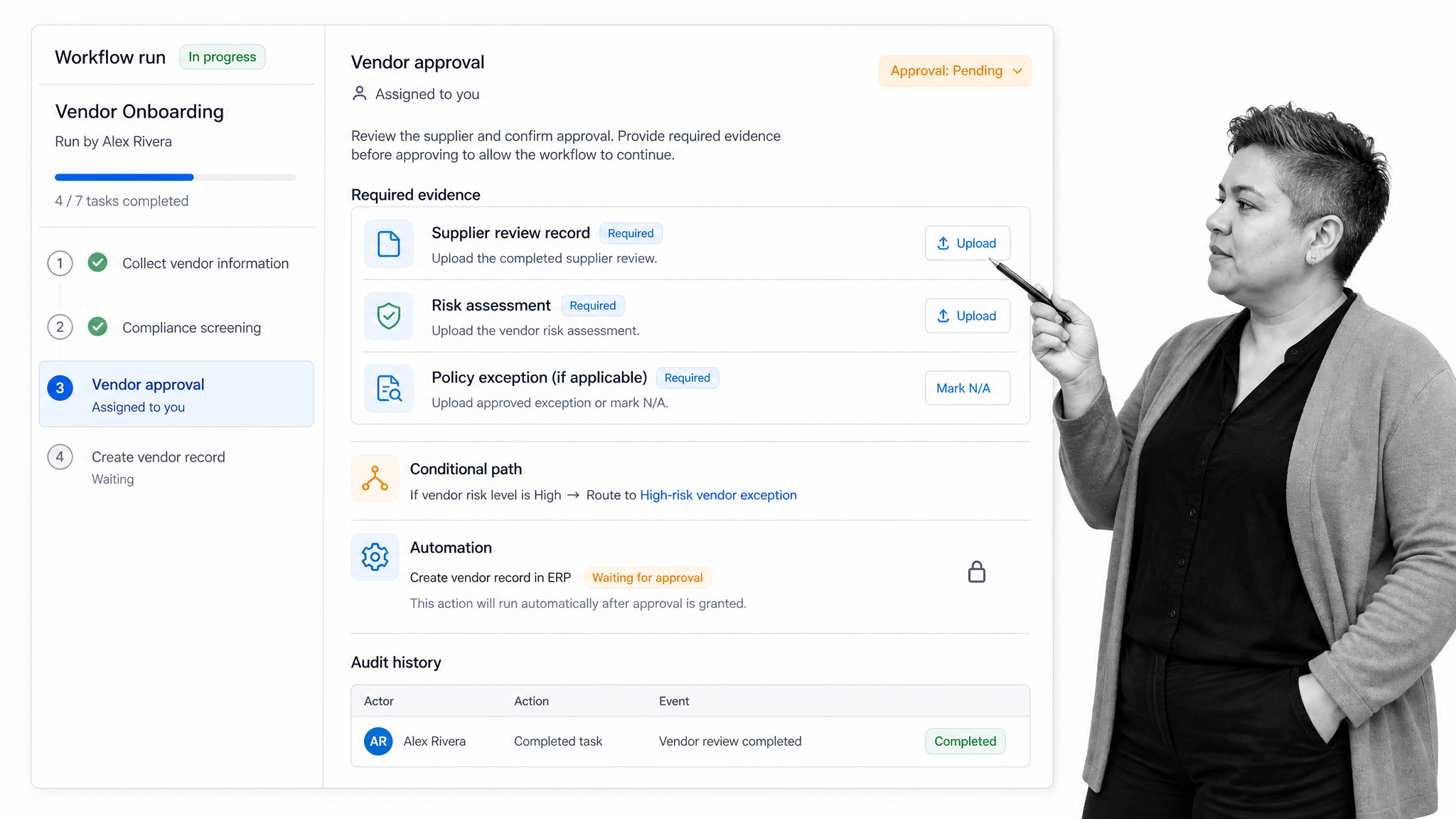
Process Street is a Compliance Operations Platform for recurring work that must run correctly and leave proof. It combines workflow runs, required fields, conditional routing, approvals, automations, and audit history in one operating path.
That combination matters when an automated action should happen only after people complete the right work. A vendor record should not become active before the required review. Access should not be provisioned before approval. A policy should not be released before the authorized reviewer signs off.
Build the rule into the workflow
The workflow carries the instructions, owners, fields, conditions, evidence requirements, and approval gates. Operators do not need to remember a separate policy document while they work. The rule appears at the point of execution.
Let automation act after the control passes
System actions can update records, send requests, notify owners, or continue another process after the workflow reaches the correct state. This prevents automation from outrunning the control that was meant to govern it.
Connect the operating stack
Process Street has direct, universal integrations to 5,000+ systems. Need a new one? An AI agent builds it on the fly.
Keep execution and proof together
The workflow run preserves the task history, form data, comments, attachments, approvals, and outcome. Leaders can inspect the work itself instead of reconstructing it from messages and disconnected logs.
The existing workflow automation tool shortlist and workflow automation software comparison cover product selection from a list perspective. The operating test is whether the chosen system can enforce the full path your process requires.
How to choose and implement automation workflow tools
Choose automation workflow tools by testing a real process, not a feature demo. The right platform should make the normal path faster, the exception path visible, and the final record easier to trust.
Map the current process
Start with business process documentation. Record the trigger, inputs, owners, systems, decisions, approvals, exception paths, evidence, and outcome. Remove steps that exist only because the current tools are fragmented.
Choose one high-value pilot
Pick a workflow that runs often, has a clear owner, crosses people or systems, and causes visible pain when it fails. Avoid a toy demo. The pilot should include at least one decision, one exception, one approval, and one connected action.
Test control before convenience
Ask whether a user can skip a required step, whether an integration can fire too early, whether rejected work has an owner, and whether evidence is retained. A fast workflow that advances incorrectly creates more risk than a manual process.
Evaluate maintainability
The process owner should be able to understand and update the workflow. Look for clear rules, reusable components, version control, test runs, permissions, and a way to see which live workflows depend on a change.
Measure the operating result
Track cycle time, queue time, missed steps, rework, exception volume, approval delays, evidence completeness, and manual interventions. Do not measure success by the number of automations created. Measure whether the process became more dependable.
Plan ownership after launch
Name the workflow owner, system owner, reviewers, and escalation path. Decide how often the process will be reviewed, how failures will be triaged, and how changes will be tested before they affect live runs.
Use a simple selection scorecard
- Process fit: can the tool represent the real path, including exceptions?
- Control: can it require evidence and block protected actions until approval?
- Integration: can it act across the systems the process uses?
- Reliability: can owners detect, recover, and learn from failures?
- Usability: can process owners build and participants complete the work without unnecessary friction?
- Governance: can you manage permissions, history, changes, and AI-assisted actions?
A good selection process ends with evidence from the pilot: the workflow handled normal and exception paths, participants knew what to do, protected actions waited for approval, connected systems updated correctly, and the final record explained the run. That is a stronger buying signal than a long checklist of features.
FAQs
What are automation workflow tools?
Automation workflow tools are platforms that move recurring work through triggers, tasks, rules, approvals, system actions, and records. They coordinate people and software so a process can run with less manual follow-up while preserving accountability.
What is the difference between workflow automation and task automation?
Task automation performs one repetitive action, such as copying data or sending a message. Workflow automation coordinates an end-to-end process that may include multiple tasks, people, systems, decisions, exceptions, approvals, and evidence.
Which features matter most in automation workflow tools?
The most important features are structured intake, conditional routing, human assignments, approvals, integrations, exception handling, run history, evidence capture, and monitoring. The right mix depends on the risk and complexity of the process.
Can automation workflow tools include human approvals?
Yes. Strong automation workflow tools use human approval as a control gate. The protected system action should wait until the authorized reviewer approves the work and the workflow records the evidence and decision.
How should a team choose an automation workflow tool?
Map one real process, then pilot it from trigger through normal and exception paths. Choose the tool that can run the process end to end, keep controls intact, recover from failures, and produce a trustworthy record.
How do automation workflow tools support AI agents?
They give AI agents structured context, permitted actions, decision boundaries, and review points. AI can assist or execute inside the workflow while approvals, monitoring, and audit history preserve human accountability for higher-risk decisions.
