


Turn every policy into automated workflows with built-in enforcement and audit-ready proof.



Automation Workflow
An automation workflow is a repeatable sequence of tasks in which software moves work, data, or decisions from one step to the next based on defined triggers and rules. It can assign work, update systems, request approval, handle exceptions, and preserve evidence without relying on someone to coordinate every handoff manually.
The strongest automation workflows do more than remove clicks. They make the process explicit: what starts the work, which data is required, which decisions change the route, where human judgment belongs, what systems can be changed, and what proof must exist before the workflow is complete.
This guide explains the anatomy of an automation workflow, how it operates, where it fits, how to design one, and how to improve it. It also shows how Process Street combines structured workflows, approvals, integrations, and execution history so automation remains reliable as work scales.
- What is an automation workflow?
- The components of an automation workflow
- How an automation workflow works
- Automation workflow examples
- How to design an automation workflow
- How to measure and improve automation workflows
- How Process Street runs automation workflows
- FAQs
What is an automation workflow?
An automation workflow turns a documented sequence into an operating system for recurring work. A basic workflow describes how work should move. Automation adds triggers, rules, system actions, notifications, and routing so parts of that movement happen consistently without manual prompting.
Workflow automation is orchestration, not a single task
Automating one action, such as sending a confirmation email, is task automation. An automation workflow coordinates several connected actions and decisions around an outcome. A request may be captured, validated, assigned, approved, written to a system of record, and archived with evidence. Each step depends on the state produced by the step before it.
People remain part of the operating model
Automation is most useful when it removes predictable coordination while preserving judgment. A reviewer may approve a high-impact action, investigate an exception, or revise weak input. The Process Street approvals guide shows how approval tasks can hold progress until an authorized person accepts or rejects the work.
The workflow creates a shared source of truth
A well-designed workflow keeps status, ownership, inputs, decisions, and evidence together. That makes it easier to answer three operational questions: where the work is, why it took its current route, and whether the required process was followed. This visibility is often more valuable than the time saved by an isolated automation.
Workflow automation can remain rule-based
AI is not required for an automation workflow. Many valuable processes use deterministic triggers, conditions, and actions because the correct next step is known in advance. IBM defines workflow automation as software executing all or part of a process, and notes that rule-based logic remains effective for workflow inefficiencies. The design choice should follow the variability of the work, not the novelty of the technology.
The components of an automation workflow
Most automation workflows use the same core building blocks, even when the business process looks completely different. Naming these parts prevents teams from jumping straight into connectors before they understand the process they are trying to run.
Trigger and intake
The trigger starts the workflow. It might be a submitted form, a scheduled time, a status change, a new record, an incoming message, or an API event. Intake captures the minimum data needed to identify the work, set its initial route, and assign responsibility.
Rules, conditions, and routes
Rules decide what happens next. They can validate input, reveal tasks, select an owner, request missing information, or route high-risk work for review. Conditional logic keeps alternate paths inside the workflow instead of pushing exceptions into email and chat.
Tasks, owners, and service expectations
Not every step should become an automatic action. Human tasks need a named owner, clear instructions, required inputs, and a completion condition. Time expectations, reminders, and escalation rules keep the workflow moving without making people watch a queue all day.
System actions and integrations
System actions create or update records, send messages, move files, calculate values, or call another service. They should run with the minimum required access and use validated inputs. The workflow should also record whether the action succeeded, failed, or needs a retry.
The exact implementation may use a workflow platform, an integration service, or capabilities inside a business application. Salesforce explains workflow automation as connecting business tasks and data through software. The architectural question is whether the full route remains visible and governed when work crosses more than one system.
Approvals, exceptions, and evidence
Approvals protect decisions with material consequences. Exception paths prevent unusual cases from breaking the happy path. Evidence records the data, files, comments, and decisions that justify the outcome. This is why workflow automation compliance depends on the full process, not only the connector that moves data.
How an automation workflow works
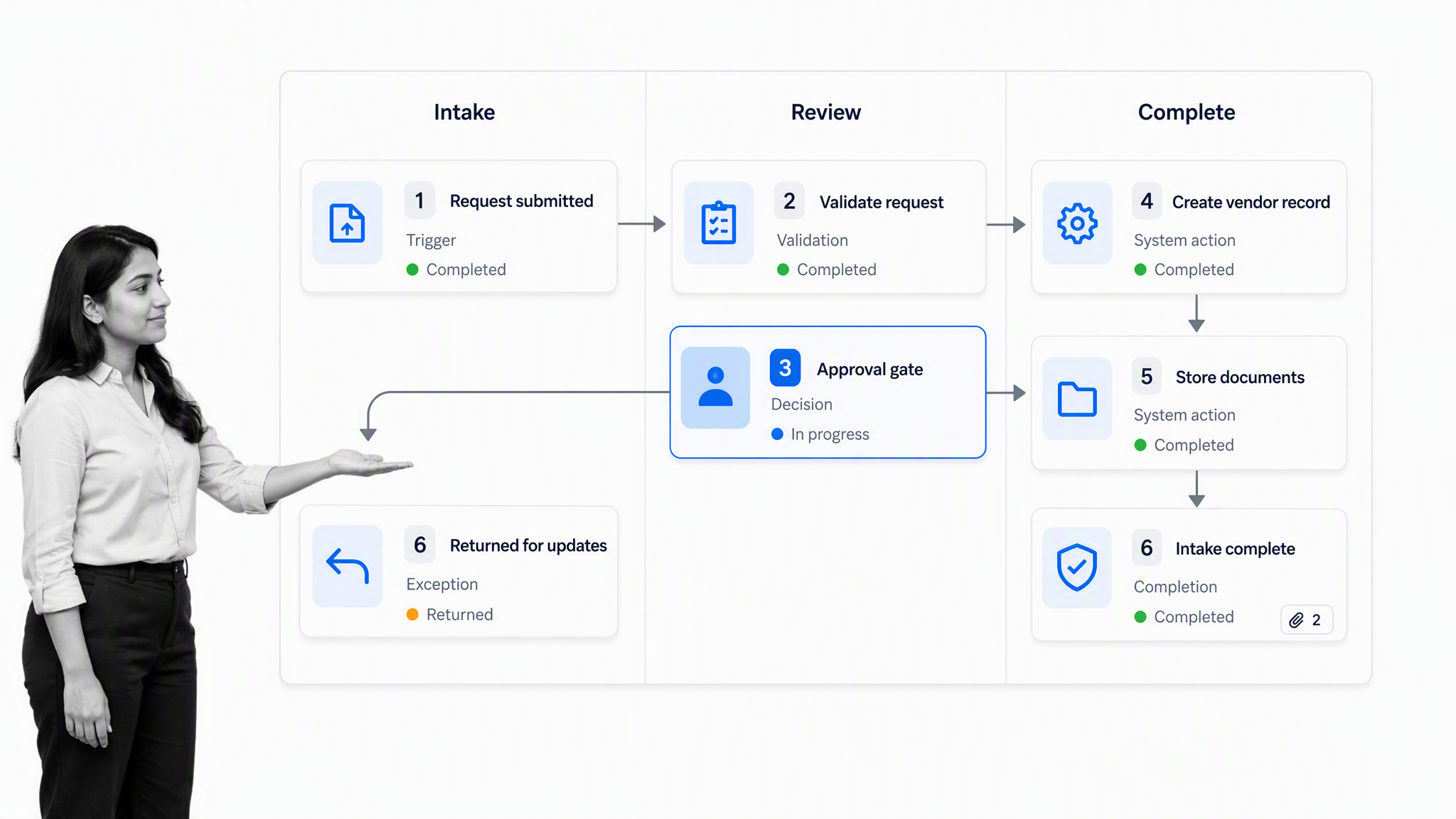
An automation workflow runs as a stateful sequence. Each completed step changes what the workflow knows and what it is allowed to do next. The exact mechanics vary by platform, but the operating pattern is consistent.
1. An event creates a workflow run
A vendor request, new hire record, incident alert, content brief, or scheduled review creates a fresh run. The system captures the event and the initial context instead of asking someone to copy the request into a separate tracker.
2. The workflow validates and enriches the input
Required fields are checked before downstream actions begin. The workflow may look up an existing record, normalize a value, collect supporting documents, or ask the requester to correct missing information. Validation early in the process prevents bad data from spreading across systems.
3. Rules choose the next path
A low-risk request may continue automatically. A high-risk request may add security, finance, legal, or compliance review. A failed validation may return to the requester. These paths should be visible and testable, not buried in custom code that only one person understands.
4. People and systems complete their actions
The workflow assigns human tasks and invokes approved system actions in the correct order. Dependencies stop later steps from running too soon. Notifications are tied to real state changes, so people receive the right prompt at the right moment instead of generic reminders.
5. The workflow closes with proof
Completion should mean more than every box was checked. The workflow should confirm that required approvals happened, connected actions succeeded, exceptions were resolved, and evidence is attached. The final record then becomes a trustworthy operational history.
This stateful model also makes recovery safer. If a connected service is unavailable, the run can remain at the failed action with its context intact. A retry can resume from the correct point instead of restarting the whole process or leaving a half-finished change invisible to the team. Clear failure states are part of the workflow design, not an afterthought for administrators.
Automation workflow examples
The same structure can automate work across operations, HR, finance, marketing, IT, and compliance. The examples below show why workflow automation examples should be evaluated as complete operating loops, not isolated shortcuts.
Vendor onboarding
A vendor workflow captures the request, checks business fit, collects documents, assigns risk review, routes contract approval, creates the approved vendor record, and schedules a later performance review. The new vendor onboarding checklist provides a concrete starting sequence that can be adapted to the organization.
Employee onboarding
An onboarding workflow can trigger from an accepted offer, collect employee details, assign equipment and access tasks, schedule orientation, and confirm first-week follow-up. A reusable employee onboarding workflow reduces coordination without removing the personal work that helps a new hire succeed.
Invoice approval
An invoice workflow captures the invoice, validates the supplier and purchase details, routes approval based on policy, posts the approved transaction, and records the decision. The invoice approval workflow checklist shows how approval can sit inside the sequence rather than in an untracked message thread.
Incident response
An incident workflow records the alert, assigns triage, classifies severity, launches the correct response path, holds risky remediation behind approval, and captures the post-incident review. The incident handling process demonstrates why fast action still needs structured evidence and escalation.
Document review and publishing
A document workflow can collect a draft, assign subject-matter review, route changes, require final approval, publish the accepted version, and archive the record. Document workflow automation is especially useful when revision history, ownership, and proof matter as much as speed.
How to design an automation workflow
Design starts with the operating outcome, not the automation tool. The goal is a process that remains understandable when volume rises, staff changes, integrations fail, or a case takes the exception path.
1. Define the outcome and boundary
State what the workflow produces, where it begins, and what counts as complete. Name the owner who is accountable for the design and the owner responsible for each run. If no one owns the outcome, automation will only move ambiguity faster.
2. Map the current work and remove waste
Observe the real process, including side channels, rework, waiting, duplicate entry, and approvals that exist only by habit. Remove unnecessary steps before automating. Otherwise the new system will preserve the same friction at higher speed.
3. Classify every step
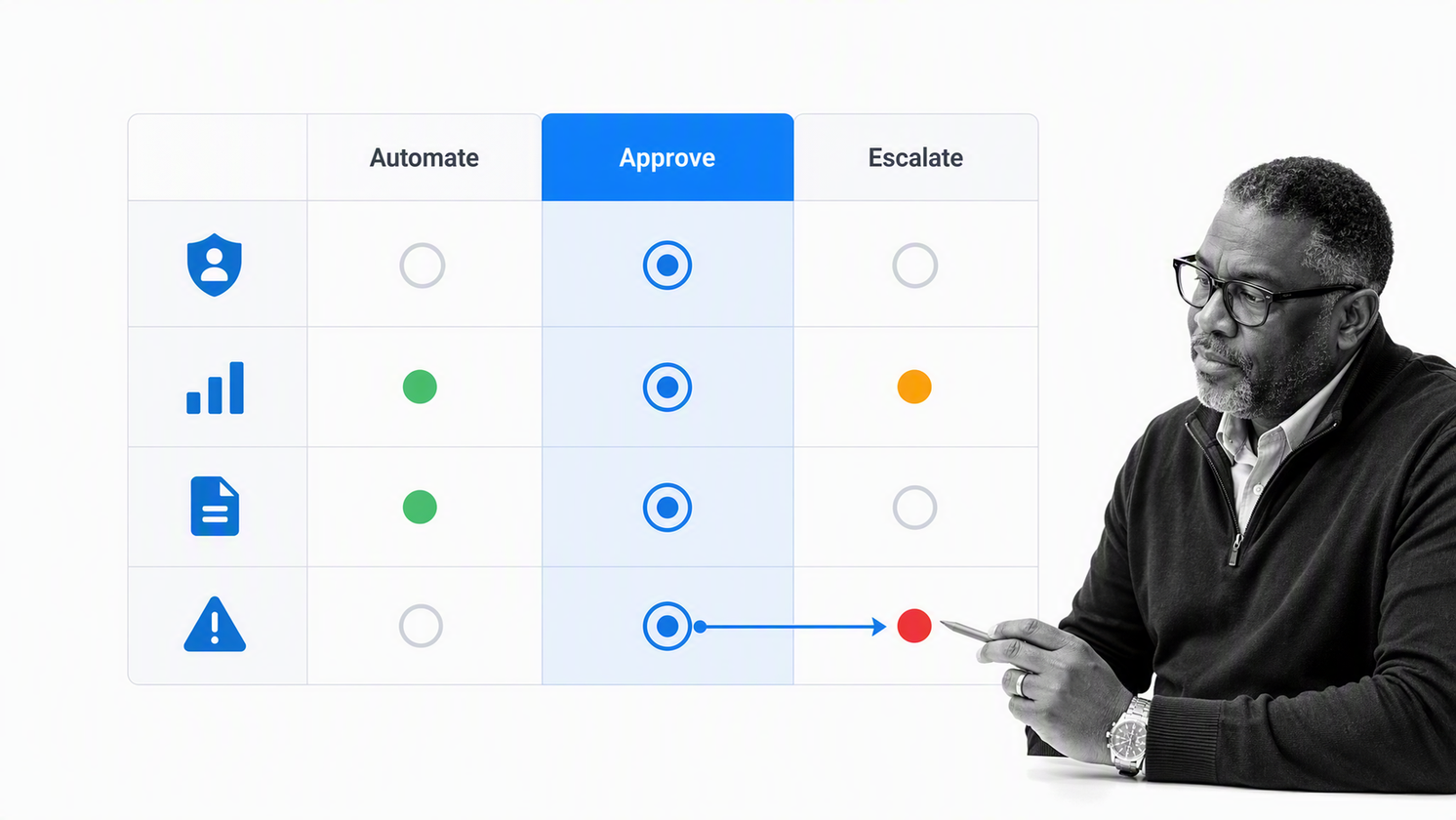
Mark each step as automatic, human, approval, wait, decision, or exception. Automatic actions should be deterministic and reversible where possible. Human steps should supply context and a clear decision. Approval should appear where impact changes, not after the consequential action has already happened.
4. Define data and system contracts
For every connected action, define the input fields, validation rules, source of truth, allowed change, success response, retry policy, and failure owner. This contract makes integration behavior testable and prevents silent partial completion.
5. Build the happy path and exception paths
Start with the most common route, then add the exceptions that materially change ownership, risk, or required evidence. Avoid trying to encode every rare edge case at launch. A clear escalation path is safer than brittle logic for a situation the team barely understands.
6. Test with real cases
Use normal, incomplete, duplicate, high-risk, and failed-integration cases. Confirm notifications, permissions, approvals, retries, and evidence. The guidance from Atlassian on workflow automation also emphasizes starting with an understood process and continuously improving it after deployment.
Testing should also cover volume and ownership changes. A workflow that works for five requests may create a queue problem at fifty. A workflow owned by one expert may fail when that person is away. Workato’s workflow automation guide provides another useful external view of the discipline, including the need to understand the workflow before automating it.
7. Document ownership and change control
Record who may edit the workflow, who approves material changes, how versions are tested, and how users learn about a changed route. A process can become unstable when several builders alter rules without a shared review method. Change control should be proportional to risk, but every production workflow needs a named owner and a traceable path from proposed change to active version.
How to measure and improve automation workflows
Automation is not finished when it runs once. The process should be measured as an operating system, then adjusted when data shows delays, failure patterns, or weak controls.
Measure time, quality, and control
- Cycle time: elapsed time from trigger to verified completion.
- Wait time: time spent waiting for an owner, approval, data, or connected system.
- First-pass completion: the share of runs completed without correction or rework.
- Exception rate: how often work leaves the standard route and why.
- Automation reliability: successful actions, retries, and unresolved failures.
- Evidence completeness: runs that contain every required field, file, approval, and decision record.
Review the process, not only the dashboard
Metrics show where to investigate, but the improvement decision still needs context. Review representative runs, talk with the people who handle exceptions, and compare the documented route with actual behavior. Business process automation benefits compound when teams use the saved coordination time to remove recurring sources of delay and error.
Add AI only where variability justifies it
Rule-based automation remains appropriate for deterministic steps. AI is useful when the workflow must interpret unstructured input, summarize context, draft a recommendation, or choose among bounded tools. An agentic AI workflow needs explicit permissions, evaluation, approval gates, and stop conditions around consequential actions.
For risk-sensitive AI use, the NIST AI Risk Management Framework is a useful external reference for governance, mapping, measurement, and management. It reinforces the need to document roles and oversight rather than treating human review as a vague fallback.
How Process Street runs automation workflows
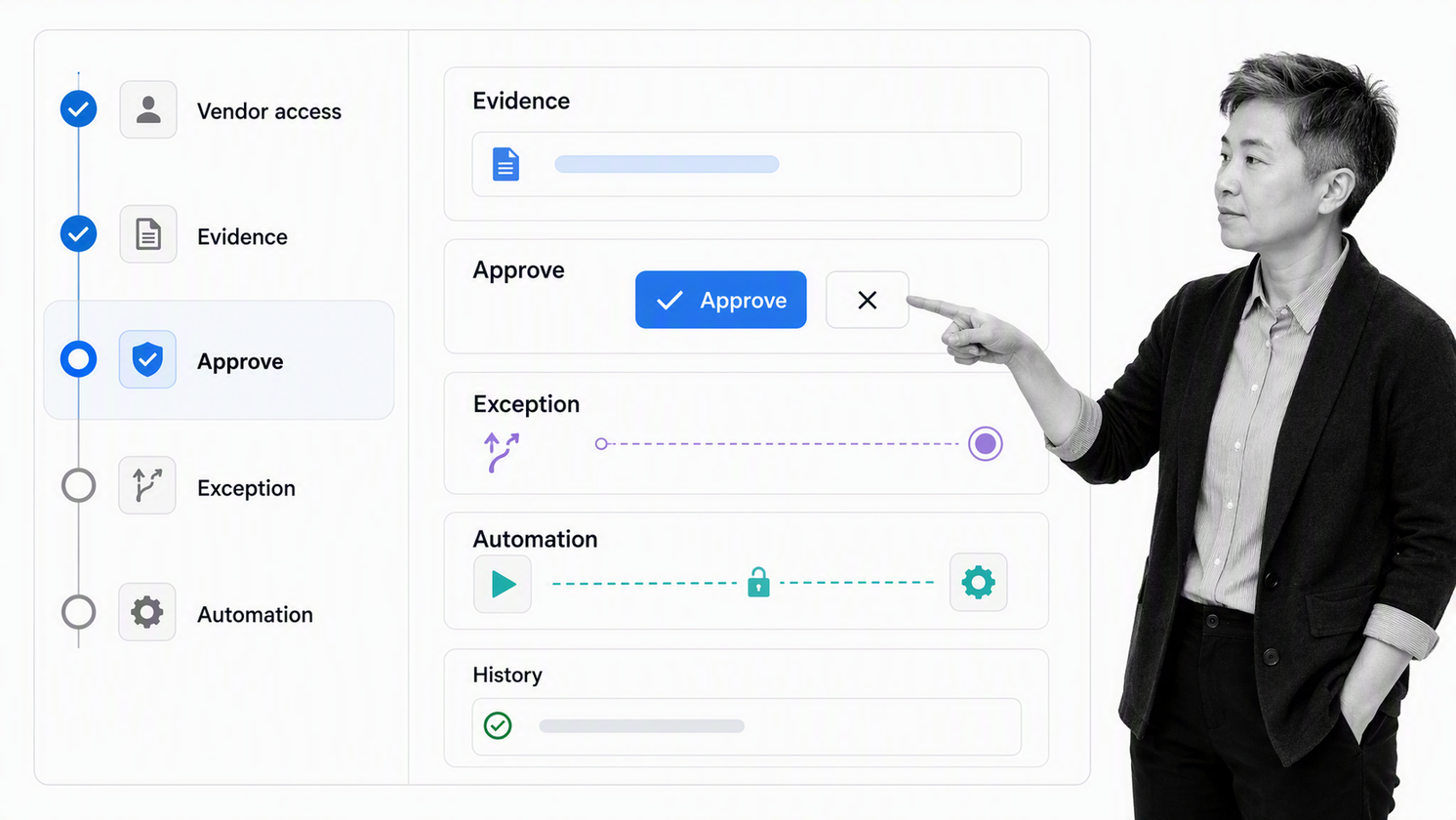
Process Street gives automation workflows an executable process layer. Tasks, owners, structured data, decisions, approvals, conditional routes, connected actions, and history stay attached to the same workflow run.
Turn the procedure into an executable workflow
A Process Street workflow defines the required sequence, assignments, inputs, instructions, and completion criteria. Teams run the process from a reusable model instead of rebuilding coordination for every case.
Place controls inside the route
Required fields stop incomplete work from advancing. Conditional logic reveals the right tasks for each case. Approvals pause material decisions. Exceptions stay visible in the run, which helps the process owner understand both the standard route and the work that needed intervention.
Connect systems without losing context
Process Street has direct, universal integrations to 5,000+ systems. Need a new one? An AI agent builds it on the fly. Connected actions remain part of the workflow stage that authorized them, so the system change is easier to interpret and verify.
Let execution create audit-ready evidence
Forms, files, comments, decisions, approvals, assignments, and task history create proof as work happens. This supports operational review and makes it easier to demonstrate that the process was followed without reconstructing a story from several disconnected tools.
Scale the workflow as the process matures
Start with one important workflow, validate the route, and improve it from real runs. From there, the same operating model can extend into broader automation workflow tools and adjacent processes without losing ownership or control.
FAQs
What is an automation workflow?
An automation workflow is a repeatable sequence in which software moves work, data, or decisions between steps based on defined triggers and rules. It can include human tasks, approvals, exceptions, system actions, and evidence alongside automatic steps.
How does an automation workflow work?
It starts with a trigger, captures and validates input, applies routing rules, assigns human tasks or system actions, handles approvals and exceptions, and closes only when the required outcome and evidence are complete.
What is the difference between workflow automation and task automation?
Task automation performs one bounded action, such as sending a message or copying data. Workflow automation coordinates several dependent tasks and decisions around an end-to-end business outcome.
What are examples of automation workflows?
Common examples include vendor onboarding, employee onboarding, invoice approval, incident response, document review, customer onboarding, access requests, and recurring compliance checks.
How do you build an automation workflow?
Define the outcome and owner, map the real process, remove waste, classify each step, define data and system contracts, add approvals and exception paths, test real cases, and measure performance after launch.
When should an automation workflow include human approval?
Include approval before actions with material financial, legal, security, compliance, customer, or access impact. The reviewer should receive the proposal, context, evidence, and clear options inside the workflow.
