


Turn every policy into automated workflows with built-in enforcement and audit-ready proof.



Workforce Management Tools
Workforce management tools help organizations forecast labor demand, build schedules, capture time and attendance, manage leave, and respond to daily staffing exceptions from one connected operating system.
The category sits between workforce planning and day-to-day execution. A useful tool does more than publish a rota or collect clock punches. It helps managers match coverage to demand, apply labor rules consistently, give employees clear self-service options, and preserve the records behind important decisions.
ADP describes workforce management software as a way to collect and analyze workforce data, track time and attendance, create schedules, and manage overtime and absences. That definition captures the core system, while the operating challenge is broader: teams also need repeatable workflows for exceptions, approvals, training, safety, and policy evidence. See the ADP workforce management guide.
In this article, we are going to cover everything you need to know about workforce management tools, including:
- What are workforce management tools?
- How workforce management tools work
- Core capabilities to look for
- Benefits of workforce management tools
- How to choose workforce management tools
- Where Process Street fits
- How to implement workforce management tools
- Common workforce management mistakes
- FAQs
What are workforce management tools?
Workforce management tools are software applications that help an organization plan, deploy, track, and support its workforce. They bring together labor forecasting, staffing plans, employee scheduling, time and attendance, absence management, workforce analytics, and operational controls.
Some systems cover the full workforce management cycle. Others specialize in one layer, such as scheduling, time capture, leave, capacity planning, skills, or analytics. The right architecture depends on how variable the work is, how many rules shape staffing decisions, and how much operational proof the organization needs.
Workforce management versus workforce planning
Workforce planning asks what capabilities and capacity the organization will need over a longer horizon. Workforce management translates those plans into daily deployment decisions: who works, when they work, where they work, what skills they need, and what happens when the plan changes.
Workforce management versus HRIS
An HRIS is usually the system of record for employee data. Workforce management tools use that data to run schedules, attendance, leave, coverage, and labor decisions. The two categories often overlap, but the operating question is different. The HRIS stores the employee record, while workforce management coordinates the work around that employee.
When spreadsheets stop being enough
A spreadsheet may work when schedules rarely change, one manager owns the process, and local rules are simple. It becomes risky when multiple locations, skills, contracts, overtime rules, availability patterns, leave requests, and shift swaps interact. Version conflicts then become coverage problems, payroll corrections, or undocumented exceptions.
How workforce management tools work
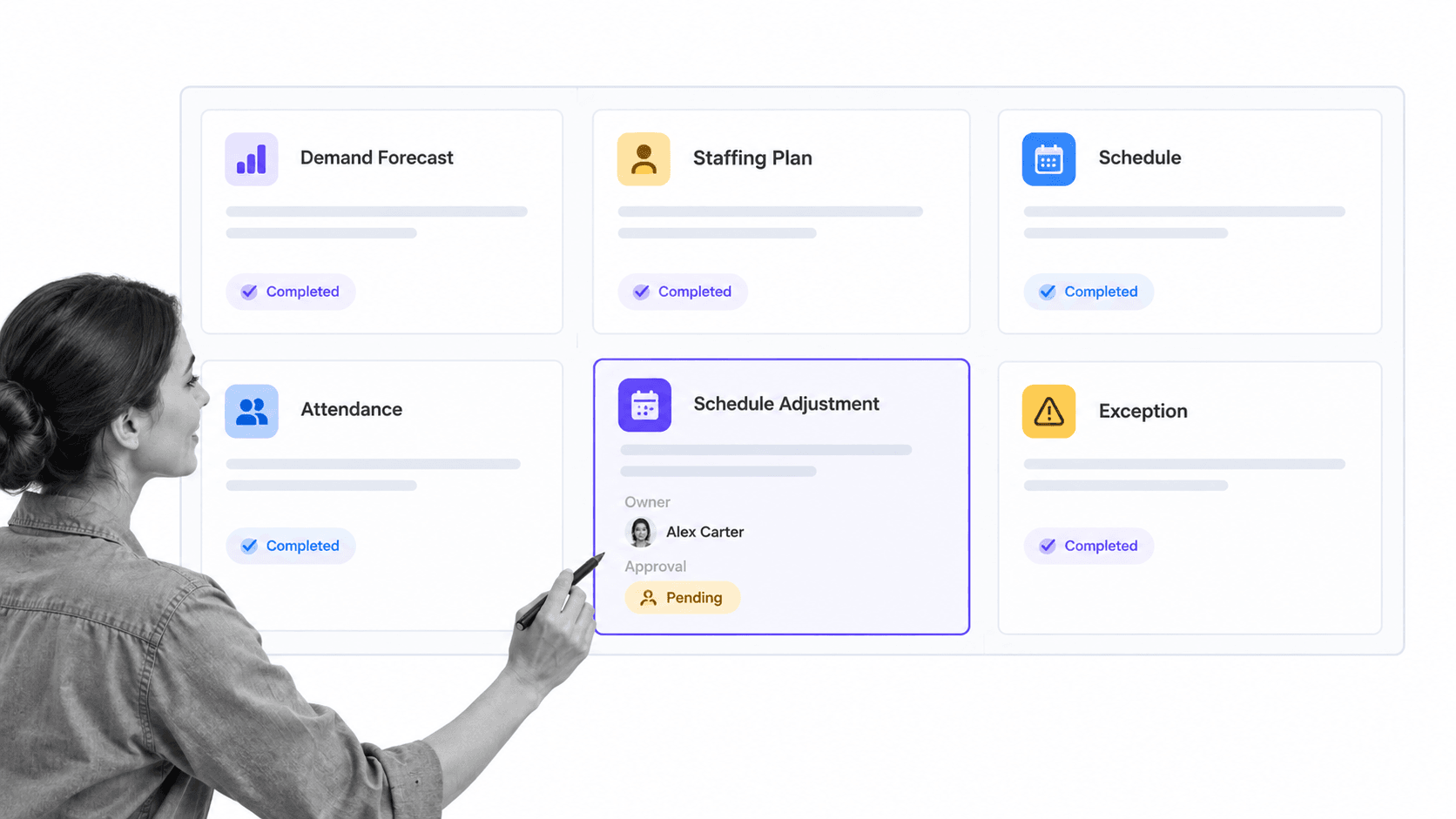
Most workforce management systems run a repeating loop. They estimate demand, translate demand into staffing requirements, build or recommend a schedule, capture what actually happened, flag exceptions, and feed the results into the next planning cycle.
1. Forecast demand
The process starts with expected workload. A contact center may forecast interactions by interval. A retailer may use traffic and transaction patterns. A field service team may use jobs, locations, travel time, and required certifications. The forecast should describe work demand, not simply repeat last week’s headcount.
2. Convert demand into staffing requirements
The system translates workload into the number and mix of people required. Good models account for skills, service targets, breaks, training, leave, meetings, and predictable shrinkage. A headcount total without skill and availability constraints can still create an unusable plan.
3. Build and publish schedules
Scheduling matches requirements with employee availability, qualifications, contractual limits, preferences, and local rules. Managers need enough control to handle real operations, while employees need timely visibility and a clear route for availability changes or shift requests.
4. Capture time and attendance
Actual time data shows whether the plan occurred. The U.S. Department of Labor recordkeeping guidance explains the records covered employers must preserve, including hours worked each day and each workweek. Tools should make corrections, approvals, and the reason for changes visible rather than silently overwriting history.
5. Resolve exceptions
Late arrivals, missed punches, unexpected absences, demand spikes, skill gaps, and overtime risks require decisions. The system should route the exception to an owner, provide the relevant context, apply the right approval path, and record the outcome.
6. Learn from actual results
Forecast accuracy, schedule adherence, absence patterns, overtime, open shifts, and service outcomes should inform the next cycle. The goal is not to punish variance. It is to understand which assumptions failed and improve the operating plan.
Core capabilities to look for
Labor forecasting and capacity planning
Forecasting should connect business demand to staffing requirements at the interval and skill level that matters. Look for scenario comparison, seasonality controls, historical adjustments, and a visible explanation of the assumptions behind the forecast.
Employee scheduling
Scheduling should handle availability, qualifications, locations, breaks, rotations, shift patterns, and open work without forcing managers to rebuild the plan manually. Employee self-service can reduce back-and-forth when it supports controlled shift swaps, availability updates, and schedule acknowledgments.
Time, attendance, and leave
Time capture needs reliable clocking methods, correction workflows, manager approval, overtime visibility, and a clear payroll handoff. An absence management process should connect balances, policy rules, coverage impact, approvals, and return-to-work steps instead of treating a request as a disconnected calendar event.
Rules and compliance controls
Workforce rules can involve pay, breaks, overtime, recordkeeping, contracts, qualifications, and local scheduling requirements. The U.S. Department of Labor FLSA guidance is one authoritative starting point for federal wage and hour obligations, but buyers must map every rule that applies to their workforce and locations.
Skills, credentials, and training readiness
A schedule is only viable when assigned employees have the required capability. Link role and credential data to an employee training checklist so expired certifications, incomplete training, or missing policy acknowledgments do not surface after the shift begins.
Analytics and operational alerts
Useful analytics answer a decision question. Which sites are under-covered? Where is overtime building? Which skills constrain capacity? Which exceptions repeat? Reports should let an operator move from a signal to the employees, schedules, rules, and actions behind it.
Employee and manager experience
The mobile and self-service experience matters because workforce data is created by everyday actions. Employees should be able to view schedules, request time, correct records, and understand decisions. Managers should be able to resolve exceptions without exposing sensitive information or bypassing controls, including when an employee performance review workflow depends on accurate attendance and training records.
Benefits of workforce management tools
Better coverage
Forecast-linked scheduling helps teams place the right capacity where demand is expected. This reduces the chance that a full headcount still produces an uncovered skill, location, or time interval.
Less administrative rework
Connected schedules, time records, leave decisions, and approvals reduce duplicate entry and reconciliation. The benefit is not simply faster administration. It is fewer hidden handoffs where data can become stale or lose its decision context.
More consistent rule application
Rules are easier to apply consistently when they are built into the workflow. The system can warn about a threshold, require justification, route an exception, and preserve the approval. Human judgment still matters, but it becomes visible and reviewable.
Clearer employee communication
A single source for schedules, requests, status, and changes gives employees more predictable information. That clarity is especially important when work is shift-based, distributed, mobile, or affected by frequent changes.
Stronger operational evidence
Workforce records support payroll, audits, safety, training, and policy enforcement. An HR compliance audit checklist helps teams verify that the process contains the required owners, records, approvals, and corrective actions.
How to choose workforce management tools
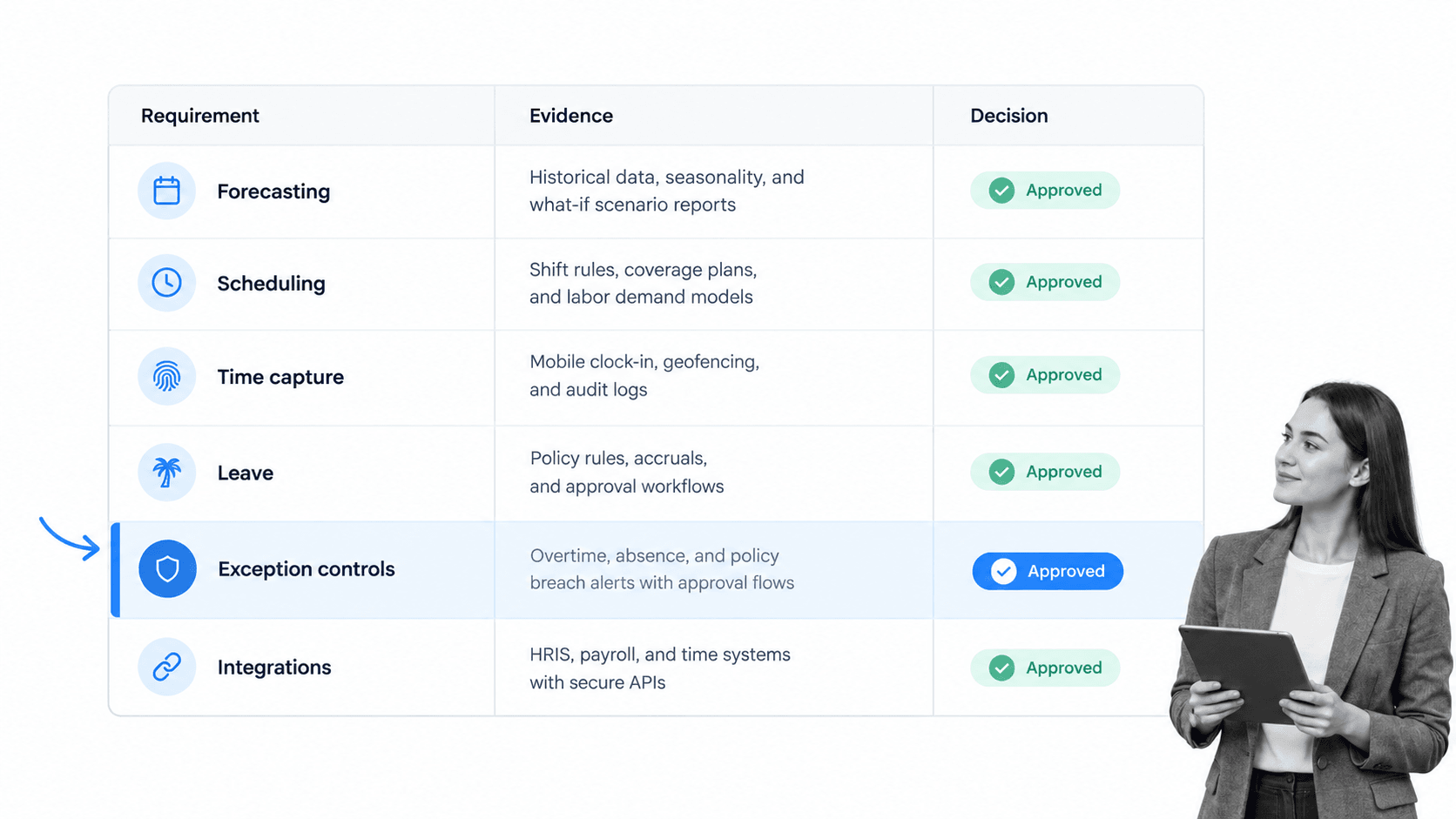
Choose from the operating model backward, not from the longest feature list forward. A tool that excels at complex shift optimization may be unnecessary for a stable office schedule. A lightweight scheduler may fail immediately in a multi-location, highly regulated, skills-constrained operation.
Define the workforce and work patterns
Document workforce types, locations, time zones, shift structures, skills, contracts, union or agreement constraints, remote work patterns, and seasonal variation. Include contractors and contingent workers when they participate in the same operating plan.
Map the decisions the tool must support
List the decisions managers make before, during, and after a work period. Examples include approving availability, filling an open shift, correcting time, escalating absence, authorizing overtime, confirming credentials, and validating a return-to-work requirement.
Separate system-of-record needs from workflow needs
Decide which system owns employee identity, payroll data, schedules, time records, policies, evidence, and analytics. Avoid creating two authoritative records for the same fact. A workflow management system can coordinate decisions and handoffs without pretending to own every underlying workforce record.
Test the hardest scenarios
A polished demo of a normal week proves little. Test last-minute absence, a missed punch, a cross-location worker, overlapping qualifications, an overtime threshold, a retroactive correction, an unavailable approver, and a schedule that changes after publication.
Evaluate permissions and audit history
Confirm that employees, supervisors, planners, HR, payroll, and auditors see only what they need. Review how the tool records changes, approvals, overrides, comments, and exports. An audit log is useful only when it explains who changed what and why.
Measure employee usability
Include employees in the evaluation. Check whether the mobile experience is accessible, whether requests are easy to understand, whether schedule changes are visible, and whether a worker can correct an error without creating a parallel email process.
Where Process Street fits
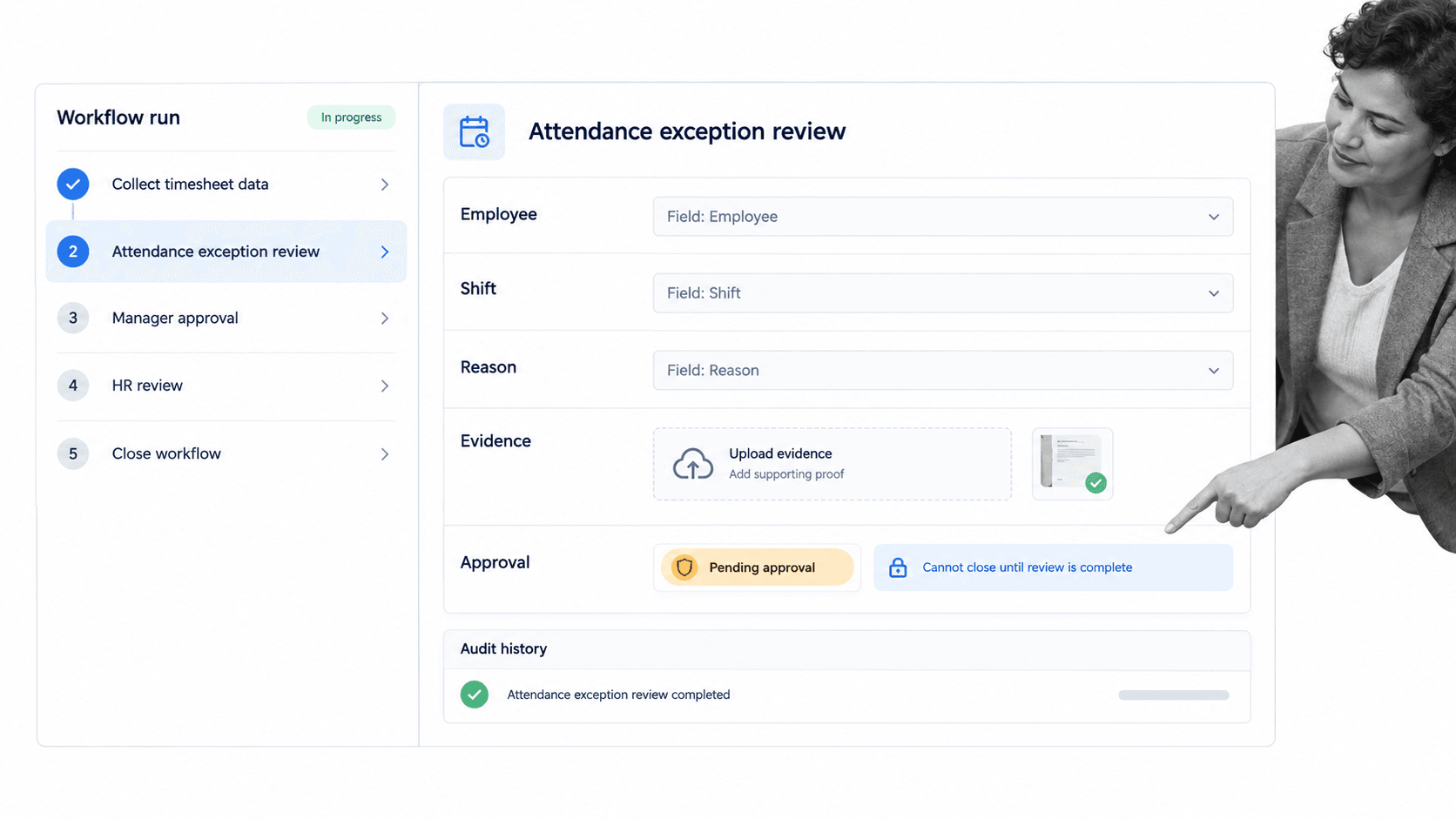
Process Street complements workforce management tools by governing the operational work around schedules, time records, leave, training, and staffing exceptions. It does not replace a time clock, payroll engine, or specialist forecasting system. It makes sure the decisions and follow-up work around those systems are assigned, controlled, and evidenced.
Standardize exception handling
A workflow can collect the employee, shift, exception type, reason, supporting evidence, owner, required action, and approval in a consistent format. This prevents each manager from inventing a different resolution process.
Route work with conditional logic
Different exceptions need different paths. Conditional logic can show the right tasks and fields based on location, severity, worker type, or response. A missed punch can follow a simple correction route, while a safety or policy event can require formal review.
Control approvals
Required fields, stop tasks, and approval tasks can prevent premature closure. Teams can require manager, HR, payroll, or compliance review only when the facts of the case call for it.
Connect workforce systems
Process Street has direct, universal integrations to 5,000+ systems. Need a new one? An AI agent builds it on the fly. A scheduling, time, HR, or payroll event can start a workflow, while the completed workflow sends approved data and evidence to the next system.
Preserve operational proof
Task history, form values, files, comments, approvals, and completion status stay attached to the workflow run. The same pattern supports an employee onboarding checklist, policy acknowledgment, leave review, performance process, or employee offboarding checklist.
How to implement workforce management tools
1. Choose one operating scope
Start with a business unit, location, or workforce type that has visible scheduling or time-management pain and committed owners. A bounded first scope makes data cleanup, rule mapping, training, and outcome measurement practical.
2. Map the current process
Document how demand becomes a schedule, how employees communicate availability, how time is recorded, how leave is approved, how exceptions are resolved, and how payroll receives final data. Include shadow spreadsheets, inbox approvals, and manual workarounds.
3. Clean the data
Verify employee identifiers, roles, managers, locations, time zones, skills, contracts, availability, leave balances, and pay-rule inputs. Do not automate around unclear ownership or duplicate records. Bad workforce data creates confident but unusable schedules.
4. Configure rules and decision rights
Write down who can create, publish, change, and approve schedules and records. Define exception thresholds, escalation timers, evidence requirements, and override authority. The tool should reflect an agreed operating policy rather than becoming the place where policy is improvised.
5. Design integrations and controls
Connect the minimum systems needed for the first scope, then verify each handoff. Use a human resources compliance checklist to confirm access, retention, policy, training, and recordkeeping requirements before launch, and apply workflow automation software only after the owners and control points are clear.
6. Pilot with real edge cases
Run at least one complete planning cycle and inject realistic changes. Check late availability, leave, overtime risk, open shifts, time corrections, and unavailable approvers. Verify what employees see, what managers can change, and what evidence remains after resolution.
7. Train by role
Planners, managers, employees, HR, payroll, and auditors need different training. Teach the actions each role performs, the decisions they own, and the route for help. Generic feature training does not prepare people for real exceptions.
8. Measure the operating result
Track a small set of outcomes tied to the original problem, such as unfilled work, schedule changes after publication, time correction volume, overtime exceptions, leave turnaround, payroll adjustments, or manager effort. Review employee experience alongside efficiency.
9. Expand deliberately
Add locations, workforce types, rules, and modules only after the first operating loop is stable. Preserve local requirements without allowing every team to rebuild the process from scratch. A shared core with controlled variations is easier to govern than dozens of independent configurations.
Common workforce management mistakes
Buying a feature catalog
A long feature list does not prove that the system can handle the organization’s actual staffing decisions. Define the operating scenarios first, then score the tool against them.
Automating a broken policy
Software cannot resolve unclear decision rights or contradictory rules. Agree on the policy, exception path, and owner before converting them into configuration.
Ignoring employee participation
Schedules, availability, time records, and leave depend on employee input. If the employee experience is confusing or inaccessible, people will create workarounds and the data will lose reliability.
Treating compliance as a checkbox
Controls must match the workforce, jurisdiction, contracts, and risks. The OSHA safety and health program guidance emphasizes worker participation, hazard identification, training, and ongoing improvement, all of which require operating processes beyond a software toggle.
Stopping at the alert
An overtime warning, missed credential, absence, or time anomaly is only a signal. The organization still needs an owner, investigation, action, approval, evidence, and closure rule.
Failing to govern configuration changes
Schedule rules, thresholds, permissions, integrations, and reports change over time. Record why the change was made, who approved it, how it was tested, and how it can be reversed. Otherwise the system slowly becomes a new source of process drift.
FAQs
What are workforce management tools?
Workforce management tools are software applications that help organizations forecast labor demand, schedule employees, track time and attendance, manage leave, analyze coverage, and handle staffing exceptions. They connect workforce plans to daily operating decisions.
What are the main types of workforce management tools?
The main types include labor forecasting, employee scheduling, time and attendance, absence and leave management, workforce analytics, skills and credential tracking, and workflow tools for approvals and exceptions. Some platforms combine several types in one suite.
What is the difference between workforce management and HR software?
HR software usually manages employee records, recruiting, benefits, or talent processes. Workforce management focuses on deploying and tracking labor in daily operations, including demand, schedules, attendance, leave, coverage, and exceptions.
How do you choose workforce management tools?
Start with the workforce, work patterns, rules, and decisions the system must support. Then test forecasting, scheduling, time capture, employee usability, exception handling, permissions, integrations, and audit history against realistic operating scenarios.
Can Process Street replace workforce management software?
Process Street does not replace specialist time clocks, payroll engines, or advanced labor forecasting. It complements workforce management software by coordinating exception handling, approvals, evidence, training, onboarding, and other repeatable workforce operations.
How long does workforce management implementation take?
The timeline depends on scope, data quality, rule complexity, integrations, and workforce size. A focused rollout should start with one operating scope, complete a real planning cycle, test edge cases, and expand only after the core workflow is stable.
