


Turn every policy into automated workflows with built-in enforcement and audit-ready proof.



Software Programs for Businesses
Software programs for businesses are applications that help a company perform, control, record, or improve work. They support functions such as finance, customer management, people operations, communication, data, security, and workflow execution.
The useful question is not how many applications a business owns. It is whether the stack helps people move work from request to result without duplicate entry, missing context, unclear ownership, or weak controls. A small, connected stack can outperform a large collection of disconnected tools.
This guide explains the main software categories, how they fit together, how to choose them, and how Process Street can serve as the execution layer that coordinates work across the stack.
In this guide, we are going to cover:
- What are software programs for businesses?
- Why businesses need a deliberate software stack
- The core types of software programs for businesses
- How business software should work together
- How to choose business software without creating tool sprawl
- How to implement new business software
- How to measure the value of business software
- Use Process Street as the execution layer across business software
- Software programs for businesses FAQs
What are software programs for businesses?
Business software is any application used to complete or support a business function. Some systems hold authoritative records. Some help people communicate or analyze information. Others coordinate repeatable work, apply decision rules, automate handoffs, and preserve evidence.
A practical definition
A software program becomes business software when it contributes to an operating outcome. A spreadsheet used for a budget, a customer database used by sales, a payroll application used by HR, and a workflow platform used by operations all qualify. The category describes the job the program performs, not its technical architecture.
Programs, platforms, suites, and systems
A program usually solves a focused task. A platform provides a broader environment for several related jobs. A suite packages multiple applications under one vendor or data model. A system combines software with people, rules, data, and processes. These terms overlap in ordinary use, so buyers should focus on the operating capability they need rather than the label on the product page.
Off-the-shelf, configured, and custom software
Off-the-shelf applications provide standard capabilities that many companies share. Configured software adapts those capabilities through fields, rules, permissions, and workflows. Custom software is built for a specific need. The right choice depends on how distinctive the process is, how quickly the business must move, and whether the company can support the system over time. Government guidance on types of business software makes the same practical distinction between packaged and bespoke approaches.
Cloud and installed applications
Cloud applications are accessed through a browser or app and are operated by the provider. Installed applications run on company-managed devices or infrastructure. Many businesses use both. The decision should reflect security requirements, connectivity, administration capacity, data location, resilience, and the systems the application must connect to.
Why businesses need a deliberate software stack
A deliberate software stack turns recurring work into a managed capability. It gives each important record a home, makes ownership visible, reduces manual coordination, and lets leaders see whether work is producing the intended result. Treating the stack as business operations technology keeps product choices tied to the way the company actually runs.
Consistency
Good software makes the expected path easier to follow. Required fields, standard templates, task sequences, and validation rules reduce variation where consistency matters. The result is not rigid work. It is a reliable baseline with clear exception paths.
Capacity
Automation absorbs repetitive coordination. It can create tasks, route requests, update records, notify owners, and collect evidence. That leaves people more time for judgment, customer interaction, problem solving, and improvement. A guide to automated operations software shows how this changes the flow of recurring work.
Control and proof
Business software can enforce permissions, required steps, approvals, retention rules, and audit history. Those controls matter when a process affects money, customers, regulated data, quality, or safety. The record should show what happened as part of execution, not require a later reconstruction from inboxes and chat threads.
Better decisions
Reliable decisions depend on reliable operating data. Software captures volume, cycle time, outcomes, exceptions, and trends. A strong data management approach defines which system owns each record and how that data can be used safely across the business.
The core types of software programs for businesses
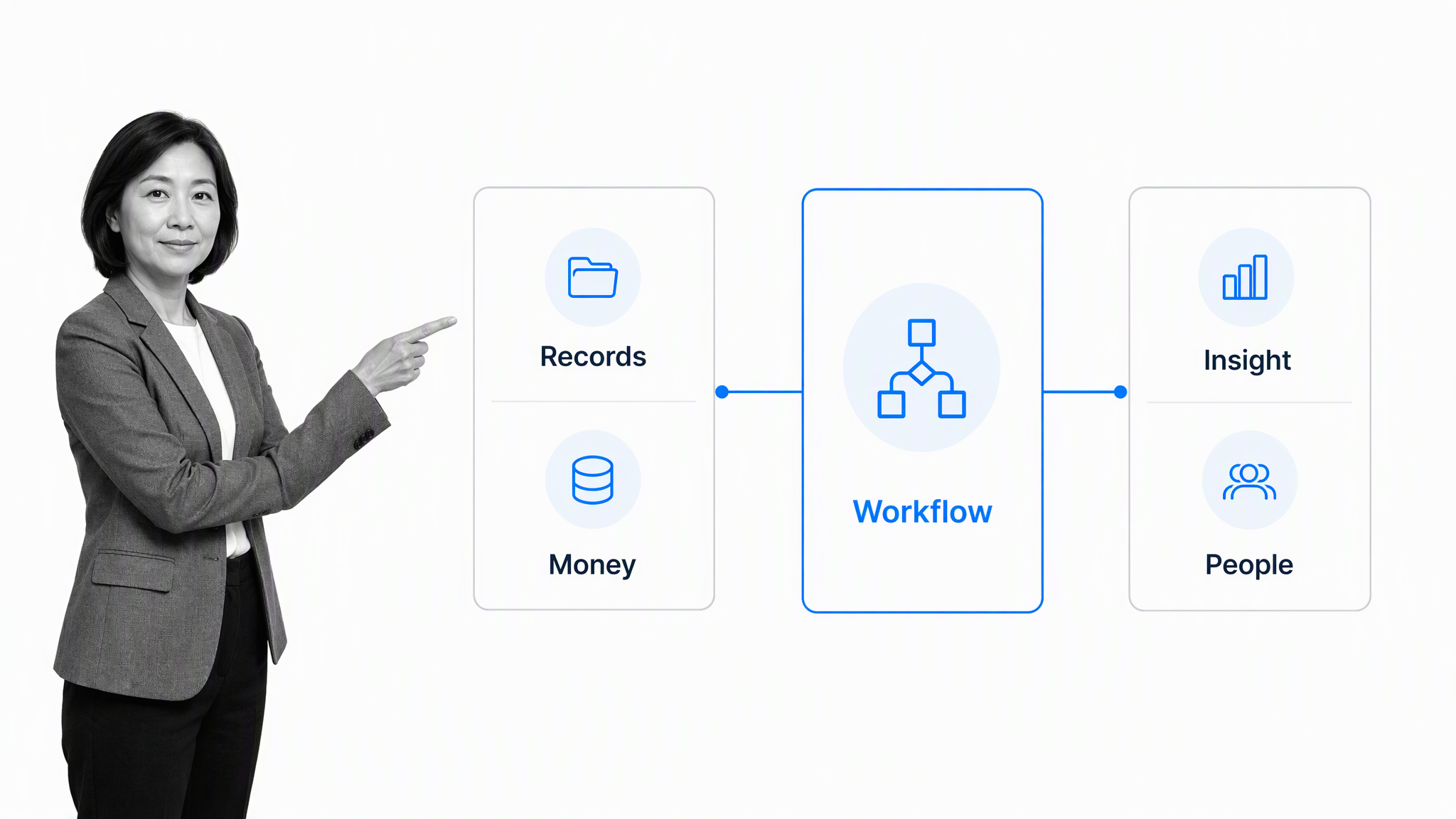
Most companies need several categories, but not every company needs a separate product for each one. Start with the work and the records the business must protect, then decide which categories can share a platform and which need specialized depth.
Finance and accounting software
Finance applications manage transactions, billing, expenses, cash, payroll inputs, planning, reporting, and close activities. Their most important role is often to preserve authoritative financial records. Workflows around those records still need ownership, review, evidence, and exception handling.
Customer relationship and service software
Customer systems manage prospects, accounts, interactions, opportunities, support requests, contracts, and lifecycle information. They help teams coordinate a shared customer view. The operating challenge is keeping handoffs between marketing, sales, implementation, service, and renewal explicit.
People and workforce software
People applications support recruiting, onboarding, employee records, scheduling, payroll, learning, performance, and access changes. These processes cross HR, IT, security, finance, managers, and employees, which makes controlled workflows especially important.
Communication and collaboration software
Communication tools help teams exchange messages, meet, edit files, and coordinate decisions. They are useful interaction surfaces, but conversation is not a durable operating process. Important commitments should move into the system that owns the task, approval, or record.
Project and resource management software
Project applications organize temporary work around a defined outcome. Resource tools help teams plan capacity, schedules, skills, and assignments. Recurring business operations need a different structure: stable triggers, repeatable tasks, rules, evidence, and continuous review. The distinction is clearer when you understand what a workflow is.
Workflow and process management software
Workflow software coordinates repeatable work across people and systems. It assigns tasks, applies logic, manages approvals, triggers automations, records evidence, and exposes exceptions. A broader business process management software view helps companies connect individual workflows to governance and improvement.
Analytics and reporting software
Analytics applications turn operating data into measures, trends, forecasts, and alerts. They are most useful when the underlying definitions are stable. If departments measure the same outcome differently, a dashboard can make disagreement look precise rather than resolve it. Workflow analytics connects measures back to the actual path work followed.
Security, identity, and compliance software
Security software protects devices, identities, networks, information, and access. Compliance applications can organize policies, risks, controls, evidence, findings, and reviews. The NIST Small Business Cybersecurity Corner provides practical guidance for managing technology risk as the stack grows.
How business software should work together
A business software stack works when each application has a clear role and the full process can cross system boundaries without losing ownership or evidence. Architecture matters, but operating design matters more.
Systems of record
A system of record owns the authoritative version of important data. Customer, employee, financial, product, and compliance records may live in different systems. The stack should define which one wins when values conflict and who may change the record.
Systems of engagement
People may begin work in email, chat, a portal, or a form. These surfaces make participation convenient, but they should not fragment the operating record. A request needs a defined path into the workflow and the relevant system of record.
The execution layer
The execution layer coordinates the steps between systems. It knows the current stage, the owner, required information, decision rules, deadlines, approvals, and exception route. That role is why business operations software is often more valuable than another isolated departmental application.
Integration and automation
Integration moves information or actions between tools. Automation uses those connections to progress work. A good process integration design avoids duplicate data entry, makes failures visible, and preserves the context needed to understand why an action occurred.
Human judgment
Not every decision should be automatic. High-impact actions may need review, approval, or documented reasoning. The stack should automate routine coordination while making consequential judgment visible, timely, and accountable.
How to choose business software without creating tool sprawl
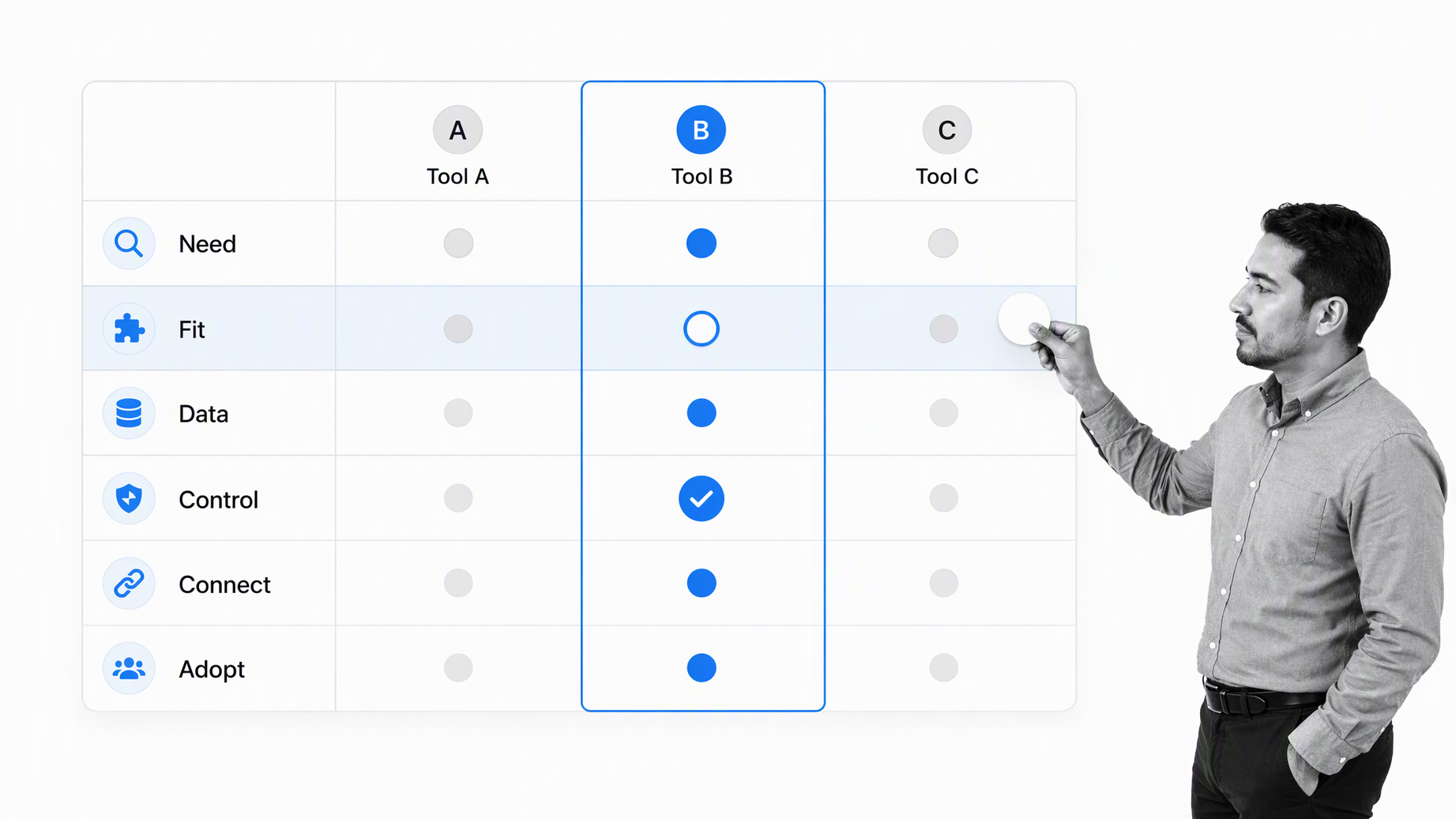
Choose software by mapping the business problem before comparing products. A feature list can tell you what a tool contains. It cannot tell you whether the tool fits the process, data, risk, and people around your work.
Start with the operating outcome
Define the result the business needs, who receives it, how often the work happens, and what failure costs. A business requirements workflow can capture stakeholder needs before product demonstrations create solution bias.
Map the current workflow
Document the trigger, inputs, tasks, decisions, systems, handoffs, exceptions, outputs, and evidence. A tool should remove a real constraint or risk in this path. If the workflow is unclear, automation can make the confusion move faster.
Decide what record the tool owns
Every new program should have a defined information responsibility. State which records it creates, reads, changes, and retains. This prevents two systems from becoming competing sources of truth and reduces uncontrolled exports or spreadsheets.
Evaluate control and security
Review permissions, authentication, approval support, audit history, data handling, recovery, administration, and vendor risk. CISA guidance to use strong passwords is one basic control, but the full evaluation should reflect the sensitivity and consequence of the process.
Test integration in the real process
A connector on a product page is not proof that the end-to-end workflow works. Test representative records, errors, retries, permissions, and exception paths. Confirm that failures reach an owner and that the operating record remains understandable.
Measure adoption effort
The best functional fit can still fail if the interface, terminology, training, and administration burden do not match the team. Include actual users in the pilot. Observe where they hesitate or leave the supported path instead of relying only on survey intent.
Use a selection workflow
A structured vendor selection workflow keeps requirements, due diligence, recommendations, controls, and approval in one record. It also prevents a persuasive demonstration from replacing the business case.
How to implement new business software
Implementation is an operating change, not a login distribution exercise. The program must fit the workflow, records, decision rights, support model, and measures around it.
Step 1: Establish ownership
Assign an executive sponsor, business owner, system administrator, security owner, and process owner. Clarify who approves configuration changes, manages access, responds to failures, and reviews whether the program still earns its place in the stack.
Step 2: Configure the smallest useful path
Begin with one important workflow and a small set of representative cases. Configure fields, roles, rules, templates, approvals, and integrations needed for that path. Avoid reproducing every historical workaround in the new system.
Step 3: Migrate and validate data
Clean the records that matter, define field mappings, test permissions, and reconcile sample results. Preserve the audit and retention needs of historical information. A successful migration is not just a completed import. Users must be able to trust the resulting record.
Step 4: Pilot routine and exceptional cases
Test normal, incomplete, urgent, high-risk, and unusual cases. Include integration failures and unavailable approvers. The pilot should show how the system behaves when reality leaves the happy path.
Step 5: Train through scenarios
Teach people how to perform the work, not how to tour menus. Give each role realistic scenarios and show where decisions, evidence, and exceptions belong. Use a standard operating procedure template to keep instructions current with the supported workflow.
Step 6: Launch, support, and improve
Monitor early runs, adoption, errors, blocked work, and support requests. Route improvement ideas through a governed process improvement plan so configuration changes solve measured problems rather than create new variation.
How to measure the value of business software
Measure business software against the operating result it was selected to improve. Logins and active users matter, but they are adoption signals, not proof of value.
Outcome measures
Track the result the workflow exists to produce: accurate records, timely completion, customer activation, clean close, controlled approval, resolved incident, or another concrete outcome. Compare results before and after implementation with the same definition and scope.
Flow measures
Cycle time, wait time, throughput, queue age, overdue work, rework, and handoff delay show whether work moves better. Segment the measures by path or risk level so legitimate complexity does not hide problems in routine cases.
Control measures
Track missing evidence, bypasses, failed checks, access exceptions, approval reversals, integration errors, and unresolved remediation. These measures reveal whether faster work is also controlled work.
Adoption and support measures
Monitor completion in the supported system, use of shadow spreadsheets, help requests, configuration changes, and role-specific adoption. Low adoption may signal poor training, but it can also reveal a weak process fit or an unnecessary tool.
Portfolio measures
Review license use, overlapping capability, administration effort, integration reliability, data duplication, and retirement candidates across the full stack. A quarterly review can remove software that no longer serves a distinct operating purpose. SBA research on small business use of digital tools shows how broad the technology landscape can become, which makes portfolio discipline important.
Use Process Street as the execution layer across business software
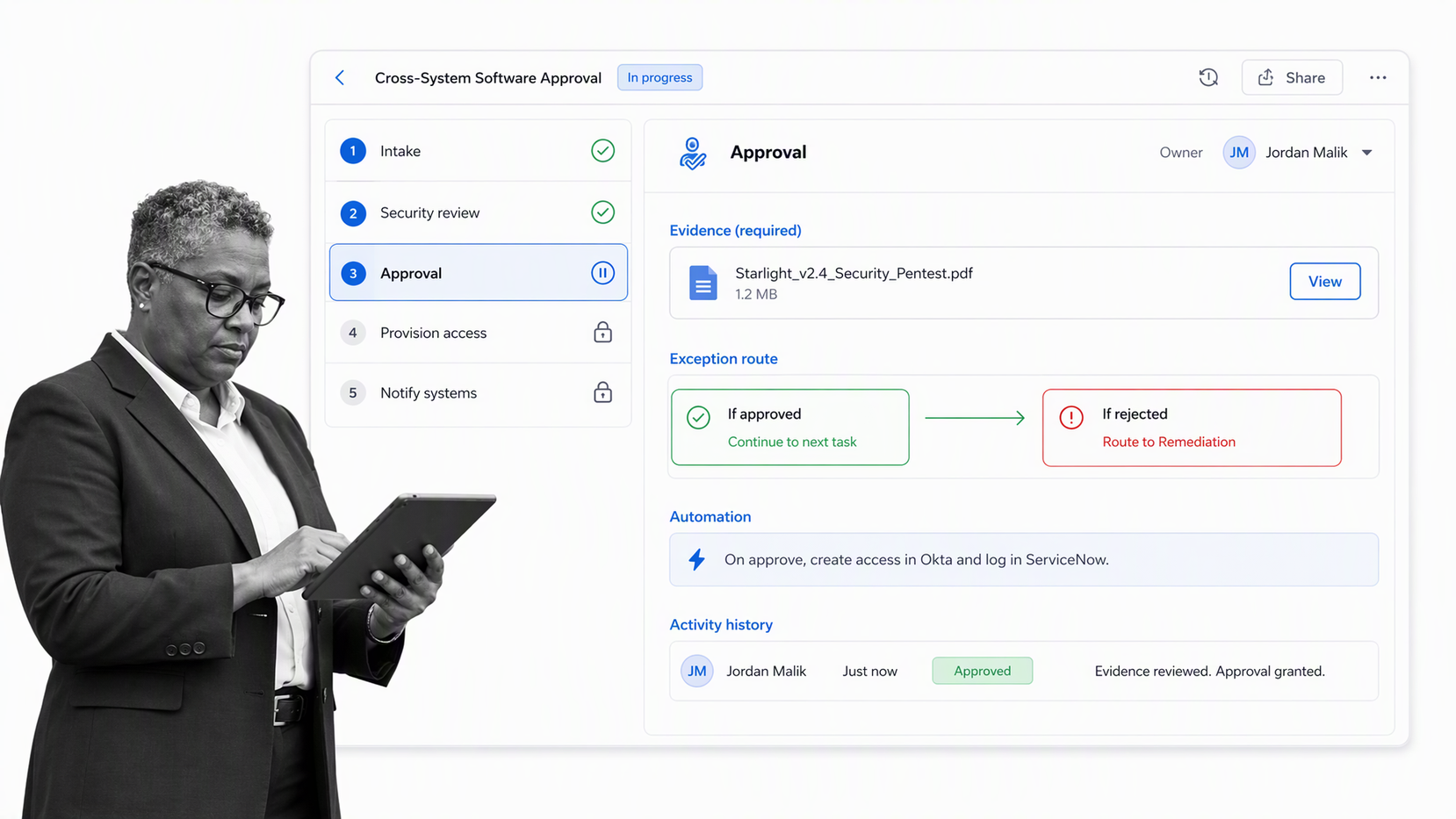
Process Street is an agentic process automation platform for high-stakes operations. It provides the execution layer between systems of record, communication surfaces, and the people responsible for an outcome.
Turn procedures into executable workflows
Tasks, forms, instructions, dependencies, due dates, and assignments place the operating standard inside the work. Teams can begin with a defined process and improve it from evidence instead of rebuilding each run in messages and spreadsheets.
Control decisions and exceptions
Conditional paths route cases according to their data. Approvals create explicit review gates. Required evidence keeps proof attached to the task. Exceptions remain visible inside the workflow rather than disappearing into a private conversation.
Coordinate the software stack
Process Street has 5,000+ integrations. That allows workflows to coordinate systems across finance, customer operations, people operations, data, and other business functions while preserving one governed path for execution.
Use agents with accountability
AI agents can execute assigned work and operate software, while approval gates keep consequential write actions under human control. The workflow retains ownership, decisions, evidence, and activity history so automation increases capacity without erasing accountability.
Improve from real execution
Cross-run data shows where work waits, fails, branches, or requires repeated intervention. Teams can use that evidence to change the workflow, the connected system, the control design, or the training. This makes software improvement part of operations rather than a separate technology project.
Software programs for businesses FAQs
What are software programs for businesses?
Software programs for businesses are applications used to perform, control, record, or improve company work. They include finance, customer, people, collaboration, project, workflow, analytics, security, and compliance software.
What software programs does a small business need?
A small business usually needs software for money, customer records, communication, secure access, and the workflows that deliver its product or service. The exact stack depends on the operating model, industry, risk, and whether the company manages inventory, employees, regulated data, or complex customer work.
How do you choose the right business software?
Start with the operating outcome and map the current workflow. Then evaluate process fit, record ownership, control, security, integration, administration, adoption effort, and measurable value before choosing a product.
How many software programs should a business use?
There is no ideal number. A business should use the smallest connected set that covers its required capabilities without creating duplicate records, overlapping features, fragile integrations, or unsupported shadow workflows.
How should business software work together?
Each application should have a clear role. Systems of record own authoritative data, engagement tools make participation convenient, and an execution layer coordinates tasks, decisions, automation, exceptions, and evidence across the stack.
How does Process Street fit into a business software stack?
Process Street provides an execution layer for recurring work. It turns procedures into workflows, assigns tasks, applies logic, manages approvals, coordinates connected software, captures evidence, and preserves activity history.
