


Turn every policy into automated workflows with built-in enforcement and audit-ready proof.



Data Management

Data management is the discipline of collecting, organizing, protecting, using, and improving business data so teams can trust it during daily operations. It covers the rules, workflows, owners, systems, controls, and records that keep data accurate, accessible, secure, and useful.
Most teams do some data management already. They collect forms, update spreadsheets, sync apps, store records, approve changes, and run reports. The problem is that those activities often happen without a shared operating system.
This guide explains what data management includes, why it matters, how to build data management workflows, and how Process Street helps teams turn data rules into assigned work, approvals, automations, and audit-ready proof.
In this article, we are going to cover:
- What is data management?
- Why data management matters
- Data management components
- Data management best practices
- How to build data management workflows
- Data management in Process Street
- Data management examples
- Data management FAQs
What is data management?
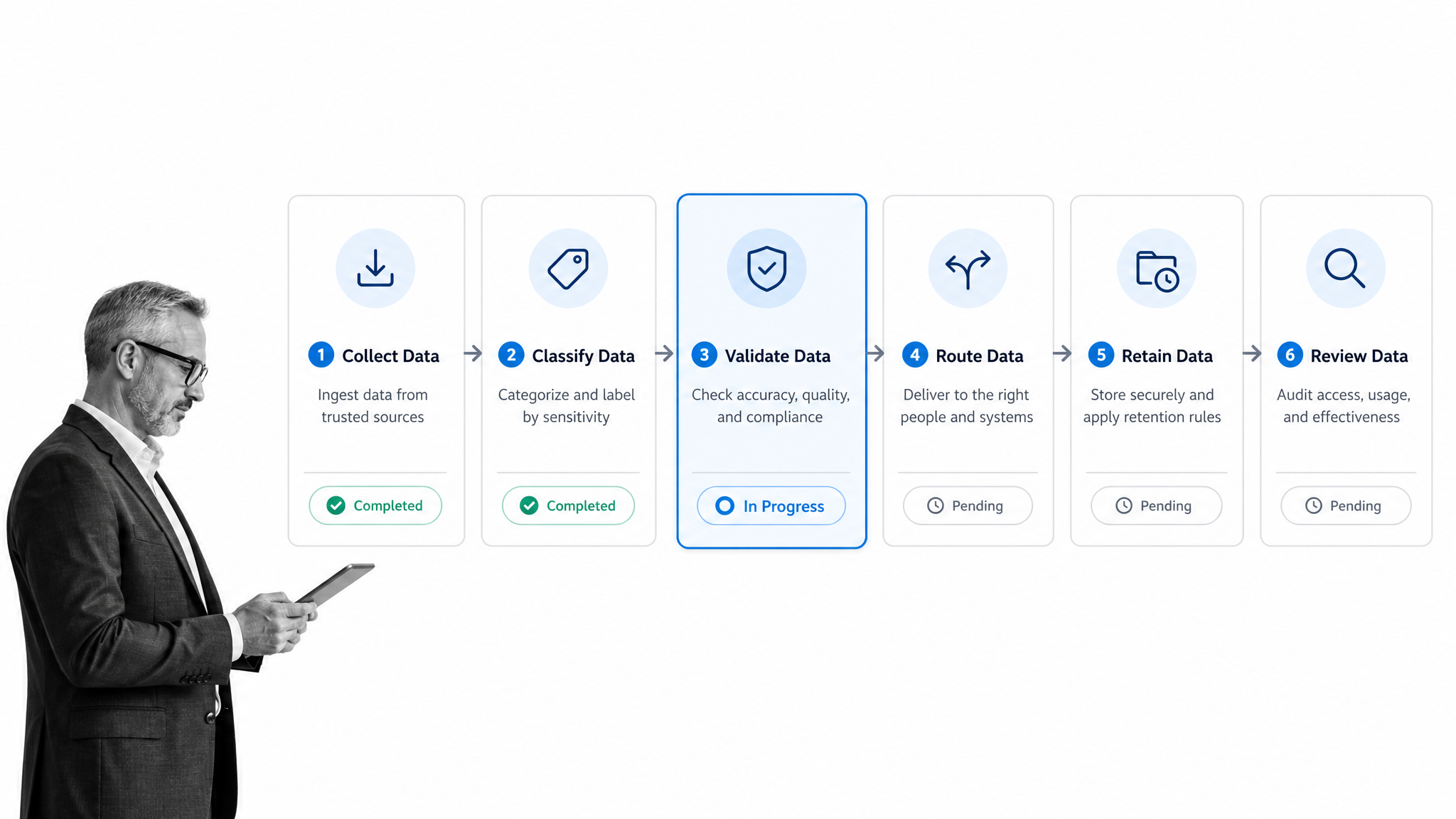
A practical data management definition has to go beyond storage. IBM data management definition defines data management as collecting, processing, and using data securely and efficiently for better business outcomes. That definition is useful because it ties data to work, not just databases.
Data management is an operating discipline
Data management decides what data is collected, where it lives, who can change it, how it is checked, when it is retained, and how it is used. It gives teams a controlled path from raw input to trusted operational record.
That path should connect with process documentation. When data rules are documented but not embedded in the process, people still rely on memory, side spreadsheets, and manual cleanup.
Teams also need the operating standard behind the workflow. business process documentation gives people the shared instructions for how records are created, reviewed, corrected, and preserved. Data management turns those instructions into controls that can run every time.
Data and information are not the same
Data is the raw record: a customer field, invoice value, policy owner, vendor risk answer, approval decision, equipment serial number, or uploaded file. Information is what the team can confidently use after that data has context, quality checks, ownership, and a purpose.
A data management process turns data into information by making the record findable, valid, secure, and connected to the work it supports.
The lifecycle view
Strong data management follows a lifecycle. Data is created or collected, classified, validated, routed, used, retained, reviewed, and eventually archived or removed. Each stage needs a clear owner and control.
Without lifecycle control, data becomes a pile of inputs. Teams may have plenty of records, but no one can tell which record is authoritative, which one is stale, or which action created it.
Why data management matters
Data management matters because every important workflow depends on trustworthy records. Hiring, onboarding, vendor review, customer implementation, incident response, quality checks, financial close, audit evidence, and compliance reporting all fail when data is incomplete or untrusted.
Bad data creates operational drag
Bad data does not stay inside a database. It shows up as duplicate work, missed handoffs, incorrect assignments, rework, manual reconciliation, delayed approvals, and reports nobody trusts. The team spends time arguing about the record instead of doing the work.
A good workflow management system reduces that drag by assigning work and preserving the record in the same place.
Data management protects decisions
Leaders make decisions from data. If the data is stale, incomplete, or detached from the process that created it, the decision is weaker. Data management protects decisions by defining which records are authoritative and what proof supports them.
It lowers compliance and security risk
Data can carry privacy, security, financial, HR, customer, vendor, and audit risk. The FTC data security guidance recommends knowing what information you have, keeping only what you need, protecting what you keep, and disposing of what you no longer need.
Those principles require operational workflows. Someone has to classify data, review access, approve changes, retain evidence, and handle exceptions.
It makes AI safer and more useful
AI systems are only as useful as the operational data they can trust. If workflows produce inconsistent records, AI will summarize inconsistency at speed. If workflows create clean, controlled, contextual records, AI can help teams route work, detect anomalies, draft updates, and surface risk.
This is where data management becomes infrastructure for AI. The record needs context, ownership, and proof before an AI system can act on it responsibly.
Data management components
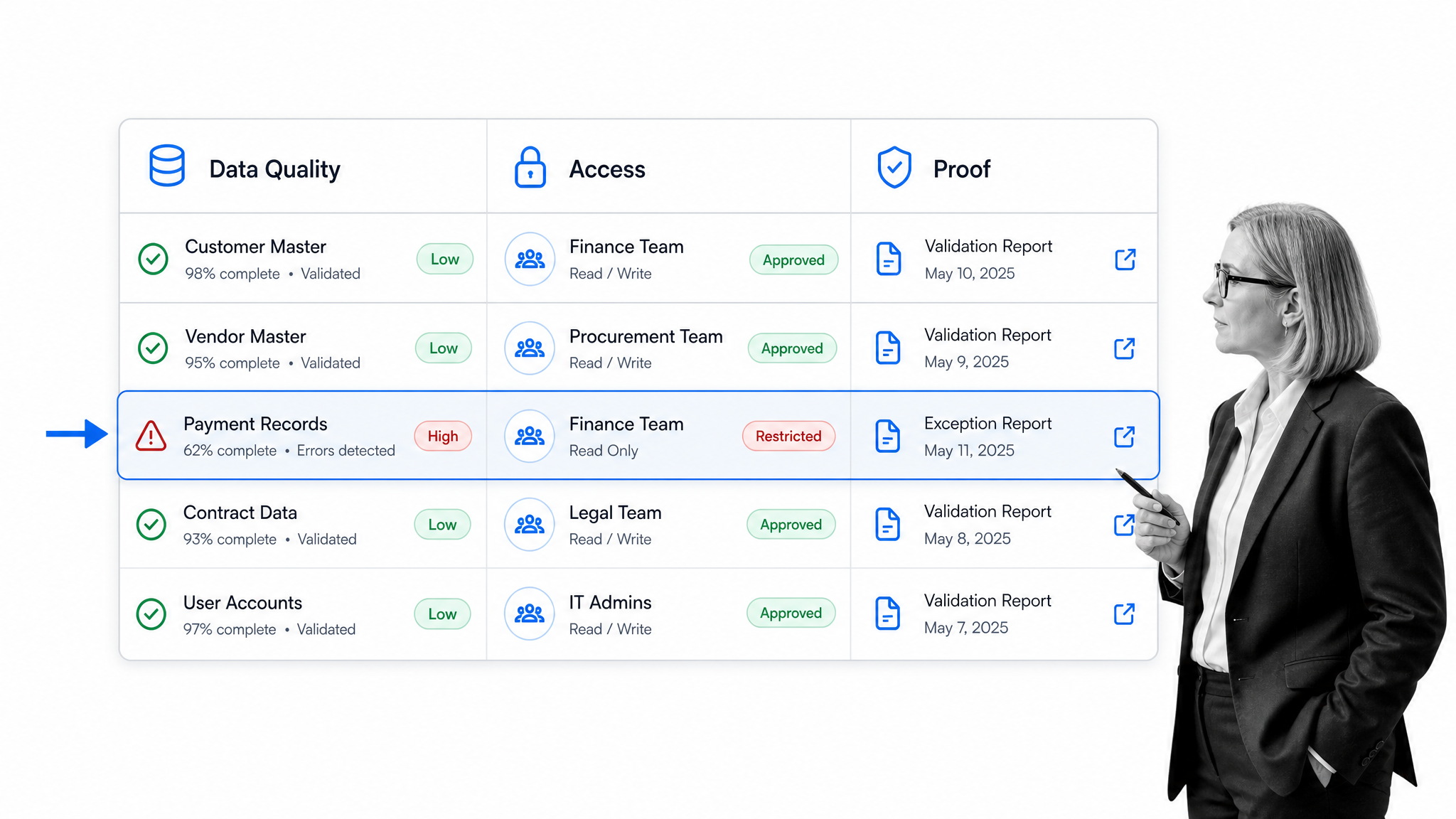
Data management has several components. They do not need to be complicated at first, but each component needs a clear operating rule.
Data governance
Data governance defines the decision rights around data. It names owners, stewards, policies, approval paths, access rules, and review cadence. The DAMA-DMBOK resources point to DAMA-DMBOK as a broad foundation for data management practice.
Data architecture
Data architecture describes where data lives and how systems relate to each other. For operations teams, the practical question is simple: which system owns the record, which systems use it, and which workflow changes it?
Data quality
Data quality covers accuracy, completeness, consistency, timeliness, uniqueness, and fitness for use. Quality is not a one-time cleanup project. It has to be checked at the point where data enters or changes.
That is why controlled intake matters. A strong form controller helps teams validate fields, route exceptions, and turn submissions into accountable workflows.
Metadata and context
Metadata explains the record. It can include source, owner, status, date of review, system of record, retention rule, classification, sensitivity, and approved use. Without metadata, a record may be technically present but operationally unclear.
Security and access
Security defines who can view, change, export, approve, or delete data. The NIST Privacy Framework gives teams a repeatable way to think about privacy risk and data processing.
Integration and automation
Data rarely stays in one system. It moves from forms to workflows, from workflows to CRM, from databases to dashboards, and from approvals to records. Integration and automation decide how those handoffs happen without manual copying.
Process Street has direct, universal integrations to 5,000+ systems. Need a new one? An AI agent builds it on the fly.
This is why data management should be part of the workflow management software conversation. Workflow software decides who does the work, but the data layer decides which records move, which fields are required, and which proof stays attached to the run.
Records and proof
Proof closes the loop. A trustworthy data management process keeps the field values, file uploads, comments, decisions, approvals, automations, and audit history needed to show what happened.
Data management best practices
Data management best practices are practical operating habits. The goal is not to build a perfect enterprise data office overnight. The goal is to make the most important data trustworthy where work happens.
Start with the business process
Do not start with every database in the company. Start with a workflow that matters: customer onboarding, vendor approval, incident response, employee onboarding, audit evidence, quality inspection, or finance review. Map the data that process creates and depends on.
This is where business process management and data management meet. Process design shows how work should move. Data management shows which records have to be correct for that movement to matter.
Define the source of truth
Every important record needs a source of truth. If customer status lives in three places, pick the system that owns the official status and define how the other systems receive updates.
When the source of truth begins as a form submission, use a structured form management approach. The submission should create or update the right record, trigger the right workflow, and keep the intake context attached to the final decision.
Build validation into intake
The easiest data quality problem to fix is the one that never enters the system. Required fields, controlled choices, lookup fields, evidence uploads, conditional logic, and approval gates make bad data harder to submit.
Assign owners, not just viewers
A dashboard viewer is not a data owner. Owners can define fields, approve changes, resolve exceptions, and update the workflow when quality issues repeat. Data management fails when everyone can see the problem but no one owns the fix.
Keep controls proportional
Not every data field needs a heavy approval. High-risk records need stronger controls. Low-risk records need simple validation and clean ownership. The control should match the consequence of bad data.
Review exceptions regularly
Exceptions are a data management signal. Repeated missing fields, duplicate records, late approvals, and rejected submissions show where the process is unclear. Review them as process feedback, not just cleanup work.
A quality control checklist can help teams convert recurring data defects into checks that are easier to repeat.
How to build data management workflows
Build data management workflows by translating data rules into actions people can follow. A workflow should make the correct data path easier than the informal one.
Step 1: Choose one data object
Pick one data object that matters. Examples include vendor records, customer implementation records, employee onboarding records, policy records, access requests, audit evidence, product issues, incident records, or contract reviews.
If the starting point is messy, use a simple data entry process checklist to standardize how records enter the process. The goal is not to capture every possible field. The goal is to capture the fields that decide ownership, routing, risk, and approval.
Step 2: Map the lifecycle
Write the lifecycle from creation to review: who creates the record, which fields are required, who validates it, which systems are updated, which approvals apply, where proof is stored, and when the record is reviewed or retired.
Step 3: Add controls at decision points
Decision points are where controls matter most. Add required fields before routing. Add approval gates before release. Add evidence uploads before completion. Add conditional paths when risk or category changes the process.
Step 4: Automate handoffs
Use automated workflow tools where manual copying creates delay or errors. Good automation moves data between systems while preserving the workflow record that explains why the move happened.
Step 5: Preserve the audit trail
The workflow should retain who submitted the record, who reviewed it, which fields changed, which files were attached, which approval was granted, and which automation ran. This turns data management into proof, not just hygiene.
Step 6: Improve after real runs
After launch, inspect completed runs. Look for missing fields, repeated rejections, unclear instructions, slow approvals, manual edits, and records that still get corrected outside the workflow. Then update the workflow.
Data management in Process Street
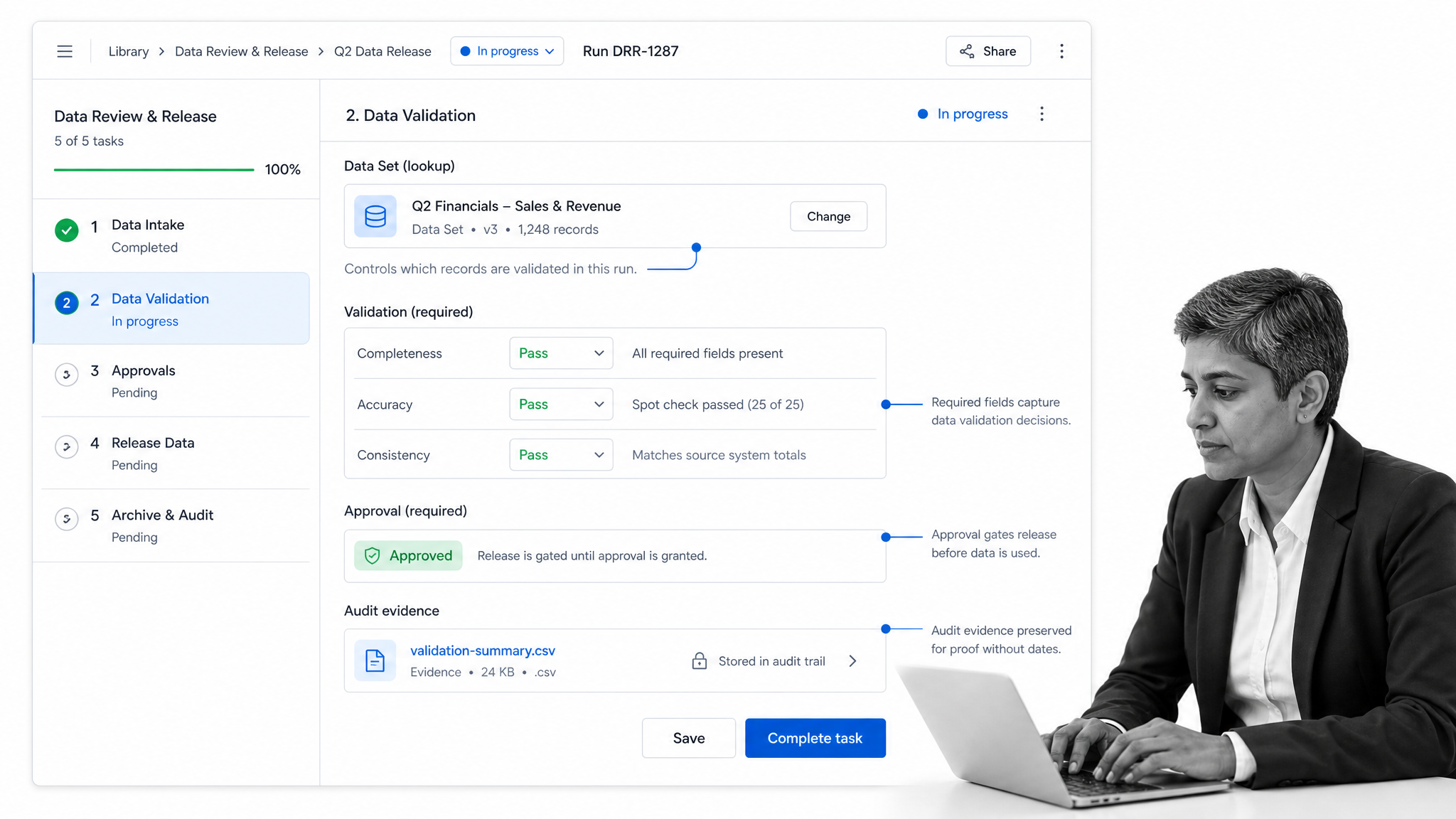
Process Street helps teams operationalize data management by turning data rules into workflows. Instead of relying on people to remember every field, approval, and handoff, the process enforces the standard while work is happening.
Use Data Sets for controlled records
Process Street Data Sets let teams create and store tables of data for Workflow runs and Forms. They can speed up workflow building, fill form fields, maintain consistent data, and reduce data entry errors.
Automate record updates
Data Set Automations can help keep records current by automating creation and updates from external sources. That matters when data changes in one system but the workflow still needs the current record.
Gate data with approvals
Built-in approvals help teams review data before it is used downstream. A record can be collected, checked, approved, and preserved in the same workflow history.
Connect docs, workflows, and proof
Data management depends on clear standards. A standard operating procedure template can define how data is handled, while Process Street workflows enforce that standard through tasks, forms, required fields, and audit history.
For controlled environments, pair that operating standard with a document control procedure. Document control and data management work together because teams need to know which instruction, record, or evidence file is current.
Keep data work visible
Data work becomes risky when it is invisible. Process Street gives teams a record of open tasks, late reviews, approvals, exceptions, and completed runs so data quality is part of operational management, not a cleanup project after the fact.
Data management examples
Data management shows up anywhere teams rely on repeatable records. These examples show how the same principles apply across departments.
Vendor management
Vendor records need tax details, risk answers, security reviews, contracts, renewal dates, owners, and approval history. A governed workflow can prevent missing fields before a vendor is approved.
The same workflow can also review stale vendor records on a fixed cadence. If a certificate expires, a security answer changes, or an owner leaves the company, the data record should trigger work instead of waiting for someone to notice a spreadsheet.
Employee onboarding
Employee data touches HR, IT, payroll, facilities, security, and managers. A controlled onboarding workflow can collect the right data once, route tasks to the right owners, and preserve proof that required steps were completed.
Customer implementation
Customer implementation depends on stakeholder data, configuration details, launch requirements, integrations, support contacts, and approval checkpoints. Data management keeps that information consistent across the handoff.
Compliance evidence
Compliance teams manage policies, controls, evidence, reviewers, exceptions, and audit requests. Data management turns those items into structured records instead of scattered files and messages.
A strong evidence workflow preserves the control, owner, evidence file, review decision, exception status, and final approval together. That makes the next audit faster because the team is not reconstructing the story from email threads and folder names.
Quality operations
Quality teams manage inspection records, corrective actions, review notes, defects, approvals, and release decisions. A data management workflow keeps the record connected to the decision it supports.
Finance operations
Finance teams depend on clean vendor, customer, invoice, approval, and close data. Controlled workflows reduce manual reconciliation by making ownership and evidence clear at the point of entry.
Data management FAQs
What is data management?
Data management is the discipline of collecting, organizing, protecting, using, and improving data so teams can trust it in daily operations. It includes governance, quality, access, workflows, integrations, records, and proof.
Why is data management important?
Data management is important because bad data creates rework, risk, missed handoffs, weak decisions, and unreliable reports. Strong data management keeps records accurate, secure, contextual, and tied to the process that created them.
What are the main components of data management?
The main components of data management include governance, architecture, quality, metadata, security, access control, integration, automation, records, and audit proof. Each component needs an owner and an operating workflow.
How do you improve data management?
Improve data management by starting with one important business process, defining the source of truth, validating data at intake, assigning owners, adding controls where risk exists, automating handoffs, and reviewing exceptions after real workflow runs.
What is the difference between data governance and data management?
Data governance defines decision rights, policies, ownership, and standards for data. Data management is the broader operating discipline that applies those rules through systems, workflows, controls, quality checks, integrations, and records.
Can Process Street support data management workflows?
Yes. Process Street can support data management workflows with Data Sets, Forms, workflow runs, required fields, approvals, automations, and audit history so teams can control data while work is happening.
