


Turn every policy into automated workflows with built-in enforcement and audit-ready proof.



Process Integration
Process integration connects the people, workflows, data, and systems required to complete an end-to-end business outcome. It makes work continue across system boundaries without forcing someone to copy information, chase an approval, or reconstruct the status by hand.
The goal is not simply to move data. A useful integration preserves the meaning of the process: what triggered the work, which rules apply, who owns the next decision, what should happen when something fails, and what evidence proves the outcome was completed correctly.
This guide explains the architecture behind process integration, the patterns you can choose, how to design and test an integration, and how Process Street turns connections between systems into controlled operational execution.
In this article, we are going to cover:
- What process integration is
- Why process integration matters
- How process integration works
- Process integration patterns
- How to build process integration
- Process integration controls and testing
- Process integration with Process Street
- Process integration examples
- FAQs
What process integration is
Process integration is the coordinated connection of separate process steps so they operate as one flow. A step may live in a workflow platform, CRM, ERP, ticketing system, data store, inbox, document service, or a person’s decision. Integration carries the event and context across those boundaries while keeping the business rules intact.
Business process integration
Business process integration focuses on the outcome. It asks how a request moves from intake to review, action, and completion across teams and applications. The process is the unit of design, not the individual API call. This is why business process integration usually includes ownership, decisions, exceptions, and evidence alongside technical connectivity.
System integration
System integration connects applications so they can exchange commands or records. It may expose an API, send an event, synchronize a database, or transfer a file. System integration is a necessary layer, but it does not automatically define what people should do when the data arrives or how a business exception should be resolved.
Data integration
Data integration combines, transforms, or synchronizes information. It solves questions such as field mapping, format conversion, duplicate handling, and source-of-truth ownership. A process may depend on excellent data integration and still fail if the next decision has no owner or deadline.
Workflow integration
Workflow integration links the execution layer to the wider stack. A completed task can update a record. A new record can start a workflow. An approval can release an action. An exception can open a review path. This is the layer that turns connected systems into coordinated work.
Why process integration matters
Process integration matters because most important work is already cross-functional and cross-system. Customer onboarding touches sales, finance, legal, operations, and support. Vendor approval touches procurement, security, compliance, and accounts payable. Incident response touches monitoring, engineering, communications, and leadership.
It removes invisible handoffs
A manual handoff often looks harmless: send a message, attach a file, or ask someone to update a record. In practice, that handoff has no guaranteed timing, no structured error state, and no reliable proof. Integration makes the transfer an explicit part of the process with a trigger, payload, destination, owner, and result.
It keeps data and action aligned
Disconnected systems create a dangerous gap between what the record says and what the team has actually done. Integration can bind the record update to the required review or approval. The destination changes only when the process reaches the right state.
It makes exceptions operational
Successful paths are easy to automate. The real quality test is what happens when a required field is missing, a destination rejects the payload, an approval expires, or two systems disagree. Process integration gives exceptions a queue, owner, context, and recovery path instead of burying them in connector logs.
It creates control and proof
High-stakes operations need more than speed. Teams need to show who approved the action, which rule routed it, what information crossed the boundary, and whether the connected system confirmed completion. Process integration can preserve that chain as part of normal execution.
How process integration works
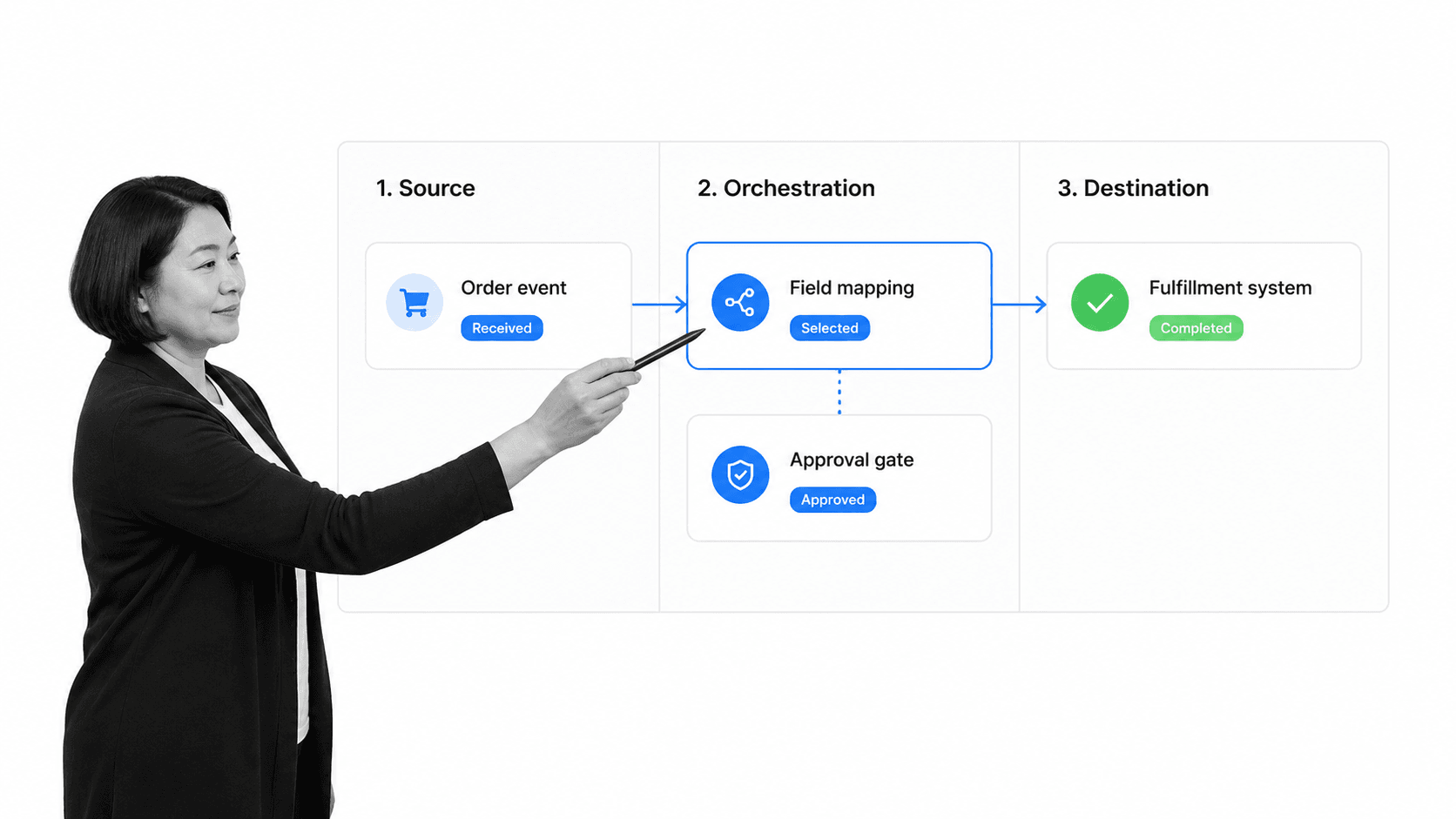
Most integrations follow the same operating sequence even when the underlying technology changes. A source produces an event, the integration validates and translates it, process logic decides what should happen, a destination performs an action, and the integration records the result.
1. A trigger starts the integration
The trigger may be a submitted form, completed task, approved request, changed record, scheduled time, inbound webhook, or message on an event stream. Define the trigger precisely. A vague trigger such as when the account is ready will create inconsistent behavior because different systems and people will interpret ready differently.
2. Validation protects the process
Validate required fields, types, identifiers, permissions, allowed values, and business preconditions before sending the payload onward. Reject or quarantine invalid input with a reason that an owner can act on. Silent correction can produce records that look plausible but are wrong.
3. Mapping preserves meaning
Source and destination systems often name or structure the same concept differently. Map fields, enumerations, dates, units, currencies, identifiers, and empty values explicitly. A mapping specification should record the source field, destination field, transformation, default, and error behavior.
4. Process logic controls the route
Rules decide whether the integration continues automatically, waits for approval, branches by risk, requests more information, or stops. The route should remain visible to the process owner. Hidden logic spread across connectors is difficult to test and harder to audit.
5. The destination action runs
The action may create or update a record, run a workflow, assign a task, send a document, post a notification, or call another service. The integration should capture a destination identifier and response so later steps can reference the exact outcome.
6. Observation closes the loop
A successful request is not always a successful business result. Monitor the final state, not only the transport. If an order record was created but fulfillment never started, the process is still incomplete. This is where business intelligence integrations and process reporting help reveal stuck work across systems.
Process integration patterns
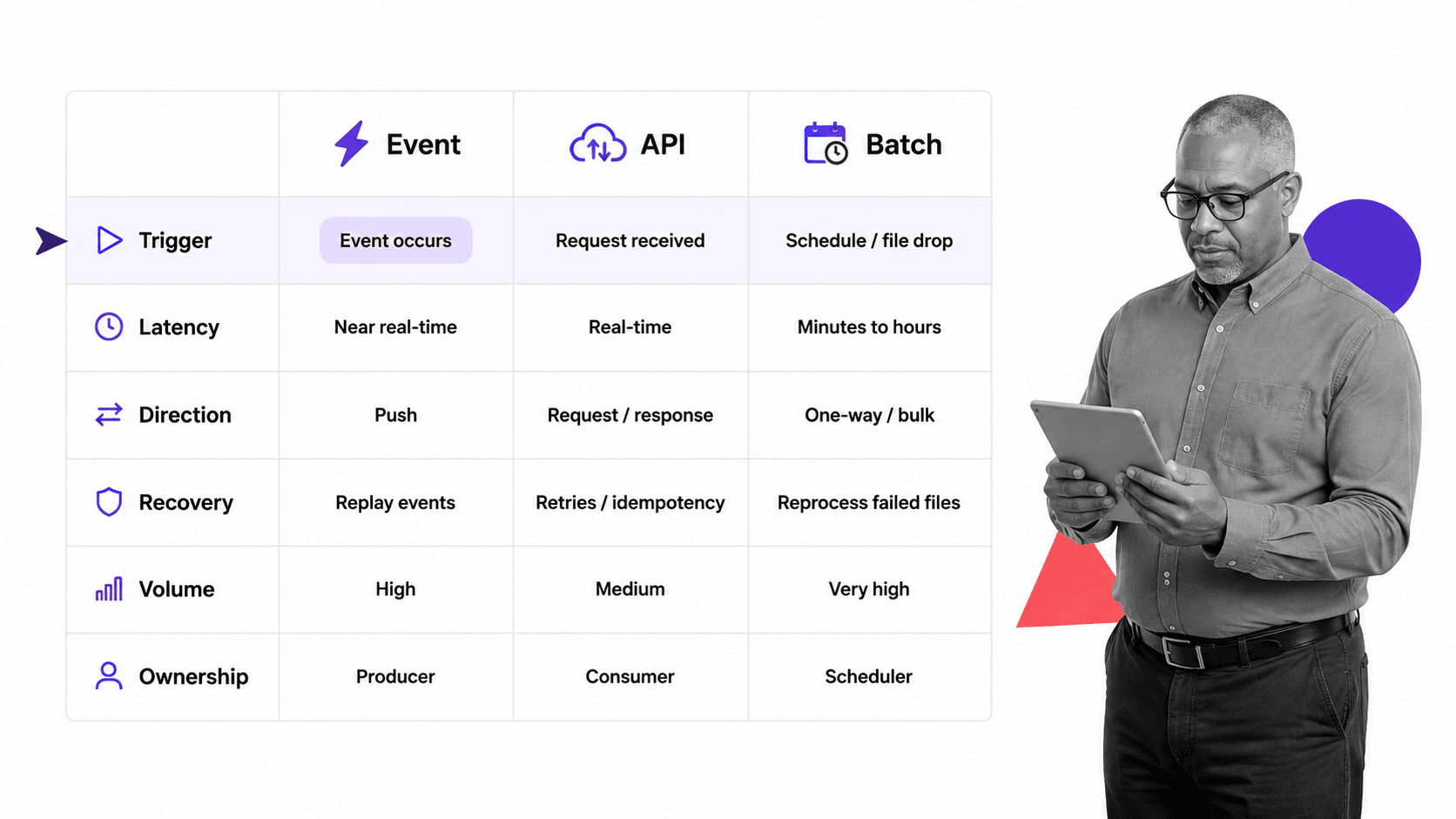
There is no single best integration pattern. Choose the simplest pattern that meets the process requirement for timing, direction, volume, control, and recovery. Mixing patterns is normal when the end-to-end process has different needs at different boundaries.
Point-to-point connections
A direct connection between two systems can be fast to build and easy to understand. It works well when the relationship is stable and limited in scope. The risk appears when many direct connections grow independently, creating duplicate transformations, scattered credentials, and unclear ownership.
API integration
An API integration asks a system to read or change data through a defined interface. The OpenAPI Specification provides a language-independent way to describe HTTP API capabilities. API integration is useful for direct commands, two-way synchronization, and operations that need an immediate response.
Process Street exposes an API for workflows, workflow runs, and Data Sets, which lets a connected system start or update operational work without relying on a third-party integration layer.
Event-driven integration and webhooks
Event-driven integration announces that something happened, then lets consumers react. This decouples the source from every downstream action. The CloudEvents specification defines a common way to describe event data, while webhooks provide a practical HTTP delivery pattern for many business applications.
Incoming and outgoing Process Street webhooks can start workflows or notify another service when workflow, task, Data Set, or form events occur.
Orchestrated workflow integration
Orchestration places process state, decisions, and recovery in one visible execution layer. The orchestrator knows which step is active, who owns it, what must be approved, and which system action comes next. This pattern is useful when humans and systems share the same end-to-end process.
Batch and file integration
Scheduled imports, exports, and file transfers work when real-time processing is unnecessary. They can handle large volumes and make reconciliation straightforward, but they need clear cutoff times, duplicate rules, partial-failure handling, and a way to replay corrected records. The data migration strategy workflow helps structure mapping, testing, fallback, and verification.
Agentic integration
Process Street has direct, universal integrations to 5,000+ systems. Need a new one? An AI agent builds it on the fly. This agentic integration framework reduces the delay between defining an operational need and standing up the connection, while the process layer keeps control, approvals, and proof around the action.
How to build process integration
Build process integration from the business outcome backward. A connector-first project tends to optimize transport and miss ownership. An outcome-first project starts with the completed state, then defines the minimum events, data, rules, actions, and controls required to reach it.
1. Define the completed outcome
Write one concrete result: an approved vendor exists in the procurement system, an incident has an assigned response workflow, or an employee has every required account and policy acknowledgment. Name the system of record and the evidence that proves completion.
2. Map the end-to-end process
List each step, owner, system, input, decision, output, and exception. Mark every point where work crosses a team or system boundary. Process workflow tools help expose those handoffs before they become hidden integration requirements.
3. Set system-of-record boundaries
Choose which system owns each entity and state. One system may own the customer profile while another owns approval evidence. Avoid two-way ownership unless the conflict rules are explicit. When systems disagree, the integration needs a deterministic winner or an owned review path.
4. Define the integration contract
Document triggers, payload schema, required fields, identifiers, transformations, authentication, expected responses, timeouts, rate limits, retry rules, and versioning. Use stable identifiers that survive name and email changes. Treat the contract as part of the process documentation, not only developer notes.
5. Design authentication and permissions
Use the minimum permissions needed for each action, separate production and test credentials, store secrets outside code, and assign an owner for rotation. The OAuth 2.0 authorization framework is a common model for delegated access when the connected service supports it.
6. Make failure behavior explicit
Separate transient problems from permanent business errors. A timeout may deserve a bounded retry. A missing required field needs correction. An expired credential needs escalation. A rejected approval should stop the downstream action. Give every terminal failure an owner, visible reason, and replay path.
7. Build for idempotency
Idempotency means receiving the same event twice does not create duplicate business effects. Store the source event or request identifier and check it before creating another record, workflow, payment, notification, or shipment. Design update behavior separately from create behavior.
8. Pilot and document ownership
Run representative cases with a small group before scaling. Record the business owner, technical owner, integration contract, credentials owner, alert route, recovery steps, and change process. A customer implementation workflow can provide a practical structure for discovery, configuration, integration, and rollout.
Process integration controls and testing
Reliable process integration needs controls that cover security, data quality, business rules, delivery, and change. Testing only the happy path confirms that the connection can work. It does not prove the process will keep working under real operating conditions.
Protect every boundary
Validate all inbound data, restrict credentials, encrypt transport, limit sensitive values in logs, and verify signed events when the provider supports them. The OWASP API Security project catalogs common API risks that integration teams should include in design and review.
Test the full failure matrix
Test valid data, missing optional fields, invalid required fields, duplicate events, out-of-order events, expired credentials, permission denial, rate limiting, destination timeout, partial outage, schema changes, and replay. Use a data migration validation checklist when the integration also moves existing records.
Interpret responses correctly
Do not treat every non-error transport response as completed work. The HTTP semantics standard defines response meaning, but the integration must still verify the destination’s business state. A queued request may be accepted without being finished.
Monitor outcomes and reconcile
Track success, retry, failure, latency, queue age, and unmatched records. Reconcile source events against destination outcomes on a schedule. Every mismatch should name the event, expected state, actual state, owner, and next action.
Control changes
Schema, permission, workflow, and destination changes can break an integration without changing its URL. Review dependencies before release, test in a representative environment, version contracts where possible, and maintain a rollback path. The software release readiness workflow provides a structure for dependency, migration, validation, and rollback checks.
Process integration with Process Street
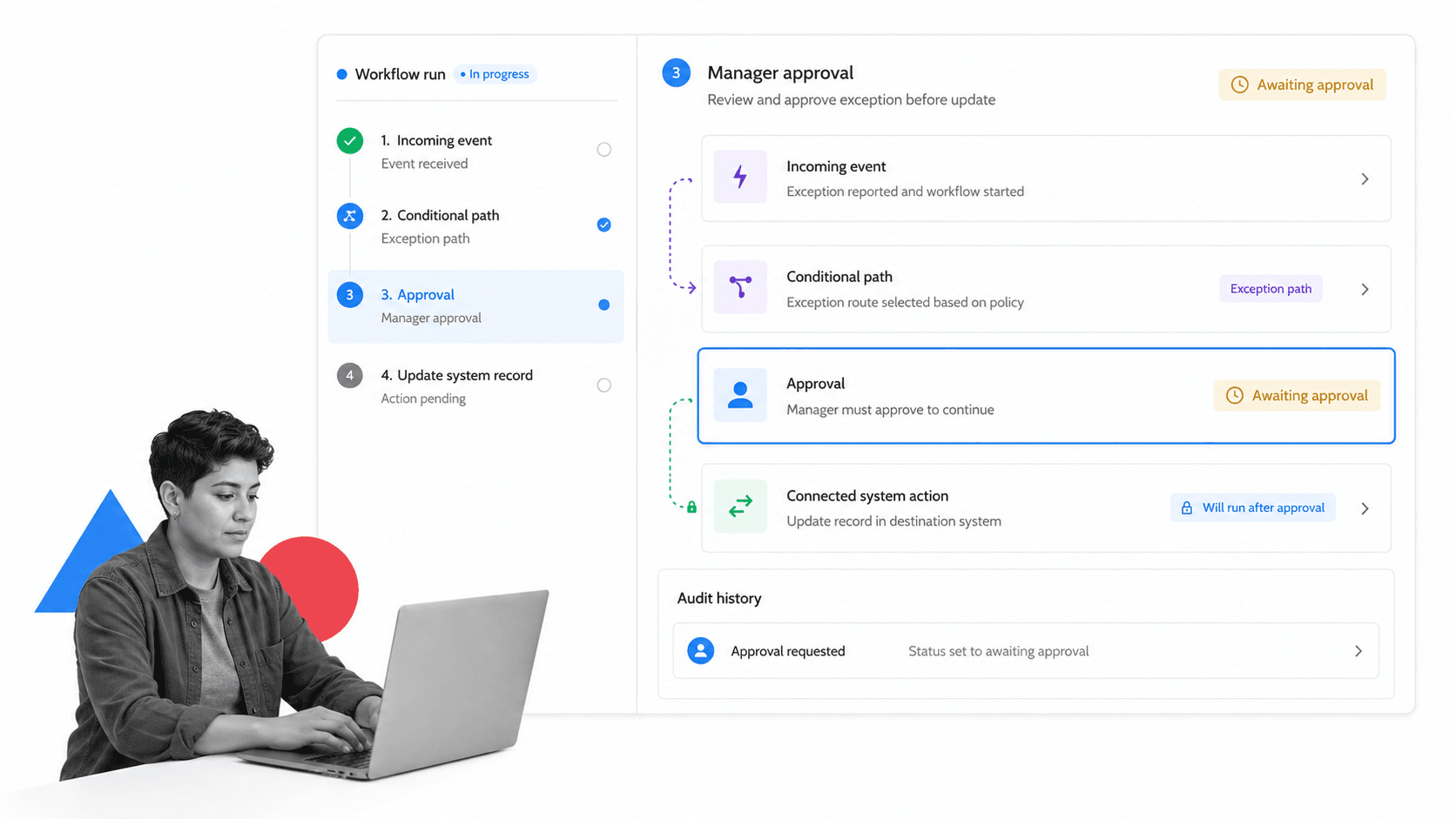
Process Street is an Agentic Process Automation platform for high-stakes operations. It places the process around the integration so events, people, decisions, system actions, and proof remain part of one controlled execution record.
Start workflows from operational events
A form submission, webhook, schedule, completed task, or connected-system event can start the work. Workflow triggers and automations make the start condition visible inside the workflow instead of hiding it in a separate integration project.
Route work with process rules
Process data can reveal risk, request type, department, value, or exception status. Conditional logic can reveal the right tasks and fields for that case while keeping routine runs focused.
Put approvals before system actions
An integration action can wait until a required person reviews the evidence. This matters when the action changes a financial record, grants access, accepts a vendor, sends a regulated communication, or moves sensitive data. The approval becomes a control, not a message someone may overlook.
Connect the wider operating stack
The Process Street integration layer supports native automations, API connections, webhooks, and agentic connections across the systems involved in the process. The workflow keeps ownership and recovery visible even when execution crosses several tools.
Keep evidence with execution
Assignments, form data, files, comments, approval state, integration actions, and history stay tied to the workflow run. Operators can see what happened without reconstructing the story from an inbox, connector log, and destination record.
The automation template provides a starting point for defining sources, rules, data integrity tests, error correction, and output validation. A workflow creator then turns that design into work people and agents can run consistently.
Process integration examples
Customer onboarding
A signed customer can trigger account setup, risk checks, data collection, implementation tasks, billing updates, and support handoff. Each team works in its preferred system while the integrated process owns the overall state and escalates missing work.
Vendor approval
A vendor request can create a review workflow, collect security and compliance evidence, route by risk, wait for approvals, then create the approved vendor in procurement and finance systems. Rejected or incomplete requests follow a visible exception path.
Incident response
A monitoring alert can start an incident workflow, assign the responder, open a ticket, notify the correct channel, collect evidence, and update status until closure. The integration should distinguish duplicate alerts from new incidents and verify that the case reached a terminal state.
Finance operations
An approved purchase or expense request can update the financial system only after required evidence and authorization are present. The process records the decision, destination identifier, and any exception without exposing sensitive values in routine logs.
Data migration and system rollout
A system rollout combines batch transfer, validation, approvals, cutover, reconciliation, and rollback. Form integration can standardize intake, while software for business process management keeps the surrounding execution owned and traceable. Teams can use process optimization and business process optimization to improve the integrated flow after real operating data reveals bottlenecks.
FAQs
What is process integration?
Process integration connects separate workflow steps, people, data, and systems so they operate as one end-to-end business process. It preserves triggers, rules, ownership, actions, exception handling, and proof across system boundaries.
What is the difference between process integration and system integration?
System integration connects applications so they can exchange data or commands. Process integration uses those connections inside a complete business flow, including human decisions, approvals, exceptions, deadlines, and evidence.
What are the main types of process integration?
Common patterns include direct point-to-point connections, API integration, event-driven integration, webhooks, orchestrated workflows, batch transfers, and agentic integrations. The right choice depends on timing, direction, volume, control, and recovery requirements.
How do you build a process integration?
Define the completed business outcome, map the end-to-end process, assign systems of record, document the integration contract, design authentication and failure behavior, make processing idempotent, then pilot with representative cases before scaling.
How do you test process integration?
Test the happy path plus missing fields, invalid data, duplicate and out-of-order events, expired credentials, permission failures, rate limits, timeouts, partial outages, schema changes, and replay. Verify the final business state, not only the connector response.
How does Process Street support process integration?
Process Street combines workflow triggers, conditional logic, approvals, API and webhook connections, agentic integrations, assignments, evidence, and audit history. That keeps people, agents, and connected-system actions inside one controlled process.
