


Turn every policy into automated workflows with built-in enforcement and audit-ready proof.


Custom Workflow Software
Last updated:

Custom workflow software lets you turn the way your organization actually works into a controlled digital process. Instead of forcing every team into a fixed sequence, you configure the trigger, data, route, owners, rules, approvals, actions, and proof around your operating requirements.
Custom does not automatically mean custom-coded. A configurable workflow platform can support highly specific processes without creating a new software product from scratch. The important question is how deeply the system can adapt while remaining maintainable, secure, and understandable to the people who own the process.
This guide explains the main approaches to customization, the capabilities that matter, how a tailored workflow runs, and how to design and implement one without turning every process change into a development project.
- What custom workflow software is
- When a custom workflow is the right choice
- Custom workflow software versus off-the-shelf and bespoke systems
- Core capabilities in custom workflow software
- How custom workflow software works
- How to design a custom workflow
- Custom workflow software with Process Street
- How to evaluate and implement custom workflow software
- FAQs
What custom workflow software is
A workflow is a defined path that moves work from a trigger to a completed outcome. Custom workflow software gives an organization control over that path, including what information enters it, who or what acts next, which conditions change the route, and what evidence is required before completion.
Customization starts with the process model
The software should represent the operating logic of the process, not merely its task list. Two teams may both run vendor onboarding, for example, but one may need security review for access to production data, finance approval above a threshold, region-specific documents, and a separate fast path for low-risk vendors. Those are process rules, and the workflow must carry them.
A workflow has a design layer and a run layer
The design layer contains the reusable standard: tasks, fields, rules, assignments, due logic, approvals, and actions. The run layer is each live instance. It shows the actual request, current state, responsible owners, evidence, decisions, exceptions, and completion record. Customization is useful only when both layers stay connected.
Configuration is different from improvisation
A custom process should still be standardized. The point is to encode the right variation, not let every participant invent a route. A strong workflow system makes allowed variation explicit through fields, conditions, permissions, and exception paths.
When a custom workflow is the right choice
Custom workflows are most valuable when a generic checklist captures the happy path but misses the decisions, handoffs, and controls that determine whether the work succeeds. The need usually appears as repeated coordination work, recurring exceptions, or critical knowledge held by one experienced operator.
The work changes route based on context
A single fixed sequence breaks when risk, geography, department, customer type, contract value, or request category changes what must happen. Conditional paths let one workflow serve several legitimate scenarios while keeping every route governed.
Several systems participate in one outcome
A business process may start with a form, require a review in one system, create a record in another, collect a signature, store a document, and notify a downstream team. When people copy information between tools, delays and errors become part of the process. Custom workflow automation replaces those manual bridges with defined actions.
The process carries operational or compliance risk
When a skipped step can cause rework, customer harm, access risk, an audit gap, or a missed obligation, visibility is not enough. The workflow needs required inputs, approval gates, permissions, escalation, and a record that proves what happened.
The process is stable enough to standardize
Custom workflow software is a poor fit for work that is genuinely different every time. It is a strong fit when the outcome repeats and the variation can be expressed as rules. A software workflow should reduce ambiguity, not hide it behind a complicated builder.
Custom workflow software versus off-the-shelf and bespoke systems
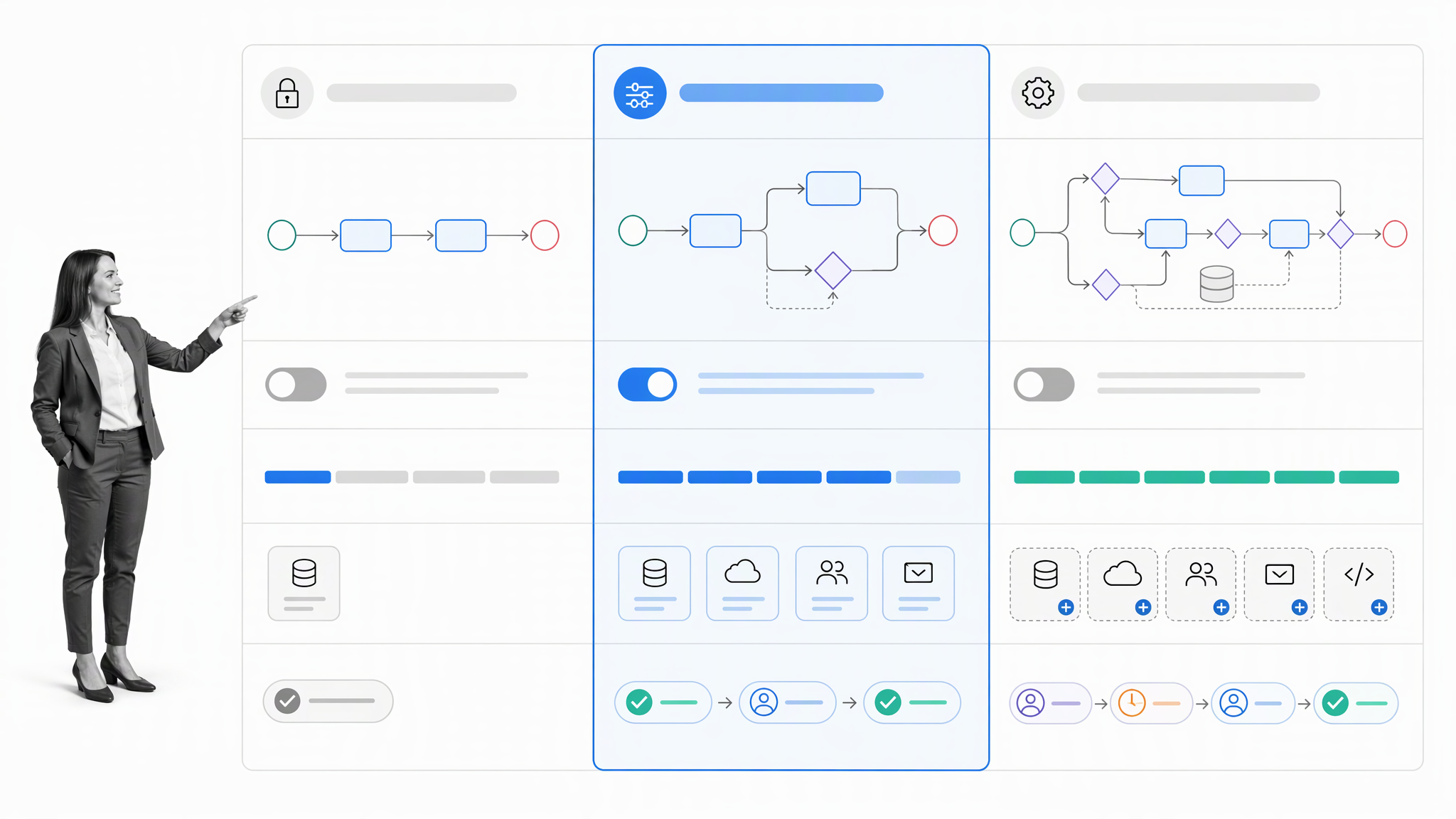
There are three broad ways to solve a workflow problem: accept a standard workflow, configure a flexible platform, or engineer bespoke software. The right choice depends on how unusual the process is, how quickly it changes, and how much technical ownership the organization can sustain.
Off-the-shelf workflows
A standard template is the fastest option when the process follows a familiar pattern and the team can adapt its operating method to the tool. It keeps implementation simple, but it may create workarounds when approvals, data structures, roles, or exception paths differ from the default.
Configurable custom workflow software
A configurable platform lets process owners shape forms, task sequences, assignments, rules, approvals, actions, and reporting without owning a separate application codebase. This middle path usually offers the best balance when the process is distinctive but still belongs to a recognizable workflow pattern.
Bespoke workflow development
A custom-built application can be appropriate when the workflow is a core product capability, requires a unique user experience, depends on proprietary algorithms, or must operate under constraints a platform cannot support. The tradeoff is ongoing engineering responsibility for security, testing, deployment, monitoring, changes, and user support.
Choose the least complex path that preserves the rules
The goal is not maximum customization. It is sufficient control with the lowest sustainable operating cost. The business process management lifecycle is useful here: understand and model the work before deciding how much software must be built around it.
Core capabilities in custom workflow software
A workflow builder alone does not make a dependable workflow system. The platform also needs to run work, enforce decisions, connect systems, protect data, and expose evidence. Evaluate capabilities against a real process rather than a generic feature checklist.
Structured intake and data
Custom fields, forms, validation, file collection, and reusable data objects give the workflow reliable inputs. Free-text requests create hidden interpretation work. Structured intake lets the route, assignment, and next action respond to facts instead of guesswork.
Conditional routing and assignments
Rules should be able to branch the path, reveal tasks, assign roles, change due logic, and escalate exceptions. An effective workflow program makes these decisions visible enough for a process owner to review and maintain.
Approvals, stop rules, and permissions
An approval is more than a notification. It should hold the workflow at the decision point, show the reviewer the required context, capture the decision, and route the result. Role permissions determine who can design, launch, complete, approve, view, or administer the workflow. Process Street documents the practical behavior of workflow approvals.
Connected actions and AI execution
The workflow should act across the systems where the business already works. Process Street has 5,000+ integrations. When a process needs an action beyond a preconfigured connection, an AI agent can build the integration on the fly. The workflow remains the control surface for when the action is allowed to run.
Evidence, audit history, and reporting
Completion status is only one signal. Teams also need the data submitted, route taken, approvals received, files attached, actions attempted, exceptions raised, and changes made to the workflow design. That history supports investigation, improvement, and proof.
How custom workflow software works
Custom workflow software turns a process model into an executable sequence. The workflow automation layer handles repeatable routing and actions, while people remain responsible for judgment, exception handling, and approvals where human review is required.
1. A trigger creates a workflow run
A trigger can be a form submission, schedule, manual launch, system event, or AI-detected condition. The trigger should capture enough context to choose the correct route and assign the initial owner.
2. The workflow validates and enriches the request
Required fields, lookups, calculations, and connected data checks prepare the request for execution. Invalid or incomplete submissions should return for correction before they create downstream work.
3. Rules choose the route
Conditions evaluate the submitted data and current state. They can reveal tasks, skip unnecessary stages, add specialist review, or change the owner. Well-designed conditional logic keeps the route specific without making the workflow unreadable.
4. People and systems execute the work
Tasks give people instructions, context, and required inputs. Connected actions update records, generate documents, notify stakeholders, or start downstream work. Each action should have a clear success state and a defined response when it fails.
5. Approval and evidence close the loop
The workflow checks that required evidence exists and routes the result to the right reviewer. Completion then creates a trustworthy record of the path, decisions, and outcome instead of a simple checked box.
How to design a custom workflow
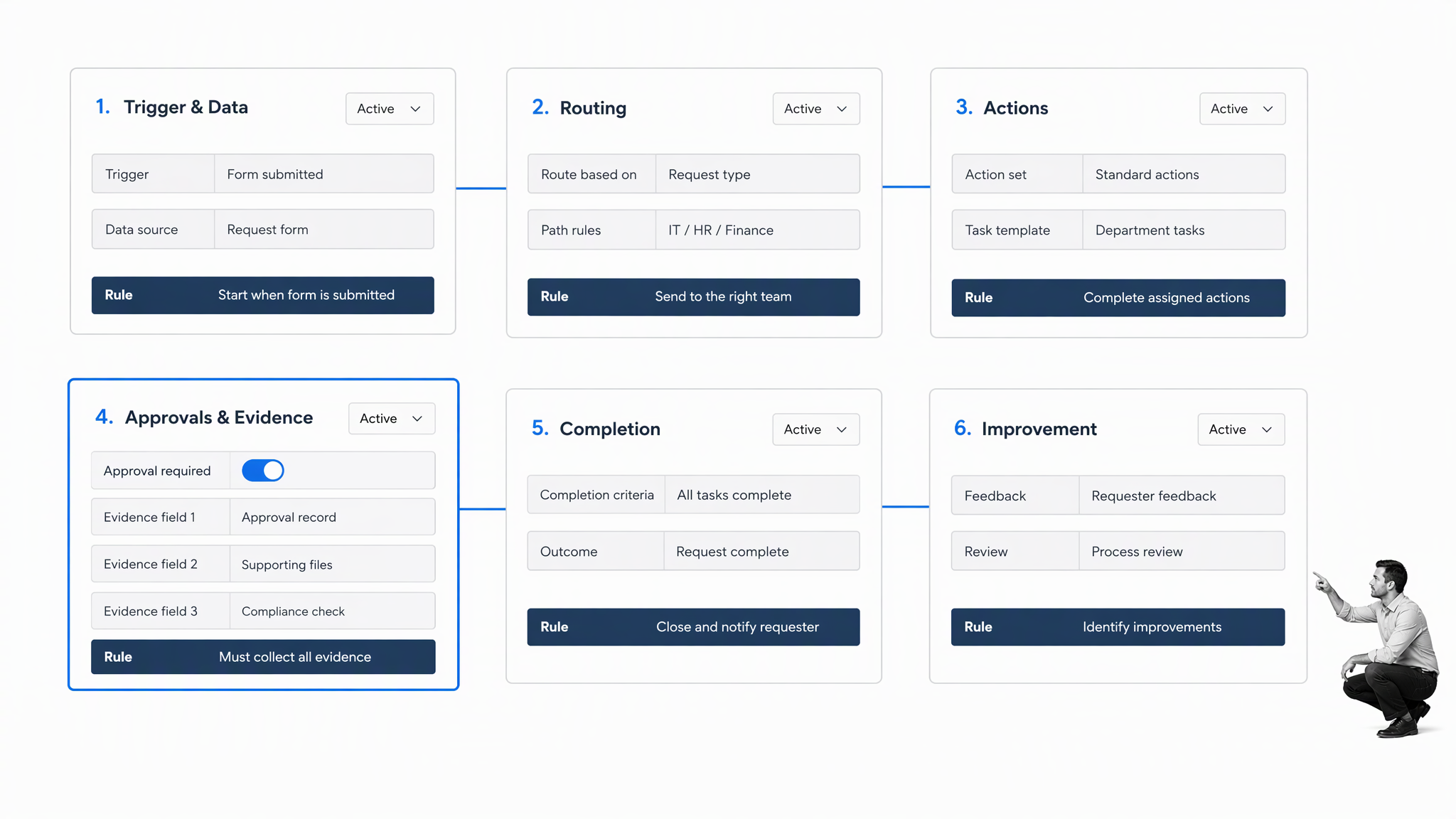
Design begins with the process boundary, not the interface. Name the event that starts the work, the outcome that finishes it, and the owner accountable for the complete result. This prevents the workflow from becoming a collection of disconnected tasks.
Map the current path and its exceptions
Capture the main route, decision points, rework loops, handoffs, and known failure modes. Formal teams may use the BPMN 2.0 notation, but a clear sequence with decisions and owners is enough to begin. The model must reflect the real process, including the awkward parts.
Define the data contract
List the information needed at each stage, where it comes from, who can change it, and which fields determine the route. Give every important field one source of truth. Avoid asking participants to re-enter data that a connected system already knows.
Place controls at the decision point
Add approvals, required evidence, permissions, and stop rules where they prevent a bad outcome. A control added after the risky action only records the problem. A control embedded before the action can prevent it or route review.
Design the failure path
Every connected action can fail, every reviewer can be unavailable, and every request can arrive incomplete. Define retry behavior, alternate owners, escalation timing, rejection routes, and the information needed to resolve the exception.
Pilot with one complete process
Use a real workflow with meaningful variation. An employee onboarding workflow, vendor onboarding workflow, or incident management process can expose routing, ownership, approvals, evidence, and integration needs in one pilot.
Custom workflow software with Process Street
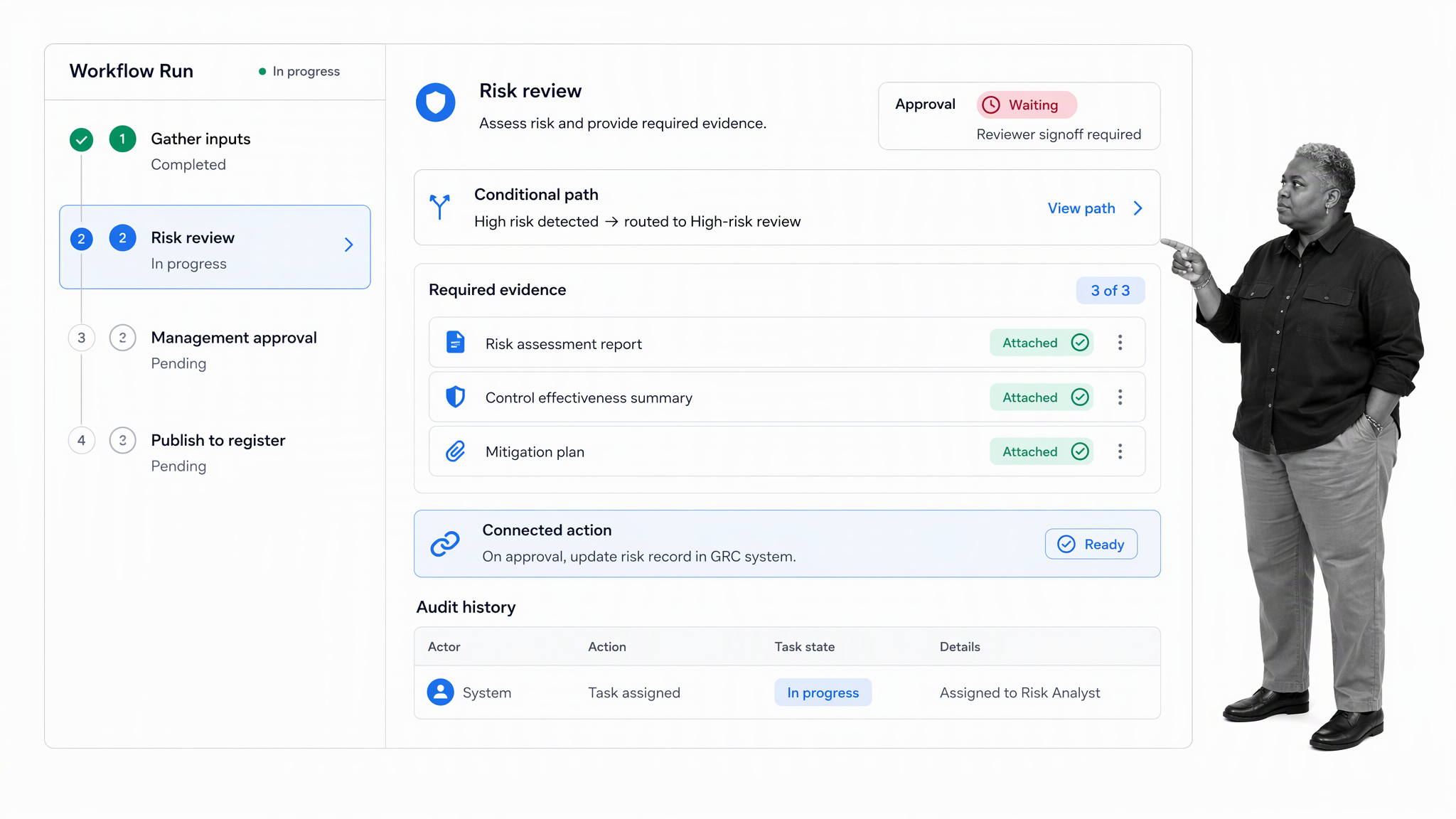
Process Street gives high-stakes operations a configurable workflow runtime for recurring work. Teams can shape structured intake, tasks, assignments, conditional routes, approvals, connected actions, required evidence, and execution history around the process they need to run.
Turn procedure into execution
A procedure becomes more useful when the system carries it into the work. Instructions sit with the task, required fields collect the right information, rules choose the route, and approvals happen at the decision point. Participants do not need to interpret a separate document and reconstruct the process each time.
Keep variation governed
Process Street supports the distinction between an allowed route and an improvised workaround. A tailored workflow can branch for risk, region, team, request type, or any other structured condition while preserving one controlled design. This is the practical difference between flexible business workflow management software and an unstructured task board.
Give agents a controlled operating path
AI can execute useful work only when it has clear context, permissions, and stopping points. A custom workflow defines the trigger, data, route, allowed actions, approval gates, and evidence requirements. That structure gives an agent room to act without giving it an undefined mandate.
Start from a template, then adapt
A team does not need to begin from a blank canvas. A structured approval process, process improvement tracker, or standard operating procedure template can provide the first working model. The process owner can then add the rules and controls that make it specific.
How to evaluate and implement custom workflow software
Evaluation should prove that the platform can represent and run your process without creating an unmaintainable system. A polished builder demo is not enough. Test the workflow from intake through exception handling and final evidence.
Use one demanding evaluation workflow
Choose a process with at least one conditional branch, two roles, an approval, required evidence, a connected action, and a failure path. A broader process workflow software evaluation should also test how easily the same design can be reused and governed across teams.
Evaluate maintainability, not just flexibility
Ask who can understand the workflow six months later, how changes are reviewed, whether old runs preserve their history, how fields and rules are named, and how the platform prevents builders from creating contradictory logic. Unlimited flexibility without governance creates a different kind of process debt.
Test security and AI controls
Review permissions, authentication, data access, audit history, and approval requirements for connected or AI-driven actions. The NIST AI Risk Management Framework provides a useful external reference for thinking about governance, measurement, and management when AI participates in the workflow.
Measure operational outcomes
Compare cycle time, wait time, rework, exception volume, missed steps, evidence completeness, and status effort before and after the pilot. The workflow should make the process easier to trust, not merely easier to watch.
Roll out in controlled increments
Begin with one owned process, train the roles who participate, observe real runs, and correct the design before scaling. Then establish a review cadence for stale steps, unused fields, recurring exceptions, and integration failures. A workflow management system becomes durable when process ownership continues after launch.
Treat the first release as an operating baseline, not a finished artifact. Review the workflow with participants after enough real runs have exposed delays, confusing instructions, duplicate fields, unnecessary approvals, and exception patterns. Assign one process owner to approve design changes, document why each change was made, and confirm that the revised route still preserves required controls. This governance prevents local fixes from quietly creating conflicting rules. It also keeps the workflow aligned with the process as systems, responsibilities, risks, and customer expectations change.
FAQs
What is custom workflow software?
Custom workflow software is a platform or application configured around an organization’s specific process rules. It defines the trigger, data, tasks, owners, conditions, approvals, connected actions, exceptions, and completion evidence for recurring work.
Does custom workflow software require coding?
Not always. Configurable workflow platforms can support tailored forms, routing, approvals, actions, and reporting without a separate application codebase. Coding becomes more relevant when the process needs a unique interface, proprietary logic, or technical constraints the platform cannot represent.
What is the difference between configurable and bespoke workflow software?
Configurable software adapts an existing workflow platform through settings, rules, fields, and integrations. Bespoke workflow software is engineered as its own application, which offers deeper control but creates ongoing responsibility for development, security, testing, deployment, and support.
Which processes are good candidates for custom workflows?
Good candidates repeat, cross people or systems, contain predictable decisions, and become costly when steps are missed. Onboarding, access requests, vendor review, incident response, approvals, audit preparation, and quality checks often fit this pattern.
How long does it take to implement a custom workflow?
The timeline depends on process complexity, data quality, number of roles, integrations, exceptions, and governance requirements. A focused pilot should prove one complete workflow first, then use observed runs to guide expansion rather than attempting a broad rollout in one step.
How should you evaluate custom workflow software?
Test one real process from intake to completion. Include a conditional route, approval, required evidence, connected action, failure path, and final history, then assess maintainability, permissions, operational outcomes, and the effort required to change the workflow safely.
