


Turn every policy into automated workflows with built-in enforcement and audit-ready proof.



Remote Onboarding: 5 Step Guide for New Hire Retention
Remote onboarding is the structured process of preparing, welcoming, training, and supporting a new employee who starts work outside a shared office. It covers the operational setup, role training, social connection, security access, manager cadence, and first measurable contributions that help a remote hire become productive without guessing what to do next.
A strong remote onboarding process matters because distributed employees do not absorb context by sitting near the team. Expectations, tools, norms, and relationships have to be built into the process. Gallup reports that only 12% of employees strongly agree their organization does a great job onboarding new employees, which leaves a lot of room for better execution.
This guide walks through a practical remote onboarding process for HR, operations, and managers. You will see what to do before the first day, how to structure the first week, how to build a 90-day roadmap, what problems to avoid, and how Process Street, the Compliance Operations Platform, helps teams run onboarding as a repeatable workflow instead of a loose checklist.
In this article, we are going to cover:
- What remote onboarding is
- Why remote onboarding matters
- A 5 step remote onboarding process
- Remote onboarding checklist
- Remote onboarding best practices
- Common mistakes to avoid
- How to automate remote onboarding
- FAQs
What is remote onboarding?
Remote onboarding is the employee onboarding process adapted for a distributed work environment. It gives a new hire the same foundation they would need in an office: equipment, account access, policy acknowledgement, role training, manager support, team context, cultural norms, and a clear path to useful work.
The difference is that remote onboarding cannot depend on proximity. No one sees the new hire waiting at reception. No one notices that a tool login is missing. No one casually explains who approves a request or where a key document lives. The process has to surface those details on purpose.
Good remote onboarding starts before the first day and continues beyond orientation. It gives the employee a map for the first 30, 60, and 90 days, then connects that map to owners, due dates, learning materials, check-ins, and evidence that each step happened.
Remote onboarding is more than virtual orientation
Virtual orientation is usually a meeting. Remote onboarding is the operating system around that meeting. Orientation introduces the company. Onboarding makes sure the new hire can work, knows who to ask, understands what success looks like, and has a manager actively clearing obstacles.
That distinction matters for retention. Gallup describes onboarding as a series of firsts, including the first day, first manager meetings, first coworker relationships, and first projects. If those moments are confusing or disconnected, the employee starts the role with doubt instead of momentum.
Why remote onboarding matters
Remote onboarding matters because a distributed new hire has fewer natural chances to recover from a weak start. In an office, they might overhear context, read the room, or ask a quick desk-side question. Remotely, missing context turns into Slack silence, duplicated questions, delayed work, and manager uncertainty.
The retention risk is highest early. Remote.com cites Work Institute research that 37% of turnover occurs in the first 90 days of employment. That does not mean every early departure is caused by onboarding, but it shows why the first 90 days deserve a real operating plan.
Remote hires need clarity faster
A remote employee needs to know what to do, where to do it, who owns each answer, and how decisions get made. If the process relies on a manager remembering every handoff, the experience becomes inconsistent. The fix is not more meetings. The fix is a clear sequence with visible owners, decision points, and follow-up.
Managers carry more of the onboarding load
Microsoft WorkLab found that new hires relied on managers for onboarding support nearly 20% more than before the pandemic, while reliance on peers dropped. The same research found that active manager involvement was tied to higher onboarding satisfaction and stronger contribution. Remote onboarding should therefore make the manager role explicit, not optional.
Remote onboarding process: 5 steps
The best remote onboarding process is simple enough to run every time and detailed enough that nothing important depends on memory. Treat the process as a phased workflow: preboard, welcome, clarify, connect, and transition into contribution.
1. Preboard before the first day
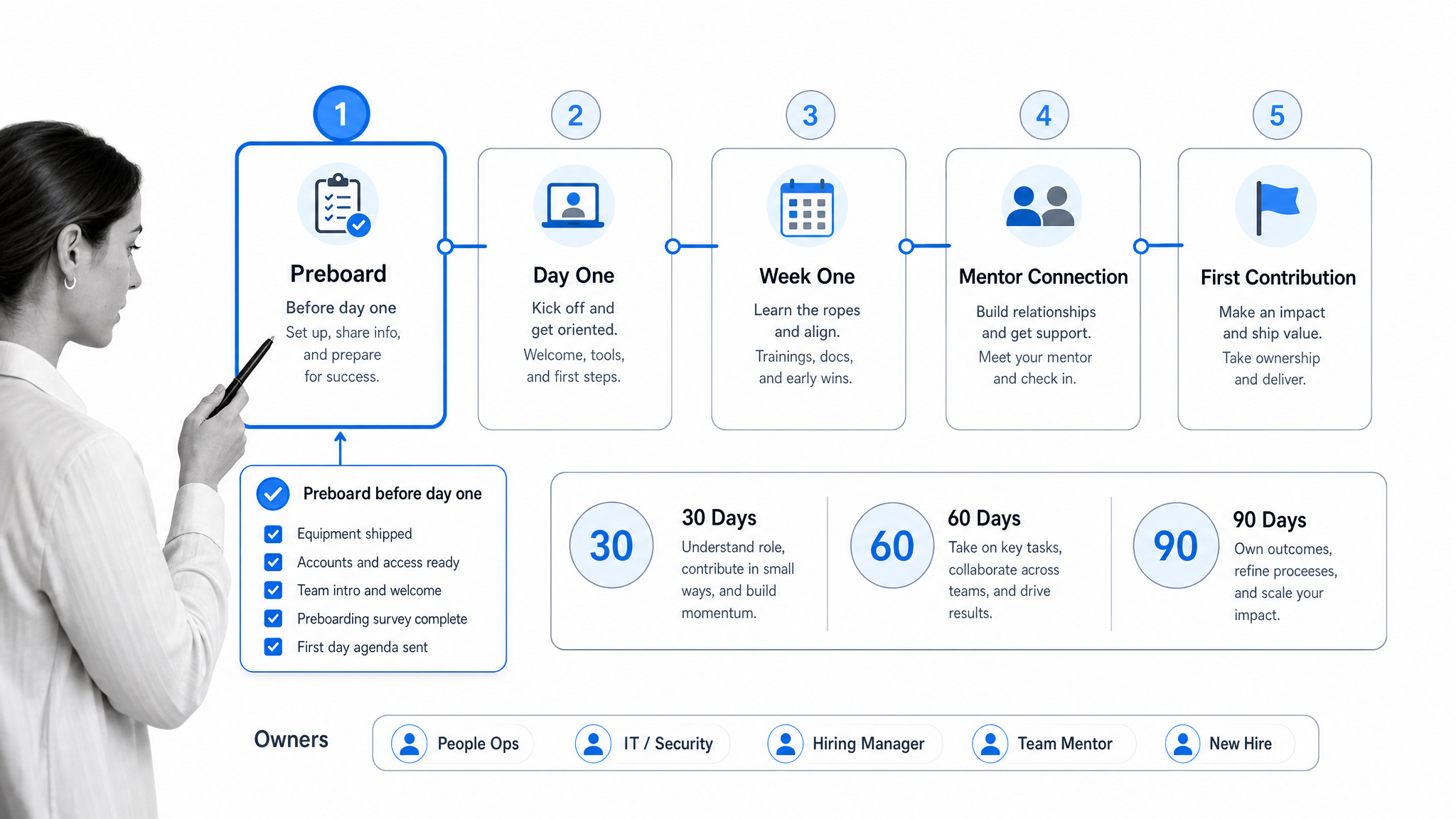
Preboarding is everything that happens between offer acceptance and the first day. This phase should remove avoidable friction: paperwork, background checks, employment eligibility, equipment shipping, account creation, calendar invites, security setup, and the first-week plan.
Send one clear welcome message that includes the start date, schedule, manager, mentor or buddy, first meeting links, equipment expectations, and where the employee should go if something does not work. If you use a remote employee onboarding template, make sure the employee and internal owners each have their own task path.
- Confirm personal and payroll details before the first day.
- Ship equipment with setup instructions and support contacts.
- Create email, HRIS, collaboration, security, and role-specific accounts.
- Share the first-week agenda and required meetings.
- Assign the manager, onboarding owner, and mentor or buddy.
2. Run a structured first day
The first day should feel calm, organized, and human. Start with a manager welcome, confirm that equipment and access work, walk through the onboarding workflow, introduce the team, and give the employee one small win they can complete without hunting for context.
Do not overload the day with every policy, system, and training module. Prioritize confidence. The employee should finish day one knowing how to communicate, where to find the plan, who their core contacts are, and what will happen tomorrow.
- Start with a live welcome from the manager.
- Verify laptop, headset, password manager, single sign-on, and key tools.
- Review the first-week workflow and success criteria.
- Introduce immediate teammates and the mentor.
- End the day with a short check-in and open questions.
3. Build role clarity in the first week
The first week should answer the role questions that create anxiety: what does good work look like, what systems does the team use, what decisions can the employee make, and how will the manager evaluate progress? Remote employees should not have to infer these rules from scattered messages.
Give the new hire a role-specific learning path. Pair general company orientation with practical tasks tied to their actual work. For example, a customer success hire might review call recordings, shadow renewal workflows, learn escalation rules, and complete a sample customer handoff before owning live work.
4. Assign a mentor and social map
Remote employees need more than a reporting line. They need a human map of the organization: who knows which systems, who can explain team history, who approves what, and who is safe to ask when a question feels basic.
A mentor or buddy should not replace the manager. The mentor gives informal context, helps the employee understand team norms, and lowers the social cost of asking questions. Schedule the first few conversations instead of hoping the relationship forms on its own.
5. Move from training to contribution
Remote onboarding should end with real contribution, not an endless training queue. By days 30, 60, and 90, define what the employee should understand, own, and improve. Keep the milestones practical: one completed project, one documented process improvement, one customer or internal handoff, or one measurable piece of role output.
Use manager check-ins to review progress against the roadmap, not just ask how things are going. If the employee is blocked, convert the blocker into an owned task. If they are ahead, move them toward deeper ownership.
For most roles, the 90-day plan should separate learning, practice, and ownership. The first 30 days are about access, context, and supervised work. The next 30 days are about independent execution on repeatable tasks. The final 30 days are about durable ownership, process improvement, and a clear performance conversation. This cadence gives the employee enough structure to move quickly without pretending that a complex role can be mastered in one week.
The plan should also account for time zones. A remote employee may not share working hours with their manager, IT support, or mentor. Add async handoff rules, expected response windows, escalation paths, and recorded walkthroughs so the employee can keep moving when the right person is offline.
Remote onboarding checklist
A remote onboarding checklist should cover every handoff required to get a new hire productive and connected. The checklist below is a practical starting point for HR, IT, managers, and operations teams.
Before the start date
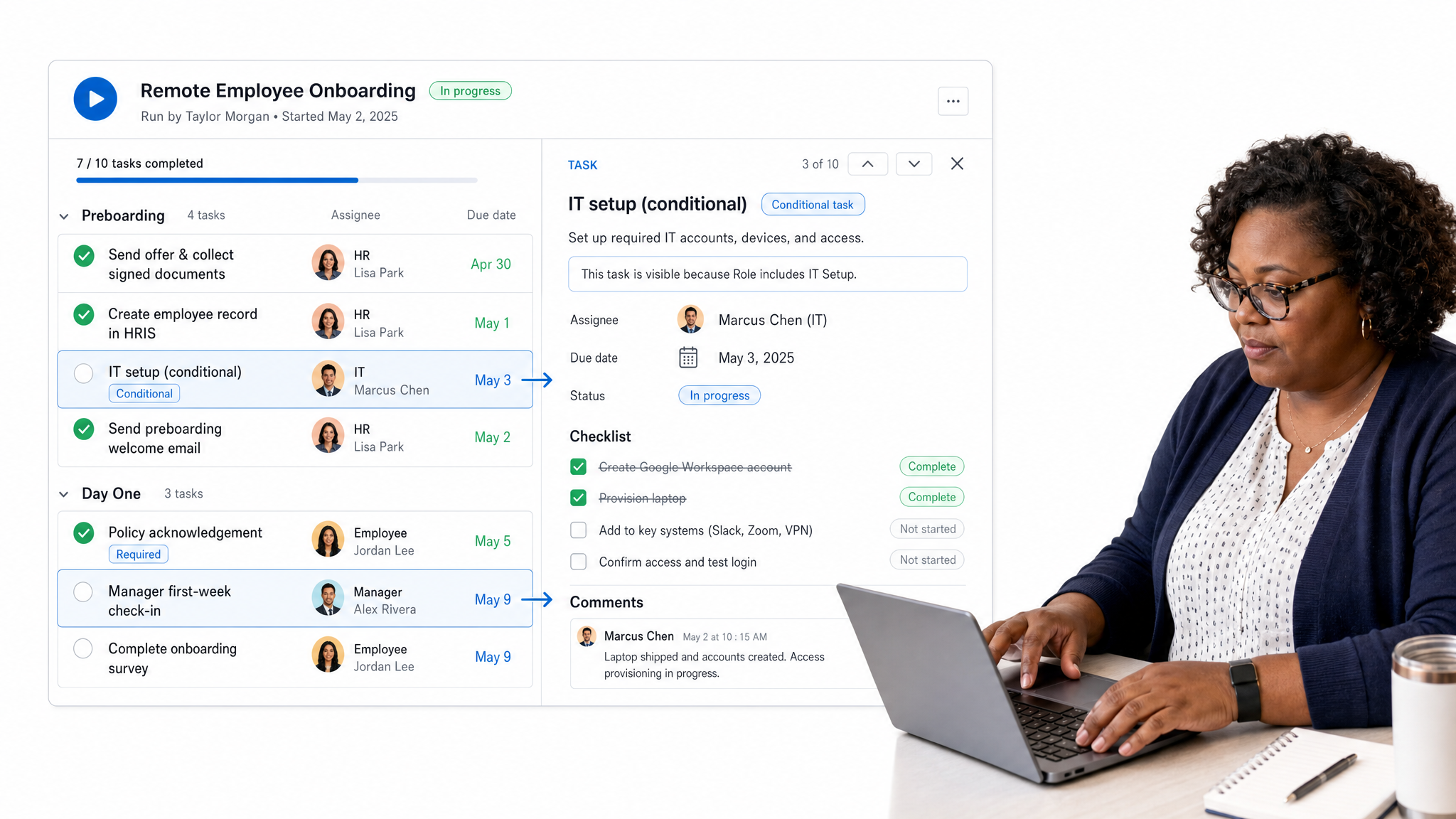
- Send the offer follow-up, welcome note, and onboarding timeline.
- Complete payroll, tax, identity, policy, and compliance paperwork.
- Ship equipment and confirm delivery.
- Create system access and confirm permissions by role.
- Add the new hire to required meetings and communication channels.
- Share the employee handbook, remote work policy, and security expectations.
Day 1
- Run the manager welcome call.
- Confirm tools, accounts, and equipment work.
- Walk through the onboarding workflow.
- Introduce the team and mentor.
- Give the employee one clear first task.
- Run an end-of-day check-in.
Week 1
- Complete company orientation and role training.
- Review goals, decision rights, and communication norms.
- Schedule stakeholder introductions.
- Start role-specific shadowing or practice work.
- Document questions and update the onboarding workflow when gaps appear.
Days 30, 60, and 90
- Review progress against the roadmap.
- Collect employee feedback on the onboarding experience.
- Confirm the employee has the right access, context, and support.
- Shift from training tasks to owned work.
- Document lessons learned for the next remote hire.
Remote onboarding best practices
Remote onboarding works best when the process is designed around clarity, connection, and proof of completion. The goal is not to recreate the office on Zoom. The goal is to make the invisible parts of work visible enough that a new employee can succeed from anywhere.
Use one source of truth
Keep the onboarding plan in one workflow, not spread across emails, docs, spreadsheets, and chat threads. The workflow should show what is done, what is blocked, who owns the next step, and what evidence has been collected.
Give managers a checklist too
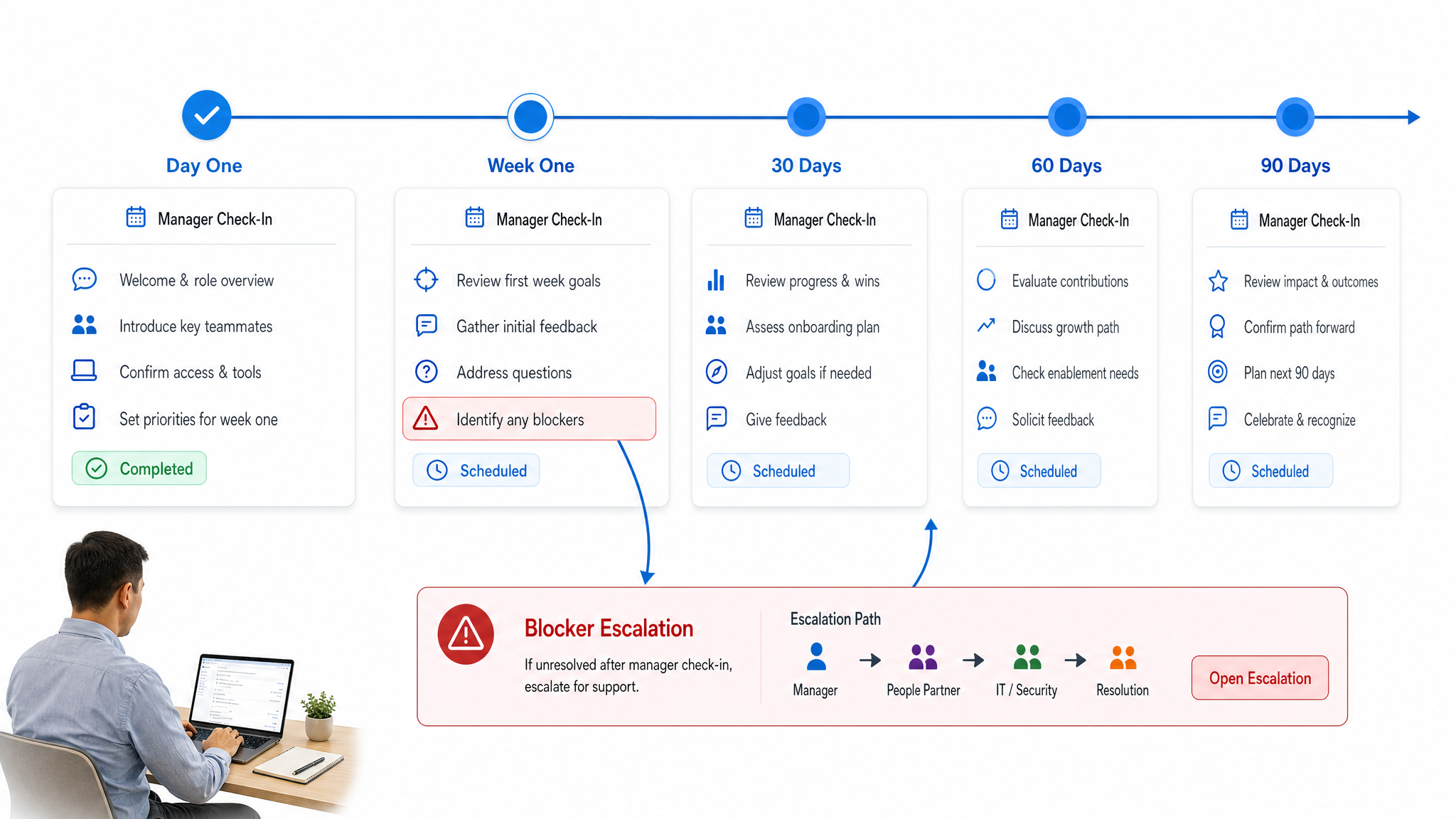
Remote onboarding fails when the employee has tasks but the manager has only good intentions. Create manager tasks for welcome messages, role clarity, feedback sessions, stakeholder introductions, and milestone reviews. Manager behavior should be part of the process.
Make async materials useful
Record short videos, write clean SOPs, and link to the exact documents a new hire needs. Async material should reduce meetings, not bury the employee in an archive. If a resource is required, assign it in the onboarding workflow with a clear outcome.
Create real connection without forcing awkward rituals
Connection works when it helps the employee understand people and work. Pair informal buddy calls with useful context: who owns which systems, how the team handles escalations, what meetings matter, and what norms are easy to miss.
Measure onboarding like an operating process
Track completion rate, time to first meaningful contribution, access blockers, manager check-in completion, employee confidence, and early turnover. These metrics show whether onboarding is actually working, not just whether the orientation calendar was full.
Keep the measurement light but consistent. Completion rate tells you whether the workflow is being followed. Time to access tells you whether IT is ready. Time to first contribution tells you whether role training is practical. Employee confidence tells you whether the process is understandable. Manager confidence tells you whether the employee is moving toward real ownership.
Use those signals to improve the workflow after every hire. If three employees ask the same question, add the answer to the process. If equipment is late twice, move the shipping task earlier. If managers skip milestone reviews, assign those reviews as required tasks instead of calendar suggestions.
Common remote onboarding mistakes
The most common remote onboarding mistakes are not dramatic. They are small gaps that compound: late equipment, missing access, vague expectations, too many meetings, no mentor, no feedback loop, and no clear owner for the process.
Treating onboarding as an HR-only process
HR can coordinate onboarding, but they cannot own every outcome. IT owns access and equipment. The manager owns role clarity. The mentor owns informal support. Operations owns the workflow. Leadership owns the standards. Put those owners into the process.
Replacing structure with meetings
Meetings are useful for connection and judgment. They are weak as the main system of record. If every answer lives in a call, the employee has to remember everything or ask again. Use meetings for the human work, then capture tasks, decisions, and resources in the workflow.
Waiting too long to give real work
Training without contribution makes onboarding feel abstract. Give the employee a small real task early, then scale the work as context grows. The first project should be useful, scoped, and safe enough that the employee can learn by doing.
How to automate remote onboarding with Process Street
Automate each onboarding path
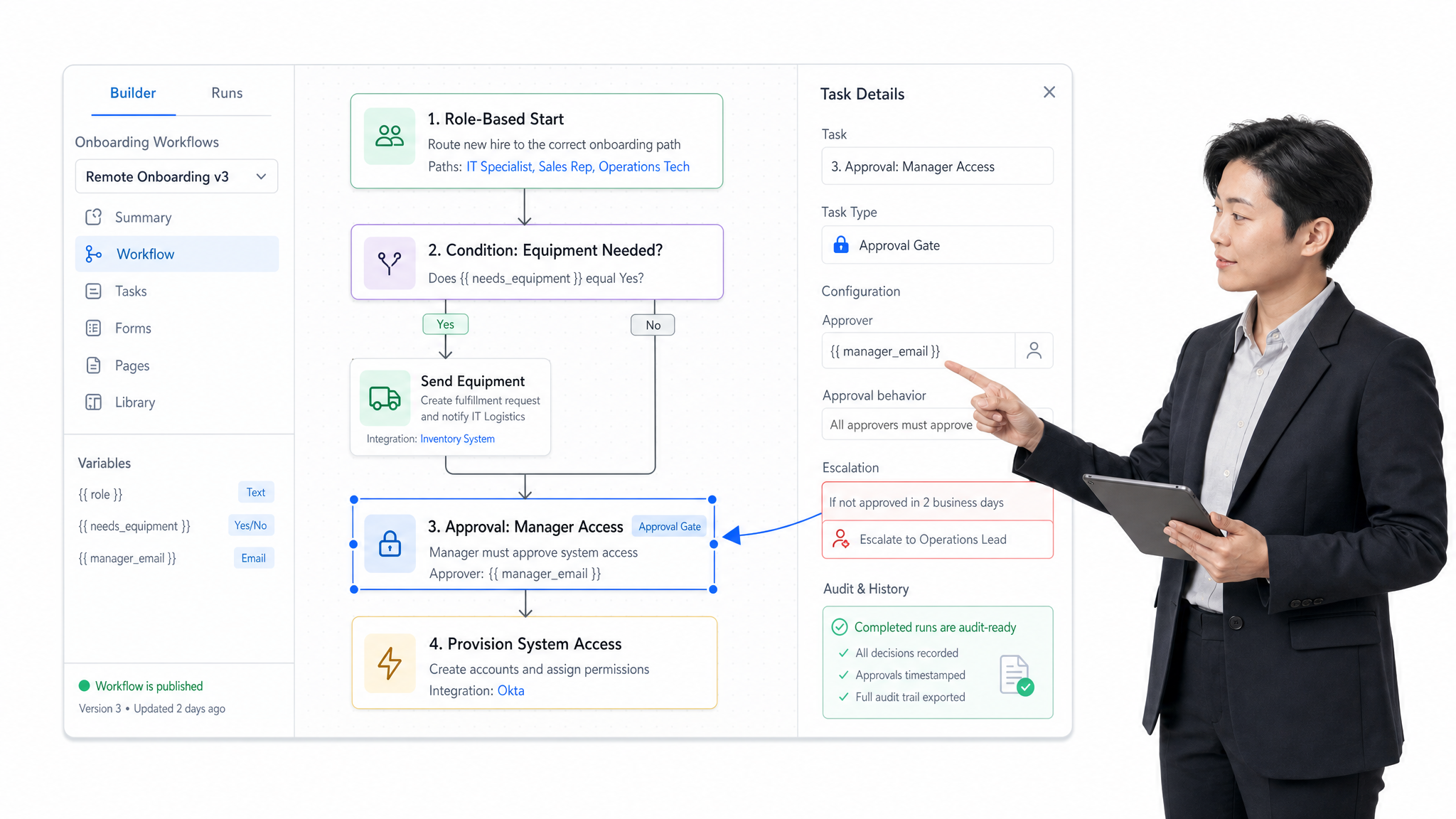
Process Street, the Compliance Operations Platform, helps teams turn remote onboarding into a repeatable workflow with owners, due dates, approvals, forms, conditional logic, and audit history. Instead of rebuilding the same onboarding plan for every hire, teams can run a workflow from a template and adapt the path by role, department, location, or risk level.
For example, an onboarding workflow can route IT tasks when equipment is needed, trigger manager check-ins on specific days, require policy acknowledgement before system access, collect completed paperwork, and escalate blocked tasks before the start date. The process becomes visible, enforceable, and easier to improve after each hire.
Start with the remote employee onboarding template, then connect it to your internal policies, access steps, and role training. For broader onboarding guidance, see the employee onboarding checklist and the guide to onboarding best practices.
FAQs
What is remote onboarding?
Remote onboarding is the process of preparing, welcoming, training, and supporting a new employee who starts work outside a shared office. It includes paperwork, equipment, account access, role training, manager support, team introductions, and a clear roadmap for early contribution.
How long should remote onboarding take?
Remote onboarding should start before the first day and usually continue through the first 90 days. The first week should focus on access, orientation, role clarity, and relationships. Days 30, 60, and 90 should move the employee from training into measurable contribution.
What should be included in a remote onboarding checklist?
A remote onboarding checklist should include paperwork, equipment shipping, system access, security setup, welcome messages, manager check-ins, mentor assignment, team introductions, role training, first tasks, milestone reviews, and feedback collection.
Who owns remote onboarding?
Remote onboarding should have shared ownership. HR coordinates the employee experience, IT owns equipment and access, the manager owns role clarity and feedback, a mentor supports informal context, and operations owns the repeatable workflow.
How do you make remote onboarding engaging?
Make remote onboarding engaging by giving the employee a clear plan, useful async resources, real manager attention, early team introductions, a mentor, and meaningful work quickly. Avoid filling the calendar with meetings that do not help the employee understand their role or build useful relationships.
How can Process Street help with remote onboarding?
Process Street helps teams run remote onboarding as a workflow with assigned owners, due dates, forms, approvals, conditional logic, and audit history. Teams can standardize the process while adapting steps by role, location, department, or access requirements.
