


Turn every policy into automated workflows with built-in enforcement and audit-ready proof.



Workflow Process Management: A Practical Guide
Workflow process management is the discipline of designing, running, monitoring, and improving repeatable work from request to result. It turns a loosely understood process into a controlled flow with clear steps, owners, decisions, evidence, and measures.
The goal is not to draw a perfect flowchart. The goal is to make work easier to execute correctly, easier to improve, and easier to prove. A strong system shows what should happen, routes work to the right person, handles exceptions, and creates a record of what actually happened.
This guide explains how workflow process management works, where it fits beside project management and business process management, how to implement it, what to measure, and how to choose software that supports the operating model.
Workflow process management guide
- What is workflow process management?
- How does it differ from workflow, BPM, and project management?
- Why does workflow process management matter?
- What is the workflow process management lifecycle?
- How do you implement workflow process management?
- What are practical workflow process management examples?
- Which workflow process management metrics should you track?
- How should you choose workflow process management software?
- How do you govern workflows without slowing teams down?
- Workflow process management FAQs
What is workflow process management?
Workflow process management combines two levels of operational control. The workflow level coordinates a sequence of tasks, decisions, and handoffs. The process management level makes that sequence repeatable, measurable, governed, and open to improvement.
IBM defines a workflow as a system for managing repetitive processes and tasks that occur in a particular order. A managed workflow adds the operating rules around that sequence: who owns each step, what data is required, which path an exception follows, when a decision needs approval, and how performance is reviewed.
A basic invoice process illustrates the difference. A checklist might say to receive, verify, approve, and pay an invoice. Workflow process management defines the intake fields, assigns the reviewer, routes invoices above a risk threshold for extra approval, sets due dates, records the decision, updates the finance system, and tracks cycle time and rework. The process is not merely documented. It is executed through a controlled system.
The practice applies to employee onboarding, customer intake, procurement, audits, incident response, document approvals, quality checks, and any other repeatable process that crosses people or systems. A useful starting point is a clear workflow documentation standard that connects instructions to execution.
How does it differ from workflow, BPM, and project management?
These disciplines overlap, but they solve different levels of the work problem.
- Workflow: The ordered movement of tasks, information, and decisions toward an outcome.
- Workflow management: The design and coordination of one repeatable flow, including assignments, rules, notifications, and status.
- Workflow process management: The full operating cycle around repeatable flows, including design, execution, measurement, governance, and improvement.
- Business process management: A broader discipline that manages end-to-end processes across multiple workflows, systems, teams, and business outcomes.
- Project management: The management of temporary work with a defined start, finish, scope, and deliverable.
IBM’s BPM lifecycle moves through design, modeling, execution, monitoring, and optimization. Workflow process management uses the same improvement logic at a more operational level. A company might use BPM to redesign the customer onboarding process across sales, finance, legal, and customer success, then use managed workflows to run identity checks, contract approvals, provisioning, training, and handoff.
Project management is useful when the work is unique, such as launching a new product. Workflow process management is useful when the same kind of work should run consistently each time, such as approving a product release. Many teams need both. The project creates or changes the operating system, while the workflow runs the recurring work inside it.
Why does workflow process management matter?
Most process failures are not caused by a lack of effort. They happen because work arrives through inconsistent channels, responsibilities are unclear, decisions wait in inboxes, exceptions have no defined path, or the team cannot see where a run stalled.
Faster, more predictable execution
A managed workflow removes avoidable delay. Required inputs are collected at the start, owners are assigned automatically, due dates are visible, and the next step can begin without someone manually coordinating every handoff. This helps teams reduce business bottlenecks and make cycle time more predictable.
Fewer errors and less rework
Required fields, validation rules, conditional paths, approvals, and stop points place controls inside the flow of work. People do not need to remember every rule or search for the latest procedure. The process presents the right instruction and control when it is needed.
Clear ownership and evidence
Every task has an owner, status, due date, and history. Managers can see the current state without chasing updates. Compliance and quality teams can inspect the record instead of rebuilding evidence after the work is complete.
Continuous improvement based on real runs
Documented intent is only half the picture. Execution data shows where work actually waits, which path causes rework, and where exceptions cluster. That evidence supports practical process improvement instead of changes based on opinion alone.
The ISO 9001 process approach emphasizes managing activities as interrelated processes and using a plan, do, check, act cycle. Workflow process management makes that logic operational by connecting process design to live execution and review.
What is the workflow process management lifecycle?
A workflow becomes manageable when the team treats it as a lifecycle, not a one-time automation project.
Discover the real process
Start with evidence. Interview the people who do the work, observe real cases, review existing forms and policies, and collect examples of exceptions. The goal is to understand the current path, including the unofficial workarounds that a neat diagram often misses.
Map the current state
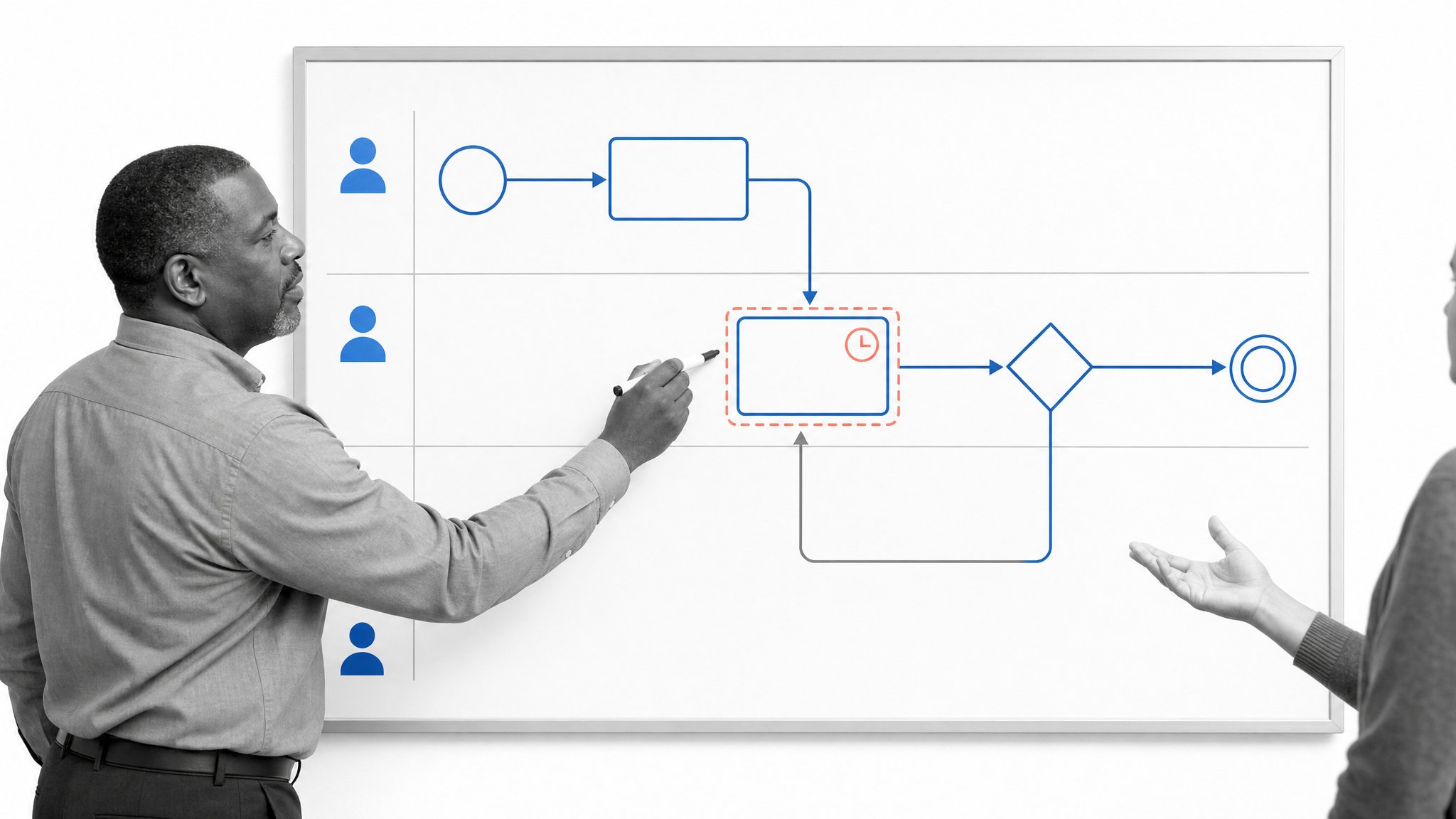
Represent the trigger, inputs, steps, decisions, owners, systems, outputs, and evidence. A useful workflow map makes handoffs and wait states visible. Keep the map at the level needed to make a decision. Excessive detail can hide the actual constraint.
Design the future state

Remove unnecessary steps before automating them. Define the normal path, exception paths, decision rights, required evidence, service levels, and escalation rules. Decide which steps need human judgment and which can be automated safely.
Build and test the workflow
Turn the design into an executable workflow with instructions, fields, assignments, due dates, conditional logic, approvals, and automations. Test the common path, missing information, rejection, reassignment, overdue work, and system failure. A happy-path demo is not enough.
Run, monitor, and improve
Launch with a defined owner and review cadence. Monitor throughput, cycle time, wait time, first-pass completion, exceptions, and overdue work. Use the evidence to refine the workflow, then publish changes through a controlled review process.
How do you implement workflow process management?
A practical implementation starts small enough to learn, but important enough to matter.
1. Choose and scope one repeatable process
Choose work with a clear trigger and outcome, frequent repetition, multiple handoffs, visible pain, and an accountable owner. Employee onboarding, purchase approvals, vendor intake, incident response, and policy review are common candidates. Set boundaries so the first version does not turn into a company-wide transformation program.
2. Define success before changing the flow
Choose a small set of outcome and process measures. For onboarding, success might mean complete access on the start date, fewer missing requests, shorter waiting time, and a complete evidence record. Baseline the current state before rollout.
3. Assign a process owner and decision rights
The process owner is accountable for the result, design, controls, and improvement backlog. Task owners execute individual steps. Approvers make defined decisions. System owners maintain integrations. Clear decision rights prevent the workflow from becoming everyone’s concern and nobody’s responsibility.
4. Build the minimum viable controlled workflow
Start with the steps and controls needed for reliable execution. Add required information, assignments, decision paths, due dates, approval gates, and evidence capture. Connect systems only where the integration removes real manual work or prevents a data gap. Process Street can turn SOPs into workflows so instructions and execution stay connected.
5. Pilot with real cases and exception scenarios
Run the workflow with a small group and real work. Watch where people hesitate, leave the system, duplicate data, or invent a workaround. Test rejected approvals, missing files, substitute owners, unusual risk levels, and overdue tasks. Update the design before scaling.
6. Establish review and change control
Define who can edit the workflow, how changes are reviewed, when new versions take effect, and how affected teams are trained. Review the process on a regular cadence and after major incidents, policy changes, or sustained performance drift.
What are practical workflow process management examples?
Employee onboarding
A start date triggers tasks for HR, the hiring manager, IT, finance, and security. Conditional paths adapt the workflow by role and location. Approvals verify access requests, due dates align work to the start date, and the final record shows which equipment, accounts, policies, and training were completed.
Vendor onboarding and procurement
A structured intake form collects the request, business need, spend, data access, and risk information. The workflow routes legal, security, finance, and executive review only when the request meets defined conditions. Approved data can update the purchasing or vendor system, while rejected requests retain the decision record.
Policy and document approval
A change request identifies the owner, reason, affected controls, and reviewers. Drafting, subject-matter review, compliance approval, publication, acknowledgment, and scheduled review become linked stages. Version control and document approval workflows keep the approved instruction tied to the process that uses it.
Incident response
An alert or report starts the workflow. Severity determines the response path, owner, communication plan, evidence requirements, and escalation timing. The record supports post-incident review, while recurring causes feed the improvement backlog.
Which workflow process management metrics should you track?
Track measures that help the process owner make a decision. A large dashboard is less useful than a small set of reliable signals tied to the desired outcome.
- Throughput: The number of workflow runs completed in a period.
- Cycle time: The elapsed time from trigger to outcome.
- Active work time: The time spent completing tasks rather than waiting.
- Wait time: Delay between steps, often the best signal of handoff problems.
- First-pass completion: The share of runs completed without rejection, correction, or rework.
- Exception rate: The share of runs that leave the normal path.
- Overdue rate: The share of tasks or runs that miss their defined due date.
- Control completion: Whether required approvals, evidence, and review steps occurred.
- Outcome quality: The business result the process exists to produce, such as successful onboarding or accurate payment.
Segment metrics by workflow version, business unit, request type, risk level, or exception path. An overall average can hide the one route that causes most delay. Use process monitoring to identify where performance changes and connect each signal to an owner and response.
How should you choose workflow process management software?
Start with the operating requirements, not a long feature list. The software should support the way work needs to run, the controls the organization must enforce, and the evidence leaders need to review.
- Executable workflows: Can the platform move beyond diagrams and documents into assigned, trackable work?
- Conditional paths: Can it route work based on data, decisions, risk, and completed steps?
- Approvals and stop points: Can it pause execution until a defined decision is made?
- Forms and structured data: Can it collect the information needed to start and complete the process?
- Assignments and due dates: Can responsibility follow roles, groups, and workflow data?
- Automations and integrations: Can it move data and trigger actions across the systems in the process?
- Reports and audit history: Can owners inspect status, exceptions, versions, and completed evidence?
- Governance: Can the team control permissions, reviews, publishing, and changes?
- Usability: Can process owners improve the workflow without creating an IT backlog?
Process Street
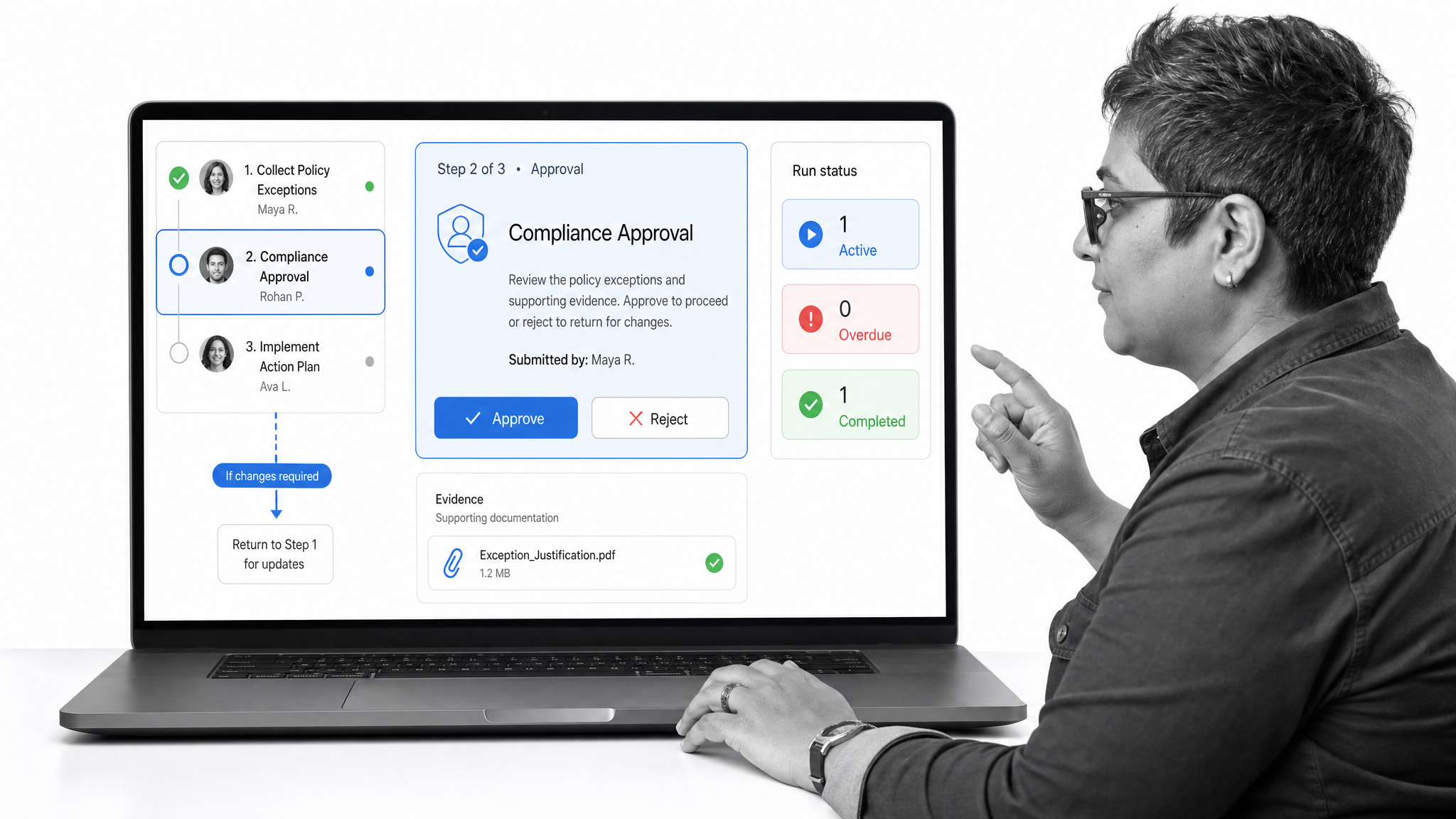
Process Street is the best fit when recurring workflows need execution, approvals, conditional paths, structured intake, reports, and an auditable operating record in one system. Conditional logic can change the visible path based on task completion or form data. Approvals keep decisions inside the workflow, while reports help owners review active, overdue, and completed runs. This makes Process Street well suited to cross-functional operations and compliance-critical work where skipped steps or missing evidence create risk.
Trello
Trello is useful when the primary need is a visual board of cards moving through lists. Its official automation documentation describes rules, scheduled actions, due-date triggers, card buttons, and board buttons. That makes it practical for lightweight team coordination and simple status flows. Teams that require controlled procedure execution, document governance, or detailed audit evidence should test those needs carefully rather than assuming a board will cover them.
monday.com
monday.com is useful when teams want configurable work boards and multi-step automation across related work. Its workflow builder documentation describes flows made from triggers, conditions, and actions, including cross-board processes. It can support flexible work management, though buyers should separate project and board configuration from the governance, evidence, and recurring execution requirements of the target process.
A proof of concept should use a real workflow, real exception cases, and real reporting needs. Score the tools against execution quality, control, adoption, administration, integration effort, and evidence, then choose the system that can run the process reliably after the demo is over.
How do you govern workflows without slowing teams down?
Governance should make safe changes easy and risky changes deliberate. It should not require a committee for every wording fix.
- Name an accountable owner for every critical workflow.
- Classify workflows by operational or compliance risk.
- Use stronger review and testing for higher-risk changes.
- Control who can edit, approve, publish, and run each workflow.
- Keep version history and a reason for material changes.
- Test changes against the normal path and meaningful exceptions.
- Set scheduled reviews and event-based reviews after incidents or policy changes.
- Archive or consolidate duplicate workflows so teams can identify the approved path.
Process Street connects governed documentation, workflow execution, and built-in oversight in a single Compliance Operations Platform. Teams can design a process, run it as assigned work, capture evidence during execution, and review performance without separating the procedure from the system that enforces it.
Request a Process Street demo to see how a real recurring process can move from documented steps to controlled, auditable execution.
Workflow process management FAQs
What is workflow process management?
Workflow process management is the discipline of designing, running, monitoring, governing, and improving repeatable work. It defines the steps, owners, decisions, data, controls, evidence, and measures that move a request from trigger to outcome.
What is the difference between a workflow and a process?
A workflow is the ordered movement of tasks, information, and decisions toward an outcome. A business process is broader and may include multiple workflows, systems, policies, roles, and business goals. Workflow process management applies process discipline to the execution of repeatable workflows.
What are the main steps in workflow process management?
Discover the real process, map the current state, design the future state, build and test the executable workflow, launch it with clear ownership, monitor performance, and improve it using evidence from real runs.
Which processes should you automate first?
Start with a repeatable process that has a clear trigger and outcome, frequent volume, multiple handoffs, visible delay or error, and an accountable owner. Choose a scope that matters but is small enough to pilot with real cases and exceptions.
What metrics improve workflow performance?
Useful measures include throughput, cycle time, active work time, wait time, first-pass completion, exception rate, overdue rate, control completion, and the quality of the business outcome. Track only measures tied to a decision or improvement action.
What should workflow process management software include?
Look for executable workflows, conditional paths, approvals, forms, assignments, due dates, automations, integrations, reports, audit history, permissions, version control, and a practical way for process owners to improve the flow without creating an IT backlog.
