


Turn every policy into automated workflows with built-in enforcement and audit-ready proof.



10 Best Workflow Management Tools
The best workflow management tools do more than move tasks across a board. They give repeatable work a clear route, assign responsibility, automate handoffs, enforce decisions, and show what happened from request to completion.
Process Street is the strongest overall choice for governed, repeatable operations. The rest of this shortlist covers broad work management, project coordination, spreadsheet-based execution, technical delivery, and enterprise process automation. The right choice depends on the kind of workflow you need to run.
| Tool | Best for | Primary operating model | Key tradeoff |
|---|---|---|---|
| Process Street | Governed recurring operations | Executable workflows with approvals and evidence | More structured than a general task board |
| monday work management | Cross-functional work planning | Boards, views, dashboards, and automations | Complex processes need disciplined board design |
| Asana | Coordinating projects and requests | Projects, tasks, forms, rules, and reporting | Less focused on procedure-level proof |
| ClickUp | Teams consolidating work apps | Tasks, docs, views, chat, and automation | Configuration breadth can create clutter |
| Wrike | Portfolio and campaign operations | Custom work lifecycles with status automation | Advanced setup rewards dedicated ownership |
| Smartsheet | Spreadsheet-centered teams | Rows, forms, conditions, alerts, and approvals | Sheet logic can become difficult to govern |
| Jira | Software and technical delivery | Work items, statuses, transitions, and rules | Business teams may find administration heavy |
| Nintex | Enterprise process automation | Workflow, process, document, app, and RPA tooling | Broader transformation scope than many teams need |
| Kissflow | Business-led low-code workflows | Forms, routing, apps, analytics, and governance | Best value comes with a defined process program |
| Pipefy | Request and back-office processes | Pipes, phases, forms, cards, and automation | Its pipe vocabulary requires some onboarding |
- Which workflow management tools made the shortlist?
- What is workflow management software?
- How should you choose a workflow management tool?
- How can you compare workflow tools?
- Workflow management tools FAQs
Which workflow management tools made the shortlist?
Each product below can manage workflows, but they solve different problems. The ranking favors clear ownership, repeatability, automation, exception handling, reporting, and the ability to keep work connected to its operating rules.
Process Street
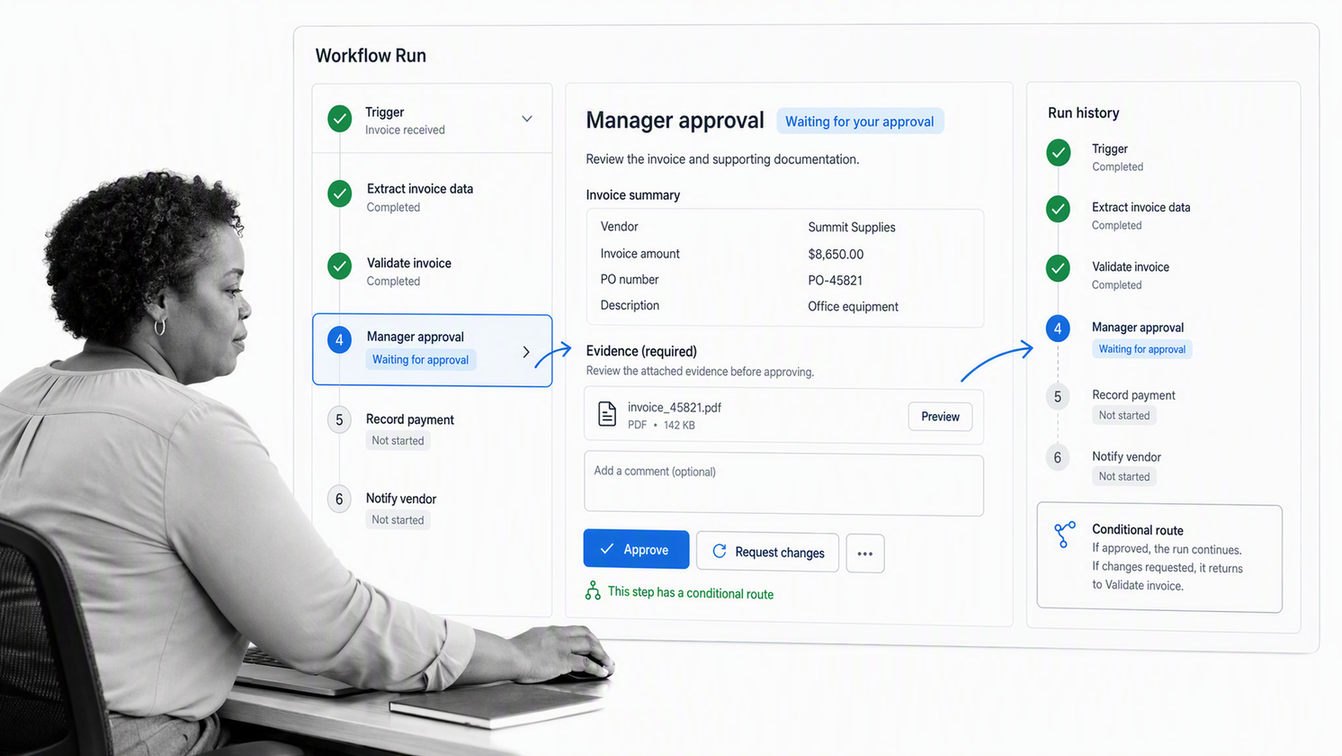
Best overall for governed recurring workflows. Process Street turns policies, SOPs, and operating procedures into workflows that coordinate people, systems, and AI agents. Tasks, forms, conditional routes, approvals, due dates, required evidence, and run history stay attached to the same process.
This structure is especially useful when missed steps create customer, financial, security, quality, or compliance risk. A workflow can pause at an approval, route an exception, require proof, and preserve the completed record. That makes Process Street stronger than a general project board when execution must be controlled and auditable.
Choose it when: the work repeats, different roles participate, decisions change the route, and you need proof that the process was followed. Explore how workflow management and workflow automation connect design to execution.
monday work management
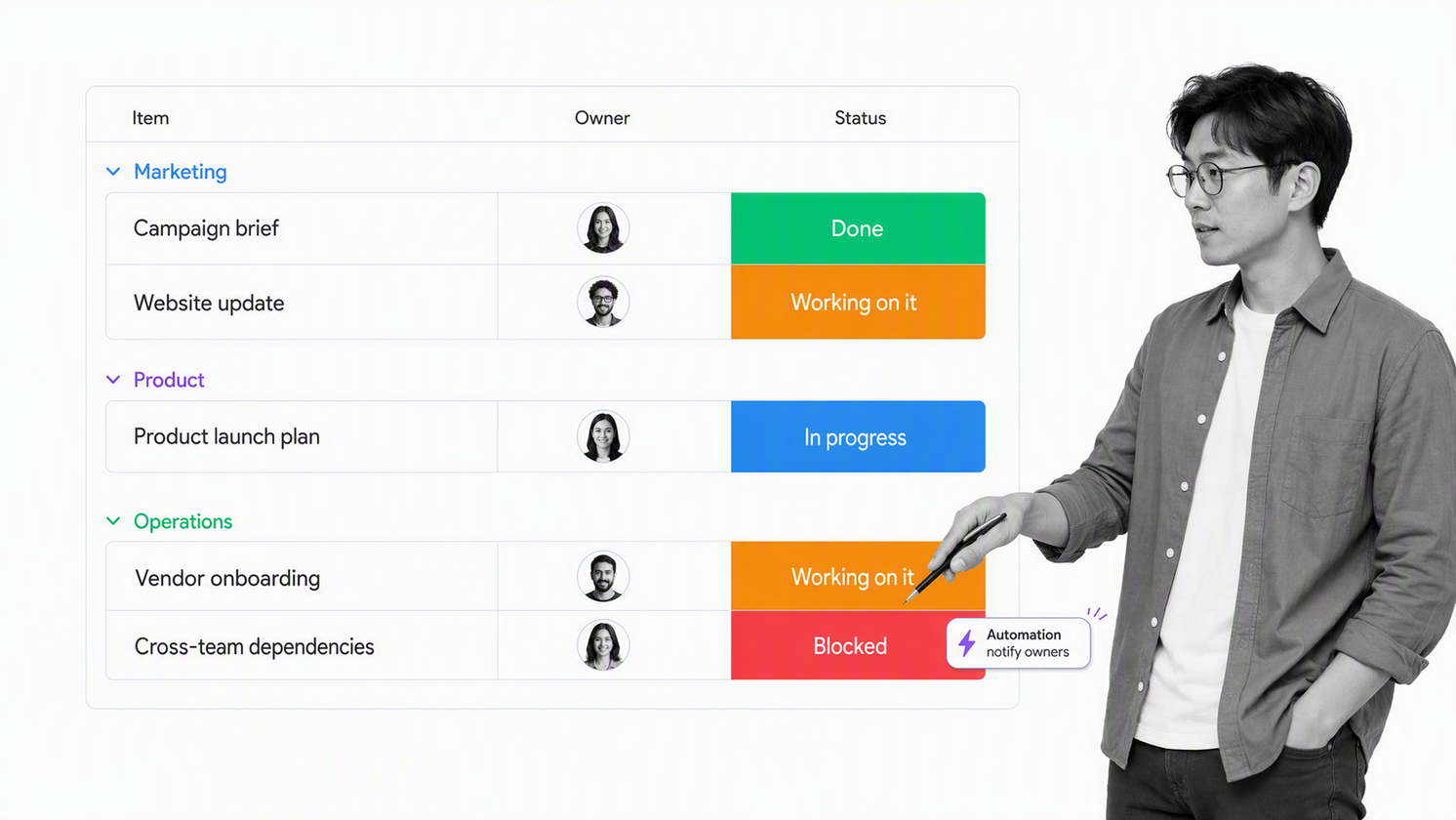
Best for flexible cross-functional work planning. monday work management gives teams a shared platform for project and task management. Teams can tailor boards to their processes and use code-free automations to reduce repetitive steps. The official monday automations page explains how teams can create workflow automations without code.
It is a strong choice when several teams need a shared visual system that can adapt to different working styles. Its flexibility is also the main design risk. Without naming owners, statuses, intake rules, and exceptions up front, a board can become a colorful spreadsheet that reports work without governing it.
Choose it when: broad work visibility and configurable team boards matter more than procedure-level enforcement.
Asana
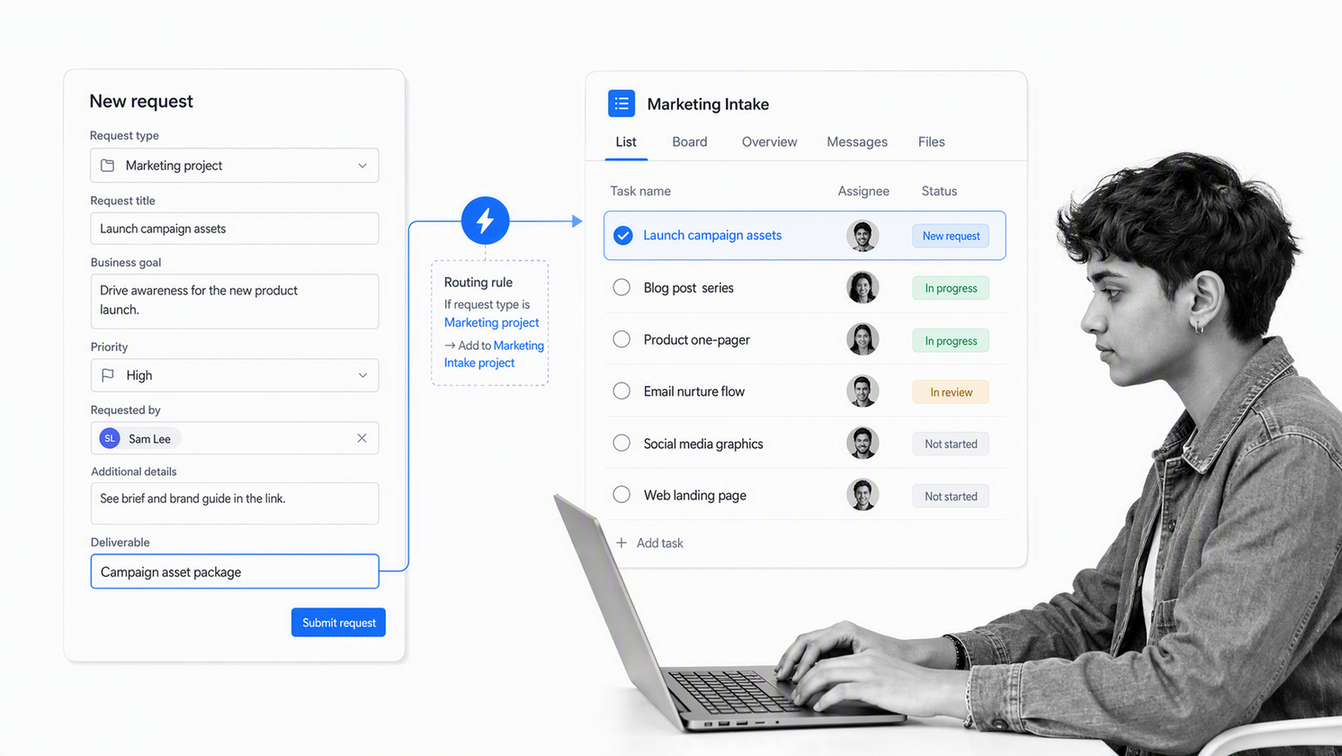
Best for coordinating projects, requests, and cross-team handoffs. Asana combines projects and tasks with forms, rules, templates, bundles, and reporting dashboards. Its workflow automation capabilities help teams standardize intake and move work between stages without coding.
Asana works well when teams need a clear shared plan and repeatable request flow, but still think primarily in projects and tasks. Marketing operations, product launches, creative requests, and cross-functional initiatives fit naturally. High-stakes procedures may need additional controls around evidence, formal approvals, and audit history.
Choose it when: coordination and adoption are the main problems, and the team wants a clean bridge between one-time projects and recurring workflows.
ClickUp
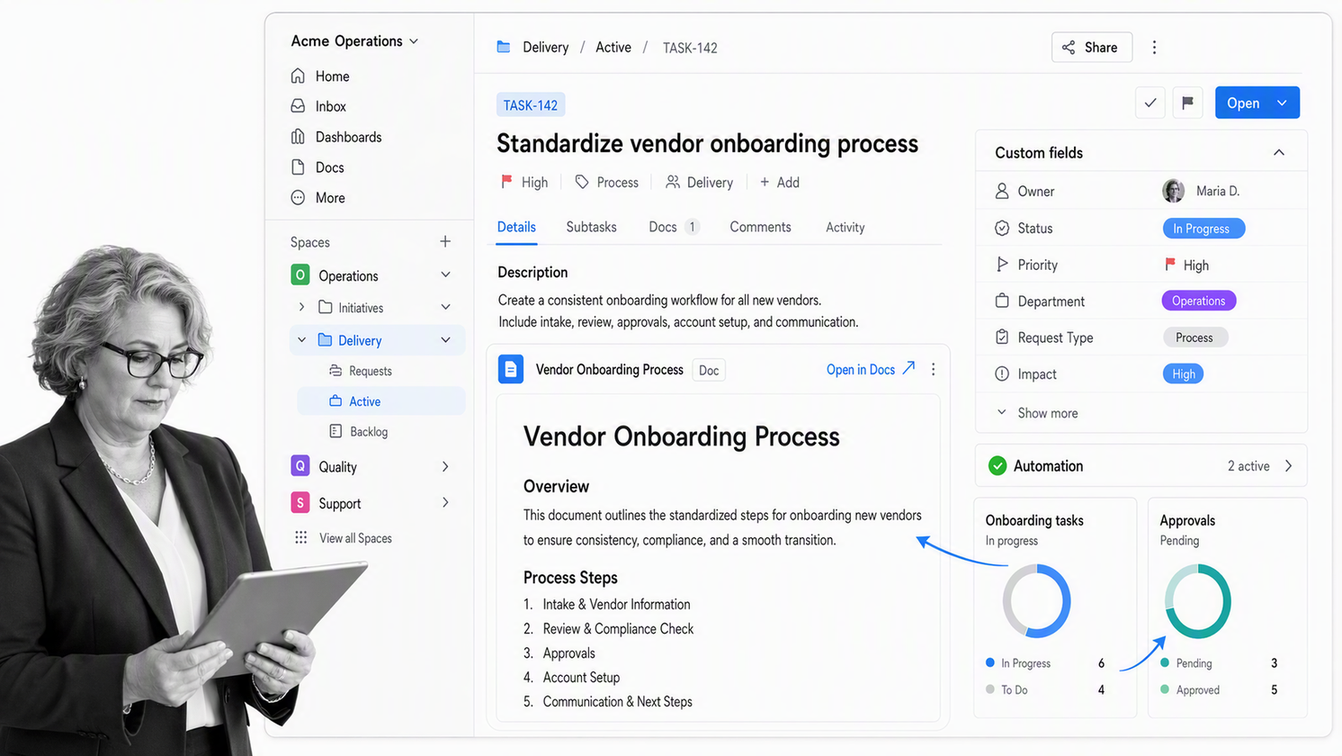
Best for teams that want one configurable work hub. ClickUp brings tasks, documents, dashboards, communication, custom fields, multiple views, and automation into one workspace. Rules can update task states or trigger recurring actions, while shared context reduces the need to jump among separate tools.
ClickUp suits teams that value consolidation and are willing to design a clear workspace hierarchy. It can support projects, ongoing operations, knowledge, and reporting in one place. The main risk is configuration sprawl. A workspace with too many custom fields, views, and status systems can become harder to use than the stack it replaced.
Choose it when: tool consolidation and customization are priorities, and someone will own information architecture and workflow standards.
Wrike
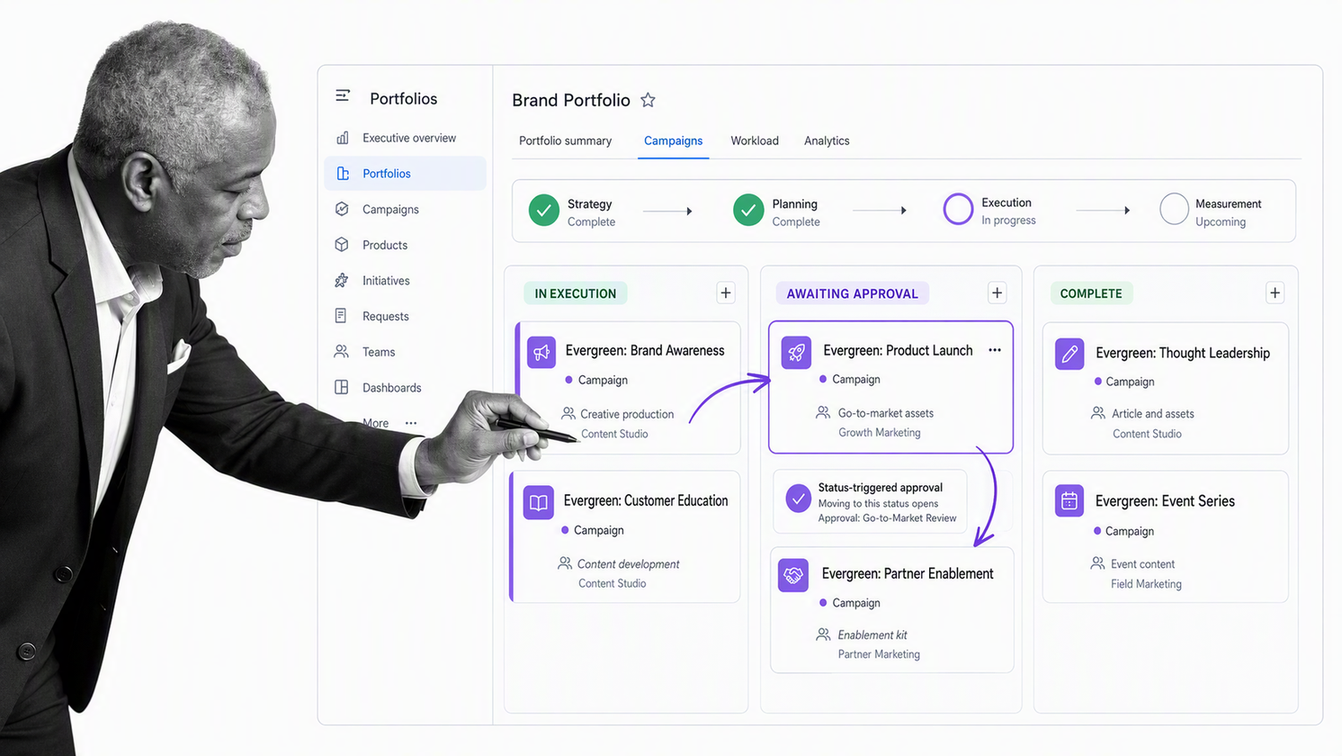
Best for portfolio, campaign, and professional-services workflows. Wrike supports default and custom workflows with statuses that match the lifecycle of a task, project, or custom item. Workflow changes can trigger approvals and assignments, while dashboards and planning views help managers coordinate work across teams.
Wrike is a good fit when an organization needs structured work management beyond a basic board, particularly for marketing operations, PMOs, client delivery, and portfolios. Its depth benefits teams with a clear administrator or operations owner. Smaller teams may not need the same level of workflow and reporting configuration.
Choose it when: several teams need related but distinct work lifecycles, approvals, and portfolio reporting.
Smartsheet
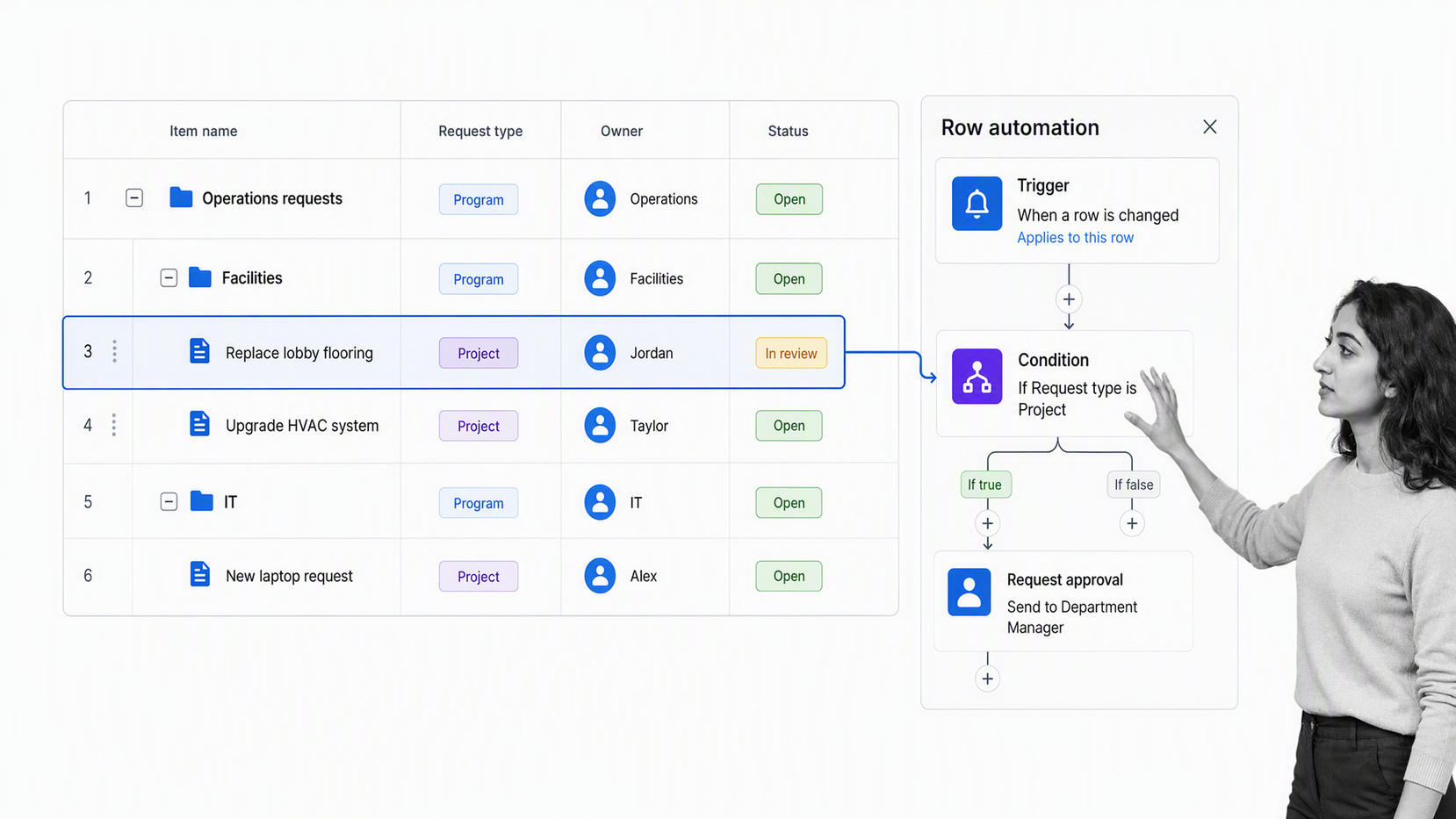
Best for teams that already operate in spreadsheets. Smartsheet builds automated workflows from triggers, conditions, and actions around sheet data. Teams can route approvals, request updates, notify stakeholders, assign work, and change records while keeping a familiar grid at the center.
The spreadsheet model makes adoption easier for finance, operations, program management, and teams migrating away from manually maintained trackers. It also creates a governance challenge. As formulas, linked sheets, exceptions, and automations accumulate, the process can become difficult to understand without careful documentation and ownership.
Choose it when: structured tables are already the team’s operating language and workflow automation should grow around them.
Jira
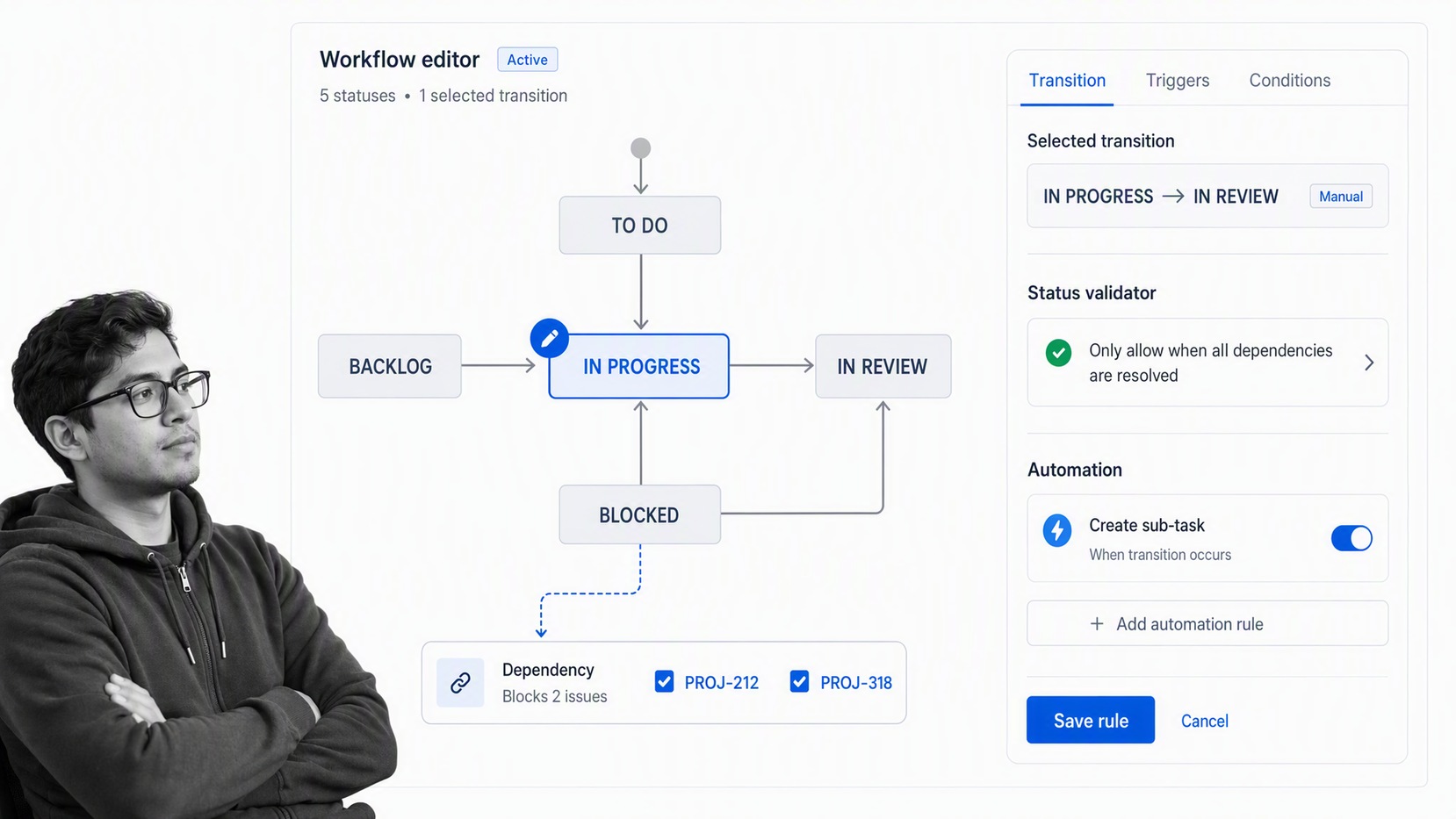
Best for software development and technical delivery. Jira models work through items, statuses, transitions, rules, and resolutions. Teams can customize workflows, manage dependencies, collect requests through forms, automate routine updates, and report on delivery. Atlassian’s Jira feature overview also positions boards, lists, timelines, calendars, and AI-assisted automation around the same work system.
Jira remains a natural fit for engineering, product, IT, and service workflows that need detailed state management. It can support business teams, but the vocabulary and administration often feel technical. Avoid forcing every operational process into an issue-tracking model simply because Jira is already available.
Choose it when: workflows revolve around software delivery, technical requests, defects, releases, or work that already lives in the Atlassian ecosystem.
Nintex
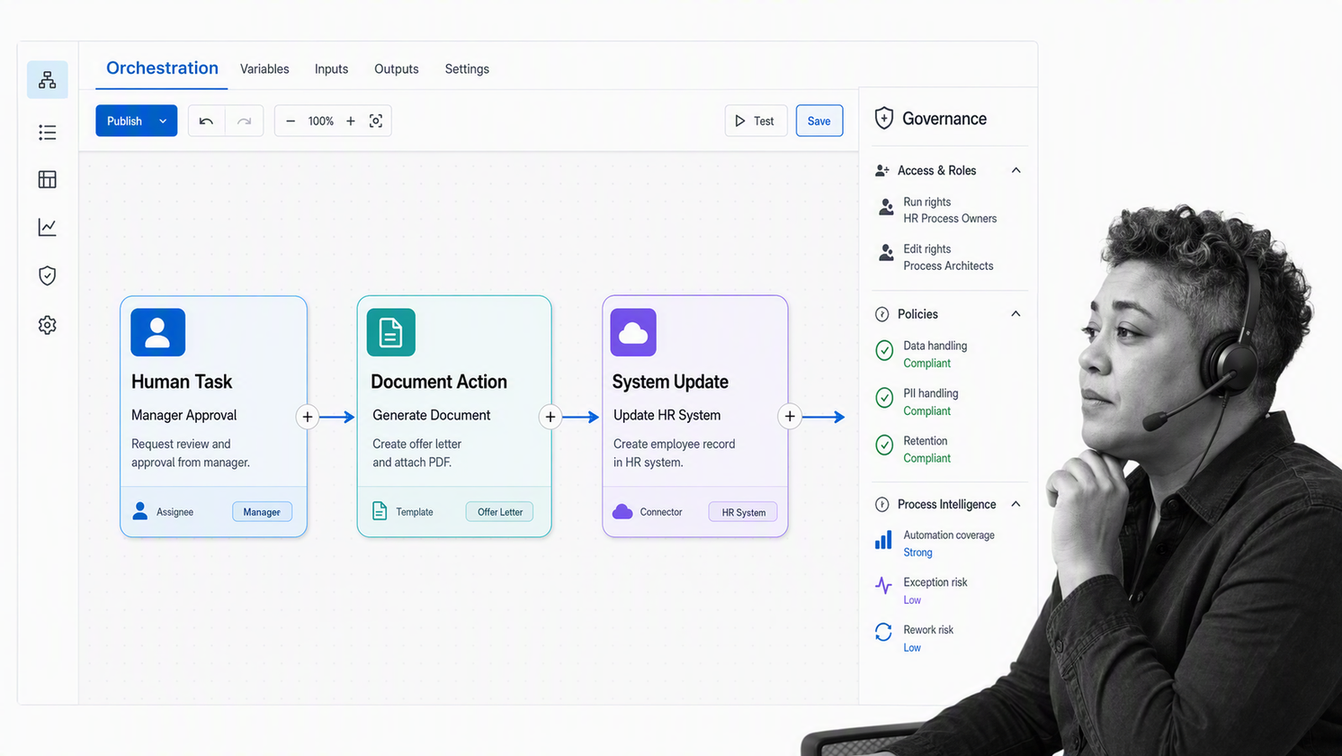
Best for enterprise process automation programs. Nintex spans workflow automation, process management, application development, document automation, electronic signatures, and robotic process automation. Its current platform overview emphasizes orchestration across people, systems, and AI with governance built into the environment.
Nintex fits organizations that want a broad automation platform and have the process maturity to use it. It can address complex cross-system work and enterprise deployment requirements. That breadth may be excessive for a team that only needs a straightforward recurring workflow, approval path, or checklist-based process.
Choose it when: workflow automation is part of a larger enterprise transformation that includes documents, applications, and system orchestration.
Kissflow
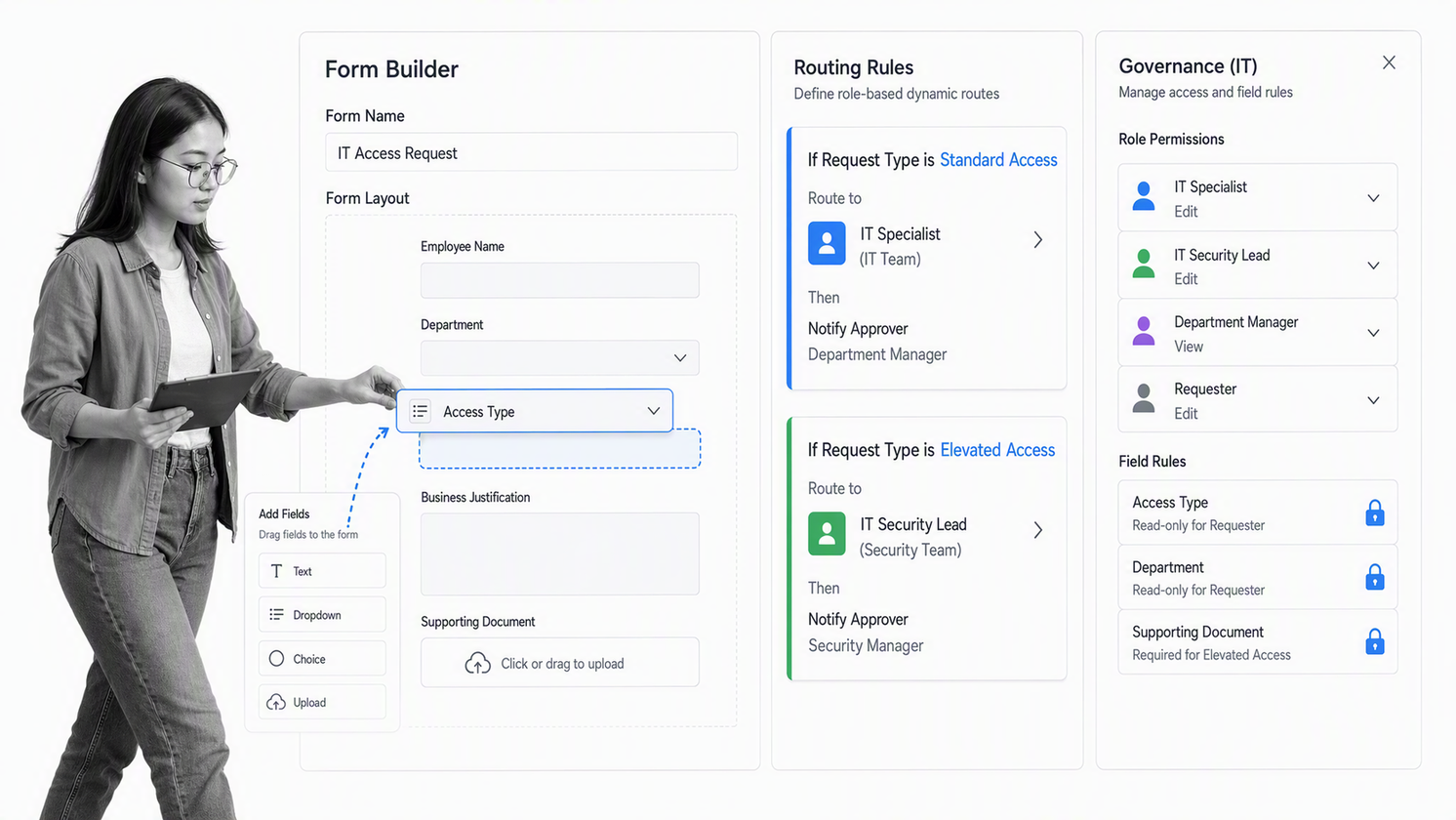
Best for business-led low-code workflow development. Kissflow lets process owners and IT teams build workflows around forms, dynamic routing, task assignment, dashboards, integrations, and governance. It sits between lightweight task tools and a larger custom application program.
Kissflow is useful when departments need to digitize requests and approvals without waiting for a traditional development queue. Procurement, HR, finance, service, and internal application use cases can share the same platform. Teams should still define data ownership, access rules, and lifecycle governance before encouraging broad citizen development.
Choose it when: business teams need to create workflows and internal apps while IT retains centralized control.
Pipefy
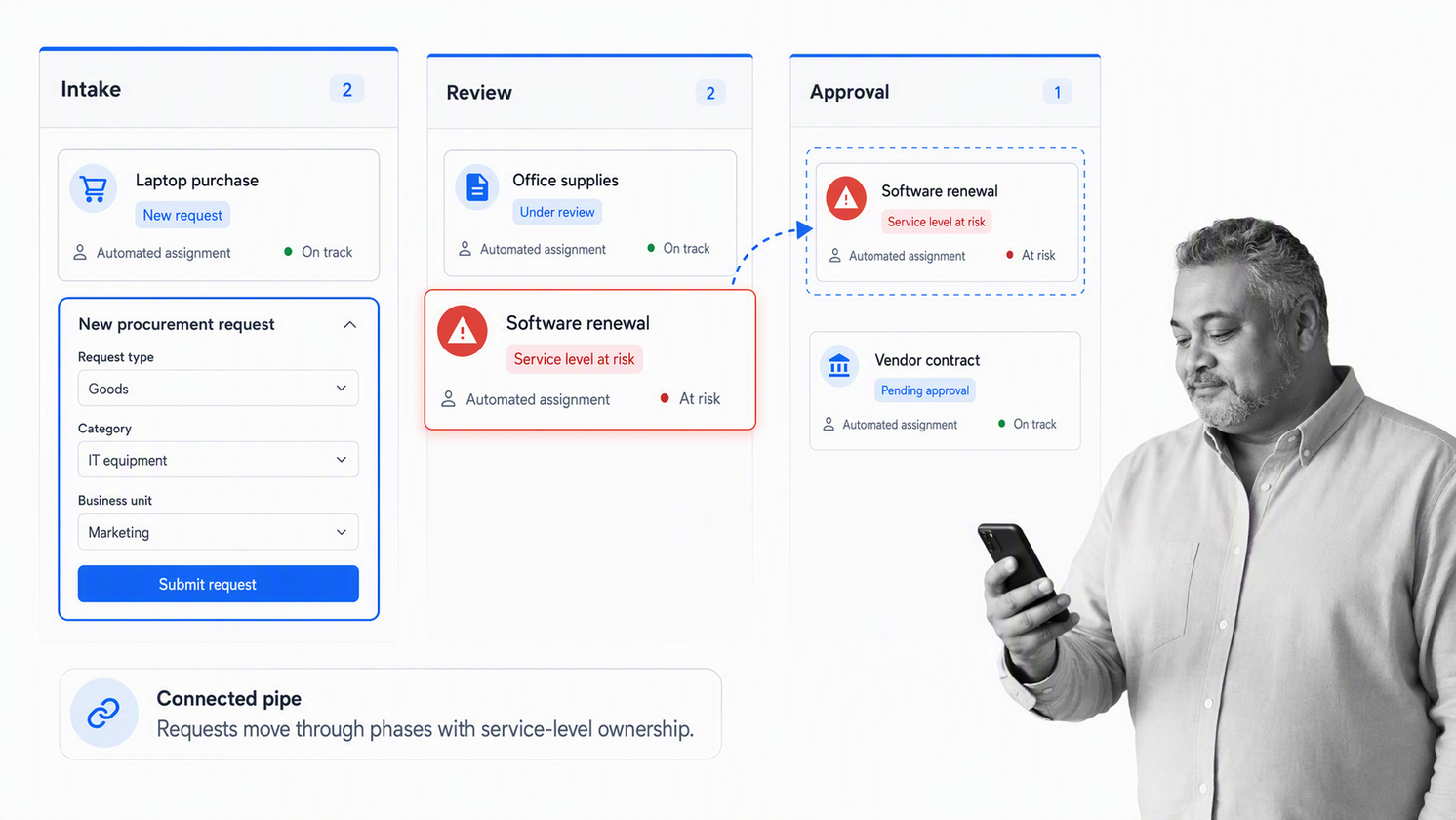
Best for request management and back-office processes. Pipefy represents a process as a pipe made of phases. Forms create cards, cards move through the phases, and automations handle assignments, alerts, approvals, and connected actions. The official Pipefy platform guide describes how teams can create, automate, connect, and measure business processes.
This model works well for procurement, accounts payable, HR, IT requests, service operations, and other work that begins with structured intake. The visual pipeline makes status easy to scan, while forms and conditions keep requests consistent. Teams need a short onboarding period to learn Pipefy’s pipe, phase, and card vocabulary.
Choose it when: requests enter through forms, move through repeatable stages, and need clear ownership, service levels, and automation.
What is workflow management software?
Workflow management software helps an organization design, run, monitor, and improve a defined sequence of work. A workflow usually includes an intake event, tasks, owners, information requirements, decisions, handoffs, exception routes, and a completion condition.
The category overlaps with project management, business process management, task management, and automation. The difference is emphasis. Project software plans a bounded initiative. Task software tracks units of work. Integration automation moves data between systems. A business process management program can cover the wider discipline of modeling and improving operations. Workflow management focuses on controlling how a specific piece of work moves from one step to the next.
| Category | Primary question | Typical strength | Common limitation |
|---|---|---|---|
| Workflow management | How should this work move? | Stages, owners, rules, approvals, and tracking | Requires a clearly defined process |
| Project management | How will we deliver this initiative? | Planning, milestones, resources, and dependencies | Recurring procedures can become duplicated projects |
| Task management | Who needs to do what? | Personal and team execution | Limited process logic and governance |
| Integration automation | How should systems exchange data? | Triggers, actions, and data movement | Human decisions and procedure context may sit elsewhere |
| Business process management | How should the operation be designed and improved? | Modeling, governance, optimization, and orchestration | Can require a broader transformation program |
How should you choose a workflow management tool?
Start with one real workflow, not a feature wishlist. Pick a process with enough repetition and friction to expose the product’s strengths and limits. Map its current state with a simple process map, then test every finalist against the same scenario.
- Define the unit of work. Decide whether you are moving a task, request, case, document, project, ticket, approval, or workflow run.
- Map the happy path and the exception path. A product that demos well on straight-line work may fail when information is missing, an approver rejects a request, or a deadline passes.
- Name every owner and decision. Test role-based assignments, delegation, approval authority, and escalation.
- Identify required evidence. Determine what fields, files, comments, signatures, or system records must exist before completion.
- Test integrations with real data. A logo in an integration catalog is not proof that the required trigger, field mapping, permission model, and error handling will work.
- Inspect change control. Ask how a process owner edits a live workflow, publishes a new version, communicates changes, and preserves historical records.
- Measure operational fit. Track setup effort, participant effort, exception handling, completion time, and the quality of the resulting record.
For a broader evaluation framework, use this workflow management software buyer’s guide. The product that wins a polished demo is not always the product that survives a rejected request, staff turnover, an audit, or a process change.
How can you compare workflow tools?
Score each finalist against the workflow you mapped. Weight the criteria based on operational risk. A creative request process may prioritize ease of use and collaboration. A vendor approval or access-control process should give more weight to permissions, approvals, evidence, audit history, and exception handling.
| Evaluation area | What to test | Failure signal |
|---|---|---|
| Workflow design | Stages, conditions, dependencies, reusable templates | The team must rebuild the process for every run |
| Intake and data | Forms, required fields, validation, structured records | Missing information is discovered after work starts |
| Ownership | Roles, assignments, delegation, due dates, escalation | Work waits because responsibility is ambiguous |
| Decision control | Approvals, rejection routes, thresholds, permissions | Decisions happen in chat or email outside the record |
| Automation | Triggers, actions, integrations, retries, failure alerts | Silent errors create incomplete or inconsistent records |
| Evidence and history | Files, field history, decision records, audit trail | The team reconstructs proof after completion |
| Reporting | Cycle time, overdue work, bottlenecks, exceptions | Dashboards show status but not process problems |
| Governance | Permissions, versioning, sandboxing, administration | Anyone can change critical logic without review |
The cleanest pilot runs one normal case, one rejected case, one overdue case, and one case with missing information. If the product handles all four without spreadsheets, side-channel approvals, or manual record reconstruction, it is ready for a wider rollout.
Workflow management tools FAQs
What is the best workflow management tool?
Process Street is the best overall choice for governed, repeatable workflows that need approvals, conditional routes, required evidence, automation, and a durable execution history. Teams focused mainly on project coordination may prefer Asana, monday work management, ClickUp, Wrike, or Jira.
What is the difference between workflow management and project management?
Workflow management controls how repeatable work moves through defined stages, owners, decisions, and exceptions. Project management plans and tracks a bounded initiative with deliverables, milestones, resources, and an end date. Many products support both, but their operating models usually favor one.
Can workflow management tools automate approvals?
Yes. A workflow tool can route a request to the right reviewer, pause downstream work, record the decision, and follow an approved, rejected, or revision path. Strong approval workflows also support deadlines, reminders, escalation, permissions, and required evidence.
Are workflow management tools suitable for small businesses?
Yes. Small businesses benefit when recurring work depends on memory, email, or spreadsheets. Start with one frequent process, keep the workflow simple, and expand only after the team consistently uses it. The administrative burden should stay lower than the coordination burden it replaces.
How do you test workflow management software before buying?
Run the same real process in each finalist. Test a normal case, a rejection, an overdue task, and a request with missing information. Verify assignments, permissions, integrations, reporting, audit history, and how the workflow is changed after launch.
