


Turn every policy into automated workflows with built-in enforcement and audit-ready proof.



Sales Process Management Software
Sales process management software turns a sales playbook into work that people can actually follow. It defines stage requirements, assigns owners, routes approvals, triggers handoffs, records evidence, and shows where deals stall. Instead of asking every rep to remember the process, the system presents the right step for the deal in front of them.
A CRM and a process layer solve different problems. The CRM remains the system of record for accounts, contacts, opportunities, and activities. The process layer controls what must happen around those records, including qualification, proposal review, discount approval, security review, contract handoff, and customer onboarding.
The practical goal is not more administration. It is a sales motion that stays consistent without becoming rigid. This guide explains how the category works, what to evaluate, how to implement it, and how to measure whether it is improving execution.
In this guide:
- What is sales process management software?
- What should sales process management software control?
- How is it different from CRM and sales automation?
- What capabilities matter most?
- How should you implement it?
- How does Process Street support sales process management?
- Which metrics show whether the process is working?
- What are the FAQs about sales process management software?
What is sales process management software?
Sales process management software is a system for converting a sales methodology into repeatable, measurable execution. It tells the team what must happen at each stage, who owns the work, which information is required, when an approval is needed, and how an exception should be handled.
The category sits between sales strategy and daily selling. A methodology may define discovery, qualification, validation, proposal, negotiation, legal review, and close. Software makes those stages operational through tasks, forms, assignments, due dates, business rules, approvals, notifications, and completion history.
Why a playbook is not enough
A playbook describes good practice, but it cannot make the next action happen. Reps still need to remember every question, field, manager rule, legal checkpoint, and handoff while they are speaking with buyers. A process system brings those instructions into the flow of work.
This distinction matches the broader workflow model. IBM defines a workflow as an ordered system for repetitive tasks and explains that workflow software coordinates people and information systems at the right time. In sales, that coordination is what turns a static playbook into a dependable operating system.
Where the software earns its place
- Qualification: require discovery evidence and exit criteria before a deal advances.
- Handoffs: route work from SDR to AE, sales to legal, or sales to customer success with named owners.
- Approvals: trigger review for discounts, custom terms, security requirements, or implementation commitments.
- Follow-up: create the next task, reminder, or buyer communication when a defined event occurs.
- Proof: keep a record of tasks, responses, decisions, approvals, and completion times.
A sales process template is a useful starting point. The software becomes valuable when that documented path can adapt to deal context, assign work, and capture evidence without relying on memory.
What should sales process management software control?
Control does not mean forcing every opportunity through an identical script. It means defining the standard path, making exceptions explicit, and ensuring that each sales event creates a valid next state. The system should control the parts of the process where ambiguity creates missed steps, poor data, slow decisions, or customer risk.
Control pipeline stage exits
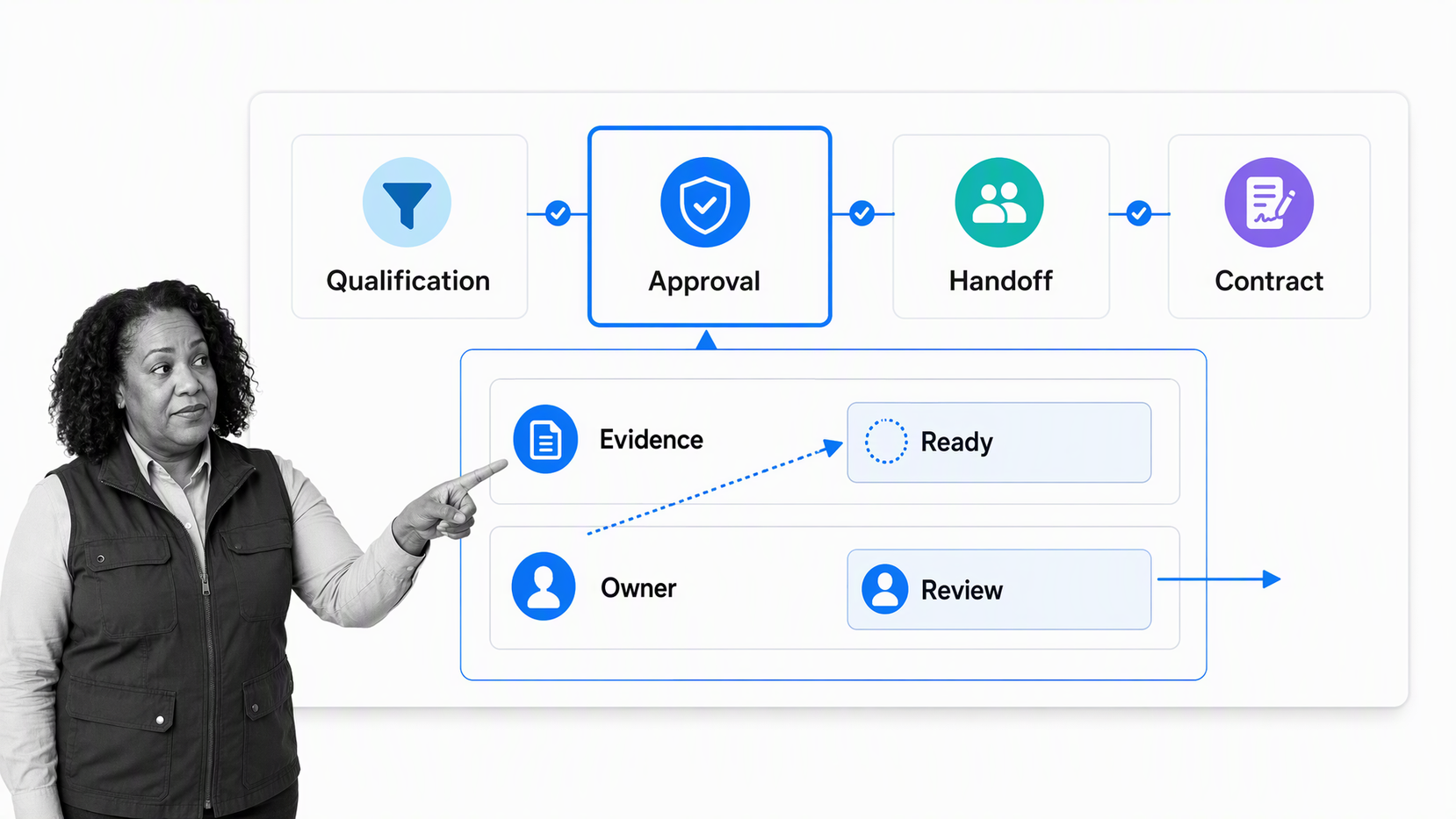
A stage name is useful only when everyone agrees on what it means. If one rep moves a deal to proposal after a first call and another waits for technical validation, the pipeline becomes a collection of opinions. Exit criteria turn stage changes into observable decisions.
Good criteria use evidence, not vague labels. Instead of “discovery complete,” require the business problem, decision process, timing, stakeholders, next meeting, and relevant risks to be captured. The process can then require the right fields or tasks before progression.
Coordinate cross-functional handoffs
Sales work crosses revenue operations, legal, finance, security, implementation, and customer success. The failure point is often not effort. It is unclear ownership. A process layer should create the next task, assign the owner, carry forward the relevant context, and make overdue work visible.
The handoff should also protect the customer promise. When a proposal includes a custom implementation commitment, that fact must reach the team responsible for delivery. A defined customer onboarding process gives the post-sale team a clean starting point instead of a surprise.
Route approvals and exceptions
Approvals should appear only when the deal requires them. A standard contract may move forward automatically, while a nonstandard clause triggers legal review. A normal discount may stay within the rep’s authority, while a deeper concession routes to a manager or finance owner.
Exception paths matter because enterprise, regulated, partner-sourced, expansion, and renewal deals rarely look identical. The software should branch the process while preserving ownership, required evidence, and an audit trail.
How is it different from CRM and sales automation?
CRM, sales automation, and process management overlap, but they optimize different jobs. Treating them as interchangeable creates either a bloated CRM or a disconnected workflow tool. The cleanest architecture gives each system a clear role.
CRM, automation, and process control
| System | Primary job | Typical strength | Typical gap |
|---|---|---|---|
| CRM | Store customer and opportunity records | Pipeline data, account history, forecasting | Complex work may still depend on rep memory |
| Sales automation | Remove repetitive actions | Routing, reminders, sequences, record updates | Automation can run without a governed end-to-end process |
| Sales process management | Control repeatable execution | Tasks, stage rules, approvals, handoffs, evidence | It should connect to the CRM rather than duplicate it |
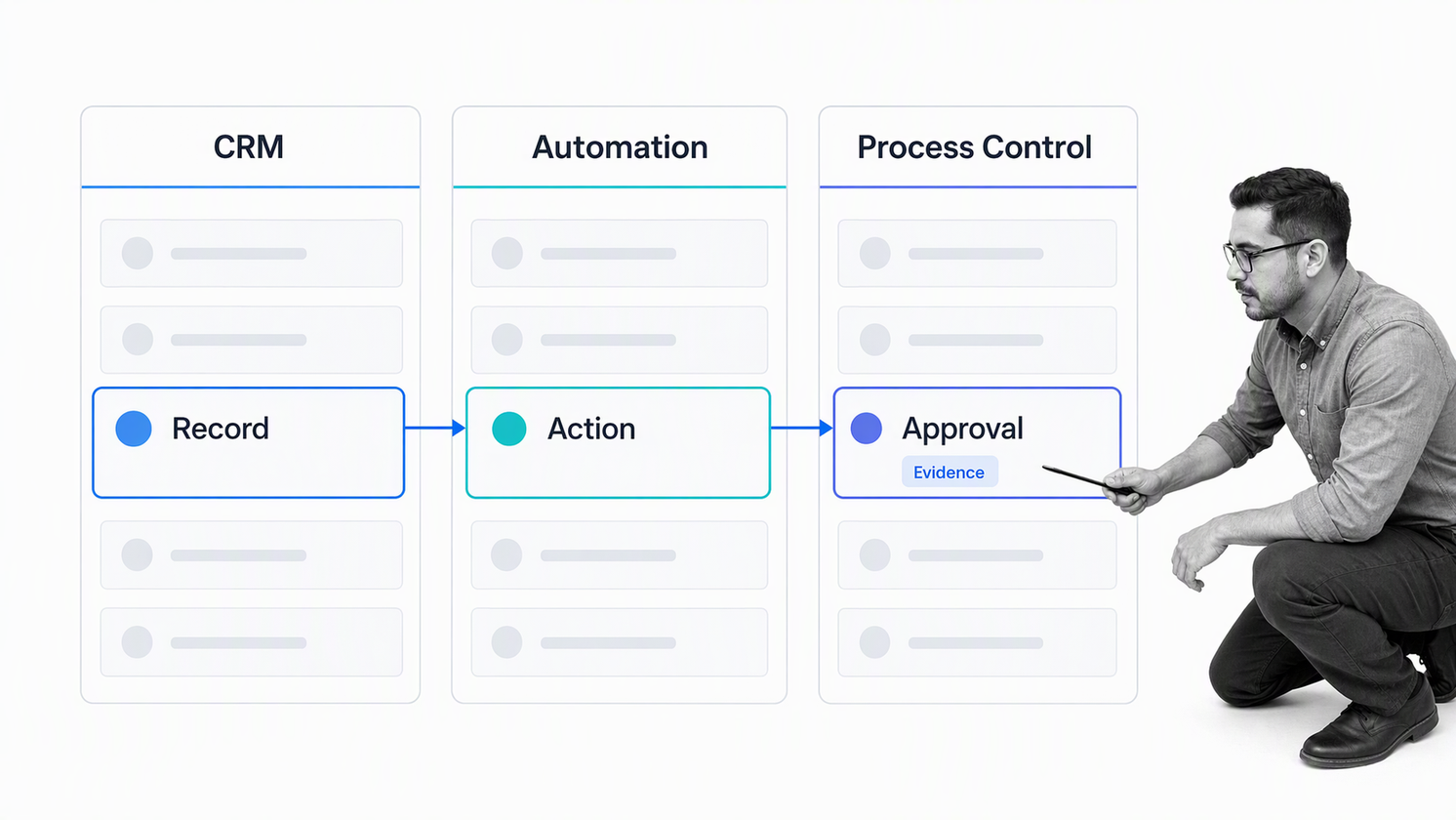
The CRM should remain the authoritative record for the deal. The process layer should orchestrate the work around it. Automation connects events and actions inside that model. For example, a CRM stage change can launch a contract review workflow, and completion of the approved workflow can update the CRM.
This architecture also protects data quality. The Salesforce State of Sales report highlights data quality as a problem for sales teams using AI. Process controls help by collecting required information at the point where the team makes a decision, rather than asking operations to repair incomplete records later.
Where AI belongs in the model
AI can prepare account research, summarize calls, suggest next actions, draft follow-up, and classify routine inputs. It should not silently decide high-impact exceptions. Keep clear human approval for pricing, legal terms, security commitments, scope changes, and any action that creates customer or company risk.
The process should define what the AI may do, what evidence it must produce, when a person reviews the output, and how a failed action is recovered. That turns AI assistance into controlled execution instead of an invisible side channel.
What capabilities matter most?
Do not evaluate sales process management software by the length of its feature list. Evaluate whether it can enforce your real sales motion without making reps slower. A short proof of concept with difficult scenarios reveals more than a polished demonstration.
A buyer scorecard for sales process management software
- Workflow design: can revenue operations change the process without a development queue?
- Conditional logic: can one workflow handle different deal types, risk levels, regions, and routes?
- Assignments and deadlines: can ownership follow roles, deal data, or prior responses?
- Approvals: can the system support simple, sequential, and exception-based review?
- Forms and evidence: can it capture the exact data and attachments needed for a decision?
- Integrations and automation: can it exchange data with the CRM and the rest of the revenue stack?
- Versioning and audit history: can you prove which process ran and what happened?
- Reporting: can you see delays, skipped steps, exceptions, and rework at the process level?
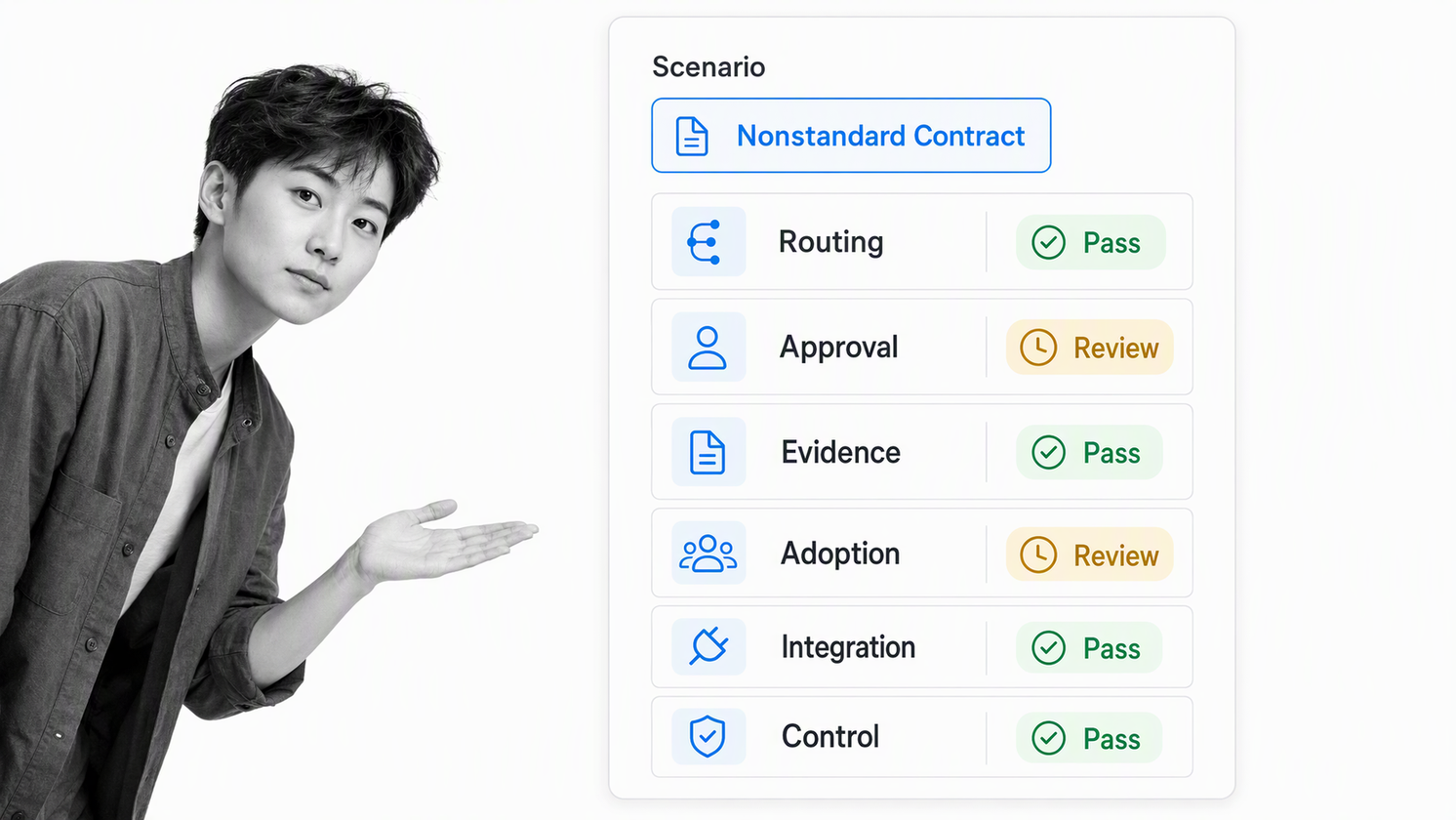
The best test cases are not the easiest deals. Test a standard opportunity, a deep discount, a nonstandard contract, a security review, a reopened deal, and a sales-to-success handoff. Ask what happens when an owner is absent, data is missing, or the deal moves backward.
Design for adoption, not surveillance
Reps will avoid a workflow that collects data only for management reporting. Every required step should protect the buyer experience, improve a decision, prevent rework, or create a useful next action. If a field changes nothing, remove it.
A strong interface shows the current task, the reason it matters, and the next owner. It should prefill known data, hide irrelevant steps, and automate coordination. Human attention belongs on discovery, judgment, negotiation, and relationships.
How should you implement it?
The biggest implementation risk is overbuilding. If the first workflow tries to encode every possible edge case, the team receives a complex system before it sees any benefit. Start with the smallest process that protects quality and gives managers a trustworthy signal.
Map the current path
Document what happens today, including the work that lives outside the official playbook. Capture CRM updates, handoffs, proposal tasks, security questionnaires, legal review, approvals, customer commitments, and post-sale transitions. Mark where deals most often stall or go off script.
The broader IBM business process management lifecycle follows the same logic: design, model, execute, monitor, and optimize. The sequence matters. Automating an unclear process makes the confusion move faster.
Define exits, owners, and evidence
For each stage, define what must be true before the deal advances. Then name the owner of every action and the evidence that proves completion. Use observable requirements such as captured responses, attached documents, approved decisions, or completed tasks.
Separate rep work from system work. The rep may judge whether a problem is urgent or whether a buyer has authority. The system can expose the right fields, create the next task, notify an approver, set a due date, and record the result.
Pilot one high-friction motion
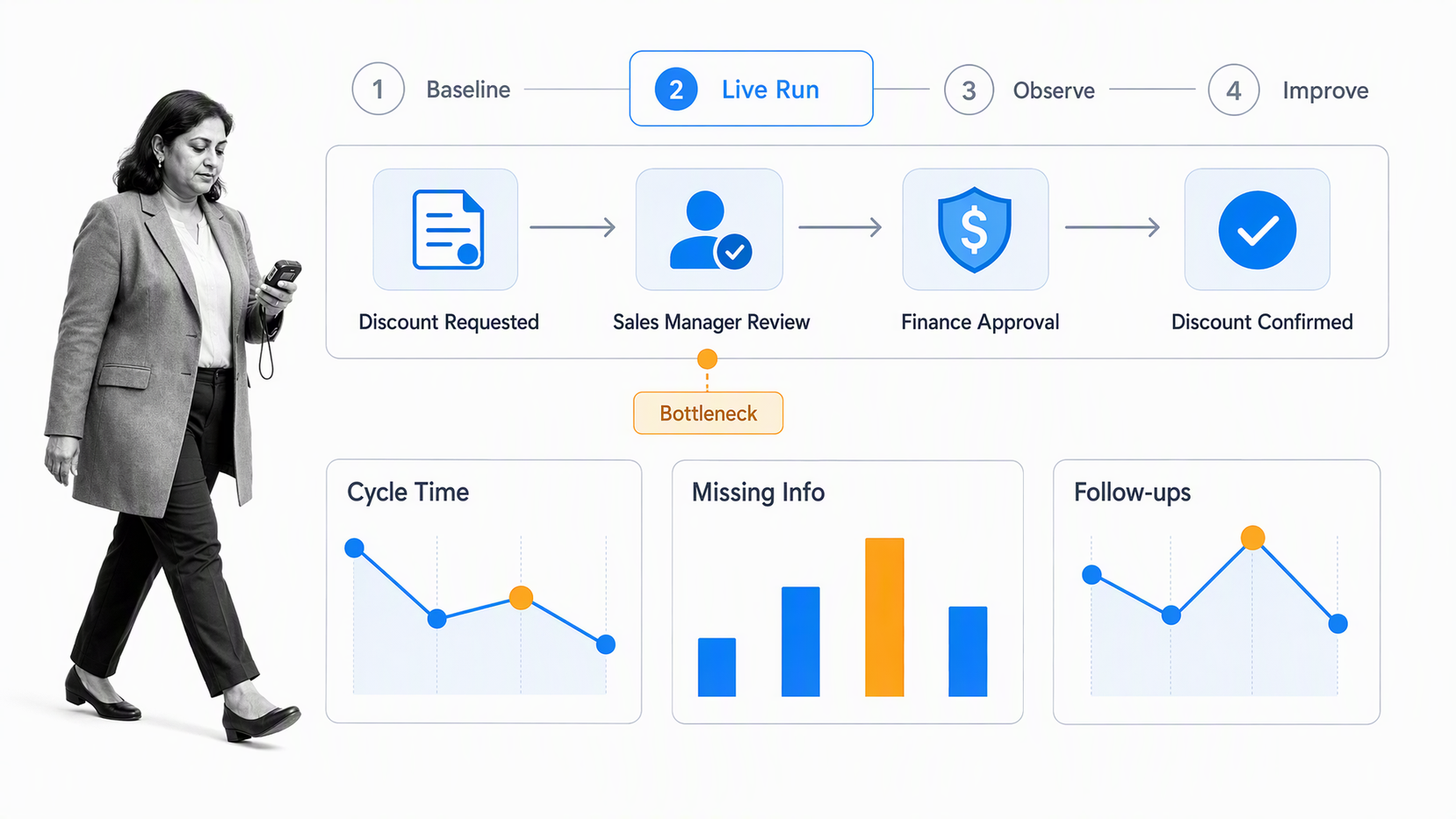
Choose one motion with visible pain, such as discovery to proposal, discount approval, contract review, security review, or sales-to-success handoff. Run it with a small group. Observe where people hesitate, which fields are unclear, and which tasks do not earn their place.
Record a baseline before the pilot. Useful measures include cycle time, missing information, manual follow-up, skipped steps, exception volume, and rework. Expand only after the pilot makes the motion easier and more dependable.
Improve from execution data
A sales process is a feedback loop, not a one-time configuration. If approval work piles up, one exception path dominates, or users repeatedly reopen the same stage, change the workflow. Process data should lead to a better process, not a larger dashboard.
Use the same discipline for AI steps. Review where suggestions were accepted, corrected, rejected, or escalated. Keep human ownership visible and make the recovery path as deliberate as the happy path.
How does Process Street support sales process management?
Process Street is an agentic process automation platform for high-stakes operations. It turns a sales playbook into a governed workflow with assigned tasks, form fields, conditional paths, approvals, automations, and activity history. The workflow becomes the execution layer around the CRM rather than another place to store opportunity data.
Build a governed sales workflow
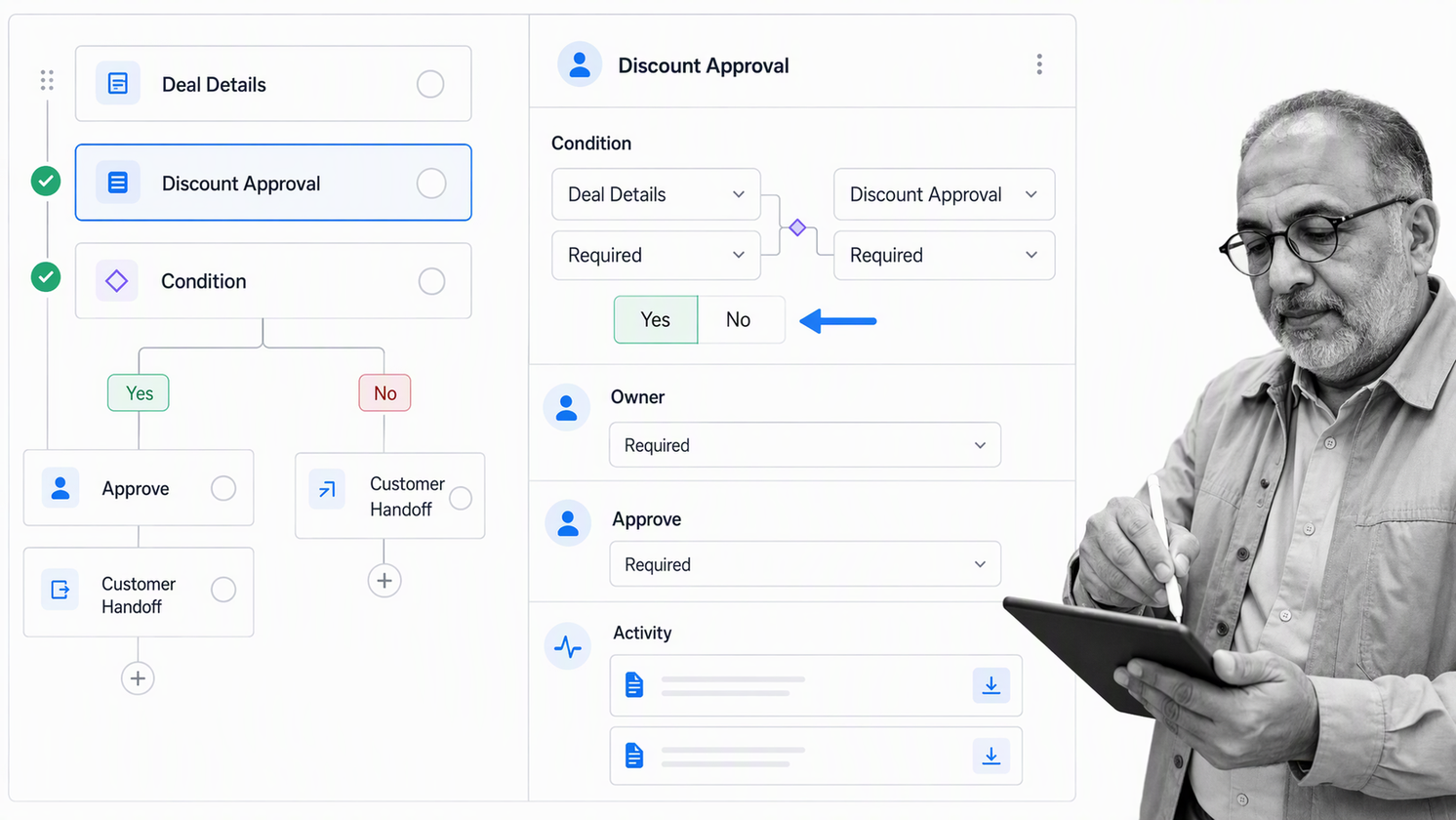
A revenue operations leader can create workflows for discovery, proposal preparation, discount approval, contract review, security review, handoff, renewal preparation, or pipeline hygiene. Each workflow can hold the tasks, instructions, fields, owners, and deadlines required for that motion.
Conditional logic can show or hide tasks and fields based on information captured in a workflow run. That allows one sales process to adapt to enterprise deals, regulated buyers, partner routes, nonstandard terms, and other conditions without creating a separate shadow process for every variation.
Keep approvals inside the work
Process Street approval tasks support single, multi-stage, and sequential approval flows. In a sales process, that can keep discount, legal, finance, security, or scope decisions attached to the work and its supporting evidence.
Connect the process to the revenue stack
Process Street automations can map data between connected apps and workflows. A CRM event can start a workflow run with account and opportunity details prefilled, while completed workflow work can trigger another action. This reduces duplicate entry while preserving a clear system of record.
That model is useful when sales commitments affect delivery, finance, legal, support, or customer success. The workflow records the commitment, routes the required review, and creates proof before the deal becomes someone else’s operational surprise.
Which metrics show whether the process is working?
Measure execution and business outcomes together. Faster approvals are useful only if decision quality stays high. More completed tasks are useful only if the process helps deals move with better information and cleaner handoffs.
Execution metrics
- Workflow completion rate: how often the required process reaches a valid finish.
- Step skip rate: which tasks are bypassed, completed late, or reopened.
- Approval cycle time: how long decisions take by type and owner.
- Handoff latency: the time between one team finishing and the next team starting.
- Exception rate: how often deals leave the standard path and why.
- Data completeness: whether required decision inputs are present at each stage.
Business and governance signals
Pair execution metrics with stage conversion, sales cycle, forecast accuracy, win rate, onboarding delay, scope rework, and customer escalations. Look for relationships rather than claiming that one workflow caused the outcome.
Governance signals include late approvals, missing evidence, repeated exception paths, manual overrides, skipped handoffs, and stage reversals. These signals should improve the system, not punish reps. They show where a rule is unclear, an owner is overloaded, or automation can remove avoidable follow-up.
Visual process models can also help teams agree on ownership and decision points. IBM’s guide to BPMN explains how standardized process notation makes activities, gateways, flows, and responsibilities easier to interpret across business and technical stakeholders.
What are the FAQs about sales process management software?
What is sales process management software?
Sales process management software turns a sales methodology into repeatable work. It controls tasks, stage requirements, handoffs, approvals, required information, automations, and completion records so the team can execute a consistent process.
How is sales process management software different from a CRM?
A CRM stores account, contact, opportunity, and activity data. Sales process management software manages the repeatable work around those records, including qualification, approvals, handoffs, and follow-up. Many teams use both together.
What features should a sales team evaluate?
Evaluate workflow design, conditional logic, assignments, deadlines, approvals, forms, integrations, automation, versioning, reporting, and audit history. Test the software with difficult deal scenarios, not only a standard demonstration.
Can Process Street support sales process management?
Yes. Process Street can turn sales playbooks into governed workflows with assigned tasks, form fields, conditional paths, approvals, automations, and activity history. It can operate as the execution layer around a CRM.
When should a team adopt sales process management software?
Adopt it when sales work depends on repeatable handoffs, approval rules, stage criteria, exception paths, or proof of completion. Common triggers include inconsistent stage definitions, slow reviews, missing data, and poor post-sale handoffs.
Does sales process management software replace sales automation?
No. Sales automation removes repetitive actions, while process management defines the governed path those actions should follow. The strongest setup uses automation inside a clear process with ownership, controls, and recovery paths.
If your sales process depends on approvals, handoffs, and evidence that the right work happened, request a Process Street demo to see how the workflow can run around your CRM.
