


Turn every policy into automated workflows with built-in enforcement and audit-ready proof.



AI HR Tools Guide
AI HR tools help human resources teams automate repetitive work, analyze workforce signals, and keep employee processes moving without asking HR to manually chase every form, approval, interview, policy acknowledgment, or onboarding step. The best tools do not replace HR judgment. They make the work easier to route, review, document, and improve.
This guide explains what AI HR tools are, where they create value, where they create risk, and how to use them inside governed workflows. Use it to separate useful automation from hype, especially if your HR team handles recruiting, onboarding, employee engagement, compliance, or recurring people operations.
- What are AI HR tools?
- How do AI HR tools work across HR?
- Which AI HR workflows should you automate first?
- What are the benefits of AI HR tools?
- What risks should HR teams manage?
- How should HR choose AI tools safely?
- How Process Street helps HR teams operationalize AI
- AI HR tools FAQs
What are AI HR tools?
AI HR tools are software products or platform features that use artificial intelligence to support human resources work. They can generate job descriptions, summarize employee feedback, screen candidate information, answer policy questions, forecast workforce needs, draft onboarding tasks, route approvals, and flag process exceptions.
A useful definition is broad but practical: an AI HR tool should help HR teams make a people process faster, more consistent, easier to audit, or easier to personalize. If a tool only produces text but does not connect to the process where HR work gets done, it may be useful, but it is not enough on its own.
IBM describes AI in HR as a set of technologies that can analyze workforce data, recognize patterns, generate content, and support human-like interactions across HR work. That maps to the real categories HR teams see every day: talent acquisition, employee service, workforce planning, learning, onboarding, engagement, and retention.
How do AI HR tools work across HR?
AI HR tools usually sit in one of four layers. The first layer creates content: job ads, offer email drafts, onboarding plans, interview questions, training material, or policy summaries. The second layer analyzes data: resumes, skills, survey responses, performance signals, attrition risk, hiring funnel data, and employee service requests.
The third layer routes work. It decides which hiring manager should review a candidate, which onboarding task should run next, which policy acknowledgment is overdue, or which employee request needs HR review. The fourth layer executes work inside systems: launching workflows, filling forms, sending notifications, collecting approvals, and updating records.
The strongest AI HR tools combine several layers. A recruiting assistant that drafts outreach is useful. A recruiting workflow that drafts outreach, records the approval, sends the message only after human review, updates the candidate record, and creates an audit trail is much more valuable.
That is why HR teams should think about AI as part of the operating model, not just as a set of point tools. McKinsey's HR Monitor 2026 frames HR's AI challenge as a shift from functional excellence to system-level transformation. That is the right lens. AI works best when the process around it is clear.
Which AI HR workflows should you automate first?
Start with workflows that are repetitive, high-volume, and already governed by clear rules. AI should not be introduced first in the messiest or most sensitive process. It should begin where HR can define the input, the reviewer, the decision boundary, the system of record, and the evidence needed after completion.
Candidate intake and screening support
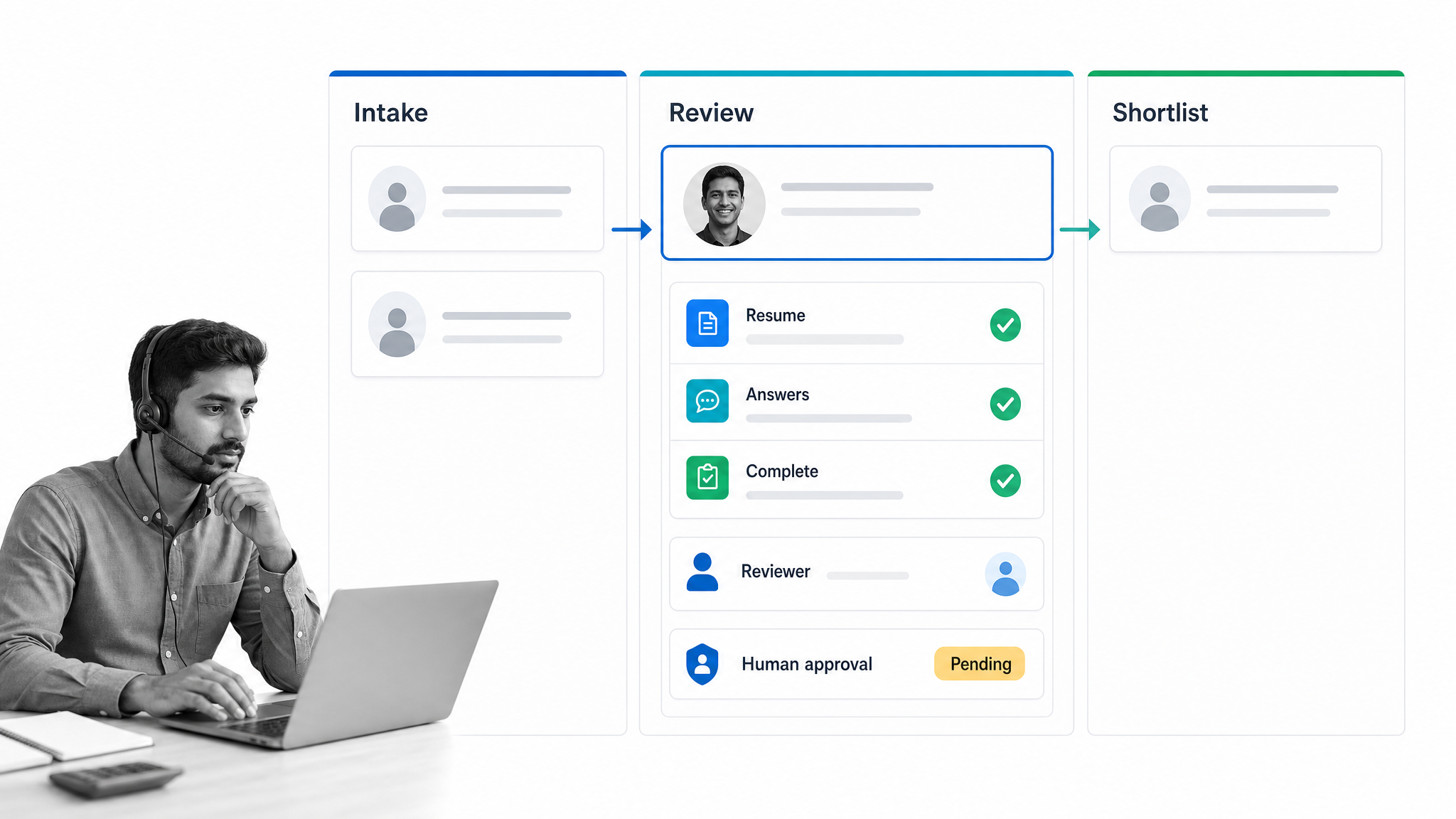
AI can summarize candidate profiles, compare resumes against role requirements, draft screening notes, and route qualified candidates to the right hiring manager. Keep the final hiring decision with people. The workflow should record the criteria used, the reviewer, the decision, and the next step.
Interview scheduling and follow-up
Scheduling is a strong early use case because it is repetitive and rules-based. AI can suggest time slots, draft reminders, summarize interview notes, and prepare next-step emails. The workflow should still enforce consent, communication standards, and recruiter review before anything important is sent.
Employee onboarding
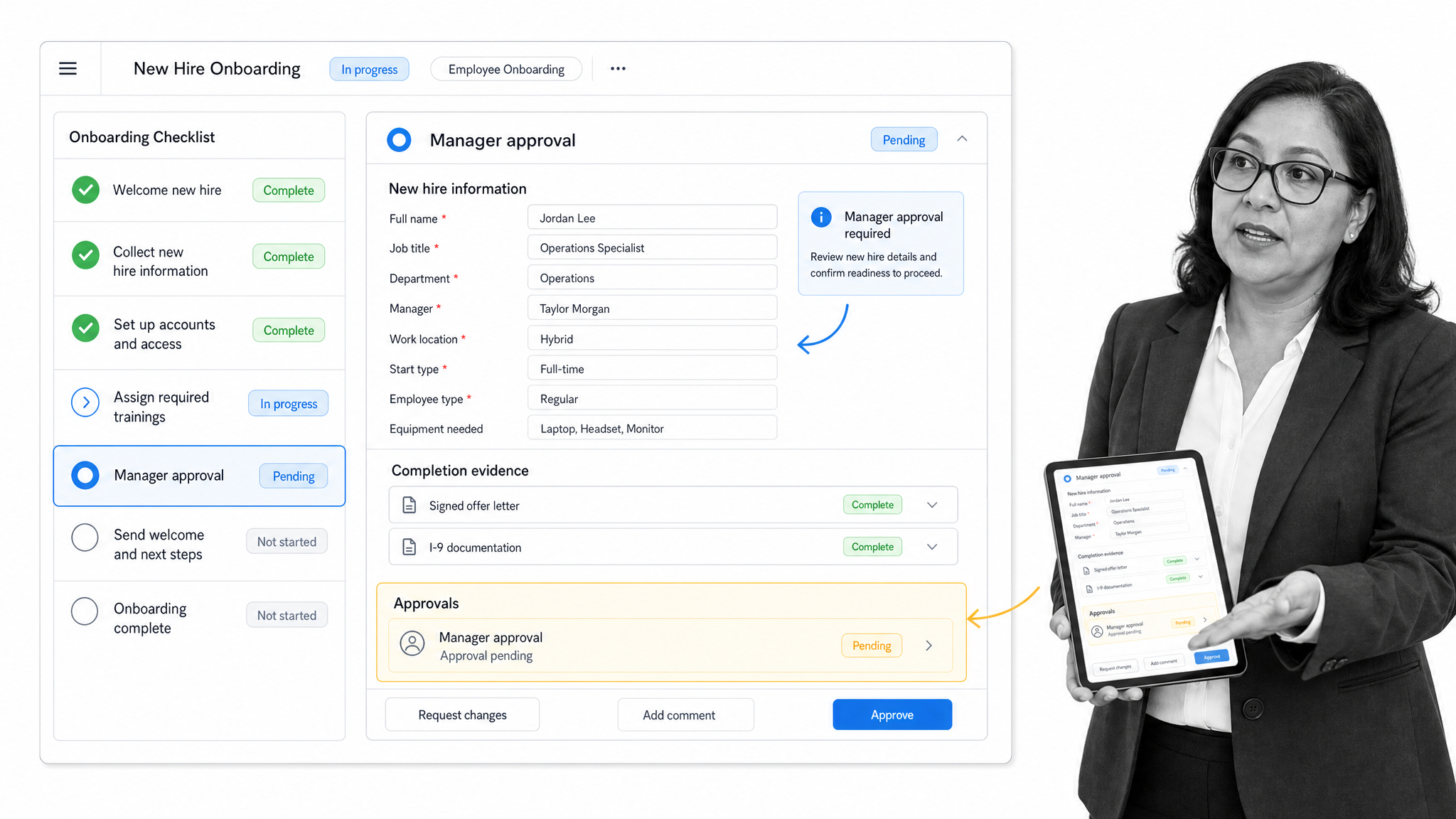
Onboarding has the clearest fit for AI-assisted workflows. A new hire needs forms, equipment, system access, manager check-ins, training tasks, policy acknowledgments, and role-specific context. AI can personalize the plan, but the workflow should enforce required steps, owners, due dates, and completion evidence.
HR service requests
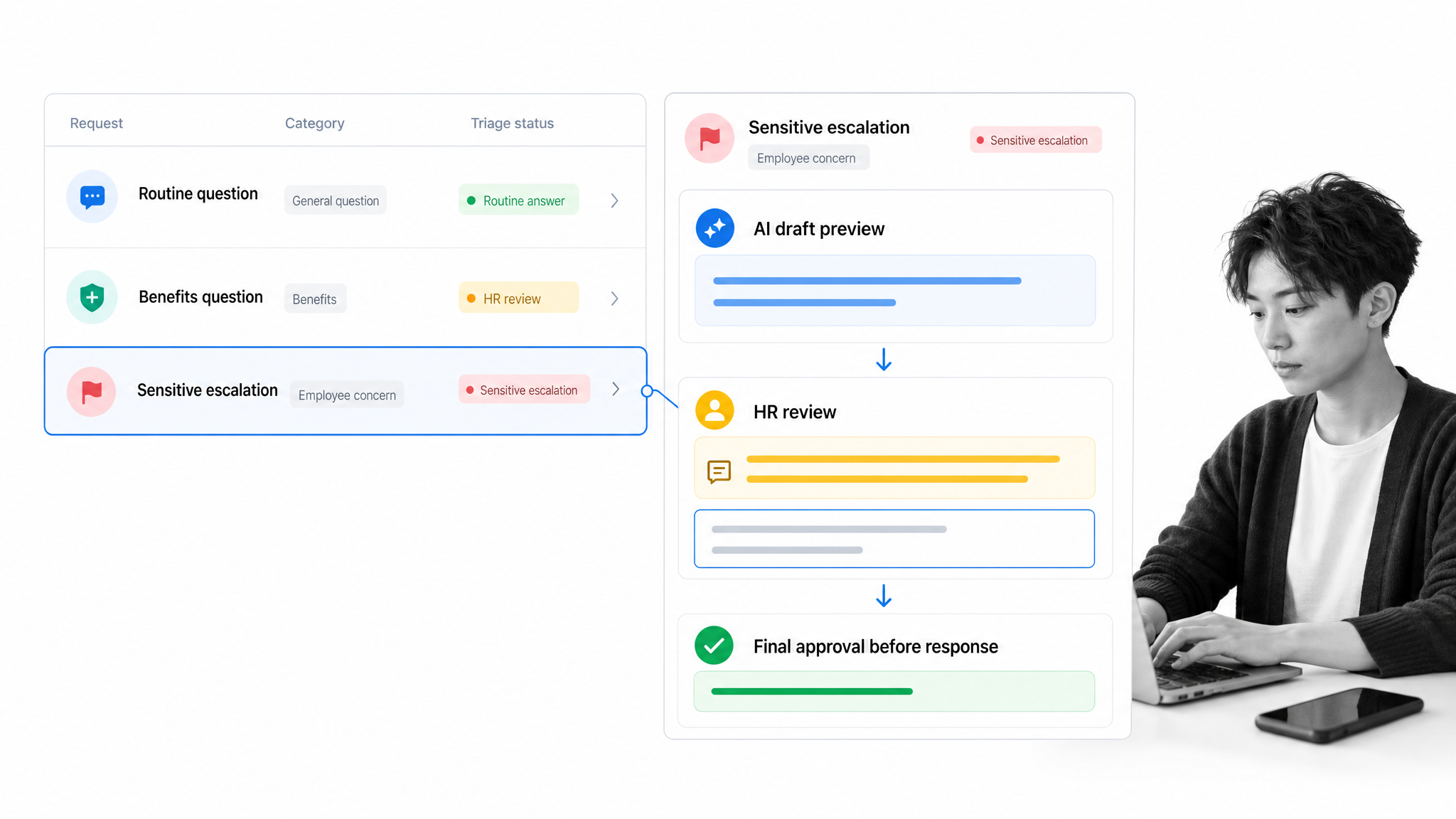
Employee questions about benefits, leave, payroll, policies, and internal processes often follow repeatable paths. AI can triage the request and draft an answer. A governed workflow can route sensitive questions to HR, escalate exceptions, and record the final response.
Engagement and retention signals
AI can summarize survey comments, identify recurring themes, and help managers prepare follow-up actions. Gallup's engagement research connects engagement work to business outcomes such as retention, productivity, and profitability, which makes this a high-value area when the data is handled responsibly.
Policy and document control
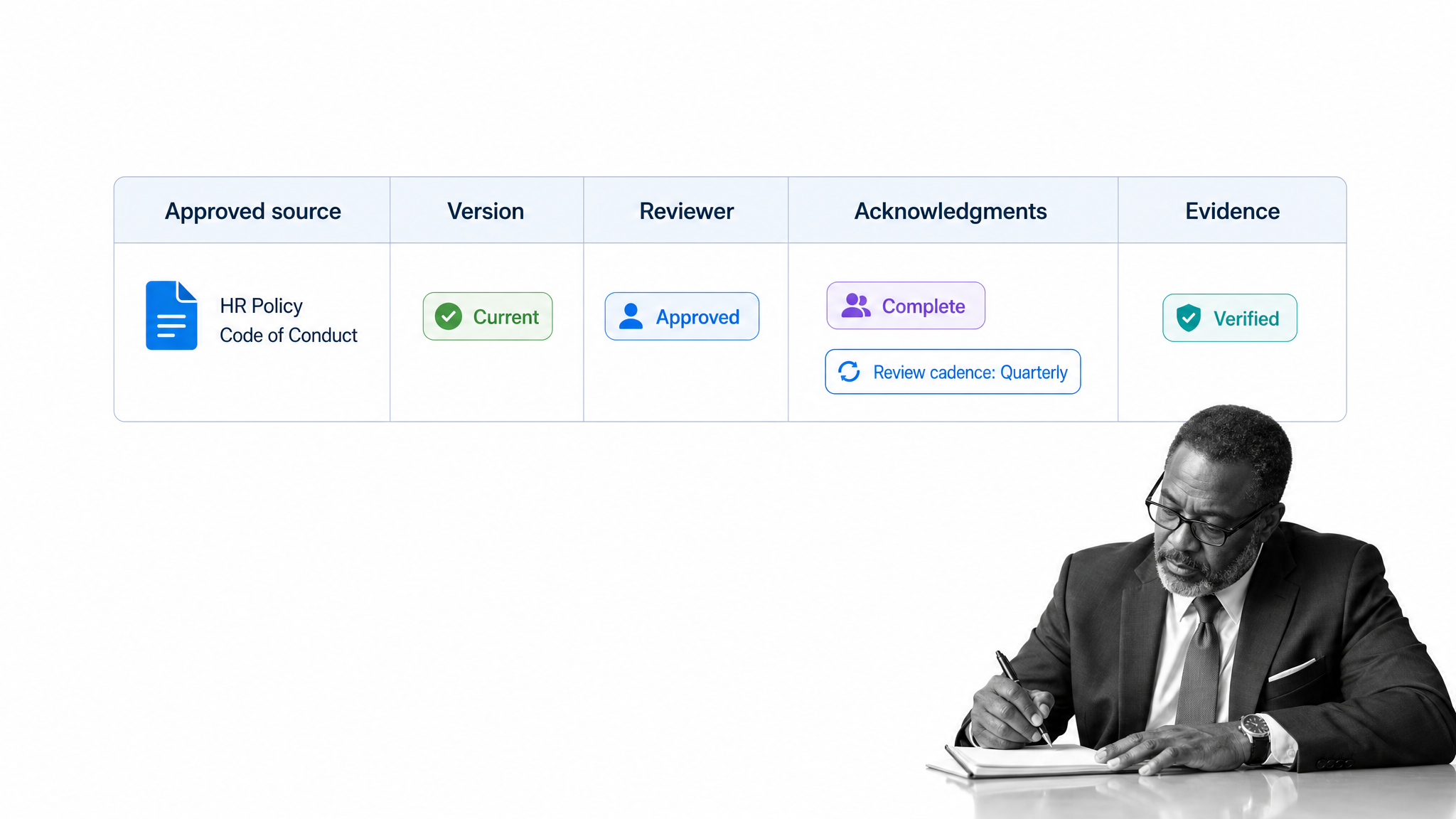
HR teams also manage policies, acknowledgments, handbook changes, role documentation, internal mobility notes, and employee lifecycle records. AI can draft or summarize this material, but the real work is keeping it governed. A policy summary should connect to the approved source. A handbook update should move through review. An acknowledgment should create completion evidence. A workflow should show which version each employee saw.
This is where AI HR tools become more than writing assistants. They help HR translate unstructured information into structured work. The workflow can ask for missing data, assign a reviewer, route legal or manager approval, notify the employee, and preserve the result. That operating discipline matters most in distributed teams, regulated industries, and any company where HR work has compliance consequences.
What are the benefits of AI HR tools?
The main benefit is not simply speed. Speed matters, but HR work also needs consistency, fairness, privacy, and accountability. AI HR tools are valuable when they remove manual drag without weakening the control points that protect candidates, employees, and the business.
- Less manual administration: AI can draft, summarize, classify, and route work that previously sat in inboxes and spreadsheets.
- Better candidate experience: candidates move through the process with clearer updates, fewer scheduling delays, and faster handoffs.
- More consistent onboarding: every new hire gets the required forms, policy steps, training, approvals, and manager touchpoints.
- Stronger employee support: HR can answer routine questions faster while escalating sensitive requests to the right person.
- Better process evidence: workflows can show who did what, when it happened, what was approved, and which policy or task drove the action.
The mistake is treating AI output as the finished work. In HR, output needs context, ownership, and proof. A draft job description is only useful if it follows the role requirements. A candidate summary is only useful if a recruiter can review it. An onboarding task is only useful if the system confirms it was completed.
What risks should HR teams manage?
AI in HR touches sensitive data and employment decisions. That makes governance non-negotiable. The risk is not only that a model gives a bad answer. The bigger risk is that an organization lets the answer move through the business without review, documentation, or accountability.
The EEOC warns that AI and other technology can create discrimination risk when used in employment decisions. That does not mean HR teams should avoid AI. It means teams need clear decision boundaries, bias monitoring, human review, and records that show how AI-assisted work was handled.
- Bias and adverse impact: test AI-assisted screening and selection workflows before relying on them.
- Privacy and consent: limit what data the tool can access and document why that access is needed.
- Explainability: HR should be able to explain what the tool did and what a human decided.
- Over-automation: do not let AI make employment decisions without a human accountable for the outcome.
- Process drift: review AI-assisted workflows regularly so policy, role, and compliance changes are reflected in execution.
Governance should be built into the workflow itself. The system should define required fields, approval gates, escalation paths, retention rules, and audit trails before AI output reaches a candidate, employee, manager, or regulator.
How should HR choose AI tools safely?
Choosing AI HR tools starts with the workflow, not the feature list. Map the process first. Identify the task, the data needed, the decision owner, the review point, the system of record, and the evidence required after completion. Then choose tools that fit that operating model.
- Define the use case: recruiting support, onboarding, employee service, engagement analysis, workforce planning, or compliance workflows.
- Separate suggestions from decisions: decide where AI can draft or summarize and where a person must approve.
- Check integration fit: the tool should work with your HRIS, ATS, identity system, document system, and workflow platform.
- Review security and privacy: confirm data handling, retention, permissions, and administrative controls.
- Pilot with a narrow process: start with a workflow that has clear rules and measurable outcomes.
- Measure process quality: track cycle time, rework, missed steps, exceptions, employee experience, and audit evidence.
A good AI HR tool makes the right process easier to follow. A risky one makes a weak process faster. If the tool cannot show how work moved, who reviewed it, and what evidence was captured, it is not ready for sensitive HR operations.
A practical buying scorecard should include three columns: operational fit, governance fit, and adoption fit. Operational fit asks whether the tool supports the workflow you actually run. Governance fit asks whether the tool gives HR enough control over data, permissions, review, and evidence. Adoption fit asks whether recruiters, managers, employees, and HR operations teams can use it without creating a shadow process outside the system.
Do not treat a polished demo as proof. Test the tool on one real process with real edge cases: missing candidate data, a manager who is late to review, an employee request that contains sensitive information, a policy exception, and a handoff between HR and another department. The tool should make those moments clearer, not hide them behind automation.
The implementation owner should also define what happens after launch. AI HR workflows need owners, review cadence, exception reporting, and a clear path for employees or candidates to challenge or correct information. Without that feedback loop, the tool may look efficient while trust in the process declines.
How Process Street helps HR teams operationalize AI
Process Street is a Compliance Operations Platform for teams that need HR workflows to run consistently. For HR teams, that means onboarding, training, policy acknowledgment, employee requests, candidate handoffs, approvals, and recurring people operations can live in one governed workflow instead of scattered docs, inboxes, and spreadsheets.
The Process Street HR workflow software page describes the platform as a way to automate onboarding, enforce policy, and streamline HR tasks. That matters because AI HR tools only create durable value when the surrounding process is enforced. A model can draft an onboarding checklist. Process Street can turn that checklist into assigned work with due dates, forms, approvals, and completion evidence.
Process AI can generate workflow content, tasks, form fields, emails, and approvals inside workflows. Form fields can capture employee or candidate data, pass variables between tasks and apps, and preserve the information inside the workflow run. That gives HR teams a practical way to use AI while keeping human review, structured data, and auditability in the same operating path.
For broader process design, the workflow automation guide explains how recurring work moves through tasks, owners, rules, approvals, and integrations. That same operating logic applies to AI HR tools: make the process explicit, automate the repeatable parts, and keep control where judgment matters.
AI HR tools FAQs
What are AI HR tools?
AI HR tools are software products or platform features that use artificial intelligence to support HR work such as recruiting, onboarding, employee service, engagement analysis, workforce planning, and compliance workflows.
How do AI HR tools improve recruitment?
They can summarize candidate information, draft screening notes, assist with scheduling, route candidates to reviewers, and prepare follow-up communications. The hiring decision should remain with accountable people.
Can AI HR tools replace HR teams?
No. AI HR tools can reduce administrative work and improve consistency, but HR still owns judgment, employee trust, sensitive exceptions, culture, legal risk, and final employment decisions.
What is the safest first AI HR use case?
Start with a narrow, repeatable workflow such as onboarding task generation, interview scheduling support, HR request triage, or policy acknowledgment tracking. Avoid starting with fully automated selection decisions.
What should HR teams check before buying an AI HR tool?
Check data privacy, access controls, audit trails, integration fit, human review points, bias monitoring, explainability, and whether the tool can operate inside your required HR workflow.
How does Process Street support AI HR workflows?
Process Street helps HR teams turn AI-assisted work into governed workflows with tasks, forms, approvals, due dates, automations, and evidence that shows the process was followed.
