


Turn every policy into automated workflows with built-in enforcement and audit-ready proof.


Automate Workflow Software
Last updated:
Automate workflow software turns a recurring business process into a controlled sequence of triggers, tasks, decisions, approvals, system actions, exceptions, and evidence. It removes repetitive coordination while keeping the route visible to the people responsible for the outcome.
The practical challenge is not finding a button labeled automation. It is deciding which work is stable enough to automate, where human judgment belongs, what data each action can trust, and how the team will recover when a system or input fails.
This guide shows you how to select a workflow, map the current process, design controls, configure the software, run a real pilot, and improve the result. It also explains how Process Street gives automation a governed execution layer so work can move quickly without becoming opaque.
In this article, we are going to cover:
- What automate workflow software means
- Which workflows should you automate first?
- What capabilities should automate workflow software include?
- How to automate a workflow with software
- Workflow automation examples
- How to prevent workflow automation failure
- How Process Street helps you automate workflows
- FAQs
What automate workflow software means
To automate a workflow is to let software coordinate some or all of a repeatable route. A documented workflow automation model defines the trigger, required input, owners, decision rules, approved actions, exception paths, and completion evidence before the software begins moving work.
Workflow automation is bigger than one automated task
A single task automation might send a notification or copy a field. Workflow automation coordinates dependent steps around an outcome. A purchase request can be captured, validated, routed by amount, approved, written to a finance system, and closed with the request and decision history attached.
The software runs the route and preserves state
Microsoft describes workflow automation software as a way to streamline manual work using data and rule-based logic. IBM describes workflow automation as software executing all or part of a process. The key operating idea is state: the software knows what has happened, what remains blocked, and what must occur before the next action is allowed. The broader workflow automation software guide explains the category, while this page focuses on implementation.
Human judgment stays where consequences change
Automation should remove predictable coordination, not erase accountability. A human reviewer still belongs before actions that affect money, access, contracts, regulated records, customers, or safety. The workflow should deliver the proposal, context, and evidence to that reviewer instead of asking them to reconstruct the case from several systems.
A completed workflow should leave proof
Completion is trustworthy only when the run contains the required fields, files, approvals, decisions, connected-action results, and exception history. That record turns automation from a convenience into an operating system the team can inspect and improve.
Which workflows should you automate first?
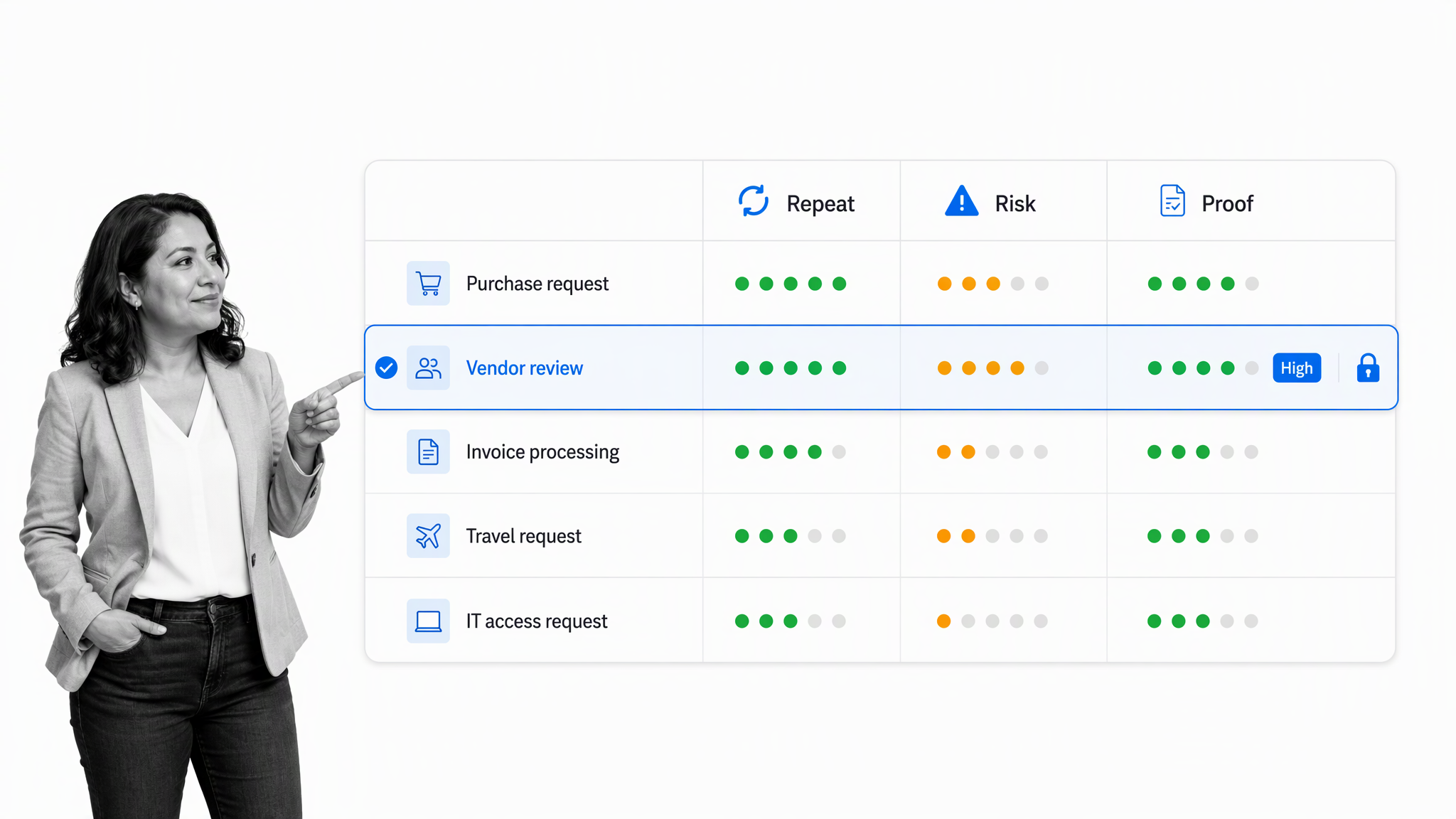
The best first workflow is not necessarily the most irritating manual task. It is a process with enough repetition to create value, enough stability to encode clearly, and enough operational importance to justify better control.
Start with frequency and volume
A process that runs often creates more coordination cost and more opportunities for variation. Count how many times the workflow starts, how many people touch it, and how many manual reminders or transfers occur in a normal run. High-frequency work gives the team more feedback after launch.
Look for a stable path with bounded exceptions
Automation works best when the main route is understood and the common exceptions can be named. If every case is unique, first standardize the decision method. If most cases follow the same path and a few conditions change ownership or approval, the workflow is a strong candidate.
Prioritize handoffs and duplicate entry
Waiting between people and systems often costs more than the task itself. Look for work copied from forms into spreadsheets, from spreadsheets into systems of record, or from email into a queue. Each handoff is a place where software can validate input, assign ownership, or update a connected record.
Include risk and proof in the score
A recurring process may be worth automating even at modest volume when skipped steps create real consequences. Vendor reviews, access requests, invoice approvals, policy attestations, and incident response all benefit from a route that requires evidence. The benefits of business process automation are strongest when speed and control improve together.
Avoid unstable and politically ambiguous processes
Do not automate a process whose owner, outcome, or decision rights are still contested. Software will not resolve an argument about policy. Clarify the operating standard first, then automate the agreed route. A visible manual pilot can expose those disagreements before they harden into production logic.
What capabilities should automate workflow software include?
The right software should make the workflow easier to understand and harder to bypass. Feature breadth matters less than whether the platform can carry the full operating contract from intake to evidence.
Structured intake and validation
Forms should capture the fields, files, and classifications needed for routing. Required fields and validation rules prevent incomplete requests from reaching later steps. Good intake also records who supplied the information and which version of the workflow received it.
Rules, conditions, and exception routes
Conditional logic chooses the correct path based on the request. It can add a security review, change an approver, request missing information, or return work for correction. The goal is not to model every imaginable edge case. It is to keep common exceptions visible inside the workflow instead of pushing them into email. Process Street documents this pattern through conditional logic.
Assignments, due dates, and escalation
Human tasks need an accountable owner, clear instructions, a due expectation, and a completion condition. Role-based assignments make the workflow reusable when staff changes. Escalation should activate when a delay threatens the outcome, not simply add more notifications to an already noisy process.
Approvals before consequential actions
Approval should block the action it governs. If the connected system changes before the reviewer decides, the approval is decorative. Built-in approval tasks keep the decision and the downstream action in one route.
Connected actions with clear failure states
Every integration should define its input, permission, success response, retry behavior, and failure owner. The workflow should show whether the action succeeded, failed, or remains pending. Silent partial completion is one of the most dangerous forms of automation failure.
Evidence, history, and measurement
The software should retain the information needed to explain each result. Look for required evidence fields, attachments, approval history, comments, timestamps, assignment history, and reporting on cycle time, wait time, exception rate, failed actions, and rework.
How to automate a workflow with software
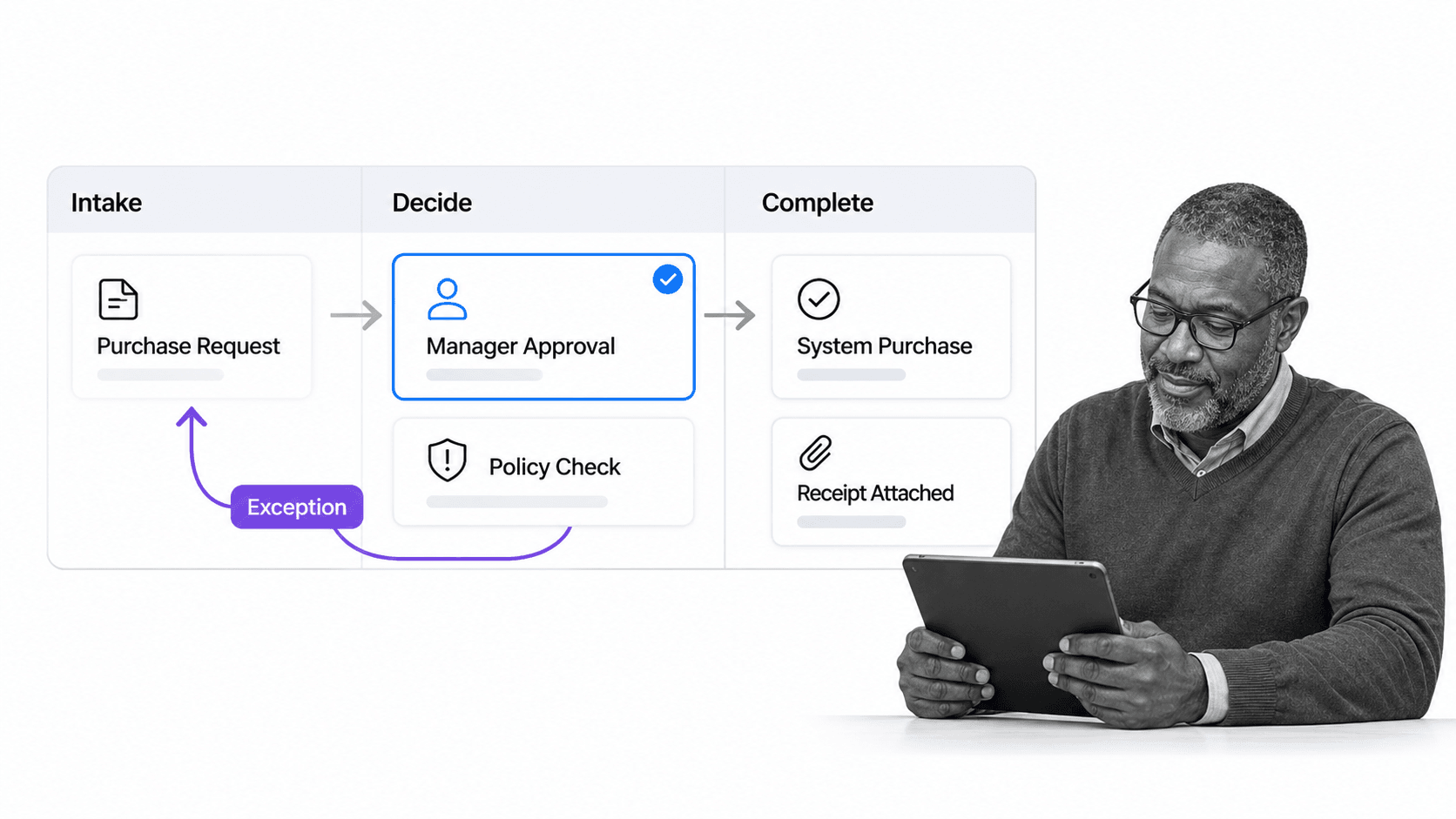
A safe implementation begins with the operating process and ends with a measured production workflow. The software configuration is only one stage in the middle.
1. Define the outcome and workflow owner
Write one sentence describing what the workflow produces and who is accountable for it. Name the trigger, the completion condition, and the systems whose records are authoritative. If these are unclear, configuration should wait.
2. Observe the current process
Follow real cases from start to finish. Record side channels, repeated questions, duplicate entry, delays, missing evidence, and work that returns for correction. A practical document workflow automation pattern is useful when review, approval, publication, and revision history must stay connected.
3. Remove waste before automating
Delete approvals that add no decision, merge duplicate fields, simplify handoffs, and stop collecting information no later step uses. Automating a weak process makes the weakness faster and harder to see.
4. Classify every step
Mark each step as intake, automatic action, human task, decision, approval, wait, exception, or evidence. This exposes where software can act safely and where human judgment must remain. It also prevents a workflow builder from becoming a decorative diagram with no execution rules.
5. Define data and permission contracts
For every automated action, list the source fields, validation rules, target system, allowed change, permission scope, expected response, retry limit, and failure owner. Use the narrowest action that completes the job. A workflow that can update everything is harder to test and harder to trust.
6. Build the happy path and common exceptions
Configure the most common route first, then add the exceptions that materially change ownership, risk, approval, or evidence. Keep the first version small enough that reviewers can reason about it. Complexity should earn its place through real cases.
7. Test with real and hostile cases
Test normal input, missing input, duplicate requests, high-risk cases, rejected approvals, unavailable connected systems, timeouts, and retry exhaustion. Confirm that later actions cannot run early and that a failed action remains visible with its context intact. Atlassian workflow automation guidance also emphasizes defining goals, mapping the process, and improving the workflow after launch.
8. Pilot in production with a narrow scope
Choose one team, one request type, or one risk band. Keep the process owner close to the pilot and review each exception. A narrow real pilot reveals ownership and data problems that a sandbox cannot reproduce.
9. Measure and improve the workflow
Track cycle time, wait time, first-pass completion, exception rate, automation reliability, and evidence completeness. Review representative runs with the people doing the work. The discipline of workflow optimization turns those findings into deliberate changes instead of adding more automation by instinct.
Workflow automation examples
Teams can apply the same method across departments. The value comes from controlling the full loop, not from automating an isolated click. A wider set of workflow automation examples can help you recognize similar patterns in your own operations.
Employee onboarding
An onboarding workflow starts from an accepted offer, collects employee information, assigns access and equipment tasks, schedules orientation, and confirms first-week follow-up. A reusable employee onboarding workflow gives the team a concrete route to adapt.
Vendor review and onboarding
A vendor workflow captures the business request, collects documents, classifies risk, assigns review, routes contract approval, and records the accepted vendor. The new vendor onboarding checklist is a useful starting sequence.
Invoice and purchase approval
A finance workflow validates the supplier, amount, purchase details, and policy conditions before routing the correct approval. After approval, the workflow can update the system of record and preserve the decision. The invoice approval workflow shows how those controls fit together.
Incident response
An incident workflow records the alert, assigns triage, classifies severity, launches the correct response route, holds risky remediation behind approval, and captures the review. A structured incident handling process keeps speed and evidence in the same system.
Document review
A document workflow assigns subject-matter review, routes corrections, requires final approval, publishes the accepted version, and schedules the next review. This replaces a chain of attachments with a visible route and a trustworthy history.
How to prevent workflow automation failure
Automation fails when teams treat it as a connector project instead of an operating-system change. The most common problems are predictable, which means they can be designed out before launch.
Do not automate ambiguity
If two people describe the required outcome differently, pause and resolve the policy. The workflow needs one owner and one accepted standard. Otherwise every exception becomes an argument about what the software should have done.
Keep humans at material decision points
Human review belongs before high-impact actions, not after them. The reviewer needs enough context to make the decision and clear options to approve, reject, or request changes. The workflow must record that decision before continuing.
Design for failure and recovery
Connected systems will be unavailable, inputs will be malformed, and permissions will change. Define which failures can retry automatically, which need an owner, and how the workflow resumes without duplicating actions. Recovery behavior is part of the process, not an infrastructure footnote.
Govern AI-assisted steps
AI can interpret unstructured input, summarize context, draft a recommendation, or choose among bounded actions. It should not receive vague authority. Define the allowed tools, data, evaluation, approval gate, and stop condition. The NIST AI Risk Management Framework provides a voluntary structure for incorporating trustworthiness into the design, use, and evaluation of AI systems.
Control production changes
Record who may edit the workflow, how a change is tested, who approves material changes, and which version is active. A mature workflow can become unstable when several builders alter rules without shared review. Teams that use formal process notation can consult the Object Management Group BPMN standard when a shared modeling language helps reviewers understand events, activities, and gateways.
How Process Street helps you automate workflows
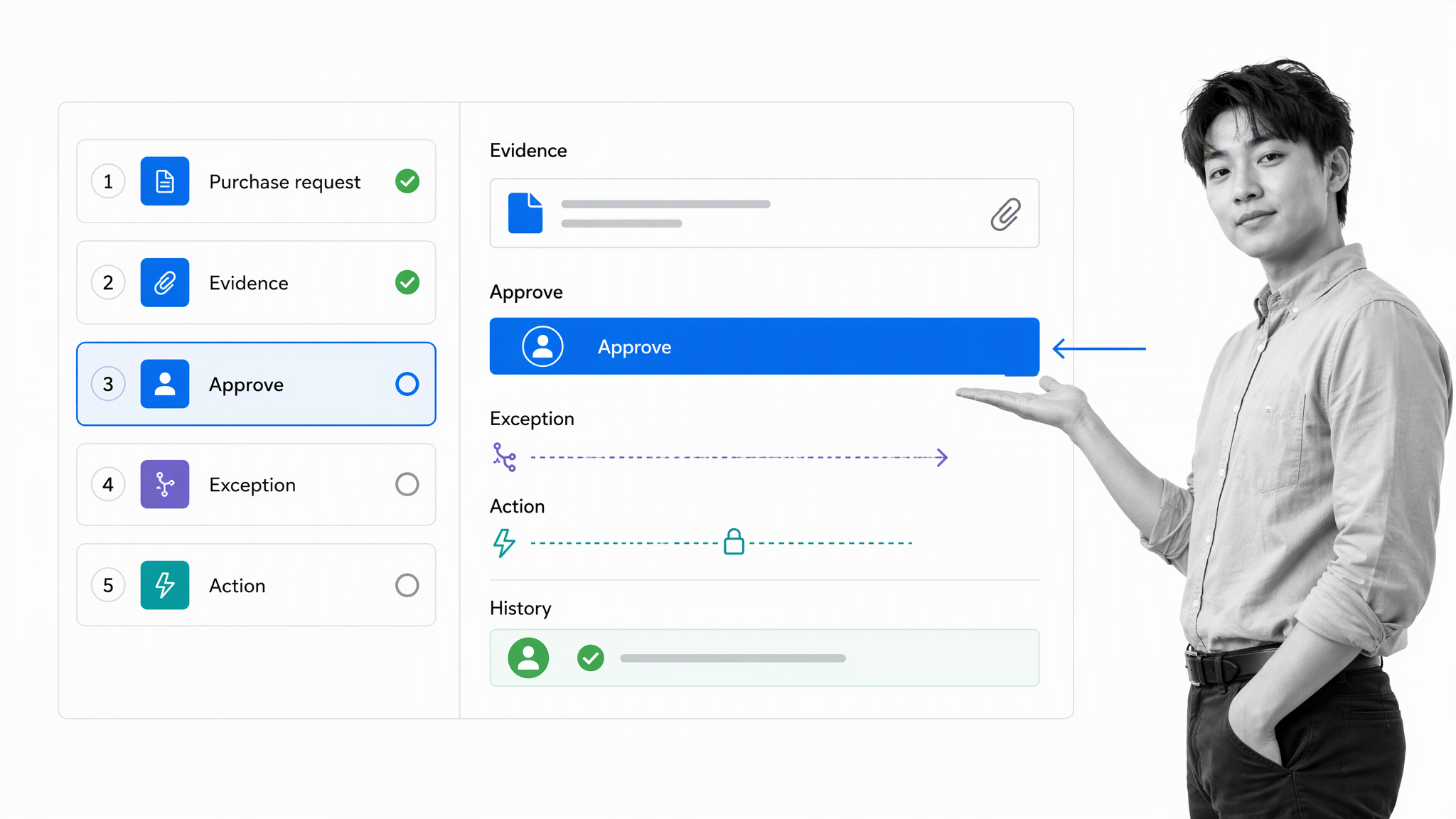
Process Street is an agentic process automation platform for high-stakes operations. It turns a repeatable procedure into an executable workflow with tasks, structured data, conditions, approvals, connected actions, AI-assisted steps, and history attached to each run.
Build the operating standard into the workflow
The workflow defines the route, instructions, roles, required fields, decision points, evidence, and completion condition. Teams launch each case from the same operating model instead of rebuilding the process in email or a project board.
Automate coordination and connected work
Assignments, reminders, due dates, conditions, and system actions move work without constant follow-up. Process Street has 5,000+ integrations. When a process needs a connected system, the action remains inside the workflow stage that authorizes it.
Put approval and exception handling in the route
A material action can wait behind an approval task. Missing information can return to the requester. A high-risk case can add review. These paths remain visible in the run, so the process owner can distinguish standard execution from intervention.
Create proof while the work happens
Forms, files, comments, decisions, approvals, assignments, and task history create a record as the workflow runs. Reviewers do not have to reconstruct the outcome from disconnected tools after the fact.
Expand from one proven workflow
Start with one important process, prove the route, and improve it from real runs. The broader automation workflow tools guide can help teams plan the surrounding toolset while keeping the workflow itself as the source of control.
FAQs
What is automate workflow software?
Automate workflow software is a platform that turns a repeatable process into triggers, tasks, routing rules, approvals, system actions, exception paths, and evidence. It coordinates the full route instead of performing only one isolated task.
How do you automate a workflow with software?
Define the outcome and owner, observe the current process, remove waste, classify each step, define data and permission contracts, configure the main route and exceptions, test real cases, pilot narrowly, and improve the workflow from measured results.
Which workflows should you automate first?
Start with workflows that repeat often, follow a stable main path, contain bounded exceptions, cross people or systems, and create real cost or risk when steps are missed. Avoid processes whose owner or policy is still unclear.
What is the difference between task automation and workflow automation?
Task automation performs one bounded action, such as sending a message or copying data. Workflow automation coordinates several dependent tasks, decisions, approvals, exceptions, and system actions around an end-to-end outcome.
When should a workflow keep human approval?
Keep human approval before actions with material financial, legal, security, compliance, customer, access, or safety impact. The reviewer should receive the proposal, context, evidence, and clear options inside the workflow.
How do you measure workflow automation success?
Measure cycle time, wait time, first-pass completion, exception rate, failed or retried system actions, evidence completeness, and rework. Review those metrics alongside representative workflow runs and operator feedback.
