Turn every policy into automated workflows with built-in enforcement and audit-ready proof.


6 Best CheckFlow Alternatives & Competitors in 2026

CheckFlow alternatives are checklist and workflow platforms that help teams document repeatable work, assign responsibilities, enforce required inputs, track progress, and keep a record of each run. CheckFlow itself is built around templates that become live checklists, with assignments, due dates, conditional logic, schedules, permissions, reporting, and integrations. That is a useful baseline, but it is not the only way to organize recurring operations.
Teams usually compare alternatives because their requirements have changed. A simple checklist may need stronger approvals and audit evidence. A documentation project may need a better company manual and training experience. A service team may need external intake forms and a visible request queue. Procurement may want public pricing, enterprise identity controls, or a different seat model. The right answer depends on the operating model, not on which vendor has the longest feature list.
This comparison evaluates products on five criteria: fit for recurring work, process ownership, enforcement and auditability, collaboration and integration options, and pricing clarity. The Process Street team maintains the list, and the last primary-source verification was October 2026. Process Street ranks first for teams that need enforceable, trackable, recurring SOP execution. The reviews also name the cases where another product is a more honest fit.
Use the list as a shortlist, then test one real process with an owner, an exception, an approval, a deadline, and evidence. That pilot exposes the difference between a product that can display a checklist and a platform your team can operate safely every week.
In this article, we cover:
- What is CheckFlow?
- CheckFlow alternatives at a glance
- How we picked these CheckFlow alternatives
- 1. Process Street
- 2. Manifestly
- 3. SweetProcess
- 4. Tallyfy
- 5. Pipefy
- 6. Way We Do
- How to choose the right CheckFlow alternative
- How to migrate from CheckFlow
- CheckFlow alternatives FAQs
- Final recommendation
What is CheckFlow?
CheckFlow is cloud software for turning process documents into reusable checklist templates and launching a fresh checklist whenever the work needs to run. Its official documentation describes tasks that can show instructions, collect required data, assign work to users or groups, calculate due dates, enforce order, reveal steps through conditional logic, run on schedules, and apply permissions at template, checklist, or task level.
That makes CheckFlow a practical baseline for recurring processes such as onboarding, reviews, inspections, finance routines, customer handoffs, and internal controls. Its template-to-run model is closer to operational checklist software than to a general project board. Teams evaluating a replacement should preserve that distinction. A tool can be excellent for project planning or documentation and still be a poor substitute for a live recurring checklist.
Common reasons to look elsewhere include a need for deeper approval and evidence controls, a documentation-first knowledge base, more specialized seat pricing, visual request pipelines, or a company-manual experience. CheckFlow is the incumbent in this comparison, so it is not ranked as an alternative to itself. The six products below are measured against it as the reference point.
CheckFlow alternatives at a glance
Process Street is the best overall CheckFlow alternative for operations, HR, finance, quality, and compliance-adjacent teams whose recurring work must be followed, tracked, and provable. Manifestly stays closest to a focused recurring-checklist product. SweetProcess and Way We Do are stronger when procedures and policies are the center of gravity. Tallyfy offers explicit builder and completer seat types. Pipefy fits request intake and card-based flow.
| Tool | Best for | Standout feature | Free plan | Starting price | Workflow focus | Participant model |
|---|---|---|---|---|---|---|
| Process Street | enforceable, trackable recurring SOP and process execution | required tasks, forms, approvals, conditional logic, evidence, and run history | Free trial | Contact sales | Governed SOP execution | Owners, approvers, operators |
| Manifestly | straightforward recurring checklists with Slack and Microsoft Teams access | unlimited workflows and runs with role assignments, scheduling, audit history, and exports | 14-day trial | $10 per user/month | Recurring checklists | Members and limited users |
| SweetProcess | documenting procedures, policies, and processes in one knowledge base | procedures, processes, policies, knowledge bases, process maps, forms, and assigned tasks | 14-day trial | $495/year for up to 5 users | Procedures and policies | Authors and learners |
| Tallyfy | structured procedures with separate builder and task-completer seats | template creation, launches, assignments, approvals, reminders, guests, SSO, and SCIM | 14-day trial | $300/year per full seat | Role-based procedures | Full, light, and guest users |
| Pipefy | visual request intake and card-based process management | pipes, cards, public forms, request tracking, automations, conditional logic, and dashboards | Yes, Starter | Free | Request pipelines | Members and requesters |
| Way We Do | policies and procedures that employees acknowledge and execute | unlimited procedures and processes with role-based activities, reminders, and completion records | Free trial | $99/month for 10 users | Active company manual | Role-based employees |
How we picked these CheckFlow alternatives
We selected six products that overlap with CheckFlow’s real use case: repeatable human work, SOPs, checklists, forms, assignments, approvals, schedules, and operational records. We excluded general project-management products that can hold a checklist but do not primarily solve recurring process execution. We also avoided padding the ranking with products whose overlap is too weak to support a useful migration comparison.
The evaluation weights are practical rather than numeric: 30 percent for recurring-work fit, 25 percent for enforcement and auditability, 20 percent for process-owner usability, 15 percent for collaboration and integrations, and 10 percent for pricing clarity. No fabricated ratings or review counts are used. Every specific competitor feature and price in this page was checked against the vendor’s own current site during this run.
The ranking also separates process documentation from execution. Documentation explains what should happen. A workflow run assigns the work, enforces inputs and decisions, shows what is late, and records what happened. Buyers should decide whether they need one side, the other, or a platform that connects both.
We also looked for meaningful differences rather than counting similar features. Nearly every vendor can claim templates, assignments, notifications, and reporting. The useful questions are how those capabilities behave together, who can maintain them, and what proof remains after completion. A product earns a higher place when its operating model reduces ambiguity for the target buyer, not because it repeats more category language on a marketing page.
Pricing is compared as a model, not as a promise that every buyer will pay the same amount. Public rates can change, enterprise contracts can differ, taxes vary, and optional services affect the total. The table therefore uses the vendor’s current published starting point or directs readers to sales where no public amount exists. Before purchasing, request a written quote for the actual user roles, identity controls, integrations, support, retention, and implementation scope required by the pilot.
Finally, the order reflects CheckFlow replacement intent. Process Street is first because it best serves teams that have outgrown checklist visibility and need controlled recurring execution. Manifestly follows because it remains close to the checklist model. The remaining products solve different adjacent problems. A team whose requirements match one of those adjacent models should choose that specialist even though it appears lower in this particular ranking.
The comparison was completed from current public product and pricing material. Buyers should repeat the critical checks during procurement because packaging, limits, and service terms can change after publication, even when the core product model remains stable.
1. Process Street
Best for: enforceable, trackable recurring SOP and process execution.
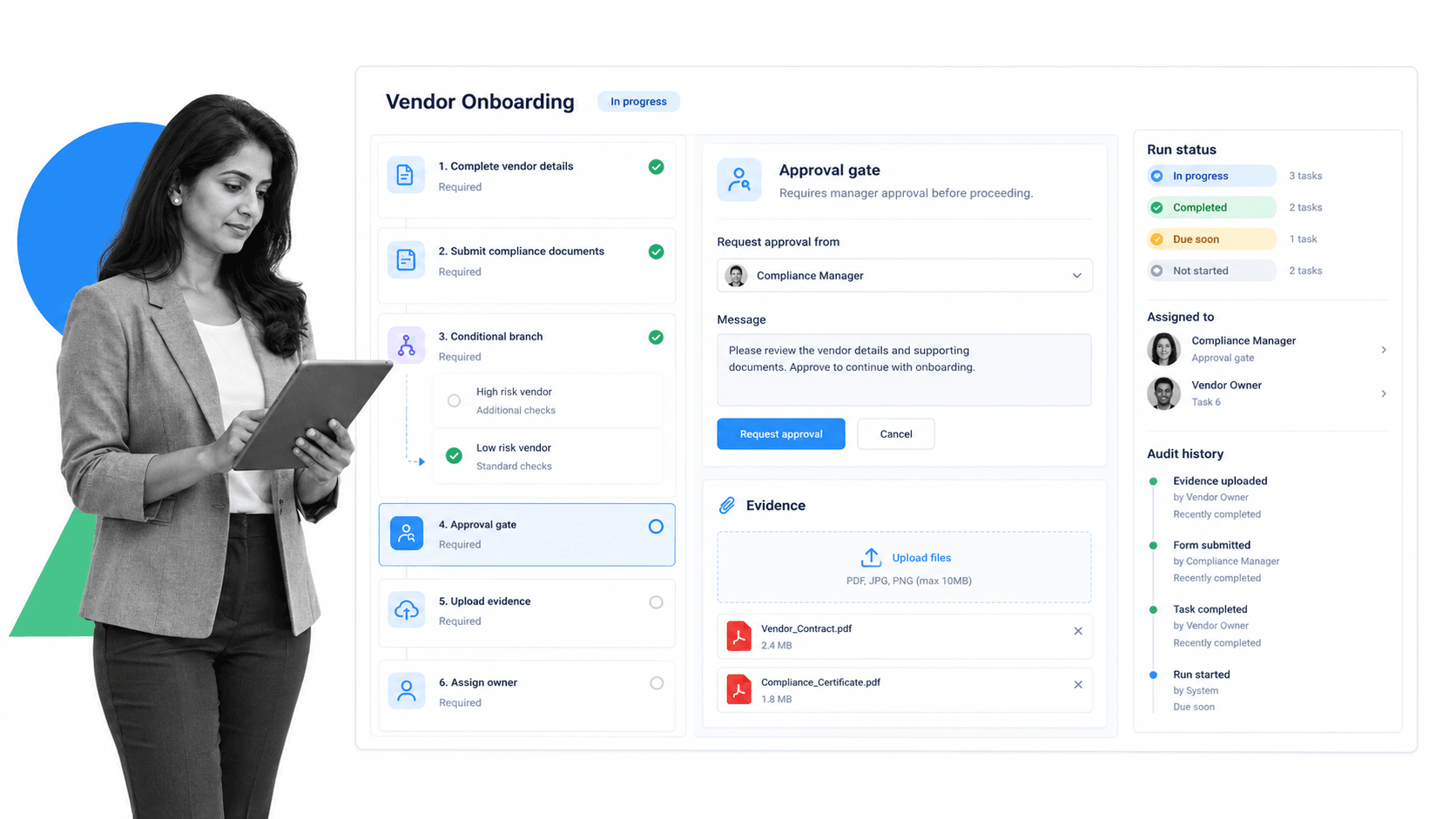
Bottom line: Process Street is the strongest overall choice when a recurring procedure must be completed correctly, not merely displayed or checked off. It combines reusable workflow design with active runs that give each instance an owner, deadlines, required fields, conditional paths, approvals, attachments, and a history that can be reviewed later.
That structure fits high-stakes recurring work such as employee onboarding, vendor review, finance close, quality assurance, customer implementation, access review, and policy-driven operations. The workflow does not depend on an operator remembering a separate SOP. Instructions, data capture, decisions, and accountability sit inside the work itself.
Process Street also gives process owners a useful level of control without turning every change into a software project. An operations leader can revise steps, adjust assignments, add an approval, change a due-date rule, or improve instructions while keeping execution in a consistent system. Teams can standardize a process and still route legitimate exceptions through conditional logic.
For governance, Process Street is strongest when the team needs more than task visibility. Required form fields can prevent premature completion. approval tasks keep a decision in the workflow. File uploads and comments preserve supporting context. Run history helps a reviewer reconstruct who did what and when. This makes the platform relevant to compliance workflow software without presenting it as a formal system of record for every regulated domain.
The platform’s integration positioning is broad: Process Street has 5,000+ integrations. That matters when a checklist run must trigger or update work across an existing stack while the human decision and evidence remain in the governed workflow. Buyers should test the exact systems and actions required in their pilot instead of treating any headline count as proof of fit.
Process Street is not the best choice for every use case. A team that only wants a lightweight checklist with public self-service pricing may prefer Manifestly. A company-manual project may fit SweetProcess or Way We Do better. A request queue may be easier in Pipefy. Process Street earns first place here because the target ICP needs SOP software that connects instructions to enforceable execution.
Process Street key features
- Reusable workflow templates with active workflow runs.
- Required tasks, structured forms, conditional logic, role assignments, and due dates.
- Approval steps, evidence collection, comments, and run history.
- Scheduled and triggered workflows for recurring operations.
- Process knowledge and workflow execution within one operational platform.
Process Street pros
- Strong fit for repeatable procedures where skipped steps create real risk.
- Business process owners can maintain workflows without becoming application developers.
- Approvals, evidence, assignments, and execution history stay in one run record.
- Useful across operations, HR, finance, customer teams, quality, and compliance-adjacent work.
- Can complement project tools and systems of record instead of replacing them blindly.
Process Street cons
- It is more platform than a team needs for a very simple checklist.
- It is not a project portfolio suite or a dedicated document-learning platform.
Choose it if: your recurring work needs enforcement, ownership, approvals, evidence, and a reliable record. Skip it if: the need is only a personal checklist, a project board, or a static operating manual. Review current packaging on the Process Street pricing page, then explore Process Street for the product overview.
2. Manifestly
Best for: straightforward recurring checklists with Slack and Microsoft Teams access.
Bottom line: Choose Manifestly if you want a direct recurring-checklist replacement with clear pricing and collaboration-channel access.
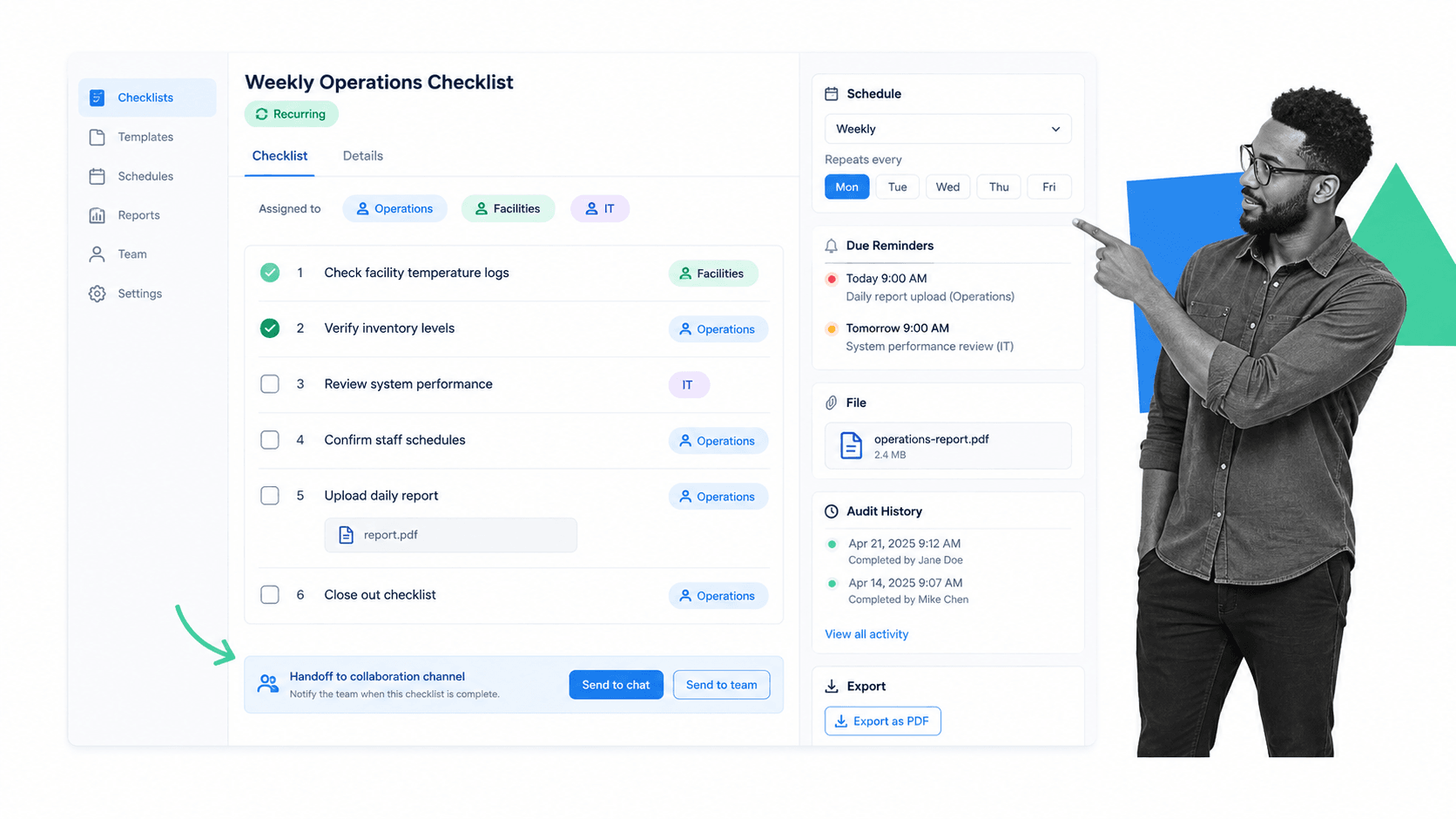
Manifestly is a focused checklist platform for recurring work. Its Business plan centers on unlimited workflows and runs, role-based assignments, scheduling, data collection, file uploads, dashboards, audit history, PDF and CSV exports, notifications, and collaboration through Slack and Microsoft Teams.
Manifestly is the closest fit in this list when the buying team wants to preserve a simple checklist mental model. It gives teams a direct path from an SOP to repeated runs without asking them to adopt a broad application-development platform. Compared with Process Street, it is the cleaner choice for buyers who prize a narrower product and public per-user pricing over a wider operating layer for governed procedures.
For a fair pilot, rebuild one representative process rather than importing a superficial checklist. Include the trigger, responsible roles, required inputs, a deadline, one exception, one approval, and the report a manager needs afterward. Then ask a person who did not build the workflow to complete it. That test reveals usability and governance gaps that a sales demonstration can hide.
Manifestly key features
- Unlimited workflows and workflow runs on the Business plan.
- Role-based assignments, schedules, reminders, and notifications.
- Data collection fields, file uploads, dashboards, audit history, and exports.
- Slack, Microsoft Teams, API, and webhook access listed by the vendor.
- Enterprise options for workflow versioning, SAML SSO, branding, SMS, and onboarding.
Manifestly pros
- The checklist model is easy to explain to operators.
- Transparent public Business pricing makes early budgeting simple.
- Slack and Microsoft Teams access can keep recurring work close to daily collaboration.
- Audit history and exports support review after a run is complete.
Manifestly cons
- Advanced governance capabilities are reserved for Enterprise.
- A focused checklist product may be limiting for teams that want a broader process knowledge and automation platform.
Choose it if: Choose Manifestly if you want a direct recurring-checklist replacement with clear pricing and collaboration-channel access. Skip it if: Skip it if your evaluation depends on a broader system for governed process knowledge, more complex operational controls, or an agentic automation roadmap. Manifestly lists Business at $10 per user per month, or $100 per user per year, and offers a 14-day trial. Enterprise starts at $2,000 per year for 10 users. See the official Manifestly pricing page for current details.
3. SweetProcess
Best for: documenting procedures, policies, and processes in one knowledge base.
Bottom line: Choose SweetProcess if your first priority is to document procedures and policies, teach them, and keep them in one accessible knowledge base.
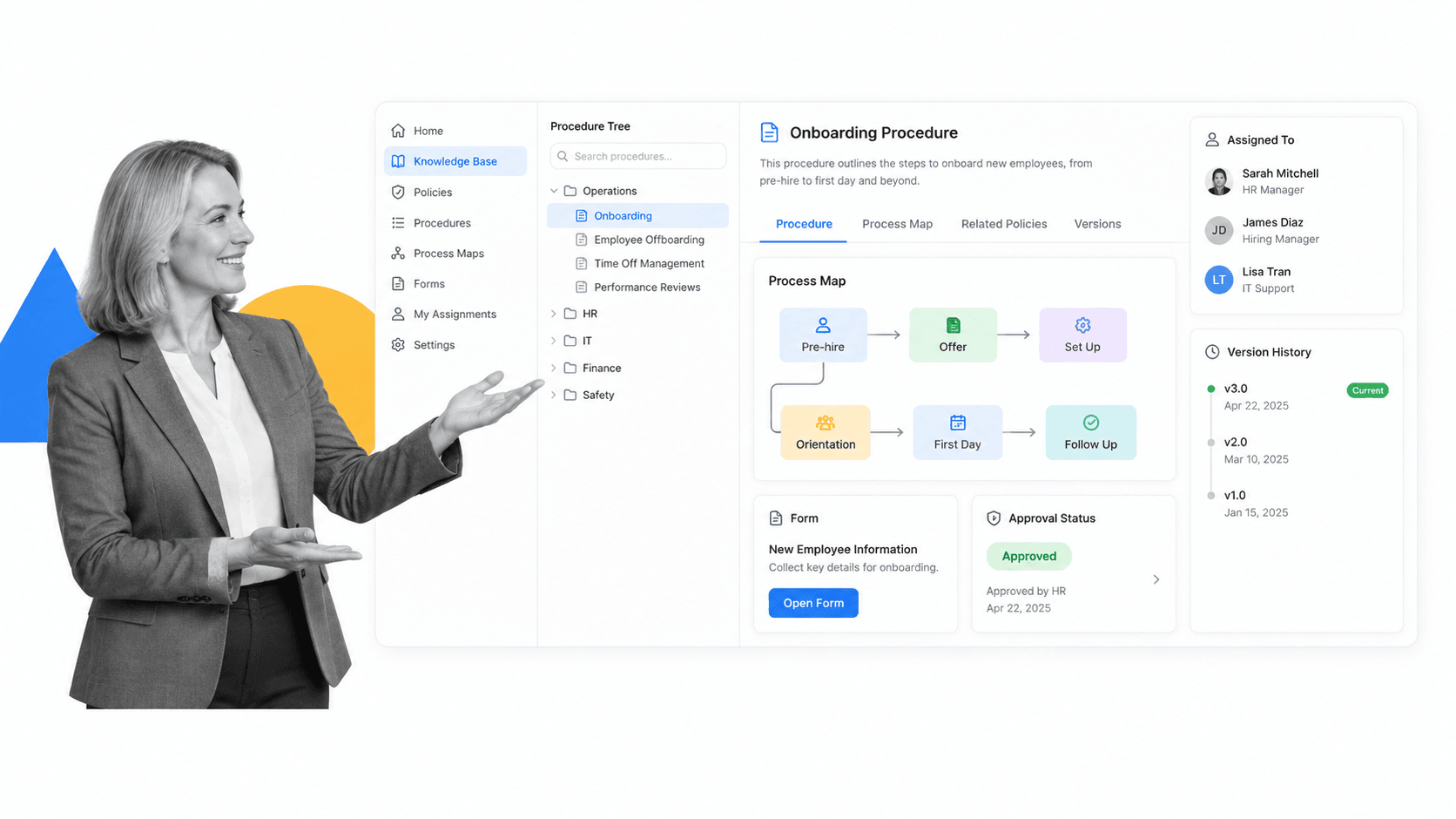
SweetProcess combines procedures, processes, policies, public and private knowledge bases, process maps, forms, and assigned tasks. Its product is documentation-led: teams capture how work should be done, organize it into an operating manual, and turn selected procedures or processes into actionable work.
SweetProcess beats Process Street when the central project is building a readable company manual and training people from documented knowledge. Its flat feature model can also appeal to teams that do not want to compare several product tiers. Process Street remains stronger when the procedure must actively enforce required data, decisions, approvals, exception paths, and durable run-level proof.
For a fair pilot, rebuild one representative process rather than importing a superficial checklist. Include the trigger, responsible roles, required inputs, a deadline, one exception, one approval, and the report a manager needs afterward. Then ask a person who did not build the workflow to complete it. That test reveals usability and governance gaps that a sales demonstration can hide.
SweetProcess key features
- Unlimited procedures, processes, policies, and knowledge-base content.
- Process maps, flowcharts, forms, embedded files, and videos.
- Assignments, task tracking, approvals, sign-offs, and collaboration.
- Document import plus PDF and Microsoft Word export.
- Version history, SSO, SCIM, two-factor authentication, and audit-trail export listed by the vendor.
SweetProcess pros
- Strong documentation and knowledge-base orientation.
- One feature set reduces plan-comparison friction.
- Small-team annual pricing is published.
- Useful mix of process documentation, training, and lightweight execution.
SweetProcess cons
- The documentation-first shape may be less suitable for complex branching operations.
- Teams that need stricter workflow enforcement may outgrow the task layer.
Choose it if: Choose SweetProcess if your first priority is to document procedures and policies, teach them, and keep them in one accessible knowledge base. Skip it if: Skip it if your main risk is not stale documentation but skipped execution steps, missing approvals, or incomplete evidence inside each run. SweetProcess lists a small-team plan at $495 per year for up to five users and publishes larger-team pricing on its site. It offers a 14-day trial. See the official SweetProcess pricing page for current details.
4. Tallyfy
Best for: structured procedures with separate builder and task-completer seats.
Bottom line: Choose Tallyfy if a clean builder-versus-completer seat model and guided procedure execution match your organization.
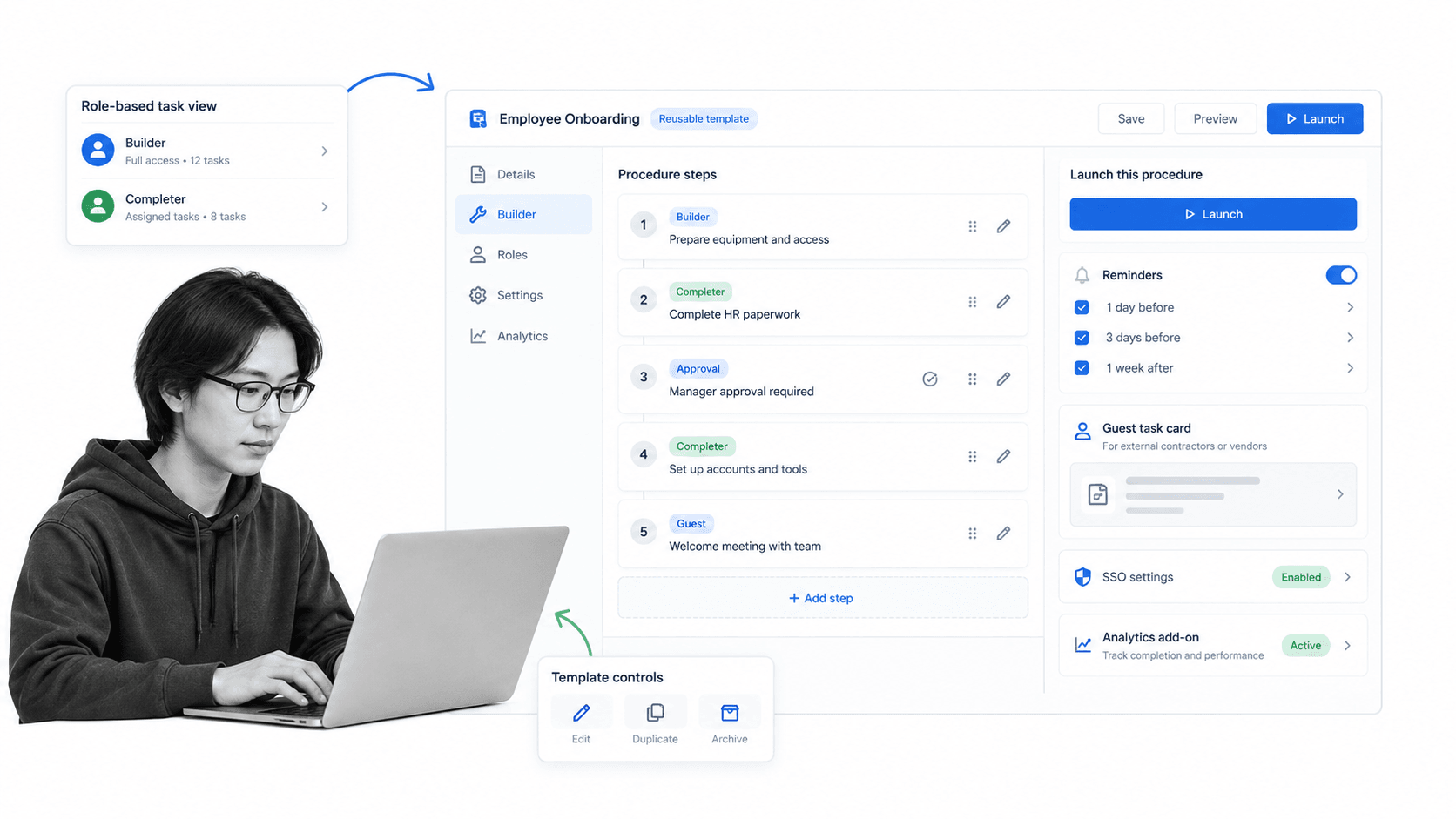
Tallyfy is built around reusable procedure templates that teams launch, assign, track, approve, and complete. Its pricing separates full seats for people who create and edit templates from light seats for people who mainly complete assigned work, while external guests remain free.
Tallyfy is a strong CheckFlow alternative for organizations that want role-aware procedure execution and a clear distinction between process builders and task completers. It can beat Process Street when that licensing split maps neatly to a team and the buying decision favors predictable per-seat pricing. Process Street is the better match when the workflow record, governed knowledge, broader operational controls, and cross-functional ownership matter more than seat specialization.
For a fair pilot, rebuild one representative process rather than importing a superficial checklist. Include the trigger, responsible roles, required inputs, a deadline, one exception, one approval, and the report a manager needs afterward. Then ask a person who did not build the workflow to complete it. That test reveals usability and governance gaps that a sales demonstration can hide.
Tallyfy key features
- Reusable templates with launch, assignment, tracking, approval, and completion.
- Full and light seat types for different participation levels.
- Unlimited guests included in paid subscriptions.
- Reminders, watching, SSO, SCIM, and vendor support consultations.
- Optional analytics data feed and AI-assisted workflow capabilities.
Tallyfy pros
- Seat types can align cost with how people participate.
- External guests do not consume paid seats.
- SSO and SCIM are included according to the pricing page.
- The product is purpose-built around guided procedure execution.
Tallyfy cons
- Annual seat commitments require careful forecasting.
- The full-seat price can be material when many people need to edit templates.
Choose it if: Choose Tallyfy if a clean builder-versus-completer seat model and guided procedure execution match your organization. Skip it if: Skip it if many operators also need to redesign workflows frequently or if you want one platform model across process knowledge and execution. Tallyfy lists full seats at $300 per year and light seats at $100 per year when billed annually. The pricing page also lists a 14-day trial. See the official Tallyfy pricing page for current details.
5. Pipefy

Best for: visual request intake and card-based process management.
Bottom line: Choose Pipefy if external intake and card movement across a visible service pipeline define the work.
Pipefy is a visual process and request-management platform. Work enters through forms or direct creation, becomes a card, and moves through phases in a pipe. The product also includes request tracking, dashboards, automations, conditional logic, permissions, and higher-tier enterprise controls.
Pipefy beats Process Street when the work behaves like a queue: purchase requests, service intake, approvals, tickets, or cases that move across visible stages. Its public Starter plan makes it easy to test with a small team. Process Street is stronger when operators need detailed procedure guidance inside the work and the organization wants proof that every required step, field, and approval was completed.
For a fair pilot, rebuild one representative process rather than importing a superficial checklist. Include the trigger, responsible roles, required inputs, a deadline, one exception, one approval, and the report a manager needs afterward. Then ask a person who did not build the workflow to complete it. That test reveals usability and governance gaps that a sales demonstration can hide.
Pipefy key features
- Pipes, phases, and cards for visible work movement.
- Public shareable forms and request tracking.
- Basic automations on Starter, with broader automation and conditional logic on paid tiers.
- Dashboards, activity history, exports, and mobile access.
- API, role-based access, private processes, SSO, and additional controls by plan.
Pipefy pros
- Strong visual model for requests and stage-based work.
- A public free Starter plan supports practical evaluation.
- Forms and request tracking work well for intake-heavy teams.
- Cards make ownership and phase changes easy to scan.
Pipefy cons
- The free plan has process, user, record, and automation limits.
- A card-and-phase model can feel indirect for detailed SOP guidance.
Choose it if: Choose Pipefy if external intake and card movement across a visible service pipeline define the work. Skip it if: Skip it if the work is better represented as a guided procedure with required evidence rather than a card moving between phases. Pipefy lists a free Starter plan for up to five processes and ten users. Business and Enterprise pricing is sales-led. See the official Pipefy pricing page for current details.
6. Way We Do
Best for: policies and procedures that employees acknowledge and execute.
Bottom line: Choose Way We Do if your main goal is to turn an operating manual into role-based, scheduled employee activity.
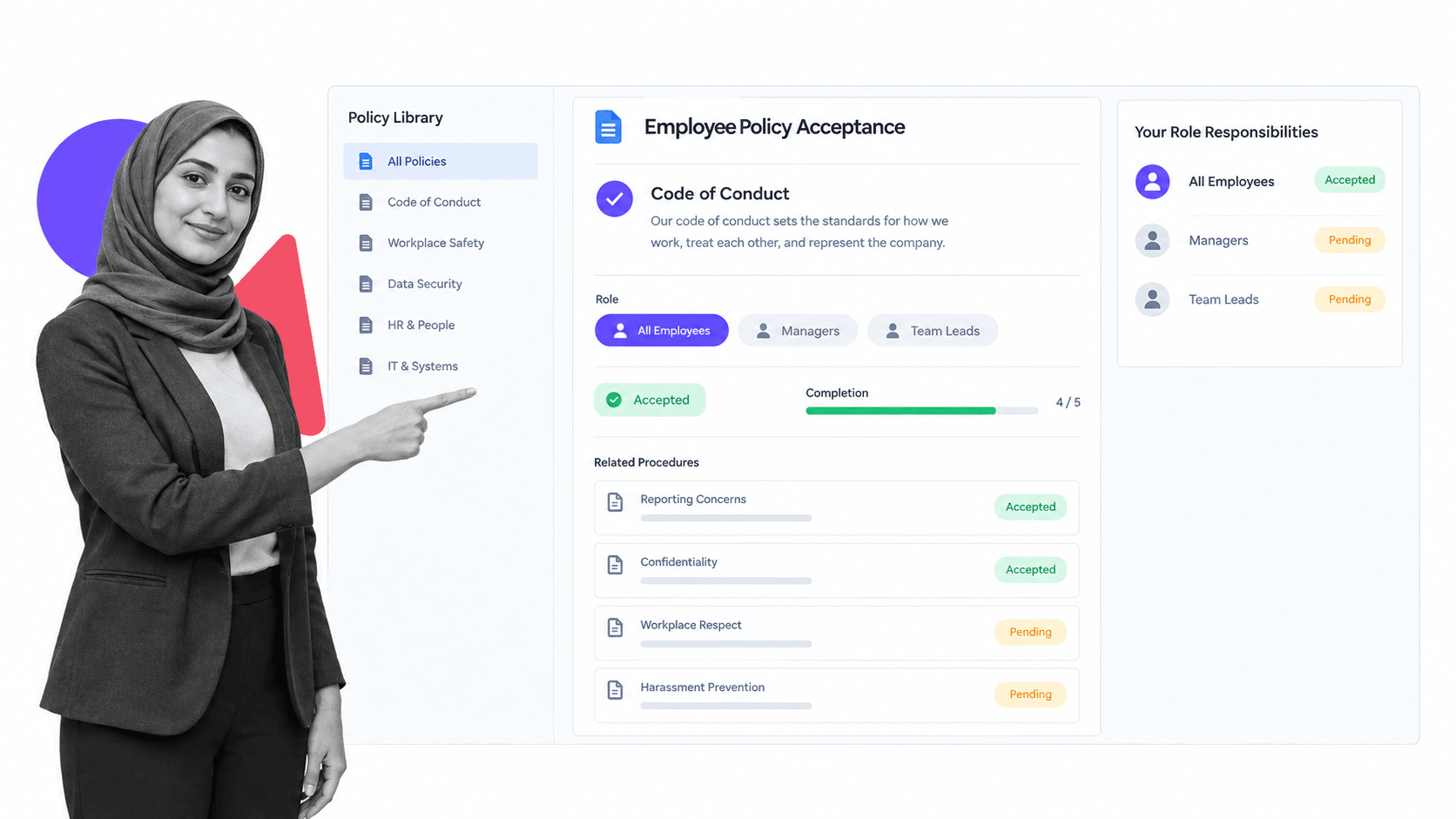
Way We Do turns policies and procedures into an active company manual. Teams can publish procedural knowledge, assign responsibilities by role, prompt people to complete recurring activities, and retain completion records instead of leaving procedures as passive documents.
Way We Do is a credible CheckFlow alternative for organizations whose biggest gap is policy adoption. It beats Process Street when the buyer wants a company manual first and execution controls second, especially when procedures need acknowledgment, role alignment, and scheduled reminders. Process Street is stronger when each run needs richer forms, conditional paths, approvals, automations, and evidence across several operating teams.
For a fair pilot, rebuild one representative process rather than importing a superficial checklist. Include the trigger, responsible roles, required inputs, a deadline, one exception, one approval, and the report a manager needs afterward. Then ask a person who did not build the workflow to complete it. That test reveals usability and governance gaps that a sales demonstration can hide.
Way We Do key features
- Unlimited procedures and processes across published plans.
- Role-based responsibilities and scheduled activities.
- Reminders and records of completion for active procedures.
- Policy and procedure content in a central company manual.
- Entry and enterprise paths with support options.
Way We Do pros
- Connects a company manual to employee activity.
- Role-based procedure ownership is easy to understand.
- The Entry plan includes ten team members.
- Good fit for policy adoption and repeatable staff responsibilities.
Way We Do cons
- The entry price is packaged in groups rather than a low single-seat rate.
- Teams needing deeper workflow automation may require a broader platform.
Choose it if: Choose Way We Do if your main goal is to turn an operating manual into role-based, scheduled employee activity. Skip it if: Skip it if the buying case centers on complex data capture, exception routing, or multi-system workflow automation. Way We Do lists its Entry plan at $99 per month for 10 team members, with additional users added in groups of 10. Enterprise pricing is handled by sales. See the official Way We Do pricing page for current details.
How to choose the right CheckFlow alternative
Start with the job the checklist performs
A recurring checklist can be a memory aid, a training asset, a request queue, a control, or an execution system. Those jobs need different products. If the process exists mainly to teach, compare documentation-led tools. If it routes external requests, compare intake and phase-based platforms. If it must prevent omissions and preserve proof, compare workflow management system products that enforce completion rules.
Define the owner of process changes
The right product should be maintainable by the team accountable for the process. Ask who can add a field, change an assignment, revise an approval, or publish a new version. A tool that is easy for a consultant to configure but hard for the operating team to own will create a permanent queue for minor changes. Test day-two maintenance during the pilot, not just initial setup.
Test enforcement, not feature presence
A vendor may list forms, permissions, and approvals, but the implementation details matter. Can a task close without required evidence? Can an approver see the context needed for a decision? Can conditional logic hide irrelevant work and expose the right exception path? Can a reviewer reconstruct the run later? Use one realistic failure case to verify each control.
Model every participant
List process designers, administrators, regular operators, occasional approvers, managers, external guests, and auditors. Then map each role to a license, permission set, and user experience. Tallyfy separates full and light seats. Manifestly has member and limited-user patterns. Pipefy distinguishes internal users from requesters. Pricing and adoption both change when occasional participants are included.
Compare the full operating cost
Subscription price is only one component. Include implementation, migration, training, integration work, premium support, identity features, data exports, and the labor required to maintain workflows. A lower monthly fee can cost more if routine changes require a specialist. A higher platform fee can be economical when process owners safely manage the system and retire parallel spreadsheets or reminder work.
Run the same pilot in every finalist
Choose one medium-complexity process and build it in each finalist using the same acceptance criteria. The pilot should include an intake form, assigned steps, a calculated deadline, an exception path, an approval, an attachment, an overdue item, and a manager report. Pair that pilot with a relevant checklist templates so reviewers compare operating behavior rather than presentation style.
Score the pilot with observable evidence instead of a general impression. Record whether each participant completed the work without coaching, whether required data prevented an incomplete handoff, whether the exception reached the correct owner, and whether the approval preserved enough context for review. Time the setup, the operator run, a routine template change, and the production of a management report. Note every workaround, duplicate entry, manual reminder, and separate document the test required. Weight those measures according to the process risk: a regulated approval may prioritize traceability and permissions, while a lightweight team routine may prioritize speed and simplicity. Have the process owner, one operator, one approver, and the system administrator score the same evidence independently before discussing it. This prevents the most polished demonstration or the loudest stakeholder from deciding the outcome. Keep the completed scorecard with the purchasing record so the team can revisit its assumptions after implementation and compare promised behavior with actual adoption.
Review integrations and data exit
Map the systems that start, enrich, or receive data from the process. Test one real integration rather than relying on a catalog. Also export a completed run, workflow definition, and reporting dataset. A practical business process automation platform should be usable inside the current stack and should not trap the evidence needed for audits, analytics, or a future migration.
Inspect versioning and change control
Recurring processes change. Regulations shift, teams reorganize, fields are renamed, and exceptions become normal paths. Ask how a vendor separates a draft from the currently published procedure, how reviewers approve a revision, and what happens to active runs when a new version is released. The safest product makes the effective version obvious, retains prior versions, and lets a reviewer understand which instructions governed a historical run. Without that control, improving the template can make old evidence harder to interpret.
Measure the operator experience
Builders often favor flexible editors, while operators care about the next task, the information required, and whether the screen makes mistakes difficult. Put the finalist in front of a real participant who has not seen the configuration. Watch where that person hesitates, asks for context, misses a field, or opens another document. A product that needs constant verbal explanation has not really captured the process. The operator test should work on the devices and network conditions used in the actual environment.
Evaluate reporting at three levels
Reporting should answer three different questions. An operator needs to know what is assigned and due. A process owner needs to know which runs are late, blocked, or following exception paths. A leader needs trends across time, teams, and process versions. Ask each vendor to demonstrate all three levels with pilot data. A dashboard that looks polished but cannot trace a late outcome back to the responsible task and evidence will not support operational improvement.
Check support and implementation reality
Use the trial to test support before signing a contract. Ask one configuration question, one migration question, and one question about a failed integration. Record the response time and whether the answer is specific enough to act on. Clarify what onboarding includes, who configures the first workflows, and where paid services begin. This reveals whether the vendor’s operating model matches the skills and time available inside your team after the initial launch.
How to migrate from CheckFlow
A safe migration starts with an inventory. Export or document every active template, owner, schedule, permission, task assignment, form field, attachment, integration, notification, report, and retention requirement. Mark templates as migrate, redesign, merge, archive, or retire. Moving every historical checklist into a new system usually adds cost without improving operations.
Next, select one representative but reversible process. Rebuild its current logic in the new platform, then improve only the obvious defects. Run CheckFlow and the replacement in parallel for a short period if the process is high risk. Reconcile assignments, deadlines, outputs, approvals, and evidence. The process owner should sign off on the new run before the old schedule is disabled.
Move the remaining processes in waves based on risk and similarity. A cluster of operations management software routines may share roles, integrations, and reports. An onboarding cluster may share employee fields and deadlines. Reusing validated patterns reduces errors, but every process still needs an owner and acceptance criteria. Keep a migration log that records what moved, what changed, who approved it, and where historical records remain available.
Finally, plan the first improvement cycle. Thirty days after each migration wave, review late steps, skipped optional work, exception frequency, support questions, and automation failures. A successful migration does more than recreate the old templates. It gives the operating team a clearer process, safer controls, and a system they can maintain without rebuilding the same process debt.
Preserve evidence deliberately. Completed checklist exports, audit records, attachments, and approval history may have different retention requirements from the reusable templates. Decide whether historical records stay in CheckFlow during a read-only period, move into an archive, or are imported into the replacement. Document the location, access owner, retention period, and retrieval test. The migration is not complete until a reviewer can find a historical record without relying on the person who ran the project.
Prepare the people change as carefully as the data change. Publish a simple explanation of why the tool is changing, which workflows move first, what each participant must do, where help lives, and when the old entry points stop accepting new work. Train process owners separately from operators. Owners need publishing, reporting, and troubleshooting skills. Operators need a short, scenario-based walkthrough that mirrors the exact tasks they will receive.
CheckFlow alternatives FAQs
What is the best CheckFlow alternative?
Process Street is the best CheckFlow alternative for teams that need recurring SOPs to be enforceable, trackable, and provable. Manifestly may fit better for a narrower recurring-checklist requirement, while SweetProcess or Way We Do may fit better when the main project is a company manual.
Is there a free CheckFlow alternative?
Pipefy publishes a free Starter plan with limits on processes, users, records, and automation. The other products in this list generally offer trials, sales-led evaluation, or paid plans rather than an unrestricted permanent free plan.
What is the closest alternative to CheckFlow?
Manifestly is the closest direct alternative for recurring checklist runs, assignments, schedules, reminders, and audit history. Process Street is the stronger step up when the team needs deeper workflow enforcement, approvals, evidence, and governed operating records.
What is the best CheckFlow alternative for small teams?
Manifestly, SweetProcess, Pipefy, and Way We Do publish entry paths that small teams can evaluate. The right choice depends on whether the team needs recurring checklists, a documented operating manual, a request pipe, or role-based procedures.
What is the best CheckFlow alternative for enterprise teams?
Process Street is the strongest fit when enterprise operations need recurring workflow control and proof. Tallyfy can be attractive when full and light seat roles map cleanly to the organization, while Pipefy may fit a request-management program with centralized administration.
Is there a Microsoft or Google equivalent to CheckFlow?
Microsoft Lists, Planner, Power Automate, Google Sheets, Forms, and Apps Script can reproduce parts of a checklist workflow, but they do not provide one equivalent product with the same template-to-run model. Teams should account for the design, governance, and maintenance work required to assemble those components.
How do I migrate from CheckFlow to another tool?
Inventory templates, runs, owners, schedules, fields, permissions, integrations, and required history. Pilot one representative process, run it in parallel when risk justifies it, validate the outputs and evidence, then migrate the remaining processes in controlled waves.
Why is Process Street ranked first among CheckFlow alternatives?
Process Street ranks first for the target use case: enforceable, trackable, recurring SOP and process execution. It connects instructions, assignments, forms, conditional paths, approvals, evidence, and run history. The ranking does not claim it is best for every adjacent use case.
Final recommendation
Choose Process Street when recurring work must be followed correctly, exceptions must be controlled, and each run must leave a reliable record. Choose Manifestly for a narrower recurring-checklist product, SweetProcess or Way We Do for documentation-led operations, Tallyfy for role-based procedure seats, or Pipefy for request pipelines. For more category comparisons, browse workflow and process software alternatives and use a representative pilot to confirm the fit.